Install with Operator
Configure the Red Hat Developer Hub Operator custom resource to install dynamic plugins with dependency management and resource specifications. The Operator automates plugin lifecycle operations during deployments.
Install dynamic plugins with the Red Hat Developer Hub Operator using a ConfigMap
You can store the configuration for dynamic plugins in a ConfigMap object that your Backstage custom resource (CR) can reference.
About this task
This procedure uses a ConfigMap to configure dynamic plugins. For simpler deployments, you can configure plugins inline in the Backstage custom resource. See Configure dynamic plugins inline in Backstage custom resource. For guidance on choosing between the two methods, see Choose between inline and ConfigMap-based plugin configuration.
Dynamic plugins might require you to configure certain Kubernetes resources. The documentation refers to these resources as plugin dependencies. For more information, see Dynamic plugins dependency management.
In Red Hat Developer Hub (RHDH), you can automatically create these resources when you apply the Backstage CR to the cluster.
If the pluginConfig field references environment variables, you must define the variables in your <my_product_secrets> secret.
Procedure
-
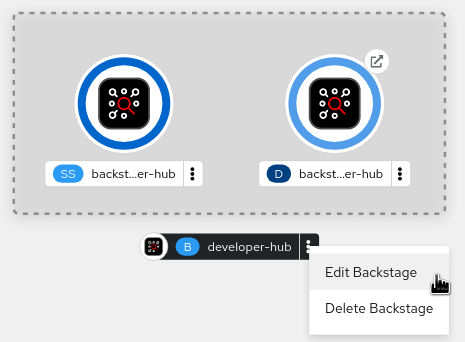
Click the overflow menu for the Red Hat Developer Hub instance that you want to use and select Edit Backstage to load the YAML view of the Red Hat Developer Hub instance.
Results
- Ensure that the system loads the dynamic plugins configuration, by appending
/api/dynamic-plugins-info/loaded-pluginsto your Red Hat Developer Hub root URL and checking the list of plugins:The following example shows a list of plugins:
[
  {
    "name": "backstage-plugin-catalog-backend-module-github-dynamic",
    "version": "0.5.2",
    "platform": "node",
    "role": "backend-plugin-module"
  },
  {
    "name": "backstage-plugin-techdocs",
    "version": "1.10.0",
    "role": "frontend-plugin",
    "platform": "web"
  },
  {
    "name": "backstage-plugin-techdocs-backend-dynamic",
    "version": "1.9.5",
    "platform": "node",
    "role": "backend-plugin"
  },
]
Configure dynamic plugins inline in Backstage custom resource
Configure dynamic plugins directly in the spec.application.dynamicPlugins field of your Backstage custom resource without creating a separate ConfigMap.
Before you begin
- You have installed the Red Hat Developer Hub Operator.
- You have cluster administrator access to an Red Hat OpenShift Container Platform cluster or permissions to create and edit
Backstagecustom resources. - You have identified the dynamic plugins you want to install and their package references.
About this task
The spec.application.dynamicPlugins field and the spec.application.dynamicPluginsConfigMapName field are mutually exclusive. You must use one or the other, not both. For guidance on choosing the appropriate method, see Choose between inline and ConfigMap-based plugin configuration.
Procedure
-
Click the overflow menu for the Red Hat Developer Hub instance that you want to configure and select Edit Backstage to open the YAML view of the Backstage custom resource.
Results
- Verify that the Operator loaded the dynamic plugins by appending
/api/dynamic-plugins-info/loaded-pluginsto your Red Hat Developer Hub root URL and checking the list of plugins.The following example shows a list of loaded plugins:
[
  {
    "name": "backstage-plugin-catalog-backend-module-github-dynamic",
    "version": "0.5.2",
    "platform": "node",
    "role": "backend-plugin-module"
  },
  {
    "name": "backstage-plugin-quay",
    "version": "1.10.1",
    "role": "frontend-plugin",
    "platform": "web"
  }
]
If you receive a validation error when applying the Backstage custom resource, check for the following common issues:
- Both
dynamicPluginsanddynamicPluginsConfigMapNameare specified: The two fields are mutually exclusive. Remove one of them from your custom resource.Example validation error:
spec.application: Invalid value: "object": dynamicPlugins and dynamicPluginsConfigMapName are mutually exclusive - Invalid package reference format: Ensure your package reference uses a supported format. See Dynamic plugin package reference formats for valid syntax.
- Missing environment variable: If your
pluginConfigreferences an environment variable that is not defined, the plugin might fail to load. Check the Developer Hub pod logs for configuration errors.
Choose between inline and ConfigMap-based plugin configuration
When you deploy Developer Hub with the Operator, configure dynamic plugins by using either inline configuration in the Backstage custom resource or a separate ConfigMap. Choose the method that best matches your deployment complexity and configuration reuse requirements.
The two configuration methods are mutually exclusive. You cannot use both spec.application.dynamicPlugins and spec.application.dynamicPluginsConfigMapName in the same Backstage custom resource.
Inline configuration in the Backstage custom resource
Inline configuration defines dynamic plugins directly in the spec.application.dynamicPlugins field of your Backstage custom resource.
Use inline configuration when:
- You are deploying a single Developer Hub instance with a straightforward plugin configuration.
- You want to reduce the number of Kubernetes resources to manage.
Benefits of inline configuration:
- Fewer Kubernetes resources to create and maintain.
- Entire plugin configuration visible in a single resource.
- Reduced boilerplate for simple deployments.
Limitations of inline configuration:
- Plugin configuration cannot be shared across multiple Developer Hub instances.
- Less flexible for environment-specific configuration variations.
ConfigMap-based configuration
ConfigMap-based configuration stores the dynamic-plugins.yaml file in a separate ConfigMap resource that the Backstage custom resource references using spec.application.dynamicPluginsConfigMapName.
Use ConfigMap-based configuration when:
- You do not want to change the configuration or prefer to split the configuration to have a shorter custom resource manifest.
- You require environment-specific plugin configuration variations (development, staging, production).
- You want to version plugin configurations independently from the custom resource.
- You need to apply configuration changes without modifying the custom resource.
Benefits of ConfigMap-based configuration:
- Plugin configuration can be shared across multiple instances.
- Supports configuration overlay patterns for environment-specific variations.
- Plugin configuration can be versioned and updated independently.
- Enables separation of concerns between deployment configuration and plugin configuration.
Limitations of ConfigMap-based configuration:
- More Kubernetes resources to create and maintain.
- Requires managing the reference consistency between the custom resource and the ConfigMap.
- Higher complexity for simple deployments.
| Deployment scenario | Recommended method | Rationale |
|---|---|---|
|
Single instance with 2-3 plugins for evaluation or testing |
Inline |
Reduces resource count and simplifies initial setup |
|
Multiple instances across environments with identical plugin sets |
ConfigMap |
Enables configuration sharing and consistency |
|
Production deployment with environment-specific plugin configurations |
ConfigMap |
Supports environment-specific variations and independent versioning |
|
Single production instance with stable plugin configuration |
Inline |
Simplifies ongoing maintenance with fewer resources |
|
Development environment with frequently changing plugin list |
Inline |
Faster iteration without managing separate ConfigMap updates |
Dynamic plugin configuration fields
When you configure dynamic plugins inline in the Backstage custom resource or in a ConfigMap, each plugin entry supports several fields that control plugin behavior and configuration.
| Field | Type | Required | Default | Description |
|---|---|---|---|---|
|
|
string |
Yes |
N/A |
Package reference identifying the plugin location. Supports several formats including built-in plugin references ( |
|
|
boolean |
No |
|
Controls whether the plugin activates. Set to |
|
|
object |
No |
|
Plugin-specific configuration as arbitrary YAML. The Red Hat Developer Hub Operator merges this configuration into the application configuration at runtime. The structure and content depend on the specific plugin requirements. |
|
|
string |
No |
N/A |
Package integrity checksum for verification in the format |
Example: Complete plugin entry with all fields
The following example shows a plugin entry with all four fields populated:
dynamicPlugins:
  - package: 'oci://registry.redhat.io/rhdh/rhdh-plugin-quay@sha256:abc123...'
    enabled: true
    integrity: 'sha256-abc123def456...'
    pluginConfig:
      quay:
        uiUrl: 'https://quay.io'
        apiUrl: 'https://quay.io/api/v1'
Field usage notes
packagefield-
The
packagefield is the only required field. It specifies where the Red Hat Developer Hub Operator should retrieve the plugin. Use digest-based OCI references for production deployments to ensure reproducibility.Example:
dynamicPlugins: - package: 'oci://registry.redhat.io/rhdh/rhdh-plugin-quay@sha256:abc123...' enabledfield-
The
enabledfield controls plugin activation state. When you setenabled: false, the Operator includes the plugin in the configuration but does not activate it.Example of disabling a plugin:
dynamicPlugins: - package: 'ref:catalog-backend-module-bitbucket' enabled: false pluginConfigfield-
The
pluginConfigfield has plugin-specific configuration that the Operator merges into the application configuration. The structure ofpluginConfigdepends on the plugin. Consult the plugin documentation for the required configuration fields. You can reference environment variables inpluginConfigby using the${VARIABLE_NAME}syntax. Ensure the environment variables exist in your secrets.Example with catalog provider configuration:
dynamicPlugins: - package: 'ref:catalog-backend-module-github' pluginConfig: catalog: providers: github: organization: "${GITHUB_ORG}" schedule: frequency: minutes: 30 timeout: minutes: 3 integrityfield-
The
integrityfield specifies a checksum for verifying the downloaded plugin package. Use integrity checksums to prevent tampering and ensure you are installing the expected plugin version. The format isalgorithm-base64hash, where algorithm is one ofsha256,sha384, orsha512. The Operator downloads the plugin, computes its checksum by using the specified algorithm, and compares it to the provided value. If the checksums do not match, the plugin installation fails.Example with integrity checksum:
dynamicPlugins:
  - package: 'https://example.com/plugins/my-plugin.tar.gz'
    integrity: 'sha256-AbC123def456Ghi789...'
Dynamic plugin package reference formats
When you configure dynamic plugins inline in the Backstage custom resource or in a ConfigMap, you specify the plugin location by using the package field. The package field supports several reference formats depending on where the plugin is hosted.
| Format | Syntax | Use case | Example |
|---|---|---|---|
|
Built-in plugin reference ( |
|
Reference plugins from the default Red Hat plugin catalog. The Operator resolves the reference to an OCI image URL. |
|
|
OCI image reference ( |
|
Reference plugins packaged as OCI images in a container registry. Use digest-based references for reproducibility. |
|
|
NPM package |
|
Reference plugins published to an npm registry. |
|
|
File system path ( |
|
Reference plugins included in custom container images or mounted volumes. |
|
|
HTTP/HTTPS URL |
|
Reference plugins served from HTTP endpoints. |
In disconnected environments, the ref:// format might not work because it resolves to OCI URLs from the default Red Hat plugin catalog hosted on the internet. For disconnected deployments, use oci:// references pointing to mirrored registries or file:// paths for plugins included in custom images.
Built-in plugin references (ref://)
The ref:// format is a convenience syntax for referencing plugins from the default Red Hat plugin catalog.
When you specify ref://<plugin-name>, the Red Hat Developer Hub Operator resolves the plugin name to an OCI image URL from the catalog. This format simplifies configuration when using Red Hat-supported plugins.
Example:
dynamicPlugins:
  - package: 'ref:catalog-backend-module-github'
The Operator resolves this reference to the corresponding OCI image URL based on your Developer Hub version.
OCI image references
The oci:// format references plugins packaged as OCI container images stored in a container registry.
Specify OCI references by using either tags or digests:
- Tag-based reference:
oci://<registry>/<repository>:_<tag>_Example:
oci://registry.redhat.io/rhdh/rhdh-plugin-quay:1.10.1Tag-based references are convenient but might change if the tag is updated to point to a different image.
- Digest-based reference:
oci://<registry>/<repository>@<digest>Example:
oci://registry.redhat.io/rhdh/rhdh-plugin-quay@sha256:abc123…Digest-based references are immutable and offer reproducibility. Use digest-based references for production deployments and disconnected environments.
NPM package references
You can reference plugins published to npm registries using standard npm package syntax:
- Simple package name:
my-plugin - Scoped package:
@myorg/my-plugin - Version-pinned package:
my-plugin@1.2.3
Example:
dynamicPlugins:
  - package: '@backstage-community/plugin-lighthouse'
The Red Hat Developer Hub Operator downloads the plugin from the configured npm registry during deployment.
File system path references
The file:// format and relative paths reference plugins from the container file system.
Use file system references when:
- Plugins are pre-loaded into a custom Developer Hub container image
- Plugins mount from persistent volumes or config maps
Examples:
dynamicPlugins:
  - package: 'file:///opt/app-root/src/dynamic-plugins/my-custom-plugin'
  - package: './dynamic-plugins/dist/my-plugin'
The Developer Hub application resolves relative paths from its application directory.
HTTP/HTTPS URL references
You can reference plugins served from HTTP or HTTPS endpoints. Package the plugin as a .tar.gz archive.
Example:
dynamicPlugins:
  - package: 'https://example.com/plugins/my-plugin.tar.gz'
For production deployments, use HTTPS URLs and consider adding an integrity checksum to verify the downloaded plugin. See Dynamic plugin configuration fields for information about the integrity field.
Dynamic plugin dependency requirements and resource specifications
Dynamic plugins configured for the Backstage custom resource (CR) might require Kubernetes resources called plugin dependencies, which RHDH creates automatically when you apply the CR.
Cluster level plugin dependencies configuration
Configure cluster-level plugin dependencies by adding Kubernetes resource manifests to custom profile directories managed by the Operator.
You can configure plugin dependencies by including the required Kubernetes resources in the /config/profile/{PROFILE}/plugin-deps directory. You must add the required resources as Kubernetes manifests in YAML format in the plugin-deps directory.
Example showing how to add example-dep1.yaml and example-dep2.yaml as plugin dependencies:
config/
  profile/
    rhdh/
     kustomization.yaml
     plugin-deps/
        example-dep1.yaml
example-dep2.yaml- If a resource manifest does not specify a namespace, the Operator creates it in the namespace of the Backstage CR.
- Resources can contain {{backstage-name}} and {{backstage-ns}} placeholders. The Operator replaces the {{backstage-name}} placeholder with the name of the Backstage CR, and replaces the {{backstage-ns}} placeholder with the namespace of the Backstage CR.
The kustomization.yaml file must contain the following lines:
configMapGenerator:
  - files:
      - plugin-deps/example-dep1.yaml
      - plugin-deps/example-dep2.yaml
    name: plugin-deps
Plugin dependencies infrastructure
Include these infrastructure manifests directly in your profile configuration directory so that they are deployed alongside the primary Operator.
To install infrastructural resources that plugin dependencies require, for example, other Operators or custom resources (CR), you can include these in the /config/profile/{PROFILE}/plugin-infra directory.
To create these infrastructural resources (along with the Operator deployment), use the make plugin-infra command.
On a production cluster, use this command with caution as it might reconfigure cluster-scoped resources.
Plugin configuration
When configuring dynamic plugins in Red Hat Developer Hub, plugins often require supporting cluster resources defined in the plugin-deps directory.
You must reference the plugin dependencies in the dependencies field of the plugin configuration when you apply the Backstage CR.
The Operator creates the resources that the files in the plugin-deps directory describe.
You can reference plugin dependencies in the dynamic-plugins ConfigMap that can either be part of the default profile configuration for all Backstage custom resources or part of the ConfigMap referenced in the Backstage CR. In Red Hat Developer Hub, you can include plugin dependencies in the dynamic plugin configuration.
Each dependencies.ref value can either match the full file name or serve as a prefix for the file name. The Operator creates the resources that the files in the plugin-deps directory describe that start with the specified ref value or exactly match it
Example showing how to add example-dep plugin dependency:
apiVersion: v1
kind: ConfigMap
metadata:
  name: default-dynamic-plugins
data:
  dynamic-plugins.yaml: |
    includes:
      - dynamic-plugins.default.yaml
    plugins:
      - disabled: false
        package: "path-or-url-to-example-plugin"
        dependencies:
          - ref: example-dep
