Use the Tekton plugin
You can use the Tekton plugin to visualize the results of CI/CD pipeline runs on your Kubernetes or OpenShift clusters. The plugin allows users to visually see high level status of all associated tasks in the pipeline for their applications.
Before you begin
- You have installed the Red Hat Developer Hub (RHDH).
- You have installed the Tekton plugin. For the installation process, see Installing and viewing plugins in Red Hat Developer Hub.
About this task
You can use the Tekton front-end plugin to view PipelineRun resources.
Procedure
-
Go to the CI tab.
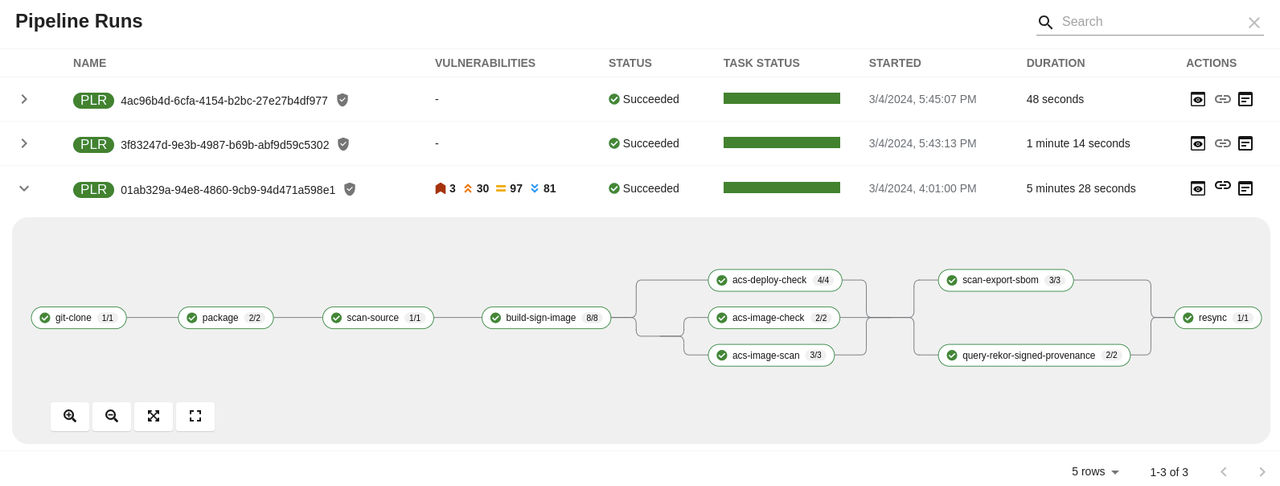
The CI tab displays the list of PipelineRun resources associated with a Kubernetes cluster. The list contains pipeline run details, such as NAME, VULNERABILITIES, STATUS, TASK STATUS, STARTED, and DURATION.

-
Click the expand row button besides PipelineRun name in the list to view the PipelineRun visualization. The pipeline run resource includes tasks to complete. When you hover the mouse pointer on a task card, you can view the steps to complete that particular task.