What is SR-IOV?
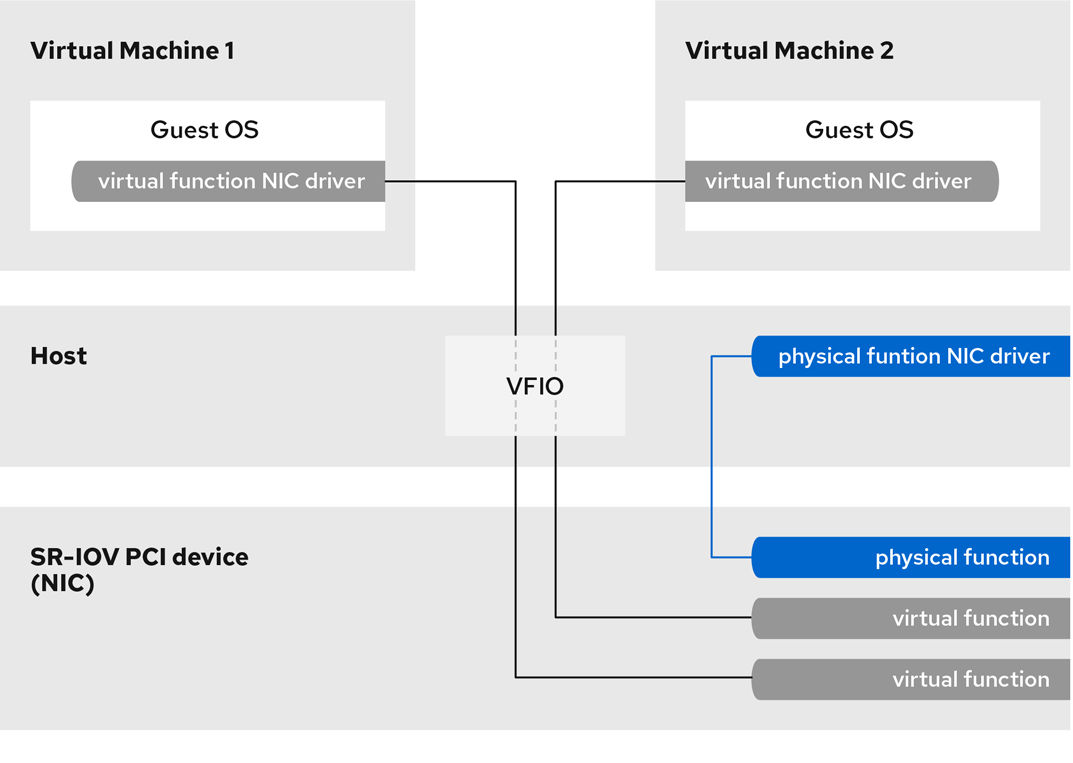
Single-root I/O virtualization (SR-IOV) is a specification that enables a single PCI Express (PCIe) device to present multiple separate PCI devices, called virtual functions (VFs), to the host system.
Each virtual function (VF):
- Is able to provide the same or similar service as the original PCIe device.
- Appears at a different address on the host PCI bus.
- Can be assigned to a different VM by using VFIO assignment.
For example, a single SR-IOV capable network device can present VFs to multiple VMs. All of the VFs use the same physical card, the same network connection, and the same network cable, but each of the VMs directly controls its own hardware network device and uses no extra resources from the host.
How SR-IOV works
The SR-IOV functionality is possible thanks to the introduction of the following PCIe functions:
- Physical functions (PFs) - A PCIe function that provides the functionality of its device (for example networking) to the host, but can also create and manage a set of VFs. Each SR-IOV capable device has one or more PFs.
- Virtual functions (VFs) - Lightweight PCIe functions that behave as independent devices. Each VF is derived from a PF. The maximum number of VFs a device can have depends on the device hardware. Each VF can be assigned only to a single VM at a time, but a VM can have multiple VFs assigned to it.
VMs recognize VFs as virtual devices. For example, a VF created by an SR-IOV network device appears as a network card to a VM to which it is assigned, in the same way as a physical network card appears to the host system.
Advantages
The primary advantages of using SR-IOV VFs rather than emulated devices are:
- Improved performance
- Reduced use of host CPU and memory resources
For example, a VF attached to a VM as a vNIC performs at almost the same level as a physical NIC, and much better than paravirtualized or emulated NICs. In particular, when multiple VFs are used simultaneously on a single host, the performance benefits can be significant.
Disadvantages
- To modify the configuration of a PF, you must first change the number of VFs exposed by the PF to zero. Therefore, you also need to remove the devices provided by these VFs from the VM to which they are assigned.
- A VM with an VFIO-assigned devices attached, including SR-IOV VFs, cannot be migrated to another host. In some cases, you can work around this limitation by pairing the assigned device with an emulated device. For example, you can bond an assigned networking VF to an emulated vNIC, and remove the VF before the migration.
- In addition, VFIO-assigned devices require pinning of VM memory, which increases the memory consumption of the VM and prevents the use of memory ballooning on the VM.

