 Red Hat Summit
2.4. Apache Kafka のソース
Apache Kafka クラスターからイベントを読み取り、これらのイベントをシンクに渡す Apache Kafka ソースを作成できます。Kafka ソースを作成するには、OpenShift Container Platform Web コンソールを使用するか、Knative (kn) CLI を使用するか、KafkaSource オブジェクトを YAML ファイルとして直接作成し、OpenShift CLI (oc) を使用して適用します。
Apache Kafka の Knative ブローカーのインストール を参照してください。
2.4.1. Web コンソールを使用した Apache Kafka イベントソースの作成
Apache Kafka の Knative ブローカー実装がクラスターにインストールされたら、Web コンソールを使用して Apache Kafka ソースを作成できます。OpenShift Container Platform Web コンソールを使用すると、Kafka ソースを作成するための合理的で直感的なユーザーインターフェイスが提供されます。
前提条件
-
OpenShift Serverless Operator、Knative Eventing、および
KnativeKafkaカスタムリソースがクラスターにインストールされている。 - Web コンソールにログインしている。
- インポートする Kafka メッセージを生成する Red Hat AMQ Streams (Kafka) クラスターにアクセスできる。
- OpenShift Container Platform でアプリケーションおよび他のワークロードを作成するために、プロジェクトを作成しているか、適切なロールおよびパーミッションを持つプロジェクトにアクセスできる。
手順
- +Add ページに移動し、Event Source を選択します。
- Event Sources ページで、Type セクションの Kafka Source を選択します。
Kafka Source 設定を設定します。
- ブートストラップサーバー のコンマ区切りのリストを追加します。
- トピック のコンマ区切りのリストを追加します。
- コンシューマーグループ を追加します。
- 作成したサービスアカウントの Service Account Name を選択します。
Target セクションで、イベントシンクを選択します。これは Resource または URI のいずれかです。
- Resource を選択して、チャネル、ブローカー、またはサービスをイベントソースのシンクとして使用します。
- URI を選択して、イベントのルーティング先となる URI (Uniform Resource Identifier) を指定します。
- Kafka イベントソースの Name を入力します。
- Create をクリックします。
検証
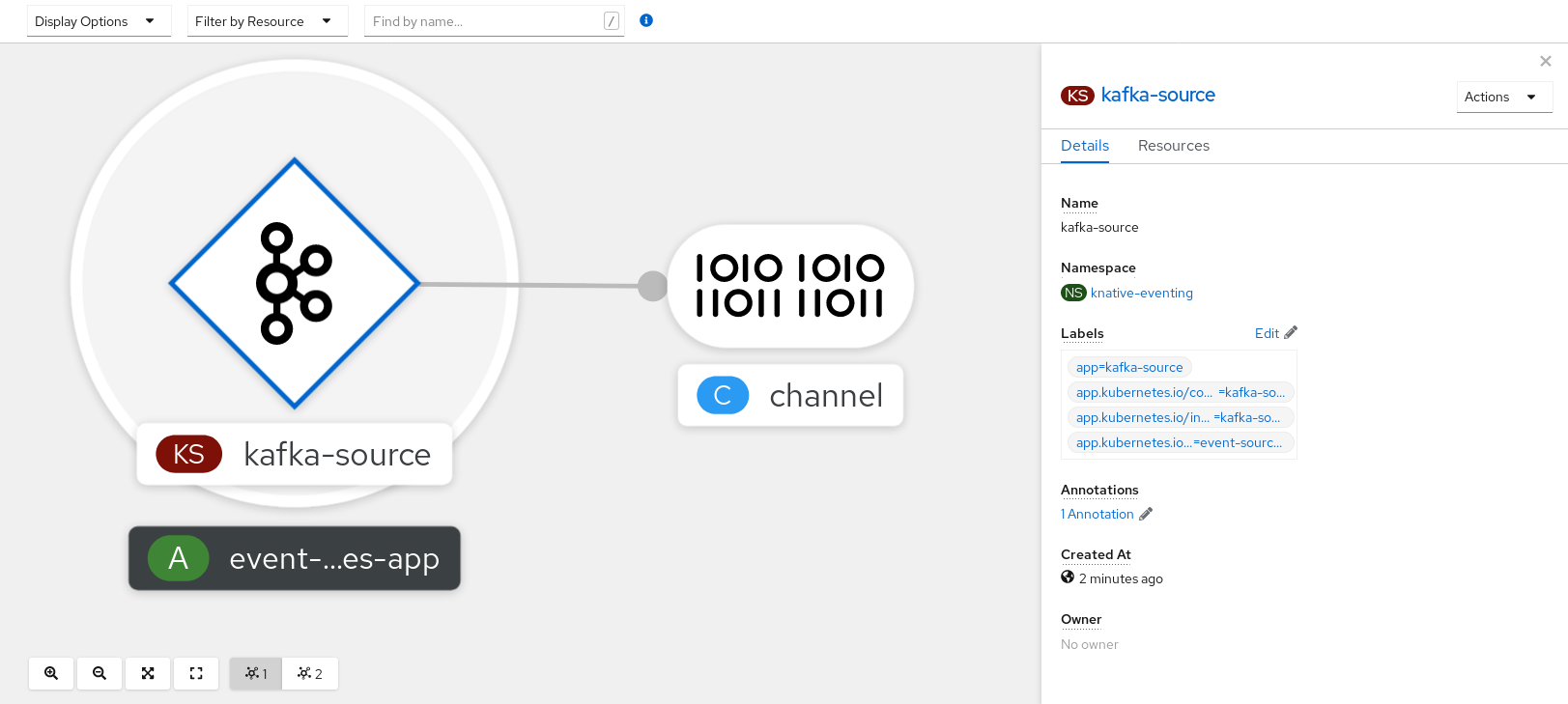
Topology ページを表示して、Kafka イベントソースが作成され、シンクに接続されていることを確認できます。
- Topology に移動します。
Kafka イベントソースおよびシンクを表示します。
2.4.2. Knative CLI を使用した Apache Kafka イベントソースの作成
kn source kafka create コマンドを使用し、Knative (kn) CLI を使用して Kafka ソースを作成できます。Knative CLI を使用してイベントソースを作成すると、YAML ファイルを直接変更するよりも合理化された直感的なユーザーインターフェイスが提供されます。
前提条件
-
OpenShift Serverless Operator、Knative Eventing、Knative Serving、および
KnativeKafkaカスタムリソース (CR) がクラスターにインストールされている。 - OpenShift Container Platform でアプリケーションおよび他のワークロードを作成するために、プロジェクトを作成しているか、適切なロールおよびパーミッションを持つプロジェクトにアクセスできる。
- インポートする Kafka メッセージを生成する Red Hat AMQ Streams (Kafka) クラスターにアクセスできる。
-
Knative (
kn) CLI がインストールされている。 -
オプション: この手順で検証ステップを使用する場合は、OpenShift CLI (
oc) をインストールしている。
手順
Kafka イベントソースが機能していることを確認するには、受信メッセージをサービスのログにダンプする Knative サービスを作成します。
$ kn service create event-display \ --image quay.io/openshift-knative/showcaseKafkaSourceCR を作成します。$ kn source kafka create <kafka_source_name> \ --servers <cluster_kafka_bootstrap>.kafka.svc:9092 \ --topics <topic_name> --consumergroup my-consumer-group \ --sink event-display注記このコマンドのプレースホルダー値は、ソース名、ブートストラップサーバー、およびトピックの値に置き換えます。
--servers、--topics、および--consumergroupオプションは、Kafka クラスターへの接続パラメーターを指定します。--consumergroupオプションは任意です。オプション: 作成した
KafkaSourceCR の詳細を表示します。$ kn source kafka describe <kafka_source_name>出力例
Name:              example-kafka-source
Namespace:         kafka
Age:               1h
BootstrapServers:  example-cluster-kafka-bootstrap.kafka.svc:9092
Topics:            example-topic
ConsumerGroup:     example-consumer-group

Sink:
  Name:       event-display
  Namespace:  default
  Resource:   Service (serving.knative.dev/v1)

Conditions:
  OK TYPE            AGE REASON
  ++ Ready            1h
  ++ Deployed         1h
  ++ SinkProvided     1h
検証手順
Kafka インスタンスをトリガーし、メッセージをトピックに送信します。
$ oc -n kafka run kafka-producer \
    -ti --image=quay.io/strimzi/kafka:latest-kafka-2.7.0 --rm=true \
    --restart=Never -- bin/kafka-console-producer.sh \
    --broker-list <cluster_kafka_bootstrap>:9092 --topic my-topic
プロンプトにメッセージを入力します。このコマンドは、以下を前提とします。
-
Kafka クラスターが
kafkanamespace にインストールされている。 -
KafkaSourceオブジェクトがmy-topicトピックを使用するように設定されている。
-
Kafka クラスターが
ログを表示して、メッセージが到達していることを確認します。
$ oc logs $(oc get pod -o name | grep event-display) -c user-container出力例
☁️  cloudevents.Event
Validation: valid
Context Attributes,
  specversion: 1.0
  type: dev.knative.kafka.event
  source: /apis/v1/namespaces/default/kafkasources/example-kafka-source#example-topic
  subject: partition:46#0
  id: partition:46/offset:0
  time: 2021-03-10T11:21:49.4Z
Extensions,
  traceparent: 00-161ff3815727d8755848ec01c866d1cd-7ff3916c44334678-00
Data,
  Hello!
2.4.2.1. Knative CLI シンクフラグ
Knative (kn) CLI を使用してイベントソースを作成する場合は、--sink フラグを使用して、そのリソースからイベントが送信されるシンクを指定できます。シンクは、他のリソースから受信イベントを受信できる、アドレス指定可能または呼び出し可能な任意のリソースです。
以下の例では、サービスの http://event-display.svc.cluster.local をシンクとして使用するシンクバインディングを作成します。
シンクフラグを使用したコマンドの例
$ kn source binding create bind-heartbeat \
  --namespace sinkbinding-example \
  --subject "Job:batch/v1:app=heartbeat-cron" \
  --sink http://event-display.svc.cluster.local \
--ce-override "sink=bound"- 1
http://event-display.svc.cluster.localのsvcは、シンクが Knative サービスであることを判別します。他のデフォルトのシンクの接頭辞には、channelおよびbrokerが含まれます。
2.4.3. YAML を使用した Apache Kafka イベントソースの作成
YAML ファイルを使用して Knative リソースを作成する場合は、宣言的 API を使用するため、再現性の高い方法でアプリケーションを宣言的に記述できます。YAML を使用して Kafka ソースを作成するには、KafkaSource オブジェクトを定義する YAML ファイルを作成し、oc apply コマンドを使用してそれを適用する必要があります。
前提条件
-
OpenShift Serverless Operator、Knative Eventing、および
KnativeKafkaカスタムリソースがクラスターにインストールされている。 - OpenShift Container Platform でアプリケーションおよび他のワークロードを作成するために、プロジェクトを作成しているか、適切なロールおよびパーミッションを持つプロジェクトにアクセスできる。
- インポートする Kafka メッセージを生成する Red Hat AMQ Streams (Kafka) クラスターにアクセスできる。
-
OpenShift CLI (
oc) がインストールされている。
手順
KafkaSourceオブジェクトを YAML ファイルとして作成します。apiVersion: sources.knative.dev/v1beta1 kind: KafkaSource metadata: name: <source_name> spec: consumerGroup: <group_name>1 bootstrapServers: - <list_of_bootstrap_servers> topics: - <list_of_topics>2 sink: - <list_of_sinks>3 重要OpenShift Serverless 上の
KafkaSourceオブジェクトの API のv1beta1バージョンのみがサポートされます。非推奨となったv1alpha1バージョンの API は使用しないでください。KafkaSourceオブジェクトの例apiVersion: sources.knative.dev/v1beta1 kind: KafkaSource metadata: name: kafka-source spec: consumerGroup: knative-group bootstrapServers: - my-cluster-kafka-bootstrap.kafka:9092 topics: - knative-demo-topic sink: ref: apiVersion: serving.knative.dev/v1 kind: Service name: event-displayKafkaSourceYAML ファイルを適用します。$ oc apply -f <filename>
検証
以下のコマンドを入力して、Kafka イベントソースが作成されたことを確認します。
$ oc get pods出力例
NAME                                    READY     STATUS    RESTARTS   AGE
kafkasource-kafka-source-5ca0248f-...   1/1       Running   0          13m
2.4.4. Apache Kafka ソースの SASL 認証の設定
Simple Authentication and Security Layer (SASL) は、Apache Kafka が認証に使用します。クラスターで SASL 認証を使用する場合、ユーザーは Kafka クラスターと通信するために Knative に認証情報を提供する必要があります。そうしないと、イベントを生成または消費できません。
前提条件
- OpenShift Container Platform でクラスターまたは専用の管理者パーミッションを持っている。
-
OpenShift Serverless Operator、Knative Eventing、および
KnativeKafkaCR は、OpenShift Container Platform クラスターにインストールされている。 - OpenShift Container Platform でアプリケーションおよび他のワークロードを作成するために、プロジェクトを作成しているか、適切なロールおよびパーミッションを持つプロジェクトにアクセスできる。
- Kafka クラスターのユーザー名およびパスワードがある。
-
使用する SASL メカニズムを選択している (例:
PLAIN、SCRAM-SHA-256、またはSCRAM-SHA-512)。 -
TLS が有効になっている場合は、Kafka クラスターの
ca.crt証明書ファイルがある。 -
OpenShift (
oc) CLI がインストールされている。
手順
選択された namespace にシークレットとして証明書ファイルを作成します。
$ oc create secret -n <namespace> generic <kafka_auth_secret> \
  --from-file=ca.crt=caroot.pem \
  --from-literal=password="SecretPassword" \
  --from-literal=saslType="SCRAM-SHA-512" \
1 --from-literal=user="my-sasl-user"- 1
- SASL タイプは
PLAIN、SCRAM-SHA-256、またはSCRAM-SHA-512です。
Kafka ソースを作成または変更して、次の
spec設定が含まれるようにします。apiVersion: sources.knative.dev/v1beta1 kind: KafkaSource metadata: name: example-source spec: ... net: sasl: enable: true user: secretKeyRef: name: <kafka_auth_secret> key: user password: secretKeyRef: name: <kafka_auth_secret> key: password type: secretKeyRef: name: <kafka_auth_secret> key: saslType tls: enable: true caCert:1 secretKeyRef: name: <kafka_auth_secret> key: ca.crt ...- 1
- パブリッククラウドの Kafka サービスを使用している場合は、
caCert仕様は必要ありません。
2.4.5. KafkaSource の KEDA 自動スケーリングの設定
Kubernetes Event Driven Autoscaler (KEDA) に基づく Custom Metrics Autoscaler Operator を使用して、Apache Kafka (KafkaSource) の Knative Eventing ソースを自動スケーリングするように設定できます。
KafkaSource の KEDA 自動スケーリングの設定は、テクノロジープレビュー機能のみです。テクノロジープレビュー機能は、Red Hat 製品のサービスレベルアグリーメント (SLA) の対象外であり、機能的に完全ではないことがあります。Red Hat は、実稼働環境でこれらを使用することを推奨していません。テクノロジープレビュー機能は、最新の製品機能をいち早く提供して、開発段階で機能のテストを行い、フィードバックを提供していただくことを目的としています。
Red Hat のテクノロジープレビュー機能のサポート範囲に関する詳細は、テクノロジープレビュー機能のサポート範囲 を参照してください。
前提条件
-
OpenShift Serverless Operator、Knative Eventing、および
KnativeKafkaカスタムリソースがクラスターにインストールされている。
手順
KnativeKafkaカスタムリソースで、KEDA スケーリングを有効にします。サンプル YAML
apiVersion: operator.serverless.openshift.io/v1alpha1 kind: KnativeKafka metadata: name: knative-kafka namespace: knative-eventing spec: config: kafka-features: controller-autoscaler-keda: enabledKnativeKafkaYAML ファイルを適用します。$ oc apply -f <filename>

'%20d='M201.5%20305.5c-13.8%200-24.9-11.1-24.9-24.6%200-13.8%2011.1-24.9%2024.9-24.9%2013.6%200%2024.6%2011.1%2024.6%2024.9%200%2013.6-11.1%2024.6-24.6%2024.6zM504%20256c0%20137-111%20248-248%20248S8%20393%208%20256%20119%208%20256%208s248%20111%20248%20248zm-132.3-41.2c-9.4%200-17.7%203.9-23.8%2010-22.4-15.5-52.6-25.5-86.1-26.6l17.4-78.3%2055.4%2012.5c0%2013.6%2011.1%2024.6%2024.6%2024.6%2013.8%200%2024.9-11.3%2024.9-24.9s-11.1-24.9-24.9-24.9c-9.7%200-18%205.8-22.1%2013.8l-61.2-13.6c-3-.8-6.1%201.4-6.9%204.4l-19.1%2086.4c-33.2%201.4-63.1%2011.3-85.5%2026.8-6.1-6.4-14.7-10.2-24.1-10.2-34.9%200-46.3%2046.9-14.4%2062.8-1.1%205-1.7%2010.2-1.7%2015.5%200%2052.6%2059.2%2095.2%20132%2095.2%2073.1%200%20132.3-42.6%20132.3-95.2%200-5.3-.6-10.8-1.9-15.8%2031.3-16%2019.8-62.5-14.9-62.5zM302.8%20331c-18.2%2018.2-76.1%2017.9-93.6%200-2.2-2.2-6.1-2.2-8.3%200-2.5%202.5-2.5%206.4%200%208.6%2022.8%2022.8%2087.3%2022.8%20110.2%200%202.5-2.2%202.5-6.1%200-8.6-2.2-2.2-6.1-2.2-8.3%200zm7.7-75c-13.6%200-24.6%2011.1-24.6%2024.9%200%2013.6%2011.1%2024.6%2024.6%2024.6%2013.8%200%2024.9-11.1%2024.9-24.6%200-13.8-11-24.9-24.9-24.9z'/%3e%3c/svg%3e)