 Red Hat Summit
27.3. Order placed マイルストーンの作成
このマイルストーンには、Place order サブプロセスの一部である ordered 変数に応答が渡されると、到達します。
手順
- プロセスデザイナーで、Object Library の Milestone を展開し、Prepare hardware spec ユーザータスクの下のキャンバスに新しいマイルストーンをドラッグします。
-
新規マイルストーンをクリックして、画面の右上隅の Properties
 アイコンをクリックします。
-
Name フィールドに
Milestone 1: Order placedと入力します。 - Implementation/Execution を展開して AdHoc Autostart を選択します。
Data Assignments を展開し、Assignments フィールドの
をクリックし、以下を追加します。
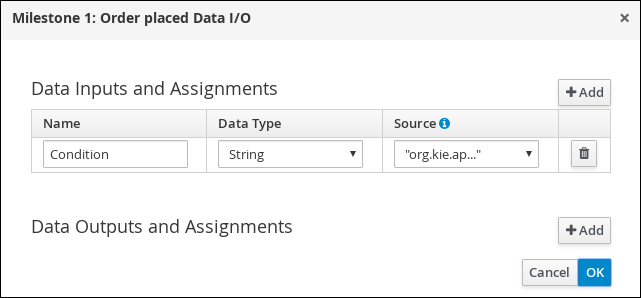
Source 列のドロップダウンをクリックし、Constant を選択し、
org.kie.api.runtime.process.CaseData(data.get("ordered") == true)を入力します。これは、orderedというケース変数が値trueを持つことを意味します。- OK をクリックします。
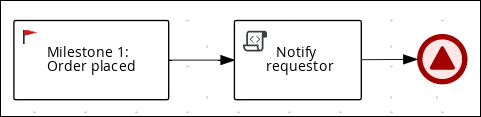
- Milestone 1: Order placed をクリックして、新しいスクリプトタスクを作成します。
-
新規スクリプトタスクをクリックして、画面の右上隅の Properties
アイコンをクリックします。
-
Name フィールドに
Notify requestorと入力します。 -
Implementation/Execution を展開して
System.out.println("Notification::Order placed");と入力します。 - Notify requestor スクリプトタスクをクリックして、シグナル終了イベントを作成します。
-
シグナルイベントをクリックして、画面の右上隅の Properties をクリックします。
アイコン。
- Implementation/Execution を展開して Signal フィールドの下向き矢印をクリックし、New を選択します。
-
Milestone 2: Order shippedと入力します。 - Signal Scope フィールドの下矢印をクリックし、Process Instance を選択します。
Save をクリックします。
図27.1 Order placed マイルストーン

'%20d='M201.5%20305.5c-13.8%200-24.9-11.1-24.9-24.6%200-13.8%2011.1-24.9%2024.9-24.9%2013.6%200%2024.6%2011.1%2024.6%2024.9%200%2013.6-11.1%2024.6-24.6%2024.6zM504%20256c0%20137-111%20248-248%20248S8%20393%208%20256%20119%208%20256%208s248%20111%20248%20248zm-132.3-41.2c-9.4%200-17.7%203.9-23.8%2010-22.4-15.5-52.6-25.5-86.1-26.6l17.4-78.3%2055.4%2012.5c0%2013.6%2011.1%2024.6%2024.6%2024.6%2013.8%200%2024.9-11.3%2024.9-24.9s-11.1-24.9-24.9-24.9c-9.7%200-18%205.8-22.1%2013.8l-61.2-13.6c-3-.8-6.1%201.4-6.9%204.4l-19.1%2086.4c-33.2%201.4-63.1%2011.3-85.5%2026.8-6.1-6.4-14.7-10.2-24.1-10.2-34.9%200-46.3%2046.9-14.4%2062.8-1.1%205-1.7%2010.2-1.7%2015.5%200%2052.6%2059.2%2095.2%20132%2095.2%2073.1%200%20132.3-42.6%20132.3-95.2%200-5.3-.6-10.8-1.9-15.8%2031.3-16%2019.8-62.5-14.9-62.5zM302.8%20331c-18.2%2018.2-76.1%2017.9-93.6%200-2.2-2.2-6.1-2.2-8.3%200-2.5%202.5-2.5%206.4%200%208.6%2022.8%2022.8%2087.3%2022.8%20110.2%200%202.5-2.2%202.5-6.1%200-8.6-2.2-2.2-6.1-2.2-8.3%200zm7.7-75c-13.6%200-24.6%2011.1-24.6%2024.9%200%2013.6%2011.1%2024.6%2024.6%2024.6%2013.8%200%2024.9-11.1%2024.9-24.6%200-13.8-11-24.9-24.9-24.9z'/%3e%3c/svg%3e)