 红帽全球峰会
16.2. Network connection types for virtual machines
To modify the networking properties and behavior of your VMs, change the type of virtual network or interface the VMs use. You can select from the following connection types available to VMs in RHEL 10.
By default, virtual network switches operate in network address translation (NAT) mode. They use IP masquerading rather than Source-NAT (SNAT) or Destination-NAT (DNAT). IP masquerading enables connected VMs to use the host machine’s IP address for communication with any external network. When the virtual network switch is operating in NAT mode, computers external to the host cannot communicate with the VMs inside the host.

Virtual network switches use NAT configured by firewall rules. Editing these rules while the switch is running is not recommended, because incorrect rules might result in the switch being unable to communicate.
16.2.2. Virtual networking in routed mode
When using Routed mode, the virtual switch connects to the physical LAN connected to the host machine, passing traffic back and forth without the use of NAT. The virtual switch can examine all traffic and use the information contained within the network packets to make routing decisions. When using this mode, the virtual machines (VMs) are all in a single subnet, separate from the host machine. The VM subnet is routed through a virtual switch, which exists on the host machine. This enables incoming connections, but requires extra routing-table entries for systems on the external network.
Routed mode uses routing based on the IP address:

A common topology that uses routed mode is virtual server hosting (VSH). A VSH provider may have several host machines, each with two physical network connections. One interface is used for management and accounting, the other for the VMs to connect through. Each VM has its own public IP address, but the host machines use private IP addresses so that only internal administrators can manage the VMs.

16.2.3. Virtual networking in bridged mode
In most VM networking modes, VMs automatically create and connect to the virbr0 virtual bridge. In contrast, in bridged mode, the VM connects to an existing Linux bridge on the host. As a result, the VM is directly visible on the physical network. This enables incoming connections, but does not require any extra routing-table entries.
Bridged mode uses connection switching based on the MAC address:
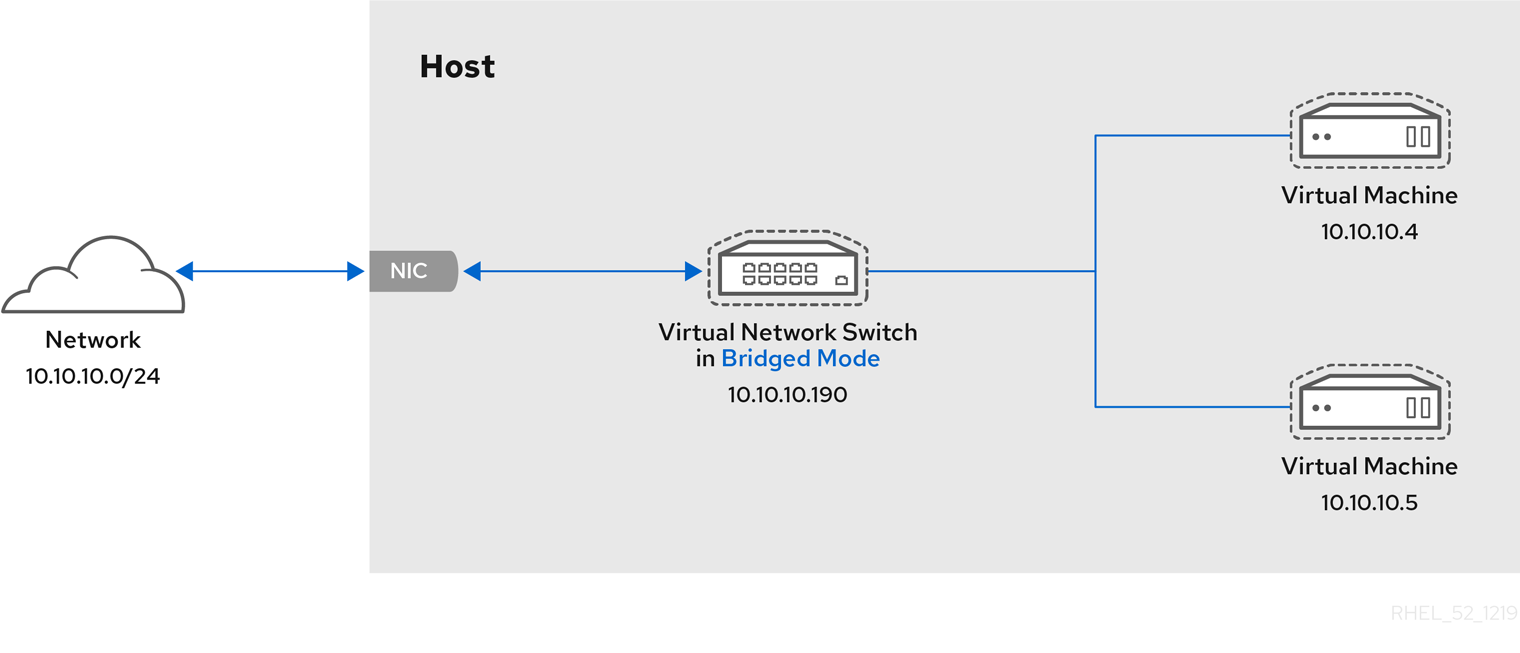
In bridged mode, the VM appear within the same subnet as the host machine. All other physical machines on the same physical network can detect the VM and access it.
Bridged network bonding
It is possible to use multiple physical bridge interfaces on the hypervisor by joining them together with a bond. The bond can then be added to a bridge, after which the VMs can be added to the bridge as well. However, the bonding driver has several modes of operation, and not all of these modes work with a bridge where VMs are in use.
Bonding modes 1, 2, and 4 are usable.
In contrast, modes 0, 3, 5, or 6 are likely to cause the connection to fail. Also note that media-independent interface (MII) monitoring should be used to monitor bonding modes, as Address Resolution Protocol (ARP) monitoring does not work correctly.
For more information about bonding modes, see the Red Hat Knowledgebase solution Which bonding modes work when used with a bridge that virtual machine guests or containers connect to?.
Common scenarios
The most common use cases for bridged mode include:
- Deploying VMs in an existing network alongside host machines, making the difference between virtual and physical machines invisible to the user.
- Deploying VMs without making any changes to existing physical network configuration settings.
- Deploying VMs that must be easily accessible to an existing physical network. Placing VMs on a physical network where they must access DHCP services.
- Connecting VMs to an existing network where virtual LANs (VLANs) are used.
- A demilitarized zone (DMZ) network. For a DMZ deployment with VMs, Red Hat recommends setting up the DMZ at the physical network router and switches, and connecting the VMs to the physical network by using bridged mode.
16.2.4. Virtual networking in isolated mode
By using isolated mode, virtual machines connected to the virtual switch can communicate with each other and with the host machine, but their traffic will not pass outside of the host machine, and they cannot receive traffic from outside the host machine. Using dnsmasq in this mode is required for basic functionality such as DHCP.

16.2.5. Virtual networking in open mode
When using open mode for networking, libvirt does not generate any firewall rules for the network. As a result, libvirt does not overwrite firewall rules provided by the host, and the user can therefore manually manage the VM’s firewall rules.
16.2.6. Comparison of virtual machine connection types
The following table provides information about the locations to which selected types of virtual machine (VM) network configurations can connect, and to which they are visible.
| Connection to the host | Connection to other VMs on the host | Connection to outside locations | Visible to outside locations | |
|---|---|---|---|---|
| Bridged mode | YES | YES | YES | YES |
| NAT | YES | YES | YES | no |
| Routed mode | YES | YES | YES | YES |
| Isolated mode | YES | YES | no | no |
| Open mode | Depends on the host’s firewall rules | |||

'%20d='M201.5%20305.5c-13.8%200-24.9-11.1-24.9-24.6%200-13.8%2011.1-24.9%2024.9-24.9%2013.6%200%2024.6%2011.1%2024.6%2024.9%200%2013.6-11.1%2024.6-24.6%2024.6zM504%20256c0%20137-111%20248-248%20248S8%20393%208%20256%20119%208%20256%208s248%20111%20248%20248zm-132.3-41.2c-9.4%200-17.7%203.9-23.8%2010-22.4-15.5-52.6-25.5-86.1-26.6l17.4-78.3%2055.4%2012.5c0%2013.6%2011.1%2024.6%2024.6%2024.6%2013.8%200%2024.9-11.3%2024.9-24.9s-11.1-24.9-24.9-24.9c-9.7%200-18%205.8-22.1%2013.8l-61.2-13.6c-3-.8-6.1%201.4-6.9%204.4l-19.1%2086.4c-33.2%201.4-63.1%2011.3-85.5%2026.8-6.1-6.4-14.7-10.2-24.1-10.2-34.9%200-46.3%2046.9-14.4%2062.8-1.1%205-1.7%2010.2-1.7%2015.5%200%2052.6%2059.2%2095.2%20132%2095.2%2073.1%200%20132.3-42.6%20132.3-95.2%200-5.3-.6-10.8-1.9-15.8%2031.3-16%2019.8-62.5-14.9-62.5zM302.8%20331c-18.2%2018.2-76.1%2017.9-93.6%200-2.2-2.2-6.1-2.2-8.3%200-2.5%202.5-2.5%206.4%200%208.6%2022.8%2022.8%2087.3%2022.8%20110.2%200%202.5-2.2%202.5-6.1%200-8.6-2.2-2.2-6.1-2.2-8.3%200zm7.7-75c-13.6%200-24.6%2011.1-24.6%2024.9%200%2013.6%2011.1%2024.6%2024.6%2024.6%2013.8%200%2024.9-11.1%2024.9-24.6%200-13.8-11-24.9-24.9-24.9z'/%3e%3c/svg%3e)