 红帽全球峰会
14.4. 以表单或流程形式进行文档附件
Red Hat Process Automation Manager 支持使用 Document 表单字段以表单形式进行文档附加。使用 Document 表单字段,您可以上传表单或流程中所需的文档。
要以表单和流程启用文档附件,请完成以下步骤:
- 设置文档总结策略。
- 在业务流程中创建文档变量。
- 将任务输入和输出映射到 document 变量。
14.4.1. 设置文档摘要策略
项目的文档总结策略决定了文档与表单和流程相关的存储位置。Red Hat Process Automation Manager 中的默认文档摘要策略是 org.jbpm.document.marshalling.DocumentMarshallingStrategy。此策略使用 DocumentStorageServiceImpl 类,将文档存储在本地存储在 PROJECT_HOME/.docs 文件夹中。您可以在 Business Central 或 kie-deployment-descriptor.xml 文件中为项目设置本文档 marshalling 策略或自定义文档 marshalling 策略。
流程
-
在 Business Central 中,转至 Menu
Design Projects。 - 选择项目。project Assets 窗口将打开。
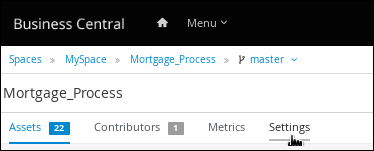
点 Settings 标签页。
图 14.3. 设置标签页
-
点 Deployments
MarshallingStrategy Add Marshalling Strategy。 在 Name 字段中输入文档摘要策略的标识符,并在 Resolver 下拉菜单中选择对应的解析器类型:
-
对于单文:输入
org.jbpm.document.marshalling.DocumentMarshallingStrategy作为文档总结策略,并将解析器类型设置为 Reflection。 -
对于多个文档:输入
新的 org.jbpm.document.marshalling.DocumentCollectionImplMarshallingStrategy(new org.jbpm.document.marshalling.DocumentMarshallingStrategy())作为文档 marshalling 策略,并将解析器类型设置为 MVEL。 - 对于自定义文档支持:输入自定义文档总结策略的标识符并选择相关解析器类型。
-
对于单文:输入
- 单击 Test 以验证您的部署描述符文件。
单击 Deploy to build 并部署更新的项目。
或者,如果您不使用 Business Central,您可以导航到
PROJECT_HOME/src/main/resources/META_INF/kie-deployment-descriptor.xml(如果适用)并使用所需的 <marshalling-strategies> 元素编辑部署描述符文件。- 点击 Save。
具有多个文档的部署描述符文件示例
<deployment-descriptor
    xsi:schemaLocation="http://www.jboss.org/jbpm deployment-descriptor.xsd"
    xmlns:xsi="http://www.w3.org/2001/XMLSchema-instance">
  <persistence-unit>org.jbpm.domain</persistence-unit>
  <audit-persistence-unit>org.jbpm.domain</audit-persistence-unit>
  <audit-mode>JPA</audit-mode>
  <persistence-mode>JPA</persistence-mode>
  <runtime-strategy>SINGLETON</runtime-strategy>
  <marshalling-strategies>
    <marshalling-strategy>
      <resolver>mvel</resolver>
      <identifier>new org.jbpm.document.marshalling.DocumentCollectionImplMarshallingStrategy(new org.jbpm.document.marshalling.DocumentMarshallingStrategy());</identifier>
    </marshalling-strategy>
  </marshalling-strategies>
14.4.1.1. 使用自定义文档发布内容管理系统(CMS)
项目的文档总结策略决定了文档与表单和流程相关的存储位置。Red Hat Process Automation Manager 中的默认文档摘要策略是 org.jbpm.document.marshalling.DocumentMarshallingStrategy。此策略使用 DocumentStorageServiceImpl 类,将文档存储在本地存储在 PROJECT_HOME/.docs 文件夹中。如果要在自定义位置存储表单和流程文档,如集中内容管理系统(CMS),请在项目中添加自定义文档摘要策略。您可以在 Business Central 或 kie-deployment-descriptor.xml 文件中设置本文档。
流程
创建自定义 marshalling 策略
.java文件,其中包含org.kie.api.marshalling.ObjectMarshallingStrategy接口的实施。这个接口可让您实施自定义文档总结策略所需的变量持久性。这个接口中的以下方法可帮助您创建策略:
-
布尔值接受(Object 对象): 确定策略是否可以被汇总指定对象 -
byte[] marshal(Context context, ObjectOutput os, Object object): Marshals the specified 对象并将 marshalled 对象返回为byte[] -
Object unmarshal(Context context, ObjectInputStream is, byte[] 对象, ClassLoader classloader): 阅读作为byte[]接收的对象并返回 unmarshalled 对象 -
void write(ObjectOutputStream os, Object object): Same 作为marshal方法,提供向后兼容 -
对象 read(ObjectInputStream os): Same 作为unmarshal方法,为向后兼容提供
以下代码示例是
ObjectMarshallingStrategy实施示例,用于从 Content Management Interoperability Services(CMIS)系统存储和检索数据:从 CMIS 系统存储和检索数据的实现示例
package org.jbpm.integration.cmis.impl; import java.io.ByteArrayInputStream; import java.io.ByteArrayOutputStream; import java.io.IOException; import java.io.ObjectInputStream; import java.io.ObjectOutputStream; import java.util.HashMap; import org.apache.chemistry.opencmis.client.api.Folder; import org.apache.chemistry.opencmis.client.api.Session; import org.apache.chemistry.opencmis.commons.data.ContentStream; import org.apache.commons.io.IOUtils; import org.drools.core.common.DroolsObjectInputStream; import org.jbpm.document.Document; import org.jbpm.integration.cmis.UpdateMode; import org.kie.api.marshalling.ObjectMarshallingStrategy; public class OpenCMISPlaceholderResolverStrategy extends OpenCMISSupport implements ObjectMarshallingStrategy { private String user; private String password; private String url; private String repository; private String contentUrl; private UpdateMode mode = UpdateMode.OVERRIDE; public OpenCMISPlaceholderResolverStrategy(String user, String password, String url, String repository) { this.user = user; this.password = password; this.url = url; this.repository = repository; } public OpenCMISPlaceholderResolverStrategy(String user, String password, String url, String repository, UpdateMode mode) { this.user = user; this.password = password; this.url = url; this.repository = repository; this.mode = mode; } public OpenCMISPlaceholderResolverStrategy(String user, String password, String url, String repository, String contentUrl) { this.user = user; this.password = password; this.url = url; this.repository = repository; this.contentUrl = contentUrl; } public OpenCMISPlaceholderResolverStrategy(String user, String password, String url, String repository, String contentUrl, UpdateMode mode) { this.user = user; this.password = password; this.url = url; this.repository = repository; this.contentUrl = contentUrl; this.mode = mode; } public boolean accept(Object object) { if (object instanceof Document) { return true; } return false; } public byte[] marshal(Context context, ObjectOutputStream os, Object object) throws IOException { Document document = (Document) object; Session session = getRepositorySession(user, password, url, repository); try { if (document.getContent() != null) { String type = getType(document); if (document.getIdentifier() == null || document.getIdentifier().isEmpty()) { String location = getLocation(document); Folder parent = findFolderForPath(session, location); if (parent == null) { parent = createFolder(session, null, location); } org.apache.chemistry.opencmis.client.api.Document doc = createDocument(session, parent, document.getName(), type, document.getContent()); document.setIdentifier(doc.getId()); document.addAttribute("updated", "true"); } else { if (document.getContent() != null && "true".equals(document.getAttribute("updated"))) { org.apache.chemistry.opencmis.client.api.Document doc = updateDocument(session, document.getIdentifier(), type, document.getContent(), mode); document.setIdentifier(doc.getId()); document.addAttribute("updated", "false"); } } } ByteArrayOutputStream buff = new ByteArrayOutputStream(); ObjectOutputStream oos = new ObjectOutputStream( buff ); oos.writeUTF(document.getIdentifier()); oos.writeUTF(object.getClass().getCanonicalName()); oos.close(); return buff.toByteArray(); } finally { session.clear(); } } public Object unmarshal(Context context, ObjectInputStream ois, byte[] object, ClassLoader classloader) throws IOException, ClassNotFoundException { DroolsObjectInputStream is = new DroolsObjectInputStream( new ByteArrayInputStream( object ), classloader ); String objectId = is.readUTF(); String canonicalName = is.readUTF(); Session session = getRepositorySession(user, password, url, repository); try { org.apache.chemistry.opencmis.client.api.Document doc = (org.apache.chemistry.opencmis.client.api.Document) findObjectForId(session, objectId); Document document = (Document) Class.forName(canonicalName).newInstance(); document.setAttributes(new HashMap<String, String>()); document.setIdentifier(objectId); document.setName(doc.getName()); document.setLastModified(doc.getLastModificationDate().getTime()); document.setSize(doc.getContentStreamLength()); document.addAttribute("location", getFolderName(doc.getParents()) + getPathAsString(doc.getPaths())); if (doc.getContentStream() != null && contentUrl == null) { ContentStream stream = doc.getContentStream(); document.setContent(IOUtils.toByteArray(stream.getStream())); document.addAttribute("updated", "false"); document.addAttribute("type", stream.getMimeType()); } else { document.setLink(contentUrl + document.getIdentifier()); } return document; } catch(Exception e) { throw new RuntimeException("Cannot read document from CMIS", e); } finally { is.close(); session.clear(); } } public Context createContext() { return null; } // For backward compatibility with previous serialization mechanism public void write(ObjectOutputStream os, Object object) throws IOException { Document document = (Document) object; Session session = getRepositorySession(user, password, url, repository); try { if (document.getContent() != null) { String type = document.getAttribute("type"); if (document.getIdentifier() == null) { String location = document.getAttribute("location"); Folder parent = findFolderForPath(session, location); if (parent == null) { parent = createFolder(session, null, location); } org.apache.chemistry.opencmis.client.api.Document doc = createDocument(session, parent, document.getName(), type, document.getContent()); document.setIdentifier(doc.getId()); document.addAttribute("updated", "false"); } else { if (document.getContent() != null && "true".equals(document.getAttribute("updated"))) { org.apache.chemistry.opencmis.client.api.Document doc = updateDocument(session, document.getIdentifier(), type, document.getContent(), mode); document.setIdentifier(doc.getId()); document.addAttribute("updated", "false"); } } } ByteArrayOutputStream buff = new ByteArrayOutputStream(); ObjectOutputStream oos = new ObjectOutputStream( buff ); oos.writeUTF(document.getIdentifier()); oos.writeUTF(object.getClass().getCanonicalName()); oos.close(); } finally { session.clear(); } } public Object read(ObjectInputStream os) throws IOException, ClassNotFoundException { String objectId = os.readUTF(); String canonicalName = os.readUTF(); Session session = getRepositorySession(user, password, url, repository); try { org.apache.chemistry.opencmis.client.api.Document doc = (org.apache.chemistry.opencmis.client.api.Document) findObjectForId(session, objectId); Document document = (Document) Class.forName(canonicalName).newInstance(); document.setIdentifier(objectId); document.setName(doc.getName()); document.addAttribute("location", getFolderName(doc.getParents()) + getPathAsString(doc.getPaths())); if (doc.getContentStream() != null) { ContentStream stream = doc.getContentStream(); document.setContent(IOUtils.toByteArray(stream.getStream())); document.addAttribute("updated", "false"); document.addAttribute("type", stream.getMimeType()); } return document; } catch(Exception e) { throw new RuntimeException("Cannot read document from CMIS", e); } finally { session.clear(); } } }-
-
在 Business Central 中,转至 Menu
Design Projects。 单击项目名称,再单击 Settings。
图 14.4. 设置标签页
-
点 Deployments
MarshallingStrategy Add Marshalling Strategy。 -
在 Name 字段中输入自定义文档 marshalling 策略的标识符,如
org.jbpm.integration.cmis.impl.OpenCMISPlaceholderResolverStrategy。 - 从 Resolver 下拉菜单中选择相关选项,如本例中的 Reflection。
- 单击 Test 以验证您的部署描述符文件。
单击 Deploy to build 并部署更新的项目。
或者,如果您不使用 Business Central,您可以导航到
PROJECT_HOME/src/main/resources/META_INF/kie-deployment-descriptor.xml(如果适用)并使用所需的 <marshalling-strategies> 元素编辑部署描述符文件。具有自定义文档总结策略的部署描述符文件示例
<deployment-descriptor xsi:schemaLocation="http://www.jboss.org/jbpm deployment-descriptor.xsd" xmlns:xsi="http://www.w3.org/2001/XMLSchema-instance"> <persistence-unit>org.jbpm.domain</persistence-unit> <audit-persistence-unit>org.jbpm.domain</audit-persistence-unit> <audit-mode>JPA</audit-mode> <persistence-mode>JPA</persistence-mode> <runtime-strategy>SINGLETON</runtime-strategy> <marshalling-strategies> <marshalling-strategy> <resolver>reflection</resolver> <identifier> org.jbpm.integration.cmis.impl.OpenCMISPlaceholderResolverStrategy </identifier> </marshalling-strategy> </marshalling-strategies>- 要启用存储在自定义位置的文档要附加到表单和进程,在相关流程中创建文档变量,并将任务输入和输出映射到 Business Central 中的变量。
14.4.2. 在业务流程中创建文档变量
设置文档总结策略后,请在相关流程中创建一个文档变量,以便将文档上传到人工任务,并为 Business Central 中的 流程实例 视图显示文档或文档。
先决条件
- 您已设置了文档总结策略,如 第 14.4.1 节 “设置文档摘要策略” 所述。
流程
-
在 Business Central 中,转至 Menu
Design Projects。 - 点击项目名称以打开资产视图,并点击业务流程名称。
-
点 canvas 并点窗口右侧的
 来打开 Properties 面板。
展开 Process Data 并点
 并输入以下值:
-
名称 :
文档 -
custom Type:
org.jbpm.document.Documentfor a single document ororg.jbpm.document.DocumentCollectionfor multiple Documentation
-
名称 :
14.4.3. 将任务输入和输出到文档变量
如果要在任务表单中查看或修改附件,请在任务输入和输出中创建分配。
先决条件
- 您有一个包含至少包含一个用户任务的业务流程资产的项目。
流程
-
在 Business Central 中,转至 Menu
Design Projects。 - 点击项目名称以打开资产视图,并点击业务流程名称。
-
点击用户任务并点击窗口右侧的
打开 Properties 面板。
-
展开 Implementation/Execution,并在 分配 旁边点
 打开 Data I/O 窗口。
在 Data Inputs and Assignments 下,点 Add 并输入以下值:
-
名称 :
taskdoc_in -
Data Type:
org.jbpm.document.Documentfor a single document ororg.jbpm.document.DocumentCollectionfor multiple Documentation -
源 :
文档
-
名称 :
在 Data Outputs and Assignments 下,点 Add 并输入以下值:
-
Name:
taskdoc_out -
Data Type:
org.jbpm.document.Documentfor a single document ororg.jbpm.document.DocumentCollectionfor multiple Documentation -
目标 :
文档
Source和Target字段包含您之前创建的进程变量的名称。-
Name:
- 点击 Save。

'%20d='M201.5%20305.5c-13.8%200-24.9-11.1-24.9-24.6%200-13.8%2011.1-24.9%2024.9-24.9%2013.6%200%2024.6%2011.1%2024.6%2024.9%200%2013.6-11.1%2024.6-24.6%2024.6zM504%20256c0%20137-111%20248-248%20248S8%20393%208%20256%20119%208%20256%208s248%20111%20248%20248zm-132.3-41.2c-9.4%200-17.7%203.9-23.8%2010-22.4-15.5-52.6-25.5-86.1-26.6l17.4-78.3%2055.4%2012.5c0%2013.6%2011.1%2024.6%2024.6%2024.6%2013.8%200%2024.9-11.3%2024.9-24.9s-11.1-24.9-24.9-24.9c-9.7%200-18%205.8-22.1%2013.8l-61.2-13.6c-3-.8-6.1%201.4-6.9%204.4l-19.1%2086.4c-33.2%201.4-63.1%2011.3-85.5%2026.8-6.1-6.4-14.7-10.2-24.1-10.2-34.9%200-46.3%2046.9-14.4%2062.8-1.1%205-1.7%2010.2-1.7%2015.5%200%2052.6%2059.2%2095.2%20132%2095.2%2073.1%200%20132.3-42.6%20132.3-95.2%200-5.3-.6-10.8-1.9-15.8%2031.3-16%2019.8-62.5-14.9-62.5zM302.8%20331c-18.2%2018.2-76.1%2017.9-93.6%200-2.2-2.2-6.1-2.2-8.3%200-2.5%202.5-2.5%206.4%200%208.6%2022.8%2022.8%2087.3%2022.8%20110.2%200%202.5-2.2%202.5-6.1%200-8.6-2.2-2.2-6.1-2.2-8.3%200zm7.7-75c-13.6%200-24.6%2011.1-24.6%2024.9%200%2013.6%2011.1%2024.6%2024.6%2024.6%2013.8%200%2024.9-11.1%2024.9-24.6%200-13.8-11-24.9-24.9-24.9z'/%3e%3c/svg%3e)