 红帽全球峰会
11.4. Adding certificate mapping data to a user entry in the IdM web UI for users stored in IdM
- Log into the IdM web UI as an administrator.
-
Navigate to
UsersActive usersidm_user. -
Find the
Certificate mapping dataoption and clickAdd. Choose one of the following options:
If you have the certificate of
idm_user:On the command line, display the certificate using the
catutility or a text editor:[root@server ~]# cat idm_user_certificate.pem -----BEGIN CERTIFICATE----- MIIFFTCCA/2gAwIBAgIBEjANBgkqhkiG9w0BAQsFADA6MRgwFgYDVQQKDA9JRE0u RVhBTVBMRS5DT00xHjAcBgNVBAMMFUNlcnRpZmljYXRlIEF1dGhvcml0eTAeFw0x ODA5MDIxODE1MzlaFw0yMDA5MDIxODE1MzlaMCwxGDAWBgNVBAoMD0lETS5FWEFN [...output truncated...]- Copy the certificate.
In the IdM web UI, click
Addnext toCertificateand paste the certificate into the window that opens up.图 11.3. Adding a user’s certificate mapping data: certificate

-
If you do not have the certificate of
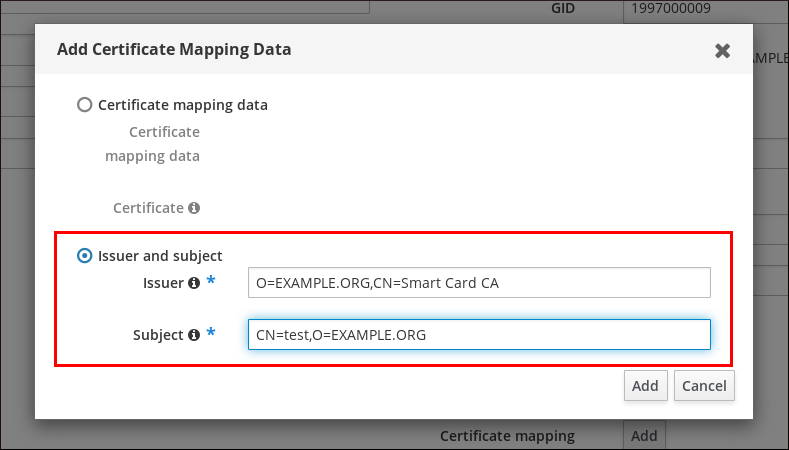
idm_userat your disposal but know theIssuerand theSubjectof the certificate, check the radio button ofIssuer and subjectand enter the values in the two respective boxes.
图 11.4. Adding a user’s certificate mapping data: issuer and subject
-
If you do not have the certificate of
-
Click
Add.
Verification
If you have access to the whole certificate in the .pem format, verify that the user and certificate are linked:
Use the
sss_cacheutility to invalidate the record ofidm_userin the SSSD cache and force a reload of theidm_userinformation:# sss_cache -u idm_userRun the
ipa certmap-matchcommand with the name of the file containing the certificate of the IdM user:# ipa certmap-match idm_user_cert.pem -------------- 1 user matched -------------- Domain: IDM.EXAMPLE.COM User logins: idm_user ---------------------------- Number of entries returned 1 ----------------------------The output confirms that now you have certificate mapping data added to
idm_userand that a corresponding mapping rule exists. This means that you can use any certificate that matches the defined certificate mapping data to authenticate asidm_user.

'%20d='M201.5%20305.5c-13.8%200-24.9-11.1-24.9-24.6%200-13.8%2011.1-24.9%2024.9-24.9%2013.6%200%2024.6%2011.1%2024.6%2024.9%200%2013.6-11.1%2024.6-24.6%2024.6zM504%20256c0%20137-111%20248-248%20248S8%20393%208%20256%20119%208%20256%208s248%20111%20248%20248zm-132.3-41.2c-9.4%200-17.7%203.9-23.8%2010-22.4-15.5-52.6-25.5-86.1-26.6l17.4-78.3%2055.4%2012.5c0%2013.6%2011.1%2024.6%2024.6%2024.6%2013.8%200%2024.9-11.3%2024.9-24.9s-11.1-24.9-24.9-24.9c-9.7%200-18%205.8-22.1%2013.8l-61.2-13.6c-3-.8-6.1%201.4-6.9%204.4l-19.1%2086.4c-33.2%201.4-63.1%2011.3-85.5%2026.8-6.1-6.4-14.7-10.2-24.1-10.2-34.9%200-46.3%2046.9-14.4%2062.8-1.1%205-1.7%2010.2-1.7%2015.5%200%2052.6%2059.2%2095.2%20132%2095.2%2073.1%200%20132.3-42.6%20132.3-95.2%200-5.3-.6-10.8-1.9-15.8%2031.3-16%2019.8-62.5-14.9-62.5zM302.8%20331c-18.2%2018.2-76.1%2017.9-93.6%200-2.2-2.2-6.1-2.2-8.3%200-2.5%202.5-2.5%206.4%200%208.6%2022.8%2022.8%2087.3%2022.8%20110.2%200%202.5-2.2%202.5-6.1%200-8.6-2.2-2.2-6.1-2.2-8.3%200zm7.7-75c-13.6%200-24.6%2011.1-24.6%2024.9%200%2013.6%2011.1%2024.6%2024.6%2024.6%2013.8%200%2024.9-11.1%2024.9-24.6%200-13.8-11-24.9-24.9-24.9z'/%3e%3c/svg%3e)