 Red Hat Summit
Ce contenu n'est pas disponible dans la langue sélectionnée.
11.5. Setting up Cross-Realm Kerberos Trusts
The Kerberos V5 realm is a set of Kerberos principals defined in the Kerberos database on all connected masters and slaves. You must configure cross-realm Kerberos trust if you want principals from different realms to communicate with each other.
A lot of Linux environments, as well as mixed environments, will already have a Kerberos realm deployed for single sign-on, application authentication, and user management. That makes Kerberos a potentially common integration path for different domains and mixed system (such as Windows and Linux) environments, particularly if the Linux environment is not using a more structured domain configuration like Identity Management.
11.5.1. A Trust Relationship
Copier lienLien copié sur presse-papiers!
A trust means that the users within one realm are trusted to access the resources in another domain as if they belonged to that realm. This is done by creating a shared key for a single principal that is held in common by both domains.
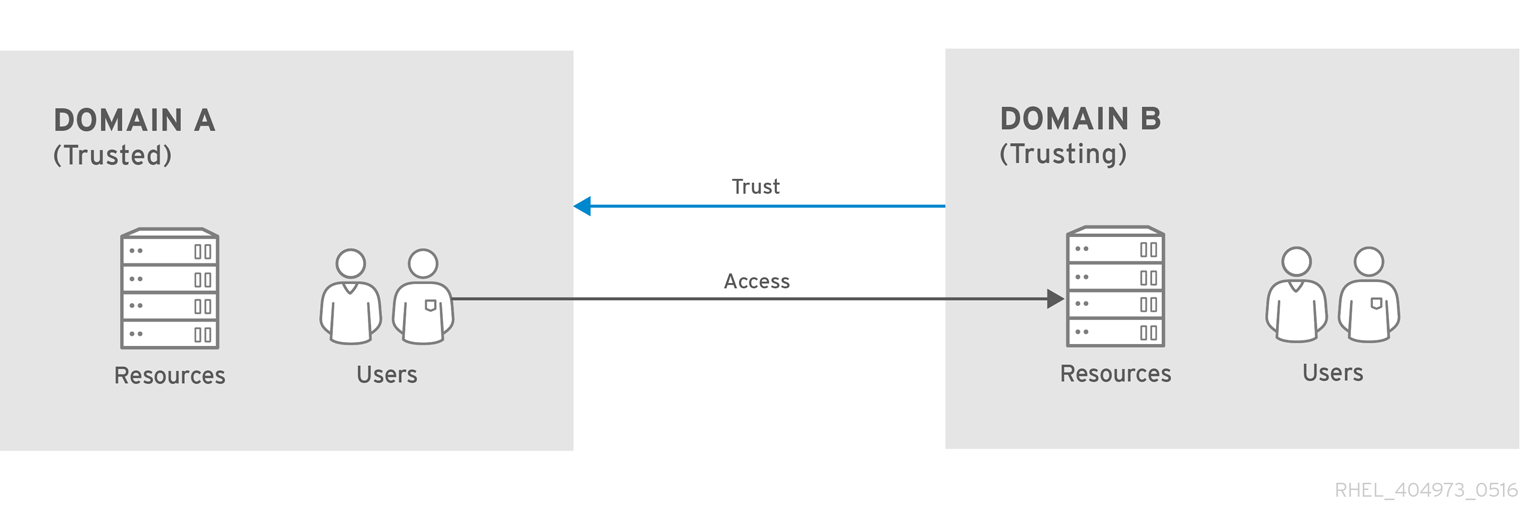
Figure 11.2. Basic Trust
In Figure 11.2, “Basic Trust”, the shared principal would belong to Domain B (
krbtgt/B.EXAMPLE.COM@A.EXAMPLE.COM). When that principal is also added to Domain A, then the clients in Domain A can access the resources in Domain B. The configured principal exists in both realms. That shared principal has three characteristics:
- It exists in both realms.
- When a key is created, the same password is used in both realms.
- The key has the same key version number (
kvno).
A cross-realm trust is unidirectional by default. This trust is not automatically reciprocated so that the
B.EXAMPLE.COM realm are trusted to authenticate to services in the A.EXAMPLE.COM realm. To establish trust in the other direction, both realms would need to share keys for the krbtgt/A.EXAMPLE.COM@B.EXAMPLE.COM service — an entry with a reverse mapping from the previous example.
A realm can have multiple trusts, both realms that it trusts and realms it is trusted by. With Kerberos trusts, the trust can flow in a chain. If Realm A trusts Realm B and Realm B trusts Realm C, Realm A implicitly trusts Realm C, as well. The trust flows along realms; this is a transitive trust.
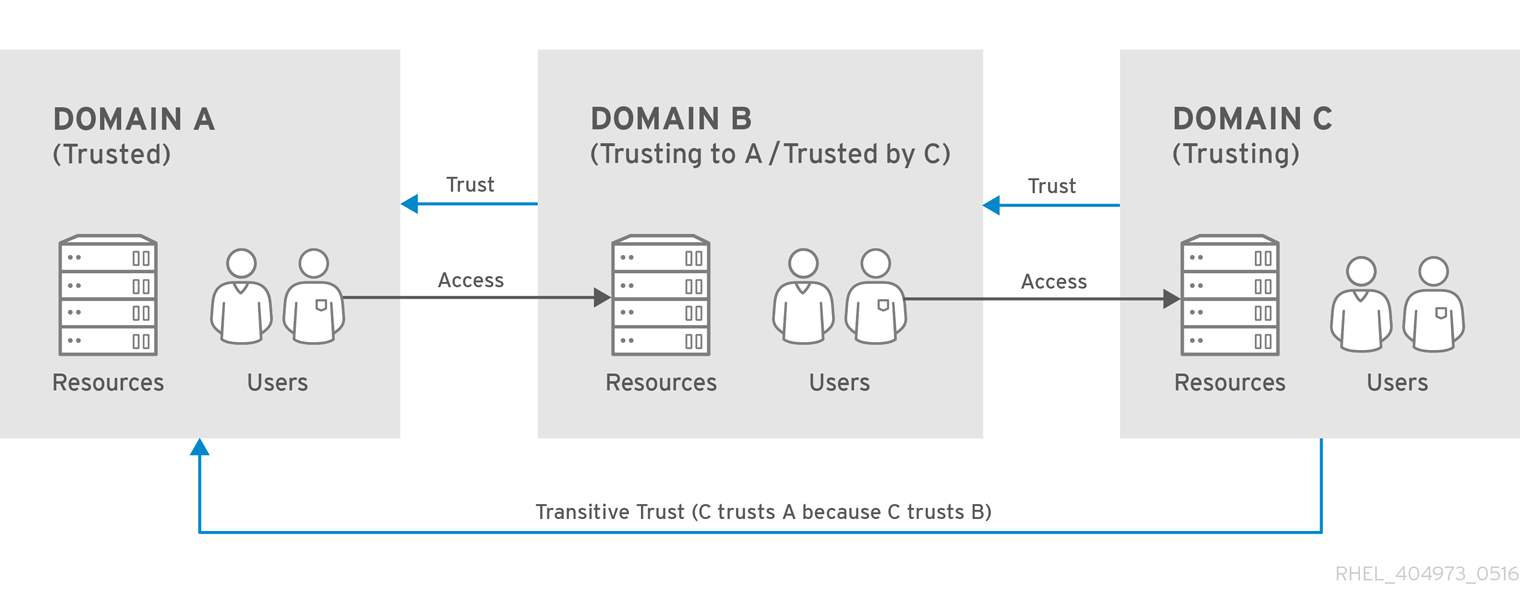
Figure 11.3. Transitive Trust
The direction of a transitive trust is the trust flow. The trust flow has to be defined, first by recognizing to what realm a service belongs and then by identifying what realms a client must contact to access that service.
A Kerberos principal name is structured in the format service/hostname@REALM. The service is generally a protocol, such as LDAP, IMAP, HTTP, or host. The hostname is the fully-qualified domain name of the host system, and the REALM is the Kerberos realm to which it belongs. Kerberos clients typically use the host name or DNS domain name for Kerberos realm mapping. This mapping can be explicit or implicit. Explicit mapping uses the
[domain_realm] section of the /etc/krb5.conf file. With implicit mapping, the domain name is converted to upper case; the converted name is then assumed to be the Kerberos realm to search.
When traversing a trust, Kerberos assumes that each realm is structured like a hierarchical DNS domain, with a root domain and subdomains. This means that the trust flows up to a shared root. Each step, or hop, has a shared key. In Figure 11.4, “Trusts in the Same Domain”, SALES.EXAMPLE.COM shares a key with EXAMPLE.COM, and EXAMPLE.COM shares a key with EVERYWHERE.EXAMPLE.COM.
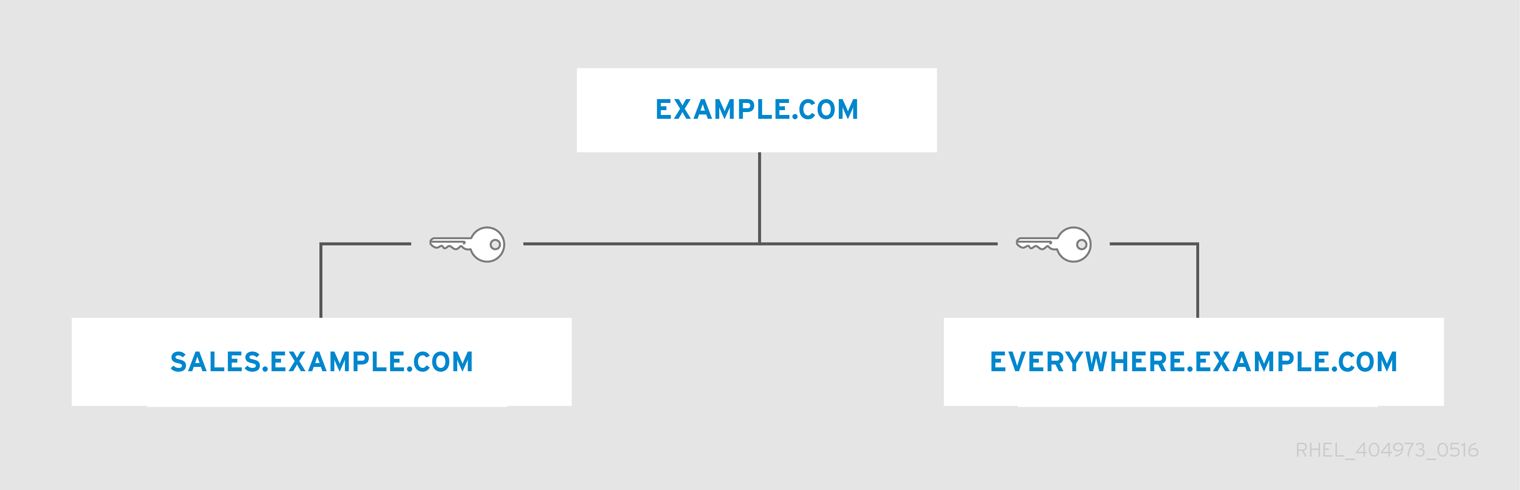
Figure 11.4. Trusts in the Same Domain
The client treats the realm name as a DNS name, and it determines its trust path by stripping off elements of its own realm name until it reaches the root name. It then begins prepending names until it reaches the service's realm.
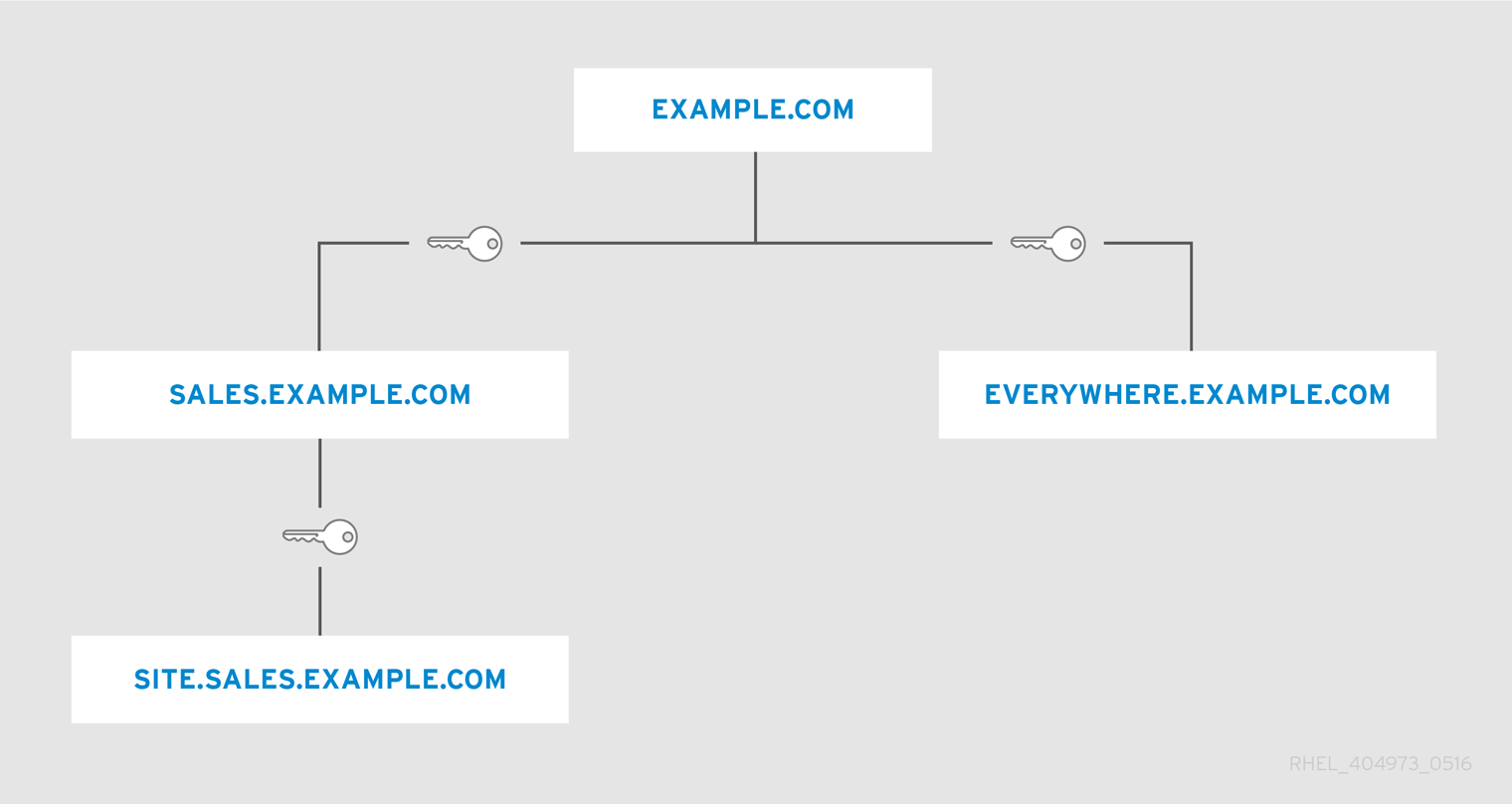
Figure 11.5. Child/Parent Trusts in the Same Domain
This is a nature of trusts being transitive. SITE.SALES.EXAMPLE.COM only has a single shared key, with SALES.EXAMPLE.COM. But because of a series of small trusts, there is a large trust flow that allows trust to go from SITE.SALES.EXAMPLE.COM to EVERYWHERE.EXAMPLE.COM.
That trust flow can even go between completely different domains by creating a shared key at the domain level, where the sites share no common suffix.
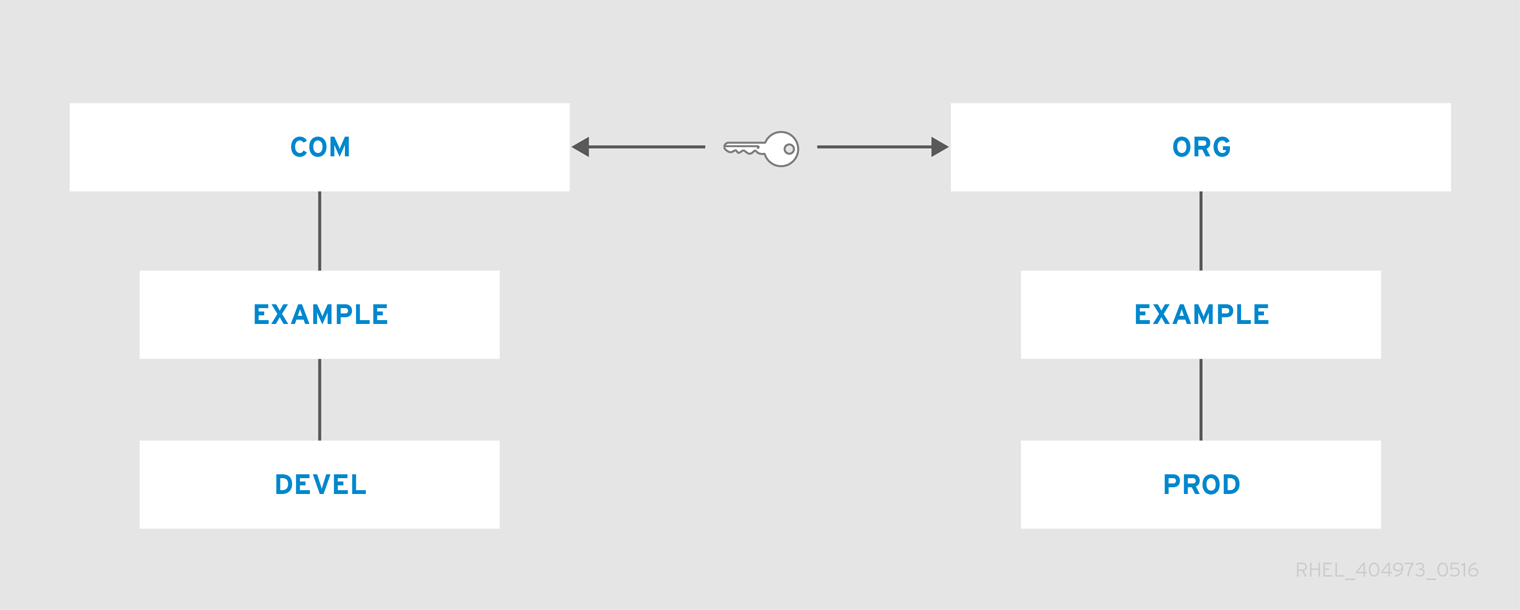
Figure 11.6. Trusts in Different Domains
The [capaths] section
It is also possible to reduce the number of hops and represent very complex trust flows by explicitly defining the flow. The
[capaths] section of the /etc/krb5.conf file defines the trust flow between different realms.
The format of the
[capaths] section is relatively straightforward: there is a main entry for each realm where a client has a principal, and then inside each realm section is a list of intermediate realms from which the client must obtain credentials.
For example,
[capaths] can be used to specify the following process for obtaining credentials:
- With credentials from Realm A, the client obtains a
krbtgt/A@Aticket from the KDC of Realm A. Using this ticket, the client then asks for thekrbtgt/B@Aticket.Thekrbtgt/B@Aticket issued by the KDC of Realm A is a cross-realm ticket granting ticket. It allows the client to ask the KDC of Realm B for a ticket to a service principal of Realm B. - With the
krbtgt/B@Aticket, the client asks for thekrbtgt/C@Bcross-realm ticket. - With the
krbtgt/C@Bticket issued by the KDC of Realm B, the client asks for thekrbtgt/D@Ccross-realm ticket. - With the
krbtgt/D@Cticket issued by the KDC of Realm C, the client asks the KDC of Realm D for a ticket to a service principal in Realm D.
After this, the credentials cache contains tickets for
krbtgt/A@A, krbtgt/B@A, krbtgt/C@B, krbtgt/D@C, and service/hostname@D. To obtain the service/hostname@D ticket, it was required to obtain the three intermediate cross-realm tickets.
For more information on the
[capaths] section, including examples of the [capaths] configuration, see the krb5.conf(5) man page.
11.5.2. Setting up a Realm Trust
Copier lienLien copié sur presse-papiers!
In this example, the Kerberos realms are
A.EXAMPLE.COM and B.EXAMPLE.COM.
Create the entry for the shared principal for the B realm in the A realm, using
kadmin.
[root@server ~]# kadmin -r A.EXAMPLE.COM
kadmin: add_principal krbtgt/B.EXAMPLE.COM@A.EXAMPLE.COM
Enter password for principal "krbtgt/B.EXAMPLE.COM@A.EXAMPLE.COM":
Re-enter password for principal "krbtgt/B.EXAMPLE.COM@A.EXAMPLE.COM":
Principal "krbtgt/B.EXAMPLE.COM@A.EXAMPLE.COM" created.
quit
That means that the A realm will trust the B principal.
Important
It is recommended that you choose very strong passwords for cross-realm principals. Unlike many other passwords, for which the user can be prompted as often as several times a day, the system will not request the password for cross-realm principal frequently from you, which is why it does not need to be easy to memorize.
To create a bidirectional trust, then create principals going the reverse way. Create a principal for the A realm in the B realm, using
kadmin.
[root@server ~]# kadmin -r B.EXAMPLE.COM
kadmin: add_principal krbtgt/A.EXAMPLE.COM@B.EXAMPLE.COM
Enter password for principal "krbtgt/A.EXAMPLE.COM@B.EXAMPLE.COM":
Re-enter password for principal "krbtgt/A.EXAMPLE.COM@B.EXAMPLE.COM":
Principal "krbtgt/A.EXAMPLE.COM@B.EXAMPLE.COM" created.
quit
Use the
get_principal command to verify that both entries have matching key version numbers (kvno values) and encryption types.
Important
A common, but incorrect, situation is for administrators to try to use the
add_principal command's -randkey option to assign a random key instead of a password, dump the new entry from the database of the first realm, and import it into the second. This will not work unless the master keys for the realm databases are identical, as the keys contained in a database dump are themselves encrypted using the master key.

'%20d='M201.5%20305.5c-13.8%200-24.9-11.1-24.9-24.6%200-13.8%2011.1-24.9%2024.9-24.9%2013.6%200%2024.6%2011.1%2024.6%2024.9%200%2013.6-11.1%2024.6-24.6%2024.6zM504%20256c0%20137-111%20248-248%20248S8%20393%208%20256%20119%208%20256%208s248%20111%20248%20248zm-132.3-41.2c-9.4%200-17.7%203.9-23.8%2010-22.4-15.5-52.6-25.5-86.1-26.6l17.4-78.3%2055.4%2012.5c0%2013.6%2011.1%2024.6%2024.6%2024.6%2013.8%200%2024.9-11.3%2024.9-24.9s-11.1-24.9-24.9-24.9c-9.7%200-18%205.8-22.1%2013.8l-61.2-13.6c-3-.8-6.1%201.4-6.9%204.4l-19.1%2086.4c-33.2%201.4-63.1%2011.3-85.5%2026.8-6.1-6.4-14.7-10.2-24.1-10.2-34.9%200-46.3%2046.9-14.4%2062.8-1.1%205-1.7%2010.2-1.7%2015.5%200%2052.6%2059.2%2095.2%20132%2095.2%2073.1%200%20132.3-42.6%20132.3-95.2%200-5.3-.6-10.8-1.9-15.8%2031.3-16%2019.8-62.5-14.9-62.5zM302.8%20331c-18.2%2018.2-76.1%2017.9-93.6%200-2.2-2.2-6.1-2.2-8.3%200-2.5%202.5-2.5%206.4%200%208.6%2022.8%2022.8%2087.3%2022.8%20110.2%200%202.5-2.2%202.5-6.1%200-8.6-2.2-2.2-6.1-2.2-8.3%200zm7.7-75c-13.6%200-24.6%2011.1-24.6%2024.9%200%2013.6%2011.1%2024.6%2024.6%2024.6%2013.8%200%2024.9-11.1%2024.9-24.6%200-13.8-11-24.9-24.9-24.9z'/%3e%3c/svg%3e)