 Red Hat Summit
Este contenido no está disponible en el idioma seleccionado.
Chapter 7. Admission plugins
7.1. About admission plugins
Admission plugins are used to help regulate how OpenShift Container Platform 4.8 functions. Admission plugins intercept requests to the master API to validate resource requests and ensure policies are adhered to, after the request is authenticated and authorized. For example, they are commonly used to enforce security policy, resource limitations or configuration requirements.
Admission plugins run in sequence as an admission chain. If any admission plugin in the sequence rejects a request, the whole chain is aborted and an error is returned.
OpenShift Container Platform has a default set of admission plugins enabled for each resource type. These are required for proper functioning of the cluster. Admission plugins ignore resources that they are not responsible for.
In addition to the defaults, the admission chain can be extended dynamically through webhook admission plugins that call out to custom webhook servers. There are two types of webhook admission plugins: a mutating admission plugin and a validating admission plugin. The mutating admission plugin runs first and can both modify resources and validate requests. The validating admission plugin validates requests and runs after the mutating admission plugin so that modifications triggered by the mutating admission plugin can also be validated.
Calling webhook servers through a mutating admission plugin can produce side effects on resources related to the target object. In such situations, you must take steps to validate that the end result is as expected.
Dynamic admission should be used cautiously because it impacts cluster control plane operations. When calling webhook servers through webhook admission plugins in OpenShift Container Platform 4.8, ensure that you have read the documentation fully and tested for side effects of mutations. Include steps to restore resources back to their original state prior to mutation, in the event that a request does not pass through the entire admission chain.
7.2. Default admission plugins
Default validating and admission plugins are enabled in OpenShift Container Platform 4.8. These default plugins contribute to fundamental control plane functionality, such as ingress policy, cluster resource limit override and quota policy. The following lists contain the default admission plugins:
Example 7.1. Validating admission plugins
-
LimitRanger -
ServiceAccount -
PodNodeSelector -
Priority -
PodTolerationRestriction -
OwnerReferencesPermissionEnforcement -
PersistentVolumeClaimResize -
RuntimeClass -
CertificateApproval -
CertificateSigning -
CertificateSubjectRestriction -
autoscaling.openshift.io/ManagementCPUsOverride -
authorization.openshift.io/RestrictSubjectBindings -
scheduling.openshift.io/OriginPodNodeEnvironment -
network.openshift.io/ExternalIPRanger -
network.openshift.io/RestrictedEndpointsAdmission -
image.openshift.io/ImagePolicy -
security.openshift.io/SecurityContextConstraint -
security.openshift.io/SCCExecRestrictions -
route.openshift.io/IngressAdmission -
config.openshift.io/ValidateAPIServer -
config.openshift.io/ValidateAuthentication -
config.openshift.io/ValidateFeatureGate -
config.openshift.io/ValidateConsole -
operator.openshift.io/ValidateDNS -
config.openshift.io/ValidateImage -
config.openshift.io/ValidateOAuth -
config.openshift.io/ValidateProject -
config.openshift.io/DenyDeleteClusterConfiguration -
config.openshift.io/ValidateScheduler -
quota.openshift.io/ValidateClusterResourceQuota -
security.openshift.io/ValidateSecurityContextConstraints -
authorization.openshift.io/ValidateRoleBindingRestriction -
config.openshift.io/ValidateNetwork -
operator.openshift.io/ValidateKubeControllerManager -
ValidatingAdmissionWebhook -
ResourceQuota -
quota.openshift.io/ClusterResourceQuota
Example 7.2. Mutating admission plugins
-
NamespaceLifecycle -
LimitRanger -
ServiceAccount -
NodeRestriction -
TaintNodesByCondition -
PodNodeSelector -
Priority -
DefaultTolerationSeconds -
PodTolerationRestriction -
DefaultStorageClass -
StorageObjectInUseProtection -
RuntimeClass -
DefaultIngressClass -
autoscaling.openshift.io/ManagementCPUsOverride -
scheduling.openshift.io/OriginPodNodeEnvironment -
image.openshift.io/ImagePolicy -
security.openshift.io/SecurityContextConstraint -
security.openshift.io/DefaultSecurityContextConstraints -
MutatingAdmissionWebhook
7.3. Webhook admission plugins
In addition to OpenShift Container Platform default admission plugins, dynamic admission can be implemented through webhook admission plugins that call webhook servers, to extend the functionality of the admission chain. Webhook servers are called over HTTP at defined endpoints.
There are two types of webhook admission plugins in OpenShift Container Platform:
- During the admission process, the mutating admission plugin can perform tasks, such as injecting affinity labels.
- At the end of the admission process, the validating admission plugin can be used to make sure an object is configured properly, for example ensuring affinity labels are as expected. If the validation passes, OpenShift Container Platform schedules the object as configured.
When an API request comes in, mutating or validating admission plugins use the list of external webhooks in the configuration and call them in parallel:
- If all of the webhooks approve the request, the admission chain continues.
- If any of the webhooks deny the request, the admission request is denied and the reason for doing so is based on the first denial.
- If more than one webhook denies the admission request, only the first denial reason is returned to the user.
-
If an error is encountered when calling a webhook, the request is either denied or the webhook is ignored depending on the error policy set. If the error policy is set to
Ignore, the request is unconditionally accepted in the event of a failure. If the policy is set toFail, failed requests are denied. UsingIgnorecan result in unpredictable behavior for all clients.
Communication between the webhook admission plugin and the webhook server must use TLS. Generate a CA certificate and use the certificate to sign the server certificate that is used by your webhook admission server. The PEM-encoded CA certificate is supplied to the webhook admission plugin using a mechanism, such as service serving certificate secrets.
The following diagram illustrates the sequential admission chain process within which multiple webhook servers are called.
Figure 7.1. API admission chain with mutating and validating admission plugins
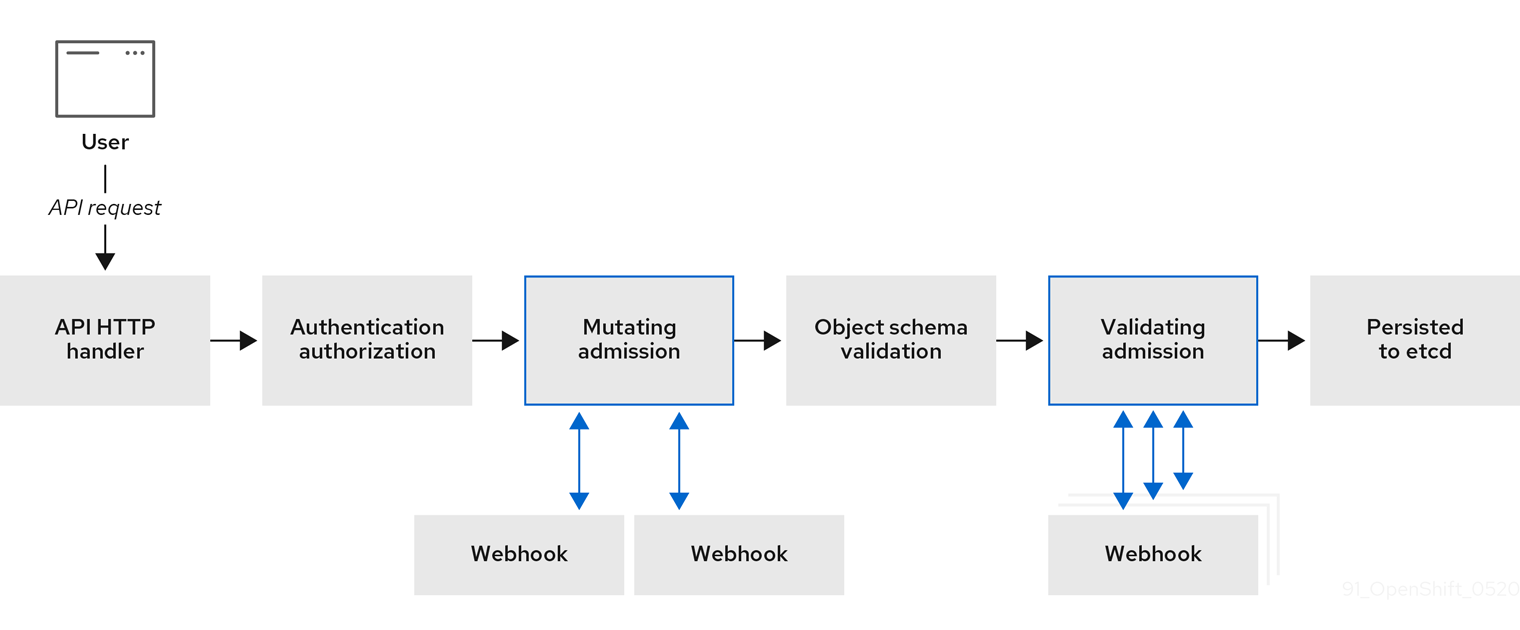
An example webhook admission plugin use case is where all pods must have a common set of labels. In this example, the mutating admission plugin can inject labels and the validating admission plugin can check that labels are as expected. OpenShift Container Platform would subsequently schedule pods that include required labels and reject those that do not.
Some common webhook admission plugin use cases include:
- Namespace reservation.
- Limiting custom network resources managed by the SR-IOV network device plugin.
- Defining tolerations that enable taints to qualify which pods should be scheduled on a node.
- Pod priority class validation.
7.4. Types of webhook admission plugins
Cluster administrators can call out to webhook servers through the mutating admission plugin or the validating admission plugin in the API server admission chain.
7.4.1. Mutating admission plugin
The mutating admission plugin is invoked during the mutation phase of the admission process, which allows modification of resource content before it is persisted. One example webhook that can be called through the mutating admission plugin is the Pod Node Selector feature, which uses an annotation on a namespace to find a label selector and add it to the pod specification.
Sample mutating admission plugin configuration
apiVersion: admissionregistration.k8s.io/v1beta1
kind: MutatingWebhookConfiguration
metadata:
  name: <webhook_name>
webhooks:
- name: <webhook_name>
clientConfig:
    service:
      namespace: default
name: kubernetes
path: <webhook_url>
caBundle: <ca_signing_certificate>
rules:
- operations:
    - <operation>
    apiGroups:
    - ""
    apiVersions:
    - "*"
    resources:
    - <resource>
  failurePolicy: <policy>
sideEffects: None- 1
- Specifies a mutating admission plugin configuration.
- 2
- The name for the
MutatingWebhookConfigurationobject. Replace<webhook_name>with the appropriate value. - 3
- The name of the webhook to call. Replace
<webhook_name>with the appropriate value. - 4
- Information about how to connect to, trust, and send data to the webhook server.
- 5
- The namespace where the front-end service is created.
- 6
- The name of the front-end service.
- 7
- The webhook URL used for admission requests. Replace
<webhook_url>with the appropriate value. - 8
- A PEM-encoded CA certificate that signs the server certificate that is used by the webhook server. Replace
<ca_signing_certificate>with the appropriate certificate in base64 format. - 9
- Rules that define when the API server should use this webhook admission plugin.
- 10
- One or more operations that trigger the API server to call this webhook admission plugin. Possible values are
create,update,deleteorconnect. Replace<operation>and<resource>with the appropriate values. - 11
- Specifies how the policy should proceed if the webhook server is unavailable. Replace
<policy>with eitherIgnore(to unconditionally accept the request in the event of a failure) orFail(to deny the failed request). UsingIgnorecan result in unpredictable behavior for all clients.
In OpenShift Container Platform 4.8, objects created by users or control loops through a mutating admission plugin might return unexpected results, especially if values set in an initial request are overwritten, which is not recommended.
7.4.2. Validating admission plugin
A validating admission plugin is invoked during the validation phase of the admission process. This phase allows the enforcement of invariants on particular API resources to ensure that the resource does not change again. The Pod Node Selector is also an example of a webhook which is called by the validating admission plugin, to ensure that all nodeSelector fields are constrained by the node selector restrictions on the namespace.
Sample validating admission plugin configuration
apiVersion: admissionregistration.k8s.io/v1beta1
kind: ValidatingWebhookConfiguration
metadata:
  name: <webhook_name>
webhooks:
- name: <webhook_name>
clientConfig:
    service:
      namespace: default
name: kubernetes
path: <webhook_url>
caBundle: <ca_signing_certificate>
rules:
- operations:
    - <operation>
    apiGroups:
    - ""
    apiVersions:
    - "*"
    resources:
    - <resource>
  failurePolicy: <policy>
sideEffects: Unknown- 1
- Specifies a validating admission plugin configuration.
- 2
- The name for the
ValidatingWebhookConfigurationobject. Replace<webhook_name>with the appropriate value. - 3
- The name of the webhook to call. Replace
<webhook_name>with the appropriate value. - 4
- Information about how to connect to, trust, and send data to the webhook server.
- 5
- The namespace where the front-end service is created.
- 6
- The name of the front-end service.
- 7
- The webhook URL used for admission requests. Replace
<webhook_url>with the appropriate value. - 8
- A PEM-encoded CA certificate that signs the server certificate that is used by the webhook server. Replace
<ca_signing_certificate>with the appropriate certificate in base64 format. - 9
- Rules that define when the API server should use this webhook admission plugin.
- 10
- One or more operations that trigger the API server to call this webhook admission plugin. Possible values are
create,update,deleteorconnect. Replace<operation>and<resource>with the appropriate values. - 11
- Specifies how the policy should proceed if the webhook server is unavailable. Replace
<policy>with eitherIgnore(to unconditionally accept the request in the event of a failure) orFail(to deny the failed request). UsingIgnorecan result in unpredictable behavior for all clients.
7.5. Configuring dynamic admission
This procedure outlines high-level steps to configure dynamic admission. The functionality of the admission chain is extended by configuring a webhook admission plugin to call out to a webhook server.
The webhook server is also configured as an aggregated API server. This allows other OpenShift Container Platform components to communicate with the webhook using internal credentials and facilitates testing using the oc command. Additionally, this enables role based access control (RBAC) into the webhook and prevents token information from other API servers from being disclosed to the webhook.
Prerequisites
- An OpenShift Container Platform account with cluster administrator access.
-
The OpenShift Container Platform CLI (
oc) installed. - A published webhook server container image.
Procedure
- Build a webhook server container image and make it available to the cluster using an image registry.
- Create a local CA key and certificate and use them to sign the webhook server’s certificate signing request (CSR).
Create a new project for webhook resources:
$ oc new-project my-webhook-namespace1 - 1
- Note that the webhook server might expect a specific name.
Define RBAC rules for the aggregated API service in a file called
rbac.yaml:apiVersion: v1 kind: List items: - apiVersion: rbac.authorization.k8s.io/v11 kind: ClusterRoleBinding metadata: name: auth-delegator-my-webhook-namespace roleRef: kind: ClusterRole apiGroup: rbac.authorization.k8s.io name: system:auth-delegator subjects: - kind: ServiceAccount namespace: my-webhook-namespace name: server - apiVersion: rbac.authorization.k8s.io/v12 kind: ClusterRole metadata: annotations: name: system:openshift:online:my-webhook-server rules: - apiGroups: - online.openshift.io resources: - namespacereservations3 verbs: - get - list - watch - apiVersion: rbac.authorization.k8s.io/v14 kind: ClusterRole metadata: name: system:openshift:online:my-webhook-requester rules: - apiGroups: - admission.online.openshift.io resources: - namespacereservations5 verbs: - create - apiVersion: rbac.authorization.k8s.io/v16 kind: ClusterRoleBinding metadata: name: my-webhook-server-my-webhook-namespace roleRef: kind: ClusterRole apiGroup: rbac.authorization.k8s.io name: system:openshift:online:my-webhook-server subjects: - kind: ServiceAccount namespace: my-webhook-namespace name: server - apiVersion: rbac.authorization.k8s.io/v17 kind: RoleBinding metadata: namespace: kube-system name: extension-server-authentication-reader-my-webhook-namespace roleRef: kind: Role apiGroup: rbac.authorization.k8s.io name: extension-apiserver-authentication-reader subjects: - kind: ServiceAccount namespace: my-webhook-namespace name: server - apiVersion: rbac.authorization.k8s.io/v18 kind: ClusterRole metadata: name: my-cluster-role rules: - apiGroups: - admissionregistration.k8s.io resources: - validatingwebhookconfigurations - mutatingwebhookconfigurations verbs: - get - list - watch - apiGroups: - "" resources: - namespaces verbs: - get - list - watch - apiVersion: rbac.authorization.k8s.io/v1 kind: ClusterRoleBinding metadata: name: my-cluster-role roleRef: kind: ClusterRole apiGroup: rbac.authorization.k8s.io name: my-cluster-role subjects: - kind: ServiceAccount namespace: my-webhook-namespace name: server- 1
- Delegates authentication and authorization to the webhook server API.
- 2
- Allows the webhook server to access cluster resources.
- 3
- Points to resources. This example points to the
namespacereservationsresource. - 4
- Enables the aggregated API server to create admission reviews.
- 5
- Points to resources. This example points to the
namespacereservationsresource. - 6
- Enables the webhook server to access cluster resources.
- 7
- Role binding to read the configuration for terminating authentication.
- 8
- Default cluster role and cluster role bindings for an aggregated API server.
Apply those RBAC rules to the cluster:
$ oc auth reconcile -f rbac.yamlCreate a YAML file called
webhook-daemonset.yamlthat is used to deploy a webhook as a daemon set server in a namespace:apiVersion: apps/v1 kind: DaemonSet metadata: namespace: my-webhook-namespace name: server labels: server: "true" spec: selector: matchLabels: server: "true" template: metadata: name: server labels: server: "true" spec: serviceAccountName: server containers: - name: my-webhook-container1 image: <image_registry_username>/<image_path>:<tag>2 imagePullPolicy: IfNotPresent command: - <container_commands>3 ports: - containerPort: 84434 volumeMounts: - mountPath: /var/serving-cert name: serving-cert readinessProbe: httpGet: path: /healthz port: 84435 scheme: HTTPS volumes: - name: serving-cert secret: defaultMode: 420 secretName: server-serving-cert- 1
- Note that the webhook server might expect a specific container name.
- 2
- Points to a webhook server container image. Replace
<image_registry_username>/<image_path>:<tag>with the appropriate value. - 3
- Specifies webhook container run commands. Replace
<container_commands>with the appropriate value. - 4
- Defines the target port within pods. This example uses port 8443.
- 5
- Specifies the port used by the readiness probe. This example uses port 8443.
Deploy the daemon set:
$ oc apply -f webhook-daemonset.yamlDefine a secret for the service serving certificate signer, within a YAML file called
webhook-secret.yaml:apiVersion: v1 kind: Secret metadata: namespace: my-webhook-namespace name: server-serving-cert type: kubernetes.io/tls data: tls.crt: <server_certificate>1 tls.key: <server_key>2 Create the secret:
$ oc apply -f webhook-secret.yamlDefine a service account and service, within a YAML file called
webhook-service.yaml:apiVersion: v1 kind: List items: - apiVersion: v1 kind: ServiceAccount metadata: namespace: my-webhook-namespace name: server - apiVersion: v1 kind: Service metadata: namespace: my-webhook-namespace name: server annotations: service.beta.openshift.io/serving-cert-secret-name: server-serving-cert spec: selector: server: "true" ports: - port: 4431 targetPort: 84432 Expose the webhook server within the cluster:
$ oc apply -f webhook-service.yamlDefine a custom resource definition for the webhook server, in a file called
webhook-crd.yaml:apiVersion: apiextensions.k8s.io/v1beta1 kind: CustomResourceDefinition metadata: name: namespacereservations.online.openshift.io1 spec: group: online.openshift.io2 version: v1alpha13 scope: Cluster4 names: plural: namespacereservations5 singular: namespacereservation6 kind: NamespaceReservation7 - 1
- Reflects
CustomResourceDefinitionspecvalues and is in the format<plural>.<group>. This example uses thenamespacereservationsresource. - 2
- REST API group name.
- 3
- REST API version name.
- 4
- Accepted values are
NamespacedorCluster. - 5
- Plural name to be included in URL.
- 6
- Alias seen in
ocoutput. - 7
- The reference for resource manifests.
Apply the custom resource definition:
$ oc apply -f webhook-crd.yamlConfigure the webhook server also as an aggregated API server, within a file called
webhook-api-service.yaml:apiVersion: apiregistration.k8s.io/v1beta1 kind: APIService metadata: name: v1beta1.admission.online.openshift.io spec: caBundle: <ca_signing_certificate>1 group: admission.online.openshift.io groupPriorityMinimum: 1000 versionPriority: 15 service: name: server namespace: my-webhook-namespace version: v1beta1- 1
- A PEM-encoded CA certificate that signs the server certificate that is used by the webhook server. Replace
<ca_signing_certificate>with the appropriate certificate in base64 format.
Deploy the aggregated API service:
$ oc apply -f webhook-api-service.yamlDefine the webhook admission plugin configuration within a file called
webhook-config.yaml. This example uses the validating admission plugin:apiVersion: admissionregistration.k8s.io/v1beta1 kind: ValidatingWebhookConfiguration metadata: name: namespacereservations.admission.online.openshift.io1 webhooks: - name: namespacereservations.admission.online.openshift.io2 clientConfig: service:3 namespace: default name: kubernetes path: /apis/admission.online.openshift.io/v1beta1/namespacereservations4 caBundle: <ca_signing_certificate>5 rules: - operations: - CREATE apiGroups: - project.openshift.io apiVersions: - "*" resources: - projectrequests - operations: - CREATE apiGroups: - "" apiVersions: - "*" resources: - namespaces failurePolicy: Fail- 1
- Name for the
ValidatingWebhookConfigurationobject. This example uses thenamespacereservationsresource. - 2
- Name of the webhook to call. This example uses the
namespacereservationsresource. - 3
- Enables access to the webhook server through the aggregated API.
- 4
- The webhook URL used for admission requests. This example uses the
namespacereservationresource. - 5
- A PEM-encoded CA certificate that signs the server certificate that is used by the webhook server. Replace
<ca_signing_certificate>with the appropriate certificate in base64 format.
Deploy the webhook:
$ oc apply -f webhook-config.yaml- Verify that the webhook is functioning as expected. For example, if you have configured dynamic admission to reserve specific namespaces, confirm that requests to create those namespaces are rejected and that requests to create non-reserved namespaces succeed.

'%20d='M201.5%20305.5c-13.8%200-24.9-11.1-24.9-24.6%200-13.8%2011.1-24.9%2024.9-24.9%2013.6%200%2024.6%2011.1%2024.6%2024.9%200%2013.6-11.1%2024.6-24.6%2024.6zM504%20256c0%20137-111%20248-248%20248S8%20393%208%20256%20119%208%20256%208s248%20111%20248%20248zm-132.3-41.2c-9.4%200-17.7%203.9-23.8%2010-22.4-15.5-52.6-25.5-86.1-26.6l17.4-78.3%2055.4%2012.5c0%2013.6%2011.1%2024.6%2024.6%2024.6%2013.8%200%2024.9-11.3%2024.9-24.9s-11.1-24.9-24.9-24.9c-9.7%200-18%205.8-22.1%2013.8l-61.2-13.6c-3-.8-6.1%201.4-6.9%204.4l-19.1%2086.4c-33.2%201.4-63.1%2011.3-85.5%2026.8-6.1-6.4-14.7-10.2-24.1-10.2-34.9%200-46.3%2046.9-14.4%2062.8-1.1%205-1.7%2010.2-1.7%2015.5%200%2052.6%2059.2%2095.2%20132%2095.2%2073.1%200%20132.3-42.6%20132.3-95.2%200-5.3-.6-10.8-1.9-15.8%2031.3-16%2019.8-62.5-14.9-62.5zM302.8%20331c-18.2%2018.2-76.1%2017.9-93.6%200-2.2-2.2-6.1-2.2-8.3%200-2.5%202.5-2.5%206.4%200%208.6%2022.8%2022.8%2087.3%2022.8%20110.2%200%202.5-2.2%202.5-6.1%200-8.6-2.2-2.2-6.1-2.2-8.3%200zm7.7-75c-13.6%200-24.6%2011.1-24.6%2024.9%200%2013.6%2011.1%2024.6%2024.6%2024.6%2013.8%200%2024.9-11.1%2024.9-24.6%200-13.8-11-24.9-24.9-24.9z'/%3e%3c/svg%3e)