 Red Hat Summit
Este contenido no está disponible en el idioma seleccionado.
Chapter 12. Installing on OpenStack
12.1. Preparing to install on OpenStack
12.1.1. Prerequisites
- You reviewed details about the OpenShift Container Platform installation and update processes.
- You read the documentation on selecting a cluster installation method and preparing it for users.
12.1.2. Choosing a method to install OpenShift Container Platform on OpenStack
You can install OpenShift Container Platform on installer-provisioned or user-provisioned infrastructure. The default installation type uses installer-provisioned infrastructure, where the installation program provisions the underlying infrastructure for the cluster. You can also install OpenShift Container Platform on infrastructure that you provision. If you do not use infrastructure that the installation program provisions, you must manage and maintain the cluster resources yourself.
See Installation process for more information about installer-provisioned and user-provisioned installation processes.
12.1.2.1. Installing a cluster on installer-provisioned infrastructure
You can install a cluster on Red Hat OpenStack Platform (RHOSP) infrastructure that is provisioned by the OpenShift Container Platform installation program, by using one of the following methods:
- Installing a cluster on OpenStack with customizations: You can install a customized cluster on RHOSP. The installation program allows for some customization to be applied at the installation stage. Many other customization options are available post-installation.
- Installing a cluster on OpenStack with Kuryr: You can install a customized OpenShift Container Platform cluster on RHOSP that uses Kuryr SDN. Kuryr and OpenShift Container Platform integration is primarily designed for OpenShift Container Platform clusters running on RHOSP VMs. Kuryr improves the network performance by plugging OpenShift Container Platform pods into RHOSP SDN. In addition, it provides interconnectivity between pods and RHOSP virtual instances.
- Installing a cluster on OpenStack in a restricted network: You can install OpenShift Container Platform on RHOSP in a restricted or disconnected network by creating an internal mirror of the installation release content. You can use this method to install a cluster that does not require an active internet connection to obtain the software components. You can also use this installation method to ensure that your clusters only use container images that satisfy your organizational controls on external content.
12.1.2.2. Installing a cluster on user-provisioned infrastructure
You can install a cluster on RHOSP infrastructure that you provision, by using one of the following methods:
- Installing a cluster on OpenStack on your own infrastructure: You can install OpenShift Container Platform on user-provisioned RHOSP infrastructure. By using this installation method, you can integrate your cluster with existing infrastructure and modifications. For installations on user-provisioned infrastructure, you must create all RHOSP resources, like Nova servers, Neutron ports, and security groups. You can use the provided Ansible playbooks to assist with the deployment process.
- Installing a cluster on OpenStack with Kuryr on your own infrastructure: You can install OpenShift Container Platform on user-provisioned RHOSP infrastructure that uses Kuryr SDN.
- Installing a cluster on OpenStack on your own SR-IOV infrastructure: You can install OpenShift Container Platform on user-provisioned RHOSP infrastructure that uses single-root input/output virtualization (SR-IOV) networks to run compute machines.
12.2. Installing a cluster on OpenStack with customizations
In OpenShift Container Platform version 4.8, you can install a customized cluster on Red Hat OpenStack Platform (RHOSP). To customize the installation, modify parameters in the install-config.yaml before you install the cluster.
12.2.1. Prerequisites
- You reviewed details about the OpenShift Container Platform installation and update processes.
- You read the documentation on selecting a cluster installation method and preparing it for users.
- You verified that OpenShift Container Platform 4.8 is compatible with your RHOSP version by using the Supported platforms for OpenShift clusters section. You can also compare platform support across different versions by viewing the OpenShift Container Platform on RHOSP support matrix.
- You have a storage service installed in RHOSP, such as block storage (Cinder) or object storage (Swift). Object storage is the recommended storage technology for OpenShift Container Platform registry cluster deployment. For more information, see Optimizing storage.
- You have the metadata service enabled in RHOSP.
12.2.2. Resource guidelines for installing OpenShift Container Platform on RHOSP
To support an OpenShift Container Platform installation, your Red Hat OpenStack Platform (RHOSP) quota must meet the following requirements:
| Resource | Value |
|---|---|
| Floating IP addresses | 3 |
| Ports | 15 |
| Routers | 1 |
| Subnets | 1 |
| RAM | 112 GB |
| vCPUs | 28 |
| Volume storage | 275 GB |
| Instances | 7 |
| Security groups | 3 |
| Security group rules | 60 |
A cluster might function with fewer than recommended resources, but its performance is not guaranteed.
If RHOSP object storage (Swift) is available and operated by a user account with the swiftoperator role, it is used as the default backend for the OpenShift Container Platform image registry. In this case, the volume storage requirement is 175 GB. Swift space requirements vary depending on the size of the image registry.
By default, your security group and security group rule quotas might be low. If you encounter problems, run openstack quota set --secgroups 3 --secgroup-rules 60 <project> as an administrator to increase them.
An OpenShift Container Platform deployment comprises control plane machines, compute machines, and a bootstrap machine.
12.2.2.1. Control plane machines
By default, the OpenShift Container Platform installation process creates three control plane machines.
Each machine requires:
- An instance from the RHOSP quota
- A port from the RHOSP quota
- A flavor with at least 16 GB memory, 4 vCPUs, and 100 GB storage space
12.2.2.2. Compute machines
By default, the OpenShift Container Platform installation process creates three compute machines.
Each machine requires:
- An instance from the RHOSP quota
- A port from the RHOSP quota
- A flavor with at least 8 GB memory, 2 vCPUs, and 100 GB storage space
Compute machines host the applications that you run on OpenShift Container Platform; aim to run as many as you can.
12.2.2.3. Bootstrap machine
During installation, a bootstrap machine is temporarily provisioned to stand up the control plane. After the production control plane is ready, the bootstrap machine is deprovisioned.
The bootstrap machine requires:
- An instance from the RHOSP quota
- A port from the RHOSP quota
- A flavor with at least 16 GB memory, 4 vCPUs, and 100 GB storage space
12.2.3. Internet access for OpenShift Container Platform
In OpenShift Container Platform 4.8, you require access to the internet to install your cluster.
You must have internet access to:
- Access OpenShift Cluster Manager to download the installation program and perform subscription management. If the cluster has internet access and you do not disable Telemetry, that service automatically entitles your cluster.
- Access Quay.io to obtain the packages that are required to install your cluster.
- Obtain the packages that are required to perform cluster updates.
If your cluster cannot have direct internet access, you can perform a restricted network installation on some types of infrastructure that you provision. During that process, you download the content that is required and use it to populate a mirror registry with the packages that you need to install a cluster and generate the installation program. With some installation types, the environment that you install your cluster in will not require internet access. Before you update the cluster, you update the content of the mirror registry.
12.2.4. Enabling Swift on RHOSP
Swift is operated by a user account with the swiftoperator role. Add the role to an account before you run the installation program.
If the Red Hat OpenStack Platform (RHOSP) object storage service, commonly known as Swift, is available, OpenShift Container Platform uses it as the image registry storage. If it is unavailable, the installation program relies on the RHOSP block storage service, commonly known as Cinder.
If Swift is present and you want to use it, you must enable access to it. If it is not present, or if you do not want to use it, skip this section.
Prerequisites
- You have a RHOSP administrator account on the target environment.
- The Swift service is installed.
-
On Ceph RGW, the
account in urloption is enabled.
Procedure
To enable Swift on RHOSP:
As an administrator in the RHOSP CLI, add the
swiftoperatorrole to the account that will access Swift:$ openstack role add --user <user> --project <project> swiftoperator
Your RHOSP deployment can now use Swift for the image registry.
12.2.5. Configuring an image registry with custom storage on clusters that run on RHOSP
After you install a cluster on Red Hat OpenStack Platform (RHOSP), you can use a Cinder volume that is in a specific availability zone for registry storage.
Procedure
Create a YAML file that specifies the storage class and availability zone to use. For example:
apiVersion: storage.k8s.io/v1 kind: StorageClass metadata: name: custom-csi-storageclass provisioner: cinder.csi.openstack.org volumeBindingMode: WaitForFirstConsumer allowVolumeExpansion: true parameters: availability: <availability_zone_name>NoteOpenShift Container Platform does not verify the existence of the availability zone you choose. Verify the name of the availability zone before you apply the configuration.
From a command line, apply the configuration:
$ oc apply -f <storage_class_file_name>Example output
storageclass.storage.k8s.io/custom-csi-storageclass createdCreate a YAML file that specifies a persistent volume claim (PVC) that uses your storage class and the
openshift-image-registrynamespace. For example:apiVersion: v1 kind: PersistentVolumeClaim metadata: name: csi-pvc-imageregistry namespace: openshift-image-registry1 annotations: imageregistry.openshift.io: "true" spec: accessModes: - ReadWriteOnce volumeMode: Filesystem resources: requests: storage: 100Gi2 storageClassName: <your_custom_storage_class>3 From a command line, apply the configuration:
$ oc apply -f <pvc_file_name>Example output
persistentvolumeclaim/csi-pvc-imageregistry createdReplace the original persistent volume claim in the image registry configuration with the new claim:
$ oc patch configs.imageregistry.operator.openshift.io/cluster --type 'json' -p='[{"op": "replace", "path": "/spec/storage/pvc/claim", "value": "csi-pvc-imageregistry"}]'Example output
config.imageregistry.operator.openshift.io/cluster patchedOver the next several minutes, the configuration is updated.
Verification
To confirm that the registry is using the resources that you defined:
Verify that the PVC claim value is identical to the name that you provided in your PVC definition:
$ oc get configs.imageregistry.operator.openshift.io/cluster -o yamlExample output
... status: ... managementState: Managed pvc: claim: csi-pvc-imageregistry ...Verify that the status of the PVC is
Bound:$ oc get pvc -n openshift-image-registry csi-pvc-imageregistryExample output
NAME STATUS VOLUME CAPACITY ACCESS MODES STORAGECLASS AGE csi-pvc-imageregistry Bound pvc-72a8f9c9-f462-11e8-b6b6-fa163e18b7b5 100Gi RWO custom-csi-storageclass 11m
12.2.6. Verifying external network access
The OpenShift Container Platform installation process requires external network access. You must provide an external network value to it, or deployment fails. Before you begin the process, verify that a network with the external router type exists in Red Hat OpenStack Platform (RHOSP).
Prerequisites
Procedure
Using the RHOSP CLI, verify the name and ID of the 'External' network:
$ openstack network list --long -c ID -c Name -c "Router Type"Example output
+--------------------------------------+----------------+-------------+ | ID | Name | Router Type | +--------------------------------------+----------------+-------------+ | 148a8023-62a7-4672-b018-003462f8d7dc | public_network | External | +--------------------------------------+----------------+-------------+
A network with an external router type appears in the network list. If at least one does not, see Creating a default floating IP network and Creating a default provider network.
If the external network’s CIDR range overlaps one of the default network ranges, you must change the matching network ranges in the install-config.yaml file before you start the installation process.
The default network ranges are:
| Network | Range |
|---|---|
|
| 10.0.0.0/16 |
|
| 172.30.0.0/16 |
|
| 10.128.0.0/14 |
If the installation program finds multiple networks with the same name, it sets one of them at random. To avoid this behavior, create unique names for resources in RHOSP.
If the Neutron trunk service plugin is enabled, a trunk port is created by default. For more information, see Neutron trunk port.
12.2.7. Defining parameters for the installation program
The OpenShift Container Platform installation program relies on a file that is called clouds.yaml. The file describes Red Hat OpenStack Platform (RHOSP) configuration parameters, including the project name, log in information, and authorization service URLs.
Procedure
Create the
clouds.yamlfile:If your RHOSP distribution includes the Horizon web UI, generate a
clouds.yamlfile in it.ImportantRemember to add a password to the
authfield. You can also keep secrets in a separate file fromclouds.yaml.If your RHOSP distribution does not include the Horizon web UI, or you do not want to use Horizon, create the file yourself. For detailed information about
clouds.yaml, see Config files in the RHOSP documentation.clouds: shiftstack: auth: auth_url: http://10.10.14.42:5000/v3 project_name: shiftstack username: shiftstack_user password: XXX user_domain_name: Default project_domain_name: Default dev-env: region_name: RegionOne auth: username: 'devuser' password: XXX project_name: 'devonly' auth_url: 'https://10.10.14.22:5001/v2.0'
If your RHOSP installation uses self-signed certificate authority (CA) certificates for endpoint authentication:
- Copy the certificate authority file to your machine.
Add the
cacertskey to theclouds.yamlfile. The value must be an absolute, non-root-accessible path to the CA certificate:clouds: shiftstack: ... cacert: "/etc/pki/ca-trust/source/anchors/ca.crt.pem"TipAfter you run the installer with a custom CA certificate, you can update the certificate by editing the value of the
ca-cert.pemkey in thecloud-provider-configkeymap. On a command line, run:$ oc edit configmap -n openshift-config cloud-provider-config
Place the
clouds.yamlfile in one of the following locations:-
The value of the
OS_CLIENT_CONFIG_FILEenvironment variable - The current directory
-
A Unix-specific user configuration directory, for example
~/.config/openstack/clouds.yaml A Unix-specific site configuration directory, for example
/etc/openstack/clouds.yamlThe installation program searches for
clouds.yamlin that order.
-
The value of the
12.2.8. Obtaining the installation program
Before you install OpenShift Container Platform, download the installation file on your provisioning machine.
Prerequisites
- You have a machine that runs Linux, for example Red Hat Enterprise Linux 8, with 500 MB of local disk space
Procedure
- Access the Infrastructure Provider page on the OpenShift Cluster Manager site. If you have a Red Hat account, log in with your credentials. If you do not, create an account.
- Select your infrastructure provider.
Navigate to the page for your installation type, download the installation program for your operating system, and place the file in the directory where you will store the installation configuration files.
ImportantThe installation program creates several files on the computer that you use to install your cluster. You must keep the installation program and the files that the installation program creates after you finish installing the cluster. Both files are required to delete the cluster.
ImportantDeleting the files created by the installation program does not remove your cluster, even if the cluster failed during installation. To remove your cluster, complete the OpenShift Container Platform uninstallation procedures for your specific cloud provider.
Extract the installation program. For example, on a computer that uses a Linux operating system, run the following command:
$ tar xvf openshift-install-linux.tar.gz- Download your installation pull secret from the Red Hat OpenShift Cluster Manager. This pull secret allows you to authenticate with the services that are provided by the included authorities, including Quay.io, which serves the container images for OpenShift Container Platform components.
12.2.9. Creating the installation configuration file
You can customize the OpenShift Container Platform cluster you install on Red Hat OpenStack Platform (RHOSP).
Prerequisites
- Obtain the OpenShift Container Platform installation program and the pull secret for your cluster.
- Obtain service principal permissions at the subscription level.
Procedure
Create the
install-config.yamlfile.Change to the directory that contains the installation program and run the following command:
$ ./openshift-install create install-config --dir <installation_directory>1 - 1
- For
<installation_directory>, specify the directory name to store the files that the installation program creates.
ImportantSpecify an empty directory. Some installation assets, like bootstrap X.509 certificates have short expiration intervals, so you must not reuse an installation directory. If you want to reuse individual files from another cluster installation, you can copy them into your directory. However, the file names for the installation assets might change between releases. Use caution when copying installation files from an earlier OpenShift Container Platform version.
At the prompts, provide the configuration details for your cloud:
Optional: Select an SSH key to use to access your cluster machines.
NoteFor production OpenShift Container Platform clusters on which you want to perform installation debugging or disaster recovery, specify an SSH key that your
ssh-agentprocess uses.- Select openstack as the platform to target.
- Specify the Red Hat OpenStack Platform (RHOSP) external network name to use for installing the cluster.
- Specify the floating IP address to use for external access to the OpenShift API.
- Specify a RHOSP flavor with at least 16 GB RAM to use for control plane nodes and 8 GB RAM for compute nodes.
- Select the base domain to deploy the cluster to. All DNS records will be sub-domains of this base and will also include the cluster name.
- Enter a name for your cluster. The name must be 14 or fewer characters long.
- Paste the pull secret from the Red Hat OpenShift Cluster Manager.
-
Modify the
install-config.yamlfile. You can find more information about the available parameters in the "Installation configuration parameters" section. Back up the
install-config.yamlfile so that you can use it to install multiple clusters.ImportantThe
install-config.yamlfile is consumed during the installation process. If you want to reuse the file, you must back it up now.
12.2.9.1. Configuring the cluster-wide proxy during installation
Production environments can deny direct access to the internet and instead have an HTTP or HTTPS proxy available. You can configure a new OpenShift Container Platform cluster to use a proxy by configuring the proxy settings in the install-config.yaml file.
Prerequisites
-
You have an existing
install-config.yamlfile. You reviewed the sites that your cluster requires access to and determined whether any of them need to bypass the proxy. By default, all cluster egress traffic is proxied, including calls to hosting cloud provider APIs. You added sites to the
Proxyobject’sspec.noProxyfield to bypass the proxy if necessary.NoteThe
Proxyobjectstatus.noProxyfield is populated with the values of thenetworking.machineNetwork[].cidr,networking.clusterNetwork[].cidr, andnetworking.serviceNetwork[]fields from your installation configuration.For installations on Amazon Web Services (AWS), Google Cloud Platform (GCP), Microsoft Azure, and Red Hat OpenStack Platform (RHOSP), the
Proxyobjectstatus.noProxyfield is also populated with the instance metadata endpoint (169.254.169.254).
Procedure
Edit your
install-config.yamlfile and add the proxy settings. For example:apiVersion: v1 baseDomain: my.domain.com proxy: httpProxy: http://<username>:<pswd>@<ip>:<port>1 httpsProxy: https://<username>:<pswd>@<ip>:<port>2 noProxy: example.com3 additionalTrustBundle: |4 -----BEGIN CERTIFICATE----- <MY_TRUSTED_CA_CERT> -----END CERTIFICATE----- ...- 1
- A proxy URL to use for creating HTTP connections outside the cluster. The URL scheme must be
http. - 2
- A proxy URL to use for creating HTTPS connections outside the cluster.
- 3
- A comma-separated list of destination domain names, IP addresses, or other network CIDRs to exclude from proxying. Preface a domain with
.to match subdomains only. For example,.y.commatchesx.y.com, but noty.com. Use*to bypass the proxy for all destinations. - 4
- If provided, the installation program generates a config map that is named
user-ca-bundlein theopenshift-confignamespace to hold the additional CA certificates. If you provideadditionalTrustBundleand at least one proxy setting, theProxyobject is configured to reference theuser-ca-bundleconfig map in thetrustedCAfield. The Cluster Network Operator then creates atrusted-ca-bundleconfig map that merges the contents specified for thetrustedCAparameter with the RHCOS trust bundle. TheadditionalTrustBundlefield is required unless the proxy’s identity certificate is signed by an authority from the RHCOS trust bundle.
NoteThe installation program does not support the proxy
readinessEndpointsfield.- Save the file and reference it when installing OpenShift Container Platform.
The installation program creates a cluster-wide proxy that is named cluster that uses the proxy settings in the provided install-config.yaml file. If no proxy settings are provided, a cluster Proxy object is still created, but it will have a nil spec.
Only the Proxy object named cluster is supported, and no additional proxies can be created.
12.2.10. Installation configuration parameters
Before you deploy an OpenShift Container Platform cluster, you provide a customized install-config.yaml installation configuration file that describes the details for your environment.
After installation, you cannot modify these parameters in the install-config.yaml file.
The openshift-install command does not validate field names for parameters. If an incorrect name is specified, the related file or object is not created, and no error is reported. Ensure that the field names for any parameters that are specified are correct.
12.2.10.1. Required configuration parameters
Required installation configuration parameters are described in the following table:
| Parameter | Description | Values |
|---|---|---|
|
|
The API version for the | String |
|
|
The base domain of your cloud provider. The base domain is used to create routes to your OpenShift Container Platform cluster components. The full DNS name for your cluster is a combination of the |
A fully-qualified domain or subdomain name, such as |
|
|
Kubernetes resource | Object |
|
|
The name of the cluster. DNS records for the cluster are all subdomains of |
String of lowercase letters, hyphens ( |
|
|
The configuration for the specific platform upon which to perform the installation: | Object |
|
| Get a pull secret from the Red Hat OpenShift Cluster Manager to authenticate downloading container images for OpenShift Container Platform components from services such as Quay.io. |
|
12.2.10.2. Network configuration parameters
You can customize your installation configuration based on the requirements of your existing network infrastructure. For example, you can expand the IP address block for the cluster network or provide different IP address blocks than the defaults.
Only IPv4 addresses are supported.
| Parameter | Description | Values |
|---|---|---|
|
| The configuration for the cluster network. | Object Note
You cannot modify parameters specified by the |
|
| The cluster network provider Container Network Interface (CNI) plugin to install. |
Either |
|
| The IP address blocks for pods.
The default value is If you specify multiple IP address blocks, the blocks must not overlap. | An array of objects. For example: |
|
|
Required if you use An IPv4 network. |
An IP address block in Classless Inter-Domain Routing (CIDR) notation. The prefix length for an IPv4 block is between |
|
|
The subnet prefix length to assign to each individual node. For example, if | A subnet prefix.
The default value is |
|
|
The IP address block for services. The default value is The OpenShift SDN and OVN-Kubernetes network providers support only a single IP address block for the service network. | An array with an IP address block in CIDR format. For example: |
|
| The IP address blocks for machines. If you specify multiple IP address blocks, the blocks must not overlap.
If you specify multiple IP kernel arguments, the | An array of objects. For example: |
|
|
Required if you use | An IP network block in CIDR notation.
For example, Note
Set the |
12.2.10.3. Optional configuration parameters
Optional installation configuration parameters are described in the following table:
| Parameter | Description | Values |
|---|---|---|
|
| A PEM-encoded X.509 certificate bundle that is added to the nodes' trusted certificate store. This trust bundle may also be used when a proxy has been configured. | String |
|
| The configuration for the machines that comprise the compute nodes. |
Array of |
|
|
Determines the instruction set architecture of the machines in the pool. Currently, heteregeneous clusters are not supported, so all pools must specify the same architecture. Valid values are | String |
|
|
Whether to enable or disable simultaneous multithreading, or Important If you disable simultaneous multithreading, ensure that your capacity planning accounts for the dramatically decreased machine performance. |
|
|
|
Required if you use |
|
|
|
Required if you use |
|
|
| The number of compute machines, which are also known as worker machines, to provision. |
A positive integer greater than or equal to |
|
| The configuration for the machines that comprise the control plane. |
Array of |
|
|
Determines the instruction set architecture of the machines in the pool. Currently, heterogeneous clusters are not supported, so all pools must specify the same architecture. Valid values are | String |
|
|
Whether to enable or disable simultaneous multithreading, or Important If you disable simultaneous multithreading, ensure that your capacity planning accounts for the dramatically decreased machine performance. |
|
|
|
Required if you use |
|
|
|
Required if you use |
|
|
| The number of control plane machines to provision. |
The only supported value is |
|
| The Cloud Credential Operator (CCO) mode. If no mode is specified, the CCO dynamically tries to determine the capabilities of the provided credentials, with a preference for mint mode on the platforms where multiple modes are supported. Note Not all CCO modes are supported for all cloud providers. For more information on CCO modes, see the Cloud Credential Operator entry in the Cluster Operators reference content. |
|
|
|
Enable or disable FIPS mode. The default is Important
The use of FIPS Validated / Modules in Process cryptographic libraries is only supported on OpenShift Container Platform deployments on the Note If you are using Azure File storage, you cannot enable FIPS mode. |
|
|
| Sources and repositories for the release-image content. |
Array of objects. Includes a |
|
|
Required if you use | String |
|
| Specify one or more repositories that may also contain the same images. | Array of strings |
|
| How to publish or expose the user-facing endpoints of your cluster, such as the Kubernetes API, OpenShift routes. |
Setting this field to |
|
| The SSH key or keys to authenticate access your cluster machines. Note
For production OpenShift Container Platform clusters on which you want to perform installation debugging or disaster recovery, specify an SSH key that your | One or more keys. For example: |
12.2.10.4. Additional Red Hat OpenStack Platform (RHOSP) configuration parameters
Additional RHOSP configuration parameters are described in the following table:
| Parameter | Description | Values |
|---|---|---|
|
| For compute machines, the size in gigabytes of the root volume. If you do not set this value, machines use ephemeral storage. |
Integer, for example |
|
| For compute machines, the root volume’s type. |
String, for example |
|
| For control plane machines, the size in gigabytes of the root volume. If you do not set this value, machines use ephemeral storage. |
Integer, for example |
|
| For control plane machines, the root volume’s type. |
String, for example |
|
|
The name of the RHOSP cloud to use from the list of clouds in the |
String, for example |
|
| The RHOSP external network name to be used for installation. |
String, for example |
|
| The RHOSP flavor to use for control plane and compute machines.
This property is deprecated. To use a flavor as the default for all machine pools, add it as the value of the |
String, for example |
12.2.10.5. Optional RHOSP configuration parameters
Optional RHOSP configuration parameters are described in the following table:
| Parameter | Description | Values |
|---|---|---|
|
| Additional networks that are associated with compute machines. Allowed address pairs are not created for additional networks. |
A list of one or more UUIDs as strings. For example, |
|
| Additional security groups that are associated with compute machines. |
A list of one or more UUIDs as strings. For example, |
|
| RHOSP Compute (Nova) availability zones (AZs) to install machines on. If this parameter is not set, the installer relies on the default settings for Nova that the RHOSP administrator configured. On clusters that use Kuryr, RHOSP Octavia does not support availability zones. Load balancers and, if you are using the Amphora provider driver, OpenShift Container Platform services that rely on Amphora VMs, are not created according to the value of this property. |
A list of strings. For example, |
|
| For compute machines, the availability zone to install root volumes on. If you do not set a value for this parameter, the installer selects the default availability zone. |
A list of strings, for example |
|
| Additional networks that are associated with control plane machines. Allowed address pairs are not created for additional networks. |
A list of one or more UUIDs as strings. For example, |
|
| Additional security groups that are associated with control plane machines. |
A list of one or more UUIDs as strings. For example, |
|
| RHOSP Compute (Nova) availability zones (AZs) to install machines on. If this parameter is not set, the installer relies on the default settings for Nova that the RHOSP administrator configured. On clusters that use Kuryr, RHOSP Octavia does not support availability zones. Load balancers and, if you are using the Amphora provider driver, OpenShift Container Platform services that rely on Amphora VMs, are not created according to the value of this property. |
A list of strings. For example, |
|
| For control plane machines, the availability zone to install root volumes on. If you do not set this value, the installer selects the default availability zone. |
A list of strings, for example |
|
| The location from which the installer downloads the RHCOS image. You must set this parameter to perform an installation in a restricted network. | An HTTP or HTTPS URL, optionally with an SHA-256 checksum.
For example, |
|
|
Properties to add to the installer-uploaded ClusterOSImage in Glance. This property is ignored if
You can use this property to exceed the default persistent volume (PV) limit for RHOSP of 26 PVs per node. To exceed the limit, set the
You can also use this property to enable the QEMU guest agent by including the |
A list of key-value string pairs. For example, |
|
| The default machine pool platform configuration. |
|
|
|
An existing floating IP address to associate with the Ingress port. To use this property, you must also define the |
An IP address, for example |
|
|
An existing floating IP address to associate with the API load balancer. To use this property, you must also define the |
An IP address, for example |
|
| IP addresses for external DNS servers that cluster instances use for DNS resolution. |
A list of IP addresses as strings. For example, |
|
| The UUID of a RHOSP subnet that the cluster’s nodes use. Nodes and virtual IP (VIP) ports are created on this subnet.
The first item in If you deploy to a custom subnet, you cannot specify an external DNS server to the OpenShift Container Platform installer. Instead, add DNS to the subnet in RHOSP. |
A UUID as a string. For example, |
12.2.10.6. Custom subnets in RHOSP deployments
Optionally, you can deploy a cluster on a Red Hat OpenStack Platform (RHOSP) subnet of your choice. The subnet’s GUID is passed as the value of platform.openstack.machinesSubnet in the install-config.yaml file.
This subnet is used as the cluster’s primary subnet. By default, nodes and ports are created on it. You can create nodes and ports on a different RHOSP subnet by setting the value of the platform.openstack.machinesSubnet property to the subnet’s UUID.
Before you run the OpenShift Container Platform installer with a custom subnet, verify that your configuration meets the following requirements:
-
The subnet that is used by
platform.openstack.machinesSubnethas DHCP enabled. -
The CIDR of
platform.openstack.machinesSubnetmatches the CIDR ofnetworking.machineNetwork. - The installation program user has permission to create ports on this network, including ports with fixed IP addresses.
Clusters that use custom subnets have the following limitations:
-
If you plan to install a cluster that uses floating IP addresses, the
platform.openstack.machinesSubnetsubnet must be attached to a router that is connected to theexternalNetworknetwork. -
If the
platform.openstack.machinesSubnetvalue is set in theinstall-config.yamlfile, the installation program does not create a private network or subnet for your RHOSP machines. -
You cannot use the
platform.openstack.externalDNSproperty at the same time as a custom subnet. To add DNS to a cluster that uses a custom subnet, configure DNS on the RHOSP network.
By default, the API VIP takes x.x.x.5 and the Ingress VIP takes x.x.x.7 from your network’s CIDR block. To override these default values, set values for platform.openstack.apiVIP and platform.openstack.ingressVIP that are outside of the DHCP allocation pool.
12.2.10.7. Deploying a cluster with bare metal machines
If you want your cluster to use bare metal machines, modify the install-config.yaml file. Your cluster can have both control plane and compute machines running on bare metal, or just compute machines.
Bare-metal compute machines are not supported on clusters that use Kuryr.
Be sure that your install-config.yaml file reflects whether the RHOSP network that you use for bare metal workers supports floating IP addresses or not.
Prerequisites
- The RHOSP Bare Metal service (Ironic) is enabled and accessible via the RHOSP Compute API.
- Bare metal is available as a RHOSP flavor.
- The RHOSP network supports both VM and bare metal server attachment.
- Your network configuration does not rely on a provider network. Provider networks are not supported.
- If you want to deploy the machines on a pre-existing network, a RHOSP subnet is provisioned.
- If you want to deploy the machines on an installer-provisioned network, the RHOSP Bare Metal service (Ironic) is able to listen for and interact with Preboot eXecution Environment (PXE) boot machines that run on tenant networks.
-
You created an
install-config.yamlfile as part of the OpenShift Container Platform installation process.
Procedure
In the
install-config.yamlfile, edit the flavors for machines:-
If you want to use bare-metal control plane machines, change the value of
controlPlane.platform.openstack.typeto a bare metal flavor. -
Change the value of
compute.platform.openstack.typeto a bare metal flavor. If you want to deploy your machines on a pre-existing network, change the value of
platform.openstack.machinesSubnetto the RHOSP subnet UUID of the network. Control plane and compute machines must use the same subnet.An example bare metal
install-config.yamlfilecontrolPlane: platform: openstack: type: <bare_metal_control_plane_flavor>1 ... compute: - architecture: amd64 hyperthreading: Enabled name: worker platform: openstack: type: <bare_metal_compute_flavor>2 replicas: 3 ... platform: openstack: machinesSubnet: <subnet_UUID>3 ...
-
If you want to use bare-metal control plane machines, change the value of
Use the updated install-config.yaml file to complete the installation process. The compute machines that are created during deployment use the flavor that you added to the file.
The installer may time out while waiting for bare metal machines to boot.
If the installer times out, restart and then complete the deployment by using the wait-for command of the installer. For example:
./openshift-install wait-for install-complete --log-level debug12.2.10.8. Cluster deployment on RHOSP provider networks
You can deploy your OpenShift Container Platform clusters on Red Hat OpenStack Platform (RHOSP) with a primary network interface on a provider network. Provider networks are commonly used to give projects direct access to a public network that can be used to reach the internet. You can also share provider networks among projects as part of the network creation process.
RHOSP provider networks map directly to an existing physical network in the data center. A RHOSP administrator must create them.
In the following example, OpenShift Container Platform workloads are connected to a data center by using a provider network:
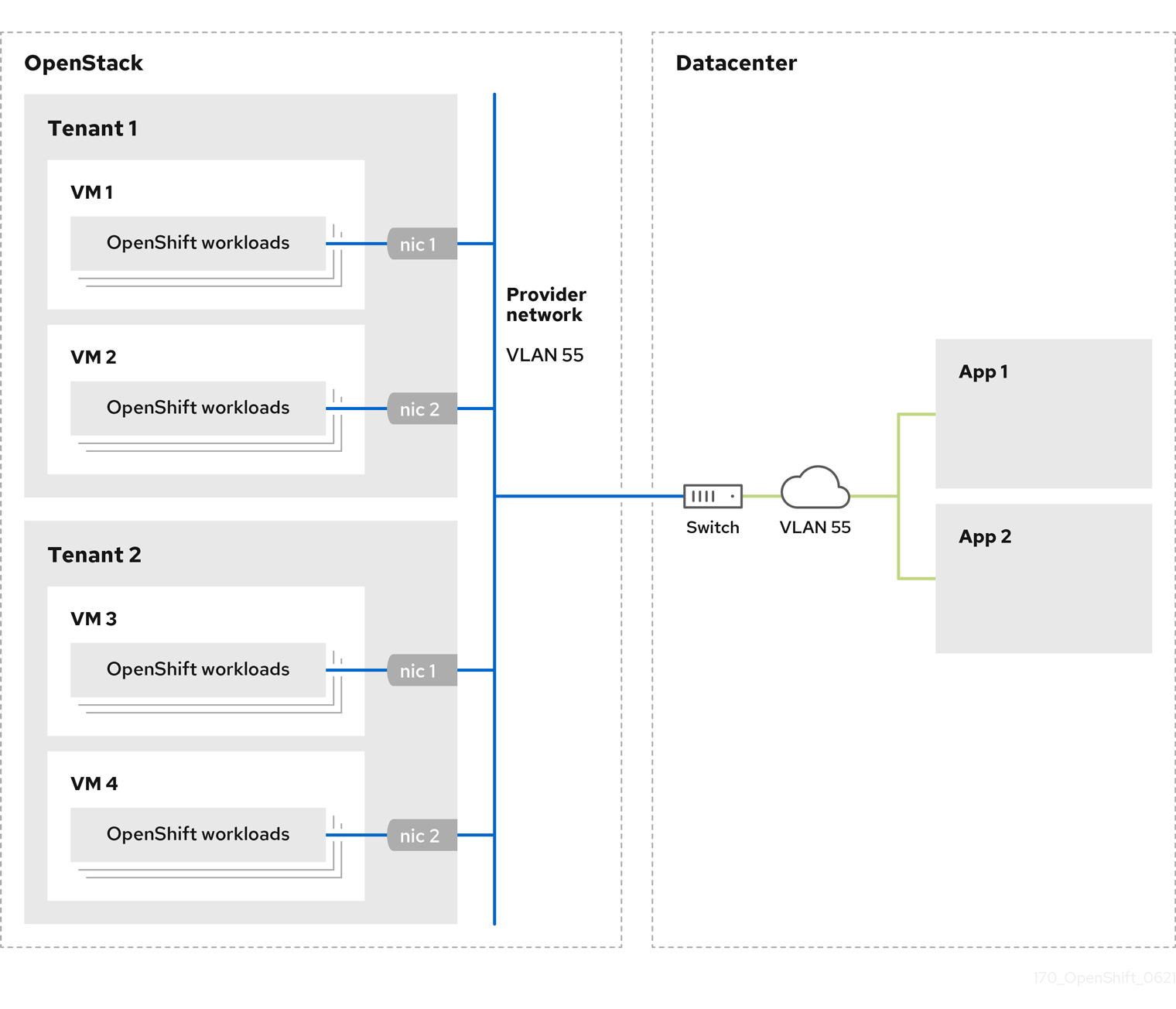
OpenShift Container Platform clusters that are installed on provider networks do not require tenant networks or floating IP addresses. The installer does not create these resources during installation.
Example provider network types include flat (untagged) and VLAN (802.1Q tagged).
A cluster can support as many provider network connections as the network type allows. For example, VLAN networks typically support up to 4096 connections.
You can learn more about provider and tenant networks in the RHOSP documentation.
12.2.10.8.1. RHOSP provider network requirements for cluster installation
Before you install an OpenShift Container Platform cluster, your Red Hat OpenStack Platform (RHOSP) deployment and provider network must meet a number of conditions:
- The RHOSP networking service (Neutron) is enabled and accessible through the RHOSP networking API.
- The RHOSP networking service has the port security and allowed address pairs extensions enabled.
The provider network can be shared with other tenants.
TipUse the
openstack network createcommand with the--shareflag to create a network that can be shared.The RHOSP project that you use to install the cluster must own the provider network, as well as an appropriate subnet.
Tip- To create a network for a project that is named "openshift," enter the following command
$ openstack network create --project openshift- To create a subnet for a project that is named "openshift," enter the following command
$ openstack subnet create --project openshiftTo learn more about creating networks on RHOSP, read the provider networks documentation.
If the cluster is owned by the
adminuser, you must run the installer as that user to create ports on the network.ImportantProvider networks must be owned by the RHOSP project that is used to create the cluster. If they are not, the RHOSP Compute service (Nova) cannot request a port from that network.
Verify that the provider network can reach the RHOSP metadata service IP address, which is
169.254.169.254by default.Depending on your RHOSP SDN and networking service configuration, you might need to provide the route when you create the subnet. For example:
$ openstack subnet create --dhcp --host-route destination=169.254.169.254/32,gateway=192.0.2.2 ...- Optional: To secure the network, create role-based access control (RBAC) rules that limit network access to a single project.
12.2.10.8.2. Deploying a cluster that has a primary interface on a provider network
You can deploy an OpenShift Container Platform cluster that has its primary network interface on an Red Hat OpenStack Platform (RHOSP) provider network. .Prerequisites
- Your Red Hat OpenStack Platform (RHOSP) deployment is configured as described by "RHOSP provider network requirements for cluster installation".
Procedure
-
In a text editor, open the
install-config.yamlfile. -
Set the value of the
platform.openstack.apiVIPproperty to the IP address for the API VIP. -
Set the value of the
platform.openstack.ingressVIPproperty to the IP address for the Ingress VIP. -
Set the value of the
platform.openstack.machinesSubnetproperty to the UUID of the provider network subnet. -
Set the value of the
networking.machineNetwork.cidrproperty to the CIDR block of the provider network subnet.
The platform.openstack.apiVIP and platform.openstack.ingressVIP properties must both be unassigned IP addresses from the networking.machineNetwork.cidr block.
Section of an installation configuration file for a cluster that relies on a RHOSP provider network
...
platform:
openstack:
apiVIP: 192.0.2.13
ingressVIP: 192.0.2.23
machinesSubnet: fa806b2f-ac49-4bce-b9db-124bc64209bf
# ...
networking:
machineNetwork:
- cidr: 192.0.2.0/24
You cannot set the platform.openstack.externalNetwork or platform.openstack.externalDNS parameters while using a provider network for the primary network interface.
When you deploy the cluster, the installer uses the install-config.yaml file to deploy the cluster on the provider network.
You can add additional networks, including provider networks, to the platform.openstack.additionalNetworkIDs list.
After you deploy your cluster, you can attach pods to additional networks. For more information, see Understanding multiple networks.
12.2.10.9. Sample customized install-config.yaml file for RHOSP
This sample install-config.yaml demonstrates all of the possible Red Hat OpenStack Platform (RHOSP) customization options.
This sample file is provided for reference only. You must obtain your install-config.yaml file by using the installation program.
apiVersion: v1
baseDomain: example.com
controlPlane:
name: master
platform: {}
replicas: 3
compute:
- name: worker
platform:
openstack:
type: ml.large
replicas: 3
metadata:
name: example
networking:
clusterNetwork:
- cidr: 10.128.0.0/14
hostPrefix: 23
machineNetwork:
- cidr: 10.0.0.0/16
serviceNetwork:
- 172.30.0.0/16
networkType: OpenShiftSDN
platform:
openstack:
cloud: mycloud
externalNetwork: external
computeFlavor: m1.xlarge
apiFloatingIP: 128.0.0.1
fips: false
pullSecret: '{"auths": ...}'
sshKey: ssh-ed25519 AAAA...12.2.11. Setting compute machine affinity
Optionally, you can set the affinity policy for compute machines during installation. The installer does not select an affinity policy for compute machines by default.
You can also create machine sets that use particular RHOSP server groups after installation.
Control plane machines are created with a soft-anti-affinity policy.
You can learn more about RHOSP instance scheduling and placement in the RHOSP documentation.
Prerequisites
-
Create the
install-config.yamlfile and complete any modifications to it.
Procedure
Using the RHOSP command-line interface, create a server group for your compute machines. For example:
$ openstack \ --os-compute-api-version=2.15 \ server group create \ --policy anti-affinity \ my-openshift-worker-groupFor more information, see the
server group createcommand documentation.Change to the directory that contains the installation program and create the manifests:
$ ./openshift-install create manifests --dir=<installation_directory>where:
installation_directory-
Specifies the name of the directory that contains the
install-config.yamlfile for your cluster.
-
Open
manifests/99_openshift-cluster-api_worker-machineset-0.yaml, theMachineSetdefinition file. Add the property
serverGroupIDto the definition beneath thespec.template.spec.providerSpec.valueproperty. For example:apiVersion: machine.openshift.io/v1beta1 kind: MachineSet metadata: labels: machine.openshift.io/cluster-api-cluster: <infrastructure_ID> machine.openshift.io/cluster-api-machine-role: <node_role> machine.openshift.io/cluster-api-machine-type: <node_role> name: <infrastructure_ID>-<node_role> namespace: openshift-machine-api spec: replicas: <number_of_replicas> selector: matchLabels: machine.openshift.io/cluster-api-cluster: <infrastructure_ID> machine.openshift.io/cluster-api-machineset: <infrastructure_ID>-<node_role> template: metadata: labels: machine.openshift.io/cluster-api-cluster: <infrastructure_ID> machine.openshift.io/cluster-api-machine-role: <node_role> machine.openshift.io/cluster-api-machine-type: <node_role> machine.openshift.io/cluster-api-machineset: <infrastructure_ID>-<node_role> spec: providerSpec: value: apiVersion: openstackproviderconfig.openshift.io/v1alpha1 cloudName: openstack cloudsSecret: name: openstack-cloud-credentials namespace: openshift-machine-api flavor: <nova_flavor> image: <glance_image_name_or_location> serverGroupID: aaaaaaaa-bbbb-cccc-dddd-eeeeeeeeeeee1 kind: OpenstackProviderSpec networks: - filter: {} subnets: - filter: name: <subnet_name> tags: openshiftClusterID=<infrastructure_ID> securityGroups: - filter: {} name: <infrastructure_ID>-<node_role> serverMetadata: Name: <infrastructure_ID>-<node_role> openshiftClusterID: <infrastructure_ID> tags: - openshiftClusterID=<infrastructure_ID> trunk: true userDataSecret: name: <node_role>-user-data availabilityZone: <optional_openstack_availability_zone>- 1
- Add the UUID of your server group here.
-
Optional: Back up the
manifests/99_openshift-cluster-api_worker-machineset-0.yamlfile. The installation program deletes themanifests/directory when creating the cluster.
When you install the cluster, the installer uses the MachineSet definition that you modified to create compute machines within your RHOSP server group.
12.2.12. Generating a key pair for cluster node SSH access
During an OpenShift Container Platform installation, you can provide an SSH public key to the installation program. The key is passed to the Red Hat Enterprise Linux CoreOS (RHCOS) nodes through their Ignition config files and is used to authenticate SSH access to the nodes. The key is added to the ~/.ssh/authorized_keys list for the core user on each node, which enables password-less authentication.
After the key is passed to the nodes, you can use the key pair to SSH in to the RHCOS nodes as the user core. To access the nodes through SSH, the private key identity must be managed by SSH for your local user.
If you want to SSH in to your cluster nodes to perform installation debugging or disaster recovery, you must provide the SSH public key during the installation process. The ./openshift-install gather command also requires the SSH public key to be in place on the cluster nodes.
Do not skip this procedure in production environments, where disaster recovery and debugging is required.
Procedure
If you do not have an existing SSH key pair on your local machine to use for authentication onto your cluster nodes, create one. For example, on a computer that uses a Linux operating system, run the following command:
$ ssh-keygen -t ed25519 -N '' -f <path>/<file_name>1 - 1
- Specify the path and file name, such as
~/.ssh/id_ed25519, of the new SSH key. If you have an existing key pair, ensure your public key is in the your~/.sshdirectory.
NoteIf you plan to install an OpenShift Container Platform cluster that uses FIPS Validated / Modules in Process cryptographic libraries on the
x86_64architecture, do not create a key that uses theed25519algorithm. Instead, create a key that uses thersaorecdsaalgorithm.View the public SSH key:
$ cat <path>/<file_name>.pubFor example, run the following to view the
~/.ssh/id_ed25519.pubpublic key:$ cat ~/.ssh/id_ed25519.pubAdd the SSH private key identity to the SSH agent for your local user, if it has not already been added. SSH agent management of the key is required for password-less SSH authentication onto your cluster nodes, or if you want to use the
./openshift-install gathercommand.NoteOn some distributions, default SSH private key identities such as
~/.ssh/id_rsaand~/.ssh/id_dsaare managed automatically.If the
ssh-agentprocess is not already running for your local user, start it as a background task:$ eval "$(ssh-agent -s)"Example output
Agent pid 31874NoteIf your cluster is in FIPS mode, only use FIPS-compliant algorithms to generate the SSH key. The key must be either RSA or ECDSA.
Add your SSH private key to the
ssh-agent:$ ssh-add <path>/<file_name>1 - 1
- Specify the path and file name for your SSH private key, such as
~/.ssh/id_ed25519
Example output
Identity added: /home/<you>/<path>/<file_name> (<computer_name>)
Next steps
- When you install OpenShift Container Platform, provide the SSH public key to the installation program.
12.2.13. Enabling access to the environment
At deployment, all OpenShift Container Platform machines are created in a Red Hat OpenStack Platform (RHOSP)-tenant network. Therefore, they are not accessible directly in most RHOSP deployments.
You can configure OpenShift Container Platform API and application access by using floating IP addresses (FIPs) during installation. You can also complete an installation without configuring FIPs, but the installer will not configure a way to reach the API or applications externally.
12.2.13.1. Enabling access with floating IP addresses
Create floating IP (FIP) addresses for external access to the OpenShift Container Platform API and cluster applications.
Procedure
Using the Red Hat OpenStack Platform (RHOSP) CLI, create the API FIP:
$ openstack floating ip create --description "API <cluster_name>.<base_domain>" <external_network>Using the Red Hat OpenStack Platform (RHOSP) CLI, create the apps, or Ingress, FIP:
$ openstack floating ip create --description "Ingress <cluster_name>.<base_domain>" <external_network>Add records that follow these patterns to your DNS server for the API and Ingress FIPs:
api.<cluster_name>.<base_domain>. IN A <API_FIP> *.apps.<cluster_name>.<base_domain>. IN A <apps_FIP>NoteIf you do not control the DNS server, you can access the cluster by adding the cluster domain names such as the following to your
/etc/hostsfile:-
<api_floating_ip> api.<cluster_name>.<base_domain> -
<application_floating_ip> grafana-openshift-monitoring.apps.<cluster_name>.<base_domain> -
<application_floating_ip> prometheus-k8s-openshift-monitoring.apps.<cluster_name>.<base_domain> -
<application_floating_ip> oauth-openshift.apps.<cluster_name>.<base_domain> -
<application_floating_ip> console-openshift-console.apps.<cluster_name>.<base_domain> -
application_floating_ip integrated-oauth-server-openshift-authentication.apps.<cluster_name>.<base_domain>
The cluster domain names in the
/etc/hostsfile grant access to the web console and the monitoring interface of your cluster locally. You can also use thekubectloroc. You can access the user applications by using the additional entries pointing to the <application_floating_ip>. This action makes the API and applications accessible to only you, which is not suitable for production deployment, but does allow installation for development and testing.-
Add the FIPs to the
install-config.yamlfile as the values of the following parameters:-
platform.openstack.ingressFloatingIP -
platform.openstack.apiFloatingIP
-
If you use these values, you must also enter an external network as the value of the platform.openstack.externalNetwork parameter in the install-config.yaml file.
You can make OpenShift Container Platform resources available outside of the cluster by assigning a floating IP address and updating your firewall configuration.
12.2.13.2. Completing installation without floating IP addresses
You can install OpenShift Container Platform on Red Hat OpenStack Platform (RHOSP) without providing floating IP addresses.
In the install-config.yaml file, do not define the following parameters:
-
platform.openstack.ingressFloatingIP -
platform.openstack.apiFloatingIP
If you cannot provide an external network, you can also leave platform.openstack.externalNetwork blank. If you do not provide a value for platform.openstack.externalNetwork, a router is not created for you, and, without additional action, the installer will fail to retrieve an image from Glance. You must configure external connectivity on your own.
If you run the installer from a system that cannot reach the cluster API due to a lack of floating IP addresses or name resolution, installation fails. To prevent installation failure in these cases, you can use a proxy network or run the installer from a system that is on the same network as your machines.
You can enable name resolution by creating DNS records for the API and Ingress ports. For example:
api.<cluster_name>.<base_domain>. IN A <api_port_IP>
*.apps.<cluster_name>.<base_domain>. IN A <ingress_port_IP>
If you do not control the DNS server, you can add the record to your /etc/hosts file. This action makes the API accessible to only you, which is not suitable for production deployment but does allow installation for development and testing.
12.2.14. Deploying the cluster
You can install OpenShift Container Platform on a compatible cloud platform.
You can run the create cluster command of the installation program only once, during initial installation.
Prerequisites
- Obtain the OpenShift Container Platform installation program and the pull secret for your cluster.
Procedure
Change to the directory that contains the installation program and initialize the cluster deployment:
$ ./openshift-install create cluster --dir <installation_directory> \1 --log-level=info2 NoteIf the cloud provider account that you configured on your host does not have sufficient permissions to deploy the cluster, the installation process stops, and the missing permissions are displayed.
When the cluster deployment completes, directions for accessing your cluster, including a link to its web console and credentials for the
kubeadminuser, display in your terminal.Example output
... INFO Install complete! INFO To access the cluster as the system:admin user when using 'oc', run 'export KUBECONFIG=/home/myuser/install_dir/auth/kubeconfig' INFO Access the OpenShift web-console here: https://console-openshift-console.apps.mycluster.example.com INFO Login to the console with user: "kubeadmin", and password: "4vYBz-Ee6gm-ymBZj-Wt5AL" INFO Time elapsed: 36m22sNoteThe cluster access and credential information also outputs to
<installation_directory>/.openshift_install.logwhen an installation succeeds.Important-
The Ignition config files that the installation program generates contain certificates that expire after 24 hours, which are then renewed at that time. If the cluster is shut down before renewing the certificates and the cluster is later restarted after the 24 hours have elapsed, the cluster automatically recovers the expired certificates. The exception is that you must manually approve the pending
node-bootstrappercertificate signing requests (CSRs) to recover kubelet certificates. See the documentation for Recovering from expired control plane certificates for more information. - It is recommended that you use Ignition config files within 12 hours after they are generated because the 24-hour certificate rotates from 16 to 22 hours after the cluster is installed. By using the Ignition config files within 12 hours, you can avoid installation failure if the certificate update runs during installation.
ImportantYou must not delete the installation program or the files that the installation program creates. Both are required to delete the cluster.
-
The Ignition config files that the installation program generates contain certificates that expire after 24 hours, which are then renewed at that time. If the cluster is shut down before renewing the certificates and the cluster is later restarted after the 24 hours have elapsed, the cluster automatically recovers the expired certificates. The exception is that you must manually approve the pending
12.2.15. Verifying cluster status
You can verify your OpenShift Container Platform cluster’s status during or after installation.
Procedure
In the cluster environment, export the administrator’s kubeconfig file:
$ export KUBECONFIG=<installation_directory>/auth/kubeconfig1 - 1
- For
<installation_directory>, specify the path to the directory that you stored the installation files in.
The
kubeconfigfile contains information about the cluster that is used by the CLI to connect a client to the correct cluster and API server.View the control plane and compute machines created after a deployment:
$ oc get nodesView your cluster’s version:
$ oc get clusterversionView your Operators' status:
$ oc get clusteroperatorView all running pods in the cluster:
$ oc get pods -A
12.2.16. Logging in to the cluster by using the CLI
You can log in to your cluster as a default system user by exporting the cluster kubeconfig file. The kubeconfig file contains information about the cluster that is used by the CLI to connect a client to the correct cluster and API server. The file is specific to a cluster and is created during OpenShift Container Platform installation.
Prerequisites
- You deployed an OpenShift Container Platform cluster.
-
You installed the
ocCLI.
Procedure
Export the
kubeadmincredentials:$ export KUBECONFIG=<installation_directory>/auth/kubeconfig1 - 1
- For
<installation_directory>, specify the path to the directory that you stored the installation files in.
Verify you can run
occommands successfully using the exported configuration:$ oc whoamiExample output
system:admin
12.2.17. Telemetry access for OpenShift Container Platform
In OpenShift Container Platform 4.8, the Telemetry service, which runs by default to provide metrics about cluster health and the success of updates, requires internet access. If your cluster is connected to the internet, Telemetry runs automatically, and your cluster is registered to OpenShift Cluster Manager.
After you confirm that your OpenShift Cluster Manager inventory is correct, either maintained automatically by Telemetry or manually by using OpenShift Cluster Manager, use subscription watch to track your OpenShift Container Platform subscriptions at the account or multi-cluster level.
12.2.18. Next steps
- Customize your cluster.
- If necessary, you can opt out of remote health reporting.
- If you need to enable external access to node ports, configure ingress cluster traffic by using a node port.
- If you did not configure RHOSP to accept application traffic over floating IP addresses, configure RHOSP access with floating IP addresses.
12.3. Installing a cluster on OpenStack with Kuryr
In OpenShift Container Platform version 4.8, you can install a customized cluster on Red Hat OpenStack Platform (RHOSP) that uses Kuryr SDN. To customize the installation, modify parameters in the install-config.yaml before you install the cluster.
12.3.1. Prerequisites
- You reviewed details about the OpenShift Container Platform installation and update processes.
- You read the documentation on selecting a cluster installation method and preparing it for users.
- You verified that OpenShift Container Platform 4.8 is compatible with your RHOSP version by using the Supported platforms for OpenShift clusters section. You can also compare platform support across different versions by viewing the OpenShift Container Platform on RHOSP support matrix.
- You have a storage service installed in RHOSP, such as block storage (Cinder) or object storage (Swift). Object storage is the recommended storage technology for OpenShift Container Platform registry cluster deployment. For more information, see Optimizing storage.
12.3.2. About Kuryr SDN
Kuryr is a container network interface (CNI) plugin solution that uses the Neutron and Octavia Red Hat OpenStack Platform (RHOSP) services to provide networking for pods and Services.
Kuryr and OpenShift Container Platform integration is primarily designed for OpenShift Container Platform clusters running on RHOSP VMs. Kuryr improves the network performance by plugging OpenShift Container Platform pods into RHOSP SDN. In addition, it provides interconnectivity between pods and RHOSP virtual instances.
Kuryr components are installed as pods in OpenShift Container Platform using the openshift-kuryr namespace:
-
kuryr-controller- a single service instance installed on amasternode. This is modeled in OpenShift Container Platform as aDeploymentobject. -
kuryr-cni- a container installing and configuring Kuryr as a CNI driver on each OpenShift Container Platform node. This is modeled in OpenShift Container Platform as aDaemonSetobject.
The Kuryr controller watches the OpenShift Container Platform API server for pod, service, and namespace create, update, and delete events. It maps the OpenShift Container Platform API calls to corresponding objects in Neutron and Octavia. This means that every network solution that implements the Neutron trunk port functionality can be used to back OpenShift Container Platform via Kuryr. This includes open source solutions such as Open vSwitch (OVS) and Open Virtual Network (OVN) as well as Neutron-compatible commercial SDNs.
Kuryr is recommended for OpenShift Container Platform deployments on encapsulated RHOSP tenant networks to avoid double encapsulation, such as running an encapsulated OpenShift Container Platform SDN over an RHOSP network.
If you use provider networks or tenant VLANs, you do not need to use Kuryr to avoid double encapsulation. The performance benefit is negligible. Depending on your configuration, though, using Kuryr to avoid having two overlays might still be beneficial.
Kuryr is not recommended in deployments where all of the following criteria are true:
- The RHOSP version is less than 16.
- The deployment uses UDP services, or a large number of TCP services on few hypervisors.
or
-
The
ovn-octaviaOctavia driver is disabled. - The deployment uses a large number of TCP services on few hypervisors.
12.3.3. Resource guidelines for installing OpenShift Container Platform on RHOSP with Kuryr
When using Kuryr SDN, the pods, services, namespaces, and network policies are using resources from the RHOSP quota; this increases the minimum requirements. Kuryr also has some additional requirements on top of what a default install requires.
Use the following quota to satisfy a default cluster’s minimum requirements:
| Resource | Value |
|---|---|
| Floating IP addresses | 3 - plus the expected number of Services of LoadBalancer type |
| Ports | 1500 - 1 needed per Pod |
| Routers | 1 |
| Subnets | 250 - 1 needed per Namespace/Project |
| Networks | 250 - 1 needed per Namespace/Project |
| RAM | 112 GB |
| vCPUs | 28 |
| Volume storage | 275 GB |
| Instances | 7 |
| Security groups | 250 - 1 needed per Service and per NetworkPolicy |
| Security group rules | 1000 |
| Load balancers | 100 - 1 needed per Service |
| Load balancer listeners | 500 - 1 needed per Service-exposed port |
| Load balancer pools | 500 - 1 needed per Service-exposed port |
A cluster might function with fewer than recommended resources, but its performance is not guaranteed.
If RHOSP object storage (Swift) is available and operated by a user account with the swiftoperator role, it is used as the default backend for the OpenShift Container Platform image registry. In this case, the volume storage requirement is 175 GB. Swift space requirements vary depending on the size of the image registry.
If you are using Red Hat OpenStack Platform (RHOSP) version 16 with the Amphora driver rather than the OVN Octavia driver, security groups are associated with service accounts instead of user projects.
Take the following notes into consideration when setting resources:
- The number of ports that are required is larger than the number of pods. Kuryr uses ports pools to have pre-created ports ready to be used by pods and speed up the pods' booting time.
-
Each network policy is mapped into an RHOSP security group, and depending on the
NetworkPolicyspec, one or more rules are added to the security group. Each service is mapped to an RHOSP load balancer. Consider this requirement when estimating the number of security groups required for the quota.
If you are using RHOSP version 15 or earlier, or the
ovn-octavia driver, each load balancer has a security group with the user project.The quota does not account for load balancer resources (such as VM resources), but you must consider these resources when you decide the RHOSP deployment’s size. The default installation will have more than 50 load balancers; the clusters must be able to accommodate them.
If you are using RHOSP version 16 with the OVN Octavia driver enabled, only one load balancer VM is generated; services are load balanced through OVN flows.
An OpenShift Container Platform deployment comprises control plane machines, compute machines, and a bootstrap machine.
To enable Kuryr SDN, your environment must meet the following requirements:
- Run RHOSP 13+.
- Have Overcloud with Octavia.
- Use Neutron Trunk ports extension.
-
Use
openvswitchfirewall driver if ML2/OVS Neutron driver is used instead ofovs-hybrid.
12.3.3.1. Increasing quota
When using Kuryr SDN, you must increase quotas to satisfy the Red Hat OpenStack Platform (RHOSP) resources used by pods, services, namespaces, and network policies.
Procedure
Increase the quotas for a project by running the following command:
$ sudo openstack quota set --secgroups 250 --secgroup-rules 1000 --ports 1500 --subnets 250 --networks 250 <project>
12.3.3.2. Configuring Neutron
Kuryr CNI leverages the Neutron Trunks extension to plug containers into the Red Hat OpenStack Platform (RHOSP) SDN, so you must use the trunks extension for Kuryr to properly work.
In addition, if you leverage the default ML2/OVS Neutron driver, the firewall must be set to openvswitch instead of ovs_hybrid so that security groups are enforced on trunk subports and Kuryr can properly handle network policies.
12.3.3.3. Configuring Octavia
Kuryr SDN uses Red Hat OpenStack Platform (RHOSP)'s Octavia LBaaS to implement OpenShift Container Platform services. Thus, you must install and configure Octavia components in RHOSP to use Kuryr SDN.
To enable Octavia, you must include the Octavia service during the installation of the RHOSP Overcloud, or upgrade the Octavia service if the Overcloud already exists. The following steps for enabling Octavia apply to both a clean install of the Overcloud or an Overcloud update.
The following steps only capture the key pieces required during the deployment of RHOSP when dealing with Octavia. It is also important to note that registry methods vary.
This example uses the local registry method.
Procedure
If you are using the local registry, create a template to upload the images to the registry. For example:
(undercloud) $ openstack overcloud container image prepare \ -e /usr/share/openstack-tripleo-heat-templates/environments/services-docker/octavia.yaml \ --namespace=registry.access.redhat.com/rhosp13 \ --push-destination=<local-ip-from-undercloud.conf>:8787 \ --prefix=openstack- \ --tag-from-label {version}-{product-version} \ --output-env-file=/home/stack/templates/overcloud_images.yaml \ --output-images-file /home/stack/local_registry_images.yamlVerify that the
local_registry_images.yamlfile contains the Octavia images. For example:... - imagename: registry.access.redhat.com/rhosp13/openstack-octavia-api:13.0-43 push_destination: <local-ip-from-undercloud.conf>:8787 - imagename: registry.access.redhat.com/rhosp13/openstack-octavia-health-manager:13.0-45 push_destination: <local-ip-from-undercloud.conf>:8787 - imagename: registry.access.redhat.com/rhosp13/openstack-octavia-housekeeping:13.0-45 push_destination: <local-ip-from-undercloud.conf>:8787 - imagename: registry.access.redhat.com/rhosp13/openstack-octavia-worker:13.0-44 push_destination: <local-ip-from-undercloud.conf>:8787NoteThe Octavia container versions vary depending upon the specific RHOSP release installed.
Pull the container images from
registry.redhat.ioto the Undercloud node:(undercloud) $ sudo openstack overcloud container image upload \ --config-file /home/stack/local_registry_images.yaml \ --verboseThis may take some time depending on the speed of your network and Undercloud disk.
Since an Octavia load balancer is used to access the OpenShift Container Platform API, you must increase their listeners' default timeouts for the connections. The default timeout is 50 seconds. Increase the timeout to 20 minutes by passing the following file to the Overcloud deploy command:
(undercloud) $ cat octavia_timeouts.yaml parameter_defaults: OctaviaTimeoutClientData: 1200000 OctaviaTimeoutMemberData: 1200000NoteThis is not needed for RHOSP 13.0.13+.
Install or update your Overcloud environment with Octavia:
$ openstack overcloud deploy --templates \ -e /usr/share/openstack-tripleo-heat-templates/environments/services-docker/octavia.yaml \ -e octavia_timeouts.yamlNoteThis command only includes the files associated with Octavia; it varies based on your specific installation of RHOSP. See the RHOSP documentation for further information. For more information on customizing your Octavia installation, see installation of Octavia using Director.
NoteWhen leveraging Kuryr SDN, the Overcloud installation requires the Neutron
trunkextension. This is available by default on director deployments. Use theopenvswitchfirewall instead of the defaultovs-hybridwhen the Neutron backend is ML2/OVS. There is no need for modifications if the backend is ML2/OVN.In RHOSP versions earlier than 13.0.13, add the project ID to the
octavia.confconfiguration file after you create the project.To enforce network policies across services, like when traffic goes through the Octavia load balancer, you must ensure Octavia creates the Amphora VM security groups on the user project.
This change ensures that required load balancer security groups belong to that project, and that they can be updated to enforce services isolation.
NoteThis task is unnecessary in RHOSP version 13.0.13 or later.
Octavia implements a new ACL API that restricts access to the load balancers VIP.
Get the project ID
$ openstack project show <project>Example output
+-------------+----------------------------------+ | Field | Value | +-------------+----------------------------------+ | description | | | domain_id | default | | enabled | True | | id | PROJECT_ID | | is_domain | False | | name | *<project>* | | parent_id | default | | tags | [] | +-------------+----------------------------------+Add the project ID to
octavia.conffor the controllers.Source the
stackrcfile:$ source stackrc # Undercloud credentialsList the Overcloud controllers:
$ openstack server listExample output
+--------------------------------------+--------------+--------+-----------------------+----------------+------------+ │ | ID | Name | Status | Networks | Image | Flavor | │ +--------------------------------------+--------------+--------+-----------------------+----------------+------------+ │ | 6bef8e73-2ba5-4860-a0b1-3937f8ca7e01 | controller-0 | ACTIVE | ctlplane=192.168.24.8 | overcloud-full | controller | │ | dda3173a-ab26-47f8-a2dc-8473b4a67ab9 | compute-0 | ACTIVE | ctlplane=192.168.24.6 | overcloud-full | compute | │ +--------------------------------------+--------------+--------+-----------------------+----------------+------------+SSH into the controller(s).
$ ssh heat-admin@192.168.24.8Edit the
octavia.conffile to add the project into the list of projects where Amphora security groups are on the user’s account.# List of project IDs that are allowed to have Load balancer security groups # belonging to them. amp_secgroup_allowed_projects = PROJECT_ID
Restart the Octavia worker so the new configuration loads.
controller-0$ sudo docker restart octavia_worker
Depending on your RHOSP environment, Octavia might not support UDP listeners. If you use Kuryr SDN on RHOSP version 13.0.13 or earlier, UDP services are not supported. RHOSP version 16 or later support UDP.
12.3.3.3.1. The Octavia OVN Driver
Octavia supports multiple provider drivers through the Octavia API.
To see all available Octavia provider drivers, on a command line, enter:
$ openstack loadbalancer provider listExample output
+---------+-------------------------------------------------+
| name | description |
+---------+-------------------------------------------------+
| amphora | The Octavia Amphora driver. |
| octavia | Deprecated alias of the Octavia Amphora driver. |
| ovn | Octavia OVN driver. |
+---------+-------------------------------------------------+
Beginning with RHOSP version 16, the Octavia OVN provider driver (ovn) is supported on OpenShift Container Platform on RHOSP deployments.
ovn is an integration driver for the load balancing that Octavia and OVN provide. It supports basic load balancing capabilities, and is based on OpenFlow rules. The driver is automatically enabled in Octavia by Director on deployments that use OVN Neutron ML2.
The Amphora provider driver is the default driver. If ovn is enabled, however, Kuryr uses it.
If Kuryr uses ovn instead of Amphora, it offers the following benefits:
- Decreased resource requirements. Kuryr does not require a load balancer VM for each service.
- Reduced network latency.
- Increased service creation speed by using OpenFlow rules instead of a VM for each service.
- Distributed load balancing actions across all nodes instead of centralized on Amphora VMs.
You can configure your cluster to use the Octavia OVN driver after your RHOSP cloud is upgraded from version 13 to version 16.
12.3.3.4. Known limitations of installing with Kuryr
Using OpenShift Container Platform with Kuryr SDN has several known limitations.
RHOSP general limitations
Using OpenShift Container Platform with Kuryr SDN has several limitations that apply to all versions and environments:
-
Serviceobjects with theNodePorttype are not supported. -
Clusters that use the OVN Octavia provider driver support
Serviceobjects for which the.spec.selectorproperty is unspecified only if the.subsets.addressesproperty of theEndpointsobject includes the subnet of the nodes or pods. -
If the subnet on which machines are created is not connected to a router, or if the subnet is connected, but the router has no external gateway set, Kuryr cannot create floating IPs for
Serviceobjects with typeLoadBalancer. -
Configuring the
sessionAffinity=ClientIPproperty onServiceobjects does not have an effect. Kuryr does not support this setting.
RHOSP version limitations
Using OpenShift Container Platform with Kuryr SDN has several limitations that depend on the RHOSP version.
RHOSP versions before 16 use the default Octavia load balancer driver (Amphora). This driver requires that one Amphora load balancer VM is deployed per OpenShift Container Platform service. Creating too many services can cause you to run out of resources.
Deployments of later versions of RHOSP that have the OVN Octavia driver disabled also use the Amphora driver. They are subject to the same resource concerns as earlier versions of RHOSP.
- Octavia RHOSP versions before 13.0.13 do not support UDP listeners. Therefore, OpenShift Container Platform UDP services are not supported.
- Octavia RHOSP versions before 13.0.13 cannot listen to multiple protocols on the same port. Services that expose the same port to different protocols, like TCP and UDP, are not supported.
- Kuryr SDN does not support automatic unidling by a service.
RHOSP environment limitations
There are limitations when using Kuryr SDN that depend on your deployment environment.
Because of Octavia’s lack of support for the UDP protocol and multiple listeners, if the RHOSP version is earlier than 13.0.13, Kuryr forces pods to use TCP for DNS resolution.
In Go versions 1.12 and earlier, applications that are compiled with CGO support disabled use UDP only. In this case, the native Go resolver does not recognize the use-vc option in resolv.conf, which controls whether TCP is forced for DNS resolution. As a result, UDP is still used for DNS resolution, which fails.
To ensure that TCP forcing is allowed, compile applications either with the environment variable CGO_ENABLED set to 1, i.e. CGO_ENABLED=1, or ensure that the variable is absent.
In Go versions 1.13 and later, TCP is used automatically if DNS resolution using UDP fails.
musl-based containers, including Alpine-based containers, do not support the use-vc option.
RHOSP upgrade limitations
As a result of the RHOSP upgrade process, the Octavia API might be changed, and upgrades to the Amphora images that are used for load balancers might be required.
You can address API changes on an individual basis.
If the Amphora image is upgraded, the RHOSP operator can handle existing load balancer VMs in two ways:
- Upgrade each VM by triggering a load balancer failover.
- Leave responsibility for upgrading the VMs to users.
If the operator takes the first option, there might be short downtimes during failovers.
If the operator takes the second option, the existing load balancers will not support upgraded Octavia API features, like UDP listeners. In this case, users must recreate their Services to use these features.
If OpenShift Container Platform detects a new Octavia version that supports UDP load balancing, it recreates the DNS service automatically. The service recreation ensures that the service default supports UDP load balancing.
The recreation causes the DNS service approximately one minute of downtime.
12.3.3.5. Control plane machines
By default, the OpenShift Container Platform installation process creates three control plane machines.
Each machine requires:
- An instance from the RHOSP quota
- A port from the RHOSP quota
- A flavor with at least 16 GB memory, 4 vCPUs, and 100 GB storage space
12.3.3.6. Compute machines
By default, the OpenShift Container Platform installation process creates three compute machines.
Each machine requires:
- An instance from the RHOSP quota
- A port from the RHOSP quota
- A flavor with at least 8 GB memory, 2 vCPUs, and 100 GB storage space
Compute machines host the applications that you run on OpenShift Container Platform; aim to run as many as you can.
12.3.3.7. Bootstrap machine
During installation, a bootstrap machine is temporarily provisioned to stand up the control plane. After the production control plane is ready, the bootstrap machine is deprovisioned.
The bootstrap machine requires:
- An instance from the RHOSP quota
- A port from the RHOSP quota
- A flavor with at least 16 GB memory, 4 vCPUs, and 100 GB storage space
12.3.4. Internet access for OpenShift Container Platform
In OpenShift Container Platform 4.8, you require access to the internet to install your cluster.
You must have internet access to:
- Access OpenShift Cluster Manager to download the installation program and perform subscription management. If the cluster has internet access and you do not disable Telemetry, that service automatically entitles your cluster.
- Access Quay.io to obtain the packages that are required to install your cluster.
- Obtain the packages that are required to perform cluster updates.
If your cluster cannot have direct internet access, you can perform a restricted network installation on some types of infrastructure that you provision. During that process, you download the content that is required and use it to populate a mirror registry with the packages that you need to install a cluster and generate the installation program. With some installation types, the environment that you install your cluster in will not require internet access. Before you update the cluster, you update the content of the mirror registry.
12.3.5. Enabling Swift on RHOSP
Swift is operated by a user account with the swiftoperator role. Add the role to an account before you run the installation program.
If the Red Hat OpenStack Platform (RHOSP) object storage service, commonly known as Swift, is available, OpenShift Container Platform uses it as the image registry storage. If it is unavailable, the installation program relies on the RHOSP block storage service, commonly known as Cinder.
If Swift is present and you want to use it, you must enable access to it. If it is not present, or if you do not want to use it, skip this section.
Prerequisites
- You have a RHOSP administrator account on the target environment.
- The Swift service is installed.
-
On Ceph RGW, the
account in urloption is enabled.
Procedure
To enable Swift on RHOSP:
As an administrator in the RHOSP CLI, add the
swiftoperatorrole to the account that will access Swift:$ openstack role add --user <user> --project <project> swiftoperator
Your RHOSP deployment can now use Swift for the image registry.
12.3.6. Verifying external network access
The OpenShift Container Platform installation process requires external network access. You must provide an external network value to it, or deployment fails. Before you begin the process, verify that a network with the external router type exists in Red Hat OpenStack Platform (RHOSP).
Prerequisites
Procedure
Using the RHOSP CLI, verify the name and ID of the 'External' network:
$ openstack network list --long -c ID -c Name -c "Router Type"Example output
+--------------------------------------+----------------+-------------+ | ID | Name | Router Type | +--------------------------------------+----------------+-------------+ | 148a8023-62a7-4672-b018-003462f8d7dc | public_network | External | +--------------------------------------+----------------+-------------+
A network with an external router type appears in the network list. If at least one does not, see Creating a default floating IP network and Creating a default provider network.
If the external network’s CIDR range overlaps one of the default network ranges, you must change the matching network ranges in the install-config.yaml file before you start the installation process.
The default network ranges are:
| Network | Range |
|---|---|
|
| 10.0.0.0/16 |
|
| 172.30.0.0/16 |
|
| 10.128.0.0/14 |
If the installation program finds multiple networks with the same name, it sets one of them at random. To avoid this behavior, create unique names for resources in RHOSP.
If the Neutron trunk service plugin is enabled, a trunk port is created by default. For more information, see Neutron trunk port.
12.3.7. Defining parameters for the installation program
The OpenShift Container Platform installation program relies on a file that is called clouds.yaml. The file describes Red Hat OpenStack Platform (RHOSP) configuration parameters, including the project name, log in information, and authorization service URLs.
Procedure
Create the
clouds.yamlfile:If your RHOSP distribution includes the Horizon web UI, generate a
clouds.yamlfile in it.ImportantRemember to add a password to the
authfield. You can also keep secrets in a separate file fromclouds.yaml.If your RHOSP distribution does not include the Horizon web UI, or you do not want to use Horizon, create the file yourself. For detailed information about
clouds.yaml, see Config files in the RHOSP documentation.clouds: shiftstack: auth: auth_url: http://10.10.14.42:5000/v3 project_name: shiftstack username: shiftstack_user password: XXX user_domain_name: Default project_domain_name: Default dev-env: region_name: RegionOne auth: username: 'devuser' password: XXX project_name: 'devonly' auth_url: 'https://10.10.14.22:5001/v2.0'
If your RHOSP installation uses self-signed certificate authority (CA) certificates for endpoint authentication:
- Copy the certificate authority file to your machine.
Add the
cacertskey to theclouds.yamlfile. The value must be an absolute, non-root-accessible path to the CA certificate:clouds: shiftstack: ... cacert: "/etc/pki/ca-trust/source/anchors/ca.crt.pem"TipAfter you run the installer with a custom CA certificate, you can update the certificate by editing the value of the
ca-cert.pemkey in thecloud-provider-configkeymap. On a command line, run:$ oc edit configmap -n openshift-config cloud-provider-config
Place the
clouds.yamlfile in one of the following locations:-
The value of the
OS_CLIENT_CONFIG_FILEenvironment variable - The current directory
-
A Unix-specific user configuration directory, for example
~/.config/openstack/clouds.yaml A Unix-specific site configuration directory, for example
/etc/openstack/clouds.yamlThe installation program searches for
clouds.yamlin that order.
-
The value of the
12.3.8. Obtaining the installation program
Before you install OpenShift Container Platform, download the installation file on your provisioning machine.
Prerequisites
- You have a machine that runs Linux, for example Red Hat Enterprise Linux 8, with 500 MB of local disk space
Procedure
- Access the Infrastructure Provider page on the OpenShift Cluster Manager site. If you have a Red Hat account, log in with your credentials. If you do not, create an account.
- Select your infrastructure provider.
Navigate to the page for your installation type, download the installation program for your operating system, and place the file in the directory where you will store the installation configuration files.
ImportantThe installation program creates several files on the computer that you use to install your cluster. You must keep the installation program and the files that the installation program creates after you finish installing the cluster. Both files are required to delete the cluster.
ImportantDeleting the files created by the installation program does not remove your cluster, even if the cluster failed during installation. To remove your cluster, complete the OpenShift Container Platform uninstallation procedures for your specific cloud provider.
Extract the installation program. For example, on a computer that uses a Linux operating system, run the following command:
$ tar xvf openshift-install-linux.tar.gz- Download your installation pull secret from the Red Hat OpenShift Cluster Manager. This pull secret allows you to authenticate with the services that are provided by the included authorities, including Quay.io, which serves the container images for OpenShift Container Platform components.
12.3.9. Creating the installation configuration file
You can customize the OpenShift Container Platform cluster you install on Red Hat OpenStack Platform (RHOSP).
Prerequisites
- Obtain the OpenShift Container Platform installation program and the pull secret for your cluster.
- Obtain service principal permissions at the subscription level.
Procedure
Create the
install-config.yamlfile.Change to the directory that contains the installation program and run the following command:
$ ./openshift-install create install-config --dir <installation_directory>1 - 1
- For
<installation_directory>, specify the directory name to store the files that the installation program creates.
ImportantSpecify an empty directory. Some installation assets, like bootstrap X.509 certificates have short expiration intervals, so you must not reuse an installation directory. If you want to reuse individual files from another cluster installation, you can copy them into your directory. However, the file names for the installation assets might change between releases. Use caution when copying installation files from an earlier OpenShift Container Platform version.
At the prompts, provide the configuration details for your cloud:
Optional: Select an SSH key to use to access your cluster machines.
NoteFor production OpenShift Container Platform clusters on which you want to perform installation debugging or disaster recovery, specify an SSH key that your
ssh-agentprocess uses.- Select openstack as the platform to target.
- Specify the Red Hat OpenStack Platform (RHOSP) external network name to use for installing the cluster.
- Specify the floating IP address to use for external access to the OpenShift API.
- Specify a RHOSP flavor with at least 16 GB RAM to use for control plane nodes and 8 GB RAM for compute nodes.
- Select the base domain to deploy the cluster to. All DNS records will be sub-domains of this base and will also include the cluster name.
- Enter a name for your cluster. The name must be 14 or fewer characters long.
- Paste the pull secret from the Red Hat OpenShift Cluster Manager.
-
Modify the
install-config.yamlfile. You can find more information about the available parameters in the "Installation configuration parameters" section. Back up the
install-config.yamlfile so that you can use it to install multiple clusters.ImportantThe
install-config.yamlfile is consumed during the installation process. If you want to reuse the file, you must back it up now.
12.3.9.1. Configuring the cluster-wide proxy during installation
Production environments can deny direct access to the internet and instead have an HTTP or HTTPS proxy available. You can configure a new OpenShift Container Platform cluster to use a proxy by configuring the proxy settings in the install-config.yaml file.
Prerequisites
-
You have an existing
install-config.yamlfile. You reviewed the sites that your cluster requires access to and determined whether any of them need to bypass the proxy. By default, all cluster egress traffic is proxied, including calls to hosting cloud provider APIs. You added sites to the
Proxyobject’sspec.noProxyfield to bypass the proxy if necessary.NoteThe
Proxyobjectstatus.noProxyfield is populated with the values of thenetworking.machineNetwork[].cidr,networking.clusterNetwork[].cidr, andnetworking.serviceNetwork[]fields from your installation configuration.For installations on Amazon Web Services (AWS), Google Cloud Platform (GCP), Microsoft Azure, and Red Hat OpenStack Platform (RHOSP), the
Proxyobjectstatus.noProxyfield is also populated with the instance metadata endpoint (169.254.169.254).
Procedure
Edit your
install-config.yamlfile and add the proxy settings. For example:apiVersion: v1 baseDomain: my.domain.com proxy: httpProxy: http://<username>:<pswd>@<ip>:<port>1 httpsProxy: https://<username>:<pswd>@<ip>:<port>2 noProxy: example.com3 additionalTrustBundle: |4 -----BEGIN CERTIFICATE----- <MY_TRUSTED_CA_CERT> -----END CERTIFICATE----- ...- 1
- A proxy URL to use for creating HTTP connections outside the cluster. The URL scheme must be
http. - 2
- A proxy URL to use for creating HTTPS connections outside the cluster.
- 3
- A comma-separated list of destination domain names, IP addresses, or other network CIDRs to exclude from proxying. Preface a domain with
.to match subdomains only. For example,.y.commatchesx.y.com, but noty.com. Use*to bypass the proxy for all destinations. - 4
- If provided, the installation program generates a config map that is named
user-ca-bundlein theopenshift-confignamespace to hold the additional CA certificates. If you provideadditionalTrustBundleand at least one proxy setting, theProxyobject is configured to reference theuser-ca-bundleconfig map in thetrustedCAfield. The Cluster Network Operator then creates atrusted-ca-bundleconfig map that merges the contents specified for thetrustedCAparameter with the RHCOS trust bundle. TheadditionalTrustBundlefield is required unless the proxy’s identity certificate is signed by an authority from the RHCOS trust bundle.
NoteThe installation program does not support the proxy
readinessEndpointsfield.- Save the file and reference it when installing OpenShift Container Platform.
The installation program creates a cluster-wide proxy that is named cluster that uses the proxy settings in the provided install-config.yaml file. If no proxy settings are provided, a cluster Proxy object is still created, but it will have a nil spec.
Only the Proxy object named cluster is supported, and no additional proxies can be created.
12.3.10. Installation configuration parameters
Before you deploy an OpenShift Container Platform cluster, you provide a customized install-config.yaml installation configuration file that describes the details for your environment.
After installation, you cannot modify these parameters in the install-config.yaml file.
The openshift-install command does not validate field names for parameters. If an incorrect name is specified, the related file or object is not created, and no error is reported. Ensure that the field names for any parameters that are specified are correct.
12.3.10.1. Required configuration parameters
Required installation configuration parameters are described in the following table:
| Parameter | Description | Values |
|---|---|---|
|
|
The API version for the | String |
|
|
The base domain of your cloud provider. The base domain is used to create routes to your OpenShift Container Platform cluster components. The full DNS name for your cluster is a combination of the |
A fully-qualified domain or subdomain name, such as |
|
|
Kubernetes resource | Object |
|
|
The name of the cluster. DNS records for the cluster are all subdomains of |
String of lowercase letters, hyphens ( |
|
|
The configuration for the specific platform upon which to perform the installation: | Object |
|
| Get a pull secret from the Red Hat OpenShift Cluster Manager to authenticate downloading container images for OpenShift Container Platform components from services such as Quay.io. |
|
12.3.10.2. Network configuration parameters
You can customize your installation configuration based on the requirements of your existing network infrastructure. For example, you can expand the IP address block for the cluster network or provide different IP address blocks than the defaults.
Only IPv4 addresses are supported.
| Parameter | Description | Values |
|---|---|---|
|
| The configuration for the cluster network. | Object Note
You cannot modify parameters specified by the |
|
| The cluster network provider Container Network Interface (CNI) plugin to install. |
Either |
|
| The IP address blocks for pods.
The default value is If you specify multiple IP address blocks, the blocks must not overlap. | An array of objects. For example: |
|
|
Required if you use An IPv4 network. |
An IP address block in Classless Inter-Domain Routing (CIDR) notation. The prefix length for an IPv4 block is between |
|
|
The subnet prefix length to assign to each individual node. For example, if | A subnet prefix.
The default value is |
|
|
The IP address block for services. The default value is The OpenShift SDN and OVN-Kubernetes network providers support only a single IP address block for the service network. | An array with an IP address block in CIDR format. For example: |
|
| The IP address blocks for machines. If you specify multiple IP address blocks, the blocks must not overlap.
If you specify multiple IP kernel arguments, the | An array of objects. For example: |
|
|
Required if you use | An IP network block in CIDR notation.
For example, Note
Set the |
12.3.10.3. Optional configuration parameters
Optional installation configuration parameters are described in the following table:
| Parameter | Description | Values |
|---|---|---|
|
| A PEM-encoded X.509 certificate bundle that is added to the nodes' trusted certificate store. This trust bundle may also be used when a proxy has been configured. | String |
|
| The configuration for the machines that comprise the compute nodes. |
Array of |
|
|
Determines the instruction set architecture of the machines in the pool. Currently, heteregeneous clusters are not supported, so all pools must specify the same architecture. Valid values are | String |
|
|
Whether to enable or disable simultaneous multithreading, or Important If you disable simultaneous multithreading, ensure that your capacity planning accounts for the dramatically decreased machine performance. |
|
|
|
Required if you use |
|
|
|
Required if you use |
|
|
| The number of compute machines, which are also known as worker machines, to provision. |
A positive integer greater than or equal to |
|
| The configuration for the machines that comprise the control plane. |
Array of |
|
|
Determines the instruction set architecture of the machines in the pool. Currently, heterogeneous clusters are not supported, so all pools must specify the same architecture. Valid values are | String |
|
|
Whether to enable or disable simultaneous multithreading, or Important If you disable simultaneous multithreading, ensure that your capacity planning accounts for the dramatically decreased machine performance. |
|
|
|
Required if you use |
|
|
|
Required if you use |
|
|
| The number of control plane machines to provision. |
The only supported value is |
|
| The Cloud Credential Operator (CCO) mode. If no mode is specified, the CCO dynamically tries to determine the capabilities of the provided credentials, with a preference for mint mode on the platforms where multiple modes are supported. Note Not all CCO modes are supported for all cloud providers. For more information on CCO modes, see the Cloud Credential Operator entry in the Cluster Operators reference content. |
|
|
|
Enable or disable FIPS mode. The default is Important
The use of FIPS Validated / Modules in Process cryptographic libraries is only supported on OpenShift Container Platform deployments on the Note If you are using Azure File storage, you cannot enable FIPS mode. |
|
|
| Sources and repositories for the release-image content. |
Array of objects. Includes a |
|
|
Required if you use | String |
|
| Specify one or more repositories that may also contain the same images. | Array of strings |
|
| How to publish or expose the user-facing endpoints of your cluster, such as the Kubernetes API, OpenShift routes. |
Setting this field to |
|
| The SSH key or keys to authenticate access your cluster machines. Note
For production OpenShift Container Platform clusters on which you want to perform installation debugging or disaster recovery, specify an SSH key that your | One or more keys. For example: |
12.3.10.4. Additional Red Hat OpenStack Platform (RHOSP) configuration parameters
Additional RHOSP configuration parameters are described in the following table:
| Parameter | Description | Values |
|---|---|---|
|
| For compute machines, the size in gigabytes of the root volume. If you do not set this value, machines use ephemeral storage. |
Integer, for example |
|
| For compute machines, the root volume’s type. |
String, for example |
|
| For control plane machines, the size in gigabytes of the root volume. If you do not set this value, machines use ephemeral storage. |
Integer, for example |
|
| For control plane machines, the root volume’s type. |
String, for example |
|
|
The name of the RHOSP cloud to use from the list of clouds in the |
String, for example |
|
| The RHOSP external network name to be used for installation. |
String, for example |
|
| The RHOSP flavor to use for control plane and compute machines.
This property is deprecated. To use a flavor as the default for all machine pools, add it as the value of the |
String, for example |
12.3.10.5. Optional RHOSP configuration parameters
Optional RHOSP configuration parameters are described in the following table:
| Parameter | Description | Values |
|---|---|---|
|
| Additional networks that are associated with compute machines. Allowed address pairs are not created for additional networks. |
A list of one or more UUIDs as strings. For example, |
|
| Additional security groups that are associated with compute machines. |
A list of one or more UUIDs as strings. For example, |
|
| RHOSP Compute (Nova) availability zones (AZs) to install machines on. If this parameter is not set, the installer relies on the default settings for Nova that the RHOSP administrator configured. On clusters that use Kuryr, RHOSP Octavia does not support availability zones. Load balancers and, if you are using the Amphora provider driver, OpenShift Container Platform services that rely on Amphora VMs, are not created according to the value of this property. |
A list of strings. For example, |
|
| For compute machines, the availability zone to install root volumes on. If you do not set a value for this parameter, the installer selects the default availability zone. |
A list of strings, for example |
|
| Additional networks that are associated with control plane machines. Allowed address pairs are not created for additional networks. |
A list of one or more UUIDs as strings. For example, |
|
| Additional security groups that are associated with control plane machines. |
A list of one or more UUIDs as strings. For example, |
|
| RHOSP Compute (Nova) availability zones (AZs) to install machines on. If this parameter is not set, the installer relies on the default settings for Nova that the RHOSP administrator configured. On clusters that use Kuryr, RHOSP Octavia does not support availability zones. Load balancers and, if you are using the Amphora provider driver, OpenShift Container Platform services that rely on Amphora VMs, are not created according to the value of this property. |
A list of strings. For example, |
|
| For control plane machines, the availability zone to install root volumes on. If you do not set this value, the installer selects the default availability zone. |
A list of strings, for example |
|
| The location from which the installer downloads the RHCOS image. You must set this parameter to perform an installation in a restricted network. | An HTTP or HTTPS URL, optionally with an SHA-256 checksum.
For example, |
|
|
Properties to add to the installer-uploaded ClusterOSImage in Glance. This property is ignored if
You can use this property to exceed the default persistent volume (PV) limit for RHOSP of 26 PVs per node. To exceed the limit, set the
You can also use this property to enable the QEMU guest agent by including the |
A list of key-value string pairs. For example, |
|
| The default machine pool platform configuration. |
|
|
|
An existing floating IP address to associate with the Ingress port. To use this property, you must also define the |
An IP address, for example |
|
|
An existing floating IP address to associate with the API load balancer. To use this property, you must also define the |
An IP address, for example |
|
| IP addresses for external DNS servers that cluster instances use for DNS resolution. |
A list of IP addresses as strings. For example, |
|
| The UUID of a RHOSP subnet that the cluster’s nodes use. Nodes and virtual IP (VIP) ports are created on this subnet.
The first item in If you deploy to a custom subnet, you cannot specify an external DNS server to the OpenShift Container Platform installer. Instead, add DNS to the subnet in RHOSP. |
A UUID as a string. For example, |
12.3.10.6. Custom subnets in RHOSP deployments
Optionally, you can deploy a cluster on a Red Hat OpenStack Platform (RHOSP) subnet of your choice. The subnet’s GUID is passed as the value of platform.openstack.machinesSubnet in the install-config.yaml file.
This subnet is used as the cluster’s primary subnet. By default, nodes and ports are created on it. You can create nodes and ports on a different RHOSP subnet by setting the value of the platform.openstack.machinesSubnet property to the subnet’s UUID.
Before you run the OpenShift Container Platform installer with a custom subnet, verify that your configuration meets the following requirements:
-
The subnet that is used by
platform.openstack.machinesSubnethas DHCP enabled. -
The CIDR of
platform.openstack.machinesSubnetmatches the CIDR ofnetworking.machineNetwork. - The installation program user has permission to create ports on this network, including ports with fixed IP addresses.
Clusters that use custom subnets have the following limitations:
-
If you plan to install a cluster that uses floating IP addresses, the
platform.openstack.machinesSubnetsubnet must be attached to a router that is connected to theexternalNetworknetwork. -
If the
platform.openstack.machinesSubnetvalue is set in theinstall-config.yamlfile, the installation program does not create a private network or subnet for your RHOSP machines. -
You cannot use the
platform.openstack.externalDNSproperty at the same time as a custom subnet. To add DNS to a cluster that uses a custom subnet, configure DNS on the RHOSP network.
By default, the API VIP takes x.x.x.5 and the Ingress VIP takes x.x.x.7 from your network’s CIDR block. To override these default values, set values for platform.openstack.apiVIP and platform.openstack.ingressVIP that are outside of the DHCP allocation pool.
12.3.10.7. Sample customized install-config.yaml file for RHOSP with Kuryr
To deploy with Kuryr SDN instead of the default OpenShift SDN, you must modify the install-config.yaml file to include Kuryr as the desired networking.networkType and proceed with the default OpenShift Container Platform SDN installation steps. This sample install-config.yaml demonstrates all of the possible Red Hat OpenStack Platform (RHOSP) customization options.
This sample file is provided for reference only. You must obtain your install-config.yaml file by using the installation program.
apiVersion: v1
baseDomain: example.com
controlPlane:
name: master
platform: {}
replicas: 3
compute:
- name: worker
platform:
openstack:
type: ml.large
replicas: 3
metadata:
name: example
networking:
clusterNetwork:
- cidr: 10.128.0.0/14
hostPrefix: 23
machineNetwork:
- cidr: 10.0.0.0/16
serviceNetwork:
- 172.30.0.0/16
networkType: Kuryr
platform:
openstack:
cloud: mycloud
externalNetwork: external
computeFlavor: m1.xlarge
apiFloatingIP: 128.0.0.1
trunkSupport: true
octaviaSupport: true
pullSecret: '{"auths": ...}'
sshKey: ssh-ed25519 AAAA...- 1
- The Amphora Octavia driver creates two ports per load balancer. As a result, the service subnet that the installer creates is twice the size of the CIDR that is specified as the value of the
serviceNetworkproperty. The larger range is required to prevent IP address conflicts. - 2 3
- Both
trunkSupportandoctaviaSupportare automatically discovered by the installer, so there is no need to set them. But if your environment does not meet both requirements, Kuryr SDN will not properly work. Trunks are needed to connect the pods to the RHOSP network and Octavia is required to create the OpenShift Container Platform services.
12.3.10.8. Cluster deployment on RHOSP provider networks
You can deploy your OpenShift Container Platform clusters on Red Hat OpenStack Platform (RHOSP) with a primary network interface on a provider network. Provider networks are commonly used to give projects direct access to a public network that can be used to reach the internet. You can also share provider networks among projects as part of the network creation process.
RHOSP provider networks map directly to an existing physical network in the data center. A RHOSP administrator must create them.
In the following example, OpenShift Container Platform workloads are connected to a data center by using a provider network:
OpenShift Container Platform clusters that are installed on provider networks do not require tenant networks or floating IP addresses. The installer does not create these resources during installation.
Example provider network types include flat (untagged) and VLAN (802.1Q tagged).
A cluster can support as many provider network connections as the network type allows. For example, VLAN networks typically support up to 4096 connections.
You can learn more about provider and tenant networks in the RHOSP documentation.
12.3.10.8.1. RHOSP provider network requirements for cluster installation
Before you install an OpenShift Container Platform cluster, your Red Hat OpenStack Platform (RHOSP) deployment and provider network must meet a number of conditions:
- The RHOSP networking service (Neutron) is enabled and accessible through the RHOSP networking API.
- The RHOSP networking service has the port security and allowed address pairs extensions enabled.
The provider network can be shared with other tenants.
TipUse the
openstack network createcommand with the--shareflag to create a network that can be shared.The RHOSP project that you use to install the cluster must own the provider network, as well as an appropriate subnet.
Tip- To create a network for a project that is named "openshift," enter the following command
$ openstack network create --project openshift- To create a subnet for a project that is named "openshift," enter the following command
$ openstack subnet create --project openshiftTo learn more about creating networks on RHOSP, read the provider networks documentation.
If the cluster is owned by the
adminuser, you must run the installer as that user to create ports on the network.ImportantProvider networks must be owned by the RHOSP project that is used to create the cluster. If they are not, the RHOSP Compute service (Nova) cannot request a port from that network.
Verify that the provider network can reach the RHOSP metadata service IP address, which is
169.254.169.254by default.Depending on your RHOSP SDN and networking service configuration, you might need to provide the route when you create the subnet. For example:
$ openstack subnet create --dhcp --host-route destination=169.254.169.254/32,gateway=192.0.2.2 ...- Optional: To secure the network, create role-based access control (RBAC) rules that limit network access to a single project.
12.3.10.8.2. Deploying a cluster that has a primary interface on a provider network
You can deploy an OpenShift Container Platform cluster that has its primary network interface on an Red Hat OpenStack Platform (RHOSP) provider network. .Prerequisites
- Your Red Hat OpenStack Platform (RHOSP) deployment is configured as described by "RHOSP provider network requirements for cluster installation".
Procedure
-
In a text editor, open the
install-config.yamlfile. -
Set the value of the
platform.openstack.apiVIPproperty to the IP address for the API VIP. -
Set the value of the
platform.openstack.ingressVIPproperty to the IP address for the Ingress VIP. -
Set the value of the
platform.openstack.machinesSubnetproperty to the UUID of the provider network subnet. -
Set the value of the
networking.machineNetwork.cidrproperty to the CIDR block of the provider network subnet.
The platform.openstack.apiVIP and platform.openstack.ingressVIP properties must both be unassigned IP addresses from the networking.machineNetwork.cidr block.
Section of an installation configuration file for a cluster that relies on a RHOSP provider network
...
platform:
openstack:
apiVIP: 192.0.2.13
ingressVIP: 192.0.2.23
machinesSubnet: fa806b2f-ac49-4bce-b9db-124bc64209bf
# ...
networking:
machineNetwork:
- cidr: 192.0.2.0/24
You cannot set the platform.openstack.externalNetwork or platform.openstack.externalDNS parameters while using a provider network for the primary network interface.
When you deploy the cluster, the installer uses the install-config.yaml file to deploy the cluster on the provider network.
You can add additional networks, including provider networks, to the platform.openstack.additionalNetworkIDs list.
After you deploy your cluster, you can attach pods to additional networks. For more information, see Understanding multiple networks.
12.3.10.9. Kuryr ports pools
A Kuryr ports pool maintains a number of ports on standby for pod creation.
Keeping ports on standby minimizes pod creation time. Without ports pools, Kuryr must explicitly request port creation or deletion whenever a pod is created or deleted.
The Neutron ports that Kuryr uses are created in subnets that are tied to namespaces. These pod ports are also added as subports to the primary port of OpenShift Container Platform cluster nodes.
Because Kuryr keeps each namespace in a separate subnet, a separate ports pool is maintained for each namespace-worker pair.
Prior to installing a cluster, you can set the following parameters in the cluster-network-03-config.yml manifest file to configure ports pool behavior:
-
The
enablePortPoolsPrepopulationparameter controls pool prepopulation, which forces Kuryr to add ports to the pool when it is created, such as when a new host is added, or a new namespace is created. The default value isfalse. -
The
poolMinPortsparameter is the minimum number of free ports that are kept in the pool. The default value is1. The
poolMaxPortsparameter is the maximum number of free ports that are kept in the pool. A value of0disables that upper bound. This is the default setting.If your OpenStack port quota is low, or you have a limited number of IP addresses on the pod network, consider setting this option to ensure that unneeded ports are deleted.
-
The
poolBatchPortsparameter defines the maximum number of Neutron ports that can be created at once. The default value is3.
12.3.10.10. Adjusting Kuryr ports pools during installation
During installation, you can configure how Kuryr manages Red Hat OpenStack Platform (RHOSP) Neutron ports to control the speed and efficiency of pod creation.
Prerequisites
-
Create and modify the
install-config.yamlfile.
Procedure
From a command line, create the manifest files:
$ ./openshift-install create manifests --dir <installation_directory>1 - 1
- For
<installation_directory>, specify the name of the directory that contains theinstall-config.yamlfile for your cluster.
Create a file that is named
cluster-network-03-config.ymlin the<installation_directory>/manifests/directory:$ touch <installation_directory>/manifests/cluster-network-03-config.yml1 - 1
- For
<installation_directory>, specify the directory name that contains themanifests/directory for your cluster.
After creating the file, several network configuration files are in the
manifests/directory, as shown:$ ls <installation_directory>/manifests/cluster-network-*Example output
cluster-network-01-crd.yml cluster-network-02-config.yml cluster-network-03-config.ymlOpen the
cluster-network-03-config.ymlfile in an editor, and enter a custom resource (CR) that describes the Cluster Network Operator configuration that you want:$ oc edit networks.operator.openshift.io clusterEdit the settings to meet your requirements. The following file is provided as an example:
apiVersion: operator.openshift.io/v1 kind: Network metadata: name: cluster spec: clusterNetwork: - cidr: 10.128.0.0/14 hostPrefix: 23 serviceNetwork: - 172.30.0.0/16 defaultNetwork: type: Kuryr kuryrConfig: enablePortPoolsPrepopulation: false1 poolMinPorts: 12 poolBatchPorts: 33 poolMaxPorts: 54 openstackServiceNetwork: 172.30.0.0/155 - 1
- Set the value of
enablePortPoolsPrepopulationtotrueto make Kuryr create new Neutron ports after a namespace is created or a new node is added to the cluster. This setting raises the Neutron ports quota but can reduce the time that is required to spawn pods. The default value isfalse. - 2
- Kuryr creates new ports for a pool if the number of free ports in that pool is lower than the value of
poolMinPorts. The default value is1. - 3
poolBatchPortscontrols the number of new ports that are created if the number of free ports is lower than the value ofpoolMinPorts. The default value is3.- 4
- If the number of free ports in a pool is higher than the value of
poolMaxPorts, Kuryr deletes them until the number matches that value. Setting this value to0disables this upper bound, preventing pools from shrinking. The default value is0. - 5
- The
openStackServiceNetworkparameter defines the CIDR range of the network from which IP addresses are allocated to RHOSP Octavia’s LoadBalancers.
If this parameter is used with the Amphora driver, Octavia takes two IP addresses from this network for each load balancer: one for OpenShift and the other for VRRP connections. Because these IP addresses are managed by OpenShift Container Platform and Neutron respectively, they must come from different pools. Therefore, the value of
openStackServiceNetworkmust be at least twice the size of the value ofserviceNetwork, and the value ofserviceNetworkmust overlap entirely with the range that is defined byopenStackServiceNetwork.The CNO verifies that VRRP IP addresses that are taken from the range that is defined by this parameter do not overlap with the range that is defined by the
serviceNetworkparameter.If this parameter is not set, the CNO uses an expanded value of
serviceNetworkthat is determined by decrementing the prefix size by 1.-
Save the
cluster-network-03-config.ymlfile, and exit the text editor. -
Optional: Back up the
manifests/cluster-network-03-config.ymlfile. The installation program deletes themanifests/directory while creating the cluster.
12.3.11. Setting compute machine affinity
Optionally, you can set the affinity policy for compute machines during installation. The installer does not select an affinity policy for compute machines by default.
You can also create machine sets that use particular RHOSP server groups after installation.
Control plane machines are created with a soft-anti-affinity policy.
You can learn more about RHOSP instance scheduling and placement in the RHOSP documentation.
Prerequisites
-
Create the
install-config.yamlfile and complete any modifications to it.
Procedure
Using the RHOSP command-line interface, create a server group for your compute machines. For example:
$ openstack \ --os-compute-api-version=2.15 \ server group create \ --policy anti-affinity \ my-openshift-worker-groupFor more information, see the
server group createcommand documentation.Change to the directory that contains the installation program and create the manifests:
$ ./openshift-install create manifests --dir=<installation_directory>where:
installation_directory-
Specifies the name of the directory that contains the
install-config.yamlfile for your cluster.
-
Open
manifests/99_openshift-cluster-api_worker-machineset-0.yaml, theMachineSetdefinition file. Add the property
serverGroupIDto the definition beneath thespec.template.spec.providerSpec.valueproperty. For example:apiVersion: machine.openshift.io/v1beta1 kind: MachineSet metadata: labels: machine.openshift.io/cluster-api-cluster: <infrastructure_ID> machine.openshift.io/cluster-api-machine-role: <node_role> machine.openshift.io/cluster-api-machine-type: <node_role> name: <infrastructure_ID>-<node_role> namespace: openshift-machine-api spec: replicas: <number_of_replicas> selector: matchLabels: machine.openshift.io/cluster-api-cluster: <infrastructure_ID> machine.openshift.io/cluster-api-machineset: <infrastructure_ID>-<node_role> template: metadata: labels: machine.openshift.io/cluster-api-cluster: <infrastructure_ID> machine.openshift.io/cluster-api-machine-role: <node_role> machine.openshift.io/cluster-api-machine-type: <node_role> machine.openshift.io/cluster-api-machineset: <infrastructure_ID>-<node_role> spec: providerSpec: value: apiVersion: openstackproviderconfig.openshift.io/v1alpha1 cloudName: openstack cloudsSecret: name: openstack-cloud-credentials namespace: openshift-machine-api flavor: <nova_flavor> image: <glance_image_name_or_location> serverGroupID: aaaaaaaa-bbbb-cccc-dddd-eeeeeeeeeeee1 kind: OpenstackProviderSpec networks: - filter: {} subnets: - filter: name: <subnet_name> tags: openshiftClusterID=<infrastructure_ID> securityGroups: - filter: {} name: <infrastructure_ID>-<node_role> serverMetadata: Name: <infrastructure_ID>-<node_role> openshiftClusterID: <infrastructure_ID> tags: - openshiftClusterID=<infrastructure_ID> trunk: true userDataSecret: name: <node_role>-user-data availabilityZone: <optional_openstack_availability_zone>- 1
- Add the UUID of your server group here.
-
Optional: Back up the
manifests/99_openshift-cluster-api_worker-machineset-0.yamlfile. The installation program deletes themanifests/directory when creating the cluster.
When you install the cluster, the installer uses the MachineSet definition that you modified to create compute machines within your RHOSP server group.
12.3.12. Generating a key pair for cluster node SSH access
During an OpenShift Container Platform installation, you can provide an SSH public key to the installation program. The key is passed to the Red Hat Enterprise Linux CoreOS (RHCOS) nodes through their Ignition config files and is used to authenticate SSH access to the nodes. The key is added to the ~/.ssh/authorized_keys list for the core user on each node, which enables password-less authentication.
After the key is passed to the nodes, you can use the key pair to SSH in to the RHCOS nodes as the user core. To access the nodes through SSH, the private key identity must be managed by SSH for your local user.
If you want to SSH in to your cluster nodes to perform installation debugging or disaster recovery, you must provide the SSH public key during the installation process. The ./openshift-install gather command also requires the SSH public key to be in place on the cluster nodes.
Do not skip this procedure in production environments, where disaster recovery and debugging is required.
Procedure
If you do not have an existing SSH key pair on your local machine to use for authentication onto your cluster nodes, create one. For example, on a computer that uses a Linux operating system, run the following command:
$ ssh-keygen -t ed25519 -N '' -f <path>/<file_name>1 - 1
- Specify the path and file name, such as
~/.ssh/id_ed25519, of the new SSH key. If you have an existing key pair, ensure your public key is in the your~/.sshdirectory.
NoteIf you plan to install an OpenShift Container Platform cluster that uses FIPS Validated / Modules in Process cryptographic libraries on the
x86_64architecture, do not create a key that uses theed25519algorithm. Instead, create a key that uses thersaorecdsaalgorithm.View the public SSH key:
$ cat <path>/<file_name>.pubFor example, run the following to view the
~/.ssh/id_ed25519.pubpublic key:$ cat ~/.ssh/id_ed25519.pubAdd the SSH private key identity to the SSH agent for your local user, if it has not already been added. SSH agent management of the key is required for password-less SSH authentication onto your cluster nodes, or if you want to use the
./openshift-install gathercommand.NoteOn some distributions, default SSH private key identities such as
~/.ssh/id_rsaand~/.ssh/id_dsaare managed automatically.If the
ssh-agentprocess is not already running for your local user, start it as a background task:$ eval "$(ssh-agent -s)"Example output
Agent pid 31874NoteIf your cluster is in FIPS mode, only use FIPS-compliant algorithms to generate the SSH key. The key must be either RSA or ECDSA.
Add your SSH private key to the
ssh-agent:$ ssh-add <path>/<file_name>1 - 1
- Specify the path and file name for your SSH private key, such as
~/.ssh/id_ed25519
Example output
Identity added: /home/<you>/<path>/<file_name> (<computer_name>)
Next steps
- When you install OpenShift Container Platform, provide the SSH public key to the installation program.
12.3.13. Enabling access to the environment
At deployment, all OpenShift Container Platform machines are created in a Red Hat OpenStack Platform (RHOSP)-tenant network. Therefore, they are not accessible directly in most RHOSP deployments.
You can configure OpenShift Container Platform API and application access by using floating IP addresses (FIPs) during installation. You can also complete an installation without configuring FIPs, but the installer will not configure a way to reach the API or applications externally.
12.3.13.1. Enabling access with floating IP addresses
Create floating IP (FIP) addresses for external access to the OpenShift Container Platform API and cluster applications.
Procedure
Using the Red Hat OpenStack Platform (RHOSP) CLI, create the API FIP:
$ openstack floating ip create --description "API <cluster_name>.<base_domain>" <external_network>Using the Red Hat OpenStack Platform (RHOSP) CLI, create the apps, or Ingress, FIP:
$ openstack floating ip create --description "Ingress <cluster_name>.<base_domain>" <external_network>Add records that follow these patterns to your DNS server for the API and Ingress FIPs:
api.<cluster_name>.<base_domain>. IN A <API_FIP> *.apps.<cluster_name>.<base_domain>. IN A <apps_FIP>NoteIf you do not control the DNS server, you can access the cluster by adding the cluster domain names such as the following to your
/etc/hostsfile:-
<api_floating_ip> api.<cluster_name>.<base_domain> -
<application_floating_ip> grafana-openshift-monitoring.apps.<cluster_name>.<base_domain> -
<application_floating_ip> prometheus-k8s-openshift-monitoring.apps.<cluster_name>.<base_domain> -
<application_floating_ip> oauth-openshift.apps.<cluster_name>.<base_domain> -
<application_floating_ip> console-openshift-console.apps.<cluster_name>.<base_domain> -
application_floating_ip integrated-oauth-server-openshift-authentication.apps.<cluster_name>.<base_domain>
The cluster domain names in the
/etc/hostsfile grant access to the web console and the monitoring interface of your cluster locally. You can also use thekubectloroc. You can access the user applications by using the additional entries pointing to the <application_floating_ip>. This action makes the API and applications accessible to only you, which is not suitable for production deployment, but does allow installation for development and testing.-
Add the FIPs to the
install-config.yamlfile as the values of the following parameters:-
platform.openstack.ingressFloatingIP -
platform.openstack.apiFloatingIP
-
If you use these values, you must also enter an external network as the value of the platform.openstack.externalNetwork parameter in the install-config.yaml file.
You can make OpenShift Container Platform resources available outside of the cluster by assigning a floating IP address and updating your firewall configuration.
12.3.13.2. Completing installation without floating IP addresses
You can install OpenShift Container Platform on Red Hat OpenStack Platform (RHOSP) without providing floating IP addresses.
In the install-config.yaml file, do not define the following parameters:
-
platform.openstack.ingressFloatingIP -
platform.openstack.apiFloatingIP
If you cannot provide an external network, you can also leave platform.openstack.externalNetwork blank. If you do not provide a value for platform.openstack.externalNetwork, a router is not created for you, and, without additional action, the installer will fail to retrieve an image from Glance. You must configure external connectivity on your own.
If you run the installer from a system that cannot reach the cluster API due to a lack of floating IP addresses or name resolution, installation fails. To prevent installation failure in these cases, you can use a proxy network or run the installer from a system that is on the same network as your machines.
You can enable name resolution by creating DNS records for the API and Ingress ports. For example:
api.<cluster_name>.<base_domain>. IN A <api_port_IP>
*.apps.<cluster_name>.<base_domain>. IN A <ingress_port_IP>
If you do not control the DNS server, you can add the record to your /etc/hosts file. This action makes the API accessible to only you, which is not suitable for production deployment but does allow installation for development and testing.
12.3.14. Deploying the cluster
You can install OpenShift Container Platform on a compatible cloud platform.
You can run the create cluster command of the installation program only once, during initial installation.
Prerequisites
- Obtain the OpenShift Container Platform installation program and the pull secret for your cluster.
Procedure
Change to the directory that contains the installation program and initialize the cluster deployment:
$ ./openshift-install create cluster --dir <installation_directory> \1 --log-level=info2 NoteIf the cloud provider account that you configured on your host does not have sufficient permissions to deploy the cluster, the installation process stops, and the missing permissions are displayed.
When the cluster deployment completes, directions for accessing your cluster, including a link to its web console and credentials for the
kubeadminuser, display in your terminal.Example output
... INFO Install complete! INFO To access the cluster as the system:admin user when using 'oc', run 'export KUBECONFIG=/home/myuser/install_dir/auth/kubeconfig' INFO Access the OpenShift web-console here: https://console-openshift-console.apps.mycluster.example.com INFO Login to the console with user: "kubeadmin", and password: "4vYBz-Ee6gm-ymBZj-Wt5AL" INFO Time elapsed: 36m22sNoteThe cluster access and credential information also outputs to
<installation_directory>/.openshift_install.logwhen an installation succeeds.Important-
The Ignition config files that the installation program generates contain certificates that expire after 24 hours, which are then renewed at that time. If the cluster is shut down before renewing the certificates and the cluster is later restarted after the 24 hours have elapsed, the cluster automatically recovers the expired certificates. The exception is that you must manually approve the pending
node-bootstrappercertificate signing requests (CSRs) to recover kubelet certificates. See the documentation for Recovering from expired control plane certificates for more information. - It is recommended that you use Ignition config files within 12 hours after they are generated because the 24-hour certificate rotates from 16 to 22 hours after the cluster is installed. By using the Ignition config files within 12 hours, you can avoid installation failure if the certificate update runs during installation.
ImportantYou must not delete the installation program or the files that the installation program creates. Both are required to delete the cluster.
-
The Ignition config files that the installation program generates contain certificates that expire after 24 hours, which are then renewed at that time. If the cluster is shut down before renewing the certificates and the cluster is later restarted after the 24 hours have elapsed, the cluster automatically recovers the expired certificates. The exception is that you must manually approve the pending
12.3.15. Verifying cluster status
You can verify your OpenShift Container Platform cluster’s status during or after installation.
Procedure
In the cluster environment, export the administrator’s kubeconfig file:
$ export KUBECONFIG=<installation_directory>/auth/kubeconfig1 - 1
- For
<installation_directory>, specify the path to the directory that you stored the installation files in.
The
kubeconfigfile contains information about the cluster that is used by the CLI to connect a client to the correct cluster and API server.View the control plane and compute machines created after a deployment:
$ oc get nodesView your cluster’s version:
$ oc get clusterversionView your Operators' status:
$ oc get clusteroperatorView all running pods in the cluster:
$ oc get pods -A
12.3.16. Logging in to the cluster by using the CLI
You can log in to your cluster as a default system user by exporting the cluster kubeconfig file. The kubeconfig file contains information about the cluster that is used by the CLI to connect a client to the correct cluster and API server. The file is specific to a cluster and is created during OpenShift Container Platform installation.
Prerequisites
- You deployed an OpenShift Container Platform cluster.
-
You installed the
ocCLI.
Procedure
Export the
kubeadmincredentials:$ export KUBECONFIG=<installation_directory>/auth/kubeconfig1 - 1
- For
<installation_directory>, specify the path to the directory that you stored the installation files in.
Verify you can run
occommands successfully using the exported configuration:$ oc whoamiExample output
system:admin
12.3.17. Telemetry access for OpenShift Container Platform
In OpenShift Container Platform 4.8, the Telemetry service, which runs by default to provide metrics about cluster health and the success of updates, requires internet access. If your cluster is connected to the internet, Telemetry runs automatically, and your cluster is registered to OpenShift Cluster Manager.
After you confirm that your OpenShift Cluster Manager inventory is correct, either maintained automatically by Telemetry or manually by using OpenShift Cluster Manager, use subscription watch to track your OpenShift Container Platform subscriptions at the account or multi-cluster level.
12.3.18. Next steps
- Customize your cluster.
- If necessary, you can opt out of remote health reporting.
- If you need to enable external access to node ports, configure ingress cluster traffic by using a node port.
- If you did not configure RHOSP to accept application traffic over floating IP addresses, configure RHOSP access with floating IP addresses.
12.4. Installing a cluster on OpenStack that supports SR-IOV-connected compute machines
In OpenShift Container Platform version 4.8, you can install a cluster on Red Hat OpenStack Platform (RHOSP) that can use compute machines with single-root I/O virtualization (SR-IOV) technology.
12.4.1. Prerequisites
Review details about the OpenShift Container Platform installation and update processes.
- Verify that OpenShift Container Platform 4.8 is compatible with your RHOSP version by using the "Supported platforms for OpenShift clusters" section. You can also compare platform support across different versions by viewing the OpenShift Container Platform on RHOSP support matrix.
- Verify that your network configuration does not rely on a provider network. Provider networks are not supported.
- Have a storage service installed in RHOSP, like block storage (Cinder) or object storage (Swift). Object storage is the recommended storage technology for OpenShift Container Platform registry cluster deployment. For more information, see Optimizing storage.
- Have metadata service enabled in RHOSP
12.4.2. Resource guidelines for installing OpenShift Container Platform on RHOSP
To support an OpenShift Container Platform installation, your Red Hat OpenStack Platform (RHOSP) quota must meet the following requirements:
| Resource | Value |
|---|---|
| Floating IP addresses | 3 |
| Ports | 15 |
| Routers | 1 |
| Subnets | 1 |
| RAM | 112 GB |
| vCPUs | 28 |
| Volume storage | 275 GB |
| Instances | 7 |
| Security groups | 3 |
| Security group rules | 60 |
A cluster might function with fewer than recommended resources, but its performance is not guaranteed.
If RHOSP object storage (Swift) is available and operated by a user account with the swiftoperator role, it is used as the default backend for the OpenShift Container Platform image registry. In this case, the volume storage requirement is 175 GB. Swift space requirements vary depending on the size of the image registry.
By default, your security group and security group rule quotas might be low. If you encounter problems, run openstack quota set --secgroups 3 --secgroup-rules 60 <project> as an administrator to increase them.
An OpenShift Container Platform deployment comprises control plane machines, compute machines, and a bootstrap machine.
12.4.2.1. Control plane machines
By default, the OpenShift Container Platform installation process creates three control plane machines.
Each machine requires:
- An instance from the RHOSP quota
- A port from the RHOSP quota
- A flavor with at least 16 GB memory, 4 vCPUs, and 100 GB storage space
12.4.2.2. Compute machines
By default, the OpenShift Container Platform installation process creates three compute machines.
Each machine requires:
- An instance from the RHOSP quota
- A port from the RHOSP quota
- A flavor with at least 8 GB memory, 2 vCPUs, and 100 GB storage space
Compute machines host the applications that you run on OpenShift Container Platform; aim to run as many as you can.
Additionally, for clusters that use single-root input/output virtualization (SR-IOV), RHOSP compute nodes require a flavor that supports huge pages.
SR-IOV deployments often employ performance optimizations, such as dedicated or isolated CPUs. For maximum performance, configure your underlying RHOSP deployment to use these optimizations, and then run OpenShift Container Platform compute machines on the optimized infrastructure.
12.4.2.3. Bootstrap machine
During installation, a bootstrap machine is temporarily provisioned to stand up the control plane. After the production control plane is ready, the bootstrap machine is deprovisioned.
The bootstrap machine requires:
- An instance from the RHOSP quota
- A port from the RHOSP quota
- A flavor with at least 16 GB memory, 4 vCPUs, and 100 GB storage space
12.4.3. Internet access for OpenShift Container Platform
In OpenShift Container Platform 4.8, you require access to the internet to install your cluster.
You must have internet access to:
- Access OpenShift Cluster Manager to download the installation program and perform subscription management. If the cluster has internet access and you do not disable Telemetry, that service automatically entitles your cluster.
- Access Quay.io to obtain the packages that are required to install your cluster.
- Obtain the packages that are required to perform cluster updates.
If your cluster cannot have direct internet access, you can perform a restricted network installation on some types of infrastructure that you provision. During that process, you download the content that is required and use it to populate a mirror registry with the packages that you need to install a cluster and generate the installation program. With some installation types, the environment that you install your cluster in will not require internet access. Before you update the cluster, you update the content of the mirror registry.
12.4.4. Enabling Swift on RHOSP
Swift is operated by a user account with the swiftoperator role. Add the role to an account before you run the installation program.
If the Red Hat OpenStack Platform (RHOSP) object storage service, commonly known as Swift, is available, OpenShift Container Platform uses it as the image registry storage. If it is unavailable, the installation program relies on the RHOSP block storage service, commonly known as Cinder.
If Swift is present and you want to use it, you must enable access to it. If it is not present, or if you do not want to use it, skip this section.
Prerequisites
- You have a RHOSP administrator account on the target environment.
- The Swift service is installed.
-
On Ceph RGW, the
account in urloption is enabled.
Procedure
To enable Swift on RHOSP:
As an administrator in the RHOSP CLI, add the
swiftoperatorrole to the account that will access Swift:$ openstack role add --user <user> --project <project> swiftoperator
Your RHOSP deployment can now use Swift for the image registry.
12.4.5. Verifying external network access
The OpenShift Container Platform installation process requires external network access. You must provide an external network value to it, or deployment fails. Before you begin the process, verify that a network with the external router type exists in Red Hat OpenStack Platform (RHOSP).
Prerequisites
Procedure
Using the RHOSP CLI, verify the name and ID of the 'External' network:
$ openstack network list --long -c ID -c Name -c "Router Type"Example output
+--------------------------------------+----------------+-------------+ | ID | Name | Router Type | +--------------------------------------+----------------+-------------+ | 148a8023-62a7-4672-b018-003462f8d7dc | public_network | External | +--------------------------------------+----------------+-------------+
A network with an external router type appears in the network list. If at least one does not, see Creating a default floating IP network and Creating a default provider network.
If the Neutron trunk service plugin is enabled, a trunk port is created by default. For more information, see Neutron trunk port.
12.4.6. Defining parameters for the installation program
The OpenShift Container Platform installation program relies on a file that is called clouds.yaml. The file describes Red Hat OpenStack Platform (RHOSP) configuration parameters, including the project name, log in information, and authorization service URLs.
Procedure
Create the
clouds.yamlfile:If your RHOSP distribution includes the Horizon web UI, generate a
clouds.yamlfile in it.ImportantRemember to add a password to the
authfield. You can also keep secrets in a separate file fromclouds.yaml.If your RHOSP distribution does not include the Horizon web UI, or you do not want to use Horizon, create the file yourself. For detailed information about
clouds.yaml, see Config files in the RHOSP documentation.clouds: shiftstack: auth: auth_url: http://10.10.14.42:5000/v3 project_name: shiftstack username: shiftstack_user password: XXX user_domain_name: Default project_domain_name: Default dev-env: region_name: RegionOne auth: username: 'devuser' password: XXX project_name: 'devonly' auth_url: 'https://10.10.14.22:5001/v2.0'
If your RHOSP installation uses self-signed certificate authority (CA) certificates for endpoint authentication:
- Copy the certificate authority file to your machine.
Add the
cacertskey to theclouds.yamlfile. The value must be an absolute, non-root-accessible path to the CA certificate:clouds: shiftstack: ... cacert: "/etc/pki/ca-trust/source/anchors/ca.crt.pem"TipAfter you run the installer with a custom CA certificate, you can update the certificate by editing the value of the
ca-cert.pemkey in thecloud-provider-configkeymap. On a command line, run:$ oc edit configmap -n openshift-config cloud-provider-config
Place the
clouds.yamlfile in one of the following locations:-
The value of the
OS_CLIENT_CONFIG_FILEenvironment variable - The current directory
-
A Unix-specific user configuration directory, for example
~/.config/openstack/clouds.yaml A Unix-specific site configuration directory, for example
/etc/openstack/clouds.yamlThe installation program searches for
clouds.yamlin that order.
-
The value of the
12.4.7. Obtaining the installation program
Before you install OpenShift Container Platform, download the installation file on your provisioning machine.
Prerequisites
- You have a machine that runs Linux, for example Red Hat Enterprise Linux 8, with 500 MB of local disk space
Procedure
- Access the Infrastructure Provider page on the OpenShift Cluster Manager site. If you have a Red Hat account, log in with your credentials. If you do not, create an account.
- Select your infrastructure provider.
Navigate to the page for your installation type, download the installation program for your operating system, and place the file in the directory where you will store the installation configuration files.
ImportantThe installation program creates several files on the computer that you use to install your cluster. You must keep the installation program and the files that the installation program creates after you finish installing the cluster. Both files are required to delete the cluster.
ImportantDeleting the files created by the installation program does not remove your cluster, even if the cluster failed during installation. To remove your cluster, complete the OpenShift Container Platform uninstallation procedures for your specific cloud provider.
Extract the installation program. For example, on a computer that uses a Linux operating system, run the following command:
$ tar xvf openshift-install-linux.tar.gz- Download your installation pull secret from the Red Hat OpenShift Cluster Manager. This pull secret allows you to authenticate with the services that are provided by the included authorities, including Quay.io, which serves the container images for OpenShift Container Platform components.
12.4.8. Creating the installation configuration file
You can customize the OpenShift Container Platform cluster you install on
Prerequisites
- Obtain the OpenShift Container Platform installation program and the pull secret for your cluster.
- Obtain service principal permissions at the subscription level.
Procedure
Create the
install-config.yamlfile.Change to the directory that contains the installation program and run the following command:
$ ./openshift-install create install-config --dir <installation_directory>1 - 1
- For
<installation_directory>, specify the directory name to store the files that the installation program creates.
ImportantSpecify an empty directory. Some installation assets, like bootstrap X.509 certificates have short expiration intervals, so you must not reuse an installation directory. If you want to reuse individual files from another cluster installation, you can copy them into your directory. However, the file names for the installation assets might change between releases. Use caution when copying installation files from an earlier OpenShift Container Platform version.
At the prompts, provide the configuration details for your cloud:
Optional: Select an SSH key to use to access your cluster machines.
NoteFor production OpenShift Container Platform clusters on which you want to perform installation debugging or disaster recovery, specify an SSH key that your
ssh-agentprocess uses.- Enter a descriptive name for your cluster.
- Paste the pull secret from the Red Hat OpenShift Cluster Manager.
-
Modify the
install-config.yamlfile. You can find more information about the available parameters in the "Installation configuration parameters" section. Back up the
install-config.yamlfile so that you can use it to install multiple clusters.ImportantThe
install-config.yamlfile is consumed during the installation process. If you want to reuse the file, you must back it up now.
12.4.8.1. Configuring the cluster-wide proxy during installation
Production environments can deny direct access to the internet and instead have an HTTP or HTTPS proxy available. You can configure a new OpenShift Container Platform cluster to use a proxy by configuring the proxy settings in the install-config.yaml file.
Prerequisites
-
You have an existing
install-config.yamlfile. You reviewed the sites that your cluster requires access to and determined whether any of them need to bypass the proxy. By default, all cluster egress traffic is proxied, including calls to hosting cloud provider APIs. You added sites to the
Proxyobject’sspec.noProxyfield to bypass the proxy if necessary.NoteThe
Proxyobjectstatus.noProxyfield is populated with the values of thenetworking.machineNetwork[].cidr,networking.clusterNetwork[].cidr, andnetworking.serviceNetwork[]fields from your installation configuration.For installations on Amazon Web Services (AWS), Google Cloud Platform (GCP), Microsoft Azure, and Red Hat OpenStack Platform (RHOSP), the
Proxyobjectstatus.noProxyfield is also populated with the instance metadata endpoint (169.254.169.254).
Procedure
Edit your
install-config.yamlfile and add the proxy settings. For example:apiVersion: v1 baseDomain: my.domain.com proxy: httpProxy: http://<username>:<pswd>@<ip>:<port>1 httpsProxy: https://<username>:<pswd>@<ip>:<port>2 noProxy: example.com3 additionalTrustBundle: |4 -----BEGIN CERTIFICATE----- <MY_TRUSTED_CA_CERT> -----END CERTIFICATE----- ...- 1
- A proxy URL to use for creating HTTP connections outside the cluster. The URL scheme must be
http. - 2
- A proxy URL to use for creating HTTPS connections outside the cluster.
- 3
- A comma-separated list of destination domain names, IP addresses, or other network CIDRs to exclude from proxying. Preface a domain with
.to match subdomains only. For example,.y.commatchesx.y.com, but noty.com. Use*to bypass the proxy for all destinations. - 4
- If provided, the installation program generates a config map that is named
user-ca-bundlein theopenshift-confignamespace to hold the additional CA certificates. If you provideadditionalTrustBundleand at least one proxy setting, theProxyobject is configured to reference theuser-ca-bundleconfig map in thetrustedCAfield. The Cluster Network Operator then creates atrusted-ca-bundleconfig map that merges the contents specified for thetrustedCAparameter with the RHCOS trust bundle. TheadditionalTrustBundlefield is required unless the proxy’s identity certificate is signed by an authority from the RHCOS trust bundle.
NoteThe installation program does not support the proxy
readinessEndpointsfield.- Save the file and reference it when installing OpenShift Container Platform.
The installation program creates a cluster-wide proxy that is named cluster that uses the proxy settings in the provided install-config.yaml file. If no proxy settings are provided, a cluster Proxy object is still created, but it will have a nil spec.
Only the Proxy object named cluster is supported, and no additional proxies can be created.
12.4.9. Installation configuration parameters
Before you deploy an OpenShift Container Platform cluster, you provide a customized install-config.yaml installation configuration file that describes the details for your environment.
After installation, you cannot modify these parameters in the install-config.yaml file.
The openshift-install command does not validate field names for parameters. If an incorrect name is specified, the related file or object is not created, and no error is reported. Ensure that the field names for any parameters that are specified are correct.
12.4.9.1. Required configuration parameters
Required installation configuration parameters are described in the following table:
| Parameter | Description | Values |
|---|---|---|
|
|
The API version for the | String |
|
|
The base domain of your cloud provider. The base domain is used to create routes to your OpenShift Container Platform cluster components. The full DNS name for your cluster is a combination of the |
A fully-qualified domain or subdomain name, such as |
|
|
Kubernetes resource | Object |
|
|
The name of the cluster. DNS records for the cluster are all subdomains of |
String of lowercase letters, hyphens ( |
|
|
The configuration for the specific platform upon which to perform the installation: | Object |
|
| Get a pull secret from the Red Hat OpenShift Cluster Manager to authenticate downloading container images for OpenShift Container Platform components from services such as Quay.io. |
|
12.4.9.2. Network configuration parameters
You can customize your installation configuration based on the requirements of your existing network infrastructure. For example, you can expand the IP address block for the cluster network or provide different IP address blocks than the defaults.
Only IPv4 addresses are supported.
| Parameter | Description | Values |
|---|---|---|
|
| The configuration for the cluster network. | Object Note
You cannot modify parameters specified by the |
|
| The cluster network provider Container Network Interface (CNI) plugin to install. |
Either |
|
| The IP address blocks for pods.
The default value is If you specify multiple IP address blocks, the blocks must not overlap. | An array of objects. For example: |
|
|
Required if you use An IPv4 network. |
An IP address block in Classless Inter-Domain Routing (CIDR) notation. The prefix length for an IPv4 block is between |
|
|
The subnet prefix length to assign to each individual node. For example, if | A subnet prefix.
The default value is |
|
|
The IP address block for services. The default value is The OpenShift SDN and OVN-Kubernetes network providers support only a single IP address block for the service network. | An array with an IP address block in CIDR format. For example: |
|
| The IP address blocks for machines. If you specify multiple IP address blocks, the blocks must not overlap.
If you specify multiple IP kernel arguments, the | An array of objects. For example: |
|
|
Required if you use | An IP network block in CIDR notation.
For example, Note
Set the |
12.4.9.3. Optional configuration parameters
Optional installation configuration parameters are described in the following table:
| Parameter | Description | Values |
|---|---|---|
|
| A PEM-encoded X.509 certificate bundle that is added to the nodes' trusted certificate store. This trust bundle may also be used when a proxy has been configured. | String |
|
| The configuration for the machines that comprise the compute nodes. |
Array of |
|
|
Determines the instruction set architecture of the machines in the pool. Currently, heteregeneous clusters are not supported, so all pools must specify the same architecture. Valid values are | String |
|
|
Whether to enable or disable simultaneous multithreading, or Important If you disable simultaneous multithreading, ensure that your capacity planning accounts for the dramatically decreased machine performance. |
|
|
|
Required if you use |
|
|
|
Required if you use |
|
|
| The number of compute machines, which are also known as worker machines, to provision. |
A positive integer greater than or equal to |
|
| The configuration for the machines that comprise the control plane. |
Array of |
|
|
Determines the instruction set architecture of the machines in the pool. Currently, heterogeneous clusters are not supported, so all pools must specify the same architecture. Valid values are | String |
|
|
Whether to enable or disable simultaneous multithreading, or Important If you disable simultaneous multithreading, ensure that your capacity planning accounts for the dramatically decreased machine performance. |
|
|
|
Required if you use |
|
|
|
Required if you use |
|
|
| The number of control plane machines to provision. |
The only supported value is |
|
| The Cloud Credential Operator (CCO) mode. If no mode is specified, the CCO dynamically tries to determine the capabilities of the provided credentials, with a preference for mint mode on the platforms where multiple modes are supported. Note Not all CCO modes are supported for all cloud providers. For more information on CCO modes, see the Cloud Credential Operator entry in the Cluster Operators reference content. |
|
|
|
Enable or disable FIPS mode. The default is Important
The use of FIPS Validated / Modules in Process cryptographic libraries is only supported on OpenShift Container Platform deployments on the Note If you are using Azure File storage, you cannot enable FIPS mode. |
|
|
| Sources and repositories for the release-image content. |
Array of objects. Includes a |
|
|
Required if you use | String |
|
| Specify one or more repositories that may also contain the same images. | Array of strings |
|
| How to publish or expose the user-facing endpoints of your cluster, such as the Kubernetes API, OpenShift routes. |
Setting this field to |
|
| The SSH key or keys to authenticate access your cluster machines. Note
For production OpenShift Container Platform clusters on which you want to perform installation debugging or disaster recovery, specify an SSH key that your | One or more keys. For example: |
12.4.9.4. Custom subnets in RHOSP deployments
Optionally, you can deploy a cluster on a Red Hat OpenStack Platform (RHOSP) subnet of your choice. The subnet’s GUID is passed as the value of platform.openstack.machinesSubnet in the install-config.yaml file.
This subnet is used as the cluster’s primary subnet. By default, nodes and ports are created on it. You can create nodes and ports on a different RHOSP subnet by setting the value of the platform.openstack.machinesSubnet property to the subnet’s UUID.
Before you run the OpenShift Container Platform installer with a custom subnet, verify that your configuration meets the following requirements:
-
The subnet that is used by
platform.openstack.machinesSubnethas DHCP enabled. -
The CIDR of
platform.openstack.machinesSubnetmatches the CIDR ofnetworking.machineNetwork. - The installation program user has permission to create ports on this network, including ports with fixed IP addresses.
Clusters that use custom subnets have the following limitations:
-
If you plan to install a cluster that uses floating IP addresses, the
platform.openstack.machinesSubnetsubnet must be attached to a router that is connected to theexternalNetworknetwork. -
If the
platform.openstack.machinesSubnetvalue is set in theinstall-config.yamlfile, the installation program does not create a private network or subnet for your RHOSP machines. -
You cannot use the
platform.openstack.externalDNSproperty at the same time as a custom subnet. To add DNS to a cluster that uses a custom subnet, configure DNS on the RHOSP network.
By default, the API VIP takes x.x.x.5 and the Ingress VIP takes x.x.x.7 from your network’s CIDR block. To override these default values, set values for platform.openstack.apiVIP and platform.openstack.ingressVIP that are outside of the DHCP allocation pool.
12.4.9.5. Deploying a cluster with bare metal machines
If you want your cluster to use bare metal machines, modify the inventory.yaml file. Your cluster can have both control plane and compute machines running on bare metal, or just compute machines.
Bare-metal compute machines are not supported on clusters that use Kuryr.
Be sure that your install-config.yaml file reflects whether the RHOSP network that you use for bare metal workers supports floating IP addresses or not.
Prerequisites
- The RHOSP Bare Metal service (Ironic) is enabled and accessible via the RHOSP Compute API.
- Bare metal is available as a RHOSP flavor.
- The RHOSP network supports both VM and bare metal server attachment.
- Your network configuration does not rely on a provider network. Provider networks are not supported.
- If you want to deploy the machines on a pre-existing network, a RHOSP subnet is provisioned.
- If you want to deploy the machines on an installer-provisioned network, the RHOSP Bare Metal service (Ironic) is able to listen for and interact with Preboot eXecution Environment (PXE) boot machines that run on tenant networks.
-
You created an
inventory.yamlfile as part of the OpenShift Container Platform installation process.
Procedure
In the
inventory.yamlfile, edit the flavors for machines:-
If you want to use bare-metal control plane machines, change the value of
os_flavor_masterto a bare metal flavor. Change the value of
os_flavor_workerto a bare metal flavor.An example bare metal
inventory.yamlfileall: hosts: localhost: ansible_connection: local ansible_python_interpreter: "{{ansible_playbook_python}}" # User-provided values os_subnet_range: '10.0.0.0/16' os_flavor_master: 'my-bare-metal-flavor'1 os_flavor_worker: 'my-bare-metal-flavor'2 os_image_rhcos: 'rhcos' os_external_network: 'external' ...
-
If you want to use bare-metal control plane machines, change the value of
Use the updated inventory.yaml file to complete the installation process. Machines that are created during deployment use the flavor that you added to the file.
The installer may time out while waiting for bare metal machines to boot.
If the installer times out, restart and then complete the deployment by using the wait-for command of the installer. For example:
./openshift-install wait-for install-complete --log-level debug12.4.9.6. Sample customized install-config.yaml file for RHOSP
This sample install-config.yaml demonstrates all of the possible Red Hat OpenStack Platform (RHOSP) customization options.
This sample file is provided for reference only. You must obtain your install-config.yaml file by using the installation program.
apiVersion: v1
baseDomain: example.com
controlPlane:
name: master
platform: {}
replicas: 3
compute:
- name: worker
platform:
openstack:
type: ml.large
replicas: 3
metadata:
name: example
networking:
clusterNetwork:
- cidr: 10.128.0.0/14
hostPrefix: 23
machineNetwork:
- cidr: 10.0.0.0/16
serviceNetwork:
- 172.30.0.0/16
networkType: OpenShiftSDN
platform:
openstack:
cloud: mycloud
externalNetwork: external
computeFlavor: m1.xlarge
apiFloatingIP: 128.0.0.1
fips: false
pullSecret: '{"auths": ...}'
sshKey: ssh-ed25519 AAAA...12.4.10. Generating a key pair for cluster node SSH access
During an OpenShift Container Platform installation, you can provide an SSH public key to the installation program. The key is passed to the Red Hat Enterprise Linux CoreOS (RHCOS) nodes through their Ignition config files and is used to authenticate SSH access to the nodes. The key is added to the ~/.ssh/authorized_keys list for the core user on each node, which enables password-less authentication.
After the key is passed to the nodes, you can use the key pair to SSH in to the RHCOS nodes as the user core. To access the nodes through SSH, the private key identity must be managed by SSH for your local user.
If you want to SSH in to your cluster nodes to perform installation debugging or disaster recovery, you must provide the SSH public key during the installation process. The ./openshift-install gather command also requires the SSH public key to be in place on the cluster nodes.
Do not skip this procedure in production environments, where disaster recovery and debugging is required.
Procedure
If you do not have an existing SSH key pair on your local machine to use for authentication onto your cluster nodes, create one. For example, on a computer that uses a Linux operating system, run the following command:
$ ssh-keygen -t ed25519 -N '' -f <path>/<file_name>1 - 1
- Specify the path and file name, such as
~/.ssh/id_ed25519, of the new SSH key. If you have an existing key pair, ensure your public key is in the your~/.sshdirectory.
NoteIf you plan to install an OpenShift Container Platform cluster that uses FIPS Validated / Modules in Process cryptographic libraries on the
x86_64architecture, do not create a key that uses theed25519algorithm. Instead, create a key that uses thersaorecdsaalgorithm.View the public SSH key:
$ cat <path>/<file_name>.pubFor example, run the following to view the
~/.ssh/id_ed25519.pubpublic key:$ cat ~/.ssh/id_ed25519.pubAdd the SSH private key identity to the SSH agent for your local user, if it has not already been added. SSH agent management of the key is required for password-less SSH authentication onto your cluster nodes, or if you want to use the
./openshift-install gathercommand.NoteOn some distributions, default SSH private key identities such as
~/.ssh/id_rsaand~/.ssh/id_dsaare managed automatically.If the
ssh-agentprocess is not already running for your local user, start it as a background task:$ eval "$(ssh-agent -s)"Example output
Agent pid 31874NoteIf your cluster is in FIPS mode, only use FIPS-compliant algorithms to generate the SSH key. The key must be either RSA or ECDSA.
Add your SSH private key to the
ssh-agent:$ ssh-add <path>/<file_name>1 - 1
- Specify the path and file name for your SSH private key, such as
~/.ssh/id_ed25519
Example output
Identity added: /home/<you>/<path>/<file_name> (<computer_name>)
Next steps
- When you install OpenShift Container Platform, provide the SSH public key to the installation program.
12.4.11. Enabling access to the environment
At deployment, all OpenShift Container Platform machines are created in a Red Hat OpenStack Platform (RHOSP)-tenant network. Therefore, they are not accessible directly in most RHOSP deployments.
You can configure OpenShift Container Platform API and application access by using floating IP addresses (FIPs) during installation. You can also complete an installation without configuring FIPs, but the installer will not configure a way to reach the API or applications externally.
12.4.11.1. Enabling access with floating IP addresses
Create floating IP (FIP) addresses for external access to the OpenShift Container Platform API and cluster applications.
Procedure
Using the Red Hat OpenStack Platform (RHOSP) CLI, create the API FIP:
$ openstack floating ip create --description "API <cluster_name>.<base_domain>" <external_network>Using the Red Hat OpenStack Platform (RHOSP) CLI, create the apps, or Ingress, FIP:
$ openstack floating ip create --description "Ingress <cluster_name>.<base_domain>" <external_network>Add records that follow these patterns to your DNS server for the API and Ingress FIPs:
api.<cluster_name>.<base_domain>. IN A <API_FIP> *.apps.<cluster_name>.<base_domain>. IN A <apps_FIP>NoteIf you do not control the DNS server, you can access the cluster by adding the cluster domain names such as the following to your
/etc/hostsfile:-
<api_floating_ip> api.<cluster_name>.<base_domain> -
<application_floating_ip> grafana-openshift-monitoring.apps.<cluster_name>.<base_domain> -
<application_floating_ip> prometheus-k8s-openshift-monitoring.apps.<cluster_name>.<base_domain> -
<application_floating_ip> oauth-openshift.apps.<cluster_name>.<base_domain> -
<application_floating_ip> console-openshift-console.apps.<cluster_name>.<base_domain> -
application_floating_ip integrated-oauth-server-openshift-authentication.apps.<cluster_name>.<base_domain>
The cluster domain names in the
/etc/hostsfile grant access to the web console and the monitoring interface of your cluster locally. You can also use thekubectloroc. You can access the user applications by using the additional entries pointing to the <application_floating_ip>. This action makes the API and applications accessible to only you, which is not suitable for production deployment, but does allow installation for development and testing.-
Add the FIPs to the
install-config.yamlfile as the values of the following parameters:-
platform.openstack.ingressFloatingIP -
platform.openstack.apiFloatingIP
-
If you use these values, you must also enter an external network as the value of the platform.openstack.externalNetwork parameter in the install-config.yaml file.
You can make OpenShift Container Platform resources available outside of the cluster by assigning a floating IP address and updating your firewall configuration.
12.4.11.2. Completing installation without floating IP addresses
You can install OpenShift Container Platform on Red Hat OpenStack Platform (RHOSP) without providing floating IP addresses.
In the file, do not define the following
If you run the installer from a system that cannot reach the cluster API due to a lack of floating IP addresses or name resolution, installation fails. To prevent installation failure in these cases, you can use a proxy network or run the installer from a system that is on the same network as your machines.
You can enable name resolution by creating DNS records for the API and Ingress ports. For example:
api.<cluster_name>.<base_domain>. IN A <api_port_IP>
*.apps.<cluster_name>.<base_domain>. IN A <ingress_port_IP>
If you do not control the DNS server, you can add the record to your /etc/hosts file. This action makes the API accessible to only you, which is not suitable for production deployment but does allow installation for development and testing.
12.4.12. Creating SR-IOV networks for compute machines
If your Red Hat OpenStack Platform (RHOSP) deployment supports single root I/O virtualization (SR-IOV), you can provision SR-IOV networks that compute machines run on.
The following instructions entail creating an external flat network and an external, VLAN-based network that can be attached to a compute machine. Depending on your RHOSP deployment, other network types might be required.
Prerequisites
Your cluster supports SR-IOV.
NoteIf you are unsure about what your cluster supports, review the OpenShift Container Platform SR-IOV hardware networks documentation.
-
You created radio and uplink provider networks as part of your RHOSP deployment. The names
radioanduplinkare used in all example commands to represent these networks.
Procedure
On a command line, create a radio RHOSP network:
$ openstack network create radio --provider-physical-network radio --provider-network-type flat --externalCreate an uplink RHOSP network:
$ openstack network create uplink --provider-physical-network uplink --provider-network-type vlan --externalCreate a subnet for the radio network:
$ openstack subnet create --network radio --subnet-range <radio_network_subnet_range> radioCreate a subnet for the uplink network:
$ openstack subnet create --network uplink --subnet-range <uplink_network_subnet_range> uplink
12.4.13. Deploying the cluster
You can install OpenShift Container Platform on a compatible cloud platform.
You can run the create cluster command of the installation program only once, during initial installation.
Prerequisites
- Obtain the OpenShift Container Platform installation program and the pull secret for your cluster.
Procedure
Change to the directory that contains the installation program and initialize the cluster deployment:
$ ./openshift-install create cluster --dir <installation_directory> \1 --log-level=info2 NoteIf the cloud provider account that you configured on your host does not have sufficient permissions to deploy the cluster, the installation process stops, and the missing permissions are displayed.
When the cluster deployment completes, directions for accessing your cluster, including a link to its web console and credentials for the
kubeadminuser, display in your terminal.Example output
... INFO Install complete! INFO To access the cluster as the system:admin user when using 'oc', run 'export KUBECONFIG=/home/myuser/install_dir/auth/kubeconfig' INFO Access the OpenShift web-console here: https://console-openshift-console.apps.mycluster.example.com INFO Login to the console with user: "kubeadmin", and password: "4vYBz-Ee6gm-ymBZj-Wt5AL" INFO Time elapsed: 36m22sNoteThe cluster access and credential information also outputs to
<installation_directory>/.openshift_install.logwhen an installation succeeds.Important-
The Ignition config files that the installation program generates contain certificates that expire after 24 hours, which are then renewed at that time. If the cluster is shut down before renewing the certificates and the cluster is later restarted after the 24 hours have elapsed, the cluster automatically recovers the expired certificates. The exception is that you must manually approve the pending
node-bootstrappercertificate signing requests (CSRs) to recover kubelet certificates. See the documentation for Recovering from expired control plane certificates for more information. - It is recommended that you use Ignition config files within 12 hours after they are generated because the 24-hour certificate rotates from 16 to 22 hours after the cluster is installed. By using the Ignition config files within 12 hours, you can avoid installation failure if the certificate update runs during installation.
ImportantYou must not delete the installation program or the files that the installation program creates. Both are required to delete the cluster.
-
The Ignition config files that the installation program generates contain certificates that expire after 24 hours, which are then renewed at that time. If the cluster is shut down before renewing the certificates and the cluster is later restarted after the 24 hours have elapsed, the cluster automatically recovers the expired certificates. The exception is that you must manually approve the pending
12.4.14. Verifying cluster status
You can verify your OpenShift Container Platform cluster’s status during or after installation.
Procedure
In the cluster environment, export the administrator’s kubeconfig file:
$ export KUBECONFIG=<installation_directory>/auth/kubeconfig1 - 1
- For
<installation_directory>, specify the path to the directory that you stored the installation files in.
The
kubeconfigfile contains information about the cluster that is used by the CLI to connect a client to the correct cluster and API server.View the control plane and compute machines created after a deployment:
$ oc get nodesView your cluster’s version:
$ oc get clusterversionView your Operators' status:
$ oc get clusteroperatorView all running pods in the cluster:
$ oc get pods -A
12.4.15. Logging in to the cluster by using the CLI
You can log in to your cluster as a default system user by exporting the cluster kubeconfig file. The kubeconfig file contains information about the cluster that is used by the CLI to connect a client to the correct cluster and API server. The file is specific to a cluster and is created during OpenShift Container Platform installation.
Prerequisites
- You deployed an OpenShift Container Platform cluster.
-
You installed the
ocCLI.
Procedure
Export the
kubeadmincredentials:$ export KUBECONFIG=<installation_directory>/auth/kubeconfig1 - 1
- For
<installation_directory>, specify the path to the directory that you stored the installation files in.
Verify you can run
occommands successfully using the exported configuration:$ oc whoamiExample output
system:admin
The cluster is operational. Before you can add SR-IOV compute machines though, you must perform additional tasks.
12.4.16. Preparing a cluster that runs on RHOSP for SR-IOV
Before you use single root I/O virtualization (SR-IOV) on a cluster that runs on Red Hat OpenStack Platform (RHOSP), make the RHOSP metadata service mountable as a drive and enable the No-IOMMU Operator for the virtual function I/O (VFIO) driver.
12.4.16.1. Enabling the RHOSP metadata service as a mountable drive
You can apply a machine config to your machine pool that makes the Red Hat OpenStack Platform (RHOSP) metadata service available as a mountable drive.
The following machine config enables the display of RHOSP network UUIDs from within the SR-IOV Network Operator. This configuration simplifies the association of SR-IOV resources to cluster SR-IOV resources.
Procedure
Create a machine config file from the following template:
A mountable metadata service machine config file
kind: MachineConfig apiVersion: machineconfiguration.openshift.io/v1 metadata: name: 20-mount-config1 labels: machineconfiguration.openshift.io/role: worker spec: config: ignition: version: 3.2.0 systemd: units: - name: create-mountpoint-var-config.service enabled: true contents: | [Unit] Description=Create mountpoint /var/config Before=kubelet.service [Service] ExecStart=/bin/mkdir -p /var/config [Install] WantedBy=var-config.mount - name: var-config.mount enabled: true contents: | [Unit] Before=local-fs.target [Mount] Where=/var/config What=/dev/disk/by-label/config-2 [Install] WantedBy=local-fs.target- 1
- You can substitute a name of your choice.
From a command line, apply the machine config:
$ oc apply -f <machine_config_file_name>.yaml
12.4.16.2. Enabling the No-IOMMU feature for the RHOSP VFIO driver
You can apply a machine config to your machine pool that enables the No-IOMMU feature for the Red Hat OpenStack Platform (RHOSP) virtual function I/O (VFIO) driver. The RHOSP vfio-pci driver requires this feature.
Procedure
Create a machine config file from the following template:
A No-IOMMU VFIO machine config file
kind: MachineConfig apiVersion: machineconfiguration.openshift.io/v1 metadata: name: 99-vfio-noiommu1 labels: machineconfiguration.openshift.io/role: worker spec: config: ignition: version: 3.2.0 storage: files: - path: /etc/modprobe.d/vfio-noiommu.conf mode: 0644 contents: source: data:;base64,b3B0aW9ucyB2ZmlvIGVuYWJsZV91bnNhZmVfbm9pb21tdV9tb2RlPTEK- 1
- You can substitute a name of your choice.
From a command line, apply the machine config:
$ oc apply -f <machine_config_file_name>.yaml
The cluster is installed and prepared for SR-IOV configuration. Complete the post-installation SR-IOV tasks that are listed in the "Next steps" section.
12.4.17. Telemetry access for OpenShift Container Platform
In OpenShift Container Platform 4.8, the Telemetry service, which runs by default to provide metrics about cluster health and the success of updates, requires internet access. If your cluster is connected to the internet, Telemetry runs automatically, and your cluster is registered to OpenShift Cluster Manager.
After you confirm that your OpenShift Cluster Manager inventory is correct, either maintained automatically by Telemetry or manually by using OpenShift Cluster Manager, use subscription watch to track your OpenShift Container Platform subscriptions at the account or multi-cluster level.
12.4.18. Next steps
To complete SR-IOV configuration for your cluster:
- Customize your cluster.
- If necessary, you can opt out of remote health reporting.
- If you need to enable external access to node ports, configure ingress cluster traffic by using a node port.
- If you did not configure RHOSP to accept application traffic over floating IP addresses, configure RHOSP access with floating IP addresses.
12.5. Installing a cluster on OpenStack on your own infrastructure
In OpenShift Container Platform version 4.8, you can install a cluster on Red Hat OpenStack Platform (RHOSP) that runs on user-provisioned infrastructure.
Using your own infrastructure allows you to integrate your cluster with existing infrastructure and modifications. The process requires more labor on your part than installer-provisioned installations, because you must create all RHOSP resources, like Nova servers, Neutron ports, and security groups. However, Red Hat provides Ansible playbooks to help you in the deployment process.
12.5.1. Prerequisites
- You reviewed details about the OpenShift Container Platform installation and update processes.
- You read the documentation on selecting a cluster installation method and preparing it for users.
- You verified that OpenShift Container Platform 4.8 is compatible with your RHOSP version by using the Supported platforms for OpenShift clusters section. You can also compare platform support across different versions by viewing the OpenShift Container Platform on RHOSP support matrix.
- You have an RHOSP account where you want to install OpenShift Container Platform.
On the machine from which you run the installation program, you have:
- A single directory in which you can keep the files you create during the installation process
- Python 3
12.5.2. Internet access for OpenShift Container Platform
In OpenShift Container Platform 4.8, you require access to the internet to install your cluster.
You must have internet access to:
- Access OpenShift Cluster Manager to download the installation program and perform subscription management. If the cluster has internet access and you do not disable Telemetry, that service automatically entitles your cluster.
- Access Quay.io to obtain the packages that are required to install your cluster.
- Obtain the packages that are required to perform cluster updates.
If your cluster cannot have direct internet access, you can perform a restricted network installation on some types of infrastructure that you provision. During that process, you download the content that is required and use it to populate a mirror registry with the packages that you need to install a cluster and generate the installation program. With some installation types, the environment that you install your cluster in will not require internet access. Before you update the cluster, you update the content of the mirror registry.
12.5.3. Resource guidelines for installing OpenShift Container Platform on RHOSP
To support an OpenShift Container Platform installation, your Red Hat OpenStack Platform (RHOSP) quota must meet the following requirements:
| Resource | Value |
|---|---|
| Floating IP addresses | 3 |
| Ports | 15 |
| Routers | 1 |
| Subnets | 1 |
| RAM | 112 GB |
| vCPUs | 28 |
| Volume storage | 275 GB |
| Instances | 7 |
| Security groups | 3 |
| Security group rules | 60 |
A cluster might function with fewer than recommended resources, but its performance is not guaranteed.
If RHOSP object storage (Swift) is available and operated by a user account with the swiftoperator role, it is used as the default backend for the OpenShift Container Platform image registry. In this case, the volume storage requirement is 175 GB. Swift space requirements vary depending on the size of the image registry.
By default, your security group and security group rule quotas might be low. If you encounter problems, run openstack quota set --secgroups 3 --secgroup-rules 60 <project> as an administrator to increase them.
An OpenShift Container Platform deployment comprises control plane machines, compute machines, and a bootstrap machine.
12.5.3.1. Control plane machines
By default, the OpenShift Container Platform installation process creates three control plane machines.
Each machine requires:
- An instance from the RHOSP quota
- A port from the RHOSP quota
- A flavor with at least 16 GB memory, 4 vCPUs, and 100 GB storage space
12.5.3.2. Compute machines
By default, the OpenShift Container Platform installation process creates three compute machines.
Each machine requires:
- An instance from the RHOSP quota
- A port from the RHOSP quota
- A flavor with at least 8 GB memory, 2 vCPUs, and 100 GB storage space
Compute machines host the applications that you run on OpenShift Container Platform; aim to run as many as you can.
12.5.3.3. Bootstrap machine
During installation, a bootstrap machine is temporarily provisioned to stand up the control plane. After the production control plane is ready, the bootstrap machine is deprovisioned.
The bootstrap machine requires:
- An instance from the RHOSP quota
- A port from the RHOSP quota
- A flavor with at least 16 GB memory, 4 vCPUs, and 100 GB storage space
12.5.4. Downloading playbook dependencies
The Ansible playbooks that simplify the installation process on user-provisioned infrastructure require several Python modules. On the machine where you will run the installer, add the modules' repositories and then download them.
These instructions assume that you are using Red Hat Enterprise Linux (RHEL) 8.
Prerequisites
- Python 3 is installed on your machine.
Procedure
On a command line, add the repositories:
Register with Red Hat Subscription Manager:
$ sudo subscription-manager register # If not done alreadyPull the latest subscription data:
$ sudo subscription-manager attach --pool=$YOUR_POOLID # If not done alreadyDisable the current repositories:
$ sudo subscription-manager repos --disable=* # If not done alreadyAdd the required repositories:
$ sudo subscription-manager repos \ --enable=rhel-8-for-x86_64-baseos-rpms \ --enable=openstack-16-tools-for-rhel-8-x86_64-rpms \ --enable=ansible-2.9-for-rhel-8-x86_64-rpms \ --enable=rhel-8-for-x86_64-appstream-rpms
Install the modules:
$ sudo yum install python3-openstackclient ansible python3-openstacksdk python3-netaddrEnsure that the
pythoncommand points topython3:$ sudo alternatives --set python /usr/bin/python3
12.5.5. Downloading the installation playbooks
Download Ansible playbooks that you can use to install OpenShift Container Platform on your own Red Hat OpenStack Platform (RHOSP) infrastructure.
Prerequisites
- The curl command-line tool is available on your machine.
Procedure
To download the playbooks to your working directory, run the following script from a command line:
$ xargs -n 1 curl -O <<< ' https://raw.githubusercontent.com/openshift/installer/release-4.8/upi/openstack/bootstrap.yaml https://raw.githubusercontent.com/openshift/installer/release-4.8/upi/openstack/common.yaml https://raw.githubusercontent.com/openshift/installer/release-4.8/upi/openstack/compute-nodes.yaml https://raw.githubusercontent.com/openshift/installer/release-4.8/upi/openstack/control-plane.yaml https://raw.githubusercontent.com/openshift/installer/release-4.8/upi/openstack/inventory.yaml https://raw.githubusercontent.com/openshift/installer/release-4.8/upi/openstack/network.yaml https://raw.githubusercontent.com/openshift/installer/release-4.8/upi/openstack/security-groups.yaml https://raw.githubusercontent.com/openshift/installer/release-4.8/upi/openstack/down-bootstrap.yaml https://raw.githubusercontent.com/openshift/installer/release-4.8/upi/openstack/down-compute-nodes.yaml https://raw.githubusercontent.com/openshift/installer/release-4.8/upi/openstack/down-control-plane.yaml https://raw.githubusercontent.com/openshift/installer/release-4.8/upi/openstack/down-load-balancers.yaml https://raw.githubusercontent.com/openshift/installer/release-4.8/upi/openstack/down-network.yaml https://raw.githubusercontent.com/openshift/installer/release-4.8/upi/openstack/down-security-groups.yaml https://raw.githubusercontent.com/openshift/installer/release-4.8/upi/openstack/down-containers.yaml'
The playbooks are downloaded to your machine.
During the installation process, you can modify the playbooks to configure your deployment.
Retain all playbooks for the life of your cluster. You must have the playbooks to remove your OpenShift Container Platform cluster from RHOSP.
You must match any edits you make in the bootstrap.yaml, compute-nodes.yaml, control-plane.yaml, network.yaml, and security-groups.yaml files to the corresponding playbooks that are prefixed with down-. For example, edits to the bootstrap.yaml file must be reflected in the down-bootstrap.yaml file, too. If you do not edit both files, the supported cluster removal process will fail.
12.5.6. Obtaining the installation program
Before you install OpenShift Container Platform, download the installation file on your provisioning machine.
Prerequisites
- You have a machine that runs Linux, for example Red Hat Enterprise Linux 8, with 500 MB of local disk space
Procedure
- Access the Infrastructure Provider page on the OpenShift Cluster Manager site. If you have a Red Hat account, log in with your credentials. If you do not, create an account.
- Select your infrastructure provider.
Navigate to the page for your installation type, download the installation program for your operating system, and place the file in the directory where you will store the installation configuration files.
ImportantThe installation program creates several files on the computer that you use to install your cluster. You must keep the installation program and the files that the installation program creates after you finish installing the cluster. Both files are required to delete the cluster.
ImportantDeleting the files created by the installation program does not remove your cluster, even if the cluster failed during installation. To remove your cluster, complete the OpenShift Container Platform uninstallation procedures for your specific cloud provider.
Extract the installation program. For example, on a computer that uses a Linux operating system, run the following command:
$ tar xvf openshift-install-linux.tar.gz- Download your installation pull secret from the Red Hat OpenShift Cluster Manager. This pull secret allows you to authenticate with the services that are provided by the included authorities, including Quay.io, which serves the container images for OpenShift Container Platform components.
12.5.7. Generating a key pair for cluster node SSH access
During an OpenShift Container Platform installation, you can provide an SSH public key to the installation program. The key is passed to the Red Hat Enterprise Linux CoreOS (RHCOS) nodes through their Ignition config files and is used to authenticate SSH access to the nodes. The key is added to the ~/.ssh/authorized_keys list for the core user on each node, which enables password-less authentication.
After the key is passed to the nodes, you can use the key pair to SSH in to the RHCOS nodes as the user core. To access the nodes through SSH, the private key identity must be managed by SSH for your local user.
If you want to SSH in to your cluster nodes to perform installation debugging or disaster recovery, you must provide the SSH public key during the installation process. The ./openshift-install gather command also requires the SSH public key to be in place on the cluster nodes.
Do not skip this procedure in production environments, where disaster recovery and debugging is required.
Procedure
If you do not have an existing SSH key pair on your local machine to use for authentication onto your cluster nodes, create one. For example, on a computer that uses a Linux operating system, run the following command:
$ ssh-keygen -t ed25519 -N '' -f <path>/<file_name>1 - 1
- Specify the path and file name, such as
~/.ssh/id_ed25519, of the new SSH key. If you have an existing key pair, ensure your public key is in the your~/.sshdirectory.
NoteIf you plan to install an OpenShift Container Platform cluster that uses FIPS Validated / Modules in Process cryptographic libraries on the
x86_64architecture, do not create a key that uses theed25519algorithm. Instead, create a key that uses thersaorecdsaalgorithm.View the public SSH key:
$ cat <path>/<file_name>.pubFor example, run the following to view the
~/.ssh/id_ed25519.pubpublic key:$ cat ~/.ssh/id_ed25519.pubAdd the SSH private key identity to the SSH agent for your local user, if it has not already been added. SSH agent management of the key is required for password-less SSH authentication onto your cluster nodes, or if you want to use the
./openshift-install gathercommand.NoteOn some distributions, default SSH private key identities such as
~/.ssh/id_rsaand~/.ssh/id_dsaare managed automatically.If the
ssh-agentprocess is not already running for your local user, start it as a background task:$ eval "$(ssh-agent -s)"Example output
Agent pid 31874NoteIf your cluster is in FIPS mode, only use FIPS-compliant algorithms to generate the SSH key. The key must be either RSA or ECDSA.
Add your SSH private key to the
ssh-agent:$ ssh-add <path>/<file_name>1 - 1
- Specify the path and file name for your SSH private key, such as
~/.ssh/id_ed25519
Example output
Identity added: /home/<you>/<path>/<file_name> (<computer_name>)
Next steps
- When you install OpenShift Container Platform, provide the SSH public key to the installation program.
12.5.8. Creating the Red Hat Enterprise Linux CoreOS (RHCOS) image
The OpenShift Container Platform installation program requires that a Red Hat Enterprise Linux CoreOS (RHCOS) image be present in the Red Hat OpenStack Platform (RHOSP) cluster. Retrieve the latest RHCOS image, then upload it using the RHOSP CLI.
Prerequisites
- The RHOSP CLI is installed.
Procedure
- Log in to the Red Hat Customer Portal’s Product Downloads page.
Under Version, select the most recent release of OpenShift Container Platform 4.8 for Red Hat Enterprise Linux (RHEL) 8.
ImportantThe RHCOS images might not change with every release of OpenShift Container Platform. You must download images with the highest version that is less than or equal to the OpenShift Container Platform version that you install. Use the image versions that match your OpenShift Container Platform version if they are available.
- Download the Red Hat Enterprise Linux CoreOS (RHCOS) - OpenStack Image (QCOW).
Decompress the image.
NoteYou must decompress the RHOSP image before the cluster can use it. The name of the downloaded file might not contain a compression extension, like
.gzor.tgz. To find out if or how the file is compressed, in a command line, enter:$ file <name_of_downloaded_file>From the image that you downloaded, create an image that is named
rhcosin your cluster by using the RHOSP CLI:$ openstack image create --container-format=bare --disk-format=qcow2 --file rhcos-${RHCOS_VERSION}-openstack.qcow2 rhcosImportantDepending on your RHOSP environment, you might be able to upload the image in either
.rawor.qcow2formats. If you use Ceph, you must use the.rawformat.WarningIf the installation program finds multiple images with the same name, it chooses one of them at random. To avoid this behavior, create unique names for resources in RHOSP.
After you upload the image to RHOSP, it is usable in the installation process.
12.5.9. Verifying external network access
The OpenShift Container Platform installation process requires external network access. You must provide an external network value to it, or deployment fails. Before you begin the process, verify that a network with the external router type exists in Red Hat OpenStack Platform (RHOSP).
Prerequisites
Procedure
Using the RHOSP CLI, verify the name and ID of the 'External' network:
$ openstack network list --long -c ID -c Name -c "Router Type"Example output
+--------------------------------------+----------------+-------------+ | ID | Name | Router Type | +--------------------------------------+----------------+-------------+ | 148a8023-62a7-4672-b018-003462f8d7dc | public_network | External | +--------------------------------------+----------------+-------------+
A network with an external router type appears in the network list. If at least one does not, see Creating a default floating IP network and Creating a default provider network.
If the Neutron trunk service plugin is enabled, a trunk port is created by default. For more information, see Neutron trunk port.
12.5.10. Enabling access to the environment
At deployment, all OpenShift Container Platform machines are created in a Red Hat OpenStack Platform (RHOSP)-tenant network. Therefore, they are not accessible directly in most RHOSP deployments.
You can configure OpenShift Container Platform API and application access by using floating IP addresses (FIPs) during installation. You can also complete an installation without configuring FIPs, but the installer will not configure a way to reach the API or applications externally.
12.5.10.1. Enabling access with floating IP addresses
Create floating IP (FIP) addresses for external access to the OpenShift Container Platform API, cluster applications, and the bootstrap process.
Procedure
Using the Red Hat OpenStack Platform (RHOSP) CLI, create the API FIP:
$ openstack floating ip create --description "API <cluster_name>.<base_domain>" <external_network>Using the Red Hat OpenStack Platform (RHOSP) CLI, create the apps, or Ingress, FIP:
$ openstack floating ip create --description "Ingress <cluster_name>.<base_domain>" <external_network>By using the Red Hat OpenStack Platform (RHOSP) CLI, create the bootstrap FIP:
$ openstack floating ip create --description "bootstrap machine" <external_network>Add records that follow these patterns to your DNS server for the API and Ingress FIPs:
api.<cluster_name>.<base_domain>. IN A <API_FIP> *.apps.<cluster_name>.<base_domain>. IN A <apps_FIP>NoteIf you do not control the DNS server, you can access the cluster by adding the cluster domain names such as the following to your
/etc/hostsfile:-
<api_floating_ip> api.<cluster_name>.<base_domain> -
<application_floating_ip> grafana-openshift-monitoring.apps.<cluster_name>.<base_domain> -
<application_floating_ip> prometheus-k8s-openshift-monitoring.apps.<cluster_name>.<base_domain> -
<application_floating_ip> oauth-openshift.apps.<cluster_name>.<base_domain> -
<application_floating_ip> console-openshift-console.apps.<cluster_name>.<base_domain> -
application_floating_ip integrated-oauth-server-openshift-authentication.apps.<cluster_name>.<base_domain>
The cluster domain names in the
/etc/hostsfile grant access to the web console and the monitoring interface of your cluster locally. You can also use thekubectloroc. You can access the user applications by using the additional entries pointing to the <application_floating_ip>. This action makes the API and applications accessible to only you, which is not suitable for production deployment, but does allow installation for development and testing.-
Add the FIPs to the
inventory.yamlfile as the values of the following variables:-
os_api_fip -
os_bootstrap_fip -
os_ingress_fip
-
If you use these values, you must also enter an external network as the value of the os_external_network variable in the inventory.yaml file.
You can make OpenShift Container Platform resources available outside of the cluster by assigning a floating IP address and updating your firewall configuration.
12.5.10.2. Completing installation without floating IP addresses
You can install OpenShift Container Platform on Red Hat OpenStack Platform (RHOSP) without providing floating IP addresses.
In the inventory.yaml file, do not define the following variables:
-
os_api_fip -
os_bootstrap_fip -
os_ingress_fip
If you cannot provide an external network, you can also leave os_external_network blank. If you do not provide a value for os_external_network, a router is not created for you, and, without additional action, the installer will fail to retrieve an image from Glance. Later in the installation process, when you create network resources, you must configure external connectivity on your own.
If you run the installer with the wait-for command from a system that cannot reach the cluster API due to a lack of floating IP addresses or name resolution, installation fails. To prevent installation failure in these cases, you can use a proxy network or run the installer from a system that is on the same network as your machines.
You can enable name resolution by creating DNS records for the API and Ingress ports. For example:
api.<cluster_name>.<base_domain>. IN A <api_port_IP>
*.apps.<cluster_name>.<base_domain>. IN A <ingress_port_IP>
If you do not control the DNS server, you can add the record to your /etc/hosts file. This action makes the API accessible to only you, which is not suitable for production deployment but does allow installation for development and testing.
12.5.11. Defining parameters for the installation program
The OpenShift Container Platform installation program relies on a file that is called clouds.yaml. The file describes Red Hat OpenStack Platform (RHOSP) configuration parameters, including the project name, log in information, and authorization service URLs.
Procedure
Create the
clouds.yamlfile:If your RHOSP distribution includes the Horizon web UI, generate a
clouds.yamlfile in it.ImportantRemember to add a password to the
authfield. You can also keep secrets in a separate file fromclouds.yaml.If your RHOSP distribution does not include the Horizon web UI, or you do not want to use Horizon, create the file yourself. For detailed information about
clouds.yaml, see Config files in the RHOSP documentation.clouds: shiftstack: auth: auth_url: http://10.10.14.42:5000/v3 project_name: shiftstack username: shiftstack_user password: XXX user_domain_name: Default project_domain_name: Default dev-env: region_name: RegionOne auth: username: 'devuser' password: XXX project_name: 'devonly' auth_url: 'https://10.10.14.22:5001/v2.0'
If your RHOSP installation uses self-signed certificate authority (CA) certificates for endpoint authentication:
- Copy the certificate authority file to your machine.
Add the
cacertskey to theclouds.yamlfile. The value must be an absolute, non-root-accessible path to the CA certificate:clouds: shiftstack: ... cacert: "/etc/pki/ca-trust/source/anchors/ca.crt.pem"TipAfter you run the installer with a custom CA certificate, you can update the certificate by editing the value of the
ca-cert.pemkey in thecloud-provider-configkeymap. On a command line, run:$ oc edit configmap -n openshift-config cloud-provider-config
Place the
clouds.yamlfile in one of the following locations:-
The value of the
OS_CLIENT_CONFIG_FILEenvironment variable - The current directory
-
A Unix-specific user configuration directory, for example
~/.config/openstack/clouds.yaml A Unix-specific site configuration directory, for example
/etc/openstack/clouds.yamlThe installation program searches for
clouds.yamlin that order.
-
The value of the
12.5.12. Creating the installation configuration file
You can customize the OpenShift Container Platform cluster you install on Red Hat OpenStack Platform (RHOSP).
Prerequisites
- Obtain the OpenShift Container Platform installation program and the pull secret for your cluster.
- Obtain service principal permissions at the subscription level.
Procedure
Create the
install-config.yamlfile.Change to the directory that contains the installation program and run the following command:
$ ./openshift-install create install-config --dir <installation_directory>1 - 1
- For
<installation_directory>, specify the directory name to store the files that the installation program creates.
ImportantSpecify an empty directory. Some installation assets, like bootstrap X.509 certificates have short expiration intervals, so you must not reuse an installation directory. If you want to reuse individual files from another cluster installation, you can copy them into your directory. However, the file names for the installation assets might change between releases. Use caution when copying installation files from an earlier OpenShift Container Platform version.
At the prompts, provide the configuration details for your cloud:
Optional: Select an SSH key to use to access your cluster machines.
NoteFor production OpenShift Container Platform clusters on which you want to perform installation debugging or disaster recovery, specify an SSH key that your
ssh-agentprocess uses.- Select openstack as the platform to target.
- Specify the Red Hat OpenStack Platform (RHOSP) external network name to use for installing the cluster.
- Specify the floating IP address to use for external access to the OpenShift API.
- Specify a RHOSP flavor with at least 16 GB RAM to use for control plane nodes and 8 GB RAM for compute nodes.
- Select the base domain to deploy the cluster to. All DNS records will be sub-domains of this base and will also include the cluster name.
- Enter a name for your cluster. The name must be 14 or fewer characters long.
- Paste the pull secret from the Red Hat OpenShift Cluster Manager.
-
Modify the
install-config.yamlfile. You can find more information about the available parameters in the "Installation configuration parameters" section. Back up the
install-config.yamlfile so that you can use it to install multiple clusters.ImportantThe
install-config.yamlfile is consumed during the installation process. If you want to reuse the file, you must back it up now.
You now have the file install-config.yaml in the directory that you specified.
12.5.13. Installation configuration parameters
Before you deploy an OpenShift Container Platform cluster, you provide a customized install-config.yaml installation configuration file that describes the details for your environment.
After installation, you cannot modify these parameters in the install-config.yaml file.
The openshift-install command does not validate field names for parameters. If an incorrect name is specified, the related file or object is not created, and no error is reported. Ensure that the field names for any parameters that are specified are correct.
12.5.13.1. Required configuration parameters
Required installation configuration parameters are described in the following table:
| Parameter | Description | Values |
|---|---|---|
|
|
The API version for the | String |
|
|
The base domain of your cloud provider. The base domain is used to create routes to your OpenShift Container Platform cluster components. The full DNS name for your cluster is a combination of the |
A fully-qualified domain or subdomain name, such as |
|
|
Kubernetes resource | Object |
|
|
The name of the cluster. DNS records for the cluster are all subdomains of |
String of lowercase letters, hyphens ( |
|
|
The configuration for the specific platform upon which to perform the installation: | Object |
|
| Get a pull secret from the Red Hat OpenShift Cluster Manager to authenticate downloading container images for OpenShift Container Platform components from services such as Quay.io. |
|
12.5.13.2. Network configuration parameters
You can customize your installation configuration based on the requirements of your existing network infrastructure. For example, you can expand the IP address block for the cluster network or provide different IP address blocks than the defaults.
Only IPv4 addresses are supported.
| Parameter | Description | Values |
|---|---|---|
|
| The configuration for the cluster network. | Object Note
You cannot modify parameters specified by the |
|
| The cluster network provider Container Network Interface (CNI) plugin to install. |
Either |
|
| The IP address blocks for pods.
The default value is If you specify multiple IP address blocks, the blocks must not overlap. | An array of objects. For example: |
|
|
Required if you use An IPv4 network. |
An IP address block in Classless Inter-Domain Routing (CIDR) notation. The prefix length for an IPv4 block is between |
|
|
The subnet prefix length to assign to each individual node. For example, if | A subnet prefix.
The default value is |
|
|
The IP address block for services. The default value is The OpenShift SDN and OVN-Kubernetes network providers support only a single IP address block for the service network. | An array with an IP address block in CIDR format. For example: |
|
| The IP address blocks for machines. If you specify multiple IP address blocks, the blocks must not overlap.
If you specify multiple IP kernel arguments, the | An array of objects. For example: |
|
|
Required if you use | An IP network block in CIDR notation.
For example, Note
Set the |
12.5.13.3. Optional configuration parameters
Optional installation configuration parameters are described in the following table:
| Parameter | Description | Values |
|---|---|---|
|
| A PEM-encoded X.509 certificate bundle that is added to the nodes' trusted certificate store. This trust bundle may also be used when a proxy has been configured. | String |
|
| The configuration for the machines that comprise the compute nodes. |
Array of |
|
|
Determines the instruction set architecture of the machines in the pool. Currently, heteregeneous clusters are not supported, so all pools must specify the same architecture. Valid values are | String |
|
|
Whether to enable or disable simultaneous multithreading, or Important If you disable simultaneous multithreading, ensure that your capacity planning accounts for the dramatically decreased machine performance. |
|
|
|
Required if you use |
|
|
|
Required if you use |
|
|
| The number of compute machines, which are also known as worker machines, to provision. |
A positive integer greater than or equal to |
|
| The configuration for the machines that comprise the control plane. |
Array of |
|
|
Determines the instruction set architecture of the machines in the pool. Currently, heterogeneous clusters are not supported, so all pools must specify the same architecture. Valid values are | String |
|
|
Whether to enable or disable simultaneous multithreading, or Important If you disable simultaneous multithreading, ensure that your capacity planning accounts for the dramatically decreased machine performance. |
|
|
|
Required if you use |
|
|
|
Required if you use |
|
|
| The number of control plane machines to provision. |
The only supported value is |
|
| The Cloud Credential Operator (CCO) mode. If no mode is specified, the CCO dynamically tries to determine the capabilities of the provided credentials, with a preference for mint mode on the platforms where multiple modes are supported. Note Not all CCO modes are supported for all cloud providers. For more information on CCO modes, see the Cloud Credential Operator entry in the Cluster Operators reference content. |
|
|
|
Enable or disable FIPS mode. The default is Important
The use of FIPS Validated / Modules in Process cryptographic libraries is only supported on OpenShift Container Platform deployments on the Note If you are using Azure File storage, you cannot enable FIPS mode. |
|
|
| Sources and repositories for the release-image content. |
Array of objects. Includes a |
|
|
Required if you use | String |
|
| Specify one or more repositories that may also contain the same images. | Array of strings |
|
| How to publish or expose the user-facing endpoints of your cluster, such as the Kubernetes API, OpenShift routes. |
Setting this field to |
|
| The SSH key or keys to authenticate access your cluster machines. Note
For production OpenShift Container Platform clusters on which you want to perform installation debugging or disaster recovery, specify an SSH key that your | One or more keys. For example: |
12.5.13.4. Additional Red Hat OpenStack Platform (RHOSP) configuration parameters
Additional RHOSP configuration parameters are described in the following table:
| Parameter | Description | Values |
|---|---|---|
|
| For compute machines, the size in gigabytes of the root volume. If you do not set this value, machines use ephemeral storage. |
Integer, for example |
|
| For compute machines, the root volume’s type. |
String, for example |
|
| For control plane machines, the size in gigabytes of the root volume. If you do not set this value, machines use ephemeral storage. |
Integer, for example |
|
| For control plane machines, the root volume’s type. |
String, for example |
|
|
The name of the RHOSP cloud to use from the list of clouds in the |
String, for example |
|
| The RHOSP external network name to be used for installation. |
String, for example |
|
| The RHOSP flavor to use for control plane and compute machines.
This property is deprecated. To use a flavor as the default for all machine pools, add it as the value of the |
String, for example |
12.5.13.5. Optional RHOSP configuration parameters
Optional RHOSP configuration parameters are described in the following table:
| Parameter | Description | Values |
|---|---|---|
|
| Additional networks that are associated with compute machines. Allowed address pairs are not created for additional networks. |
A list of one or more UUIDs as strings. For example, |
|
| Additional security groups that are associated with compute machines. |
A list of one or more UUIDs as strings. For example, |
|
| RHOSP Compute (Nova) availability zones (AZs) to install machines on. If this parameter is not set, the installer relies on the default settings for Nova that the RHOSP administrator configured. On clusters that use Kuryr, RHOSP Octavia does not support availability zones. Load balancers and, if you are using the Amphora provider driver, OpenShift Container Platform services that rely on Amphora VMs, are not created according to the value of this property. |
A list of strings. For example, |
|
| For compute machines, the availability zone to install root volumes on. If you do not set a value for this parameter, the installer selects the default availability zone. |
A list of strings, for example |
|
| Additional networks that are associated with control plane machines. Allowed address pairs are not created for additional networks. |
A list of one or more UUIDs as strings. For example, |
|
| Additional security groups that are associated with control plane machines. |
A list of one or more UUIDs as strings. For example, |
|
| RHOSP Compute (Nova) availability zones (AZs) to install machines on. If this parameter is not set, the installer relies on the default settings for Nova that the RHOSP administrator configured. On clusters that use Kuryr, RHOSP Octavia does not support availability zones. Load balancers and, if you are using the Amphora provider driver, OpenShift Container Platform services that rely on Amphora VMs, are not created according to the value of this property. |
A list of strings. For example, |
|
| For control plane machines, the availability zone to install root volumes on. If you do not set this value, the installer selects the default availability zone. |
A list of strings, for example |
|
| The location from which the installer downloads the RHCOS image. You must set this parameter to perform an installation in a restricted network. | An HTTP or HTTPS URL, optionally with an SHA-256 checksum.
For example, |
|
|
Properties to add to the installer-uploaded ClusterOSImage in Glance. This property is ignored if
You can use this property to exceed the default persistent volume (PV) limit for RHOSP of 26 PVs per node. To exceed the limit, set the
You can also use this property to enable the QEMU guest agent by including the |
A list of key-value string pairs. For example, |
|
| The default machine pool platform configuration. |
|
|
|
An existing floating IP address to associate with the Ingress port. To use this property, you must also define the |
An IP address, for example |
|
|
An existing floating IP address to associate with the API load balancer. To use this property, you must also define the |
An IP address, for example |
|
| IP addresses for external DNS servers that cluster instances use for DNS resolution. |
A list of IP addresses as strings. For example, |
|
| The UUID of a RHOSP subnet that the cluster’s nodes use. Nodes and virtual IP (VIP) ports are created on this subnet.
The first item in If you deploy to a custom subnet, you cannot specify an external DNS server to the OpenShift Container Platform installer. Instead, add DNS to the subnet in RHOSP. |
A UUID as a string. For example, |
12.5.13.6. Custom subnets in RHOSP deployments
Optionally, you can deploy a cluster on a Red Hat OpenStack Platform (RHOSP) subnet of your choice. The subnet’s GUID is passed as the value of platform.openstack.machinesSubnet in the install-config.yaml file.
This subnet is used as the cluster’s primary subnet. By default, nodes and ports are created on it. You can create nodes and ports on a different RHOSP subnet by setting the value of the platform.openstack.machinesSubnet property to the subnet’s UUID.
Before you run the OpenShift Container Platform installer with a custom subnet, verify that your configuration meets the following requirements:
-
The subnet that is used by
platform.openstack.machinesSubnethas DHCP enabled. -
The CIDR of
platform.openstack.machinesSubnetmatches the CIDR ofnetworking.machineNetwork. - The installation program user has permission to create ports on this network, including ports with fixed IP addresses.
Clusters that use custom subnets have the following limitations:
-
If you plan to install a cluster that uses floating IP addresses, the
platform.openstack.machinesSubnetsubnet must be attached to a router that is connected to theexternalNetworknetwork. -
If the
platform.openstack.machinesSubnetvalue is set in theinstall-config.yamlfile, the installation program does not create a private network or subnet for your RHOSP machines. -
You cannot use the
platform.openstack.externalDNSproperty at the same time as a custom subnet. To add DNS to a cluster that uses a custom subnet, configure DNS on the RHOSP network.
By default, the API VIP takes x.x.x.5 and the Ingress VIP takes x.x.x.7 from your network’s CIDR block. To override these default values, set values for platform.openstack.apiVIP and platform.openstack.ingressVIP that are outside of the DHCP allocation pool.
12.5.13.7. Sample customized install-config.yaml file for RHOSP
This sample install-config.yaml demonstrates all of the possible Red Hat OpenStack Platform (RHOSP) customization options.
This sample file is provided for reference only. You must obtain your install-config.yaml file by using the installation program.
apiVersion: v1
baseDomain: example.com
controlPlane:
name: master
platform: {}
replicas: 3
compute:
- name: worker
platform:
openstack:
type: ml.large
replicas: 3
metadata:
name: example
networking:
clusterNetwork:
- cidr: 10.128.0.0/14
hostPrefix: 23
machineNetwork:
- cidr: 10.0.0.0/16
serviceNetwork:
- 172.30.0.0/16
networkType: OpenShiftSDN
platform:
openstack:
cloud: mycloud
externalNetwork: external
computeFlavor: m1.xlarge
apiFloatingIP: 128.0.0.1
fips: false
pullSecret: '{"auths": ...}'
sshKey: ssh-ed25519 AAAA...12.5.13.8. Setting a custom subnet for machines
The IP range that the installation program uses by default might not match the Neutron subnet that you create when you install OpenShift Container Platform. If necessary, update the CIDR value for new machines by editing the installation configuration file.
Prerequisites
-
You have the
install-config.yamlfile that was generated by the OpenShift Container Platform installation program.
Procedure
-
On a command line, browse to the directory that contains
install-config.yaml. From that directory, either run a script to edit the
install-config.yamlfile or update the file manually:To set the value by using a script, run:
$ python -c ' import yaml; path = "install-config.yaml"; data = yaml.safe_load(open(path)); data["networking"]["machineNetwork"] = [{"cidr": "192.168.0.0/18"}];1 open(path, "w").write(yaml.dump(data, default_flow_style=False))'- 1
- Insert a value that matches your intended Neutron subnet, e.g.
192.0.2.0/24.
-
To set the value manually, open the file and set the value of
networking.machineCIDRto something that matches your intended Neutron subnet.
12.5.13.9. Emptying compute machine pools
To proceed with an installation that uses your own infrastructure, set the number of compute machines in the installation configuration file to zero. Later, you create these machines manually.
Prerequisites
-
You have the
install-config.yamlfile that was generated by the OpenShift Container Platform installation program.
Procedure
-
On a command line, browse to the directory that contains
install-config.yaml. From that directory, either run a script to edit the
install-config.yamlfile or update the file manually:To set the value by using a script, run:
$ python -c ' import yaml; path = "install-config.yaml"; data = yaml.safe_load(open(path)); data["compute"][0]["replicas"] = 0; open(path, "w").write(yaml.dump(data, default_flow_style=False))'-
To set the value manually, open the file and set the value of
compute.<first entry>.replicasto0.
12.5.13.10. Cluster deployment on RHOSP provider networks
You can deploy your OpenShift Container Platform clusters on Red Hat OpenStack Platform (RHOSP) with a primary network interface on a provider network. Provider networks are commonly used to give projects direct access to a public network that can be used to reach the internet. You can also share provider networks among projects as part of the network creation process.
RHOSP provider networks map directly to an existing physical network in the data center. A RHOSP administrator must create them.
In the following example, OpenShift Container Platform workloads are connected to a data center by using a provider network:
OpenShift Container Platform clusters that are installed on provider networks do not require tenant networks or floating IP addresses. The installer does not create these resources during installation.
Example provider network types include flat (untagged) and VLAN (802.1Q tagged).
A cluster can support as many provider network connections as the network type allows. For example, VLAN networks typically support up to 4096 connections.
You can learn more about provider and tenant networks in the RHOSP documentation.
12.5.13.10.1. RHOSP provider network requirements for cluster installation
Before you install an OpenShift Container Platform cluster, your Red Hat OpenStack Platform (RHOSP) deployment and provider network must meet a number of conditions:
- The RHOSP networking service (Neutron) is enabled and accessible through the RHOSP networking API.
- The RHOSP networking service has the port security and allowed address pairs extensions enabled.
The provider network can be shared with other tenants.
TipUse the
openstack network createcommand with the--shareflag to create a network that can be shared.The RHOSP project that you use to install the cluster must own the provider network, as well as an appropriate subnet.
Tip- To create a network for a project that is named "openshift," enter the following command
$ openstack network create --project openshift- To create a subnet for a project that is named "openshift," enter the following command
$ openstack subnet create --project openshiftTo learn more about creating networks on RHOSP, read the provider networks documentation.
If the cluster is owned by the
adminuser, you must run the installer as that user to create ports on the network.ImportantProvider networks must be owned by the RHOSP project that is used to create the cluster. If they are not, the RHOSP Compute service (Nova) cannot request a port from that network.
Verify that the provider network can reach the RHOSP metadata service IP address, which is
169.254.169.254by default.Depending on your RHOSP SDN and networking service configuration, you might need to provide the route when you create the subnet. For example:
$ openstack subnet create --dhcp --host-route destination=169.254.169.254/32,gateway=192.0.2.2 ...- Optional: To secure the network, create role-based access control (RBAC) rules that limit network access to a single project.
12.5.13.10.2. Deploying a cluster that has a primary interface on a provider network
You can deploy an OpenShift Container Platform cluster that has its primary network interface on an Red Hat OpenStack Platform (RHOSP) provider network. .Prerequisites
- Your Red Hat OpenStack Platform (RHOSP) deployment is configured as described by "RHOSP provider network requirements for cluster installation".
Procedure
-
In a text editor, open the
install-config.yamlfile. -
Set the value of the
platform.openstack.apiVIPproperty to the IP address for the API VIP. -
Set the value of the
platform.openstack.ingressVIPproperty to the IP address for the Ingress VIP. -
Set the value of the
platform.openstack.machinesSubnetproperty to the UUID of the provider network subnet. -
Set the value of the
networking.machineNetwork.cidrproperty to the CIDR block of the provider network subnet.
The platform.openstack.apiVIP and platform.openstack.ingressVIP properties must both be unassigned IP addresses from the networking.machineNetwork.cidr block.
Section of an installation configuration file for a cluster that relies on a RHOSP provider network
...
platform:
openstack:
apiVIP: 192.0.2.13
ingressVIP: 192.0.2.23
machinesSubnet: fa806b2f-ac49-4bce-b9db-124bc64209bf
# ...
networking:
machineNetwork:
- cidr: 192.0.2.0/24
You cannot set the platform.openstack.externalNetwork or platform.openstack.externalDNS parameters while using a provider network for the primary network interface.
When you deploy the cluster, the installer uses the install-config.yaml file to deploy the cluster on the provider network.
You can add additional networks, including provider networks, to the platform.openstack.additionalNetworkIDs list.
After you deploy your cluster, you can attach pods to additional networks. For more information, see Understanding multiple networks.
12.5.14. Creating the Kubernetes manifest and Ignition config files
Because you must modify some cluster definition files and manually start the cluster machines, you must generate the Kubernetes manifest and Ignition config files that the cluster needs to configure the machines.
The installation configuration file transforms into the Kubernetes manifests. The manifests wrap into the Ignition configuration files, which are later used to configure the cluster machines.
-
The Ignition config files that the OpenShift Container Platform installation program generates contain certificates that expire after 24 hours, which are then renewed at that time. If the cluster is shut down before renewing the certificates and the cluster is later restarted after the 24 hours have elapsed, the cluster automatically recovers the expired certificates. The exception is that you must manually approve the pending
node-bootstrappercertificate signing requests (CSRs) to recover kubelet certificates. See the documentation for Recovering from expired control plane certificates for more information. - It is recommended that you use Ignition config files within 12 hours after they are generated because the 24-hour certificate rotates from 16 to 22 hours after the cluster is installed. By using the Ignition config files within 12 hours, you can avoid installation failure if the certificate update runs during installation.
The installation program that generates the manifest and Ignition files is architecture specific and can be obtained from the client image mirror. The Linux version of the installation program runs on s390x only. This installer program is also available as a Mac OS version.
Prerequisites
- You obtained the OpenShift Container Platform installation program.
-
You created the
install-config.yamlinstallation configuration file.
Procedure
Change to the directory that contains the OpenShift Container Platform installation program and generate the Kubernetes manifests for the cluster:
$ ./openshift-install create manifests --dir <installation_directory>1 - 1
- For
<installation_directory>, specify the installation directory that contains theinstall-config.yamlfile you created.
Remove the Kubernetes manifest files that define the control plane machines and compute machine sets:
$ rm -f openshift/99_openshift-cluster-api_master-machines-*.yaml openshift/99_openshift-cluster-api_worker-machineset-*.yamlBecause you create and manage these resources yourself, you do not have to initialize them.
You can preserve the machine set files to create compute machines by using the machine API, but you must update references to them to match your environment.
WarningIf you are installing a three-node cluster, skip the following step to allow the control plane nodes to be schedulable.
ImportantWhen you configure control plane nodes from the default unschedulable to schedulable, additional subscriptions are required. This is because control plane nodes then become worker nodes.
Check that the
mastersSchedulableparameter in the<installation_directory>/manifests/cluster-scheduler-02-config.ymlKubernetes manifest file is set tofalse. This setting prevents pods from being scheduled on the control plane machines:-
Open the
<installation_directory>/manifests/cluster-scheduler-02-config.ymlfile. -
Locate the
mastersSchedulableparameter and ensure that it is set tofalse. - Save and exit the file.
-
Open the
To create the Ignition configuration files, run the following command from the directory that contains the installation program:
$ ./openshift-install create ignition-configs --dir <installation_directory>1 - 1
- For
<installation_directory>, specify the same installation directory.
Ignition config files are created for the bootstrap, control plane, and compute nodes in the installation directory. The
kubeadmin-passwordandkubeconfigfiles are created in the./<installation_directory>/authdirectory:. ├── auth │ ├── kubeadmin-password │ └── kubeconfig ├── bootstrap.ign ├── master.ign ├── metadata.json └── worker.ignExport the metadata file’s
infraIDkey as an environment variable:$ export INFRA_ID=$(jq -r .infraID metadata.json)
Extract the infraID key from metadata.json and use it as a prefix for all of the RHOSP resources that you create. By doing so, you avoid name conflicts when making multiple deployments in the same project.
12.5.15. Preparing the bootstrap Ignition files
The OpenShift Container Platform installation process relies on bootstrap machines that are created from a bootstrap Ignition configuration file.
Edit the file and upload it. Then, create a secondary bootstrap Ignition configuration file that Red Hat OpenStack Platform (RHOSP) uses to download the primary file.
Prerequisites
-
You have the bootstrap Ignition file that the installer program generates,
bootstrap.ign. The infrastructure ID from the installer’s metadata file is set as an environment variable (
$INFRA_ID).- If the variable is not set, see Creating the Kubernetes manifest and Ignition config files.
You have an HTTP(S)-accessible way to store the bootstrap Ignition file.
- The documented procedure uses the RHOSP image service (Glance), but you can also use the RHOSP storage service (Swift), Amazon S3, an internal HTTP server, or an ad hoc Nova server.
Procedure
Run the following Python script. The script modifies the bootstrap Ignition file to set the hostname and, if available, CA certificate file when it runs:
import base64 import json import os with open('bootstrap.ign', 'r') as f: ignition = json.load(f) files = ignition['storage'].get('files', []) infra_id = os.environ.get('INFRA_ID', 'openshift').encode() hostname_b64 = base64.standard_b64encode(infra_id + b'-bootstrap\n').decode().strip() files.append( { 'path': '/etc/hostname', 'mode': 420, 'contents': { 'source': 'data:text/plain;charset=utf-8;base64,' + hostname_b64 } }) ca_cert_path = os.environ.get('OS_CACERT', '') if ca_cert_path: with open(ca_cert_path, 'r') as f: ca_cert = f.read().encode() ca_cert_b64 = base64.standard_b64encode(ca_cert).decode().strip() files.append( { 'path': '/opt/openshift/tls/cloud-ca-cert.pem', 'mode': 420, 'contents': { 'source': 'data:text/plain;charset=utf-8;base64,' + ca_cert_b64 } }) ignition['storage']['files'] = files; with open('bootstrap.ign', 'w') as f: json.dump(ignition, f)Using the RHOSP CLI, create an image that uses the bootstrap Ignition file:
$ openstack image create --disk-format=raw --container-format=bare --file bootstrap.ign <image_name>Get the image’s details:
$ openstack image show <image_name>Make a note of the
filevalue; it follows the patternv2/images/<image_ID>/file.NoteVerify that the image you created is active.
Retrieve the image service’s public address:
$ openstack catalog show image-
Combine the public address with the image
filevalue and save the result as the storage location. The location follows the pattern<image_service_public_URL>/v2/images/<image_ID>/file. Generate an auth token and save the token ID:
$ openstack token issue -c id -f valueInsert the following content into a file called
$INFRA_ID-bootstrap-ignition.jsonand edit the placeholders to match your own values:{ "ignition": { "config": { "merge": [{ "source": "<storage_url>",1 "httpHeaders": [{ "name": "X-Auth-Token",2 "value": "<token_ID>"3 }] }] }, "security": { "tls": { "certificateAuthorities": [{ "source": "data:text/plain;charset=utf-8;base64,<base64_encoded_certificate>"4 }] } }, "version": "3.2.0" } }- 1
- Replace the value of
ignition.config.merge.sourcewith the bootstrap Ignition file storage URL. - 2
- Set
nameinhttpHeadersto"X-Auth-Token". - 3
- Set
valueinhttpHeadersto your token’s ID. - 4
- If the bootstrap Ignition file server uses a self-signed certificate, include the base64-encoded certificate.
- Save the secondary Ignition config file.
The bootstrap Ignition data will be passed to RHOSP during installation.
The bootstrap Ignition file contains sensitive information, like clouds.yaml credentials. Ensure that you store it in a secure place, and delete it after you complete the installation process.
12.5.16. Creating control plane Ignition config files on RHOSP
Installing OpenShift Container Platform on Red Hat OpenStack Platform (RHOSP) on your own infrastructure requires control plane Ignition config files. You must create multiple config files.
As with the bootstrap Ignition configuration, you must explicitly define a hostname for each control plane machine.
Prerequisites
The infrastructure ID from the installation program’s metadata file is set as an environment variable (
$INFRA_ID).- If the variable is not set, see "Creating the Kubernetes manifest and Ignition config files".
Procedure
On a command line, run the following Python script:
$ for index in $(seq 0 2); do MASTER_HOSTNAME="$INFRA_ID-master-$index\n" python -c "import base64, json, sys; ignition = json.load(sys.stdin); storage = ignition.get('storage', {}); files = storage.get('files', []); files.append({'path': '/etc/hostname', 'mode': 420, 'contents': {'source': 'data:text/plain;charset=utf-8;base64,' + base64.standard_b64encode(b'$MASTER_HOSTNAME').decode().strip(), 'verification': {}}, 'filesystem': 'root'}); storage['files'] = files; ignition['storage'] = storage json.dump(ignition, sys.stdout)" <master.ign >"$INFRA_ID-master-$index-ignition.json" doneYou now have three control plane Ignition files:
<INFRA_ID>-master-0-ignition.json,<INFRA_ID>-master-1-ignition.json, and<INFRA_ID>-master-2-ignition.json.
12.5.17. Creating network resources on RHOSP
Create the network resources that an OpenShift Container Platform on Red Hat OpenStack Platform (RHOSP) installation on your own infrastructure requires. To save time, run supplied Ansible playbooks that generate security groups, networks, subnets, routers, and ports.
Prerequisites
- Python 3 is installed on your machine.
- You downloaded the modules in "Downloading playbook dependencies".
- You downloaded the playbooks in "Downloading the installation playbooks".
Procedure
Optional: Add an external network value to the
inventory.yamlplaybook:Example external network value in the
inventory.yamlAnsible playbook... # The public network providing connectivity to the cluster. If not # provided, the cluster external connectivity must be provided in another # way. # Required for os_api_fip, os_ingress_fip, os_bootstrap_fip. os_external_network: 'external' ...ImportantIf you did not provide a value for
os_external_networkin theinventory.yamlfile, you must ensure that VMs can access Glance and an external connection yourself.Optional: Add external network and floating IP (FIP) address values to the
inventory.yamlplaybook:Example FIP values in the
inventory.yamlAnsible playbook... # OpenShift API floating IP address. If this value is non-empty, the # corresponding floating IP will be attached to the Control Plane to # serve the OpenShift API. os_api_fip: '203.0.113.23' # OpenShift Ingress floating IP address. If this value is non-empty, the # corresponding floating IP will be attached to the worker nodes to serve # the applications. os_ingress_fip: '203.0.113.19' # If this value is non-empty, the corresponding floating IP will be # attached to the bootstrap machine. This is needed for collecting logs # in case of install failure. os_bootstrap_fip: '203.0.113.20'ImportantIf you do not define values for
os_api_fipandos_ingress_fip, you must perform post-installation network configuration.If you do not define a value for
os_bootstrap_fip, the installer cannot download debugging information from failed installations.See "Enabling access to the environment" for more information.
On a command line, create security groups by running the
security-groups.yamlplaybook:$ ansible-playbook -i inventory.yaml security-groups.yamlOn a command line, create a network, subnet, and router by running the
network.yamlplaybook:$ ansible-playbook -i inventory.yaml network.yamlOptional: If you want to control the default resolvers that Nova servers use, run the RHOSP CLI command:
$ openstack subnet set --dns-nameserver <server_1> --dns-nameserver <server_2> "$INFRA_ID-nodes"
Optionally, you can use the inventory.yaml file that you created to customize your installation. For example, you can deploy a cluster that uses bare metal machines.
12.5.17.1. Deploying a cluster with bare metal machines
If you want your cluster to use bare metal machines, modify the inventory.yaml file. Your cluster can have both control plane and compute machines running on bare metal, or just compute machines.
Bare-metal compute machines are not supported on clusters that use Kuryr.
Be sure that your install-config.yaml file reflects whether the RHOSP network that you use for bare metal workers supports floating IP addresses or not.
Prerequisites
- The RHOSP Bare Metal service (Ironic) is enabled and accessible via the RHOSP Compute API.
- Bare metal is available as a RHOSP flavor.
- The RHOSP network supports both VM and bare metal server attachment.
- Your network configuration does not rely on a provider network. Provider networks are not supported.
- If you want to deploy the machines on a pre-existing network, a RHOSP subnet is provisioned.
- If you want to deploy the machines on an installer-provisioned network, the RHOSP Bare Metal service (Ironic) is able to listen for and interact with Preboot eXecution Environment (PXE) boot machines that run on tenant networks.
-
You created an
inventory.yamlfile as part of the OpenShift Container Platform installation process.
Procedure
In the
inventory.yamlfile, edit the flavors for machines:-
If you want to use bare-metal control plane machines, change the value of
os_flavor_masterto a bare metal flavor. Change the value of
os_flavor_workerto a bare metal flavor.An example bare metal
inventory.yamlfileall: hosts: localhost: ansible_connection: local ansible_python_interpreter: "{{ansible_playbook_python}}" # User-provided values os_subnet_range: '10.0.0.0/16' os_flavor_master: 'my-bare-metal-flavor'1 os_flavor_worker: 'my-bare-metal-flavor'2 os_image_rhcos: 'rhcos' os_external_network: 'external' ...
-
If you want to use bare-metal control plane machines, change the value of
Use the updated inventory.yaml file to complete the installation process. Machines that are created during deployment use the flavor that you added to the file.
The installer may time out while waiting for bare metal machines to boot.
If the installer times out, restart and then complete the deployment by using the wait-for command of the installer. For example:
./openshift-install wait-for install-complete --log-level debug12.5.18. Creating the bootstrap machine on RHOSP
Create a bootstrap machine and give it the network access it needs to run on Red Hat OpenStack Platform (RHOSP). Red Hat provides an Ansible playbook that you run to simplify this process.
Prerequisites
- You downloaded the modules in "Downloading playbook dependencies".
- You downloaded the playbooks in "Downloading the installation playbooks".
-
The
inventory.yaml,common.yaml, andbootstrap.yamlAnsible playbooks are in a common directory. -
The
metadata.jsonfile that the installation program created is in the same directory as the Ansible playbooks.
Procedure
- On a command line, change the working directory to the location of the playbooks.
On a command line, run the
bootstrap.yamlplaybook:$ ansible-playbook -i inventory.yaml bootstrap.yamlAfter the bootstrap server is active, view the logs to verify that the Ignition files were received:
$ openstack console log show "$INFRA_ID-bootstrap"
12.5.19. Creating the control plane machines on RHOSP
Create three control plane machines by using the Ignition config files that you generated. Red Hat provides an Ansible playbook that you run to simplify this process.
Prerequisites
- You downloaded the modules in "Downloading playbook dependencies".
- You downloaded the playbooks in "Downloading the installation playbooks".
-
The infrastructure ID from the installation program’s metadata file is set as an environment variable (
$INFRA_ID). -
The
inventory.yaml,common.yaml, andcontrol-plane.yamlAnsible playbooks are in a common directory. - You have the three Ignition files that were created in "Creating control plane Ignition config files".
Procedure
- On a command line, change the working directory to the location of the playbooks.
- If the control plane Ignition config files aren’t already in your working directory, copy them into it.
On a command line, run the
control-plane.yamlplaybook:$ ansible-playbook -i inventory.yaml control-plane.yamlRun the following command to monitor the bootstrapping process:
$ openshift-install wait-for bootstrap-completeYou will see messages that confirm that the control plane machines are running and have joined the cluster:
INFO API v1.14.6+f9b5405 up INFO Waiting up to 30m0s for bootstrapping to complete... ... INFO It is now safe to remove the bootstrap resources
12.5.20. Logging in to the cluster by using the CLI
You can log in to your cluster as a default system user by exporting the cluster kubeconfig file. The kubeconfig file contains information about the cluster that is used by the CLI to connect a client to the correct cluster and API server. The file is specific to a cluster and is created during OpenShift Container Platform installation.
Prerequisites
- You deployed an OpenShift Container Platform cluster.
-
You installed the
ocCLI.
Procedure
Export the
kubeadmincredentials:$ export KUBECONFIG=<installation_directory>/auth/kubeconfig1 - 1
- For
<installation_directory>, specify the path to the directory that you stored the installation files in.
Verify you can run
occommands successfully using the exported configuration:$ oc whoamiExample output
system:admin
12.5.21. Deleting bootstrap resources from RHOSP
Delete the bootstrap resources that you no longer need.
Prerequisites
- You downloaded the modules in "Downloading playbook dependencies".
- You downloaded the playbooks in "Downloading the installation playbooks".
-
The
inventory.yaml,common.yaml, anddown-bootstrap.yamlAnsible playbooks are in a common directory. The control plane machines are running.
- If you do not know the status of the machines, see "Verifying cluster status".
Procedure
- On a command line, change the working directory to the location of the playbooks.
On a command line, run the
down-bootstrap.yamlplaybook:$ ansible-playbook -i inventory.yaml down-bootstrap.yaml
The bootstrap port, server, and floating IP address are deleted.
If you did not disable the bootstrap Ignition file URL earlier, do so now.
12.5.22. Creating compute machines on RHOSP
After standing up the control plane, create compute machines. Red Hat provides an Ansible playbook that you run to simplify this process.
Prerequisites
- You downloaded the modules in "Downloading playbook dependencies".
- You downloaded the playbooks in "Downloading the installation playbooks".
-
The
inventory.yaml,common.yaml, andcompute-nodes.yamlAnsible playbooks are in a common directory. -
The
metadata.jsonfile that the installation program created is in the same directory as the Ansible playbooks. - The control plane is active.
Procedure
- On a command line, change the working directory to the location of the playbooks.
On a command line, run the playbook:
$ ansible-playbook -i inventory.yaml compute-nodes.yaml
Next steps
- Approve the certificate signing requests for the machines.
12.5.23. Approving the certificate signing requests for your machines
When you add machines to a cluster, two pending certificate signing requests (CSRs) are generated for each machine that you added. You must confirm that these CSRs are approved or, if necessary, approve them yourself. The client requests must be approved first, followed by the server requests.
Prerequisites
- You added machines to your cluster.
Procedure
Confirm that the cluster recognizes the machines:
$ oc get nodesExample output
NAME STATUS ROLES AGE VERSION master-0 Ready master 63m v1.21.0 master-1 Ready master 63m v1.21.0 master-2 Ready master 64m v1.21.0The output lists all of the machines that you created.
NoteThe preceding output might not include the compute nodes, also known as worker nodes, until some CSRs are approved.
Review the pending CSRs and ensure that you see the client requests with the
PendingorApprovedstatus for each machine that you added to the cluster:$ oc get csrExample output
NAME AGE REQUESTOR CONDITION csr-mddf5 20m system:node:master-01.example.com Approved,Issued csr-z5rln 16m system:node:worker-21.example.com Approved,IssuedIf the CSRs were not approved, after all of the pending CSRs for the machines you added are in
Pendingstatus, approve the CSRs for your cluster machines:NoteBecause the CSRs rotate automatically, approve your CSRs within an hour of adding the machines to the cluster. If you do not approve them within an hour, the certificates will rotate, and more than two certificates will be present for each node. You must approve all of these certificates. After the client CSR is approved, the Kubelet creates a secondary CSR for the serving certificate, which requires manual approval. Then, subsequent serving certificate renewal requests are automatically approved by the
machine-approverif the Kubelet requests a new certificate with identical parameters.NoteFor clusters running on platforms that are not machine API enabled, such as bare metal and other user-provisioned infrastructure, you must implement a method of automatically approving the kubelet serving certificate requests (CSRs). If a request is not approved, then the
oc exec,oc rsh, andoc logscommands cannot succeed, because a serving certificate is required when the API server connects to the kubelet. Any operation that contacts the Kubelet endpoint requires this certificate approval to be in place. The method must watch for new CSRs, confirm that the CSR was submitted by thenode-bootstrapperservice account in thesystem:nodeorsystem:admingroups, and confirm the identity of the node.To approve them individually, run the following command for each valid CSR:
$ oc adm certificate approve <csr_name>1 - 1
<csr_name>is the name of a CSR from the list of current CSRs.
To approve all pending CSRs, run the following command:
$ oc get csr -o go-template='{{range .items}}{{if not .status}}{{.metadata.name}}{{"\n"}}{{end}}{{end}}' | xargs --no-run-if-empty oc adm certificate approveNoteSome Operators might not become available until some CSRs are approved.
Now that your client requests are approved, you must review the server requests for each machine that you added to the cluster:
$ oc get csrExample output
NAME AGE REQUESTOR CONDITION csr-bfd72 5m26s system:node:ip-10-0-50-126.us-east-2.compute.internal Pending csr-c57lv 5m26s system:node:ip-10-0-95-157.us-east-2.compute.internal Pending ...If the remaining CSRs are not approved, and are in the
Pendingstatus, approve the CSRs for your cluster machines:To approve them individually, run the following command for each valid CSR:
$ oc adm certificate approve <csr_name>1 - 1
<csr_name>is the name of a CSR from the list of current CSRs.
To approve all pending CSRs, run the following command:
$ oc get csr -o go-template='{{range .items}}{{if not .status}}{{.metadata.name}}{{"\n"}}{{end}}{{end}}' | xargs oc adm certificate approve
After all client and server CSRs have been approved, the machines have the
Readystatus. Verify this by running the following command:$ oc get nodesExample output
NAME STATUS ROLES AGE VERSION master-0 Ready master 73m v1.21.0 master-1 Ready master 73m v1.21.0 master-2 Ready master 74m v1.21.0 worker-0 Ready worker 11m v1.21.0 worker-1 Ready worker 11m v1.21.0NoteIt can take a few minutes after approval of the server CSRs for the machines to transition to the
Readystatus.
Additional information
- For more information on CSRs, see Certificate Signing Requests.
12.5.24. Verifying a successful installation
Verify that the OpenShift Container Platform installation is complete.
Prerequisites
-
You have the installation program (
openshift-install)
Procedure
On a command line, enter:
$ openshift-install --log-level debug wait-for install-complete
The program outputs the console URL, as well as the administrator’s login information.
12.5.25. Telemetry access for OpenShift Container Platform
In OpenShift Container Platform 4.8, the Telemetry service, which runs by default to provide metrics about cluster health and the success of updates, requires internet access. If your cluster is connected to the internet, Telemetry runs automatically, and your cluster is registered to OpenShift Cluster Manager.
After you confirm that your OpenShift Cluster Manager inventory is correct, either maintained automatically by Telemetry or manually by using OpenShift Cluster Manager, use subscription watch to track your OpenShift Container Platform subscriptions at the account or multi-cluster level.
12.5.26. Next steps
- Customize your cluster.
- If necessary, you can opt out of remote health reporting.
- If you need to enable external access to node ports, configure ingress cluster traffic by using a node port.
- If you did not configure RHOSP to accept application traffic over floating IP addresses, configure RHOSP access with floating IP addresses.
12.6. Installing a cluster on OpenStack with Kuryr on your own infrastructure
In OpenShift Container Platform version 4.8, you can install a cluster on Red Hat OpenStack Platform (RHOSP) that runs on user-provisioned infrastructure.
Using your own infrastructure allows you to integrate your cluster with existing infrastructure and modifications. The process requires more labor on your part than installer-provisioned installations, because you must create all RHOSP resources, like Nova servers, Neutron ports, and security groups. However, Red Hat provides Ansible playbooks to help you in the deployment process.
12.6.1. Prerequisites
- You reviewed details about the OpenShift Container Platform installation and update processes.
- You read the documentation on selecting a cluster installation method and preparing it for users.
- You verified that OpenShift Container Platform 4.8 is compatible with your RHOSP version by using the Supported platforms for OpenShift clusters section. You can also compare platform support across different versions by viewing the OpenShift Container Platform on RHOSP support matrix.
- You have an RHOSP account where you want to install OpenShift Container Platform.
On the machine from which you run the installation program, you have:
- A single directory in which you can keep the files you create during the installation process
- Python 3
12.6.2. About Kuryr SDN
Kuryr is a container network interface (CNI) plugin solution that uses the Neutron and Octavia Red Hat OpenStack Platform (RHOSP) services to provide networking for pods and Services.
Kuryr and OpenShift Container Platform integration is primarily designed for OpenShift Container Platform clusters running on RHOSP VMs. Kuryr improves the network performance by plugging OpenShift Container Platform pods into RHOSP SDN. In addition, it provides interconnectivity between pods and RHOSP virtual instances.
Kuryr components are installed as pods in OpenShift Container Platform using the openshift-kuryr namespace:
-
kuryr-controller- a single service instance installed on amasternode. This is modeled in OpenShift Container Platform as aDeploymentobject. -
kuryr-cni- a container installing and configuring Kuryr as a CNI driver on each OpenShift Container Platform node. This is modeled in OpenShift Container Platform as aDaemonSetobject.
The Kuryr controller watches the OpenShift Container Platform API server for pod, service, and namespace create, update, and delete events. It maps the OpenShift Container Platform API calls to corresponding objects in Neutron and Octavia. This means that every network solution that implements the Neutron trunk port functionality can be used to back OpenShift Container Platform via Kuryr. This includes open source solutions such as Open vSwitch (OVS) and Open Virtual Network (OVN) as well as Neutron-compatible commercial SDNs.
Kuryr is recommended for OpenShift Container Platform deployments on encapsulated RHOSP tenant networks to avoid double encapsulation, such as running an encapsulated OpenShift Container Platform SDN over an RHOSP network.
If you use provider networks or tenant VLANs, you do not need to use Kuryr to avoid double encapsulation. The performance benefit is negligible. Depending on your configuration, though, using Kuryr to avoid having two overlays might still be beneficial.
Kuryr is not recommended in deployments where all of the following criteria are true:
- The RHOSP version is less than 16.
- The deployment uses UDP services, or a large number of TCP services on few hypervisors.
or
-
The
ovn-octaviaOctavia driver is disabled. - The deployment uses a large number of TCP services on few hypervisors.
12.6.3. Resource guidelines for installing OpenShift Container Platform on RHOSP with Kuryr
When using Kuryr SDN, the pods, services, namespaces, and network policies are using resources from the RHOSP quota; this increases the minimum requirements. Kuryr also has some additional requirements on top of what a default install requires.
Use the following quota to satisfy a default cluster’s minimum requirements:
| Resource | Value |
|---|---|
| Floating IP addresses | 3 - plus the expected number of Services of LoadBalancer type |
| Ports | 1500 - 1 needed per Pod |
| Routers | 1 |
| Subnets | 250 - 1 needed per Namespace/Project |
| Networks | 250 - 1 needed per Namespace/Project |
| RAM | 112 GB |
| vCPUs | 28 |
| Volume storage | 275 GB |
| Instances | 7 |
| Security groups | 250 - 1 needed per Service and per NetworkPolicy |
| Security group rules | 1000 |
| Load balancers | 100 - 1 needed per Service |
| Load balancer listeners | 500 - 1 needed per Service-exposed port |
| Load balancer pools | 500 - 1 needed per Service-exposed port |
A cluster might function with fewer than recommended resources, but its performance is not guaranteed.
If RHOSP object storage (Swift) is available and operated by a user account with the swiftoperator role, it is used as the default backend for the OpenShift Container Platform image registry. In this case, the volume storage requirement is 175 GB. Swift space requirements vary depending on the size of the image registry.
If you are using Red Hat OpenStack Platform (RHOSP) version 16 with the Amphora driver rather than the OVN Octavia driver, security groups are associated with service accounts instead of user projects.
Take the following notes into consideration when setting resources:
- The number of ports that are required is larger than the number of pods. Kuryr uses ports pools to have pre-created ports ready to be used by pods and speed up the pods' booting time.
-
Each network policy is mapped into an RHOSP security group, and depending on the
NetworkPolicyspec, one or more rules are added to the security group. Each service is mapped to an RHOSP load balancer. Consider this requirement when estimating the number of security groups required for the quota.
If you are using RHOSP version 15 or earlier, or the
ovn-octavia driver, each load balancer has a security group with the user project.The quota does not account for load balancer resources (such as VM resources), but you must consider these resources when you decide the RHOSP deployment’s size. The default installation will have more than 50 load balancers; the clusters must be able to accommodate them.
If you are using RHOSP version 16 with the OVN Octavia driver enabled, only one load balancer VM is generated; services are load balanced through OVN flows.
An OpenShift Container Platform deployment comprises control plane machines, compute machines, and a bootstrap machine.
To enable Kuryr SDN, your environment must meet the following requirements:
- Run RHOSP 13+.
- Have Overcloud with Octavia.
- Use Neutron Trunk ports extension.
-
Use
openvswitchfirewall driver if ML2/OVS Neutron driver is used instead ofovs-hybrid.
12.6.3.1. Increasing quota
When using Kuryr SDN, you must increase quotas to satisfy the Red Hat OpenStack Platform (RHOSP) resources used by pods, services, namespaces, and network policies.
Procedure
Increase the quotas for a project by running the following command:
$ sudo openstack quota set --secgroups 250 --secgroup-rules 1000 --ports 1500 --subnets 250 --networks 250 <project>
12.6.3.2. Configuring Neutron
Kuryr CNI leverages the Neutron Trunks extension to plug containers into the Red Hat OpenStack Platform (RHOSP) SDN, so you must use the trunks extension for Kuryr to properly work.
In addition, if you leverage the default ML2/OVS Neutron driver, the firewall must be set to openvswitch instead of ovs_hybrid so that security groups are enforced on trunk subports and Kuryr can properly handle network policies.
12.6.3.3. Configuring Octavia
Kuryr SDN uses Red Hat OpenStack Platform (RHOSP)'s Octavia LBaaS to implement OpenShift Container Platform services. Thus, you must install and configure Octavia components in RHOSP to use Kuryr SDN.
To enable Octavia, you must include the Octavia service during the installation of the RHOSP Overcloud, or upgrade the Octavia service if the Overcloud already exists. The following steps for enabling Octavia apply to both a clean install of the Overcloud or an Overcloud update.
The following steps only capture the key pieces required during the deployment of RHOSP when dealing with Octavia. It is also important to note that registry methods vary.
This example uses the local registry method.
Procedure
If you are using the local registry, create a template to upload the images to the registry. For example:
(undercloud) $ openstack overcloud container image prepare \ -e /usr/share/openstack-tripleo-heat-templates/environments/services-docker/octavia.yaml \ --namespace=registry.access.redhat.com/rhosp13 \ --push-destination=<local-ip-from-undercloud.conf>:8787 \ --prefix=openstack- \ --tag-from-label {version}-{product-version} \ --output-env-file=/home/stack/templates/overcloud_images.yaml \ --output-images-file /home/stack/local_registry_images.yamlVerify that the
local_registry_images.yamlfile contains the Octavia images. For example:... - imagename: registry.access.redhat.com/rhosp13/openstack-octavia-api:13.0-43 push_destination: <local-ip-from-undercloud.conf>:8787 - imagename: registry.access.redhat.com/rhosp13/openstack-octavia-health-manager:13.0-45 push_destination: <local-ip-from-undercloud.conf>:8787 - imagename: registry.access.redhat.com/rhosp13/openstack-octavia-housekeeping:13.0-45 push_destination: <local-ip-from-undercloud.conf>:8787 - imagename: registry.access.redhat.com/rhosp13/openstack-octavia-worker:13.0-44 push_destination: <local-ip-from-undercloud.conf>:8787NoteThe Octavia container versions vary depending upon the specific RHOSP release installed.
Pull the container images from
registry.redhat.ioto the Undercloud node:(undercloud) $ sudo openstack overcloud container image upload \ --config-file /home/stack/local_registry_images.yaml \ --verboseThis may take some time depending on the speed of your network and Undercloud disk.
Since an Octavia load balancer is used to access the OpenShift Container Platform API, you must increase their listeners' default timeouts for the connections. The default timeout is 50 seconds. Increase the timeout to 20 minutes by passing the following file to the Overcloud deploy command:
(undercloud) $ cat octavia_timeouts.yaml parameter_defaults: OctaviaTimeoutClientData: 1200000 OctaviaTimeoutMemberData: 1200000NoteThis is not needed for RHOSP 13.0.13+.
Install or update your Overcloud environment with Octavia:
$ openstack overcloud deploy --templates \ -e /usr/share/openstack-tripleo-heat-templates/environments/services-docker/octavia.yaml \ -e octavia_timeouts.yamlNoteThis command only includes the files associated with Octavia; it varies based on your specific installation of RHOSP. See the RHOSP documentation for further information. For more information on customizing your Octavia installation, see installation of Octavia using Director.
NoteWhen leveraging Kuryr SDN, the Overcloud installation requires the Neutron
trunkextension. This is available by default on director deployments. Use theopenvswitchfirewall instead of the defaultovs-hybridwhen the Neutron backend is ML2/OVS. There is no need for modifications if the backend is ML2/OVN.In RHOSP versions earlier than 13.0.13, add the project ID to the
octavia.confconfiguration file after you create the project.To enforce network policies across services, like when traffic goes through the Octavia load balancer, you must ensure Octavia creates the Amphora VM security groups on the user project.
This change ensures that required load balancer security groups belong to that project, and that they can be updated to enforce services isolation.
NoteThis task is unnecessary in RHOSP version 13.0.13 or later.
Octavia implements a new ACL API that restricts access to the load balancers VIP.
Get the project ID
$ openstack project show <project>Example output
+-------------+----------------------------------+ | Field | Value | +-------------+----------------------------------+ | description | | | domain_id | default | | enabled | True | | id | PROJECT_ID | | is_domain | False | | name | *<project>* | | parent_id | default | | tags | [] | +-------------+----------------------------------+Add the project ID to
octavia.conffor the controllers.Source the
stackrcfile:$ source stackrc # Undercloud credentialsList the Overcloud controllers:
$ openstack server listExample output
+--------------------------------------+--------------+--------+-----------------------+----------------+------------+ │ | ID | Name | Status | Networks | Image | Flavor | │ +--------------------------------------+--------------+--------+-----------------------+----------------+------------+ │ | 6bef8e73-2ba5-4860-a0b1-3937f8ca7e01 | controller-0 | ACTIVE | ctlplane=192.168.24.8 | overcloud-full | controller | │ | dda3173a-ab26-47f8-a2dc-8473b4a67ab9 | compute-0 | ACTIVE | ctlplane=192.168.24.6 | overcloud-full | compute | │ +--------------------------------------+--------------+--------+-----------------------+----------------+------------+SSH into the controller(s).
$ ssh heat-admin@192.168.24.8Edit the
octavia.conffile to add the project into the list of projects where Amphora security groups are on the user’s account.# List of project IDs that are allowed to have Load balancer security groups # belonging to them. amp_secgroup_allowed_projects = PROJECT_ID
Restart the Octavia worker so the new configuration loads.
controller-0$ sudo docker restart octavia_worker
Depending on your RHOSP environment, Octavia might not support UDP listeners. If you use Kuryr SDN on RHOSP version 13.0.13 or earlier, UDP services are not supported. RHOSP version 16 or later support UDP.
12.6.3.3.1. The Octavia OVN Driver
Octavia supports multiple provider drivers through the Octavia API.
To see all available Octavia provider drivers, on a command line, enter:
$ openstack loadbalancer provider listExample output
+---------+-------------------------------------------------+
| name | description |
+---------+-------------------------------------------------+
| amphora | The Octavia Amphora driver. |
| octavia | Deprecated alias of the Octavia Amphora driver. |
| ovn | Octavia OVN driver. |
+---------+-------------------------------------------------+
Beginning with RHOSP version 16, the Octavia OVN provider driver (ovn) is supported on OpenShift Container Platform on RHOSP deployments.
ovn is an integration driver for the load balancing that Octavia and OVN provide. It supports basic load balancing capabilities, and is based on OpenFlow rules. The driver is automatically enabled in Octavia by Director on deployments that use OVN Neutron ML2.
The Amphora provider driver is the default driver. If ovn is enabled, however, Kuryr uses it.
If Kuryr uses ovn instead of Amphora, it offers the following benefits:
- Decreased resource requirements. Kuryr does not require a load balancer VM for each service.
- Reduced network latency.
- Increased service creation speed by using OpenFlow rules instead of a VM for each service.
- Distributed load balancing actions across all nodes instead of centralized on Amphora VMs.
12.6.3.4. Known limitations of installing with Kuryr
Using OpenShift Container Platform with Kuryr SDN has several known limitations.
RHOSP general limitations
Using OpenShift Container Platform with Kuryr SDN has several limitations that apply to all versions and environments:
-
Serviceobjects with theNodePorttype are not supported. -
Clusters that use the OVN Octavia provider driver support
Serviceobjects for which the.spec.selectorproperty is unspecified only if the.subsets.addressesproperty of theEndpointsobject includes the subnet of the nodes or pods. -
If the subnet on which machines are created is not connected to a router, or if the subnet is connected, but the router has no external gateway set, Kuryr cannot create floating IPs for
Serviceobjects with typeLoadBalancer. -
Configuring the
sessionAffinity=ClientIPproperty onServiceobjects does not have an effect. Kuryr does not support this setting.
RHOSP version limitations
Using OpenShift Container Platform with Kuryr SDN has several limitations that depend on the RHOSP version.
RHOSP versions before 16 use the default Octavia load balancer driver (Amphora). This driver requires that one Amphora load balancer VM is deployed per OpenShift Container Platform service. Creating too many services can cause you to run out of resources.
Deployments of later versions of RHOSP that have the OVN Octavia driver disabled also use the Amphora driver. They are subject to the same resource concerns as earlier versions of RHOSP.
- Octavia RHOSP versions before 13.0.13 do not support UDP listeners. Therefore, OpenShift Container Platform UDP services are not supported.
- Octavia RHOSP versions before 13.0.13 cannot listen to multiple protocols on the same port. Services that expose the same port to different protocols, like TCP and UDP, are not supported.
- Kuryr SDN does not support automatic unidling by a service.
RHOSP environment limitations
There are limitations when using Kuryr SDN that depend on your deployment environment.
Because of Octavia’s lack of support for the UDP protocol and multiple listeners, if the RHOSP version is earlier than 13.0.13, Kuryr forces pods to use TCP for DNS resolution.
In Go versions 1.12 and earlier, applications that are compiled with CGO support disabled use UDP only. In this case, the native Go resolver does not recognize the use-vc option in resolv.conf, which controls whether TCP is forced for DNS resolution. As a result, UDP is still used for DNS resolution, which fails.
To ensure that TCP forcing is allowed, compile applications either with the environment variable CGO_ENABLED set to 1, i.e. CGO_ENABLED=1, or ensure that the variable is absent.
In Go versions 1.13 and later, TCP is used automatically if DNS resolution using UDP fails.
musl-based containers, including Alpine-based containers, do not support the use-vc option.
RHOSP upgrade limitations
As a result of the RHOSP upgrade process, the Octavia API might be changed, and upgrades to the Amphora images that are used for load balancers might be required.
You can address API changes on an individual basis.
If the Amphora image is upgraded, the RHOSP operator can handle existing load balancer VMs in two ways:
- Upgrade each VM by triggering a load balancer failover.
- Leave responsibility for upgrading the VMs to users.
If the operator takes the first option, there might be short downtimes during failovers.
If the operator takes the second option, the existing load balancers will not support upgraded Octavia API features, like UDP listeners. In this case, users must recreate their Services to use these features.
If OpenShift Container Platform detects a new Octavia version that supports UDP load balancing, it recreates the DNS service automatically. The service recreation ensures that the service default supports UDP load balancing.
The recreation causes the DNS service approximately one minute of downtime.
12.6.3.5. Control plane machines
By default, the OpenShift Container Platform installation process creates three control plane machines.
Each machine requires:
- An instance from the RHOSP quota
- A port from the RHOSP quota
- A flavor with at least 16 GB memory, 4 vCPUs, and 100 GB storage space
12.6.3.6. Compute machines
By default, the OpenShift Container Platform installation process creates three compute machines.
Each machine requires:
- An instance from the RHOSP quota
- A port from the RHOSP quota
- A flavor with at least 8 GB memory, 2 vCPUs, and 100 GB storage space
Compute machines host the applications that you run on OpenShift Container Platform; aim to run as many as you can.
12.6.3.7. Bootstrap machine
During installation, a bootstrap machine is temporarily provisioned to stand up the control plane. After the production control plane is ready, the bootstrap machine is deprovisioned.
The bootstrap machine requires:
- An instance from the RHOSP quota
- A port from the RHOSP quota
- A flavor with at least 16 GB memory, 4 vCPUs, and 100 GB storage space
12.6.4. Internet access for OpenShift Container Platform
In OpenShift Container Platform 4.8, you require access to the internet to install your cluster.
You must have internet access to:
- Access OpenShift Cluster Manager to download the installation program and perform subscription management. If the cluster has internet access and you do not disable Telemetry, that service automatically entitles your cluster.
- Access Quay.io to obtain the packages that are required to install your cluster.
- Obtain the packages that are required to perform cluster updates.
If your cluster cannot have direct internet access, you can perform a restricted network installation on some types of infrastructure that you provision. During that process, you download the content that is required and use it to populate a mirror registry with the packages that you need to install a cluster and generate the installation program. With some installation types, the environment that you install your cluster in will not require internet access. Before you update the cluster, you update the content of the mirror registry.
12.6.5. Downloading playbook dependencies
The Ansible playbooks that simplify the installation process on user-provisioned infrastructure require several Python modules. On the machine where you will run the installer, add the modules' repositories and then download them.
These instructions assume that you are using Red Hat Enterprise Linux (RHEL) 8.
Prerequisites
- Python 3 is installed on your machine.
Procedure
On a command line, add the repositories:
Register with Red Hat Subscription Manager:
$ sudo subscription-manager register # If not done alreadyPull the latest subscription data:
$ sudo subscription-manager attach --pool=$YOUR_POOLID # If not done alreadyDisable the current repositories:
$ sudo subscription-manager repos --disable=* # If not done alreadyAdd the required repositories:
$ sudo subscription-manager repos \ --enable=rhel-8-for-x86_64-baseos-rpms \ --enable=openstack-16-tools-for-rhel-8-x86_64-rpms \ --enable=ansible-2.9-for-rhel-8-x86_64-rpms \ --enable=rhel-8-for-x86_64-appstream-rpms
Install the modules:
$ sudo yum install python3-openstackclient ansible python3-openstacksdk python3-netaddrEnsure that the
pythoncommand points topython3:$ sudo alternatives --set python /usr/bin/python3
12.6.6. Downloading the installation playbooks
Download Ansible playbooks that you can use to install OpenShift Container Platform on your own Red Hat OpenStack Platform (RHOSP) infrastructure.
Prerequisites
- The curl command-line tool is available on your machine.
Procedure
To download the playbooks to your working directory, run the following script from a command line:
$ xargs -n 1 curl -O <<< ' https://raw.githubusercontent.com/openshift/installer/release-4.8/upi/openstack/bootstrap.yaml https://raw.githubusercontent.com/openshift/installer/release-4.8/upi/openstack/common.yaml https://raw.githubusercontent.com/openshift/installer/release-4.8/upi/openstack/compute-nodes.yaml https://raw.githubusercontent.com/openshift/installer/release-4.8/upi/openstack/control-plane.yaml https://raw.githubusercontent.com/openshift/installer/release-4.8/upi/openstack/inventory.yaml https://raw.githubusercontent.com/openshift/installer/release-4.8/upi/openstack/network.yaml https://raw.githubusercontent.com/openshift/installer/release-4.8/upi/openstack/security-groups.yaml https://raw.githubusercontent.com/openshift/installer/release-4.8/upi/openstack/down-bootstrap.yaml https://raw.githubusercontent.com/openshift/installer/release-4.8/upi/openstack/down-compute-nodes.yaml https://raw.githubusercontent.com/openshift/installer/release-4.8/upi/openstack/down-control-plane.yaml https://raw.githubusercontent.com/openshift/installer/release-4.8/upi/openstack/down-load-balancers.yaml https://raw.githubusercontent.com/openshift/installer/release-4.8/upi/openstack/down-network.yaml https://raw.githubusercontent.com/openshift/installer/release-4.8/upi/openstack/down-security-groups.yaml https://raw.githubusercontent.com/openshift/installer/release-4.8/upi/openstack/down-containers.yaml'
The playbooks are downloaded to your machine.
During the installation process, you can modify the playbooks to configure your deployment.
Retain all playbooks for the life of your cluster. You must have the playbooks to remove your OpenShift Container Platform cluster from RHOSP.
You must match any edits you make in the bootstrap.yaml, compute-nodes.yaml, control-plane.yaml, network.yaml, and security-groups.yaml files to the corresponding playbooks that are prefixed with down-. For example, edits to the bootstrap.yaml file must be reflected in the down-bootstrap.yaml file, too. If you do not edit both files, the supported cluster removal process will fail.
12.6.7. Obtaining the installation program
Before you install OpenShift Container Platform, download the installation file on your provisioning machine.
Prerequisites
- You have a machine that runs Linux, for example Red Hat Enterprise Linux 8, with 500 MB of local disk space
Procedure
- Access the Infrastructure Provider page on the OpenShift Cluster Manager site. If you have a Red Hat account, log in with your credentials. If you do not, create an account.
- Select your infrastructure provider.
Navigate to the page for your installation type, download the installation program for your operating system, and place the file in the directory where you will store the installation configuration files.
ImportantThe installation program creates several files on the computer that you use to install your cluster. You must keep the installation program and the files that the installation program creates after you finish installing the cluster. Both files are required to delete the cluster.
ImportantDeleting the files created by the installation program does not remove your cluster, even if the cluster failed during installation. To remove your cluster, complete the OpenShift Container Platform uninstallation procedures for your specific cloud provider.
Extract the installation program. For example, on a computer that uses a Linux operating system, run the following command:
$ tar xvf openshift-install-linux.tar.gz- Download your installation pull secret from the Red Hat OpenShift Cluster Manager. This pull secret allows you to authenticate with the services that are provided by the included authorities, including Quay.io, which serves the container images for OpenShift Container Platform components.
12.6.8. Generating a key pair for cluster node SSH access
During an OpenShift Container Platform installation, you can provide an SSH public key to the installation program. The key is passed to the Red Hat Enterprise Linux CoreOS (RHCOS) nodes through their Ignition config files and is used to authenticate SSH access to the nodes. The key is added to the ~/.ssh/authorized_keys list for the core user on each node, which enables password-less authentication.
After the key is passed to the nodes, you can use the key pair to SSH in to the RHCOS nodes as the user core. To access the nodes through SSH, the private key identity must be managed by SSH for your local user.
If you want to SSH in to your cluster nodes to perform installation debugging or disaster recovery, you must provide the SSH public key during the installation process. The ./openshift-install gather command also requires the SSH public key to be in place on the cluster nodes.
Do not skip this procedure in production environments, where disaster recovery and debugging is required.
Procedure
If you do not have an existing SSH key pair on your local machine to use for authentication onto your cluster nodes, create one. For example, on a computer that uses a Linux operating system, run the following command:
$ ssh-keygen -t ed25519 -N '' -f <path>/<file_name>1 - 1
- Specify the path and file name, such as
~/.ssh/id_ed25519, of the new SSH key. If you have an existing key pair, ensure your public key is in the your~/.sshdirectory.
NoteIf you plan to install an OpenShift Container Platform cluster that uses FIPS Validated / Modules in Process cryptographic libraries on the
x86_64architecture, do not create a key that uses theed25519algorithm. Instead, create a key that uses thersaorecdsaalgorithm.View the public SSH key:
$ cat <path>/<file_name>.pubFor example, run the following to view the
~/.ssh/id_ed25519.pubpublic key:$ cat ~/.ssh/id_ed25519.pubAdd the SSH private key identity to the SSH agent for your local user, if it has not already been added. SSH agent management of the key is required for password-less SSH authentication onto your cluster nodes, or if you want to use the
./openshift-install gathercommand.NoteOn some distributions, default SSH private key identities such as
~/.ssh/id_rsaand~/.ssh/id_dsaare managed automatically.If the
ssh-agentprocess is not already running for your local user, start it as a background task:$ eval "$(ssh-agent -s)"Example output
Agent pid 31874NoteIf your cluster is in FIPS mode, only use FIPS-compliant algorithms to generate the SSH key. The key must be either RSA or ECDSA.
Add your SSH private key to the
ssh-agent:$ ssh-add <path>/<file_name>1 - 1
- Specify the path and file name for your SSH private key, such as
~/.ssh/id_ed25519
Example output
Identity added: /home/<you>/<path>/<file_name> (<computer_name>)
Next steps
- When you install OpenShift Container Platform, provide the SSH public key to the installation program.
12.6.9. Creating the Red Hat Enterprise Linux CoreOS (RHCOS) image
The OpenShift Container Platform installation program requires that a Red Hat Enterprise Linux CoreOS (RHCOS) image be present in the Red Hat OpenStack Platform (RHOSP) cluster. Retrieve the latest RHCOS image, then upload it using the RHOSP CLI.
Prerequisites
- The RHOSP CLI is installed.
Procedure
- Log in to the Red Hat Customer Portal’s Product Downloads page.
Under Version, select the most recent release of OpenShift Container Platform 4.8 for Red Hat Enterprise Linux (RHEL) 8.
ImportantThe RHCOS images might not change with every release of OpenShift Container Platform. You must download images with the highest version that is less than or equal to the OpenShift Container Platform version that you install. Use the image versions that match your OpenShift Container Platform version if they are available.
- Download the Red Hat Enterprise Linux CoreOS (RHCOS) - OpenStack Image (QCOW).
Decompress the image.
NoteYou must decompress the RHOSP image before the cluster can use it. The name of the downloaded file might not contain a compression extension, like
.gzor.tgz. To find out if or how the file is compressed, in a command line, enter:$ file <name_of_downloaded_file>From the image that you downloaded, create an image that is named
rhcosin your cluster by using the RHOSP CLI:$ openstack image create --container-format=bare --disk-format=qcow2 --file rhcos-${RHCOS_VERSION}-openstack.qcow2 rhcosImportantDepending on your RHOSP environment, you might be able to upload the image in either
.rawor.qcow2formats. If you use Ceph, you must use the.rawformat.WarningIf the installation program finds multiple images with the same name, it chooses one of them at random. To avoid this behavior, create unique names for resources in RHOSP.
After you upload the image to RHOSP, it is usable in the installation process.
12.6.10. Verifying external network access
The OpenShift Container Platform installation process requires external network access. You must provide an external network value to it, or deployment fails. Before you begin the process, verify that a network with the external router type exists in Red Hat OpenStack Platform (RHOSP).
Prerequisites
Procedure
Using the RHOSP CLI, verify the name and ID of the 'External' network:
$ openstack network list --long -c ID -c Name -c "Router Type"Example output
+--------------------------------------+----------------+-------------+ | ID | Name | Router Type | +--------------------------------------+----------------+-------------+ | 148a8023-62a7-4672-b018-003462f8d7dc | public_network | External | +--------------------------------------+----------------+-------------+
A network with an external router type appears in the network list. If at least one does not, see Creating a default floating IP network and Creating a default provider network.
If the Neutron trunk service plugin is enabled, a trunk port is created by default. For more information, see Neutron trunk port.
12.6.11. Enabling access to the environment
At deployment, all OpenShift Container Platform machines are created in a Red Hat OpenStack Platform (RHOSP)-tenant network. Therefore, they are not accessible directly in most RHOSP deployments.
You can configure OpenShift Container Platform API and application access by using floating IP addresses (FIPs) during installation. You can also complete an installation without configuring FIPs, but the installer will not configure a way to reach the API or applications externally.
12.6.11.1. Enabling access with floating IP addresses
Create floating IP (FIP) addresses for external access to the OpenShift Container Platform API, cluster applications, and the bootstrap process.
Procedure
Using the Red Hat OpenStack Platform (RHOSP) CLI, create the API FIP:
$ openstack floating ip create --description "API <cluster_name>.<base_domain>" <external_network>Using the Red Hat OpenStack Platform (RHOSP) CLI, create the apps, or Ingress, FIP:
$ openstack floating ip create --description "Ingress <cluster_name>.<base_domain>" <external_network>By using the Red Hat OpenStack Platform (RHOSP) CLI, create the bootstrap FIP:
$ openstack floating ip create --description "bootstrap machine" <external_network>Add records that follow these patterns to your DNS server for the API and Ingress FIPs:
api.<cluster_name>.<base_domain>. IN A <API_FIP> *.apps.<cluster_name>.<base_domain>. IN A <apps_FIP>NoteIf you do not control the DNS server, you can access the cluster by adding the cluster domain names such as the following to your
/etc/hostsfile:-
<api_floating_ip> api.<cluster_name>.<base_domain> -
<application_floating_ip> grafana-openshift-monitoring.apps.<cluster_name>.<base_domain> -
<application_floating_ip> prometheus-k8s-openshift-monitoring.apps.<cluster_name>.<base_domain> -
<application_floating_ip> oauth-openshift.apps.<cluster_name>.<base_domain> -
<application_floating_ip> console-openshift-console.apps.<cluster_name>.<base_domain> -
application_floating_ip integrated-oauth-server-openshift-authentication.apps.<cluster_name>.<base_domain>
The cluster domain names in the
/etc/hostsfile grant access to the web console and the monitoring interface of your cluster locally. You can also use thekubectloroc. You can access the user applications by using the additional entries pointing to the <application_floating_ip>. This action makes the API and applications accessible to only you, which is not suitable for production deployment, but does allow installation for development and testing.-
Add the FIPs to the
inventory.yamlfile as the values of the following variables:-
os_api_fip -
os_bootstrap_fip -
os_ingress_fip
-
If you use these values, you must also enter an external network as the value of the os_external_network variable in the inventory.yaml file.
You can make OpenShift Container Platform resources available outside of the cluster by assigning a floating IP address and updating your firewall configuration.
12.6.11.2. Completing installation without floating IP addresses
You can install OpenShift Container Platform on Red Hat OpenStack Platform (RHOSP) without providing floating IP addresses.
In the inventory.yaml file, do not define the following variables:
-
os_api_fip -
os_bootstrap_fip -
os_ingress_fip
If you cannot provide an external network, you can also leave os_external_network blank. If you do not provide a value for os_external_network, a router is not created for you, and, without additional action, the installer will fail to retrieve an image from Glance. Later in the installation process, when you create network resources, you must configure external connectivity on your own.
If you run the installer with the wait-for command from a system that cannot reach the cluster API due to a lack of floating IP addresses or name resolution, installation fails. To prevent installation failure in these cases, you can use a proxy network or run the installer from a system that is on the same network as your machines.
You can enable name resolution by creating DNS records for the API and Ingress ports. For example:
api.<cluster_name>.<base_domain>. IN A <api_port_IP>
*.apps.<cluster_name>.<base_domain>. IN A <ingress_port_IP>
If you do not control the DNS server, you can add the record to your /etc/hosts file. This action makes the API accessible to only you, which is not suitable for production deployment but does allow installation for development and testing.
12.6.12. Defining parameters for the installation program
The OpenShift Container Platform installation program relies on a file that is called clouds.yaml. The file describes Red Hat OpenStack Platform (RHOSP) configuration parameters, including the project name, log in information, and authorization service URLs.
Procedure
Create the
clouds.yamlfile:If your RHOSP distribution includes the Horizon web UI, generate a
clouds.yamlfile in it.ImportantRemember to add a password to the
authfield. You can also keep secrets in a separate file fromclouds.yaml.If your RHOSP distribution does not include the Horizon web UI, or you do not want to use Horizon, create the file yourself. For detailed information about
clouds.yaml, see Config files in the RHOSP documentation.clouds: shiftstack: auth: auth_url: http://10.10.14.42:5000/v3 project_name: shiftstack username: shiftstack_user password: XXX user_domain_name: Default project_domain_name: Default dev-env: region_name: RegionOne auth: username: 'devuser' password: XXX project_name: 'devonly' auth_url: 'https://10.10.14.22:5001/v2.0'
If your RHOSP installation uses self-signed certificate authority (CA) certificates for endpoint authentication:
- Copy the certificate authority file to your machine.
Add the
cacertskey to theclouds.yamlfile. The value must be an absolute, non-root-accessible path to the CA certificate:clouds: shiftstack: ... cacert: "/etc/pki/ca-trust/source/anchors/ca.crt.pem"TipAfter you run the installer with a custom CA certificate, you can update the certificate by editing the value of the
ca-cert.pemkey in thecloud-provider-configkeymap. On a command line, run:$ oc edit configmap -n openshift-config cloud-provider-config
Place the
clouds.yamlfile in one of the following locations:-
The value of the
OS_CLIENT_CONFIG_FILEenvironment variable - The current directory
-
A Unix-specific user configuration directory, for example
~/.config/openstack/clouds.yaml A Unix-specific site configuration directory, for example
/etc/openstack/clouds.yamlThe installation program searches for
clouds.yamlin that order.
-
The value of the
12.6.13. Creating the installation configuration file
You can customize the OpenShift Container Platform cluster you install on Red Hat OpenStack Platform (RHOSP).
Prerequisites
- Obtain the OpenShift Container Platform installation program and the pull secret for your cluster.
- Obtain service principal permissions at the subscription level.
Procedure
Create the
install-config.yamlfile.Change to the directory that contains the installation program and run the following command:
$ ./openshift-install create install-config --dir <installation_directory>1 - 1
- For
<installation_directory>, specify the directory name to store the files that the installation program creates.
ImportantSpecify an empty directory. Some installation assets, like bootstrap X.509 certificates have short expiration intervals, so you must not reuse an installation directory. If you want to reuse individual files from another cluster installation, you can copy them into your directory. However, the file names for the installation assets might change between releases. Use caution when copying installation files from an earlier OpenShift Container Platform version.
At the prompts, provide the configuration details for your cloud:
Optional: Select an SSH key to use to access your cluster machines.
NoteFor production OpenShift Container Platform clusters on which you want to perform installation debugging or disaster recovery, specify an SSH key that your
ssh-agentprocess uses.- Select openstack as the platform to target.
- Specify the Red Hat OpenStack Platform (RHOSP) external network name to use for installing the cluster.
- Specify the floating IP address to use for external access to the OpenShift API.
- Specify a RHOSP flavor with at least 16 GB RAM to use for control plane nodes and 8 GB RAM for compute nodes.
- Select the base domain to deploy the cluster to. All DNS records will be sub-domains of this base and will also include the cluster name.
- Enter a name for your cluster. The name must be 14 or fewer characters long.
- Paste the pull secret from the Red Hat OpenShift Cluster Manager.
-
Modify the
install-config.yamlfile. You can find more information about the available parameters in the "Installation configuration parameters" section. Back up the
install-config.yamlfile so that you can use it to install multiple clusters.ImportantThe
install-config.yamlfile is consumed during the installation process. If you want to reuse the file, you must back it up now.
You now have the file install-config.yaml in the directory that you specified.
12.6.14. Installation configuration parameters
Before you deploy an OpenShift Container Platform cluster, you provide a customized install-config.yaml installation configuration file that describes the details for your environment.
After installation, you cannot modify these parameters in the install-config.yaml file.
The openshift-install command does not validate field names for parameters. If an incorrect name is specified, the related file or object is not created, and no error is reported. Ensure that the field names for any parameters that are specified are correct.
12.6.14.1. Required configuration parameters
Required installation configuration parameters are described in the following table:
| Parameter | Description | Values |
|---|---|---|
|
|
The API version for the | String |
|
|
The base domain of your cloud provider. The base domain is used to create routes to your OpenShift Container Platform cluster components. The full DNS name for your cluster is a combination of the |
A fully-qualified domain or subdomain name, such as |
|
|
Kubernetes resource | Object |
|
|
The name of the cluster. DNS records for the cluster are all subdomains of |
String of lowercase letters, hyphens ( |
|
|
The configuration for the specific platform upon which to perform the installation: | Object |
|
| Get a pull secret from the Red Hat OpenShift Cluster Manager to authenticate downloading container images for OpenShift Container Platform components from services such as Quay.io. |
|
12.6.14.2. Network configuration parameters
You can customize your installation configuration based on the requirements of your existing network infrastructure. For example, you can expand the IP address block for the cluster network or provide different IP address blocks than the defaults.
Only IPv4 addresses are supported.
| Parameter | Description | Values |
|---|---|---|
|
| The configuration for the cluster network. | Object Note
You cannot modify parameters specified by the |
|
| The cluster network provider Container Network Interface (CNI) plugin to install. |
Either |
|
| The IP address blocks for pods.
The default value is If you specify multiple IP address blocks, the blocks must not overlap. | An array of objects. For example: |
|
|
Required if you use An IPv4 network. |
An IP address block in Classless Inter-Domain Routing (CIDR) notation. The prefix length for an IPv4 block is between |
|
|
The subnet prefix length to assign to each individual node. For example, if | A subnet prefix.
The default value is |
|
|
The IP address block for services. The default value is The OpenShift SDN and OVN-Kubernetes network providers support only a single IP address block for the service network. | An array with an IP address block in CIDR format. For example: |
|
| The IP address blocks for machines. If you specify multiple IP address blocks, the blocks must not overlap.
If you specify multiple IP kernel arguments, the | An array of objects. For example: |
|
|
Required if you use | An IP network block in CIDR notation.
For example, Note
Set the |
12.6.14.3. Optional configuration parameters
Optional installation configuration parameters are described in the following table:
| Parameter | Description | Values |
|---|---|---|
|
| A PEM-encoded X.509 certificate bundle that is added to the nodes' trusted certificate store. This trust bundle may also be used when a proxy has been configured. | String |
|
| The configuration for the machines that comprise the compute nodes. |
Array of |
|
|
Determines the instruction set architecture of the machines in the pool. Currently, heteregeneous clusters are not supported, so all pools must specify the same architecture. Valid values are | String |
|
|
Whether to enable or disable simultaneous multithreading, or Important If you disable simultaneous multithreading, ensure that your capacity planning accounts for the dramatically decreased machine performance. |
|
|
|
Required if you use |
|
|
|
Required if you use |
|
|
| The number of compute machines, which are also known as worker machines, to provision. |
A positive integer greater than or equal to |
|
| The configuration for the machines that comprise the control plane. |
Array of |
|
|
Determines the instruction set architecture of the machines in the pool. Currently, heterogeneous clusters are not supported, so all pools must specify the same architecture. Valid values are | String |
|
|
Whether to enable or disable simultaneous multithreading, or Important If you disable simultaneous multithreading, ensure that your capacity planning accounts for the dramatically decreased machine performance. |
|
|
|
Required if you use |
|
|
|
Required if you use |
|
|
| The number of control plane machines to provision. |
The only supported value is |
|
| The Cloud Credential Operator (CCO) mode. If no mode is specified, the CCO dynamically tries to determine the capabilities of the provided credentials, with a preference for mint mode on the platforms where multiple modes are supported. Note Not all CCO modes are supported for all cloud providers. For more information on CCO modes, see the Cloud Credential Operator entry in the Cluster Operators reference content. |
|
|
|
Enable or disable FIPS mode. The default is Important
The use of FIPS Validated / Modules in Process cryptographic libraries is only supported on OpenShift Container Platform deployments on the Note If you are using Azure File storage, you cannot enable FIPS mode. |
|
|
| Sources and repositories for the release-image content. |
Array of objects. Includes a |
|
|
Required if you use | String |
|
| Specify one or more repositories that may also contain the same images. | Array of strings |
|
| How to publish or expose the user-facing endpoints of your cluster, such as the Kubernetes API, OpenShift routes. |
Setting this field to |
|
| The SSH key or keys to authenticate access your cluster machines. Note
For production OpenShift Container Platform clusters on which you want to perform installation debugging or disaster recovery, specify an SSH key that your | One or more keys. For example: |
12.6.14.4. Additional Red Hat OpenStack Platform (RHOSP) configuration parameters
Additional RHOSP configuration parameters are described in the following table:
| Parameter | Description | Values |
|---|---|---|
|
| For compute machines, the size in gigabytes of the root volume. If you do not set this value, machines use ephemeral storage. |
Integer, for example |
|
| For compute machines, the root volume’s type. |
String, for example |
|
| For control plane machines, the size in gigabytes of the root volume. If you do not set this value, machines use ephemeral storage. |
Integer, for example |
|
| For control plane machines, the root volume’s type. |
String, for example |
|
|
The name of the RHOSP cloud to use from the list of clouds in the |
String, for example |
|
| The RHOSP external network name to be used for installation. |
String, for example |
|
| The RHOSP flavor to use for control plane and compute machines.
This property is deprecated. To use a flavor as the default for all machine pools, add it as the value of the |
String, for example |
12.6.14.5. Optional RHOSP configuration parameters
Optional RHOSP configuration parameters are described in the following table:
| Parameter | Description | Values |
|---|---|---|
|
| Additional networks that are associated with compute machines. Allowed address pairs are not created for additional networks. |
A list of one or more UUIDs as strings. For example, |
|
| Additional security groups that are associated with compute machines. |
A list of one or more UUIDs as strings. For example, |
|
| RHOSP Compute (Nova) availability zones (AZs) to install machines on. If this parameter is not set, the installer relies on the default settings for Nova that the RHOSP administrator configured. On clusters that use Kuryr, RHOSP Octavia does not support availability zones. Load balancers and, if you are using the Amphora provider driver, OpenShift Container Platform services that rely on Amphora VMs, are not created according to the value of this property. |
A list of strings. For example, |
|
| For compute machines, the availability zone to install root volumes on. If you do not set a value for this parameter, the installer selects the default availability zone. |
A list of strings, for example |
|
| Additional networks that are associated with control plane machines. Allowed address pairs are not created for additional networks. |
A list of one or more UUIDs as strings. For example, |
|
| Additional security groups that are associated with control plane machines. |
A list of one or more UUIDs as strings. For example, |
|
| RHOSP Compute (Nova) availability zones (AZs) to install machines on. If this parameter is not set, the installer relies on the default settings for Nova that the RHOSP administrator configured. On clusters that use Kuryr, RHOSP Octavia does not support availability zones. Load balancers and, if you are using the Amphora provider driver, OpenShift Container Platform services that rely on Amphora VMs, are not created according to the value of this property. |
A list of strings. For example, |
|
| For control plane machines, the availability zone to install root volumes on. If you do not set this value, the installer selects the default availability zone. |
A list of strings, for example |
|
| The location from which the installer downloads the RHCOS image. You must set this parameter to perform an installation in a restricted network. | An HTTP or HTTPS URL, optionally with an SHA-256 checksum.
For example, |
|
|
Properties to add to the installer-uploaded ClusterOSImage in Glance. This property is ignored if
You can use this property to exceed the default persistent volume (PV) limit for RHOSP of 26 PVs per node. To exceed the limit, set the
You can also use this property to enable the QEMU guest agent by including the |
A list of key-value string pairs. For example, |
|
| The default machine pool platform configuration. |
|
|
|
An existing floating IP address to associate with the Ingress port. To use this property, you must also define the |
An IP address, for example |
|
|
An existing floating IP address to associate with the API load balancer. To use this property, you must also define the |
An IP address, for example |
|
| IP addresses for external DNS servers that cluster instances use for DNS resolution. |
A list of IP addresses as strings. For example, |
|
| The UUID of a RHOSP subnet that the cluster’s nodes use. Nodes and virtual IP (VIP) ports are created on this subnet.
The first item in If you deploy to a custom subnet, you cannot specify an external DNS server to the OpenShift Container Platform installer. Instead, add DNS to the subnet in RHOSP. |
A UUID as a string. For example, |
12.6.14.6. Custom subnets in RHOSP deployments
Optionally, you can deploy a cluster on a Red Hat OpenStack Platform (RHOSP) subnet of your choice. The subnet’s GUID is passed as the value of platform.openstack.machinesSubnet in the install-config.yaml file.
This subnet is used as the cluster’s primary subnet. By default, nodes and ports are created on it. You can create nodes and ports on a different RHOSP subnet by setting the value of the platform.openstack.machinesSubnet property to the subnet’s UUID.
Before you run the OpenShift Container Platform installer with a custom subnet, verify that your configuration meets the following requirements:
-
The subnet that is used by
platform.openstack.machinesSubnethas DHCP enabled. -
The CIDR of
platform.openstack.machinesSubnetmatches the CIDR ofnetworking.machineNetwork. - The installation program user has permission to create ports on this network, including ports with fixed IP addresses.
Clusters that use custom subnets have the following limitations:
-
If you plan to install a cluster that uses floating IP addresses, the
platform.openstack.machinesSubnetsubnet must be attached to a router that is connected to theexternalNetworknetwork. -
If the
platform.openstack.machinesSubnetvalue is set in theinstall-config.yamlfile, the installation program does not create a private network or subnet for your RHOSP machines. -
You cannot use the
platform.openstack.externalDNSproperty at the same time as a custom subnet. To add DNS to a cluster that uses a custom subnet, configure DNS on the RHOSP network.
By default, the API VIP takes x.x.x.5 and the Ingress VIP takes x.x.x.7 from your network’s CIDR block. To override these default values, set values for platform.openstack.apiVIP and platform.openstack.ingressVIP that are outside of the DHCP allocation pool.
12.6.14.7. Sample customized install-config.yaml file for RHOSP with Kuryr
To deploy with Kuryr SDN instead of the default OpenShift SDN, you must modify the install-config.yaml file to include Kuryr as the desired networking.networkType and proceed with the default OpenShift Container Platform SDN installation steps. This sample install-config.yaml demonstrates all of the possible Red Hat OpenStack Platform (RHOSP) customization options.
This sample file is provided for reference only. You must obtain your install-config.yaml file by using the installation program.
apiVersion: v1
baseDomain: example.com
controlPlane:
name: master
platform: {}
replicas: 3
compute:
- name: worker
platform:
openstack:
type: ml.large
replicas: 3
metadata:
name: example
networking:
clusterNetwork:
- cidr: 10.128.0.0/14
hostPrefix: 23
machineNetwork:
- cidr: 10.0.0.0/16
serviceNetwork:
- 172.30.0.0/16
networkType: Kuryr
platform:
openstack:
cloud: mycloud
externalNetwork: external
computeFlavor: m1.xlarge
apiFloatingIP: 128.0.0.1
trunkSupport: true
octaviaSupport: true
pullSecret: '{"auths": ...}'
sshKey: ssh-ed25519 AAAA...- 1
- The Amphora Octavia driver creates two ports per load balancer. As a result, the service subnet that the installer creates is twice the size of the CIDR that is specified as the value of the
serviceNetworkproperty. The larger range is required to prevent IP address conflicts. - 2 3
- Both
trunkSupportandoctaviaSupportare automatically discovered by the installer, so there is no need to set them. But if your environment does not meet both requirements, Kuryr SDN will not properly work. Trunks are needed to connect the pods to the RHOSP network and Octavia is required to create the OpenShift Container Platform services.
12.6.14.8. Cluster deployment on RHOSP provider networks
You can deploy your OpenShift Container Platform clusters on Red Hat OpenStack Platform (RHOSP) with a primary network interface on a provider network. Provider networks are commonly used to give projects direct access to a public network that can be used to reach the internet. You can also share provider networks among projects as part of the network creation process.
RHOSP provider networks map directly to an existing physical network in the data center. A RHOSP administrator must create them.
In the following example, OpenShift Container Platform workloads are connected to a data center by using a provider network:
OpenShift Container Platform clusters that are installed on provider networks do not require tenant networks or floating IP addresses. The installer does not create these resources during installation.
Example provider network types include flat (untagged) and VLAN (802.1Q tagged).
A cluster can support as many provider network connections as the network type allows. For example, VLAN networks typically support up to 4096 connections.
You can learn more about provider and tenant networks in the RHOSP documentation.
12.6.14.8.1. RHOSP provider network requirements for cluster installation
Before you install an OpenShift Container Platform cluster, your Red Hat OpenStack Platform (RHOSP) deployment and provider network must meet a number of conditions:
- The RHOSP networking service (Neutron) is enabled and accessible through the RHOSP networking API.
- The RHOSP networking service has the port security and allowed address pairs extensions enabled.
The provider network can be shared with other tenants.
TipUse the
openstack network createcommand with the--shareflag to create a network that can be shared.The RHOSP project that you use to install the cluster must own the provider network, as well as an appropriate subnet.
Tip- To create a network for a project that is named "openshift," enter the following command
$ openstack network create --project openshift- To create a subnet for a project that is named "openshift," enter the following command
$ openstack subnet create --project openshiftTo learn more about creating networks on RHOSP, read the provider networks documentation.
If the cluster is owned by the
adminuser, you must run the installer as that user to create ports on the network.ImportantProvider networks must be owned by the RHOSP project that is used to create the cluster. If they are not, the RHOSP Compute service (Nova) cannot request a port from that network.
Verify that the provider network can reach the RHOSP metadata service IP address, which is
169.254.169.254by default.Depending on your RHOSP SDN and networking service configuration, you might need to provide the route when you create the subnet. For example:
$ openstack subnet create --dhcp --host-route destination=169.254.169.254/32,gateway=192.0.2.2 ...- Optional: To secure the network, create role-based access control (RBAC) rules that limit network access to a single project.
12.6.14.8.2. Deploying a cluster that has a primary interface on a provider network
You can deploy an OpenShift Container Platform cluster that has its primary network interface on an Red Hat OpenStack Platform (RHOSP) provider network. .Prerequisites
- Your Red Hat OpenStack Platform (RHOSP) deployment is configured as described by "RHOSP provider network requirements for cluster installation".
Procedure
-
In a text editor, open the
install-config.yamlfile. -
Set the value of the
platform.openstack.apiVIPproperty to the IP address for the API VIP. -
Set the value of the
platform.openstack.ingressVIPproperty to the IP address for the Ingress VIP. -
Set the value of the
platform.openstack.machinesSubnetproperty to the UUID of the provider network subnet. -
Set the value of the
networking.machineNetwork.cidrproperty to the CIDR block of the provider network subnet.
The platform.openstack.apiVIP and platform.openstack.ingressVIP properties must both be unassigned IP addresses from the networking.machineNetwork.cidr block.
Section of an installation configuration file for a cluster that relies on a RHOSP provider network
...
platform:
openstack:
apiVIP: 192.0.2.13
ingressVIP: 192.0.2.23
machinesSubnet: fa806b2f-ac49-4bce-b9db-124bc64209bf
# ...
networking:
machineNetwork:
- cidr: 192.0.2.0/24
You cannot set the platform.openstack.externalNetwork or platform.openstack.externalDNS parameters while using a provider network for the primary network interface.
When you deploy the cluster, the installer uses the install-config.yaml file to deploy the cluster on the provider network.
You can add additional networks, including provider networks, to the platform.openstack.additionalNetworkIDs list.
After you deploy your cluster, you can attach pods to additional networks. For more information, see Understanding multiple networks.
12.6.14.9. Kuryr ports pools
A Kuryr ports pool maintains a number of ports on standby for pod creation.
Keeping ports on standby minimizes pod creation time. Without ports pools, Kuryr must explicitly request port creation or deletion whenever a pod is created or deleted.
The Neutron ports that Kuryr uses are created in subnets that are tied to namespaces. These pod ports are also added as subports to the primary port of OpenShift Container Platform cluster nodes.
Because Kuryr keeps each namespace in a separate subnet, a separate ports pool is maintained for each namespace-worker pair.
Prior to installing a cluster, you can set the following parameters in the cluster-network-03-config.yml manifest file to configure ports pool behavior:
-
The
enablePortPoolsPrepopulationparameter controls pool prepopulation, which forces Kuryr to add ports to the pool when it is created, such as when a new host is added, or a new namespace is created. The default value isfalse. -
The
poolMinPortsparameter is the minimum number of free ports that are kept in the pool. The default value is1. The
poolMaxPortsparameter is the maximum number of free ports that are kept in the pool. A value of0disables that upper bound. This is the default setting.If your OpenStack port quota is low, or you have a limited number of IP addresses on the pod network, consider setting this option to ensure that unneeded ports are deleted.
-
The
poolBatchPortsparameter defines the maximum number of Neutron ports that can be created at once. The default value is3.
12.6.14.10. Adjusting Kuryr ports pools during installation
During installation, you can configure how Kuryr manages Red Hat OpenStack Platform (RHOSP) Neutron ports to control the speed and efficiency of pod creation.
Prerequisites
-
Create and modify the
install-config.yamlfile.
Procedure
From a command line, create the manifest files:
$ ./openshift-install create manifests --dir <installation_directory>1 - 1
- For
<installation_directory>, specify the name of the directory that contains theinstall-config.yamlfile for your cluster.
Create a file that is named
cluster-network-03-config.ymlin the<installation_directory>/manifests/directory:$ touch <installation_directory>/manifests/cluster-network-03-config.yml1 - 1
- For
<installation_directory>, specify the directory name that contains themanifests/directory for your cluster.
After creating the file, several network configuration files are in the
manifests/directory, as shown:$ ls <installation_directory>/manifests/cluster-network-*Example output
cluster-network-01-crd.yml cluster-network-02-config.yml cluster-network-03-config.ymlOpen the
cluster-network-03-config.ymlfile in an editor, and enter a custom resource (CR) that describes the Cluster Network Operator configuration that you want:$ oc edit networks.operator.openshift.io clusterEdit the settings to meet your requirements. The following file is provided as an example:
apiVersion: operator.openshift.io/v1 kind: Network metadata: name: cluster spec: clusterNetwork: - cidr: 10.128.0.0/14 hostPrefix: 23 serviceNetwork: - 172.30.0.0/16 defaultNetwork: type: Kuryr kuryrConfig: enablePortPoolsPrepopulation: false1 poolMinPorts: 12 poolBatchPorts: 33 poolMaxPorts: 54 openstackServiceNetwork: 172.30.0.0/155 - 1
- Set the value of
enablePortPoolsPrepopulationtotrueto make Kuryr create new Neutron ports after a namespace is created or a new node is added to the cluster. This setting raises the Neutron ports quota but can reduce the time that is required to spawn pods. The default value isfalse. - 2
- Kuryr creates new ports for a pool if the number of free ports in that pool is lower than the value of
poolMinPorts. The default value is1. - 3
poolBatchPortscontrols the number of new ports that are created if the number of free ports is lower than the value ofpoolMinPorts. The default value is3.- 4
- If the number of free ports in a pool is higher than the value of
poolMaxPorts, Kuryr deletes them until the number matches that value. Setting this value to0disables this upper bound, preventing pools from shrinking. The default value is0. - 5
- The
openStackServiceNetworkparameter defines the CIDR range of the network from which IP addresses are allocated to RHOSP Octavia’s LoadBalancers.
If this parameter is used with the Amphora driver, Octavia takes two IP addresses from this network for each load balancer: one for OpenShift and the other for VRRP connections. Because these IP addresses are managed by OpenShift Container Platform and Neutron respectively, they must come from different pools. Therefore, the value of
openStackServiceNetworkmust be at least twice the size of the value ofserviceNetwork, and the value ofserviceNetworkmust overlap entirely with the range that is defined byopenStackServiceNetwork.The CNO verifies that VRRP IP addresses that are taken from the range that is defined by this parameter do not overlap with the range that is defined by the
serviceNetworkparameter.If this parameter is not set, the CNO uses an expanded value of
serviceNetworkthat is determined by decrementing the prefix size by 1.-
Save the
cluster-network-03-config.ymlfile, and exit the text editor. -
Optional: Back up the
manifests/cluster-network-03-config.ymlfile. The installation program deletes themanifests/directory while creating the cluster.
12.6.14.11. Setting a custom subnet for machines
The IP range that the installation program uses by default might not match the Neutron subnet that you create when you install OpenShift Container Platform. If necessary, update the CIDR value for new machines by editing the installation configuration file.
Prerequisites
-
You have the
install-config.yamlfile that was generated by the OpenShift Container Platform installation program.
Procedure
-
On a command line, browse to the directory that contains
install-config.yaml. From that directory, either run a script to edit the
install-config.yamlfile or update the file manually:To set the value by using a script, run:
$ python -c ' import yaml; path = "install-config.yaml"; data = yaml.safe_load(open(path)); data["networking"]["machineNetwork"] = [{"cidr": "192.168.0.0/18"}];1 open(path, "w").write(yaml.dump(data, default_flow_style=False))'- 1
- Insert a value that matches your intended Neutron subnet, e.g.
192.0.2.0/24.
-
To set the value manually, open the file and set the value of
networking.machineCIDRto something that matches your intended Neutron subnet.
12.6.14.12. Emptying compute machine pools
To proceed with an installation that uses your own infrastructure, set the number of compute machines in the installation configuration file to zero. Later, you create these machines manually.
Prerequisites
-
You have the
install-config.yamlfile that was generated by the OpenShift Container Platform installation program.
Procedure
-
On a command line, browse to the directory that contains
install-config.yaml. From that directory, either run a script to edit the
install-config.yamlfile or update the file manually:To set the value by using a script, run:
$ python -c ' import yaml; path = "install-config.yaml"; data = yaml.safe_load(open(path)); data["compute"][0]["replicas"] = 0; open(path, "w").write(yaml.dump(data, default_flow_style=False))'-
To set the value manually, open the file and set the value of
compute.<first entry>.replicasto0.
12.6.14.13. Modifying the network type
By default, the installation program selects the OpenShiftSDN network type. To use Kuryr instead, change the value in the installation configuration file that the program generated.
Prerequisites
-
You have the file
install-config.yamlthat was generated by the OpenShift Container Platform installation program
Procedure
-
In a command prompt, browse to the directory that contains
install-config.yaml. From that directory, either run a script to edit the
install-config.yamlfile or update the file manually:To set the value by using a script, run:
$ python -c ' import yaml; path = "install-config.yaml"; data = yaml.safe_load(open(path)); data["networking"]["networkType"] = "Kuryr"; open(path, "w").write(yaml.dump(data, default_flow_style=False))'-
To set the value manually, open the file and set
networking.networkTypeto"Kuryr".
12.6.15. Creating the Kubernetes manifest and Ignition config files
Because you must modify some cluster definition files and manually start the cluster machines, you must generate the Kubernetes manifest and Ignition config files that the cluster needs to configure the machines.
The installation configuration file transforms into the Kubernetes manifests. The manifests wrap into the Ignition configuration files, which are later used to configure the cluster machines.
-
The Ignition config files that the OpenShift Container Platform installation program generates contain certificates that expire after 24 hours, which are then renewed at that time. If the cluster is shut down before renewing the certificates and the cluster is later restarted after the 24 hours have elapsed, the cluster automatically recovers the expired certificates. The exception is that you must manually approve the pending
node-bootstrappercertificate signing requests (CSRs) to recover kubelet certificates. See the documentation for Recovering from expired control plane certificates for more information. - It is recommended that you use Ignition config files within 12 hours after they are generated because the 24-hour certificate rotates from 16 to 22 hours after the cluster is installed. By using the Ignition config files within 12 hours, you can avoid installation failure if the certificate update runs during installation.
The installation program that generates the manifest and Ignition files is architecture specific and can be obtained from the client image mirror. The Linux version of the installation program runs on s390x only. This installer program is also available as a Mac OS version.
Prerequisites
- You obtained the OpenShift Container Platform installation program.
-
You created the
install-config.yamlinstallation configuration file.
Procedure
Change to the directory that contains the OpenShift Container Platform installation program and generate the Kubernetes manifests for the cluster:
$ ./openshift-install create manifests --dir <installation_directory>1 - 1
- For
<installation_directory>, specify the installation directory that contains theinstall-config.yamlfile you created.
Remove the Kubernetes manifest files that define the control plane machines and compute machine sets:
$ rm -f openshift/99_openshift-cluster-api_master-machines-*.yaml openshift/99_openshift-cluster-api_worker-machineset-*.yamlBecause you create and manage these resources yourself, you do not have to initialize them.
You can preserve the machine set files to create compute machines by using the machine API, but you must update references to them to match your environment.
WarningIf you are installing a three-node cluster, skip the following step to allow the control plane nodes to be schedulable.
ImportantWhen you configure control plane nodes from the default unschedulable to schedulable, additional subscriptions are required. This is because control plane nodes then become worker nodes.
Check that the
mastersSchedulableparameter in the<installation_directory>/manifests/cluster-scheduler-02-config.ymlKubernetes manifest file is set tofalse. This setting prevents pods from being scheduled on the control plane machines:-
Open the
<installation_directory>/manifests/cluster-scheduler-02-config.ymlfile. -
Locate the
mastersSchedulableparameter and ensure that it is set tofalse. - Save and exit the file.
-
Open the
To create the Ignition configuration files, run the following command from the directory that contains the installation program:
$ ./openshift-install create ignition-configs --dir <installation_directory>1 - 1
- For
<installation_directory>, specify the same installation directory.
Ignition config files are created for the bootstrap, control plane, and compute nodes in the installation directory. The
kubeadmin-passwordandkubeconfigfiles are created in the./<installation_directory>/authdirectory:. ├── auth │ ├── kubeadmin-password │ └── kubeconfig ├── bootstrap.ign ├── master.ign ├── metadata.json └── worker.ignExport the metadata file’s
infraIDkey as an environment variable:$ export INFRA_ID=$(jq -r .infraID metadata.json)
Extract the infraID key from metadata.json and use it as a prefix for all of the RHOSP resources that you create. By doing so, you avoid name conflicts when making multiple deployments in the same project.
12.6.16. Preparing the bootstrap Ignition files
The OpenShift Container Platform installation process relies on bootstrap machines that are created from a bootstrap Ignition configuration file.
Edit the file and upload it. Then, create a secondary bootstrap Ignition configuration file that Red Hat OpenStack Platform (RHOSP) uses to download the primary file.
Prerequisites
-
You have the bootstrap Ignition file that the installer program generates,
bootstrap.ign. The infrastructure ID from the installer’s metadata file is set as an environment variable (
$INFRA_ID).- If the variable is not set, see Creating the Kubernetes manifest and Ignition config files.
You have an HTTP(S)-accessible way to store the bootstrap Ignition file.
- The documented procedure uses the RHOSP image service (Glance), but you can also use the RHOSP storage service (Swift), Amazon S3, an internal HTTP server, or an ad hoc Nova server.
Procedure
Run the following Python script. The script modifies the bootstrap Ignition file to set the hostname and, if available, CA certificate file when it runs:
import base64 import json import os with open('bootstrap.ign', 'r') as f: ignition = json.load(f) files = ignition['storage'].get('files', []) infra_id = os.environ.get('INFRA_ID', 'openshift').encode() hostname_b64 = base64.standard_b64encode(infra_id + b'-bootstrap\n').decode().strip() files.append( { 'path': '/etc/hostname', 'mode': 420, 'contents': { 'source': 'data:text/plain;charset=utf-8;base64,' + hostname_b64 } }) ca_cert_path = os.environ.get('OS_CACERT', '') if ca_cert_path: with open(ca_cert_path, 'r') as f: ca_cert = f.read().encode() ca_cert_b64 = base64.standard_b64encode(ca_cert).decode().strip() files.append( { 'path': '/opt/openshift/tls/cloud-ca-cert.pem', 'mode': 420, 'contents': { 'source': 'data:text/plain;charset=utf-8;base64,' + ca_cert_b64 } }) ignition['storage']['files'] = files; with open('bootstrap.ign', 'w') as f: json.dump(ignition, f)Using the RHOSP CLI, create an image that uses the bootstrap Ignition file:
$ openstack image create --disk-format=raw --container-format=bare --file bootstrap.ign <image_name>Get the image’s details:
$ openstack image show <image_name>Make a note of the
filevalue; it follows the patternv2/images/<image_ID>/file.NoteVerify that the image you created is active.
Retrieve the image service’s public address:
$ openstack catalog show image-
Combine the public address with the image
filevalue and save the result as the storage location. The location follows the pattern<image_service_public_URL>/v2/images/<image_ID>/file. Generate an auth token and save the token ID:
$ openstack token issue -c id -f valueInsert the following content into a file called
$INFRA_ID-bootstrap-ignition.jsonand edit the placeholders to match your own values:{ "ignition": { "config": { "merge": [{ "source": "<storage_url>",1 "httpHeaders": [{ "name": "X-Auth-Token",2 "value": "<token_ID>"3 }] }] }, "security": { "tls": { "certificateAuthorities": [{ "source": "data:text/plain;charset=utf-8;base64,<base64_encoded_certificate>"4 }] } }, "version": "3.2.0" } }- 1
- Replace the value of
ignition.config.merge.sourcewith the bootstrap Ignition file storage URL. - 2
- Set
nameinhttpHeadersto"X-Auth-Token". - 3
- Set
valueinhttpHeadersto your token’s ID. - 4
- If the bootstrap Ignition file server uses a self-signed certificate, include the base64-encoded certificate.
- Save the secondary Ignition config file.
The bootstrap Ignition data will be passed to RHOSP during installation.
The bootstrap Ignition file contains sensitive information, like clouds.yaml credentials. Ensure that you store it in a secure place, and delete it after you complete the installation process.
12.6.17. Creating control plane Ignition config files on RHOSP
Installing OpenShift Container Platform on Red Hat OpenStack Platform (RHOSP) on your own infrastructure requires control plane Ignition config files. You must create multiple config files.
As with the bootstrap Ignition configuration, you must explicitly define a hostname for each control plane machine.
Prerequisites
The infrastructure ID from the installation program’s metadata file is set as an environment variable (
$INFRA_ID).- If the variable is not set, see "Creating the Kubernetes manifest and Ignition config files".
Procedure
On a command line, run the following Python script:
$ for index in $(seq 0 2); do MASTER_HOSTNAME="$INFRA_ID-master-$index\n" python -c "import base64, json, sys; ignition = json.load(sys.stdin); storage = ignition.get('storage', {}); files = storage.get('files', []); files.append({'path': '/etc/hostname', 'mode': 420, 'contents': {'source': 'data:text/plain;charset=utf-8;base64,' + base64.standard_b64encode(b'$MASTER_HOSTNAME').decode().strip(), 'verification': {}}, 'filesystem': 'root'}); storage['files'] = files; ignition['storage'] = storage json.dump(ignition, sys.stdout)" <master.ign >"$INFRA_ID-master-$index-ignition.json" doneYou now have three control plane Ignition files:
<INFRA_ID>-master-0-ignition.json,<INFRA_ID>-master-1-ignition.json, and<INFRA_ID>-master-2-ignition.json.
12.6.18. Creating network resources on RHOSP
Create the network resources that an OpenShift Container Platform on Red Hat OpenStack Platform (RHOSP) installation on your own infrastructure requires. To save time, run supplied Ansible playbooks that generate security groups, networks, subnets, routers, and ports.
Prerequisites
- Python 3 is installed on your machine.
- You downloaded the modules in "Downloading playbook dependencies".
- You downloaded the playbooks in "Downloading the installation playbooks".
Procedure
Optional: Add an external network value to the
inventory.yamlplaybook:Example external network value in the
inventory.yamlAnsible playbook... # The public network providing connectivity to the cluster. If not # provided, the cluster external connectivity must be provided in another # way. # Required for os_api_fip, os_ingress_fip, os_bootstrap_fip. os_external_network: 'external' ...ImportantIf you did not provide a value for
os_external_networkin theinventory.yamlfile, you must ensure that VMs can access Glance and an external connection yourself.Optional: Add external network and floating IP (FIP) address values to the
inventory.yamlplaybook:Example FIP values in the
inventory.yamlAnsible playbook... # OpenShift API floating IP address. If this value is non-empty, the # corresponding floating IP will be attached to the Control Plane to # serve the OpenShift API. os_api_fip: '203.0.113.23' # OpenShift Ingress floating IP address. If this value is non-empty, the # corresponding floating IP will be attached to the worker nodes to serve # the applications. os_ingress_fip: '203.0.113.19' # If this value is non-empty, the corresponding floating IP will be # attached to the bootstrap machine. This is needed for collecting logs # in case of install failure. os_bootstrap_fip: '203.0.113.20'ImportantIf you do not define values for
os_api_fipandos_ingress_fip, you must perform post-installation network configuration.If you do not define a value for
os_bootstrap_fip, the installer cannot download debugging information from failed installations.See "Enabling access to the environment" for more information.
On a command line, create security groups by running the
security-groups.yamlplaybook:$ ansible-playbook -i inventory.yaml security-groups.yamlOn a command line, create a network, subnet, and router by running the
network.yamlplaybook:$ ansible-playbook -i inventory.yaml network.yamlOptional: If you want to control the default resolvers that Nova servers use, run the RHOSP CLI command:
$ openstack subnet set --dns-nameserver <server_1> --dns-nameserver <server_2> "$INFRA_ID-nodes"
12.6.19. Creating the bootstrap machine on RHOSP
Create a bootstrap machine and give it the network access it needs to run on Red Hat OpenStack Platform (RHOSP). Red Hat provides an Ansible playbook that you run to simplify this process.
Prerequisites
- You downloaded the modules in "Downloading playbook dependencies".
- You downloaded the playbooks in "Downloading the installation playbooks".
-
The
inventory.yaml,common.yaml, andbootstrap.yamlAnsible playbooks are in a common directory. -
The
metadata.jsonfile that the installation program created is in the same directory as the Ansible playbooks.
Procedure
- On a command line, change the working directory to the location of the playbooks.
On a command line, run the
bootstrap.yamlplaybook:$ ansible-playbook -i inventory.yaml bootstrap.yamlAfter the bootstrap server is active, view the logs to verify that the Ignition files were received:
$ openstack console log show "$INFRA_ID-bootstrap"
12.6.20. Creating the control plane machines on RHOSP
Create three control plane machines by using the Ignition config files that you generated. Red Hat provides an Ansible playbook that you run to simplify this process.
Prerequisites
- You downloaded the modules in "Downloading playbook dependencies".
- You downloaded the playbooks in "Downloading the installation playbooks".
-
The infrastructure ID from the installation program’s metadata file is set as an environment variable (
$INFRA_ID). -
The
inventory.yaml,common.yaml, andcontrol-plane.yamlAnsible playbooks are in a common directory. - You have the three Ignition files that were created in "Creating control plane Ignition config files".
Procedure
- On a command line, change the working directory to the location of the playbooks.
- If the control plane Ignition config files aren’t already in your working directory, copy them into it.
On a command line, run the
control-plane.yamlplaybook:$ ansible-playbook -i inventory.yaml control-plane.yamlRun the following command to monitor the bootstrapping process:
$ openshift-install wait-for bootstrap-completeYou will see messages that confirm that the control plane machines are running and have joined the cluster:
INFO API v1.14.6+f9b5405 up INFO Waiting up to 30m0s for bootstrapping to complete... ... INFO It is now safe to remove the bootstrap resources
12.6.21. Logging in to the cluster by using the CLI
You can log in to your cluster as a default system user by exporting the cluster kubeconfig file. The kubeconfig file contains information about the cluster that is used by the CLI to connect a client to the correct cluster and API server. The file is specific to a cluster and is created during OpenShift Container Platform installation.
Prerequisites
- You deployed an OpenShift Container Platform cluster.
-
You installed the
ocCLI.
Procedure
Export the
kubeadmincredentials:$ export KUBECONFIG=<installation_directory>/auth/kubeconfig1 - 1
- For
<installation_directory>, specify the path to the directory that you stored the installation files in.
Verify you can run
occommands successfully using the exported configuration:$ oc whoamiExample output
system:admin
12.6.22. Deleting bootstrap resources from RHOSP
Delete the bootstrap resources that you no longer need.
Prerequisites
- You downloaded the modules in "Downloading playbook dependencies".
- You downloaded the playbooks in "Downloading the installation playbooks".
-
The
inventory.yaml,common.yaml, anddown-bootstrap.yamlAnsible playbooks are in a common directory. The control plane machines are running.
- If you do not know the status of the machines, see "Verifying cluster status".
Procedure
- On a command line, change the working directory to the location of the playbooks.
On a command line, run the
down-bootstrap.yamlplaybook:$ ansible-playbook -i inventory.yaml down-bootstrap.yaml
The bootstrap port, server, and floating IP address are deleted.
If you did not disable the bootstrap Ignition file URL earlier, do so now.
12.6.23. Creating compute machines on RHOSP
After standing up the control plane, create compute machines. Red Hat provides an Ansible playbook that you run to simplify this process.
Prerequisites
- You downloaded the modules in "Downloading playbook dependencies".
- You downloaded the playbooks in "Downloading the installation playbooks".
-
The
inventory.yaml,common.yaml, andcompute-nodes.yamlAnsible playbooks are in a common directory. -
The
metadata.jsonfile that the installation program created is in the same directory as the Ansible playbooks. - The control plane is active.
Procedure
- On a command line, change the working directory to the location of the playbooks.
On a command line, run the playbook:
$ ansible-playbook -i inventory.yaml compute-nodes.yaml
Next steps
- Approve the certificate signing requests for the machines.
12.6.24. Approving the certificate signing requests for your machines
When you add machines to a cluster, two pending certificate signing requests (CSRs) are generated for each machine that you added. You must confirm that these CSRs are approved or, if necessary, approve them yourself. The client requests must be approved first, followed by the server requests.
Prerequisites
- You added machines to your cluster.
Procedure
Confirm that the cluster recognizes the machines:
$ oc get nodesExample output
NAME STATUS ROLES AGE VERSION master-0 Ready master 63m v1.21.0 master-1 Ready master 63m v1.21.0 master-2 Ready master 64m v1.21.0The output lists all of the machines that you created.
NoteThe preceding output might not include the compute nodes, also known as worker nodes, until some CSRs are approved.
Review the pending CSRs and ensure that you see the client requests with the
PendingorApprovedstatus for each machine that you added to the cluster:$ oc get csrExample output
NAME AGE REQUESTOR CONDITION csr-mddf5 20m system:node:master-01.example.com Approved,Issued csr-z5rln 16m system:node:worker-21.example.com Approved,IssuedIf the CSRs were not approved, after all of the pending CSRs for the machines you added are in
Pendingstatus, approve the CSRs for your cluster machines:NoteBecause the CSRs rotate automatically, approve your CSRs within an hour of adding the machines to the cluster. If you do not approve them within an hour, the certificates will rotate, and more than two certificates will be present for each node. You must approve all of these certificates. After the client CSR is approved, the Kubelet creates a secondary CSR for the serving certificate, which requires manual approval. Then, subsequent serving certificate renewal requests are automatically approved by the
machine-approverif the Kubelet requests a new certificate with identical parameters.NoteFor clusters running on platforms that are not machine API enabled, such as bare metal and other user-provisioned infrastructure, you must implement a method of automatically approving the kubelet serving certificate requests (CSRs). If a request is not approved, then the
oc exec,oc rsh, andoc logscommands cannot succeed, because a serving certificate is required when the API server connects to the kubelet. Any operation that contacts the Kubelet endpoint requires this certificate approval to be in place. The method must watch for new CSRs, confirm that the CSR was submitted by thenode-bootstrapperservice account in thesystem:nodeorsystem:admingroups, and confirm the identity of the node.To approve them individually, run the following command for each valid CSR:
$ oc adm certificate approve <csr_name>1 - 1
<csr_name>is the name of a CSR from the list of current CSRs.
To approve all pending CSRs, run the following command:
$ oc get csr -o go-template='{{range .items}}{{if not .status}}{{.metadata.name}}{{"\n"}}{{end}}{{end}}' | xargs --no-run-if-empty oc adm certificate approveNoteSome Operators might not become available until some CSRs are approved.
Now that your client requests are approved, you must review the server requests for each machine that you added to the cluster:
$ oc get csrExample output
NAME AGE REQUESTOR CONDITION csr-bfd72 5m26s system:node:ip-10-0-50-126.us-east-2.compute.internal Pending csr-c57lv 5m26s system:node:ip-10-0-95-157.us-east-2.compute.internal Pending ...If the remaining CSRs are not approved, and are in the
Pendingstatus, approve the CSRs for your cluster machines:To approve them individually, run the following command for each valid CSR:
$ oc adm certificate approve <csr_name>1 - 1
<csr_name>is the name of a CSR from the list of current CSRs.
To approve all pending CSRs, run the following command:
$ oc get csr -o go-template='{{range .items}}{{if not .status}}{{.metadata.name}}{{"\n"}}{{end}}{{end}}' | xargs oc adm certificate approve
After all client and server CSRs have been approved, the machines have the
Readystatus. Verify this by running the following command:$ oc get nodesExample output
NAME STATUS ROLES AGE VERSION master-0 Ready master 73m v1.21.0 master-1 Ready master 73m v1.21.0 master-2 Ready master 74m v1.21.0 worker-0 Ready worker 11m v1.21.0 worker-1 Ready worker 11m v1.21.0NoteIt can take a few minutes after approval of the server CSRs for the machines to transition to the
Readystatus.
Additional information
- For more information on CSRs, see Certificate Signing Requests.
12.6.25. Verifying a successful installation
Verify that the OpenShift Container Platform installation is complete.
Prerequisites
-
You have the installation program (
openshift-install)
Procedure
On a command line, enter:
$ openshift-install --log-level debug wait-for install-complete
The program outputs the console URL, as well as the administrator’s login information.
12.6.26. Telemetry access for OpenShift Container Platform
In OpenShift Container Platform 4.8, the Telemetry service, which runs by default to provide metrics about cluster health and the success of updates, requires internet access. If your cluster is connected to the internet, Telemetry runs automatically, and your cluster is registered to OpenShift Cluster Manager.
After you confirm that your OpenShift Cluster Manager inventory is correct, either maintained automatically by Telemetry or manually by using OpenShift Cluster Manager, use subscription watch to track your OpenShift Container Platform subscriptions at the account or multi-cluster level.
12.6.27. Next steps
- Customize your cluster.
- If necessary, you can opt out of remote health reporting.
- If you need to enable external access to node ports, configure ingress cluster traffic by using a node port.
- If you did not configure RHOSP to accept application traffic over floating IP addresses, configure RHOSP access with floating IP addresses.
12.7. Installing a cluster on OpenStack on your own SR-IOV infrastructure
In OpenShift Container Platform 4.8, you can install a cluster on Red Hat OpenStack Platform (RHOSP) that runs on user-provisioned infrastructure and uses single-root input/output virtualization (SR-IOV) networks to run compute machines.
Using your own infrastructure allows you to integrate your cluster with existing infrastructure and modifications. The process requires more labor on your part than installer-provisioned installations, because you must create all RHOSP resources, such as Nova servers, Neutron ports, and security groups. However, Red Hat provides Ansible playbooks to help you in the deployment process.
12.7.1. Prerequisites
- You reviewed details about the OpenShift Container Platform installation and update processes.
- You read the documentation on selecting a cluster installation method and preparing it for users.
- You verified that OpenShift Container Platform 4.8 is compatible with your RHOSP version by using the Supported platforms for OpenShift clusters section. You can also compare platform support across different versions by viewing the OpenShift Container Platform on RHOSP support matrix.
- Your network configuration does not rely on a provider network. Provider networks are not supported.
- You have an RHOSP account where you want to install OpenShift Container Platform.
On the machine where you run the installation program, you have:
- A single directory in which you can keep the files you create during the installation process
- Python 3
12.7.2. Internet access for OpenShift Container Platform
In OpenShift Container Platform 4.8, you require access to the internet to install your cluster.
You must have internet access to:
- Access OpenShift Cluster Manager to download the installation program and perform subscription management. If the cluster has internet access and you do not disable Telemetry, that service automatically entitles your cluster.
- Access Quay.io to obtain the packages that are required to install your cluster.
- Obtain the packages that are required to perform cluster updates.
If your cluster cannot have direct internet access, you can perform a restricted network installation on some types of infrastructure that you provision. During that process, you download the content that is required and use it to populate a mirror registry with the packages that you need to install a cluster and generate the installation program. With some installation types, the environment that you install your cluster in will not require internet access. Before you update the cluster, you update the content of the mirror registry.
12.7.3. Resource guidelines for installing OpenShift Container Platform on RHOSP
To support an OpenShift Container Platform installation, your Red Hat OpenStack Platform (RHOSP) quota must meet the following requirements:
| Resource | Value |
|---|---|
| Floating IP addresses | 3 |
| Ports | 15 |
| Routers | 1 |
| Subnets | 1 |
| RAM | 112 GB |
| vCPUs | 28 |
| Volume storage | 275 GB |
| Instances | 7 |
| Security groups | 3 |
| Security group rules | 60 |
A cluster might function with fewer than recommended resources, but its performance is not guaranteed.
If RHOSP object storage (Swift) is available and operated by a user account with the swiftoperator role, it is used as the default backend for the OpenShift Container Platform image registry. In this case, the volume storage requirement is 175 GB. Swift space requirements vary depending on the size of the image registry.
By default, your security group and security group rule quotas might be low. If you encounter problems, run openstack quota set --secgroups 3 --secgroup-rules 60 <project> as an administrator to increase them.
An OpenShift Container Platform deployment comprises control plane machines, compute machines, and a bootstrap machine.
12.7.3.1. Control plane machines
By default, the OpenShift Container Platform installation process creates three control plane machines.
Each machine requires:
- An instance from the RHOSP quota
- A port from the RHOSP quota
- A flavor with at least 16 GB memory, 4 vCPUs, and 100 GB storage space
12.7.3.2. Compute machines
By default, the OpenShift Container Platform installation process creates three compute machines.
Each machine requires:
- An instance from the RHOSP quota
- A port from the RHOSP quota
- A flavor with at least 8 GB memory, 2 vCPUs, and 100 GB storage space
Compute machines host the applications that you run on OpenShift Container Platform; aim to run as many as you can.
Additionally, for clusters that use single-root input/output virtualization (SR-IOV), RHOSP compute nodes require a flavor that supports huge pages.
SR-IOV deployments often employ performance optimizations, such as dedicated or isolated CPUs. For maximum performance, configure your underlying RHOSP deployment to use these optimizations, and then run OpenShift Container Platform compute machines on the optimized infrastructure.
12.7.3.3. Bootstrap machine
During installation, a bootstrap machine is temporarily provisioned to stand up the control plane. After the production control plane is ready, the bootstrap machine is deprovisioned.
The bootstrap machine requires:
- An instance from the RHOSP quota
- A port from the RHOSP quota
- A flavor with at least 16 GB memory, 4 vCPUs, and 100 GB storage space
12.7.4. Downloading playbook dependencies
The Ansible playbooks that simplify the installation process on user-provisioned infrastructure require several Python modules. On the machine where you will run the installer, add the modules' repositories and then download them.
These instructions assume that you are using Red Hat Enterprise Linux (RHEL) 8.
Prerequisites
- Python 3 is installed on your machine.
Procedure
On a command line, add the repositories:
Register with Red Hat Subscription Manager:
$ sudo subscription-manager register # If not done alreadyPull the latest subscription data:
$ sudo subscription-manager attach --pool=$YOUR_POOLID # If not done alreadyDisable the current repositories:
$ sudo subscription-manager repos --disable=* # If not done alreadyAdd the required repositories:
$ sudo subscription-manager repos \ --enable=rhel-8-for-x86_64-baseos-rpms \ --enable=openstack-16-tools-for-rhel-8-x86_64-rpms \ --enable=ansible-2.9-for-rhel-8-x86_64-rpms \ --enable=rhel-8-for-x86_64-appstream-rpms
Install the modules:
$ sudo yum install python3-openstackclient ansible python3-openstacksdk python3-netaddrEnsure that the
pythoncommand points topython3:$ sudo alternatives --set python /usr/bin/python3
12.7.5. Downloading the installation playbooks
Download Ansible playbooks that you can use to install OpenShift Container Platform on your own Red Hat OpenStack Platform (RHOSP) infrastructure.
Prerequisites
- The curl command-line tool is available on your machine.
Procedure
To download the playbooks to your working directory, run the following script from a command line:
$ xargs -n 1 curl -O <<< ' https://raw.githubusercontent.com/openshift/installer/release-4.8/upi/openstack/bootstrap.yaml https://raw.githubusercontent.com/openshift/installer/release-4.8/upi/openstack/common.yaml https://raw.githubusercontent.com/openshift/installer/release-4.8/upi/openstack/compute-nodes.yaml https://raw.githubusercontent.com/openshift/installer/release-4.8/upi/openstack/control-plane.yaml https://raw.githubusercontent.com/openshift/installer/release-4.8/upi/openstack/inventory.yaml https://raw.githubusercontent.com/openshift/installer/release-4.8/upi/openstack/network.yaml https://raw.githubusercontent.com/openshift/installer/release-4.8/upi/openstack/security-groups.yaml https://raw.githubusercontent.com/openshift/installer/release-4.8/upi/openstack/down-bootstrap.yaml https://raw.githubusercontent.com/openshift/installer/release-4.8/upi/openstack/down-compute-nodes.yaml https://raw.githubusercontent.com/openshift/installer/release-4.8/upi/openstack/down-control-plane.yaml https://raw.githubusercontent.com/openshift/installer/release-4.8/upi/openstack/down-load-balancers.yaml https://raw.githubusercontent.com/openshift/installer/release-4.8/upi/openstack/down-network.yaml https://raw.githubusercontent.com/openshift/installer/release-4.8/upi/openstack/down-security-groups.yaml https://raw.githubusercontent.com/openshift/installer/release-4.8/upi/openstack/down-containers.yaml'
The playbooks are downloaded to your machine.
During the installation process, you can modify the playbooks to configure your deployment.
Retain all playbooks for the life of your cluster. You must have the playbooks to remove your OpenShift Container Platform cluster from RHOSP.
You must match any edits you make in the bootstrap.yaml, compute-nodes.yaml, control-plane.yaml, network.yaml, and security-groups.yaml files to the corresponding playbooks that are prefixed with down-. For example, edits to the bootstrap.yaml file must be reflected in the down-bootstrap.yaml file, too. If you do not edit both files, the supported cluster removal process will fail.
12.7.6. Obtaining the installation program
Before you install OpenShift Container Platform, download the installation file on your provisioning machine.
Prerequisites
- You have a machine that runs Linux, for example Red Hat Enterprise Linux 8, with 500 MB of local disk space
Procedure
- Access the Infrastructure Provider page on the OpenShift Cluster Manager site. If you have a Red Hat account, log in with your credentials. If you do not, create an account.
- Select your infrastructure provider.
Navigate to the page for your installation type, download the installation program for your operating system, and place the file in the directory where you will store the installation configuration files.
ImportantThe installation program creates several files on the computer that you use to install your cluster. You must keep the installation program and the files that the installation program creates after you finish installing the cluster. Both files are required to delete the cluster.
ImportantDeleting the files created by the installation program does not remove your cluster, even if the cluster failed during installation. To remove your cluster, complete the OpenShift Container Platform uninstallation procedures for your specific cloud provider.
Extract the installation program. For example, on a computer that uses a Linux operating system, run the following command:
$ tar xvf openshift-install-linux.tar.gz- Download your installation pull secret from the Red Hat OpenShift Cluster Manager. This pull secret allows you to authenticate with the services that are provided by the included authorities, including Quay.io, which serves the container images for OpenShift Container Platform components.
12.7.7. Generating a key pair for cluster node SSH access
During an OpenShift Container Platform installation, you can provide an SSH public key to the installation program. The key is passed to the Red Hat Enterprise Linux CoreOS (RHCOS) nodes through their Ignition config files and is used to authenticate SSH access to the nodes. The key is added to the ~/.ssh/authorized_keys list for the core user on each node, which enables password-less authentication.
After the key is passed to the nodes, you can use the key pair to SSH in to the RHCOS nodes as the user core. To access the nodes through SSH, the private key identity must be managed by SSH for your local user.
If you want to SSH in to your cluster nodes to perform installation debugging or disaster recovery, you must provide the SSH public key during the installation process. The ./openshift-install gather command also requires the SSH public key to be in place on the cluster nodes.
Do not skip this procedure in production environments, where disaster recovery and debugging is required.
Procedure
If you do not have an existing SSH key pair on your local machine to use for authentication onto your cluster nodes, create one. For example, on a computer that uses a Linux operating system, run the following command:
$ ssh-keygen -t ed25519 -N '' -f <path>/<file_name>1 - 1
- Specify the path and file name, such as
~/.ssh/id_ed25519, of the new SSH key. If you have an existing key pair, ensure your public key is in the your~/.sshdirectory.
NoteIf you plan to install an OpenShift Container Platform cluster that uses FIPS Validated / Modules in Process cryptographic libraries on the
x86_64architecture, do not create a key that uses theed25519algorithm. Instead, create a key that uses thersaorecdsaalgorithm.View the public SSH key:
$ cat <path>/<file_name>.pubFor example, run the following to view the
~/.ssh/id_ed25519.pubpublic key:$ cat ~/.ssh/id_ed25519.pubAdd the SSH private key identity to the SSH agent for your local user, if it has not already been added. SSH agent management of the key is required for password-less SSH authentication onto your cluster nodes, or if you want to use the
./openshift-install gathercommand.NoteOn some distributions, default SSH private key identities such as
~/.ssh/id_rsaand~/.ssh/id_dsaare managed automatically.If the
ssh-agentprocess is not already running for your local user, start it as a background task:$ eval "$(ssh-agent -s)"Example output
Agent pid 31874NoteIf your cluster is in FIPS mode, only use FIPS-compliant algorithms to generate the SSH key. The key must be either RSA or ECDSA.
Add your SSH private key to the
ssh-agent:$ ssh-add <path>/<file_name>1 - 1
- Specify the path and file name for your SSH private key, such as
~/.ssh/id_ed25519
Example output
Identity added: /home/<you>/<path>/<file_name> (<computer_name>)
Next steps
- When you install OpenShift Container Platform, provide the SSH public key to the installation program.
12.7.8. Creating the Red Hat Enterprise Linux CoreOS (RHCOS) image
The OpenShift Container Platform installation program requires that a Red Hat Enterprise Linux CoreOS (RHCOS) image be present in the Red Hat OpenStack Platform (RHOSP) cluster. Retrieve the latest RHCOS image, then upload it using the RHOSP CLI.
Prerequisites
- The RHOSP CLI is installed.
Procedure
- Log in to the Red Hat Customer Portal’s Product Downloads page.
Under Version, select the most recent release of OpenShift Container Platform 4.8 for Red Hat Enterprise Linux (RHEL) 8.
ImportantThe RHCOS images might not change with every release of OpenShift Container Platform. You must download images with the highest version that is less than or equal to the OpenShift Container Platform version that you install. Use the image versions that match your OpenShift Container Platform version if they are available.
- Download the Red Hat Enterprise Linux CoreOS (RHCOS) - OpenStack Image (QCOW).
Decompress the image.
NoteYou must decompress the RHOSP image before the cluster can use it. The name of the downloaded file might not contain a compression extension, like
.gzor.tgz. To find out if or how the file is compressed, in a command line, enter:$ file <name_of_downloaded_file>From the image that you downloaded, create an image that is named
rhcosin your cluster by using the RHOSP CLI:$ openstack image create --container-format=bare --disk-format=qcow2 --file rhcos-${RHCOS_VERSION}-openstack.qcow2 rhcosImportantDepending on your RHOSP environment, you might be able to upload the image in either
.rawor.qcow2formats. If you use Ceph, you must use the.rawformat.WarningIf the installation program finds multiple images with the same name, it chooses one of them at random. To avoid this behavior, create unique names for resources in RHOSP.
After you upload the image to RHOSP, it is usable in the installation process.
12.7.9. Verifying external network access
The OpenShift Container Platform installation process requires external network access. You must provide an external network value to it, or deployment fails. Before you begin the process, verify that a network with the external router type exists in Red Hat OpenStack Platform (RHOSP).
Prerequisites
Procedure
Using the RHOSP CLI, verify the name and ID of the 'External' network:
$ openstack network list --long -c ID -c Name -c "Router Type"Example output
+--------------------------------------+----------------+-------------+ | ID | Name | Router Type | +--------------------------------------+----------------+-------------+ | 148a8023-62a7-4672-b018-003462f8d7dc | public_network | External | +--------------------------------------+----------------+-------------+
A network with an external router type appears in the network list. If at least one does not, see Creating a default floating IP network and Creating a default provider network.
If the Neutron trunk service plugin is enabled, a trunk port is created by default. For more information, see Neutron trunk port.
12.7.10. Enabling access to the environment
At deployment, all OpenShift Container Platform machines are created in a Red Hat OpenStack Platform (RHOSP)-tenant network. Therefore, they are not accessible directly in most RHOSP deployments.
You can configure OpenShift Container Platform API and application access by using floating IP addresses (FIPs) during installation. You can also complete an installation without configuring FIPs, but the installer will not configure a way to reach the API or applications externally.
12.7.10.1. Enabling access with floating IP addresses
Create floating IP (FIP) addresses for external access to the OpenShift Container Platform API, cluster applications, and the bootstrap process.
Procedure
Using the Red Hat OpenStack Platform (RHOSP) CLI, create the API FIP:
$ openstack floating ip create --description "API <cluster_name>.<base_domain>" <external_network>Using the Red Hat OpenStack Platform (RHOSP) CLI, create the apps, or Ingress, FIP:
$ openstack floating ip create --description "Ingress <cluster_name>.<base_domain>" <external_network>By using the Red Hat OpenStack Platform (RHOSP) CLI, create the bootstrap FIP:
$ openstack floating ip create --description "bootstrap machine" <external_network>Add records that follow these patterns to your DNS server for the API and Ingress FIPs:
api.<cluster_name>.<base_domain>. IN A <API_FIP> *.apps.<cluster_name>.<base_domain>. IN A <apps_FIP>NoteIf you do not control the DNS server, you can access the cluster by adding the cluster domain names such as the following to your
/etc/hostsfile:-
<api_floating_ip> api.<cluster_name>.<base_domain> -
<application_floating_ip> grafana-openshift-monitoring.apps.<cluster_name>.<base_domain> -
<application_floating_ip> prometheus-k8s-openshift-monitoring.apps.<cluster_name>.<base_domain> -
<application_floating_ip> oauth-openshift.apps.<cluster_name>.<base_domain> -
<application_floating_ip> console-openshift-console.apps.<cluster_name>.<base_domain> -
application_floating_ip integrated-oauth-server-openshift-authentication.apps.<cluster_name>.<base_domain>
The cluster domain names in the
/etc/hostsfile grant access to the web console and the monitoring interface of your cluster locally. You can also use thekubectloroc. You can access the user applications by using the additional entries pointing to the <application_floating_ip>. This action makes the API and applications accessible to only you, which is not suitable for production deployment, but does allow installation for development and testing.-
Add the FIPs to the
inventory.yamlfile as the values of the following variables:-
os_api_fip -
os_bootstrap_fip -
os_ingress_fip
-
If you use these values, you must also enter an external network as the value of the os_external_network variable in the inventory.yaml file.
You can make OpenShift Container Platform resources available outside of the cluster by assigning a floating IP address and updating your firewall configuration.
12.7.10.2. Completing installation without floating IP addresses
You can install OpenShift Container Platform on Red Hat OpenStack Platform (RHOSP) without providing floating IP addresses.
In the inventory.yaml file, do not define the following variables:
-
os_api_fip -
os_bootstrap_fip -
os_ingress_fip
If you cannot provide an external network, you can also leave os_external_network blank. If you do not provide a value for os_external_network, a router is not created for you, and, without additional action, the installer will fail to retrieve an image from Glance. Later in the installation process, when you create network resources, you must configure external connectivity on your own.
If you run the installer with the wait-for command from a system that cannot reach the cluster API due to a lack of floating IP addresses or name resolution, installation fails. To prevent installation failure in these cases, you can use a proxy network or run the installer from a system that is on the same network as your machines.
You can enable name resolution by creating DNS records for the API and Ingress ports. For example:
api.<cluster_name>.<base_domain>. IN A <api_port_IP>
*.apps.<cluster_name>.<base_domain>. IN A <ingress_port_IP>
If you do not control the DNS server, you can add the record to your /etc/hosts file. This action makes the API accessible to only you, which is not suitable for production deployment but does allow installation for development and testing.
12.7.11. Defining parameters for the installation program
The OpenShift Container Platform installation program relies on a file that is called clouds.yaml. The file describes Red Hat OpenStack Platform (RHOSP) configuration parameters, including the project name, log in information, and authorization service URLs.
Procedure
Create the
clouds.yamlfile:If your RHOSP distribution includes the Horizon web UI, generate a
clouds.yamlfile in it.ImportantRemember to add a password to the
authfield. You can also keep secrets in a separate file fromclouds.yaml.If your RHOSP distribution does not include the Horizon web UI, or you do not want to use Horizon, create the file yourself. For detailed information about
clouds.yaml, see Config files in the RHOSP documentation.clouds: shiftstack: auth: auth_url: http://10.10.14.42:5000/v3 project_name: shiftstack username: shiftstack_user password: XXX user_domain_name: Default project_domain_name: Default dev-env: region_name: RegionOne auth: username: 'devuser' password: XXX project_name: 'devonly' auth_url: 'https://10.10.14.22:5001/v2.0'
If your RHOSP installation uses self-signed certificate authority (CA) certificates for endpoint authentication:
- Copy the certificate authority file to your machine.
Add the
cacertskey to theclouds.yamlfile. The value must be an absolute, non-root-accessible path to the CA certificate:clouds: shiftstack: ... cacert: "/etc/pki/ca-trust/source/anchors/ca.crt.pem"TipAfter you run the installer with a custom CA certificate, you can update the certificate by editing the value of the
ca-cert.pemkey in thecloud-provider-configkeymap. On a command line, run:$ oc edit configmap -n openshift-config cloud-provider-config
Place the
clouds.yamlfile in one of the following locations:-
The value of the
OS_CLIENT_CONFIG_FILEenvironment variable - The current directory
-
A Unix-specific user configuration directory, for example
~/.config/openstack/clouds.yaml A Unix-specific site configuration directory, for example
/etc/openstack/clouds.yamlThe installation program searches for
clouds.yamlin that order.
-
The value of the
12.7.12. Creating the installation configuration file
You can customize the OpenShift Container Platform cluster you install on Red Hat OpenStack Platform (RHOSP).
Prerequisites
- Obtain the OpenShift Container Platform installation program and the pull secret for your cluster.
- Obtain service principal permissions at the subscription level.
Procedure
Create the
install-config.yamlfile.Change to the directory that contains the installation program and run the following command:
$ ./openshift-install create install-config --dir <installation_directory>1 - 1
- For
<installation_directory>, specify the directory name to store the files that the installation program creates.
ImportantSpecify an empty directory. Some installation assets, like bootstrap X.509 certificates have short expiration intervals, so you must not reuse an installation directory. If you want to reuse individual files from another cluster installation, you can copy them into your directory. However, the file names for the installation assets might change between releases. Use caution when copying installation files from an earlier OpenShift Container Platform version.
At the prompts, provide the configuration details for your cloud:
Optional: Select an SSH key to use to access your cluster machines.
NoteFor production OpenShift Container Platform clusters on which you want to perform installation debugging or disaster recovery, specify an SSH key that your
ssh-agentprocess uses.- Select openstack as the platform to target.
- Specify the Red Hat OpenStack Platform (RHOSP) external network name to use for installing the cluster.
- Specify the floating IP address to use for external access to the OpenShift API.
- Specify a RHOSP flavor with at least 16 GB RAM to use for control plane nodes and 8 GB RAM for compute nodes.
- Select the base domain to deploy the cluster to. All DNS records will be sub-domains of this base and will also include the cluster name.
- Enter a name for your cluster. The name must be 14 or fewer characters long.
- Paste the pull secret from the Red Hat OpenShift Cluster Manager.
-
Modify the
install-config.yamlfile. You can find more information about the available parameters in the "Installation configuration parameters" section. Back up the
install-config.yamlfile so that you can use it to install multiple clusters.ImportantThe
install-config.yamlfile is consumed during the installation process. If you want to reuse the file, you must back it up now.
You now have the file install-config.yaml in the directory that you specified.
12.7.13. Installation configuration parameters
Before you deploy an OpenShift Container Platform cluster, you provide a customized install-config.yaml installation configuration file that describes the details for your environment.
After installation, you cannot modify these parameters in the install-config.yaml file.
The openshift-install command does not validate field names for parameters. If an incorrect name is specified, the related file or object is not created, and no error is reported. Ensure that the field names for any parameters that are specified are correct.
12.7.13.1. Required configuration parameters
Required installation configuration parameters are described in the following table:
| Parameter | Description | Values |
|---|---|---|
|
|
The API version for the | String |
|
|
The base domain of your cloud provider. The base domain is used to create routes to your OpenShift Container Platform cluster components. The full DNS name for your cluster is a combination of the |
A fully-qualified domain or subdomain name, such as |
|
|
Kubernetes resource | Object |
|
|
The name of the cluster. DNS records for the cluster are all subdomains of |
String of lowercase letters, hyphens ( |
|
|
The configuration for the specific platform upon which to perform the installation: | Object |
|
| Get a pull secret from the Red Hat OpenShift Cluster Manager to authenticate downloading container images for OpenShift Container Platform components from services such as Quay.io. |
|
12.7.13.2. Network configuration parameters
You can customize your installation configuration based on the requirements of your existing network infrastructure. For example, you can expand the IP address block for the cluster network or provide different IP address blocks than the defaults.
Only IPv4 addresses are supported.
| Parameter | Description | Values |
|---|---|---|
|
| The configuration for the cluster network. | Object Note
You cannot modify parameters specified by the |
|
| The cluster network provider Container Network Interface (CNI) plugin to install. |
Either |
|
| The IP address blocks for pods.
The default value is If you specify multiple IP address blocks, the blocks must not overlap. | An array of objects. For example: |
|
|
Required if you use An IPv4 network. |
An IP address block in Classless Inter-Domain Routing (CIDR) notation. The prefix length for an IPv4 block is between |
|
|
The subnet prefix length to assign to each individual node. For example, if | A subnet prefix.
The default value is |
|
|
The IP address block for services. The default value is The OpenShift SDN and OVN-Kubernetes network providers support only a single IP address block for the service network. | An array with an IP address block in CIDR format. For example: |
|
| The IP address blocks for machines. If you specify multiple IP address blocks, the blocks must not overlap.
If you specify multiple IP kernel arguments, the | An array of objects. For example: |
|
|
Required if you use | An IP network block in CIDR notation.
For example, Note
Set the |
12.7.13.3. Optional configuration parameters
Optional installation configuration parameters are described in the following table:
| Parameter | Description | Values |
|---|---|---|
|
| A PEM-encoded X.509 certificate bundle that is added to the nodes' trusted certificate store. This trust bundle may also be used when a proxy has been configured. | String |
|
| The configuration for the machines that comprise the compute nodes. |
Array of |
|
|
Determines the instruction set architecture of the machines in the pool. Currently, heteregeneous clusters are not supported, so all pools must specify the same architecture. Valid values are | String |
|
|
Whether to enable or disable simultaneous multithreading, or Important If you disable simultaneous multithreading, ensure that your capacity planning accounts for the dramatically decreased machine performance. |
|
|
|
Required if you use |
|
|
|
Required if you use |
|
|
| The number of compute machines, which are also known as worker machines, to provision. |
A positive integer greater than or equal to |
|
| The configuration for the machines that comprise the control plane. |
Array of |
|
|
Determines the instruction set architecture of the machines in the pool. Currently, heterogeneous clusters are not supported, so all pools must specify the same architecture. Valid values are | String |
|
|
Whether to enable or disable simultaneous multithreading, or Important If you disable simultaneous multithreading, ensure that your capacity planning accounts for the dramatically decreased machine performance. |
|
|
|
Required if you use |
|
|
|
Required if you use |
|
|
| The number of control plane machines to provision. |
The only supported value is |
|
| The Cloud Credential Operator (CCO) mode. If no mode is specified, the CCO dynamically tries to determine the capabilities of the provided credentials, with a preference for mint mode on the platforms where multiple modes are supported. Note Not all CCO modes are supported for all cloud providers. For more information on CCO modes, see the Cloud Credential Operator entry in the Cluster Operators reference content. |
|
|
|
Enable or disable FIPS mode. The default is Important
The use of FIPS Validated / Modules in Process cryptographic libraries is only supported on OpenShift Container Platform deployments on the Note If you are using Azure File storage, you cannot enable FIPS mode. |
|
|
| Sources and repositories for the release-image content. |
Array of objects. Includes a |
|
|
Required if you use | String |
|
| Specify one or more repositories that may also contain the same images. | Array of strings |
|
| How to publish or expose the user-facing endpoints of your cluster, such as the Kubernetes API, OpenShift routes. |
Setting this field to |
|
| The SSH key or keys to authenticate access your cluster machines. Note
For production OpenShift Container Platform clusters on which you want to perform installation debugging or disaster recovery, specify an SSH key that your | One or more keys. For example: |
12.7.13.4. Additional Red Hat OpenStack Platform (RHOSP) configuration parameters
Additional RHOSP configuration parameters are described in the following table:
| Parameter | Description | Values |
|---|---|---|
|
| For compute machines, the size in gigabytes of the root volume. If you do not set this value, machines use ephemeral storage. |
Integer, for example |
|
| For compute machines, the root volume’s type. |
String, for example |
|
| For control plane machines, the size in gigabytes of the root volume. If you do not set this value, machines use ephemeral storage. |
Integer, for example |
|
| For control plane machines, the root volume’s type. |
String, for example |
|
|
The name of the RHOSP cloud to use from the list of clouds in the |
String, for example |
|
| The RHOSP external network name to be used for installation. |
String, for example |
|
| The RHOSP flavor to use for control plane and compute machines.
This property is deprecated. To use a flavor as the default for all machine pools, add it as the value of the |
String, for example |
12.7.13.5. Optional RHOSP configuration parameters
Optional RHOSP configuration parameters are described in the following table:
| Parameter | Description | Values |
|---|---|---|
|
| Additional networks that are associated with compute machines. Allowed address pairs are not created for additional networks. |
A list of one or more UUIDs as strings. For example, |
|
| Additional security groups that are associated with compute machines. |
A list of one or more UUIDs as strings. For example, |
|
| RHOSP Compute (Nova) availability zones (AZs) to install machines on. If this parameter is not set, the installer relies on the default settings for Nova that the RHOSP administrator configured. On clusters that use Kuryr, RHOSP Octavia does not support availability zones. Load balancers and, if you are using the Amphora provider driver, OpenShift Container Platform services that rely on Amphora VMs, are not created according to the value of this property. |
A list of strings. For example, |
|
| For compute machines, the availability zone to install root volumes on. If you do not set a value for this parameter, the installer selects the default availability zone. |
A list of strings, for example |
|
| Additional networks that are associated with control plane machines. Allowed address pairs are not created for additional networks. |
A list of one or more UUIDs as strings. For example, |
|
| Additional security groups that are associated with control plane machines. |
A list of one or more UUIDs as strings. For example, |
|
| RHOSP Compute (Nova) availability zones (AZs) to install machines on. If this parameter is not set, the installer relies on the default settings for Nova that the RHOSP administrator configured. On clusters that use Kuryr, RHOSP Octavia does not support availability zones. Load balancers and, if you are using the Amphora provider driver, OpenShift Container Platform services that rely on Amphora VMs, are not created according to the value of this property. |
A list of strings. For example, |
|
| For control plane machines, the availability zone to install root volumes on. If you do not set this value, the installer selects the default availability zone. |
A list of strings, for example |
|
| The location from which the installer downloads the RHCOS image. You must set this parameter to perform an installation in a restricted network. | An HTTP or HTTPS URL, optionally with an SHA-256 checksum.
For example, |
|
|
Properties to add to the installer-uploaded ClusterOSImage in Glance. This property is ignored if
You can use this property to exceed the default persistent volume (PV) limit for RHOSP of 26 PVs per node. To exceed the limit, set the
You can also use this property to enable the QEMU guest agent by including the |
A list of key-value string pairs. For example, |
|
| The default machine pool platform configuration. |
|
|
|
An existing floating IP address to associate with the Ingress port. To use this property, you must also define the |
An IP address, for example |
|
|
An existing floating IP address to associate with the API load balancer. To use this property, you must also define the |
An IP address, for example |
|
| IP addresses for external DNS servers that cluster instances use for DNS resolution. |
A list of IP addresses as strings. For example, |
|
| The UUID of a RHOSP subnet that the cluster’s nodes use. Nodes and virtual IP (VIP) ports are created on this subnet.
The first item in If you deploy to a custom subnet, you cannot specify an external DNS server to the OpenShift Container Platform installer. Instead, add DNS to the subnet in RHOSP. |
A UUID as a string. For example, |
12.7.13.6. Sample customized install-config.yaml file for RHOSP
This sample install-config.yaml demonstrates all of the possible Red Hat OpenStack Platform (RHOSP) customization options.
This sample file is provided for reference only. You must obtain your install-config.yaml file by using the installation program.
apiVersion: v1
baseDomain: example.com
controlPlane:
name: master
platform: {}
replicas: 3
compute:
- name: worker
platform:
openstack:
type: ml.large
replicas: 3
metadata:
name: example
networking:
clusterNetwork:
- cidr: 10.128.0.0/14
hostPrefix: 23
machineNetwork:
- cidr: 10.0.0.0/16
serviceNetwork:
- 172.30.0.0/16
networkType: OpenShiftSDN
platform:
openstack:
cloud: mycloud
externalNetwork: external
computeFlavor: m1.xlarge
apiFloatingIP: 128.0.0.1
fips: false
pullSecret: '{"auths": ...}'
sshKey: ssh-ed25519 AAAA...12.7.13.7. Custom subnets in RHOSP deployments
Optionally, you can deploy a cluster on a Red Hat OpenStack Platform (RHOSP) subnet of your choice. The subnet’s GUID is passed as the value of platform.openstack.machinesSubnet in the install-config.yaml file.
This subnet is used as the cluster’s primary subnet. By default, nodes and ports are created on it. You can create nodes and ports on a different RHOSP subnet by setting the value of the platform.openstack.machinesSubnet property to the subnet’s UUID.
Before you run the OpenShift Container Platform installer with a custom subnet, verify that your configuration meets the following requirements:
-
The subnet that is used by
platform.openstack.machinesSubnethas DHCP enabled. -
The CIDR of
platform.openstack.machinesSubnetmatches the CIDR ofnetworking.machineNetwork. - The installation program user has permission to create ports on this network, including ports with fixed IP addresses.
Clusters that use custom subnets have the following limitations:
-
If you plan to install a cluster that uses floating IP addresses, the
platform.openstack.machinesSubnetsubnet must be attached to a router that is connected to theexternalNetworknetwork. -
If the
platform.openstack.machinesSubnetvalue is set in theinstall-config.yamlfile, the installation program does not create a private network or subnet for your RHOSP machines. -
You cannot use the
platform.openstack.externalDNSproperty at the same time as a custom subnet. To add DNS to a cluster that uses a custom subnet, configure DNS on the RHOSP network.
By default, the API VIP takes x.x.x.5 and the Ingress VIP takes x.x.x.7 from your network’s CIDR block. To override these default values, set values for platform.openstack.apiVIP and platform.openstack.ingressVIP that are outside of the DHCP allocation pool.
12.7.13.8. Setting a custom subnet for machines
The IP range that the installation program uses by default might not match the Neutron subnet that you create when you install OpenShift Container Platform. If necessary, update the CIDR value for new machines by editing the installation configuration file.
Prerequisites
-
You have the
install-config.yamlfile that was generated by the OpenShift Container Platform installation program.
Procedure
-
On a command line, browse to the directory that contains
install-config.yaml. From that directory, either run a script to edit the
install-config.yamlfile or update the file manually:To set the value by using a script, run:
$ python -c ' import yaml; path = "install-config.yaml"; data = yaml.safe_load(open(path)); data["networking"]["machineNetwork"] = [{"cidr": "192.168.0.0/18"}];1 open(path, "w").write(yaml.dump(data, default_flow_style=False))'- 1
- Insert a value that matches your intended Neutron subnet, e.g.
192.0.2.0/24.
-
To set the value manually, open the file and set the value of
networking.machineCIDRto something that matches your intended Neutron subnet.
12.7.13.9. Emptying compute machine pools
To proceed with an installation that uses your own infrastructure, set the number of compute machines in the installation configuration file to zero. Later, you create these machines manually.
Prerequisites
-
You have the
install-config.yamlfile that was generated by the OpenShift Container Platform installation program.
Procedure
-
On a command line, browse to the directory that contains
install-config.yaml. From that directory, either run a script to edit the
install-config.yamlfile or update the file manually:To set the value by using a script, run:
$ python -c ' import yaml; path = "install-config.yaml"; data = yaml.safe_load(open(path)); data["compute"][0]["replicas"] = 0; open(path, "w").write(yaml.dump(data, default_flow_style=False))'-
To set the value manually, open the file and set the value of
compute.<first entry>.replicasto0.
12.7.14. Creating the Kubernetes manifest and Ignition config files
Because you must modify some cluster definition files and manually start the cluster machines, you must generate the Kubernetes manifest and Ignition config files that the cluster needs to configure the machines.
The installation configuration file transforms into the Kubernetes manifests. The manifests wrap into the Ignition configuration files, which are later used to configure the cluster machines.
-
The Ignition config files that the OpenShift Container Platform installation program generates contain certificates that expire after 24 hours, which are then renewed at that time. If the cluster is shut down before renewing the certificates and the cluster is later restarted after the 24 hours have elapsed, the cluster automatically recovers the expired certificates. The exception is that you must manually approve the pending
node-bootstrappercertificate signing requests (CSRs) to recover kubelet certificates. See the documentation for Recovering from expired control plane certificates for more information. - It is recommended that you use Ignition config files within 12 hours after they are generated because the 24-hour certificate rotates from 16 to 22 hours after the cluster is installed. By using the Ignition config files within 12 hours, you can avoid installation failure if the certificate update runs during installation.
The installation program that generates the manifest and Ignition files is architecture specific and can be obtained from the client image mirror. The Linux version of the installation program runs on s390x only. This installer program is also available as a Mac OS version.
Prerequisites
- You obtained the OpenShift Container Platform installation program.
-
You created the
install-config.yamlinstallation configuration file.
Procedure
Change to the directory that contains the OpenShift Container Platform installation program and generate the Kubernetes manifests for the cluster:
$ ./openshift-install create manifests --dir <installation_directory>1 - 1
- For
<installation_directory>, specify the installation directory that contains theinstall-config.yamlfile you created.
Remove the Kubernetes manifest files that define the control plane machines and compute machine sets:
$ rm -f openshift/99_openshift-cluster-api_master-machines-*.yaml openshift/99_openshift-cluster-api_worker-machineset-*.yamlBecause you create and manage these resources yourself, you do not have to initialize them.
You can preserve the machine set files to create compute machines by using the machine API, but you must update references to them to match your environment.
WarningIf you are installing a three-node cluster, skip the following step to allow the control plane nodes to be schedulable.
ImportantWhen you configure control plane nodes from the default unschedulable to schedulable, additional subscriptions are required. This is because control plane nodes then become worker nodes.
Check that the
mastersSchedulableparameter in the<installation_directory>/manifests/cluster-scheduler-02-config.ymlKubernetes manifest file is set tofalse. This setting prevents pods from being scheduled on the control plane machines:-
Open the
<installation_directory>/manifests/cluster-scheduler-02-config.ymlfile. -
Locate the
mastersSchedulableparameter and ensure that it is set tofalse. - Save and exit the file.
-
Open the
To create the Ignition configuration files, run the following command from the directory that contains the installation program:
$ ./openshift-install create ignition-configs --dir <installation_directory>1 - 1
- For
<installation_directory>, specify the same installation directory.
Ignition config files are created for the bootstrap, control plane, and compute nodes in the installation directory. The
kubeadmin-passwordandkubeconfigfiles are created in the./<installation_directory>/authdirectory:. ├── auth │ ├── kubeadmin-password │ └── kubeconfig ├── bootstrap.ign ├── master.ign ├── metadata.json └── worker.ignExport the metadata file’s
infraIDkey as an environment variable:$ export INFRA_ID=$(jq -r .infraID metadata.json)
Extract the infraID key from metadata.json and use it as a prefix for all of the RHOSP resources that you create. By doing so, you avoid name conflicts when making multiple deployments in the same project.
12.7.15. Preparing the bootstrap Ignition files
The OpenShift Container Platform installation process relies on bootstrap machines that are created from a bootstrap Ignition configuration file.
Edit the file and upload it. Then, create a secondary bootstrap Ignition configuration file that Red Hat OpenStack Platform (RHOSP) uses to download the primary file.
Prerequisites
-
You have the bootstrap Ignition file that the installer program generates,
bootstrap.ign. The infrastructure ID from the installer’s metadata file is set as an environment variable (
$INFRA_ID).- If the variable is not set, see Creating the Kubernetes manifest and Ignition config files.
You have an HTTP(S)-accessible way to store the bootstrap Ignition file.
- The documented procedure uses the RHOSP image service (Glance), but you can also use the RHOSP storage service (Swift), Amazon S3, an internal HTTP server, or an ad hoc Nova server.
Procedure
Run the following Python script. The script modifies the bootstrap Ignition file to set the hostname and, if available, CA certificate file when it runs:
import base64 import json import os with open('bootstrap.ign', 'r') as f: ignition = json.load(f) files = ignition['storage'].get('files', []) infra_id = os.environ.get('INFRA_ID', 'openshift').encode() hostname_b64 = base64.standard_b64encode(infra_id + b'-bootstrap\n').decode().strip() files.append( { 'path': '/etc/hostname', 'mode': 420, 'contents': { 'source': 'data:text/plain;charset=utf-8;base64,' + hostname_b64 } }) ca_cert_path = os.environ.get('OS_CACERT', '') if ca_cert_path: with open(ca_cert_path, 'r') as f: ca_cert = f.read().encode() ca_cert_b64 = base64.standard_b64encode(ca_cert).decode().strip() files.append( { 'path': '/opt/openshift/tls/cloud-ca-cert.pem', 'mode': 420, 'contents': { 'source': 'data:text/plain;charset=utf-8;base64,' + ca_cert_b64 } }) ignition['storage']['files'] = files; with open('bootstrap.ign', 'w') as f: json.dump(ignition, f)Using the RHOSP CLI, create an image that uses the bootstrap Ignition file:
$ openstack image create --disk-format=raw --container-format=bare --file bootstrap.ign <image_name>Get the image’s details:
$ openstack image show <image_name>Make a note of the
filevalue; it follows the patternv2/images/<image_ID>/file.NoteVerify that the image you created is active.
Retrieve the image service’s public address:
$ openstack catalog show image-
Combine the public address with the image
filevalue and save the result as the storage location. The location follows the pattern<image_service_public_URL>/v2/images/<image_ID>/file. Generate an auth token and save the token ID:
$ openstack token issue -c id -f valueInsert the following content into a file called
$INFRA_ID-bootstrap-ignition.jsonand edit the placeholders to match your own values:{ "ignition": { "config": { "merge": [{ "source": "<storage_url>",1 "httpHeaders": [{ "name": "X-Auth-Token",2 "value": "<token_ID>"3 }] }] }, "security": { "tls": { "certificateAuthorities": [{ "source": "data:text/plain;charset=utf-8;base64,<base64_encoded_certificate>"4 }] } }, "version": "3.2.0" } }- 1
- Replace the value of
ignition.config.merge.sourcewith the bootstrap Ignition file storage URL. - 2
- Set
nameinhttpHeadersto"X-Auth-Token". - 3
- Set
valueinhttpHeadersto your token’s ID. - 4
- If the bootstrap Ignition file server uses a self-signed certificate, include the base64-encoded certificate.
- Save the secondary Ignition config file.
The bootstrap Ignition data will be passed to RHOSP during installation.
The bootstrap Ignition file contains sensitive information, like clouds.yaml credentials. Ensure that you store it in a secure place, and delete it after you complete the installation process.
12.7.16. Creating control plane Ignition config files on RHOSP
Installing OpenShift Container Platform on Red Hat OpenStack Platform (RHOSP) on your own infrastructure requires control plane Ignition config files. You must create multiple config files.
As with the bootstrap Ignition configuration, you must explicitly define a hostname for each control plane machine.
Prerequisites
The infrastructure ID from the installation program’s metadata file is set as an environment variable (
$INFRA_ID).- If the variable is not set, see "Creating the Kubernetes manifest and Ignition config files".
Procedure
On a command line, run the following Python script:
$ for index in $(seq 0 2); do MASTER_HOSTNAME="$INFRA_ID-master-$index\n" python -c "import base64, json, sys; ignition = json.load(sys.stdin); storage = ignition.get('storage', {}); files = storage.get('files', []); files.append({'path': '/etc/hostname', 'mode': 420, 'contents': {'source': 'data:text/plain;charset=utf-8;base64,' + base64.standard_b64encode(b'$MASTER_HOSTNAME').decode().strip(), 'verification': {}}, 'filesystem': 'root'}); storage['files'] = files; ignition['storage'] = storage json.dump(ignition, sys.stdout)" <master.ign >"$INFRA_ID-master-$index-ignition.json" doneYou now have three control plane Ignition files:
<INFRA_ID>-master-0-ignition.json,<INFRA_ID>-master-1-ignition.json, and<INFRA_ID>-master-2-ignition.json.
12.7.17. Creating network resources on RHOSP
Create the network resources that an OpenShift Container Platform on Red Hat OpenStack Platform (RHOSP) installation on your own infrastructure requires. To save time, run supplied Ansible playbooks that generate security groups, networks, subnets, routers, and ports.
Prerequisites
- Python 3 is installed on your machine.
- You downloaded the modules in "Downloading playbook dependencies".
- You downloaded the playbooks in "Downloading the installation playbooks".
Procedure
Optional: Add an external network value to the
inventory.yamlplaybook:Example external network value in the
inventory.yamlAnsible playbook... # The public network providing connectivity to the cluster. If not # provided, the cluster external connectivity must be provided in another # way. # Required for os_api_fip, os_ingress_fip, os_bootstrap_fip. os_external_network: 'external' ...ImportantIf you did not provide a value for
os_external_networkin theinventory.yamlfile, you must ensure that VMs can access Glance and an external connection yourself.Optional: Add external network and floating IP (FIP) address values to the
inventory.yamlplaybook:Example FIP values in the
inventory.yamlAnsible playbook... # OpenShift API floating IP address. If this value is non-empty, the # corresponding floating IP will be attached to the Control Plane to # serve the OpenShift API. os_api_fip: '203.0.113.23' # OpenShift Ingress floating IP address. If this value is non-empty, the # corresponding floating IP will be attached to the worker nodes to serve # the applications. os_ingress_fip: '203.0.113.19' # If this value is non-empty, the corresponding floating IP will be # attached to the bootstrap machine. This is needed for collecting logs # in case of install failure. os_bootstrap_fip: '203.0.113.20'ImportantIf you do not define values for
os_api_fipandos_ingress_fip, you must perform post-installation network configuration.If you do not define a value for
os_bootstrap_fip, the installer cannot download debugging information from failed installations.See "Enabling access to the environment" for more information.
On a command line, create security groups by running the
security-groups.yamlplaybook:$ ansible-playbook -i inventory.yaml security-groups.yamlOn a command line, create a network, subnet, and router by running the
network.yamlplaybook:$ ansible-playbook -i inventory.yaml network.yamlOptional: If you want to control the default resolvers that Nova servers use, run the RHOSP CLI command:
$ openstack subnet set --dns-nameserver <server_1> --dns-nameserver <server_2> "$INFRA_ID-nodes"
Optionally, you can use the inventory.yaml file that you created to customize your installation. For example, you can deploy a cluster that uses bare metal machines.
12.7.17.1. Deploying a cluster with bare metal machines
If you want your cluster to use bare metal machines, modify the inventory.yaml file. Your cluster can have both control plane and compute machines running on bare metal, or just compute machines.
Bare-metal compute machines are not supported on clusters that use Kuryr.
Be sure that your install-config.yaml file reflects whether the RHOSP network that you use for bare metal workers supports floating IP addresses or not.
Prerequisites
- The RHOSP Bare Metal service (Ironic) is enabled and accessible via the RHOSP Compute API.
- Bare metal is available as a RHOSP flavor.
- The RHOSP network supports both VM and bare metal server attachment.
- Your network configuration does not rely on a provider network. Provider networks are not supported.
- If you want to deploy the machines on a pre-existing network, a RHOSP subnet is provisioned.
- If you want to deploy the machines on an installer-provisioned network, the RHOSP Bare Metal service (Ironic) is able to listen for and interact with Preboot eXecution Environment (PXE) boot machines that run on tenant networks.
-
You created an
inventory.yamlfile as part of the OpenShift Container Platform installation process.
Procedure
In the
inventory.yamlfile, edit the flavors for machines:-
If you want to use bare-metal control plane machines, change the value of
os_flavor_masterto a bare metal flavor. Change the value of
os_flavor_workerto a bare metal flavor.An example bare metal
inventory.yamlfileall: hosts: localhost: ansible_connection: local ansible_python_interpreter: "{{ansible_playbook_python}}" # User-provided values os_subnet_range: '10.0.0.0/16' os_flavor_master: 'my-bare-metal-flavor'1 os_flavor_worker: 'my-bare-metal-flavor'2 os_image_rhcos: 'rhcos' os_external_network: 'external' ...
-
If you want to use bare-metal control plane machines, change the value of
Use the updated inventory.yaml file to complete the installation process. Machines that are created during deployment use the flavor that you added to the file.
The installer may time out while waiting for bare metal machines to boot.
If the installer times out, restart and then complete the deployment by using the wait-for command of the installer. For example:
./openshift-install wait-for install-complete --log-level debug12.7.18. Creating the bootstrap machine on RHOSP
Create a bootstrap machine and give it the network access it needs to run on Red Hat OpenStack Platform (RHOSP). Red Hat provides an Ansible playbook that you run to simplify this process.
Prerequisites
- You downloaded the modules in "Downloading playbook dependencies".
- You downloaded the playbooks in "Downloading the installation playbooks".
-
The
inventory.yaml,common.yaml, andbootstrap.yamlAnsible playbooks are in a common directory. -
The
metadata.jsonfile that the installation program created is in the same directory as the Ansible playbooks.
Procedure
- On a command line, change the working directory to the location of the playbooks.
On a command line, run the
bootstrap.yamlplaybook:$ ansible-playbook -i inventory.yaml bootstrap.yamlAfter the bootstrap server is active, view the logs to verify that the Ignition files were received:
$ openstack console log show "$INFRA_ID-bootstrap"
12.7.19. Creating the control plane machines on RHOSP
Create three control plane machines by using the Ignition config files that you generated. Red Hat provides an Ansible playbook that you run to simplify this process.
Prerequisites
- You downloaded the modules in "Downloading playbook dependencies".
- You downloaded the playbooks in "Downloading the installation playbooks".
-
The infrastructure ID from the installation program’s metadata file is set as an environment variable (
$INFRA_ID). -
The
inventory.yaml,common.yaml, andcontrol-plane.yamlAnsible playbooks are in a common directory. - You have the three Ignition files that were created in "Creating control plane Ignition config files".
Procedure
- On a command line, change the working directory to the location of the playbooks.
- If the control plane Ignition config files aren’t already in your working directory, copy them into it.
On a command line, run the
control-plane.yamlplaybook:$ ansible-playbook -i inventory.yaml control-plane.yamlRun the following command to monitor the bootstrapping process:
$ openshift-install wait-for bootstrap-completeYou will see messages that confirm that the control plane machines are running and have joined the cluster:
INFO API v1.14.6+f9b5405 up INFO Waiting up to 30m0s for bootstrapping to complete... ... INFO It is now safe to remove the bootstrap resources
12.7.20. Logging in to the cluster by using the CLI
You can log in to your cluster as a default system user by exporting the cluster kubeconfig file. The kubeconfig file contains information about the cluster that is used by the CLI to connect a client to the correct cluster and API server. The file is specific to a cluster and is created during OpenShift Container Platform installation.
Prerequisites
- You deployed an OpenShift Container Platform cluster.
-
You installed the
ocCLI.
Procedure
Export the
kubeadmincredentials:$ export KUBECONFIG=<installation_directory>/auth/kubeconfig1 - 1
- For
<installation_directory>, specify the path to the directory that you stored the installation files in.
Verify you can run
occommands successfully using the exported configuration:$ oc whoamiExample output
system:admin
12.7.21. Deleting bootstrap resources from RHOSP
Delete the bootstrap resources that you no longer need.
Prerequisites
- You downloaded the modules in "Downloading playbook dependencies".
- You downloaded the playbooks in "Downloading the installation playbooks".
-
The
inventory.yaml,common.yaml, anddown-bootstrap.yamlAnsible playbooks are in a common directory. The control plane machines are running.
- If you do not know the status of the machines, see "Verifying cluster status".
Procedure
- On a command line, change the working directory to the location of the playbooks.
On a command line, run the
down-bootstrap.yamlplaybook:$ ansible-playbook -i inventory.yaml down-bootstrap.yaml
The bootstrap port, server, and floating IP address are deleted.
If you did not disable the bootstrap Ignition file URL earlier, do so now.
12.7.22. Creating SR-IOV networks for compute machines
If your Red Hat OpenStack Platform (RHOSP) deployment supports single root I/O virtualization (SR-IOV), you can provision SR-IOV networks that compute machines run on.
The following instructions entail creating an external flat network and an external, VLAN-based network that can be attached to a compute machine. Depending on your RHOSP deployment, other network types might be required.
Prerequisites
Your cluster supports SR-IOV.
NoteIf you are unsure about what your cluster supports, review the OpenShift Container Platform SR-IOV hardware networks documentation.
-
You created radio and uplink provider networks as part of your RHOSP deployment. The names
radioanduplinkare used in all example commands to represent these networks.
Procedure
On a command line, create a radio RHOSP network:
$ openstack network create radio --provider-physical-network radio --provider-network-type flat --externalCreate an uplink RHOSP network:
$ openstack network create uplink --provider-physical-network uplink --provider-network-type vlan --externalCreate a subnet for the radio network:
$ openstack subnet create --network radio --subnet-range <radio_network_subnet_range> radioCreate a subnet for the uplink network:
$ openstack subnet create --network uplink --subnet-range <uplink_network_subnet_range> uplink
12.7.23. Creating compute machines that run on SR-IOV networks
After standing up the control plane, create compute machines that run on the SR-IOV networks that you created in "Creating SR-IOV networks for compute machines".
Prerequisites
- You downloaded the modules in "Downloading playbook dependencies".
- You downloaded the playbooks in "Downloading the installation playbooks".
-
The
metadata.yamlfile that the installation program created is in the same directory as the Ansible playbooks. - The control plane is active.
-
You created
radioanduplinkSR-IOV networks as described in "Creating SR-IOV networks for compute machines".
Procedure
-
On a command line, change the working directory to the location of the
inventory.yamlandcommon.yamlfiles. Add the
radioanduplinknetworks to the end of theinventory.yamlfile by using theadditionalNetworksparameter:.... # If this value is non-empty, the corresponding floating IP will be # attached to the bootstrap machine. This is needed for collecting logs # in case of install failure. os_bootstrap_fip: '203.0.113.20' additionalNetworks: - id: radio count: 41 type: direct port_security_enabled: no - id: uplink count: 42 type: direct port_security_enabled: noReplace the content of the
compute-nodes.yamlfile with the following text:Example 12.1.
compute-nodes.yaml- import_playbook: common.yaml - hosts: all gather_facts: no vars: worker_list: [] port_name_list: [] nic_list: [] tasks: # Create the SDN/primary port for each worker node - name: 'Create the Compute ports' os_port: name: "{{ item.1 }}-{{ item.0 }}" network: "{{ os_network }}" security_groups: - "{{ os_sg_worker }}" allowed_address_pairs: - ip_address: "{{ os_ingressVIP }}" with_indexed_items: "{{ [os_port_worker] * os_compute_nodes_number }}" register: ports # Tag each SDN/primary port with cluster name - name: 'Set Compute ports tag' command: cmd: "openstack port set --tag {{ cluster_id_tag }} {{ item.1 }}-{{ item.0 }}" with_indexed_items: "{{ [os_port_worker] * os_compute_nodes_number }}" - name: 'List the Compute Trunks' command: cmd: "openstack network trunk list" when: os_networking_type == "Kuryr" register: compute_trunks - name: 'Create the Compute trunks' command: cmd: "openstack network trunk create --parent-port {{ item.1.id }} {{ os_compute_trunk_name }}-{{ item.0 }}" with_indexed_items: "{{ ports.results }}" when: - os_networking_type == "Kuryr" - "os_compute_trunk_name|string not in compute_trunks.stdout" - name: ‘Call additional-port processing’ include_tasks: additional-ports.yaml # Create additional ports in OpenStack - name: ‘Create additionalNetworks ports’ os_port: name: "{{ item.0 }}-{{ item.1.name }}" vnic_type: "{{ item.1.type }}" network: "{{ item.1.uuid }}" port_security_enabled: "{{ item.1.port_security_enabled|default(omit) }}" no_security_groups: "{{ 'true' if item.1.security_groups is not defined else omit }}" security_groups: "{{ item.1.security_groups | default(omit) }}" with_nested: - "{{ worker_list }}" - "{{ port_name_list }}" # Tag the ports with the cluster info - name: 'Set additionalNetworks ports tag' command: cmd: "openstack port set --tag {{ cluster_id_tag }} {{ item.0 }}-{{ item.1.name }}" with_nested: - "{{ worker_list }}" - "{{ port_name_list }}" # Build the nic list to use for server create - name: Build nic list set_fact: nic_list: "{{ nic_list | default([]) + [ item.name ] }}" with_items: "{{ port_name_list }}" # Create the servers - name: 'Create the Compute servers' vars: worker_nics: "{{ [ item.1 ] | product(nic_list) | map('join','-') | map('regex_replace', '(.*)', 'port-name=\\1') | list }}" os_server: name: "{{ item.1 }}" image: "{{ os_image_rhcos }}" flavor: "{{ os_flavor_worker }}" auto_ip: no userdata: "{{ lookup('file', 'worker.ign') | string }}" security_groups: [] nics: "{{ [ 'port-name=' + os_port_worker + '-' + item.0|string ] + worker_nics }}" config_drive: yes with_indexed_items: "{{ worker_list }}"Insert the following content into a local file that is called
additional-ports.yaml:Example 12.2.
additional-ports.yaml# Build a list of worker nodes with indexes - name: ‘Build worker list’ set_fact: worker_list: "{{ worker_list | default([]) + [ item.1 + '-' + item.0 | string ] }}" with_indexed_items: "{{ [ os_compute_server_name ] * os_compute_nodes_number }}" # Ensure that each network specified in additionalNetworks exists - name: ‘Verify additionalNetworks’ os_networks_info: name: "{{ item.id }}" with_items: "{{ additionalNetworks }}" register: network_info # Expand additionalNetworks by the count parameter in each network definition - name: ‘Build port and port index list for additionalNetworks’ set_fact: port_list: "{{ port_list | default([]) + [ { 'net_name' : item.1.id, 'uuid' : network_info.results[item.0].openstack_networks[0].id, 'type' : item.1.type|default('normal'), 'security_groups' : item.1.security_groups|default(omit), 'port_security_enabled' : item.1.port_security_enabled|default(omit) } ] * item.1.count|default(1) }}" index_list: "{{ index_list | default([]) + range(item.1.count|default(1)) | list }}" with_indexed_items: "{{ additionalNetworks }}" # Calculate and save the name of the port # The format of the name is cluster_name-worker-workerID-networkUUID(partial)-count # i.e. fdp-nz995-worker-1-99bcd111-1 - name: ‘Calculate port name’ set_fact: port_name_list: "{{ port_name_list | default([]) + [ item.1 | combine( {'name' : item.1.uuid | regex_search('([^-]+)') + '-' + index_list[item.0]|string } ) ] }}" with_indexed_items: "{{ port_list }}" when: port_list is definedOn a command line, run the
compute-nodes.yamlplaybook:$ ansible-playbook -i inventory.yaml compute-nodes.yaml
12.7.24. Approving the certificate signing requests for your machines
When you add machines to a cluster, two pending certificate signing requests (CSRs) are generated for each machine that you added. You must confirm that these CSRs are approved or, if necessary, approve them yourself. The client requests must be approved first, followed by the server requests.
Prerequisites
- You added machines to your cluster.
Procedure
Confirm that the cluster recognizes the machines:
$ oc get nodesExample output
NAME STATUS ROLES AGE VERSION master-0 Ready master 63m v1.21.0 master-1 Ready master 63m v1.21.0 master-2 Ready master 64m v1.21.0The output lists all of the machines that you created.
NoteThe preceding output might not include the compute nodes, also known as worker nodes, until some CSRs are approved.
Review the pending CSRs and ensure that you see the client requests with the
PendingorApprovedstatus for each machine that you added to the cluster:$ oc get csrExample output
NAME AGE REQUESTOR CONDITION csr-mddf5 20m system:node:master-01.example.com Approved,Issued csr-z5rln 16m system:node:worker-21.example.com Approved,IssuedIf the CSRs were not approved, after all of the pending CSRs for the machines you added are in
Pendingstatus, approve the CSRs for your cluster machines:NoteBecause the CSRs rotate automatically, approve your CSRs within an hour of adding the machines to the cluster. If you do not approve them within an hour, the certificates will rotate, and more than two certificates will be present for each node. You must approve all of these certificates. After the client CSR is approved, the Kubelet creates a secondary CSR for the serving certificate, which requires manual approval. Then, subsequent serving certificate renewal requests are automatically approved by the
machine-approverif the Kubelet requests a new certificate with identical parameters.NoteFor clusters running on platforms that are not machine API enabled, such as bare metal and other user-provisioned infrastructure, you must implement a method of automatically approving the kubelet serving certificate requests (CSRs). If a request is not approved, then the
oc exec,oc rsh, andoc logscommands cannot succeed, because a serving certificate is required when the API server connects to the kubelet. Any operation that contacts the Kubelet endpoint requires this certificate approval to be in place. The method must watch for new CSRs, confirm that the CSR was submitted by thenode-bootstrapperservice account in thesystem:nodeorsystem:admingroups, and confirm the identity of the node.To approve them individually, run the following command for each valid CSR:
$ oc adm certificate approve <csr_name>1 - 1
<csr_name>is the name of a CSR from the list of current CSRs.
To approve all pending CSRs, run the following command:
$ oc get csr -o go-template='{{range .items}}{{if not .status}}{{.metadata.name}}{{"\n"}}{{end}}{{end}}' | xargs --no-run-if-empty oc adm certificate approveNoteSome Operators might not become available until some CSRs are approved.
Now that your client requests are approved, you must review the server requests for each machine that you added to the cluster:
$ oc get csrExample output
NAME AGE REQUESTOR CONDITION csr-bfd72 5m26s system:node:ip-10-0-50-126.us-east-2.compute.internal Pending csr-c57lv 5m26s system:node:ip-10-0-95-157.us-east-2.compute.internal Pending ...If the remaining CSRs are not approved, and are in the
Pendingstatus, approve the CSRs for your cluster machines:To approve them individually, run the following command for each valid CSR:
$ oc adm certificate approve <csr_name>1 - 1
<csr_name>is the name of a CSR from the list of current CSRs.
To approve all pending CSRs, run the following command:
$ oc get csr -o go-template='{{range .items}}{{if not .status}}{{.metadata.name}}{{"\n"}}{{end}}{{end}}' | xargs oc adm certificate approve
After all client and server CSRs have been approved, the machines have the
Readystatus. Verify this by running the following command:$ oc get nodesExample output
NAME STATUS ROLES AGE VERSION master-0 Ready master 73m v1.21.0 master-1 Ready master 73m v1.21.0 master-2 Ready master 74m v1.21.0 worker-0 Ready worker 11m v1.21.0 worker-1 Ready worker 11m v1.21.0NoteIt can take a few minutes after approval of the server CSRs for the machines to transition to the
Readystatus.
Additional information
- For more information on CSRs, see Certificate Signing Requests.
12.7.25. Verifying a successful installation
Verify that the OpenShift Container Platform installation is complete.
Prerequisites
-
You have the installation program (
openshift-install)
Procedure
On a command line, enter:
$ openshift-install --log-level debug wait-for install-complete
The program outputs the console URL, as well as the administrator’s login information.
The cluster is operational. Before you can configure it for SR-IOV networks though, you must perform additional tasks.
12.7.26. Preparing a cluster that runs on RHOSP for SR-IOV
Before you use single root I/O virtualization (SR-IOV) on a cluster that runs on Red Hat OpenStack Platform (RHOSP), make the RHOSP metadata service mountable as a drive and enable the No-IOMMU Operator for the virtual function I/O (VFIO) driver.
12.7.26.1. Enabling the RHOSP metadata service as a mountable drive
You can apply a machine config to your machine pool that makes the Red Hat OpenStack Platform (RHOSP) metadata service available as a mountable drive.
The following machine config enables the display of RHOSP network UUIDs from within the SR-IOV Network Operator. This configuration simplifies the association of SR-IOV resources to cluster SR-IOV resources.
Procedure
Create a machine config file from the following template:
A mountable metadata service machine config file
kind: MachineConfig apiVersion: machineconfiguration.openshift.io/v1 metadata: name: 20-mount-config1 labels: machineconfiguration.openshift.io/role: worker spec: config: ignition: version: 3.2.0 systemd: units: - name: create-mountpoint-var-config.service enabled: true contents: | [Unit] Description=Create mountpoint /var/config Before=kubelet.service [Service] ExecStart=/bin/mkdir -p /var/config [Install] WantedBy=var-config.mount - name: var-config.mount enabled: true contents: | [Unit] Before=local-fs.target [Mount] Where=/var/config What=/dev/disk/by-label/config-2 [Install] WantedBy=local-fs.target- 1
- You can substitute a name of your choice.
From a command line, apply the machine config:
$ oc apply -f <machine_config_file_name>.yaml
12.7.26.2. Enabling the No-IOMMU feature for the RHOSP VFIO driver
You can apply a machine config to your machine pool that enables the No-IOMMU feature for the Red Hat OpenStack Platform (RHOSP) virtual function I/O (VFIO) driver. The RHOSP vfio-pci driver requires this feature.
Procedure
Create a machine config file from the following template:
A No-IOMMU VFIO machine config file
kind: MachineConfig apiVersion: machineconfiguration.openshift.io/v1 metadata: name: 99-vfio-noiommu1 labels: machineconfiguration.openshift.io/role: worker spec: config: ignition: version: 3.2.0 storage: files: - path: /etc/modprobe.d/vfio-noiommu.conf mode: 0644 contents: source: data:;base64,b3B0aW9ucyB2ZmlvIGVuYWJsZV91bnNhZmVfbm9pb21tdV9tb2RlPTEK- 1
- You can substitute a name of your choice.
From a command line, apply the machine config:
$ oc apply -f <machine_config_file_name>.yaml
After you apply the machine config to the machine pool, you can watch the machine config pool status to see when the machines are available.
The cluster is installed and prepared for SR-IOV configuration. You must now perform the SR-IOV configuration tasks in "Next steps".
12.7.27. Telemetry access for OpenShift Container Platform
In OpenShift Container Platform 4.8, the Telemetry service, which runs by default to provide metrics about cluster health and the success of updates, requires internet access. If your cluster is connected to the internet, Telemetry runs automatically, and your cluster is registered to OpenShift Cluster Manager.
After you confirm that your OpenShift Cluster Manager inventory is correct, either maintained automatically by Telemetry or manually by using OpenShift Cluster Manager, use subscription watch to track your OpenShift Container Platform subscriptions at the account or multi-cluster level.
12.7.29. Next steps
To complete SR-IOV configuration for your cluster:
- Customize your cluster.
- If necessary, you can opt out of remote health reporting.
- If you need to enable external access to node ports, configure ingress cluster traffic by using a node port.
- If you did not configure RHOSP to accept application traffic over floating IP addresses, configure RHOSP access with floating IP addresses.
12.8. Installing a cluster on OpenStack in a restricted network
In OpenShift Container Platform 4.8, you can install a cluster on Red Hat OpenStack Platform (RHOSP) in a restricted network by creating an internal mirror of the installation release content.
12.8.1. Prerequisites
- You reviewed details about the OpenShift Container Platform installation and update processes.
- You read the documentation on selecting a cluster installation method and preparing it for users.
- You verified that OpenShift Container Platform 4.8 is compatible with your RHOSP version by using the Supported platforms for OpenShift clusters section. You can also compare platform support across different versions by viewing the OpenShift Container Platform on RHOSP support matrix.
You created a registry on your mirror host and obtained the
imageContentSourcesdata for your version of OpenShift Container Platform.ImportantBecause the installation media is on the mirror host, you can use that computer to complete all installation steps.
- You have the metadata service enabled in RHOSP.
12.8.2. About installations in restricted networks
In OpenShift Container Platform 4.8, you can perform an installation that does not require an active connection to the internet to obtain software components. Restricted network installations can be completed using installer-provisioned infrastructure or user-provisioned infrastructure, depending on the cloud platform to which you are installing the cluster.
If you choose to perform a restricted network installation on a cloud platform, you still require access to its cloud APIs. Some cloud functions, like Amazon Web Service’s Route 53 DNS and IAM services, require internet access. Depending on your network, you might require less internet access for an installation on bare metal hardware or on VMware vSphere.
To complete a restricted network installation, you must create a registry that mirrors the contents of the OpenShift Container Platform registry and contains the installation media. You can create this registry on a mirror host, which can access both the internet and your closed network, or by using other methods that meet your restrictions.
12.8.2.1. Additional limits
Clusters in restricted networks have the following additional limitations and restrictions:
-
The
ClusterVersionstatus includes anUnable to retrieve available updateserror. - By default, you cannot use the contents of the Developer Catalog because you cannot access the required image stream tags.
12.8.3. Resource guidelines for installing OpenShift Container Platform on RHOSP
To support an OpenShift Container Platform installation, your Red Hat OpenStack Platform (RHOSP) quota must meet the following requirements:
| Resource | Value |
|---|---|
| Floating IP addresses | 3 |
| Ports | 15 |
| Routers | 1 |
| Subnets | 1 |
| RAM | 112 GB |
| vCPUs | 28 |
| Volume storage | 275 GB |
| Instances | 7 |
| Security groups | 3 |
| Security group rules | 60 |
A cluster might function with fewer than recommended resources, but its performance is not guaranteed.
If RHOSP object storage (Swift) is available and operated by a user account with the swiftoperator role, it is used as the default backend for the OpenShift Container Platform image registry. In this case, the volume storage requirement is 175 GB. Swift space requirements vary depending on the size of the image registry.
By default, your security group and security group rule quotas might be low. If you encounter problems, run openstack quota set --secgroups 3 --secgroup-rules 60 <project> as an administrator to increase them.
An OpenShift Container Platform deployment comprises control plane machines, compute machines, and a bootstrap machine.
12.8.3.1. Control plane machines
By default, the OpenShift Container Platform installation process creates three control plane machines.
Each machine requires:
- An instance from the RHOSP quota
- A port from the RHOSP quota
- A flavor with at least 16 GB memory, 4 vCPUs, and 100 GB storage space
12.8.3.2. Compute machines
By default, the OpenShift Container Platform installation process creates three compute machines.
Each machine requires:
- An instance from the RHOSP quota
- A port from the RHOSP quota
- A flavor with at least 8 GB memory, 2 vCPUs, and 100 GB storage space
Compute machines host the applications that you run on OpenShift Container Platform; aim to run as many as you can.
12.8.3.3. Bootstrap machine
During installation, a bootstrap machine is temporarily provisioned to stand up the control plane. After the production control plane is ready, the bootstrap machine is deprovisioned.
The bootstrap machine requires:
- An instance from the RHOSP quota
- A port from the RHOSP quota
- A flavor with at least 16 GB memory, 4 vCPUs, and 100 GB storage space
12.8.4. Internet access for OpenShift Container Platform
In OpenShift Container Platform 4.8, you require access to the internet to obtain the images that are necessary to install your cluster.
You must have internet access to:
- Access OpenShift Cluster Manager to download the installation program and perform subscription management. If the cluster has internet access and you do not disable Telemetry, that service automatically entitles your cluster.
- Access Quay.io to obtain the packages that are required to install your cluster.
- Obtain the packages that are required to perform cluster updates.
If your cluster cannot have direct internet access, you can perform a restricted network installation on some types of infrastructure that you provision. During that process, you download the content that is required and use it to populate a mirror registry with the packages that you need to install a cluster and generate the installation program. With some installation types, the environment that you install your cluster in will not require internet access. Before you update the cluster, you update the content of the mirror registry.
12.8.5. Enabling Swift on RHOSP
Swift is operated by a user account with the swiftoperator role. Add the role to an account before you run the installation program.
If the Red Hat OpenStack Platform (RHOSP) object storage service, commonly known as Swift, is available, OpenShift Container Platform uses it as the image registry storage. If it is unavailable, the installation program relies on the RHOSP block storage service, commonly known as Cinder.
If Swift is present and you want to use it, you must enable access to it. If it is not present, or if you do not want to use it, skip this section.
Prerequisites
- You have a RHOSP administrator account on the target environment.
- The Swift service is installed.
-
On Ceph RGW, the
account in urloption is enabled.
Procedure
To enable Swift on RHOSP:
As an administrator in the RHOSP CLI, add the
swiftoperatorrole to the account that will access Swift:$ openstack role add --user <user> --project <project> swiftoperator
Your RHOSP deployment can now use Swift for the image registry.
12.8.6. Defining parameters for the installation program
The OpenShift Container Platform installation program relies on a file that is called clouds.yaml. The file describes Red Hat OpenStack Platform (RHOSP) configuration parameters, including the project name, log in information, and authorization service URLs.
Procedure
Create the
clouds.yamlfile:If your RHOSP distribution includes the Horizon web UI, generate a
clouds.yamlfile in it.ImportantRemember to add a password to the
authfield. You can also keep secrets in a separate file fromclouds.yaml.If your RHOSP distribution does not include the Horizon web UI, or you do not want to use Horizon, create the file yourself. For detailed information about
clouds.yaml, see Config files in the RHOSP documentation.clouds: shiftstack: auth: auth_url: http://10.10.14.42:5000/v3 project_name: shiftstack username: shiftstack_user password: XXX user_domain_name: Default project_domain_name: Default dev-env: region_name: RegionOne auth: username: 'devuser' password: XXX project_name: 'devonly' auth_url: 'https://10.10.14.22:5001/v2.0'
If your RHOSP installation uses self-signed certificate authority (CA) certificates for endpoint authentication:
- Copy the certificate authority file to your machine.
Add the
cacertskey to theclouds.yamlfile. The value must be an absolute, non-root-accessible path to the CA certificate:clouds: shiftstack: ... cacert: "/etc/pki/ca-trust/source/anchors/ca.crt.pem"TipAfter you run the installer with a custom CA certificate, you can update the certificate by editing the value of the
ca-cert.pemkey in thecloud-provider-configkeymap. On a command line, run:$ oc edit configmap -n openshift-config cloud-provider-config
Place the
clouds.yamlfile in one of the following locations:-
The value of the
OS_CLIENT_CONFIG_FILEenvironment variable - The current directory
-
A Unix-specific user configuration directory, for example
~/.config/openstack/clouds.yaml A Unix-specific site configuration directory, for example
/etc/openstack/clouds.yamlThe installation program searches for
clouds.yamlin that order.
-
The value of the
12.8.7. Creating the RHCOS image for restricted network installations
Download the Red Hat Enterprise Linux CoreOS (RHCOS) image to install OpenShift Container Platform on a restricted network Red Hat OpenStack Platform (RHOSP) environment.
Prerequisites
- Obtain the OpenShift Container Platform installation program. For a restricted network installation, the program is on your mirror registry host.
Procedure
- Log in to the Red Hat Customer Portal’s Product Downloads page.
Under Version, select the most recent release of OpenShift Container Platform 4.8 for RHEL 8.
ImportantThe RHCOS images might not change with every release of OpenShift Container Platform. You must download images with the highest version that is less than or equal to the OpenShift Container Platform version that you install. Use the image versions that match your OpenShift Container Platform version if they are available.
- Download the Red Hat Enterprise Linux CoreOS (RHCOS) - OpenStack Image (QCOW) image.
Decompress the image.
NoteYou must decompress the image before the cluster can use it. The name of the downloaded file might not contain a compression extension, like
.gzor.tgz. To find out if or how the file is compressed, in a command line, enter:$ file <name_of_downloaded_file>Upload the image that you decompressed to a location that is accessible from the bastion server, like Glance. For example:
$ openstack image create --file rhcos-44.81.202003110027-0-openstack.x86_64.qcow2 --disk-format qcow2 rhcos-${RHCOS_VERSION}ImportantDepending on your RHOSP environment, you might be able to upload the image in either
.rawor.qcow2formats. If you use Ceph, you must use the.rawformat.WarningIf the installation program finds multiple images with the same name, it chooses one of them at random. To avoid this behavior, create unique names for resources in RHOSP.
The image is now available for a restricted installation. Note the image name or location for use in OpenShift Container Platform deployment.
12.8.8. Creating the installation configuration file
You can customize the OpenShift Container Platform cluster you install on Red Hat OpenStack Platform (RHOSP).
Prerequisites
- Obtain the OpenShift Container Platform installation program and the pull secret for your cluster. For a restricted network installation, these files are on your mirror host.
-
Have the
imageContentSourcesvalues that were generated during mirror registry creation. - Obtain the contents of the certificate for your mirror registry.
- Retrieve a Red Hat Enterprise Linux CoreOS (RHCOS) image and upload it to an accessible location.
- Obtain service principal permissions at the subscription level.
Procedure
Create the
install-config.yamlfile.Change to the directory that contains the installation program and run the following command:
$ ./openshift-install create install-config --dir <installation_directory>1 - 1
- For
<installation_directory>, specify the directory name to store the files that the installation program creates.
ImportantSpecify an empty directory. Some installation assets, like bootstrap X.509 certificates have short expiration intervals, so you must not reuse an installation directory. If you want to reuse individual files from another cluster installation, you can copy them into your directory. However, the file names for the installation assets might change between releases. Use caution when copying installation files from an earlier OpenShift Container Platform version.
At the prompts, provide the configuration details for your cloud:
Optional: Select an SSH key to use to access your cluster machines.
NoteFor production OpenShift Container Platform clusters on which you want to perform installation debugging or disaster recovery, specify an SSH key that your
ssh-agentprocess uses.- Select openstack as the platform to target.
- Specify the Red Hat OpenStack Platform (RHOSP) external network name to use for installing the cluster.
- Specify the floating IP address to use for external access to the OpenShift API.
- Specify a RHOSP flavor with at least 16 GB RAM to use for control plane nodes and 8 GB RAM for compute nodes.
- Select the base domain to deploy the cluster to. All DNS records will be sub-domains of this base and will also include the cluster name.
- Enter a name for your cluster. The name must be 14 or fewer characters long.
- Paste the pull secret from the Red Hat OpenShift Cluster Manager.
In the
install-config.yamlfile, set the value ofplatform.openstack.clusterOSImageto the image location or name. For example:platform: openstack: clusterOSImage: http://mirror.example.com/images/rhcos-43.81.201912131630.0-openstack.x86_64.qcow2.gz?sha256=ffebbd68e8a1f2a245ca19522c16c86f67f9ac8e4e0c1f0a812b068b16f7265dEdit the
install-config.yamlfile to provide the additional information that is required for an installation in a restricted network.Update the
pullSecretvalue to contain the authentication information for your registry:pullSecret: '{"auths":{"<mirror_host_name>:5000": {"auth": "<credentials>","email": "you@example.com"}}}'For
<mirror_host_name>, specify the registry domain name that you specified in the certificate for your mirror registry, and for<credentials>, specify the base64-encoded user name and password for your mirror registry.Add the
additionalTrustBundleparameter and value.additionalTrustBundle: | -----BEGIN CERTIFICATE----- ZZZZZZZZZZZZZZZZZZZZZZZZZZZZZZZZZZZZZZZZZZZZZZZZZZZZZZZZZZZZZZZZ -----END CERTIFICATE-----The value must be the contents of the certificate file that you used for your mirror registry, which can be an existing, trusted certificate authority or the self-signed certificate that you generated for the mirror registry.
Add the image content resources, which look like this excerpt:
imageContentSources: - mirrors: - <mirror_host_name>:5000/<repo_name>/release source: quay.example.com/openshift-release-dev/ocp-release - mirrors: - <mirror_host_name>:5000/<repo_name>/release source: registry.example.com/ocp/releaseTo complete these values, use the
imageContentSourcesthat you recorded during mirror registry creation.
-
Make any other modifications to the
install-config.yamlfile that you require. You can find more information about the available parameters in the Installation configuration parameters section. Back up the
install-config.yamlfile so that you can use it to install multiple clusters.ImportantThe
install-config.yamlfile is consumed during the installation process. If you want to reuse the file, you must back it up now.
12.8.8.1. Configuring the cluster-wide proxy during installation
Production environments can deny direct access to the internet and instead have an HTTP or HTTPS proxy available. You can configure a new OpenShift Container Platform cluster to use a proxy by configuring the proxy settings in the install-config.yaml file.
Prerequisites
-
You have an existing
install-config.yamlfile. You reviewed the sites that your cluster requires access to and determined whether any of them need to bypass the proxy. By default, all cluster egress traffic is proxied, including calls to hosting cloud provider APIs. You added sites to the
Proxyobject’sspec.noProxyfield to bypass the proxy if necessary.NoteThe
Proxyobjectstatus.noProxyfield is populated with the values of thenetworking.machineNetwork[].cidr,networking.clusterNetwork[].cidr, andnetworking.serviceNetwork[]fields from your installation configuration.For installations on Amazon Web Services (AWS), Google Cloud Platform (GCP), Microsoft Azure, and Red Hat OpenStack Platform (RHOSP), the
Proxyobjectstatus.noProxyfield is also populated with the instance metadata endpoint (169.254.169.254).
Procedure
Edit your
install-config.yamlfile and add the proxy settings. For example:apiVersion: v1 baseDomain: my.domain.com proxy: httpProxy: http://<username>:<pswd>@<ip>:<port>1 httpsProxy: https://<username>:<pswd>@<ip>:<port>2 noProxy: example.com3 additionalTrustBundle: |4 -----BEGIN CERTIFICATE----- <MY_TRUSTED_CA_CERT> -----END CERTIFICATE----- ...- 1
- A proxy URL to use for creating HTTP connections outside the cluster. The URL scheme must be
http. - 2
- A proxy URL to use for creating HTTPS connections outside the cluster.
- 3
- A comma-separated list of destination domain names, IP addresses, or other network CIDRs to exclude from proxying. Preface a domain with
.to match subdomains only. For example,.y.commatchesx.y.com, but noty.com. Use*to bypass the proxy for all destinations. - 4
- If provided, the installation program generates a config map that is named
user-ca-bundlein theopenshift-confignamespace to hold the additional CA certificates. If you provideadditionalTrustBundleand at least one proxy setting, theProxyobject is configured to reference theuser-ca-bundleconfig map in thetrustedCAfield. The Cluster Network Operator then creates atrusted-ca-bundleconfig map that merges the contents specified for thetrustedCAparameter with the RHCOS trust bundle. TheadditionalTrustBundlefield is required unless the proxy’s identity certificate is signed by an authority from the RHCOS trust bundle.
NoteThe installation program does not support the proxy
readinessEndpointsfield.- Save the file and reference it when installing OpenShift Container Platform.
The installation program creates a cluster-wide proxy that is named cluster that uses the proxy settings in the provided install-config.yaml file. If no proxy settings are provided, a cluster Proxy object is still created, but it will have a nil spec.
Only the Proxy object named cluster is supported, and no additional proxies can be created.
12.8.8.2. Installation configuration parameters
Before you deploy an OpenShift Container Platform cluster, you provide a customized install-config.yaml installation configuration file that describes the details for your environment.
After installation, you cannot modify these parameters in the install-config.yaml file.
The openshift-install command does not validate field names for parameters. If an incorrect name is specified, the related file or object is not created, and no error is reported. Ensure that the field names for any parameters that are specified are correct.
12.8.8.2.1. Required configuration parameters
Required installation configuration parameters are described in the following table:
| Parameter | Description | Values |
|---|---|---|
|
|
The API version for the | String |
|
|
The base domain of your cloud provider. The base domain is used to create routes to your OpenShift Container Platform cluster components. The full DNS name for your cluster is a combination of the |
A fully-qualified domain or subdomain name, such as |
|
|
Kubernetes resource | Object |
|
|
The name of the cluster. DNS records for the cluster are all subdomains of |
String of lowercase letters, hyphens ( |
|
|
The configuration for the specific platform upon which to perform the installation: | Object |
|
| Get a pull secret from the Red Hat OpenShift Cluster Manager to authenticate downloading container images for OpenShift Container Platform components from services such as Quay.io. |
|
12.8.8.2.2. Network configuration parameters
You can customize your installation configuration based on the requirements of your existing network infrastructure. For example, you can expand the IP address block for the cluster network or provide different IP address blocks than the defaults.
Only IPv4 addresses are supported.
| Parameter | Description | Values |
|---|---|---|
|
| The configuration for the cluster network. | Object Note
You cannot modify parameters specified by the |
|
| The cluster network provider Container Network Interface (CNI) plugin to install. |
Either |
|
| The IP address blocks for pods.
The default value is If you specify multiple IP address blocks, the blocks must not overlap. | An array of objects. For example: |
|
|
Required if you use An IPv4 network. |
An IP address block in Classless Inter-Domain Routing (CIDR) notation. The prefix length for an IPv4 block is between |
|
|
The subnet prefix length to assign to each individual node. For example, if | A subnet prefix.
The default value is |
|
|
The IP address block for services. The default value is The OpenShift SDN and OVN-Kubernetes network providers support only a single IP address block for the service network. | An array with an IP address block in CIDR format. For example: |
|
| The IP address blocks for machines. If you specify multiple IP address blocks, the blocks must not overlap.
If you specify multiple IP kernel arguments, the | An array of objects. For example: |
|
|
Required if you use | An IP network block in CIDR notation.
For example, Note
Set the |
12.8.8.2.3. Optional configuration parameters
Optional installation configuration parameters are described in the following table:
| Parameter | Description | Values |
|---|---|---|
|
| A PEM-encoded X.509 certificate bundle that is added to the nodes' trusted certificate store. This trust bundle may also be used when a proxy has been configured. | String |
|
| The configuration for the machines that comprise the compute nodes. |
Array of |
|
|
Determines the instruction set architecture of the machines in the pool. Currently, heteregeneous clusters are not supported, so all pools must specify the same architecture. Valid values are | String |
|
|
Whether to enable or disable simultaneous multithreading, or Important If you disable simultaneous multithreading, ensure that your capacity planning accounts for the dramatically decreased machine performance. |
|
|
|
Required if you use |
|
|
|
Required if you use |
|
|
| The number of compute machines, which are also known as worker machines, to provision. |
A positive integer greater than or equal to |
|
| The configuration for the machines that comprise the control plane. |
Array of |
|
|
Determines the instruction set architecture of the machines in the pool. Currently, heterogeneous clusters are not supported, so all pools must specify the same architecture. Valid values are | String |
|
|
Whether to enable or disable simultaneous multithreading, or Important If you disable simultaneous multithreading, ensure that your capacity planning accounts for the dramatically decreased machine performance. |
|
|
|
Required if you use |
|
|
|
Required if you use |
|
|
| The number of control plane machines to provision. |
The only supported value is |
|
| The Cloud Credential Operator (CCO) mode. If no mode is specified, the CCO dynamically tries to determine the capabilities of the provided credentials, with a preference for mint mode on the platforms where multiple modes are supported. Note Not all CCO modes are supported for all cloud providers. For more information on CCO modes, see the Cloud Credential Operator entry in the Cluster Operators reference content. |
|
|
|
Enable or disable FIPS mode. The default is Important
The use of FIPS Validated / Modules in Process cryptographic libraries is only supported on OpenShift Container Platform deployments on the Note If you are using Azure File storage, you cannot enable FIPS mode. |
|
|
| Sources and repositories for the release-image content. |
Array of objects. Includes a |
|
|
Required if you use | String |
|
| Specify one or more repositories that may also contain the same images. | Array of strings |
|
| How to publish or expose the user-facing endpoints of your cluster, such as the Kubernetes API, OpenShift routes. |
Setting this field to |
|
| The SSH key or keys to authenticate access your cluster machines. Note
For production OpenShift Container Platform clusters on which you want to perform installation debugging or disaster recovery, specify an SSH key that your | One or more keys. For example: |
12.8.8.2.4. Additional Red Hat OpenStack Platform (RHOSP) configuration parameters
Additional RHOSP configuration parameters are described in the following table:
| Parameter | Description | Values |
|---|---|---|
|
| For compute machines, the size in gigabytes of the root volume. If you do not set this value, machines use ephemeral storage. |
Integer, for example |
|
| For compute machines, the root volume’s type. |
String, for example |
|
| For control plane machines, the size in gigabytes of the root volume. If you do not set this value, machines use ephemeral storage. |
Integer, for example |
|
| For control plane machines, the root volume’s type. |
String, for example |
|
|
The name of the RHOSP cloud to use from the list of clouds in the |
String, for example |
|
| The RHOSP external network name to be used for installation. |
String, for example |
|
| The RHOSP flavor to use for control plane and compute machines.
This property is deprecated. To use a flavor as the default for all machine pools, add it as the value of the |
String, for example |
12.8.8.2.5. Optional RHOSP configuration parameters
Optional RHOSP configuration parameters are described in the following table:
| Parameter | Description | Values |
|---|---|---|
|
| Additional networks that are associated with compute machines. Allowed address pairs are not created for additional networks. |
A list of one or more UUIDs as strings. For example, |
|
| Additional security groups that are associated with compute machines. |
A list of one or more UUIDs as strings. For example, |
|
| RHOSP Compute (Nova) availability zones (AZs) to install machines on. If this parameter is not set, the installer relies on the default settings for Nova that the RHOSP administrator configured. On clusters that use Kuryr, RHOSP Octavia does not support availability zones. Load balancers and, if you are using the Amphora provider driver, OpenShift Container Platform services that rely on Amphora VMs, are not created according to the value of this property. |
A list of strings. For example, |
|
| For compute machines, the availability zone to install root volumes on. If you do not set a value for this parameter, the installer selects the default availability zone. |
A list of strings, for example |
|
| Additional networks that are associated with control plane machines. Allowed address pairs are not created for additional networks. |
A list of one or more UUIDs as strings. For example, |
|
| Additional security groups that are associated with control plane machines. |
A list of one or more UUIDs as strings. For example, |
|
| RHOSP Compute (Nova) availability zones (AZs) to install machines on. If this parameter is not set, the installer relies on the default settings for Nova that the RHOSP administrator configured. On clusters that use Kuryr, RHOSP Octavia does not support availability zones. Load balancers and, if you are using the Amphora provider driver, OpenShift Container Platform services that rely on Amphora VMs, are not created according to the value of this property. |
A list of strings. For example, |
|
| For control plane machines, the availability zone to install root volumes on. If you do not set this value, the installer selects the default availability zone. |
A list of strings, for example |
|
| The location from which the installer downloads the RHCOS image. You must set this parameter to perform an installation in a restricted network. | An HTTP or HTTPS URL, optionally with an SHA-256 checksum.
For example, |
|
|
Properties to add to the installer-uploaded ClusterOSImage in Glance. This property is ignored if
You can use this property to exceed the default persistent volume (PV) limit for RHOSP of 26 PVs per node. To exceed the limit, set the
You can also use this property to enable the QEMU guest agent by including the |
A list of key-value string pairs. For example, |
|
| The default machine pool platform configuration. |
|
|
|
An existing floating IP address to associate with the Ingress port. To use this property, you must also define the |
An IP address, for example |
|
|
An existing floating IP address to associate with the API load balancer. To use this property, you must also define the |
An IP address, for example |
|
| IP addresses for external DNS servers that cluster instances use for DNS resolution. |
A list of IP addresses as strings. For example, |
|
| The UUID of a RHOSP subnet that the cluster’s nodes use. Nodes and virtual IP (VIP) ports are created on this subnet.
The first item in If you deploy to a custom subnet, you cannot specify an external DNS server to the OpenShift Container Platform installer. Instead, add DNS to the subnet in RHOSP. |
A UUID as a string. For example, |
12.8.8.3. Sample customized install-config.yaml file for restricted OpenStack installations
This sample install-config.yaml demonstrates all of the possible Red Hat OpenStack Platform (RHOSP) customization options.
This sample file is provided for reference only. You must obtain your install-config.yaml file by using the installation program.
apiVersion: v1
baseDomain: example.com
controlPlane:
name: master
platform: {}
replicas: 3
compute:
- name: worker
platform:
openstack:
type: ml.large
replicas: 3
metadata:
name: example
networking:
clusterNetwork:
- cidr: 10.128.0.0/14
hostPrefix: 23
machineCIDR: 10.0.0.0/16
serviceNetwork:
- 172.30.0.0/16
networkType: OpenShiftSDN
platform:
openstack:
region: region1
cloud: mycloud
externalNetwork: external
computeFlavor: m1.xlarge
apiFloatingIP: 128.0.0.1
fips: false
pullSecret: '{"auths": ...}'
sshKey: ssh-ed25519 AAAA...
additionalTrustBundle: |
-----BEGIN CERTIFICATE-----
ZZZZZZZZZZZZZZZZZZZZZZZZZZZZZZZZZZZZZZZZZZZZZZZZZZZZZZZZZZZZZZZZ
-----END CERTIFICATE-----
imageContentSources:
- mirrors:
- <mirror_registry>/<repo_name>/release
source: quay.io/openshift-release-dev/ocp-release
- mirrors:
- <mirror_registry>/<repo_name>/release
source: quay.io/openshift-release-dev/ocp-v4.0-art-dev12.8.9. Setting compute machine affinity
Optionally, you can set the affinity policy for compute machines during installation. The installer does not select an affinity policy for compute machines by default.
You can also create machine sets that use particular RHOSP server groups after installation.
Control plane machines are created with a soft-anti-affinity policy.
You can learn more about RHOSP instance scheduling and placement in the RHOSP documentation.
Prerequisites
-
Create the
install-config.yamlfile and complete any modifications to it.
Procedure
Using the RHOSP command-line interface, create a server group for your compute machines. For example:
$ openstack \ --os-compute-api-version=2.15 \ server group create \ --policy anti-affinity \ my-openshift-worker-groupFor more information, see the
server group createcommand documentation.Change to the directory that contains the installation program and create the manifests:
$ ./openshift-install create manifests --dir=<installation_directory>where:
installation_directory-
Specifies the name of the directory that contains the
install-config.yamlfile for your cluster.
-
Open
manifests/99_openshift-cluster-api_worker-machineset-0.yaml, theMachineSetdefinition file. Add the property
serverGroupIDto the definition beneath thespec.template.spec.providerSpec.valueproperty. For example:apiVersion: machine.openshift.io/v1beta1 kind: MachineSet metadata: labels: machine.openshift.io/cluster-api-cluster: <infrastructure_ID> machine.openshift.io/cluster-api-machine-role: <node_role> machine.openshift.io/cluster-api-machine-type: <node_role> name: <infrastructure_ID>-<node_role> namespace: openshift-machine-api spec: replicas: <number_of_replicas> selector: matchLabels: machine.openshift.io/cluster-api-cluster: <infrastructure_ID> machine.openshift.io/cluster-api-machineset: <infrastructure_ID>-<node_role> template: metadata: labels: machine.openshift.io/cluster-api-cluster: <infrastructure_ID> machine.openshift.io/cluster-api-machine-role: <node_role> machine.openshift.io/cluster-api-machine-type: <node_role> machine.openshift.io/cluster-api-machineset: <infrastructure_ID>-<node_role> spec: providerSpec: value: apiVersion: openstackproviderconfig.openshift.io/v1alpha1 cloudName: openstack cloudsSecret: name: openstack-cloud-credentials namespace: openshift-machine-api flavor: <nova_flavor> image: <glance_image_name_or_location> serverGroupID: aaaaaaaa-bbbb-cccc-dddd-eeeeeeeeeeee1 kind: OpenstackProviderSpec networks: - filter: {} subnets: - filter: name: <subnet_name> tags: openshiftClusterID=<infrastructure_ID> securityGroups: - filter: {} name: <infrastructure_ID>-<node_role> serverMetadata: Name: <infrastructure_ID>-<node_role> openshiftClusterID: <infrastructure_ID> tags: - openshiftClusterID=<infrastructure_ID> trunk: true userDataSecret: name: <node_role>-user-data availabilityZone: <optional_openstack_availability_zone>- 1
- Add the UUID of your server group here.
-
Optional: Back up the
manifests/99_openshift-cluster-api_worker-machineset-0.yamlfile. The installation program deletes themanifests/directory when creating the cluster.
When you install the cluster, the installer uses the MachineSet definition that you modified to create compute machines within your RHOSP server group.
12.8.10. Generating a key pair for cluster node SSH access
During an OpenShift Container Platform installation, you can provide an SSH public key to the installation program. The key is passed to the Red Hat Enterprise Linux CoreOS (RHCOS) nodes through their Ignition config files and is used to authenticate SSH access to the nodes. The key is added to the ~/.ssh/authorized_keys list for the core user on each node, which enables password-less authentication.
After the key is passed to the nodes, you can use the key pair to SSH in to the RHCOS nodes as the user core. To access the nodes through SSH, the private key identity must be managed by SSH for your local user.
If you want to SSH in to your cluster nodes to perform installation debugging or disaster recovery, you must provide the SSH public key during the installation process. The ./openshift-install gather command also requires the SSH public key to be in place on the cluster nodes.
Do not skip this procedure in production environments, where disaster recovery and debugging is required.
Procedure
If you do not have an existing SSH key pair on your local machine to use for authentication onto your cluster nodes, create one. For example, on a computer that uses a Linux operating system, run the following command:
$ ssh-keygen -t ed25519 -N '' -f <path>/<file_name>1 - 1
- Specify the path and file name, such as
~/.ssh/id_ed25519, of the new SSH key. If you have an existing key pair, ensure your public key is in the your~/.sshdirectory.
NoteIf you plan to install an OpenShift Container Platform cluster that uses FIPS Validated / Modules in Process cryptographic libraries on the
x86_64architecture, do not create a key that uses theed25519algorithm. Instead, create a key that uses thersaorecdsaalgorithm.View the public SSH key:
$ cat <path>/<file_name>.pubFor example, run the following to view the
~/.ssh/id_ed25519.pubpublic key:$ cat ~/.ssh/id_ed25519.pubAdd the SSH private key identity to the SSH agent for your local user, if it has not already been added. SSH agent management of the key is required for password-less SSH authentication onto your cluster nodes, or if you want to use the
./openshift-install gathercommand.NoteOn some distributions, default SSH private key identities such as
~/.ssh/id_rsaand~/.ssh/id_dsaare managed automatically.If the
ssh-agentprocess is not already running for your local user, start it as a background task:$ eval "$(ssh-agent -s)"Example output
Agent pid 31874NoteIf your cluster is in FIPS mode, only use FIPS-compliant algorithms to generate the SSH key. The key must be either RSA or ECDSA.
Add your SSH private key to the
ssh-agent:$ ssh-add <path>/<file_name>1 - 1
- Specify the path and file name for your SSH private key, such as
~/.ssh/id_ed25519
Example output
Identity added: /home/<you>/<path>/<file_name> (<computer_name>)
Next steps
- When you install OpenShift Container Platform, provide the SSH public key to the installation program.
12.8.11. Enabling access to the environment
At deployment, all OpenShift Container Platform machines are created in a Red Hat OpenStack Platform (RHOSP)-tenant network. Therefore, they are not accessible directly in most RHOSP deployments.
You can configure OpenShift Container Platform API and application access by using floating IP addresses (FIPs) during installation. You can also complete an installation without configuring FIPs, but the installer will not configure a way to reach the API or applications externally.
12.8.11.1. Enabling access with floating IP addresses
Create floating IP (FIP) addresses for external access to the OpenShift Container Platform API and cluster applications.
Procedure
Using the Red Hat OpenStack Platform (RHOSP) CLI, create the API FIP:
$ openstack floating ip create --description "API <cluster_name>.<base_domain>" <external_network>Using the Red Hat OpenStack Platform (RHOSP) CLI, create the apps, or Ingress, FIP:
$ openstack floating ip create --description "Ingress <cluster_name>.<base_domain>" <external_network>Add records that follow these patterns to your DNS server for the API and Ingress FIPs:
api.<cluster_name>.<base_domain>. IN A <API_FIP> *.apps.<cluster_name>.<base_domain>. IN A <apps_FIP>NoteIf you do not control the DNS server, you can access the cluster by adding the cluster domain names such as the following to your
/etc/hostsfile:-
<api_floating_ip> api.<cluster_name>.<base_domain> -
<application_floating_ip> grafana-openshift-monitoring.apps.<cluster_name>.<base_domain> -
<application_floating_ip> prometheus-k8s-openshift-monitoring.apps.<cluster_name>.<base_domain> -
<application_floating_ip> oauth-openshift.apps.<cluster_name>.<base_domain> -
<application_floating_ip> console-openshift-console.apps.<cluster_name>.<base_domain> -
application_floating_ip integrated-oauth-server-openshift-authentication.apps.<cluster_name>.<base_domain>
The cluster domain names in the
/etc/hostsfile grant access to the web console and the monitoring interface of your cluster locally. You can also use thekubectloroc. You can access the user applications by using the additional entries pointing to the <application_floating_ip>. This action makes the API and applications accessible to only you, which is not suitable for production deployment, but does allow installation for development and testing.-
Add the FIPs to the
install-config.yamlfile as the values of the following parameters:-
platform.openstack.ingressFloatingIP -
platform.openstack.apiFloatingIP
-
If you use these values, you must also enter an external network as the value of the platform.openstack.externalNetwork parameter in the install-config.yaml file.
You can make OpenShift Container Platform resources available outside of the cluster by assigning a floating IP address and updating your firewall configuration.
12.8.11.2. Completing installation without floating IP addresses
You can install OpenShift Container Platform on Red Hat OpenStack Platform (RHOSP) without providing floating IP addresses.
In the install-config.yaml file, do not define the following parameters:
-
platform.openstack.ingressFloatingIP -
platform.openstack.apiFloatingIP
If you cannot provide an external network, you can also leave platform.openstack.externalNetwork blank. If you do not provide a value for platform.openstack.externalNetwork, a router is not created for you, and, without additional action, the installer will fail to retrieve an image from Glance. You must configure external connectivity on your own.
If you run the installer from a system that cannot reach the cluster API due to a lack of floating IP addresses or name resolution, installation fails. To prevent installation failure in these cases, you can use a proxy network or run the installer from a system that is on the same network as your machines.
You can enable name resolution by creating DNS records for the API and Ingress ports. For example:
api.<cluster_name>.<base_domain>. IN A <api_port_IP>
*.apps.<cluster_name>.<base_domain>. IN A <ingress_port_IP>
If you do not control the DNS server, you can add the record to your /etc/hosts file. This action makes the API accessible to only you, which is not suitable for production deployment but does allow installation for development and testing.
12.8.12. Deploying the cluster
You can install OpenShift Container Platform on a compatible cloud platform.
You can run the create cluster command of the installation program only once, during initial installation.
Prerequisites
- Obtain the OpenShift Container Platform installation program and the pull secret for your cluster.
Procedure
Change to the directory that contains the installation program and initialize the cluster deployment:
$ ./openshift-install create cluster --dir <installation_directory> \1 --log-level=info2 NoteIf the cloud provider account that you configured on your host does not have sufficient permissions to deploy the cluster, the installation process stops, and the missing permissions are displayed.
When the cluster deployment completes, directions for accessing your cluster, including a link to its web console and credentials for the
kubeadminuser, display in your terminal.Example output
... INFO Install complete! INFO To access the cluster as the system:admin user when using 'oc', run 'export KUBECONFIG=/home/myuser/install_dir/auth/kubeconfig' INFO Access the OpenShift web-console here: https://console-openshift-console.apps.mycluster.example.com INFO Login to the console with user: "kubeadmin", and password: "4vYBz-Ee6gm-ymBZj-Wt5AL" INFO Time elapsed: 36m22sNoteThe cluster access and credential information also outputs to
<installation_directory>/.openshift_install.logwhen an installation succeeds.Important-
The Ignition config files that the installation program generates contain certificates that expire after 24 hours, which are then renewed at that time. If the cluster is shut down before renewing the certificates and the cluster is later restarted after the 24 hours have elapsed, the cluster automatically recovers the expired certificates. The exception is that you must manually approve the pending
node-bootstrappercertificate signing requests (CSRs) to recover kubelet certificates. See the documentation for Recovering from expired control plane certificates for more information. - It is recommended that you use Ignition config files within 12 hours after they are generated because the 24-hour certificate rotates from 16 to 22 hours after the cluster is installed. By using the Ignition config files within 12 hours, you can avoid installation failure if the certificate update runs during installation.
ImportantYou must not delete the installation program or the files that the installation program creates. Both are required to delete the cluster.
-
The Ignition config files that the installation program generates contain certificates that expire after 24 hours, which are then renewed at that time. If the cluster is shut down before renewing the certificates and the cluster is later restarted after the 24 hours have elapsed, the cluster automatically recovers the expired certificates. The exception is that you must manually approve the pending
12.8.13. Verifying cluster status
You can verify your OpenShift Container Platform cluster’s status during or after installation.
Procedure
In the cluster environment, export the administrator’s kubeconfig file:
$ export KUBECONFIG=<installation_directory>/auth/kubeconfig1 - 1
- For
<installation_directory>, specify the path to the directory that you stored the installation files in.
The
kubeconfigfile contains information about the cluster that is used by the CLI to connect a client to the correct cluster and API server.View the control plane and compute machines created after a deployment:
$ oc get nodesView your cluster’s version:
$ oc get clusterversionView your Operators' status:
$ oc get clusteroperatorView all running pods in the cluster:
$ oc get pods -A
12.8.14. Logging in to the cluster by using the CLI
You can log in to your cluster as a default system user by exporting the cluster kubeconfig file. The kubeconfig file contains information about the cluster that is used by the CLI to connect a client to the correct cluster and API server. The file is specific to a cluster and is created during OpenShift Container Platform installation.
Prerequisites
- You deployed an OpenShift Container Platform cluster.
-
You installed the
ocCLI.
Procedure
Export the
kubeadmincredentials:$ export KUBECONFIG=<installation_directory>/auth/kubeconfig1 - 1
- For
<installation_directory>, specify the path to the directory that you stored the installation files in.
Verify you can run
occommands successfully using the exported configuration:$ oc whoamiExample output
system:admin
12.8.15. Disabling the default OperatorHub sources
Operator catalogs that source content provided by Red Hat and community projects are configured for OperatorHub by default during an OpenShift Container Platform installation. In a restricted network environment, you must disable the default catalogs as a cluster administrator.
Procedure
Disable the sources for the default catalogs by adding
disableAllDefaultSources: trueto theOperatorHubobject:$ oc patch OperatorHub cluster --type json \ -p '[{"op": "add", "path": "/spec/disableAllDefaultSources", "value": true}]'
Alternatively, you can use the web console to manage catalog sources. From the Administration
12.8.16. Telemetry access for OpenShift Container Platform
In OpenShift Container Platform 4.8, the Telemetry service, which runs by default to provide metrics about cluster health and the success of updates, requires internet access. If your cluster is connected to the internet, Telemetry runs automatically, and your cluster is registered to OpenShift Cluster Manager.
After you confirm that your OpenShift Cluster Manager inventory is correct, either maintained automatically by Telemetry or manually by using OpenShift Cluster Manager, use subscription watch to track your OpenShift Container Platform subscriptions at the account or multi-cluster level.
12.8.17. Next steps
- Customize your cluster.
- If the mirror registry that you used to install your cluster has a trusted CA, add it to the cluster by configuring additional trust stores.
- If necessary, you can opt out of remote health reporting.
-
Configure image streams for the Cluster Samples Operator and the
must-gathertool. - Learn how to use Operator Lifecycle Manager (OLM) on restricted networks.
- If you did not configure RHOSP to accept application traffic over floating IP addresses, configure RHOSP access with floating IP addresses.
12.9. Uninstalling a cluster on OpenStack
You can remove a cluster that you deployed to Red Hat OpenStack Platform (RHOSP).
12.9.1. Removing a cluster that uses installer-provisioned infrastructure
You can remove a cluster that uses installer-provisioned infrastructure from your cloud.
After uninstallation, check your cloud provider for any resources not removed properly, especially with User Provisioned Infrastructure (UPI) clusters. There might be resources that the installer did not create or that the installer is unable to access.
Prerequisites
- Have a copy of the installation program that you used to deploy the cluster.
- Have the files that the installation program generated when you created your cluster.
Procedure
From the directory that contains the installation program on the computer that you used to install the cluster, run the following command:
$ ./openshift-install destroy cluster \ --dir <installation_directory> --log-level info1 2 NoteYou must specify the directory that contains the cluster definition files for your cluster. The installation program requires the
metadata.jsonfile in this directory to delete the cluster.-
Optional: Delete the
<installation_directory>directory and the OpenShift Container Platform installation program.
12.10. Uninstalling a cluster on RHOSP from your own infrastructure
You can remove a cluster that you deployed to Red Hat OpenStack Platform (RHOSP) on user-provisioned infrastructure.
12.10.1. Downloading playbook dependencies
The Ansible playbooks that simplify the removal process on user-provisioned infrastructure require several Python modules. On the machine where you will run the process, add the modules' repositories and then download them.
These instructions assume that you are using Red Hat Enterprise Linux (RHEL) 8.
Prerequisites
- Python 3 is installed on your machine.
Procedure
On a command line, add the repositories:
Register with Red Hat Subscription Manager:
$ sudo subscription-manager register # If not done alreadyPull the latest subscription data:
$ sudo subscription-manager attach --pool=$YOUR_POOLID # If not done alreadyDisable the current repositories:
$ sudo subscription-manager repos --disable=* # If not done alreadyAdd the required repositories:
$ sudo subscription-manager repos \ --enable=rhel-8-for-x86_64-baseos-rpms \ --enable=openstack-16-tools-for-rhel-8-x86_64-rpms \ --enable=ansible-2.9-for-rhel-8-x86_64-rpms \ --enable=rhel-8-for-x86_64-appstream-rpms
Install the modules:
$ sudo yum install python3-openstackclient ansible python3-openstacksdkEnsure that the
pythoncommand points topython3:$ sudo alternatives --set python /usr/bin/python3
12.10.2. Removing a cluster from RHOSP that uses your own infrastructure
You can remove an OpenShift Container Platform cluster on Red Hat OpenStack Platform (RHOSP) that uses your own infrastructure. To complete the removal process quickly, run several Ansible playbooks.
Prerequisites
- Python 3 is installed on your machine.
- You downloaded the modules in "Downloading playbook dependencies."
- You have the playbooks that you used to install the cluster.
-
You modified the playbooks that are prefixed with
down-to reflect any changes that you made to their corresponding installation playbooks. For example, changes to thebootstrap.yamlfile are reflected in thedown-bootstrap.yamlfile. - All of the playbooks are in a common directory.
Procedure
On a command line, run the playbooks that you downloaded:
$ ansible-playbook -i inventory.yaml \ down-bootstrap.yaml \ down-control-plane.yaml \ down-compute-nodes.yaml \ down-load-balancers.yaml \ down-network.yaml \ down-security-groups.yaml- Remove any DNS record changes you made for the OpenShift Container Platform installation.
OpenShift Container Platform is removed from your infrastructure.

'%20d='M201.5%20305.5c-13.8%200-24.9-11.1-24.9-24.6%200-13.8%2011.1-24.9%2024.9-24.9%2013.6%200%2024.6%2011.1%2024.6%2024.9%200%2013.6-11.1%2024.6-24.6%2024.6zM504%20256c0%20137-111%20248-248%20248S8%20393%208%20256%20119%208%20256%208s248%20111%20248%20248zm-132.3-41.2c-9.4%200-17.7%203.9-23.8%2010-22.4-15.5-52.6-25.5-86.1-26.6l17.4-78.3%2055.4%2012.5c0%2013.6%2011.1%2024.6%2024.6%2024.6%2013.8%200%2024.9-11.3%2024.9-24.9s-11.1-24.9-24.9-24.9c-9.7%200-18%205.8-22.1%2013.8l-61.2-13.6c-3-.8-6.1%201.4-6.9%204.4l-19.1%2086.4c-33.2%201.4-63.1%2011.3-85.5%2026.8-6.1-6.4-14.7-10.2-24.1-10.2-34.9%200-46.3%2046.9-14.4%2062.8-1.1%205-1.7%2010.2-1.7%2015.5%200%2052.6%2059.2%2095.2%20132%2095.2%2073.1%200%20132.3-42.6%20132.3-95.2%200-5.3-.6-10.8-1.9-15.8%2031.3-16%2019.8-62.5-14.9-62.5zM302.8%20331c-18.2%2018.2-76.1%2017.9-93.6%200-2.2-2.2-6.1-2.2-8.3%200-2.5%202.5-2.5%206.4%200%208.6%2022.8%2022.8%2087.3%2022.8%20110.2%200%202.5-2.2%202.5-6.1%200-8.6-2.2-2.2-6.1-2.2-8.3%200zm7.7-75c-13.6%200-24.6%2011.1-24.6%2024.9%200%2013.6%2011.1%2024.6%2024.6%2024.6%2013.8%200%2024.9-11.1%2024.9-24.6%200-13.8-11-24.9-24.9-24.9z'/%3e%3c/svg%3e)