 Red Hat Summit
Este contenido no está disponible en el idioma seleccionado.
Chapter 16. OVN-Kubernetes default CNI network provider
16.1. About the OVN-Kubernetes default Container Network Interface (CNI) network provider
The OpenShift Container Platform cluster uses a virtualized network for pod and service networks. The OVN-Kubernetes Container Network Interface (CNI) plugin is a network provider for the default cluster network. OVN-Kubernetes is based on Open Virtual Network (OVN) and provides an overlay-based networking implementation. A cluster that uses the OVN-Kubernetes network provider also runs Open vSwitch (OVS) on each node. OVN configures OVS on each node to implement the declared network configuration.
16.1.1. OVN-Kubernetes features
The OVN-Kubernetes Container Network Interface (CNI) cluster network provider implements the following features:
- Uses OVN (Open Virtual Network) to manage network traffic flows. OVN is a community developed, vendor-agnostic network virtualization solution.
- Implements Kubernetes network policy support, including ingress and egress rules.
- Uses the Geneve (Generic Network Virtualization Encapsulation) protocol rather than VXLAN to create an overlay network between nodes.
16.1.2. Supported default CNI network provider feature matrix
OpenShift Container Platform offers two supported choices, OpenShift SDN and OVN-Kubernetes, for the default Container Network Interface (CNI) network provider. The following table summarizes the current feature support for both network providers:
| Feature | OVN-Kubernetes | OpenShift SDN |
|---|---|---|
| Egress IPs | Supported | Supported |
| Egress firewall [1] | Supported | Supported |
| Egress router | Supported [2] | Supported |
| IPsec encryption | Supported | Not supported |
| IPv6 | Supported [3] | Not supported |
| Kubernetes network policy | Supported | Partially supported [4] |
| Kubernetes network policy logs | Supported | Not supported |
| Multicast | Supported | Supported |
- Egress firewall is also known as egress network policy in OpenShift SDN. This is not the same as network policy egress.
- Egress router for OVN-Kubernetes supports only redirect mode.
- IPv6 is supported only on bare metal clusters.
-
Network policy for OpenShift SDN does not support egress rules and some
ipBlockrules.
16.1.3. OVN-Kubernetes limitations
The OVN-Kubernetes Container Network Interface (CNI) cluster network provider has the following limitations:
-
OVN-Kubernetes does not support setting the external traffic policy or internal traffic policy for a Kubernetes service to
local. The default value,cluster, is supported for both parameters. This limitation can affect you when you add a service of typeLoadBalancer,NodePort, or add a service with an external IP. -
The
sessionAffinityConfig.clientIP.timeoutSecondsservice has no effect in an OpenShift OVN environment, but does in an OpenShift SDN environment. This incompatibility can make it difficult for users to migrate from OpenShift SDN to OVN.
For clusters configured for dual-stack networking, both IPv4 and IPv6 traffic must use the same network interface as the default gateway. If this requirement is not met, pods on the host in the
ovnkube-nodedaemon set enter theCrashLoopBackOffstate. If you display a pod with a command such asoc get pod -n openshift-ovn-kubernetes -l app=ovnkube-node -o yaml, thestatusfield contains more than one message about the default gateway, as shown in the following output:I1006 16:09:50.985852 60651 helper_linux.go:73] Found default gateway interface br-ex 192.168.127.1 I1006 16:09:50.985923 60651 helper_linux.go:73] Found default gateway interface ens4 fe80::5054:ff:febe:bcd4 F1006 16:09:50.985939 60651 ovnkube.go:130] multiple gateway interfaces detected: br-ex ens4The only resolution is to reconfigure the host networking so that both IP families use the same network interface for the default gateway.
For clusters configured for dual-stack networking, both the IPv4 and IPv6 routing tables must contain the default gateway. If this requirement is not met, pods on the host in the
ovnkube-nodedaemon set enter theCrashLoopBackOffstate. If you display a pod with a command such asoc get pod -n openshift-ovn-kubernetes -l app=ovnkube-node -o yaml, thestatusfield contains more than one message about the default gateway, as shown in the following output:I0512 19:07:17.589083 108432 helper_linux.go:74] Found default gateway interface br-ex 192.168.123.1 F0512 19:07:17.589141 108432 ovnkube.go:133] failed to get default gateway interfaceThe only resolution is to reconfigure the host networking so that both IP families contain the default gateway.
16.2. Migrating from the OpenShift SDN cluster network provider
As a cluster administrator, you can migrate to the OVN-Kubernetes Container Network Interface (CNI) cluster network provider from the OpenShift SDN CNI cluster network provider.
To learn more about OVN-Kubernetes, read About the OVN-Kubernetes network provider.
16.2.1. Migration to the OVN-Kubernetes network provider
Migrating to the OVN-Kubernetes Container Network Interface (CNI) cluster network provider is a manual process that includes some downtime during which your cluster is unreachable. Although a rollback procedure is provided, the migration is intended to be a one-way process.
A migration to the OVN-Kubernetes cluster network provider is supported on the following platforms:
- Bare metal hardware
- Amazon Web Services (AWS)
- Google Cloud Platform (GCP)
- Microsoft Azure
- Red Hat OpenStack Platform (RHOSP)
- Red Hat Virtualization (RHV)
- VMware vSphere
Migrating to or from the OVN-Kubernetes network plugin is not supported for managed OpenShift cloud services such as OpenShift Dedicated and Red Hat OpenShift Service on AWS (ROSA).
16.2.1.1. Considerations for migrating to the OVN-Kubernetes network provider
If you have more than 150 nodes in your OpenShift Container Platform cluster, then open a support case for consultation on your migration to the OVN-Kubernetes network plugin.
The subnets assigned to nodes and the IP addresses assigned to individual pods are not preserved during the migration.
While the OVN-Kubernetes network provider implements many of the capabilities present in the OpenShift SDN network provider, the configuration is not the same.
If your cluster uses any of the following OpenShift SDN capabilities, you must manually configure the same capability in OVN-Kubernetes:
- Namespace isolation
- Egress IP addresses
- Egress network policies
- Egress router pods
- Multicast
-
If your cluster uses any part of the
100.64.0.0/16IP address range, you cannot migrate to OVN-Kubernetes because it uses this IP address range internally.
The following sections highlight the differences in configuration between the aforementioned capabilities in OVN-Kubernetes and OpenShift SDN.
Namespace isolation
OVN-Kubernetes supports only the network policy isolation mode.
If your cluster uses OpenShift SDN configured in either the multitenant or subnet isolation modes, you cannot migrate to the OVN-Kubernetes network provider.
Egress IP addresses
The differences in configuring an egress IP address between OVN-Kubernetes and OpenShift SDN is described in the following table:
| OVN-Kubernetes | OpenShift SDN |
|---|---|
|
|
For more information on using egress IP addresses in OVN-Kubernetes, see "Configuring an egress IP address".
Egress network policies
The difference in configuring an egress network policy, also known as an egress firewall, between OVN-Kubernetes and OpenShift SDN is described in the following table:
| OVN-Kubernetes | OpenShift SDN |
|---|---|
|
|
For more information on using an egress firewall in OVN-Kubernetes, see "Configuring an egress firewall for a project".
Egress router pods
OVN-Kubernetes supports egress router pods in redirect mode. OVN-Kubernetes does not support egress router pods in HTTP proxy mode or DNS proxy mode.
When you deploy an egress router with the Cluster Network Operator, you cannot specify a node selector to control which node is used to host the egress router pod.
Multicast
The difference between enabling multicast traffic on OVN-Kubernetes and OpenShift SDN is described in the following table:
| OVN-Kubernetes | OpenShift SDN |
|---|---|
|
|
For more information on using multicast in OVN-Kubernetes, see "Enabling multicast for a project".
Network policies
OVN-Kubernetes fully supports the Kubernetes NetworkPolicy API in the networking.k8s.io/v1 API group. No changes are necessary in your network policies when migrating from OpenShift SDN.
16.2.1.2. How the migration process works
The following table summarizes the migration process by segmenting between the user-initiated steps in the process and the actions that the migration performs in response.
| User-initiated steps | Migration activity |
|---|---|
|
Set the |
|
|
Update the |
|
| Reboot each node in the cluster. |
|
If a rollback to OpenShift SDN is required, the following table describes the process.
| User-initiated steps | Migration activity |
|---|---|
| Suspend the MCO to ensure that it does not interrupt the migration. | The MCO stops. |
|
Set the |
|
|
Update the |
|
| Reboot each node in the cluster. |
|
| Enable the MCO after all nodes in the cluster reboot. |
|
16.2.2. Migrating to the OVN-Kubernetes default CNI network provider
As a cluster administrator, you can change the default Container Network Interface (CNI) network provider for your cluster to OVN-Kubernetes. During the migration, you must reboot every node in your cluster.
While performing the migration, your cluster is unavailable and workloads might be interrupted. Perform the migration only when an interruption in service is acceptable.
Prerequisites
- A cluster configured with the OpenShift SDN CNI cluster network provider in the network policy isolation mode.
-
Install the OpenShift CLI (
oc). -
Access to the cluster as a user with the
cluster-adminrole. - A recent backup of the etcd database is available.
- A reboot can be triggered manually for each node.
- The cluster is in a known good state, without any errors.
Procedure
To backup the configuration for the cluster network, enter the following command:
$ oc get Network.config.openshift.io cluster -o yaml > cluster-openshift-sdn.yamlTo prepare all the nodes for the migration, set the
migrationfield on the Cluster Network Operator configuration object by entering the following command:$ oc patch Network.operator.openshift.io cluster --type='merge' \ --patch '{ "spec": { "migration": {"networkType": "OVNKubernetes" } } }'NoteThis step does not deploy OVN-Kubernetes immediately. Instead, specifying the
migrationfield triggers the Machine Config Operator (MCO) to apply new machine configs to all the nodes in the cluster in preparation for the OVN-Kubernetes deployment.Optional: You can customize the following settings for OVN-Kubernetes to meet your network infrastructure requirements:
- Maximum transmission unit (MTU)
- Geneve (Generic Network Virtualization Encapsulation) overlay network port
To customize either of the previously noted settings, enter and customize the following command. If you do not need to change the default value, omit the key from the patch.
$ oc patch Network.operator.openshift.io cluster --type=merge \ --patch '{ "spec":{ "defaultNetwork":{ "ovnKubernetesConfig":{ "mtu":<mtu>, "genevePort":<port> }}}}'mtu-
The MTU for the Geneve overlay network. This value is normally configured automatically, but if the nodes in your cluster do not all use the same MTU, then you must set this explicitly to
100less than the smallest node MTU value. port-
The UDP port for the Geneve overlay network. If a value is not specified, the default is
6081. The port cannot be the same as the VXLAN port that is used by OpenShift SDN. The default value for the VXLAN port is4789.
Example patch command to update
mtufield$ oc patch Network.operator.openshift.io cluster --type=merge \ --patch '{ "spec":{ "defaultNetwork":{ "ovnKubernetesConfig":{ "mtu":1200 }}}}'As the MCO updates machines in each machine config pool, it reboots each node one by one. You must wait until all the nodes are updated. Check the machine config pool status by entering the following command:
$ oc get mcpA successfully updated node has the following status:
UPDATED=true,UPDATING=false,DEGRADED=false.NoteBy default, the MCO updates one machine per pool at a time, causing the total time the migration takes to increase with the size of the cluster.
Confirm the status of the new machine configuration on the hosts:
To list the machine configuration state and the name of the applied machine configuration, enter the following command:
$ oc describe node | egrep "hostname|machineconfig"Example output
kubernetes.io/hostname=master-0
machineconfiguration.openshift.io/currentConfig: rendered-master-c53e221d9d24e1c8bb6ee89dd3d8ad7b
machineconfiguration.openshift.io/desiredConfig: rendered-master-c53e221d9d24e1c8bb6ee89dd3d8ad7b
machineconfiguration.openshift.io/reason:
machineconfiguration.openshift.io/state: Done
Verify that the following statements are true:
-
The value of
machineconfiguration.openshift.io/statefield isDone. -
The value of the
machineconfiguration.openshift.io/currentConfigfield is equal to the value of themachineconfiguration.openshift.io/desiredConfigfield.
-
The value of
To confirm that the machine config is correct, enter the following command:
$ oc get machineconfig <config_name> -o yaml | grep ExecStartwhere
<config_name>is the name of the machine config from themachineconfiguration.openshift.io/currentConfigfield.The machine config must include the following update to the systemd configuration:
ExecStart=/usr/local/bin/configure-ovs.sh OVNKubernetesIf a node is stuck in the
NotReadystate, investigate the machine config daemon pod logs and resolve any errors.To list the pods, enter the following command:
$ oc get pod -n openshift-machine-config-operatorExample output
NAME                                         READY   STATUS    RESTARTS   AGE
machine-config-controller-75f756f89d-sjp8b   1/1     Running   0          37m
machine-config-daemon-5cf4b                  2/2     Running   0          43h
machine-config-daemon-7wzcd                  2/2     Running   0          43h
machine-config-daemon-fc946                  2/2     Running   0          43h
machine-config-daemon-g2v28                  2/2     Running   0          43h
machine-config-daemon-gcl4f                  2/2     Running   0          43h
machine-config-daemon-l5tnv                  2/2     Running   0          43h
machine-config-operator-79d9c55d5-hth92      1/1     Running   0          37m
machine-config-server-bsc8h                  1/1     Running   0          43h
machine-config-server-hklrm                  1/1     Running   0          43h
machine-config-server-k9rtx                  1/1     Running   0          43h
The names for the config daemon pods are in the following format:
machine-config-daemon-<seq>. The<seq>value is a random five character alphanumeric sequence.Display the pod log for the first machine config daemon pod shown in the previous output by enter the following command:
$ oc logs <pod> -n openshift-machine-config-operatorwhere
podis the name of a machine config daemon pod.- Resolve any errors in the logs shown by the output from the previous command.
To start the migration, configure the OVN-Kubernetes cluster network provider by using one of the following commands:
To specify the network provider without changing the cluster network IP address block, enter the following command:
$ oc patch Network.config.openshift.io cluster \
  --type='merge' --patch '{ "spec": { "networkType": "OVNKubernetes" } }'
To specify a different cluster network IP address block, enter the following command:
$ oc patch Network.config.openshift.io cluster \
  --type='merge' --patch '{
    "spec": {
      "clusterNetwork": [
        {
          "cidr": "<cidr>",
          "hostPrefix": "<prefix>"
        }
      ]
      "networkType": "OVNKubernetes"
    }
  }'
where
cidris a CIDR block andprefixis the slice of the CIDR block apportioned to each node in your cluster. You cannot use any CIDR block that overlaps with the100.64.0.0/16CIDR block because the OVN-Kubernetes network provider uses this block internally.ImportantYou cannot change the service network address block during the migration.
Verify that the Multus daemon set rollout is complete before continuing with subsequent steps:
$ oc -n openshift-multus rollout status daemonset/multusThe name of the Multus pods is in the form of
multus-<xxxxx>where<xxxxx>is a random sequence of letters. It might take several moments for the pods to restart.Example output
Waiting for daemon set "multus" rollout to finish: 1 out of 6 new pods have been updated...
...
Waiting for daemon set "multus" rollout to finish: 5 of 6 updated pods are available...
daemon set "multus" successfully rolled out
To complete the migration, reboot each node in your cluster. For example, you can use a bash script similar to the following example. The script assumes that you can connect to each host by using
sshand that you have configuredsudoto not prompt for a password.#!/bin/bash for ip in $(oc get nodes -o jsonpath='{.items[*].status.addresses[?(@.type=="InternalIP")].address}') do echo "reboot node $ip" ssh -o StrictHostKeyChecking=no core@$ip sudo shutdown -r -t 3 doneIf ssh access is not available, you might be able to reboot each node through the management portal for your infrastructure provider.
Confirm that the migration succeeded:
To confirm that the CNI cluster network provider is OVN-Kubernetes, enter the following command. The value of
status.networkTypemust beOVNKubernetes.$ oc get network.config/cluster -o jsonpath='{.status.networkType}{"\n"}'To confirm that the cluster nodes are in the
Readystate, enter the following command:$ oc get nodesTo confirm that your pods are not in an error state, enter the following command:
$ oc get pods --all-namespaces -o wide --sort-by='{.spec.nodeName}'If pods on a node are in an error state, reboot that node.
To confirm that all of the cluster Operators are not in an abnormal state, enter the following command:
$ oc get coThe status of every cluster Operator must be the following:
AVAILABLE="True",PROGRESSING="False",DEGRADED="False". If a cluster Operator is not available or degraded, check the logs for the cluster Operator for more information.
Complete the following steps only if the migration succeeds and your cluster is in a good state:
To remove the migration configuration from the CNO configuration object, enter the following command:
$ oc patch Network.operator.openshift.io cluster --type='merge' \
  --patch '{ "spec": { "migration": null } }'
To remove custom configuration for the OpenShift SDN network provider, enter the following command:
$ oc patch Network.operator.openshift.io cluster --type='merge' \
  --patch '{ "spec": { "defaultNetwork": { "openshiftSDNConfig": null } } }'
To remove the OpenShift SDN network provider namespace, enter the following command:
$ oc delete namespace openshift-sdn
16.3. Rolling back to the OpenShift SDN network provider
As a cluster administrator, you can rollback to the OpenShift SDN Container Network Interface (CNI) cluster network provider from the OVN-Kubernetes CNI cluster network provider if the migration to OVN-Kubernetes is unsuccessful.
16.3.1. Rolling back the default CNI network provider to OpenShift SDN
As a cluster administrator, you can rollback your cluster to the OpenShift SDN Container Network Interface (CNI) cluster network provider. During the rollback, you must reboot every node in your cluster.
Only rollback to OpenShift SDN if the migration to OVN-Kubernetes fails.
Prerequisites
-
Install the OpenShift CLI (
oc). -
Access to the cluster as a user with the
cluster-adminrole. - A cluster installed on infrastructure configured with the OVN-Kubernetes CNI cluster network provider.
Procedure
Stop all of the machine configuration pools managed by the Machine Config Operator (MCO):
Stop the master configuration pool:
$ oc patch MachineConfigPool master --type='merge' --patch \
  '{ "spec": { "paused": true } }'
Stop the worker machine configuration pool:
$ oc patch MachineConfigPool worker --type='merge' --patch \
  '{ "spec":{ "paused" :true } }'
To start the migration, set the cluster network provider back to OpenShift SDN by entering the following commands:
$ oc patch Network.operator.openshift.io cluster --type='merge' \
  --patch '{ "spec": { "migration": { "networkType": "OpenShiftSDN" } } }'

$ oc patch Network.config.openshift.io cluster --type='merge' \
  --patch '{ "spec": { "networkType": "OpenShiftSDN" } }'
Optional: You can customize the following settings for OpenShift SDN to meet your network infrastructure requirements:
- Maximum transmission unit (MTU)
- VXLAN port
To customize either or both of the previously noted settings, customize and enter the following command. If you do not need to change the default value, omit the key from the patch.
$ oc patch Network.operator.openshift.io cluster --type=merge \ --patch '{ "spec":{ "defaultNetwork":{ "openshiftSDNConfig":{ "mtu":<mtu>, "vxlanPort":<port> }}}}'mtu-
The MTU for the VXLAN overlay network. This value is normally configured automatically, but if the nodes in your cluster do not all use the same MTU, then you must set this explicitly to
50less than the smallest node MTU value. port-
The UDP port for the VXLAN overlay network. If a value is not specified, the default is
4789. The port cannot be the same as the Geneve port that is used by OVN-Kubernetes. The default value for the Geneve port is6081.
Example patch command
$ oc patch Network.operator.openshift.io cluster --type=merge \
  --patch '{
    "spec":{
      "defaultNetwork":{
        "openshiftSDNConfig":{
          "mtu":1200
    }}}}'
Wait until the Multus daemon set rollout completes.
$ oc -n openshift-multus rollout status daemonset/multusThe name of the Multus pods is in form of
multus-<xxxxx>where<xxxxx>is a random sequence of letters. It might take several moments for the pods to restart.Example output
Waiting for daemon set "multus" rollout to finish: 1 out of 6 new pods have been updated...
...
Waiting for daemon set "multus" rollout to finish: 5 of 6 updated pods are available...
daemon set "multus" successfully rolled out
To complete the rollback, reboot each node in your cluster. For example, you could use a bash script similar to the following. The script assumes that you can connect to each host by using
sshand that you have configuredsudoto not prompt for a password.#!/bin/bash for ip in $(oc get nodes -o jsonpath='{.items[*].status.addresses[?(@.type=="InternalIP")].address}') do echo "reboot node $ip" ssh -o StrictHostKeyChecking=no core@$ip sudo shutdown -r -t 3 doneIf ssh access is not available, you might be able to reboot each node through the management portal for your infrastructure provider.
After the nodes in your cluster have rebooted, start all of the machine configuration pools:
Start the master configuration pool:
$ oc patch MachineConfigPool master --type='merge' --patch \
  '{ "spec": { "paused": false } }'
Start the worker configuration pool:
$ oc patch MachineConfigPool worker --type='merge' --patch \
  '{ "spec": { "paused": false } }'
As the MCO updates machines in each config pool, it reboots each node.
By default the MCO updates a single machine per pool at a time, so the time that the migration requires to complete grows with the size of the cluster.
Confirm the status of the new machine configuration on the hosts:
To list the machine configuration state and the name of the applied machine configuration, enter the following command:
$ oc describe node | egrep "hostname|machineconfig"Example output
kubernetes.io/hostname=master-0
machineconfiguration.openshift.io/currentConfig: rendered-master-c53e221d9d24e1c8bb6ee89dd3d8ad7b
machineconfiguration.openshift.io/desiredConfig: rendered-master-c53e221d9d24e1c8bb6ee89dd3d8ad7b
machineconfiguration.openshift.io/reason:
machineconfiguration.openshift.io/state: Done
Verify that the following statements are true:
-
The value of
machineconfiguration.openshift.io/statefield isDone. -
The value of the
machineconfiguration.openshift.io/currentConfigfield is equal to the value of themachineconfiguration.openshift.io/desiredConfigfield.
-
The value of
To confirm that the machine config is correct, enter the following command:
$ oc get machineconfig <config_name> -o yamlwhere
<config_name>is the name of the machine config from themachineconfiguration.openshift.io/currentConfigfield.
Confirm that the migration succeeded:
To confirm that the default CNI network provider is OVN-Kubernetes, enter the following command. The value of
status.networkTypemust beOpenShiftSDN.$ oc get network.config/cluster -o jsonpath='{.status.networkType}{"\n"}'To confirm that the cluster nodes are in the
Readystate, enter the following command:$ oc get nodesIf a node is stuck in the
NotReadystate, investigate the machine config daemon pod logs and resolve any errors.To list the pods, enter the following command:
$ oc get pod -n openshift-machine-config-operatorExample output
NAME                                         READY   STATUS    RESTARTS   AGE
machine-config-controller-75f756f89d-sjp8b   1/1     Running   0          37m
machine-config-daemon-5cf4b                  2/2     Running   0          43h
machine-config-daemon-7wzcd                  2/2     Running   0          43h
machine-config-daemon-fc946                  2/2     Running   0          43h
machine-config-daemon-g2v28                  2/2     Running   0          43h
machine-config-daemon-gcl4f                  2/2     Running   0          43h
machine-config-daemon-l5tnv                  2/2     Running   0          43h
machine-config-operator-79d9c55d5-hth92      1/1     Running   0          37m
machine-config-server-bsc8h                  1/1     Running   0          43h
machine-config-server-hklrm                  1/1     Running   0          43h
machine-config-server-k9rtx                  1/1     Running   0          43h
The names for the config daemon pods are in the following format:
machine-config-daemon-<seq>. The<seq>value is a random five character alphanumeric sequence.To display the pod log for each machine config daemon pod shown in the previous output, enter the following command:
$ oc logs <pod> -n openshift-machine-config-operatorwhere
podis the name of a machine config daemon pod.- Resolve any errors in the logs shown by the output from the previous command.
To confirm that your pods are not in an error state, enter the following command:
$ oc get pods --all-namespaces -o wide --sort-by='{.spec.nodeName}'If pods on a node are in an error state, reboot that node.
Complete the following steps only if the migration succeeds and your cluster is in a good state:
To remove the migration configuration from the Cluster Network Operator configuration object, enter the following command:
$ oc patch Network.operator.openshift.io cluster --type='merge' \
  --patch '{ "spec": { "migration": null } }'
To remove the OVN-Kubernetes configuration, enter the following command:
$ oc patch Network.operator.openshift.io cluster --type='merge' \
  --patch '{ "spec": { "defaultNetwork": { "ovnKubernetesConfig":null } } }'
To remove the OVN-Kubernetes network provider namespace, enter the following command:
$ oc delete namespace openshift-ovn-kubernetes
16.4. Converting to IPv4/IPv6 dual-stack networking
As a cluster administrator, you can convert your IPv4 single-stack cluster to a dual-network cluster network that supports IPv4 and IPv6 address families. After converting to dual-stack, all newly created pods are dual-stack enabled.
A dual-stack network is supported on clusters provisioned on only installer-provisioned bare metal infrastructure.
16.4.1. Converting to a dual-stack cluster network
As a cluster administrator, you can convert your single-stack cluster network to a dual-stack cluster network.
After converting to dual-stack networking only newly created pods are assigned IPv6 addresses. Any pods created before the conversion must be recreated to receive an IPv6 address.
Prerequisites
-
You installed the OpenShift CLI (
oc). -
You are logged in to the cluster with a user with
cluster-adminprivileges. - Your cluster uses the OVN-Kubernetes cluster network provider.
- The cluster nodes have IPv6 addresses.
Procedure
To specify IPv6 address blocks for the cluster and service networks, create a file containing the following YAML:
- op: add
  path: /spec/clusterNetwork/-
  value:
1 cidr: fd01::/48 hostPrefix: 64 - op: add path: /spec/serviceNetwork/- value: fd02::/1122 - 1
- Specify an object with the
cidrandhostPrefixfields. The host prefix must be64or greater. The IPv6 CIDR prefix must be large enough to accommodate the specified host prefix. - 2
- Specify an IPv6 CIDR with a prefix of
112. Kubernetes uses only the lowest 16 bits. For a prefix of112, IP addresses are assigned from112to128bits.
To patch the cluster network configuration, enter the following command:
$ oc patch network.config.openshift.io cluster \
  --type='json' --patch-file <file>.yaml
where:
file- Specifies the name of the file you created in the previous step.
Example output
network.config.openshift.io/cluster patched
Verification
Complete the following step to verify that the cluster network recognizes the IPv6 address blocks that you specified in the previous procedure.
Display the network configuration:
$ oc describe networkExample output
Status:
  Cluster Network:
    Cidr:               10.128.0.0/14
    Host Prefix:        23
    Cidr:               fd01::/48
    Host Prefix:        64
  Cluster Network MTU:  1400
  Network Type:         OVNKubernetes
  Service Network:
    172.30.0.0/16
    fd02::/112
16.5. IPsec encryption configuration
With IPsec enabled, all network traffic between nodes on the OVN-Kubernetes Container Network Interface (CNI) cluster network travels through an encrypted tunnel.
IPsec is disabled by default.
IPsec encryption can be enabled only during cluster installation and cannot be disabled after it is enabled. For installation documentation, refer to Selecting a cluster installation method and preparing it for users.
16.5.1. Types of network traffic flows encrypted by IPsec
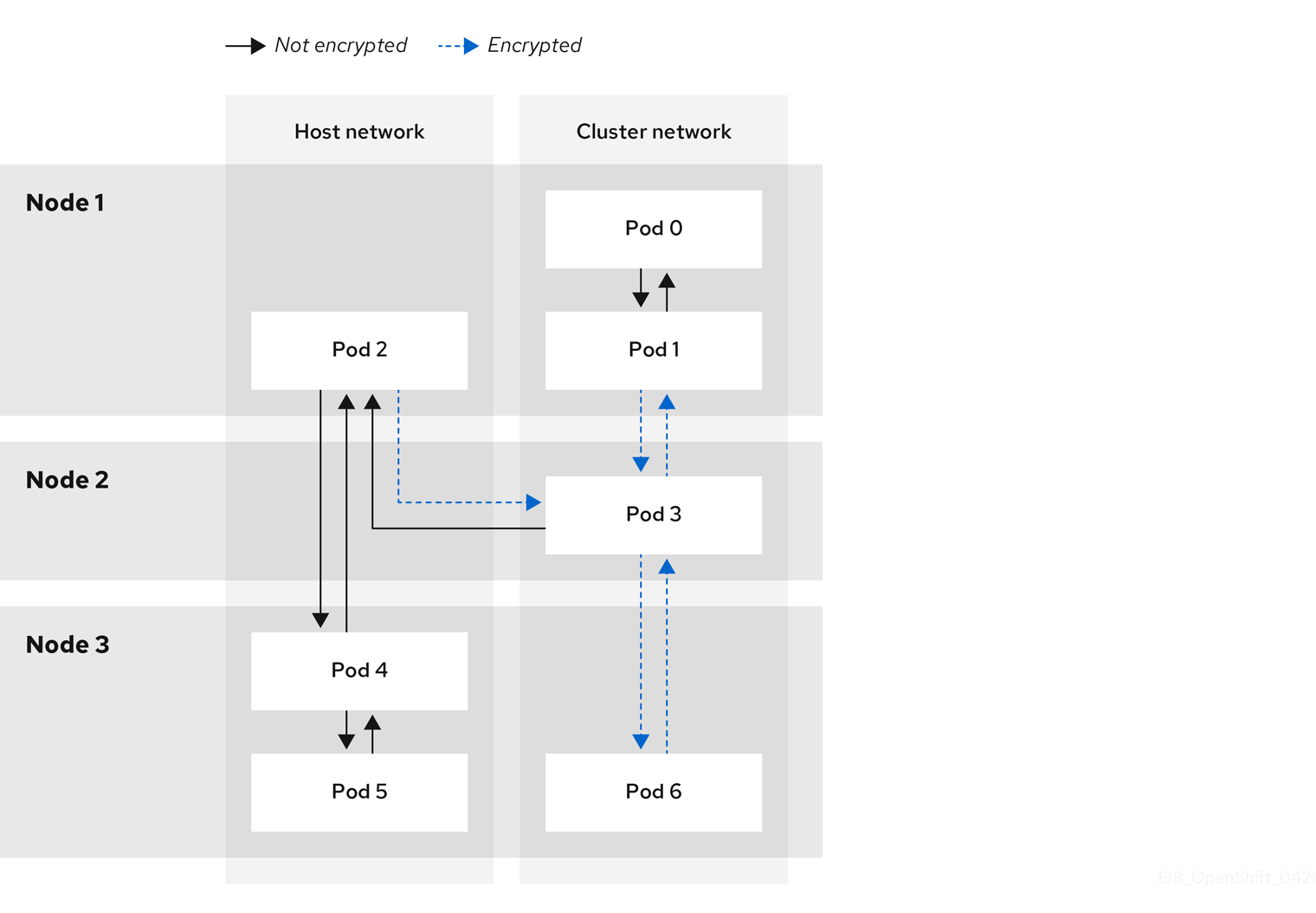
With IPsec enabled, only the following network traffic flows between pods are encrypted:
- Traffic between pods on different nodes on the cluster network
- Traffic from a pod on the host network to a pod on the cluster network
The following traffic flows are not encrypted:
- Traffic between pods on the same node on the cluster network
- Traffic between pods on the host network
- Traffic from a pod on the cluster network to a pod on the host network
The encrypted and unencrypted flows are illustrated in the following diagram:
16.5.1.1. Network connectivity requirements when IPsec is enabled
You must configure the network connectivity between machines to allow OpenShift Container Platform cluster components to communicate. Each machine must be able to resolve the hostnames of all other machines in the cluster.
| Protocol | Port | Description |
|---|---|---|
| UDP |
| IPsec IKE packets |
|
| IPsec NAT-T packets | |
| ESP | N/A | IPsec Encapsulating Security Payload (ESP) |
16.5.2. Encryption protocol and tunnel mode for IPsec
The encrypt cipher used is AES-GCM-16-256. The integrity check value (ICV) is 16 bytes. The key length is 256 bits.
The IPsec tunnel mode used is Transport mode, a mode that encrypts end-to-end communication.
16.5.3. Security certificate generation and rotation
The Cluster Network Operator (CNO) generates a self-signed X.509 certificate authority (CA) that is used by IPsec for encryption. Certificate signing requests (CSRs) from each node are automatically fulfilled by the CNO.
The CA is valid for 10 years. The individual node certificates are valid for 5 years and are automatically rotated after 4 1/2 years elapse.
16.6. Configuring an egress firewall for a project
As a cluster administrator, you can create an egress firewall for a project that restricts egress traffic leaving your OpenShift Container Platform cluster.
16.6.1. How an egress firewall works in a project
As a cluster administrator, you can use an egress firewall to limit the external hosts that some or all pods can access from within the cluster. An egress firewall supports the following scenarios:
- A pod can only connect to internal hosts and cannot initiate connections to the public internet.
- A pod can only connect to the public internet and cannot initiate connections to internal hosts that are outside the OpenShift Container Platform cluster.
- A pod cannot reach specified internal subnets or hosts outside the OpenShift Container Platform cluster.
- A pod can connect to only specific external hosts.
For example, you can allow one project access to a specified IP range but deny the same access to a different project. Or you can restrict application developers from updating from Python pip mirrors, and force updates to come only from approved sources.
You configure an egress firewall policy by creating an EgressFirewall custom resource (CR) object. The egress firewall matches network traffic that meets any of the following criteria:
- An IP address range in CIDR format
- A DNS name that resolves to an IP address
- A port number
- A protocol that is one of the following protocols: TCP, UDP, and SCTP
If your egress firewall includes a deny rule for 0.0.0.0/0, access to your OpenShift Container Platform API servers is blocked. To ensure that pods can continue to access the OpenShift Container Platform API servers, you must include the IP address range that the API servers listen on in your egress firewall rules, as in the following example:
apiVersion: k8s.ovn.org/v1
kind: EgressFirewall
metadata:
  name: default
  namespace: <namespace>
spec:
  egress:
  - to:
      cidrSelector: <api_server_address_range>
    type: Allow
# ...
  - to:
      cidrSelector: 0.0.0.0/0
type: Deny
To find the IP address for your API servers, run oc get ep kubernetes -n default.
For more information, see BZ#1988324.
Egress firewall rules do not apply to traffic that goes through routers. Any user with permission to create a Route CR object can bypass egress firewall policy rules by creating a route that points to a forbidden destination.
16.6.1.1. Limitations of an egress firewall
An egress firewall has the following limitations:
- No project can have more than one EgressFirewall object.
- A maximum of one EgressFirewall object with a maximum of 8,000 rules can be defined per project.
- If you are using the OVN-Kubernetes network plugin with shared gateway mode in Red Hat OpenShift Networking, return ingress replies are affected by egress firewall rules. If the egress firewall rules drop the ingress reply destination IP, the traffic is dropped.
Violating any of these restrictions results in a broken egress firewall for the project, and might cause all external network traffic to be dropped.
An Egress Firewall resource can be created in the kube-node-lease, kube-public, kube-system, openshift and openshift- projects.
16.6.1.2. Matching order for egress firewall policy rules
The egress firewall policy rules are evaluated in the order that they are defined, from first to last. The first rule that matches an egress connection from a pod applies. Any subsequent rules are ignored for that connection.
16.6.1.3. How Domain Name Server (DNS) resolution works
If you use DNS names in any of your egress firewall policy rules, proper resolution of the domain names is subject to the following restrictions:
- Domain name updates are polled based on a time-to-live (TTL) duration. By default, the duration is 30 minutes. When the egress firewall controller queries the local name servers for a domain name, if the response includes a TTL and the TTL is less than 30 minutes, the controller sets the duration for that DNS name to the returned value. Each DNS name is queried after the TTL for the DNS record expires.
- The pod must resolve the domain from the same local name servers when necessary. Otherwise the IP addresses for the domain known by the egress firewall controller and the pod can be different. If the IP addresses for a hostname differ, the egress firewall might not be enforced consistently.
- Because the egress firewall controller and pods asynchronously poll the same local name server, the pod might obtain the updated IP address before the egress controller does, which causes a race condition. Due to this current limitation, domain name usage in EgressFirewall objects is only recommended for domains with infrequent IP address changes.
The egress firewall always allows pods access to the external interface of the node that the pod is on for DNS resolution.
If you use domain names in your egress firewall policy and your DNS resolution is not handled by a DNS server on the local node, then you must add egress firewall rules that allow access to your DNS server’s IP addresses. if you are using domain names in your pods.
16.6.2. EgressFirewall custom resource (CR) object
You can define one or more rules for an egress firewall. A rule is either an Allow rule or a Deny rule, with a specification for the traffic that the rule applies to.
The following YAML describes an EgressFirewall CR object:
EgressFirewall object
apiVersion: k8s.ovn.org/v1
kind: EgressFirewall
metadata:
  name: <name>
spec:
  egress:
...16.6.2.1. EgressFirewall rules
The following YAML describes an egress firewall rule object. The egress stanza expects an array of one or more objects.
Egress policy rule stanza
egress:
- type: <type>
to:
cidrSelector: <cidr>
dnsName: <dns_name>
ports:
...- 1
- The type of rule. The value must be either
AlloworDeny. - 2
- A stanza describing an egress traffic match rule that specifies the
cidrSelectorfield or thednsNamefield. You cannot use both fields in the same rule. - 3
- An IP address range in CIDR format.
- 4
- A DNS domain name.
- 5
- Optional: A stanza describing a collection of network ports and protocols for the rule.
Ports stanza
ports:
- port: <port>
protocol: <protocol> 16.6.2.2. Example EgressFirewall CR objects
The following example defines several egress firewall policy rules:
apiVersion: k8s.ovn.org/v1
kind: EgressFirewall
metadata:
  name: default
spec:
  egress:
  - type: Allow
    to:
      cidrSelector: 1.2.3.0/24
  - type: Deny
    to:
cidrSelector: 0.0.0.0/0- 1
- A collection of egress firewall policy rule objects.
The following example defines a policy rule that denies traffic to the host at the 172.16.1.1 IP address, if the traffic is using either the TCP protocol and destination port 80 or any protocol and destination port 443.
apiVersion: k8s.ovn.org/v1
kind: EgressFirewall
metadata:
  name: default
spec:
  egress:
  - type: Deny
    to:
      cidrSelector: 172.16.1.1
    ports:
    - port: 80
      protocol: TCP
    - port: 443
16.6.3. Creating an egress firewall policy object
As a cluster administrator, you can create an egress firewall policy object for a project.
If the project already has an EgressFirewall object defined, you must edit the existing policy to make changes to the egress firewall rules.
Prerequisites
- A cluster that uses the OVN-Kubernetes default Container Network Interface (CNI) network provider plugin.
-
Install the OpenShift CLI (
oc). - You must log in to the cluster as a cluster administrator.
Procedure
Create a policy rule:
-
Create a
<policy_name>.yamlfile where<policy_name>describes the egress policy rules. - In the file you created, define an egress policy object.
-
Create a
Enter the following command to create the policy object. Replace
<policy_name>with the name of the policy and<project>with the project that the rule applies to.$ oc create -f <policy_name>.yaml -n <project>In the following example, a new EgressFirewall object is created in a project named
project1:$ oc create -f default.yaml -n project1Example output
egressfirewall.k8s.ovn.org/v1 created-
Optional: Save the
<policy_name>.yamlfile so that you can make changes later.
16.7. Viewing an egress firewall for a project
As a cluster administrator, you can list the names of any existing egress firewalls and view the traffic rules for a specific egress firewall.
16.7.1. Viewing an EgressFirewall object
You can view an EgressFirewall object in your cluster.
Prerequisites
- A cluster using the OVN-Kubernetes default Container Network Interface (CNI) network provider plugin.
-
Install the OpenShift Command-line Interface (CLI), commonly known as
oc. - You must log in to the cluster.
Procedure
Optional: To view the names of the EgressFirewall objects defined in your cluster, enter the following command:
$ oc get egressfirewall --all-namespacesTo inspect a policy, enter the following command. Replace
<policy_name>with the name of the policy to inspect.$ oc describe egressfirewall <policy_name>Example output
Name:		default
Namespace:	project1
Created:	20 minutes ago
Labels:		<none>
Annotations:	<none>
Rule:		Allow to 1.2.3.0/24
Rule:		Allow to www.example.com
Rule:		Deny to 0.0.0.0/0
16.8. Editing an egress firewall for a project
As a cluster administrator, you can modify network traffic rules for an existing egress firewall.
16.8.1. Editing an EgressFirewall object
As a cluster administrator, you can update the egress firewall for a project.
Prerequisites
- A cluster using the OVN-Kubernetes default Container Network Interface (CNI) network provider plugin.
-
Install the OpenShift CLI (
oc). - You must log in to the cluster as a cluster administrator.
Procedure
Find the name of the EgressFirewall object for the project. Replace
<project>with the name of the project.$ oc get -n <project> egressfirewallOptional: If you did not save a copy of the EgressFirewall object when you created the egress network firewall, enter the following command to create a copy.
$ oc get -n <project> egressfirewall <name> -o yaml > <filename>.yamlReplace
<project>with the name of the project. Replace<name>with the name of the object. Replace<filename>with the name of the file to save the YAML to.After making changes to the policy rules, enter the following command to replace the EgressFirewall object. Replace
<filename>with the name of the file containing the updated EgressFirewall object.$ oc replace -f <filename>.yaml
16.9. Removing an egress firewall from a project
As a cluster administrator, you can remove an egress firewall from a project to remove all restrictions on network traffic from the project that leaves the OpenShift Container Platform cluster.
16.9.1. Removing an EgressFirewall object
As a cluster administrator, you can remove an egress firewall from a project.
Prerequisites
- A cluster using the OVN-Kubernetes default Container Network Interface (CNI) network provider plugin.
-
Install the OpenShift CLI (
oc). - You must log in to the cluster as a cluster administrator.
Procedure
Find the name of the EgressFirewall object for the project. Replace
<project>with the name of the project.$ oc get -n <project> egressfirewallEnter the following command to delete the EgressFirewall object. Replace
<project>with the name of the project and<name>with the name of the object.$ oc delete -n <project> egressfirewall <name>
16.10. Configuring an egress IP address
As a cluster administrator, you can configure the OVN-Kubernetes default Container Network Interface (CNI) network provider to assign one or more egress IP addresses to a namespace, or to specific pods in a namespace.
16.10.1. Egress IP address architectural design and implementation
The OpenShift Container Platform egress IP address functionality allows you to ensure that the traffic from one or more pods in one or more namespaces has a consistent source IP address for services outside the cluster network.
For example, you might have a pod that periodically queries a database that is hosted on a server outside of your cluster. To enforce access requirements for the server, a packet filtering device is configured to allow traffic only from specific IP addresses. To ensure that you can reliably allow access to the server from only that specific pod, you can configure a specific egress IP address for the pod that makes the requests to the server.
An egress IP address is implemented as an additional IP address on the primary network interface of a node and must be in the same subnet as the primary IP address of the node. The additional IP address must not be assigned to any other node in the cluster.
In some cluster configurations, application pods and ingress router pods run on the same node. If you configure an egress IP address for an application project in this scenario, the IP address is not used when you send a request to a route from the application project.
16.10.1.1. Platform support
Support for the egress IP address functionality on various platforms is summarized in the following table:
The egress IP address implementation is not compatible with Amazon Web Services (AWS), Azure Cloud, or any other public cloud platform incompatible with the automatic layer 2 network manipulation required by the egress IP feature.
| Platform | Supported |
|---|---|
| Bare metal | Yes |
| vSphere | Yes |
| Red Hat OpenStack Platform (RHOSP) | No |
| Public cloud | No |
16.10.1.2. Assignment of egress IPs to pods
To assign one or more egress IPs to a namespace or specific pods in a namespace, the following conditions must be satisfied:
-
At least one node in your cluster must have the
k8s.ovn.org/egress-assignable: ""label. -
An
EgressIPobject exists that defines one or more egress IP addresses to use as the source IP address for traffic leaving the cluster from pods in a namespace.
If you create EgressIP objects prior to labeling any nodes in your cluster for egress IP assignment, OpenShift Container Platform might assign every egress IP address to the first node with the k8s.ovn.org/egress-assignable: "" label.
To ensure that egress IP addresses are widely distributed across nodes in the cluster, always apply the label to the nodes you intent to host the egress IP addresses before creating any EgressIP objects.
16.10.1.3. Assignment of egress IPs to nodes
When creating an EgressIP object, the following conditions apply to nodes that are labeled with the k8s.ovn.org/egress-assignable: "" label:
- An egress IP address is never assigned to more than one node at a time.
- An egress IP address is equally balanced between available nodes that can host the egress IP address.
-
If the
spec.EgressIPsarray in anEgressIPobject specifies more than one IP address, no node will ever host more than one of the specified addresses. - If a node becomes unavailable, any egress IP addresses assigned to it are automatically reassigned, subject to the previously described conditions.
When a pod matches the selector for multiple EgressIP objects, there is no guarantee which of the egress IP addresses that are specified in the EgressIP objects is assigned as the egress IP address for the pod.
Additionally, if an EgressIP object specifies multiple egress IP addresses, there is no guarantee which of the egress IP addresses might be used. For example, if a pod matches a selector for an EgressIP object with two egress IP addresses, 10.10.20.1 and 10.10.20.2, either might be used for each TCP connection or UDP conversation.
16.10.1.4. Architectural diagram of an egress IP address configuration
The following diagram depicts an egress IP address configuration. The diagram describes four pods in two different namespaces running on three nodes in a cluster. The nodes are assigned IP addresses from the 192.168.126.0/18 CIDR block on the host network.
Both Node 1 and Node 3 are labeled with k8s.ovn.org/egress-assignable: "" and thus available for the assignment of egress IP addresses.
The dashed lines in the diagram depict the traffic flow from pod1, pod2, and pod3 traveling through the pod network to egress the cluster from Node 1 and Node 3. When an external service receives traffic from any of the pods selected by the example EgressIP object, the source IP address is either 192.168.126.10 or 192.168.126.102.
The following resources from the diagram are illustrated in detail:
NamespaceobjectsThe namespaces are defined in the following manifest:
Namespace objects
apiVersion: v1 kind: Namespace metadata: name: namespace1 labels: env: prod --- apiVersion: v1 kind: Namespace metadata: name: namespace2 labels: env: prodEgressIPobjectThe following
EgressIPobject describes a configuration that selects all pods in any namespace with theenvlabel set toprod. The egress IP addresses for the selected pods are192.168.126.10and192.168.126.102.EgressIPobjectapiVersion: k8s.ovn.org/v1 kind: EgressIP metadata: name: egressips-prod spec: egressIPs: - 192.168.126.10 - 192.168.126.102 namespaceSelector: matchLabels: env: prod status: assignments: - node: node1 egressIP: 192.168.126.10 - node: node3 egressIP: 192.168.126.102For the configuration in the previous example, OpenShift Container Platform assigns both egress IP addresses to the available nodes. The
statusfield reflects whether and where the egress IP addresses are assigned.
16.10.2. EgressIP object
The following YAML describes the API for the EgressIP object. The scope of the object is cluster-wide; it is not created in a namespace.
apiVersion: k8s.ovn.org/v1
kind: EgressIP
metadata:
  name: <name>
spec:
  egressIPs:
  - <ip_address>
  namespaceSelector:
    ...
  podSelector:
...- 1
- The name for the
EgressIPsobject. - 2
- An array of one or more IP addresses.
- 3
- One or more selectors for the namespaces to associate the egress IP addresses with.
- 4
- Optional: One or more selectors for pods in the specified namespaces to associate egress IP addresses with. Applying these selectors allows for the selection of a subset of pods within a namespace.
The following YAML describes the stanza for the namespace selector:
Namespace selector stanza
namespaceSelector:
  matchLabels:
<label_name>: <label_value>- 1
- One or more matching rules for namespaces. If more than one match rule is provided, all matching namespaces are selected.
The following YAML describes the optional stanza for the pod selector:
Pod selector stanza
podSelector:
  matchLabels:
<label_name>: <label_value>- 1
- Optional: One or more matching rules for pods in the namespaces that match the specified
namespaceSelectorrules. If specified, only pods that match are selected. Others pods in the namespace are not selected.
In the following example, the EgressIP object associates the 192.168.126.11 and 192.168.126.102 egress IP addresses with pods that have the app label set to web and are in the namespaces that have the env label set to prod:
Example EgressIP object
apiVersion: k8s.ovn.org/v1
kind: EgressIP
metadata:
  name: egress-group1
spec:
  egressIPs:
  - 192.168.126.11
  - 192.168.126.102
  podSelector:
    matchLabels:
      app: web
  namespaceSelector:
    matchLabels:
      env: prod
In the following example, the EgressIP object associates the 192.168.127.30 and 192.168.127.40 egress IP addresses with any pods that do not have the environment label set to development:
Example EgressIP object
apiVersion: k8s.ovn.org/v1
kind: EgressIP
metadata:
  name: egress-group2
spec:
  egressIPs:
  - 192.168.127.30
  - 192.168.127.40
  namespaceSelector:
    matchExpressions:
    - key: environment
      operator: NotIn
      values:
      - development
16.10.3. Labeling a node to host egress IP addresses
You can apply the k8s.ovn.org/egress-assignable="" label to a node in your cluster so that OpenShift Container Platform can assign one or more egress IP addresses to the node.
Prerequisites
-
Install the OpenShift CLI (
oc). - Log in to the cluster as a cluster administrator.
Procedure
To label a node so that it can host one or more egress IP addresses, enter the following command:
$ oc label nodes <node_name> k8s.ovn.org/egress-assignable=""1 - 1
- The name of the node to label.
TipYou can alternatively apply the following YAML to add the label to a node:
apiVersion: v1
kind: Node
metadata:
  labels:
    k8s.ovn.org/egress-assignable: ""
  name: <node_name>
16.10.4. Next steps
16.11. Assigning an egress IP address
As a cluster administrator, you can assign an egress IP address for traffic leaving the cluster from a namespace or from specific pods in a namespace.
16.11.1. Assigning an egress IP address to a namespace
You can assign one or more egress IP addresses to a namespace or to specific pods in a namespace.
Prerequisites
-
Install the OpenShift CLI (
oc). - Log in to the cluster as a cluster administrator.
- Configure at least one node to host an egress IP address.
Procedure
Create an
EgressIPobject:-
Create a
<egressips_name>.yamlfile where<egressips_name>is the name of the object. In the file that you created, define an
EgressIPobject, as in the following example:apiVersion: k8s.ovn.org/v1 kind: EgressIP metadata: name: egress-project1 spec: egressIPs: - 192.168.127.10 - 192.168.127.11 namespaceSelector: matchLabels: env: qa
-
Create a
To create the object, enter the following command.
$ oc apply -f <egressips_name>.yaml1 - 1
- Replace
<egressips_name>with the name of the object.
Example output
egressips.k8s.ovn.org/<egressips_name> created-
Optional: Save the
<egressips_name>.yamlfile so that you can make changes later. Add labels to the namespace that requires egress IP addresses. To add a label to the namespace of an
EgressIPobject defined in step 1, run the following command:$ oc label ns <namespace> env=qa1 - 1
- Replace
<namespace>with the namespace that requires egress IP addresses.
16.12. Considerations for the use of an egress router pod
16.12.1. About an egress router pod
The OpenShift Container Platform egress router pod redirects traffic to a specified remote server from a private source IP address that is not used for any other purpose. An egress router pod can send network traffic to servers that are set up to allow access only from specific IP addresses.
The egress router pod is not intended for every outgoing connection. Creating large numbers of egress router pods can exceed the limits of your network hardware. For example, creating an egress router pod for every project or application could exceed the number of local MAC addresses that the network interface can handle before reverting to filtering MAC addresses in software.
The egress router image is not compatible with Amazon AWS, Azure Cloud, or any other cloud platform that does not support layer 2 manipulations due to their incompatibility with macvlan traffic.
16.12.1.1. Egress router modes
In redirect mode, an egress router pod configures iptables rules to redirect traffic from its own IP address to one or more destination IP addresses. Client pods that need to use the reserved source IP address must be modified to connect to the egress router rather than connecting directly to the destination IP.
The egress router CNI plugin supports redirect mode only. This is a difference with the egress router implementation that you can deploy with OpenShift SDN. Unlike the egress router for OpenShift SDN, the egress router CNI plugin does not support HTTP proxy mode or DNS proxy mode.
16.12.1.2. Egress router pod implementation
The egress router implementation uses the egress router Container Network Interface (CNI) plugin. The plugin adds a secondary network interface to a pod.
An egress router is a pod that has two network interfaces. For example, the pod can have eth0 and net1 network interfaces. The eth0 interface is on the cluster network and the pod continues to use the interface for ordinary cluster-related network traffic. The net1 interface is on a secondary network and has an IP address and gateway for that network. Other pods in the OpenShift Container Platform cluster can access the egress router service and the service enables the pods to access external services. The egress router acts as a bridge between pods and an external system.
Traffic that leaves the egress router exits through a node, but the packets have the MAC address of the net1 interface from the egress router pod.
When you add an egress router custom resource, the Cluster Network Operator creates the following objects:
-
The network attachment definition for the
net1secondary network interface of the pod. - A deployment for the egress router.
If you delete an egress router custom resource, the Operator deletes the two objects in the preceding list that are associated with the egress router.
16.12.1.3. Deployment considerations
An egress router pod adds an additional IP address and MAC address to the primary network interface of the node. As a result, you might need to configure your hypervisor or cloud provider to allow the additional address.
- Red Hat OpenStack Platform (RHOSP)
If you deploy OpenShift Container Platform on RHOSP, you must allow traffic from the IP and MAC addresses of the egress router pod on your OpenStack environment. If you do not allow the traffic, then communication will fail:
$ openstack port set --allowed-address \ ip_address=<ip_address>,mac_address=<mac_address> <neutron_port_uuid>- Red Hat Virtualization (RHV)
- If you are using RHV, you must select No Network Filter for the Virtual network interface controller (vNIC).
- VMware vSphere
- If you are using VMware vSphere, see the VMware documentation for securing vSphere standard switches. View and change VMware vSphere default settings by selecting the host virtual switch from the vSphere Web Client.
Specifically, ensure that the following are enabled:
16.12.1.4. Failover configuration
To avoid downtime, the Cluster Network Operator deploys the egress router pod as a deployment resource. The deployment name is egress-router-cni-deployment. The pod that corresponds to the deployment has a label of app=egress-router-cni.
To create a new service for the deployment, use the oc expose deployment/egress-router-cni-deployment --port <port_number> command or create a file like the following example:
apiVersion: v1
kind: Service
metadata:
  name: app-egress
spec:
  ports:
  - name: tcp-8080
    protocol: TCP
    port: 8080
  - name: tcp-8443
    protocol: TCP
    port: 8443
  - name: udp-80
    protocol: UDP
    port: 80
  type: ClusterIP
  selector:
app: egress-router-cni16.13. Deploying an egress router pod in redirect mode
As a cluster administrator, you can deploy an egress router pod to redirect traffic to specified destination IP addresses from a reserved source IP address.
The egress router implementation uses the egress router Container Network Interface (CNI) plugin.
16.13.1. Egress router custom resource
Define the configuration for an egress router pod in an egress router custom resource. The following YAML describes the fields for the configuration of an egress router in redirect mode:
apiVersion: network.operator.openshift.io/v1
kind: EgressRouter
metadata:
  name: <egress_router_name>
  namespace: <namespace>  <.>
spec:
  addresses: [  <.>
    {
      ip: "<egress_router>",  <.>
      gateway: "<egress_gateway>"  <.>
    }
  ]
  mode: Redirect
  redirect: {
    redirectRules: [  <.>
      {
        destinationIP: "<egress_destination>",
        port: <egress_router_port>,
        targetPort: <target_port>,  <.>
        protocol: <network_protocol>  <.>
      },
      ...
    ],
    fallbackIP: "<egress_destination>" <.>
  }
<.> Optional: The namespace field specifies the namespace to create the egress router in. If you do not specify a value in the file or on the command line, the default namespace is used.
<.> The addresses field specifies the IP addresses to configure on the secondary network interface.
<.> The ip field specifies the reserved source IP address and netmask from the physical network that the node is on to use with egress router pod. Use CIDR notation to specify the IP address and netmask.
<.> The gateway field specifies the IP address of the network gateway.
<.> Optional: The redirectRules field specifies a combination of egress destination IP address, egress router port, and protocol. Incoming connections to the egress router on the specified port and protocol are routed to the destination IP address.
<.> Optional: The targetPort field specifies the network port on the destination IP address. If this field is not specified, traffic is routed to the same network port that it arrived on.
<.> The protocol field supports TCP, UDP, or SCTP.
<.> Optional: The fallbackIP field specifies a destination IP address. If you do not specify any redirect rules, the egress router sends all traffic to this fallback IP address. If you specify redirect rules, any connections to network ports that are not defined in the rules are sent by the egress router to this fallback IP address. If you do not specify this field, the egress router rejects connections to network ports that are not defined in the rules.
Example egress router specification
apiVersion: network.operator.openshift.io/v1
kind: EgressRouter
metadata:
  name: egress-router-redirect
spec:
  networkInterface: {
    macvlan: {
      mode: "Bridge"
    }
  }
  addresses: [
    {
      ip: "192.168.12.99/24",
      gateway: "192.168.12.1"
    }
  ]
  mode: Redirect
  redirect: {
    redirectRules: [
      {
        destinationIP: "10.0.0.99",
        port: 80,
        protocol: UDP
      },
      {
        destinationIP: "203.0.113.26",
        port: 8080,
        targetPort: 80,
        protocol: TCP
      },
      {
        destinationIP: "203.0.113.27",
        port: 8443,
        targetPort: 443,
        protocol: TCP
      }
    ]
  }
16.13.2. Deploying an egress router in redirect mode
You can deploy an egress router to redirect traffic from its own reserved source IP address to one or more destination IP addresses.
After you add an egress router, the client pods that need to use the reserved source IP address must be modified to connect to the egress router rather than connecting directly to the destination IP.
Prerequisites
-
Install the OpenShift CLI (
oc). -
Log in as a user with
cluster-adminprivileges.
Procedure
- Create an egress router definition.
To ensure that other pods can find the IP address of the egress router pod, create a service that uses the egress router, as in the following example:
apiVersion: v1
kind: Service
metadata:
  name: egress-1
spec:
  ports:
  - name: web-app
    protocol: TCP
    port: 8080
  type: ClusterIP
  selector:
    app: egress-router-cni <.>
<.> Specify the label for the egress router. The value shown is added by the Cluster Network Operator and is not configurable.
After you create the service, your pods can connect to the service. The egress router pod redirects traffic to the corresponding port on the destination IP address. The connections originate from the reserved source IP address.
Verification
To verify that the Cluster Network Operator started the egress router, complete the following procedure:
View the network attachment definition that the Operator created for the egress router:
$ oc get network-attachment-definition egress-router-cni-nadThe name of the network attachment definition is not configurable.
Example output
NAME                    AGE
egress-router-cni-nad   18m
View the deployment for the egress router pod:
$ oc get deployment egress-router-cni-deploymentThe name of the deployment is not configurable.
Example output
NAME                           READY   UP-TO-DATE   AVAILABLE   AGE
egress-router-cni-deployment   1/1     1            1           18m
View the status of the egress router pod:
$ oc get pods -l app=egress-router-cniExample output
NAME READY STATUS RESTARTS AGE egress-router-cni-deployment-575465c75c-qkq6m 1/1 Running 0 18m- View the logs and the routing table for the egress router pod.
Get the node name for the egress router pod:
$ POD_NODENAME=$(oc get pod -l app=egress-router-cni -o jsonpath="{.items[0].spec.nodeName}")Enter into a debug session on the target node. This step instantiates a debug pod called
<node_name>-debug:$ oc debug node/$POD_NODENAMESet
/hostas the root directory within the debug shell. The debug pod mounts the root file system of the host in/hostwithin the pod. By changing the root directory to/host, you can run binaries from the executable paths of the host:# chroot /hostFrom within the
chrootenvironment console, display the egress router logs:# cat /tmp/egress-router-logExample output
2021-04-26T12:27:20Z [debug] Called CNI ADD
2021-04-26T12:27:20Z [debug] Gateway: 192.168.12.1
2021-04-26T12:27:20Z [debug] IP Source Addresses: [192.168.12.99/24]
2021-04-26T12:27:20Z [debug] IP Destinations: [80 UDP 10.0.0.99/30 8080 TCP 203.0.113.26/30 80 8443 TCP 203.0.113.27/30 443]
2021-04-26T12:27:20Z [debug] Created macvlan interface
2021-04-26T12:27:20Z [debug] Renamed macvlan to "net1"
2021-04-26T12:27:20Z [debug] Adding route to gateway 192.168.12.1 on macvlan interface
2021-04-26T12:27:20Z [debug] deleted default route {Ifindex: 3 Dst: <nil> Src: <nil> Gw: 10.128.10.1 Flags: [] Table: 254}
2021-04-26T12:27:20Z [debug] Added new default route with gateway 192.168.12.1
2021-04-26T12:27:20Z [debug] Added iptables rule: iptables -t nat PREROUTING -i eth0 -p UDP --dport 80 -j DNAT --to-destination 10.0.0.99
2021-04-26T12:27:20Z [debug] Added iptables rule: iptables -t nat PREROUTING -i eth0 -p TCP --dport 8080 -j DNAT --to-destination 203.0.113.26:80
2021-04-26T12:27:20Z [debug] Added iptables rule: iptables -t nat PREROUTING -i eth0 -p TCP --dport 8443 -j DNAT --to-destination 203.0.113.27:443
2021-04-26T12:27:20Z [debug] Added iptables rule: iptables -t nat -o net1 -j SNAT --to-source 192.168.12.99
The logging file location and logging level are not configurable when you start the egress router by creating an
EgressRouterobject as described in this procedure.From within the
chrootenvironment console, get the container ID:# crictl ps --name egress-router-cni-pod | awk '{print $1}'Example output
CONTAINER
bac9fae69ddb6
Determine the process ID of the container. In this example, the container ID is
bac9fae69ddb6:# crictl inspect -o yaml bac9fae69ddb6 | grep 'pid:' | awk '{print $2}'Example output
68857Enter the network namespace of the container:
# nsenter -n -t 68857Display the routing table:
# ip routeIn the following example output, the
net1network interface is the default route. Traffic for the cluster network uses theeth0network interface. Traffic for the192.168.12.0/24network uses thenet1network interface and originates from the reserved source IP address192.168.12.99. The pod routes all other traffic to the gateway at IP address192.168.12.1. Routing for the service network is not shown.Example output
default via 192.168.12.1 dev net1
10.128.10.0/23 dev eth0 proto kernel scope link src 10.128.10.18
192.168.12.0/24 dev net1 proto kernel scope link src 192.168.12.99
192.168.12.1 dev net1
16.14. Enabling multicast for a project
16.14.1. About multicast
With IP multicast, data is broadcast to many IP addresses simultaneously.
At this time, multicast is best used for low-bandwidth coordination or service discovery and not a high-bandwidth solution.
Multicast traffic between OpenShift Container Platform pods is disabled by default. If you are using the OVN-Kubernetes default Container Network Interface (CNI) network provider, you can enable multicast on a per-project basis.
16.14.2. Enabling multicast between pods
You can enable multicast between pods for your project.
Prerequisites
-
Install the OpenShift CLI (
oc). -
You must log in to the cluster with a user that has the
cluster-adminrole.
Procedure
Run the following command to enable multicast for a project. Replace
<namespace>with the namespace for the project you want to enable multicast for.$ oc annotate namespace <namespace> \ k8s.ovn.org/multicast-enabled=trueTipYou can alternatively apply the following YAML to add the annotation:
apiVersion: v1
kind: Namespace
metadata:
  name: <namespace>
  annotations:
    k8s.ovn.org/multicast-enabled: "true"
Verification
To verify that multicast is enabled for a project, complete the following procedure:
Change your current project to the project that you enabled multicast for. Replace
<project>with the project name.$ oc project <project>Create a pod to act as a multicast receiver:
$ cat <<EOF| oc create -f -
apiVersion: v1
kind: Pod
metadata:
  name: mlistener
  labels:
    app: multicast-verify
spec:
  containers:
    - name: mlistener
      image: registry.access.redhat.com/ubi8
      command: ["/bin/sh", "-c"]
      args:
        ["dnf -y install socat hostname && sleep inf"]
      ports:
        - containerPort: 30102
          name: mlistener
          protocol: UDP
EOF
Create a pod to act as a multicast sender:
$ cat <<EOF| oc create -f -
apiVersion: v1
kind: Pod
metadata:
  name: msender
  labels:
    app: multicast-verify
spec:
  containers:
    - name: msender
      image: registry.access.redhat.com/ubi8
      command: ["/bin/sh", "-c"]
      args:
        ["dnf -y install socat && sleep inf"]
EOF
In a new terminal window or tab, start the multicast listener.
Get the IP address for the Pod:
$ POD_IP=$(oc get pods mlistener -o jsonpath='{.status.podIP}')Start the multicast listener by entering the following command:
$ oc exec mlistener -i -t -- \
    socat UDP4-RECVFROM:30102,ip-add-membership=224.1.0.1:$POD_IP,fork EXEC:hostname
Start the multicast transmitter.
Get the pod network IP address range:
$ CIDR=$(oc get Network.config.openshift.io cluster \
    -o jsonpath='{.status.clusterNetwork[0].cidr}')
To send a multicast message, enter the following command:
$ oc exec msender -i -t -- \
    /bin/bash -c "echo | socat STDIO UDP4-DATAGRAM:224.1.0.1:30102,range=$CIDR,ip-multicast-ttl=64"
If multicast is working, the previous command returns the following output:
mlistener
16.15. Disabling multicast for a project
16.15.1. Disabling multicast between pods
You can disable multicast between pods for your project.
Prerequisites
-
Install the OpenShift CLI (
oc). -
You must log in to the cluster with a user that has the
cluster-adminrole.
Procedure
Disable multicast by running the following command:
$ oc annotate namespace <namespace> \1 k8s.ovn.org/multicast-enabled-- 1
- The
namespacefor the project you want to disable multicast for.
TipYou can alternatively apply the following YAML to delete the annotation:
apiVersion: v1
kind: Namespace
metadata:
  name: <namespace>
  annotations:
    k8s.ovn.org/multicast-enabled: null
16.16. Tracking network flows
As a cluster administrator, you can collect information about pod network flows from your cluster to assist with the following areas:
- Monitor ingress and egress traffic on the pod network.
- Troubleshoot performance issues.
- Gather data for capacity planning and security audits.
When you enable the collection of the network flows, only the metadata about the traffic is collected. For example, packet data is not collected, but the protocol, source address, destination address, port numbers, number of bytes, and other packet-level information is collected.
The data is collected in one or more of the following record formats:
- NetFlow
- sFlow
- IPFIX
When you configure the Cluster Network Operator (CNO) with one or more collector IP addresses and port numbers, the Operator configures Open vSwitch (OVS) on each node to send the network flows records to each collector.
You can configure the Operator to send records to more than one type of network flow collector. For example, you can send records to NetFlow collectors and also send records to sFlow collectors.
When OVS sends data to the collectors, each type of collector receives identical records. For example, if you configure two NetFlow collectors, OVS on a node sends identical records to the two collectors. If you also configure two sFlow collectors, the two sFlow collectors receive identical records. However, each collector type has a unique record format.
Collecting the network flows data and sending the records to collectors affects performance. Nodes process packets at a slower rate. If the performance impact is too great, you can delete the destinations for collectors to disable collecting network flows data and restore performance.
Enabling network flow collectors might have an impact on the overall performance of the cluster network.
16.16.1. Network object configuration for tracking network flows
The fields for configuring network flows collectors in the Cluster Network Operator (CNO) are shown in the following table:
| Field | Type | Description |
|---|---|---|
|
|
|
The name of the CNO object. This name is always |
|
|
|
One or more of |
|
|
| A list of IP address and network port pairs for up to 10 collectors. |
|
|
| A list of IP address and network port pairs for up to 10 collectors. |
|
|
| A list of IP address and network port pairs for up to 10 collectors. |
After applying the following manifest to the CNO, the Operator configures Open vSwitch (OVS) on each node in the cluster to send network flows records to the NetFlow collector that is listening at 192.168.1.99:2056.
Example configuration for tracking network flows
apiVersion: operator.openshift.io/v1
kind: Network
metadata:
  name: cluster
spec:
  exportNetworkFlows:
    netFlow:
      collectors:
        - 192.168.1.99:2056
16.16.2. Adding destinations for network flows collectors
As a cluster administrator, you can configure the Cluster Network Operator (CNO) to send network flows metadata about the pod network to a network flows collector.
Prerequisites
-
You installed the OpenShift CLI (
oc). -
You are logged in to the cluster with a user with
cluster-adminprivileges. - You have a network flows collector and know the IP address and port that it listens on.
Procedure
Create a patch file that specifies the network flows collector type and the IP address and port information of the collectors:
spec:
  exportNetworkFlows:
    netFlow:
      collectors:
        - 192.168.1.99:2056
Configure the CNO with the network flows collectors:
$ oc patch network.operator cluster --type merge -p "$(cat <file_name>.yaml)"Example output
network.operator.openshift.io/cluster patched
Verification
Verification is not typically necessary. You can run the following command to confirm that Open vSwitch (OVS) on each node is configured to send network flows records to one or more collectors.
View the Operator configuration to confirm that the
exportNetworkFlowsfield is configured:$ oc get network.operator cluster -o jsonpath="{.spec.exportNetworkFlows}"Example output
{"netFlow":{"collectors":["192.168.1.99:2056"]}}View the network flows configuration in OVS from each node:
$ for pod in $(oc get pods -n openshift-ovn-kubernetes -l app=ovnkube-node -o jsonpath='{range@.items[*]}{.metadata.name}{"\n"}{end}');
  do ;
    echo;
    echo $pod;
    oc -n openshift-ovn-kubernetes exec -c ovnkube-node $pod \
      -- bash -c 'for type in ipfix sflow netflow ; do ovs-vsctl find $type ; done';
done
Example output
ovnkube-node-xrn4p
_uuid               : a4d2aaca-5023-4f3d-9400-7275f92611f9
active_timeout      : 60
add_id_to_interface : false
engine_id           : []
engine_type         : []
external_ids        : {}
targets             : ["192.168.1.99:2056"]

ovnkube-node-z4vq9
_uuid               : 61d02fdb-9228-4993-8ff5-b27f01a29bd6
active_timeout      : 60
add_id_to_interface : false
engine_id           : []
engine_type         : []
external_ids        : {}
targets             : ["192.168.1.99:2056"]-

...
16.16.3. Deleting all destinations for network flows collectors
As a cluster administrator, you can configure the Cluster Network Operator (CNO) to stop sending network flows metadata to a network flows collector.
Prerequisites
-
You installed the OpenShift CLI (
oc). -
You are logged in to the cluster with a user with
cluster-adminprivileges.
Procedure
Remove all network flows collectors:
$ oc patch network.operator cluster --type='json' \
    -p='[{"op":"remove", "path":"/spec/exportNetworkFlows"}]'
Example output
network.operator.openshift.io/cluster patched
16.17. Configuring hybrid networking
As a cluster administrator, you can configure the OVN-Kubernetes Container Network Interface (CNI) cluster network provider to allow Linux and Windows nodes to host Linux and Windows workloads, respectively.
16.17.1. Configuring hybrid networking with OVN-Kubernetes
You can configure your cluster to use hybrid networking with OVN-Kubernetes. This allows a hybrid cluster that supports different node networking configurations. For example, this is necessary to run both Linux and Windows nodes in a cluster.
You must configure hybrid networking with OVN-Kubernetes during the installation of your cluster. You cannot switch to hybrid networking after the installation process.
Prerequisites
-
You defined
OVNKubernetesfor thenetworking.networkTypeparameter in theinstall-config.yamlfile. See the installation documentation for configuring OpenShift Container Platform network customizations on your chosen cloud provider for more information.
Procedure
Change to the directory that contains the installation program and create the manifests:
$ ./openshift-install create manifests --dir <installation_directory>where:
<installation_directory>-
Specifies the name of the directory that contains the
install-config.yamlfile for your cluster.
Create a stub manifest file for the advanced network configuration that is named
cluster-network-03-config.ymlin the<installation_directory>/manifests/directory:$ cat <<EOF > <installation_directory>/manifests/cluster-network-03-config.yml apiVersion: operator.openshift.io/v1 kind: Network metadata: name: cluster spec: EOFwhere:
<installation_directory>-
Specifies the directory name that contains the
manifests/directory for your cluster.
Open the
cluster-network-03-config.ymlfile in an editor and configure OVN-Kubernetes with hybrid networking, such as in the following example:Specify a hybrid networking configuration
apiVersion: operator.openshift.io/v1
kind: Network
metadata:
  name: cluster
spec:
  defaultNetwork:
    ovnKubernetesConfig:
      hybridOverlayConfig:
        hybridClusterNetwork:
1 - cidr: 10.132.0.0/14 hostPrefix: 23 hybridOverlayVXLANPort: 98982 - 1
- Specify the CIDR configuration used for nodes on the additional overlay network. The
hybridClusterNetworkCIDR cannot overlap with theclusterNetworkCIDR. - 2
- Specify a custom VXLAN port for the additional overlay network. This is required for running Windows nodes in a cluster installed on vSphere, and must not be configured for any other cloud provider. The custom port can be any open port excluding the default
4789port. For more information on this requirement, see the Microsoft documentation on Pod-to-pod connectivity between hosts is broken.
NoteWindows Server Long-Term Servicing Channel (LTSC): Windows Server 2019 is not supported on clusters with a custom
hybridOverlayVXLANPortvalue because this Windows server version does not support selecting a custom VXLAN port.-
Save the
cluster-network-03-config.ymlfile and quit the text editor. -
Optional: Back up the
manifests/cluster-network-03-config.ymlfile. The installation program deletes themanifests/directory when creating the cluster.
Complete any further installation configurations, and then create your cluster. Hybrid networking is enabled when the installation process is finished.

'%20d='M201.5%20305.5c-13.8%200-24.9-11.1-24.9-24.6%200-13.8%2011.1-24.9%2024.9-24.9%2013.6%200%2024.6%2011.1%2024.6%2024.9%200%2013.6-11.1%2024.6-24.6%2024.6zM504%20256c0%20137-111%20248-248%20248S8%20393%208%20256%20119%208%20256%208s248%20111%20248%20248zm-132.3-41.2c-9.4%200-17.7%203.9-23.8%2010-22.4-15.5-52.6-25.5-86.1-26.6l17.4-78.3%2055.4%2012.5c0%2013.6%2011.1%2024.6%2024.6%2024.6%2013.8%200%2024.9-11.3%2024.9-24.9s-11.1-24.9-24.9-24.9c-9.7%200-18%205.8-22.1%2013.8l-61.2-13.6c-3-.8-6.1%201.4-6.9%204.4l-19.1%2086.4c-33.2%201.4-63.1%2011.3-85.5%2026.8-6.1-6.4-14.7-10.2-24.1-10.2-34.9%200-46.3%2046.9-14.4%2062.8-1.1%205-1.7%2010.2-1.7%2015.5%200%2052.6%2059.2%2095.2%20132%2095.2%2073.1%200%20132.3-42.6%20132.3-95.2%200-5.3-.6-10.8-1.9-15.8%2031.3-16%2019.8-62.5-14.9-62.5zM302.8%20331c-18.2%2018.2-76.1%2017.9-93.6%200-2.2-2.2-6.1-2.2-8.3%200-2.5%202.5-2.5%206.4%200%208.6%2022.8%2022.8%2087.3%2022.8%20110.2%200%202.5-2.2%202.5-6.1%200-8.6-2.2-2.2-6.1-2.2-8.3%200zm7.7-75c-13.6%200-24.6%2011.1-24.6%2024.9%200%2013.6%2011.1%2024.6%2024.6%2024.6%2013.8%200%2024.9-11.1%2024.9-24.6%200-13.8-11-24.9-24.9-24.9z'/%3e%3c/svg%3e)