 Red Hat Summit
Ce contenu n'est pas disponible dans la langue sélectionnée.
12.5.2. Adding an iSCSI Target to virt-manager
This procedure covers creating a storage pool with an iSCSI target in
virt-manager.
Procedure 12.5. Adding an iSCSI device to virt-manager
Open the host physical machine's storage tab
Open the Storage tab in the Connection Details window.- Open
virt-manager. - Select a host physical machine from the main
virt-managerwindow. Click Edit menu and select Connection Details.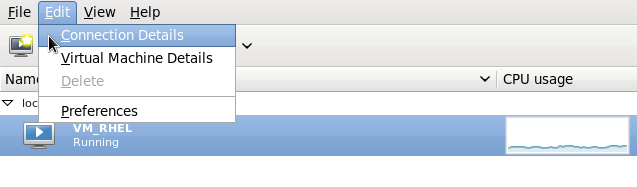
Figure 12.19. Connection details
- Click on the Storage tab.
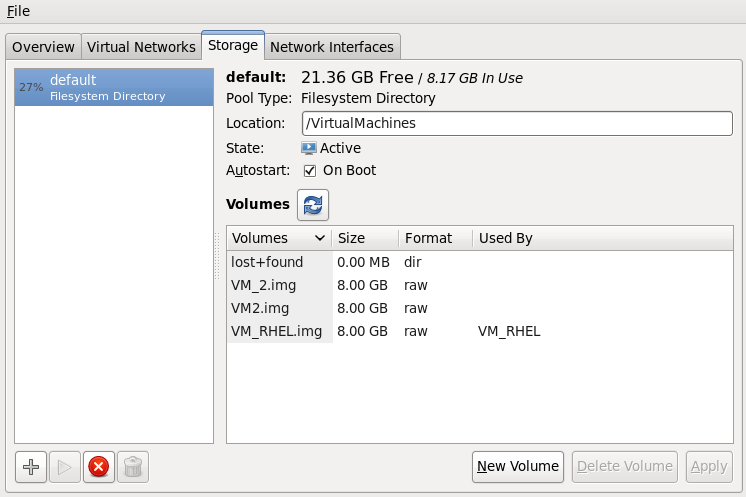
Figure 12.20. Storage menu
Add a new pool (part 1)
Press the + button (the add pool button). The Add a New Storage Pool wizard appears.
Figure 12.21. Add an iscsi storage pool name and type
Choose a name for the storage pool, change the Type to iscsi, and press to continue.Add a new pool (part 2)
You will need the information you used in Section 12.5, “iSCSI-based Storage Pools” and Procedure 12.4, “Creating an iSCSI target” to complete the fields in this menu.- Enter the iSCSI source and target. The Format option is not available as formatting is handled by the guest virtual machines. It is not advised to edit the Target Path. The default target path value,
/dev/disk/by-path/, adds the drive path to that directory. The target path should be the same on all host physical machines for migration. - Enter the host name or IP address of the iSCSI target. This example uses
host1.example.com. - In the Source Pathfield, enter the iSCSI target IQN. If you look at Procedure 12.4, “Creating an iSCSI target” in Section 12.5, “iSCSI-based Storage Pools”, this is the information you added in the
/etc/tgt/targets.conf file. This example usesiqn.2010-05.com.example.server1:iscsirhel6guest. - Check the IQN check box to enter the IQN for the initiator. This example uses
iqn.2010-05.com.example.host1:iscsirhel6. - Click to create the new storage pool.

Figure 12.22. Create an iscsi storage pool

'%20d='M201.5%20305.5c-13.8%200-24.9-11.1-24.9-24.6%200-13.8%2011.1-24.9%2024.9-24.9%2013.6%200%2024.6%2011.1%2024.6%2024.9%200%2013.6-11.1%2024.6-24.6%2024.6zM504%20256c0%20137-111%20248-248%20248S8%20393%208%20256%20119%208%20256%208s248%20111%20248%20248zm-132.3-41.2c-9.4%200-17.7%203.9-23.8%2010-22.4-15.5-52.6-25.5-86.1-26.6l17.4-78.3%2055.4%2012.5c0%2013.6%2011.1%2024.6%2024.6%2024.6%2013.8%200%2024.9-11.3%2024.9-24.9s-11.1-24.9-24.9-24.9c-9.7%200-18%205.8-22.1%2013.8l-61.2-13.6c-3-.8-6.1%201.4-6.9%204.4l-19.1%2086.4c-33.2%201.4-63.1%2011.3-85.5%2026.8-6.1-6.4-14.7-10.2-24.1-10.2-34.9%200-46.3%2046.9-14.4%2062.8-1.1%205-1.7%2010.2-1.7%2015.5%200%2052.6%2059.2%2095.2%20132%2095.2%2073.1%200%20132.3-42.6%20132.3-95.2%200-5.3-.6-10.8-1.9-15.8%2031.3-16%2019.8-62.5-14.9-62.5zM302.8%20331c-18.2%2018.2-76.1%2017.9-93.6%200-2.2-2.2-6.1-2.2-8.3%200-2.5%202.5-2.5%206.4%200%208.6%2022.8%2022.8%2087.3%2022.8%20110.2%200%202.5-2.2%202.5-6.1%200-8.6-2.2-2.2-6.1-2.2-8.3%200zm7.7-75c-13.6%200-24.6%2011.1-24.6%2024.9%200%2013.6%2011.1%2024.6%2024.6%2024.6%2013.8%200%2024.9-11.1%2024.9-24.6%200-13.8-11-24.9-24.9-24.9z'/%3e%3c/svg%3e)