 Red Hat Summit
39.11. 기능화된 애플리케이션 구성
웹 콘솔에는 시작 페이지 카탈로그에 주요 애플리케이션 링크 선택 목록이 있습니다. 페이지 상단에 표시되며 아이콘, 제목, 간단한 설명 및 링크를 가질 수 있습니다.
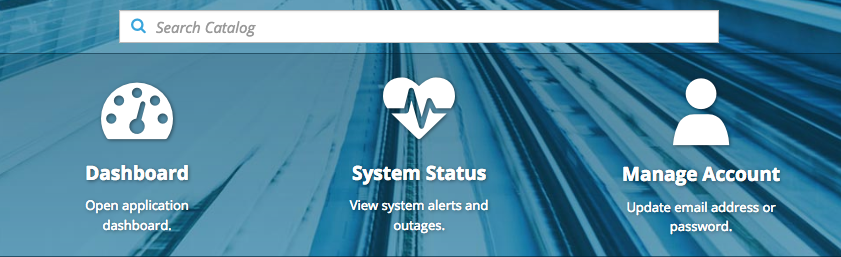
// Add featured applications to the top of the catalog.
window.OPENSHIFT_CONSTANTS.SAAS_OFFERINGS = [{
  title: "Dashboard",                         // The text label
  icon: "fa fa-dashboard",                    // The icon you want to appear
  url: "http://example.com/dashboard",        // Where to go when this item is clicked
  description: "Open application dashboard."  // Short description
}, {
  title: "System Status",
  icon: "fa fa-heartbeat",
  url: "http://example.com/status",
  description: "View system alerts and outages."
}, {
  title: "Manage Account",
  icon: "pficon pficon-user",
  url: "http://example.com/account",
  description: "Update email address or password."
}];
확장 스크립트 및 스타일시트 로드 에 설명된 대로 스크립트를 추가합니다.

'%20d='M201.5%20305.5c-13.8%200-24.9-11.1-24.9-24.6%200-13.8%2011.1-24.9%2024.9-24.9%2013.6%200%2024.6%2011.1%2024.6%2024.9%200%2013.6-11.1%2024.6-24.6%2024.6zM504%20256c0%20137-111%20248-248%20248S8%20393%208%20256%20119%208%20256%208s248%20111%20248%20248zm-132.3-41.2c-9.4%200-17.7%203.9-23.8%2010-22.4-15.5-52.6-25.5-86.1-26.6l17.4-78.3%2055.4%2012.5c0%2013.6%2011.1%2024.6%2024.6%2024.6%2013.8%200%2024.9-11.3%2024.9-24.9s-11.1-24.9-24.9-24.9c-9.7%200-18%205.8-22.1%2013.8l-61.2-13.6c-3-.8-6.1%201.4-6.9%204.4l-19.1%2086.4c-33.2%201.4-63.1%2011.3-85.5%2026.8-6.1-6.4-14.7-10.2-24.1-10.2-34.9%200-46.3%2046.9-14.4%2062.8-1.1%205-1.7%2010.2-1.7%2015.5%200%2052.6%2059.2%2095.2%20132%2095.2%2073.1%200%20132.3-42.6%20132.3-95.2%200-5.3-.6-10.8-1.9-15.8%2031.3-16%2019.8-62.5-14.9-62.5zM302.8%20331c-18.2%2018.2-76.1%2017.9-93.6%200-2.2-2.2-6.1-2.2-8.3%200-2.5%202.5-2.5%206.4%200%208.6%2022.8%2022.8%2087.3%2022.8%20110.2%200%202.5-2.2%202.5-6.1%200-8.6-2.2-2.2-6.1-2.2-8.3%200zm7.7-75c-13.6%200-24.6%2011.1-24.6%2024.9%200%2013.6%2011.1%2024.6%2024.6%2024.6%2013.8%200%2024.9-11.1%2024.9-24.6%200-13.8-11-24.9-24.9-24.9z'/%3e%3c/svg%3e)