 Red Hat Summit
第1章 利用可能なストレージオプションの概要
Red Hat Enterprise Linux で利用可能なローカル、リモート、およびクラスターベースのストレージオプションを紹介します。ストレージのアーキテクチャーを理解できるように、直接接続されたストレージデバイスと、LAN、インターネット、またはファイバーチャネルネットワーク経由でアクセスされるリモートストレージについて説明します。
ローカルストレージは、ストレージデバイスがシステムにインストールされているか、システムに直接接続されていることを意味します。
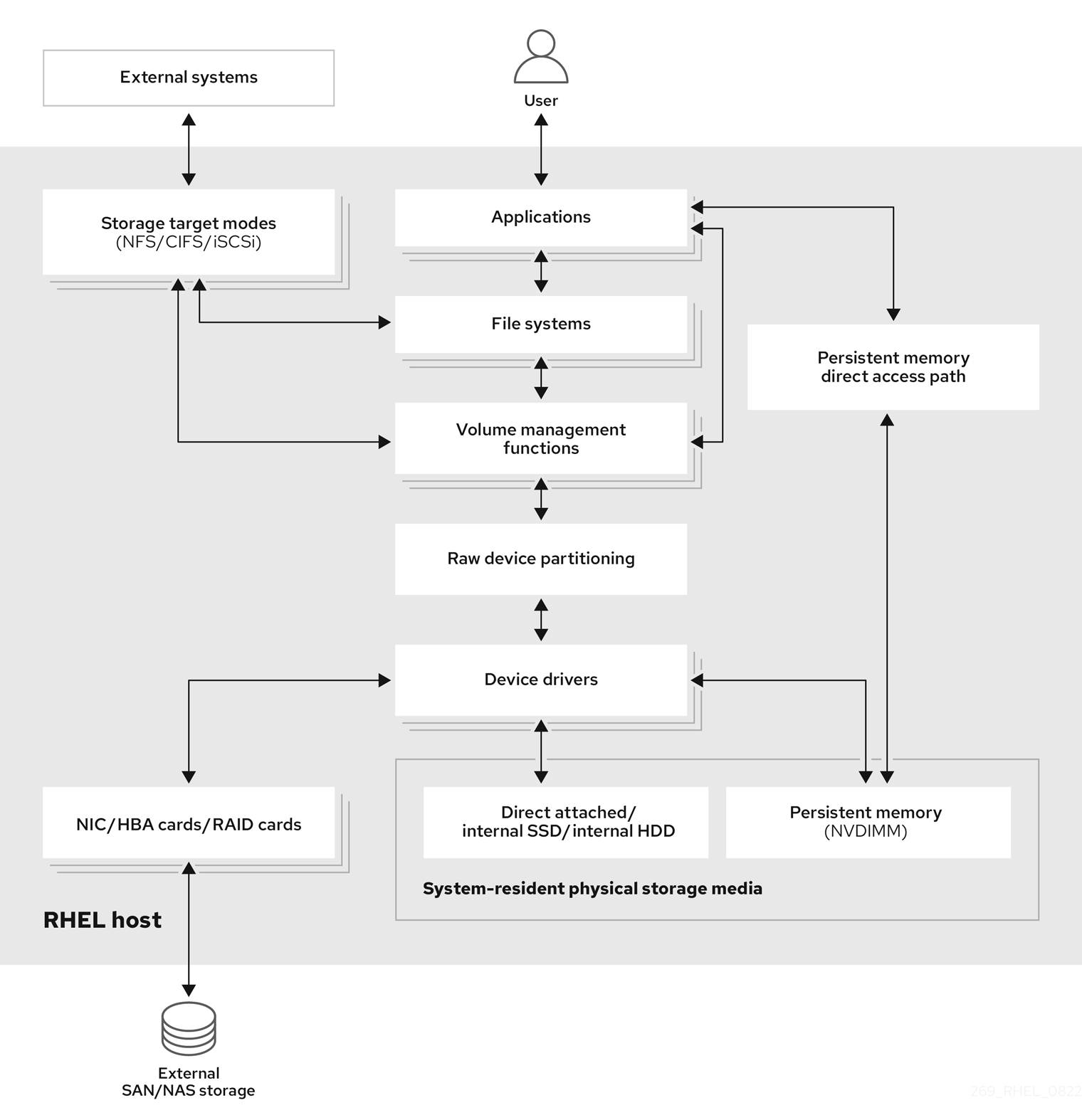
リモートストレージでは、LAN、インターネット、またはファイバーチャネルネットワークを介してデバイスにアクセスします。以下の Red Hat Enterprise Linux ストレージダイアグラムの概要では、さまざまなストレージオプションを説明します。
図1.1 Red Hat Enterprise Linux ストレージダイアグラム (概要)
1.1. ローカルストレージの概要
ローカルストレージとは、システムにインストールされているか、直接接続されているストレージデバイスを指します。これには、ネットワーク接続なしで管理できるディスクパーティション、論理ボリューム、およびファイルシステムが含まれます。
Red Hat Enterprise Linux 10 は、ローカルストレージオプションを複数提供します。
- 基本的なディスク管理:
partedとfdiskを使用して、ディスクパーティションを作成、変更、削除、および表示できます。パーティショニングレイアウトの標準は以下のようになります。- GUID パーティションテーブル (GPT)
- Globally Unique Identifier (GUID) を使用し、一意のディスクおよびパーティション GUID を提供します。
- マスターブートレコード (MBR)
- BIOS ベースのコンピューターで使用されます。プライマリーパーティション、拡張パーティション、および論理パーティションを作成できます。
- ストレージ使用オプション
- Non-Volatile Dual In-line Memory Modules (NVDIMM) の管理
- メモリーとストレージの組み合わせです。システムに接続した NVDIMM デバイスで、さまざまな種類のストレージを有効にして管理できます。
- ブロックストレージ管理
- 各ブロックに固有の識別子を持つブロックの形式でデータを保存します。
- ファイルストレージ
- データは、ローカルシステムのファイルレベルに保存されます。これらのデータには、XFS (デフォルト) または ext4 を使用してローカルでアクセスすることも、NFS および SMB を使用してネットワーク経由でアクセスすることもできます。
- 論理ボリューム
- 論理ボリュームマネージャー (LVM)
- 物理デバイスから論理デバイスを作成します。論理ボリューム (LV) は、物理ボリューム (PV) とボリュームグループ (VG) の組み合わせです。
- VDO (Virtual Data Optimizer)
重複排除、圧縮、およびシンプロビジョニングを使用して、データの削減に使用されます。VDO の下で論理ボリュームを使用すると、次のことができます。
- VDO ボリュームの拡張
- 複数のデバイスにまたがる VDO ボリューム
- ローカルファイルシステム
- XFS
- デフォルトの RHEL ファイルシステム。
- Ext4
- レガシーファイルシステム。
- Stratis
- Stratis は、高度なストレージ機能に対応する、ユーザーとカーネルのハイブリッドローカルストレージ管理システムです。

'%20d='M201.5%20305.5c-13.8%200-24.9-11.1-24.9-24.6%200-13.8%2011.1-24.9%2024.9-24.9%2013.6%200%2024.6%2011.1%2024.6%2024.9%200%2013.6-11.1%2024.6-24.6%2024.6zM504%20256c0%20137-111%20248-248%20248S8%20393%208%20256%20119%208%20256%208s248%20111%20248%20248zm-132.3-41.2c-9.4%200-17.7%203.9-23.8%2010-22.4-15.5-52.6-25.5-86.1-26.6l17.4-78.3%2055.4%2012.5c0%2013.6%2011.1%2024.6%2024.6%2024.6%2013.8%200%2024.9-11.3%2024.9-24.9s-11.1-24.9-24.9-24.9c-9.7%200-18%205.8-22.1%2013.8l-61.2-13.6c-3-.8-6.1%201.4-6.9%204.4l-19.1%2086.4c-33.2%201.4-63.1%2011.3-85.5%2026.8-6.1-6.4-14.7-10.2-24.1-10.2-34.9%200-46.3%2046.9-14.4%2062.8-1.1%205-1.7%2010.2-1.7%2015.5%200%2052.6%2059.2%2095.2%20132%2095.2%2073.1%200%20132.3-42.6%20132.3-95.2%200-5.3-.6-10.8-1.9-15.8%2031.3-16%2019.8-62.5-14.9-62.5zM302.8%20331c-18.2%2018.2-76.1%2017.9-93.6%200-2.2-2.2-6.1-2.2-8.3%200-2.5%202.5-2.5%206.4%200%208.6%2022.8%2022.8%2087.3%2022.8%20110.2%200%202.5-2.2%202.5-6.1%200-8.6-2.2-2.2-6.1-2.2-8.3%200zm7.7-75c-13.6%200-24.6%2011.1-24.6%2024.9%200%2013.6%2011.1%2024.6%2024.6%2024.6%2013.8%200%2024.9-11.1%2024.9-24.6%200-13.8-11-24.9-24.9-24.9z'/%3e%3c/svg%3e)