 Red Hat Summit
Dieser Inhalt ist in der von Ihnen ausgewählten Sprache nicht verfügbar.
Chapter 4. Creating and building an application using the CLI
4.1. Before you begin
- Review About the OpenShift CLI.
- You must be able to access a running instance of OpenShift Container Platform. If you do not have access, contact your cluster administrator.
-
You must have the OpenShift CLI (
oc) downloaded and installed.
4.2. Logging in to the CLI
You can log in to the OpenShift CLI (oc) to access and manage your cluster.
Prerequisites
- You must have access to an OpenShift Container Platform cluster.
-
You must have installed the OpenShift CLI (
oc).
Procedure
Log into OpenShift Container Platform from the CLI using your username and password, with an OAuth token, or with a web browser:
With username and password:
$ oc login -u=<username> -p=<password> --server=<your-openshift-server> --insecure-skip-tls-verifyWith an OAuth token:
$ oc login <https://api.your-openshift-server.com> --token=<tokenID>With a web browser:
$ oc login <cluster_url> --web
You can now create a project or issue other commands for managing your cluster.
4.3. Creating a new project
A project enables a community of users to organize and manage their content in isolation. Projects are OpenShift Container Platform extensions to Kubernetes namespaces. Projects have additional features that enable user self-provisioning.
Users must receive access to projects from administrators. Cluster administrators can allow developers to create their own projects. In most cases, users automatically have access to their own projects.
Each project has its own set of objects, policies, constraints, and service accounts.
Prerequisites
- You must have access to an OpenShift Container Platform cluster.
-
You must have installed the OpenShift CLI (
oc).
Procedure
To create a new project, enter the following command:
$ oc new-project user-getting-started --display-name="Getting Started with OpenShift"Example output
Now using project "user-getting-started" on server "https://openshift.example.com:6443".
4.4. Granting view permissions
OpenShift Container Platform automatically creates a few special service accounts in every project. The default service account takes responsibility for running the pods. OpenShift Container Platform uses and injects this service account into every pod that launches.
The following procedure creates a RoleBinding object for the default ServiceAccount object. The service account communicates with the OpenShift Container Platform API to learn about pods, services, and resources within the project.
Prerequisites
- You must have access to an OpenShift Container Platform cluster.
-
You must have installed the OpenShift CLI (
oc). - You have a deployed image.
-
You must have
cluster-adminorproject-adminprivileges.
Procedure
To add the view role to the default service account in the
user-getting-started project, enter the following command:$ oc adm policy add-role-to-user view -z default -n user-getting-started
4.5. Deploying your first image
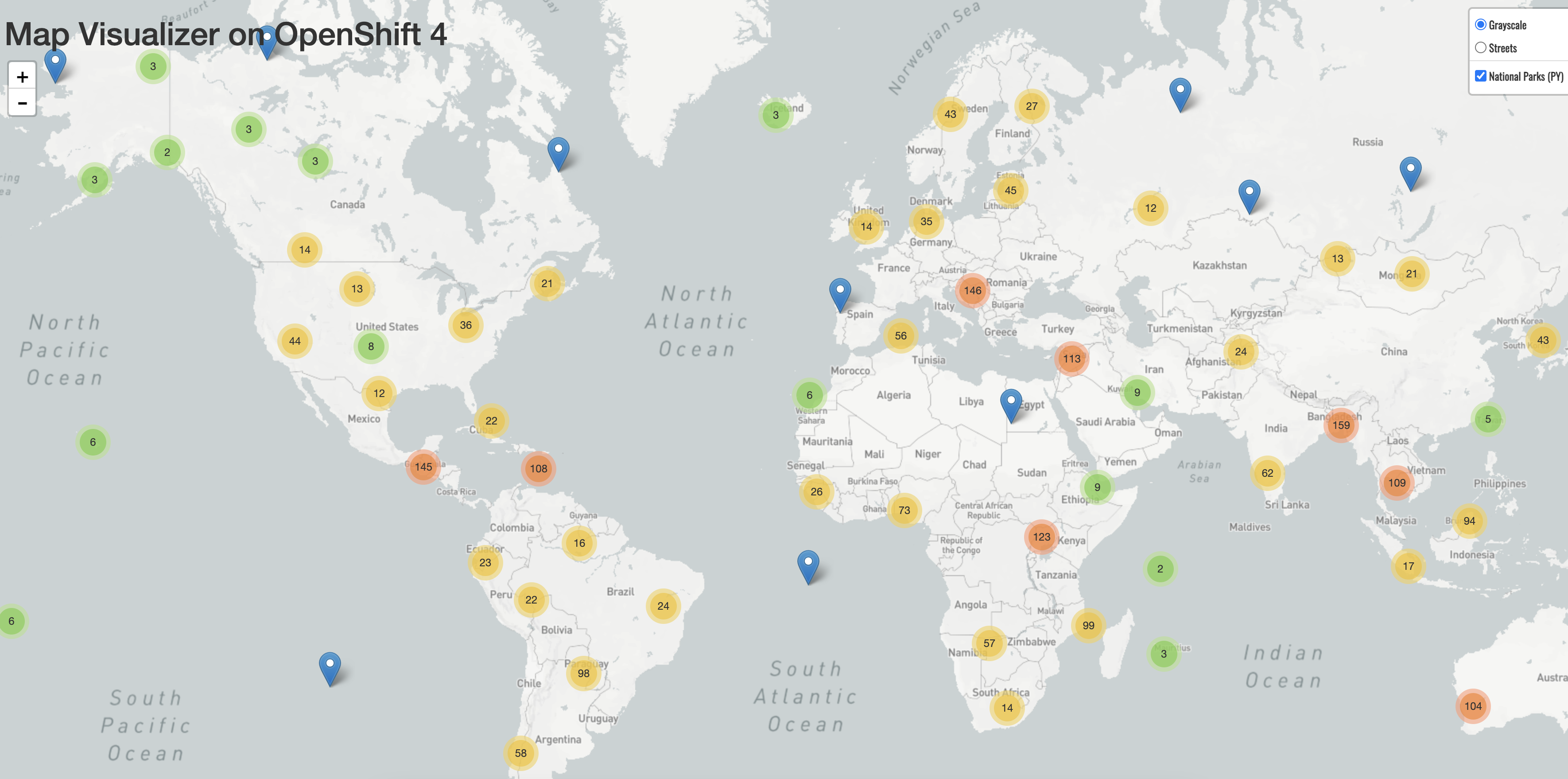
The simplest way to deploy an application in OpenShift Container Platform is to run an existing container image. The following procedure deploys a front-end component of an application called national-parks-app. The web application displays an interactive map. The map displays the location of major national parks across the world.
Prerequisites
- You must have access to an OpenShift Container Platform cluster.
-
Install the OpenShift CLI (
oc).
Procedure
To deploy an application, enter the following command:
$ oc new-app quay.io/openshiftroadshow/parksmap:latest --name=parksmap -l 'app=national-parks-app,component=parksmap,role=frontend,app.kubernetes.io/part-of=national-parks-app'Example output
--> Found container image 0c2f55f (12 months old) from quay.io for "quay.io/openshiftroadshow/parksmap:latest"

    * An image stream tag will be created as "parksmap:latest" that will track this image

--> Creating resources with label app=national-parks-app,app.kubernetes.io/part-of=national-parks-app,component=parksmap,role=frontend ...
    imagestream.image.openshift.io "parksmap" created
    deployment.apps "parksmap" created
    service "parksmap" created
--> Success
4.5.1. Creating a route
External clients can access applications running on OpenShift Container Platform through the routing layer and the data object behind that is a route. The default OpenShift Container Platform router (HAProxy) uses the HTTP header of the incoming request to determine where to proxy the connection.
Optionally, you can define security, such as TLS, for the route.
Prerequisites
- You must have access to an OpenShift Container Platform cluster.
-
You must have installed the OpenShift CLI (
oc). - You have a deployed image.
-
You must have
cluster-adminorproject-adminprivileges.
Procedure
To retrieve the created application service, enter the following command:
$ oc get serviceExample output
NAME      TYPE       CLUSTER-IP         EXTERNAL-IP    PORT(S)   AGE
parksmap  ClusterIP  <your-cluster-IP>  <123.456.789>  8080/TCP  8m29s
To create a route, enter the following command:
$ oc create route edge parksmap --service=parksmapExample output
route.route.openshift.io/parksmap createdTo retrieve the created application route, enter the following command:
$ oc get routeExample output
NAME        HOST/PORT                                                   PATH   SERVICES   PORT       TERMINATION   WILDCARD
parksmap    parksmap-user-getting-started.apps.cluster.example.com             parksmap   8080-tcp   edge          None
4.5.2. Examining the pod
OpenShift Container Platform leverages the Kubernetes concept of a pod, which is one or more containers deployed together on one host, and the smallest compute unit that can be defined, deployed, and managed. Pods are the rough equivalent of a machine instance, physical or virtual, to a container.
You can view the pods in your cluster and to determine the health of those pods and the cluster as a whole.
Prerequisites
- You must have access to an OpenShift Container Platform cluster.
-
You must have installed the OpenShift CLI (
oc). - You have a deployed image.
Procedure
To list all pods with node names, enter the following command:
$ oc get podsExample output
NAME                       READY   STATUS    RESTARTS   AGE
parksmap-5f9579955-6sng8   1/1     Running   0          77s
To list all pod details, enter the following command:
$ oc describe podsExample output
Name:         parksmap-848bd4954b-5pvcc
Namespace:    user-getting-started
Priority:     0
Node:         ci-ln-fr1rt92-72292-4fzf9-worker-a-g9g7c/10.0.128.4
Start Time:   Sun, 13 Feb 2022 14:14:14 -0500
Labels:       app=national-parks-app
              app.kubernetes.io/part-of=national-parks-app
              component=parksmap
              deployment=parksmap
              pod-template-hash=848bd4954b
              role=frontend
Annotations:  k8s.v1.cni.cncf.io/network-status:
                [{
                    "name": "openshift-sdn",
                    "interface": "eth0",
                    "ips": [
                        "10.131.0.14"
                    ],
                    "default": true,
                    "dns": {}
                }]
              k8s.v1.cni.cncf.io/network-status:
                [{
                    "name": "openshift-sdn",
                    "interface": "eth0",
                    "ips": [
                        "10.131.0.14"
                    ],
                    "default": true,
                    "dns": {}
                }]
              openshift.io/generated-by: OpenShiftNewApp
              openshift.io/scc: restricted
Status:       Running
IP:           10.131.0.14
IPs:
  IP:           10.131.0.14
Controlled By:  ReplicaSet/parksmap-848bd4954b
Containers:
  parksmap:
    Container ID:   cri-o://4b2625d4f61861e33cc95ad6d455915ea8ff6b75e17650538cc33c1e3e26aeb8
    Image:          quay.io/openshiftroadshow/parksmap@sha256:89d1e324846cb431df9039e1a7fd0ed2ba0c51aafbae73f2abd70a83d5fa173b
    Image ID:       quay.io/openshiftroadshow/parksmap@sha256:89d1e324846cb431df9039e1a7fd0ed2ba0c51aafbae73f2abd70a83d5fa173b
    Port:           8080/TCP
    Host Port:      0/TCP
    State:          Running
      Started:      Sun, 13 Feb 2022 14:14:25 -0500
    Ready:          True
    Restart Count:  0
    Environment:    <none>
    Mounts:
      /var/run/secrets/kubernetes.io/serviceaccount from kube-api-access-6f844 (ro)
Conditions:
  Type              Status
  Initialized       True
  Ready             True
  ContainersReady   True
  PodScheduled      True
Volumes:
  kube-api-access-6f844:
    Type:                    Projected (a volume that contains injected data from multiple sources)
    TokenExpirationSeconds:  3607
    ConfigMapName:           kube-root-ca.crt
    ConfigMapOptional:       <nil>
    DownwardAPI:             true
    ConfigMapName:           openshift-service-ca.crt
    ConfigMapOptional:       <nil>
QoS Class:                   BestEffort
Node-Selectors:              <none>
Tolerations:                 node.kubernetes.io/not-ready:NoExecute op=Exists for 300s
                             node.kubernetes.io/unreachable:NoExecute op=Exists for 300s
Events:
  Type    Reason          Age   From               Message
  ----    ------          ----  ----               -------
  Normal  Scheduled       46s   default-scheduler  Successfully assigned user-getting-started/parksmap-848bd4954b-5pvcc to ci-ln-fr1rt92-72292-4fzf9-worker-a-g9g7c
  Normal  AddedInterface  44s   multus             Add eth0 [10.131.0.14/23] from openshift-sdn
  Normal  Pulling         44s   kubelet            Pulling image "quay.io/openshiftroadshow/parksmap@sha256:89d1e324846cb431df9039e1a7fd0ed2ba0c51aafbae73f2abd70a83d5fa173b"
  Normal  Pulled          35s   kubelet            Successfully pulled image "quay.io/openshiftroadshow/parksmap@sha256:89d1e324846cb431df9039e1a7fd0ed2ba0c51aafbae73f2abd70a83d5fa173b" in 9.49243308s
  Normal  Created         35s   kubelet            Created container parksmap
  Normal  Started         35s   kubelet            Started container parksmap
4.5.3. Scaling the application
In Kubernetes, a Deployment object defines how an application deploys. In most cases, users use Pod, Service, ReplicaSets, and Deployment resources together. In most cases, OpenShift Container Platform creates the resources for you.
When you deploy the national-parks-app image, a deployment resource is created. In this example, only one Pod is deployed.
The following procedure scales the national-parks-image to use two instances.
Prerequisites
- You must have access to an OpenShift Container Platform cluster.
-
You must have installed the OpenShift CLI (
oc). - You have a deployed image.
Procedure
To scale your application from one pod instance to two pod instances, enter the following command:
$ oc scale --current-replicas=1 --replicas=2 deployment/parksmapExample output
deployment.apps/parksmap scaled
Verification
To ensure that your application scaled properly, enter the following command:
$ oc get podsExample output
NAME                       READY   STATUS    RESTARTS   AGE
parksmap-5f9579955-6sng8   1/1     Running   0          7m39s
parksmap-5f9579955-8tgft   1/1     Running   0          24s
To scale your application back down to one pod instance, enter the following command:
$ oc scale --current-replicas=2 --replicas=1 deployment/parksmap
4.6. Deploying a Python application
The following procedure deploys a back-end service for the parksmap application. The Python application performs 2D geo-spatial queries against a MongoDB database to locate and return map coordinates of all national parks in the world.
The deployed back-end service is nationalparks.
Prerequisites
- You must have access to an OpenShift Container Platform cluster.
-
You must have installed the OpenShift CLI (
oc). - You have a deployed image.
Procedure
To create a new Python application, enter the following command:
$ oc new-app python~https://github.com/openshift-roadshow/nationalparks-py.git --name nationalparks -l 'app=national-parks-app,component=nationalparks,role=backend,app.kubernetes.io/part-of=national-parks-app,app.kubernetes.io/name=python' --allow-missing-images=trueExample output
--> Found image 0406f6c (13 days old) in image stream "openshift/python" under tag "3.9-ubi9" for "python"

    Python 3.9
    ----------
    Python 3.9 available as container is a base platform for building and running various Python 3.9 applications and frameworks. Python is an easy to learn, powerful programming language. It has efficient high-level data structures and a simple but effective approach to object-oriented programming. Python's elegant syntax and dynamic typing, together with its interpreted nature, make it an ideal language for scripting and rapid application development in many areas on most platforms.

    Tags: builder, python, python39, python-39, rh-python39

    * A source build using source code from https://github.com/openshift-roadshow/nationalparks-py.git will be created
      * The resulting image will be pushed to image stream tag "nationalparks:latest"
      * Use 'oc start-build' to trigger a new build

--> Creating resources with label app=national-parks-app,app.kubernetes.io/name=python,app.kubernetes.io/part-of=national-parks-app,component=nationalparks,role=backend ...
    imagestream.image.openshift.io "nationalparks" created
    buildconfig.build.openshift.io "nationalparks" created
    deployment.apps "nationalparks" created
    service "nationalparks" created
--> Success
To create a route to expose your application,
nationalparks, enter the following command:$ oc create route edge nationalparks --service=nationalparksExample output
route.route.openshift.io/parksmap createdTo retrieve the created application route, enter the following command:
$ oc get routeExample output
NAME             HOST/PORT                                                           PATH   SERVICES        PORT       TERMINATION   WILDCARD
nationalparks    nationalparks-user-getting-started.apps.cluster.example.com                nationalparks   8080-tcp   edge          None
parksmap         parksmap-user-getting-started.apps.cluster.example.com                     parksmap        8080-tcp   edge          None
4.7. Connecting to a database
Deploy and connect a MongoDB database where the national-parks-app application stores location information. Once you mark the national-parks-app application as a backend for the map visualization tool, parksmap deployment uses the OpenShift Container Platform discover mechanism to display the map automatically.
Prerequisites
- You must have access to an OpenShift Container Platform cluster.
-
You must have installed the OpenShift CLI (
oc). - You have a deployed image.
Procedure
To connect to a database, enter the following command:
$ oc new-app quay.io/centos7/mongodb-36-centos7:master --name mongodb-nationalparks -e MONGODB_USER=mongodb -e MONGODB_PASSWORD=mongodb -e MONGODB_DATABASE=mongodb -e MONGODB_ADMIN_PASSWORD=mongodb -l 'app.kubernetes.io/part-of=national-parks-app,app.kubernetes.io/name=mongodb'Example output
--> Found container image dc18f52 (3 years old) from quay.io for "quay.io/centos7/mongodb-36-centos7:master"

    MongoDB 3.6
    -----------
    MongoDB (from humongous) is a free and open-source cross-platform document-oriented database program. Classified as a NoSQL database program, MongoDB uses JSON-like documents with schemas. This container image contains programs to run mongod server.

    Tags: database, mongodb, rh-mongodb36

    * An image stream tag will be created as "mongodb-nationalparks:master" that will track this image

--> Creating resources with label app.kubernetes.io/name=mongodb,app.kubernetes.io/part-of=national-parks-app ...
    imagestream.image.openshift.io "mongodb-nationalparks" created
    deployment.apps "mongodb-nationalparks" created
    service "mongodb-nationalparks" created
--> Success
4.7.1. Creating a secret
The Secret object provides a mechanism to hold sensitive information such as passwords, OpenShift Container Platform client configuration files, private source repository credentials, and so on. Secrets decouple sensitive content from the pods. You can mount secrets into containers using a volume plugin or the system can use secrets to perform actions on behalf of a pod. The following procedure adds the secret nationalparks-mongodb-parameters and mounts it to the nationalparks workload.
Prerequisites
- You must have access to an OpenShift Container Platform cluster.
-
You must have installed the OpenShift CLI (
oc). - You have a deployed image.
Procedure
To create a secret, enter the following command:
$ oc create secret generic nationalparks-mongodb-parameters --from-literal=DATABASE_SERVICE_NAME=mongodb-nationalparks --from-literal=MONGODB_USER=mongodb --from-literal=MONGODB_PASSWORD=mongodb --from-literal=MONGODB_DATABASE=mongodb --from-literal=MONGODB_ADMIN_PASSWORD=mongodbExample output
secret/nationalparks-mongodb-parameters createdTo update the environment variable to attach the mongodb secret to the
nationalpartksworkload, enter the following command:$ oc set env --from=secret/nationalparks-mongodb-parameters deploy/nationalparksExample output
deployment.apps/nationalparks updatedTo show the status of the
nationalparksdeployment, enter the following command:$ oc rollout status deployment nationalparksExample output
deployment "nationalparks" successfully rolled outTo show the status of the
mongodb-nationalparksdeployment, enter the following command:$ oc rollout status deployment mongodb-nationalparksExample output
deployment "mongodb-nationalparks" successfully rolled out
4.7.2. Loading data and displaying the national parks map
You deployed the parksmap and nationalparks applications and then deployed the mongodb-nationalparks database. However, no data has been loaded into the database.
Prerequisites
- You must have access to an OpenShift Container Platform cluster.
-
You must have installed the OpenShift CLI (
oc). - You have a deployed image.
Procedure
To load national parks data, enter the following command:
$ oc exec $(oc get pods -l component=nationalparks | tail -n 1 | awk '{print $1;}') -- curl -s http://localhost:8080/ws/data/loadExample output
"Items inserted in database: 2893"To verify that your data is loaded properly, enter the following command:
$ oc exec $(oc get pods -l component=nationalparks | tail -n 1 | awk '{print $1;}') -- curl -s http://localhost:8080/ws/data/allExample output (trimmed)
, {"id": "Great Zimbabwe", "latitude": "-20.2674635", "longitude": "30.9337986", "name": "Great Zimbabwe"}]To add labels to the route, enter the following command:
$ oc label route nationalparks type=parksmap-backendExample output
route.route.openshift.io/nationalparks labeledTo retrieve your routes to view your map, enter the following command:
$ oc get routesExample output
NAME            HOST/PORT                                                      PATH   SERVICES        PORT       TERMINATION   WILDCARD
nationalparks   nationalparks-user-getting-started.apps.cluster.example.com           nationalparks   8080-tcp   edge          None
parksmap        parksmap-user-getting-started.apps.cluster.example.com                parksmap        8080-tcp   edge          None
Copy and paste the
HOST/PORTpath you retrieved above into your web browser. Your browser should display a map of the national parks across the world.Figure 4.1. National parks across the world

'%20d='M201.5%20305.5c-13.8%200-24.9-11.1-24.9-24.6%200-13.8%2011.1-24.9%2024.9-24.9%2013.6%200%2024.6%2011.1%2024.6%2024.9%200%2013.6-11.1%2024.6-24.6%2024.6zM504%20256c0%20137-111%20248-248%20248S8%20393%208%20256%20119%208%20256%208s248%20111%20248%20248zm-132.3-41.2c-9.4%200-17.7%203.9-23.8%2010-22.4-15.5-52.6-25.5-86.1-26.6l17.4-78.3%2055.4%2012.5c0%2013.6%2011.1%2024.6%2024.6%2024.6%2013.8%200%2024.9-11.3%2024.9-24.9s-11.1-24.9-24.9-24.9c-9.7%200-18%205.8-22.1%2013.8l-61.2-13.6c-3-.8-6.1%201.4-6.9%204.4l-19.1%2086.4c-33.2%201.4-63.1%2011.3-85.5%2026.8-6.1-6.4-14.7-10.2-24.1-10.2-34.9%200-46.3%2046.9-14.4%2062.8-1.1%205-1.7%2010.2-1.7%2015.5%200%2052.6%2059.2%2095.2%20132%2095.2%2073.1%200%20132.3-42.6%20132.3-95.2%200-5.3-.6-10.8-1.9-15.8%2031.3-16%2019.8-62.5-14.9-62.5zM302.8%20331c-18.2%2018.2-76.1%2017.9-93.6%200-2.2-2.2-6.1-2.2-8.3%200-2.5%202.5-2.5%206.4%200%208.6%2022.8%2022.8%2087.3%2022.8%20110.2%200%202.5-2.2%202.5-6.1%200-8.6-2.2-2.2-6.1-2.2-8.3%200zm7.7-75c-13.6%200-24.6%2011.1-24.6%2024.9%200%2013.6%2011.1%2024.6%2024.6%2024.6%2013.8%200%2024.9-11.1%2024.9-24.6%200-13.8-11-24.9-24.9-24.9z'/%3e%3c/svg%3e)