 Red Hat Summit
Dieser Inhalt ist in der von Ihnen ausgewählten Sprache nicht verfügbar.
Chapter 1. About
1.1. About OpenShift Virtualization
Learn about OpenShift Virtualization’s capabilities and support scope.
1.1.1. What you can do with OpenShift Virtualization
OpenShift Virtualization is an add-on to OpenShift Container Platform that allows you to run and manage virtual machine workloads alongside container workloads.
OpenShift Virtualization adds new objects into your OpenShift Container Platform cluster by using Kubernetes custom resources to enable virtualization tasks. These tasks include:
- Creating and managing Linux and Windows virtual machines (VMs)
- Running pod and VM workloads alongside each other in a cluster
- Connecting to virtual machines through a variety of consoles and CLI tools
- Importing and cloning existing virtual machines
- Managing network interface controllers and storage disks attached to virtual machines
- Live migrating virtual machines between nodes
An enhanced web console provides a graphical portal to manage these virtualized resources alongside the OpenShift Container Platform cluster containers and infrastructure.
OpenShift Virtualization is designed and tested to work well with Red Hat OpenShift Data Foundation features.
When you deploy OpenShift Virtualization with OpenShift Data Foundation, you must create a dedicated storage class for Windows virtual machine disks. See Optimizing ODF PersistentVolumes for Windows VMs for details.
You can use OpenShift Virtualization with OVN-Kubernetes, OpenShift SDN, or one of the other certified network plugins listed in Certified OpenShift CNI Plug-ins.
You can check your OpenShift Virtualization cluster for compliance issues by installing the Compliance Operator and running a scan with the ocp4-moderate and ocp4-moderate-node profiles. The Compliance Operator uses OpenSCAP, a NIST-certified tool, to scan and enforce security policies.
1.1.1.1. OpenShift Virtualization supported cluster version
The latest stable release of OpenShift Virtualization 4.14 is 4.14.19.
OpenShift Virtualization 4.14 is supported for use on OpenShift Container Platform 4.14 clusters. To use the latest z-stream release of OpenShift Virtualization, you must first upgrade to the latest version of OpenShift Container Platform.
1.1.2. About volume and access modes for virtual machine disks
If you use the storage API with known storage providers, the volume and access modes are selected automatically. However, if you use a storage class that does not have a storage profile, you must configure the volume and access mode.
For best results, use the ReadWriteMany (RWX) access mode and the Block volume mode. This is important for the following reasons:
-
ReadWriteMany(RWX) access mode is required for live migration. The
Blockvolume mode performs significantly better than theFilesystemvolume mode. This is because theFilesystemvolume mode uses more storage layers, including a file system layer and a disk image file. These layers are not necessary for VM disk storage.For example, if you use Red Hat OpenShift Data Foundation, Ceph RBD volumes are preferable to CephFS volumes.
You cannot live migrate virtual machines with the following configurations:
-
Storage volume with
ReadWriteOnce(RWO) access mode - Passthrough features such as GPUs
Do not set the evictionStrategy field to LiveMigrate for these virtual machines.
1.1.3. Single-node OpenShift differences
You can install OpenShift Virtualization on single-node OpenShift.
However, you should be aware that Single-node OpenShift does not support the following features:
- High availability
- Pod disruption
- Live migration
- Virtual machines or templates that have an eviction strategy configured
1.2. Supported limits
You can refer to tested object maximums when planning your OpenShift Container Platform environment for OpenShift Virtualization. However, approaching the maximum values can reduce performance and increase latency. Ensure that you plan for your specific use case and consider all factors that can impact cluster scaling.
For more information about cluster configuration and options that impact performance, see the OpenShift Virtualization - Tuning & Scaling Guide in the Red Hat Knowledgebase.
1.2.1. Tested maximums for OpenShift Virtualization
The following limits apply to a large-scale OpenShift Virtualization 4.x environment. They are based on a single cluster of the largest possible size. When you plan an environment, remember that multiple smaller clusters might be the best option for your use case.
1.2.1.1. Virtual machine maximums
The following maximums apply to virtual machines (VMs) running on OpenShift Virtualization. These values are subject to the limits specified in Virtualization limits for Red Hat Enterprise Linux with KVM.
| Objective (per VM) | Tested limit | Theoretical limit |
|---|---|---|
| Virtual CPUs | 216 vCPUs | 255 vCPUs |
| Memory | 6 TB | 16 TB |
| Single disk size | 20 TB | 100 TB |
| Hot-pluggable disks | 255 disks | N/A |
Each VM must have at least 512 MB of memory.
1.2.1.2. Host maximums
The following maximums apply to the OpenShift Container Platform hosts used for OpenShift Virtualization.
| Objective (per host) | Tested limit | Theoretical limit |
|---|---|---|
| Logical CPU cores or threads | Same as Red Hat Enterprise Linux (RHEL) | N/A |
| RAM | Same as RHEL | N/A |
| Simultaneous live migrations | Defaults to 2 outbound migrations per node, and 5 concurrent migrations per cluster | Depends on NIC bandwidth |
| Live migration bandwidth | No default limit | Depends on NIC bandwidth |
1.2.1.3. Cluster maximums
The following maximums apply to objects defined in OpenShift Virtualization.
| Objective (per cluster) | Tested limit | Theoretical limit |
|---|---|---|
| Number of attached PVs per node | N/A | CSI storage provider dependent |
| Maximum PV size | N/A | CSI storage provider dependent |
| Hosts | 500 hosts (100 or fewer recommended) [1] | Same as OpenShift Container Platform |
| Defined VMs | 10,000 VMs [2] | Same as OpenShift Container Platform |
If you use more than 100 nodes, consider using Red Hat Advanced Cluster Management (RHACM) to manage multiple clusters instead of scaling out a single control plane. Larger clusters add complexity, require longer updates, and depending on node size and total object density, they can increase control plane stress.
Using multiple clusters can be beneficial in areas like per-cluster isolation and high availability.
The maximum number of VMs per node depends on the host hardware and resource capacity. It is also limited by the following parameters:
-
Settings that limit the number of pods that can be scheduled to a node. For example:
maxPods. -
The default number of KVM devices. For example:
devices.kubevirt.io/kvm: 1k.
-
Settings that limit the number of pods that can be scheduled to a node. For example:
1.3. Security policies
Learn about OpenShift Virtualization security and authorization.
Key points
-
OpenShift Virtualization adheres to the
restrictedKubernetes pod security standards profile, which aims to enforce the current best practices for pod security. - Virtual machine (VM) workloads run as unprivileged pods.
-
Security context constraints (SCCs) are defined for the
kubevirt-controllerservice account. - TLS certificates for OpenShift Virtualization components are renewed and rotated automatically.
1.3.1. About workload security
By default, virtual machine (VM) workloads do not run with root privileges in OpenShift Virtualization, and there are no supported OpenShift Virtualization features that require root privileges.
For each VM, a virt-launcher pod runs an instance of libvirt in session mode to manage the VM process. In session mode, the libvirt daemon runs as a non-root user account and only permits connections from clients that are running under the same user identifier (UID). Therefore, VMs run as unprivileged pods, adhering to the security principle of least privilege.
1.3.2. TLS certificates
TLS certificates for OpenShift Virtualization components are renewed and rotated automatically. You are not required to refresh them manually.
Automatic renewal schedules
TLS certificates are automatically deleted and replaced according to the following schedule:
- KubeVirt certificates are renewed daily.
- Containerized Data Importer controller (CDI) certificates are renewed every 15 days.
- MAC pool certificates are renewed every year.
Automatic TLS certificate rotation does not disrupt any operations. For example, the following operations continue to function without any disruption:
- Migrations
- Image uploads
- VNC and console connections
1.3.3. Authorization
OpenShift Virtualization uses role-based access control (RBAC) to define permissions for human users and service accounts. The permissions defined for service accounts control the actions that OpenShift Virtualization components can perform.
You can also use RBAC roles to manage user access to virtualization features. For example, an administrator can create an RBAC role that provides the permissions required to launch a virtual machine. The administrator can then restrict access by binding the role to specific users.
1.3.3.1. Default cluster roles for OpenShift Virtualization
By using cluster role aggregation, OpenShift Virtualization extends the default OpenShift Container Platform cluster roles to include permissions for accessing virtualization objects.
| Default cluster role | OpenShift Virtualization cluster role | OpenShift Virtualization cluster role description |
|---|---|---|
|
|
| A user that can view all OpenShift Virtualization resources in the cluster but cannot create, delete, modify, or access them. For example, the user can see that a virtual machine (VM) is running but cannot shut it down or gain access to its console. |
|
|
| A user that can modify all OpenShift Virtualization resources in the cluster. For example, the user can create VMs, access VM consoles, and delete VMs. |
|
|
|
A user that has full permissions to all OpenShift Virtualization resources, including the ability to delete collections of resources. The user can also view and modify the OpenShift Virtualization runtime configuration, which is located in the |
1.3.3.2. RBAC roles for storage features in OpenShift Virtualization
The following permissions are granted to the Containerized Data Importer (CDI), including the cdi-operator and cdi-controller service accounts.
1.3.3.2.1. Cluster-wide RBAC roles
| CDI cluster role | Resources | Verbs |
|---|---|---|
|
|
|
|
|
|
| |
|
|
|
|
|
|
| |
|
|
|
|
|
|
| |
|
|
|
|
| API group | Resources | Verbs |
|---|---|---|
|
|
|
|
|
|
|
|
|
|
|
|
|
|
|
|
|
|
|
|
|
|
|
|
|
|
Allow list: |
|
|
|
Allow list: |
|
|
|
|
|
| API group | Resources | Verbs |
|---|---|---|
|
|
|
|
|
|
|
|
|
|
|
|
|
|
|
|
|
|
|
|
|
|
|
|
|
|
|
|
|
|
|
|
|
|
|
|
|
|
|
|
|
|
|
|
|
|
|
|
|
|
|
|
|
|
|
|
|
|
|
|
|
|
|
|
1.3.3.2.2. Namespaced RBAC roles
| API group | Resources | Verbs |
|---|---|---|
|
|
|
|
|
|
|
|
|
|
|
|
|
|
|
|
|
|
|
|
|
|
|
|
|
|
|
|
| API group | Resources | Verbs |
|---|---|---|
|
|
|
|
|
|
|
|
|
|
|
|
|
|
|
|
|
|
|
|
|
|
|
|
|
|
|
|
1.3.3.3. Additional SCCs and permissions for the kubevirt-controller service account
Security context constraints (SCCs) control permissions for pods. These permissions include actions that a pod, a collection of containers, can perform and what resources it can access. You can use SCCs to define a set of conditions that a pod must run with to be accepted into the system.
The virt-controller is a cluster controller that creates the virt-launcher pods for virtual machines in the cluster.
By default, virt-launcher pods run with the default service account in the namespace. If your compliance controls require a unique service account, assign one to the VM. The setting applies to the VirtualMachineInstance object and the virt-launcher pod.
The kubevirt-controller service account is granted additional SCCs and Linux capabilities so that it can create virt-launcher pods with the appropriate permissions. These extended permissions allow virtual machines to use OpenShift Virtualization features that are beyond the scope of typical pods.
The kubevirt-controller service account is granted the following SCCs:
-
scc.AllowHostDirVolumePlugin = true
This allows virtual machines to use the hostpath volume plugin. -
scc.AllowPrivilegedContainer = false
This ensures thevirt-launcherpod is not run as a privileged container. scc.AllowedCapabilities = []corev1.Capability{"SYS_NICE", "NET_BIND_SERVICE"}-
SYS_NICEallows setting the CPU affinity. -
NET_BIND_SERVICEallows DHCP and Slirp operations.
-
Viewing the SCC and RBAC definitions for the kubevirt-controller
You can view the SecurityContextConstraints definition for the kubevirt-controller by using the oc tool:
$ oc get scc kubevirt-controller -o yaml
You can view the RBAC definition for the kubevirt-controller clusterrole by using the oc tool:
$ oc get clusterrole kubevirt-controller -o yaml1.4. OpenShift Virtualization Architecture
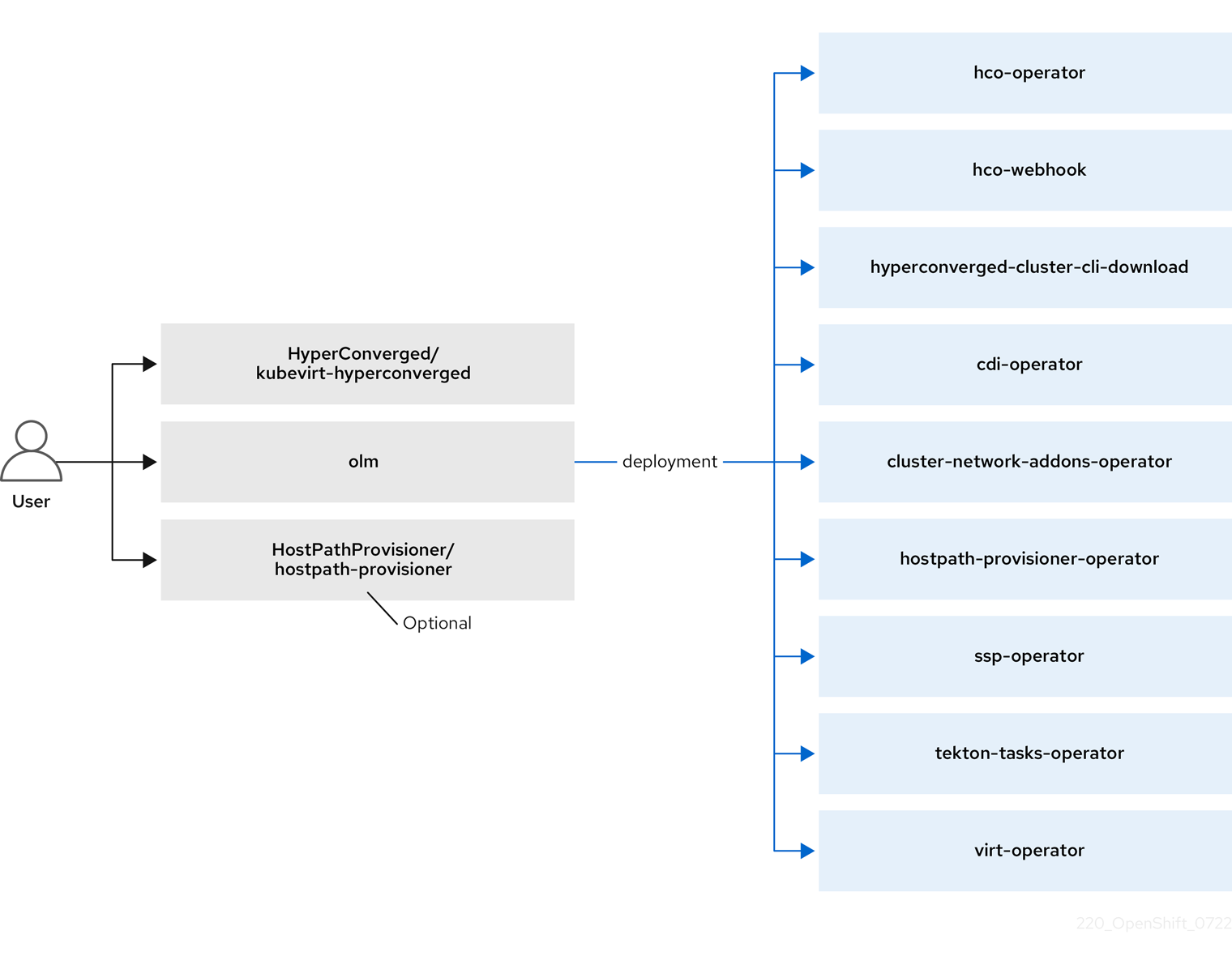
The Operator Lifecycle Manager (OLM) deploys operator pods for each component of OpenShift Virtualization:
-
Compute:
virt-operator -
Storage:
cdi-operator -
Network:
cluster-network-addons-operator -
Scaling:
ssp-operator -
Templating:
tekton-tasks-operator
OLM also deploys the hyperconverged-cluster-operator pod, which is responsible for the deployment, configuration, and life cycle of other components, and several helper pods: hco-webhook, and hyperconverged-cluster-cli-download.
After all operator pods are successfully deployed, you should create the HyperConverged custom resource (CR). The configurations set in the HyperConverged CR serve as the single source of truth and the entrypoint for OpenShift Virtualization, and guide the behavior of the CRs.
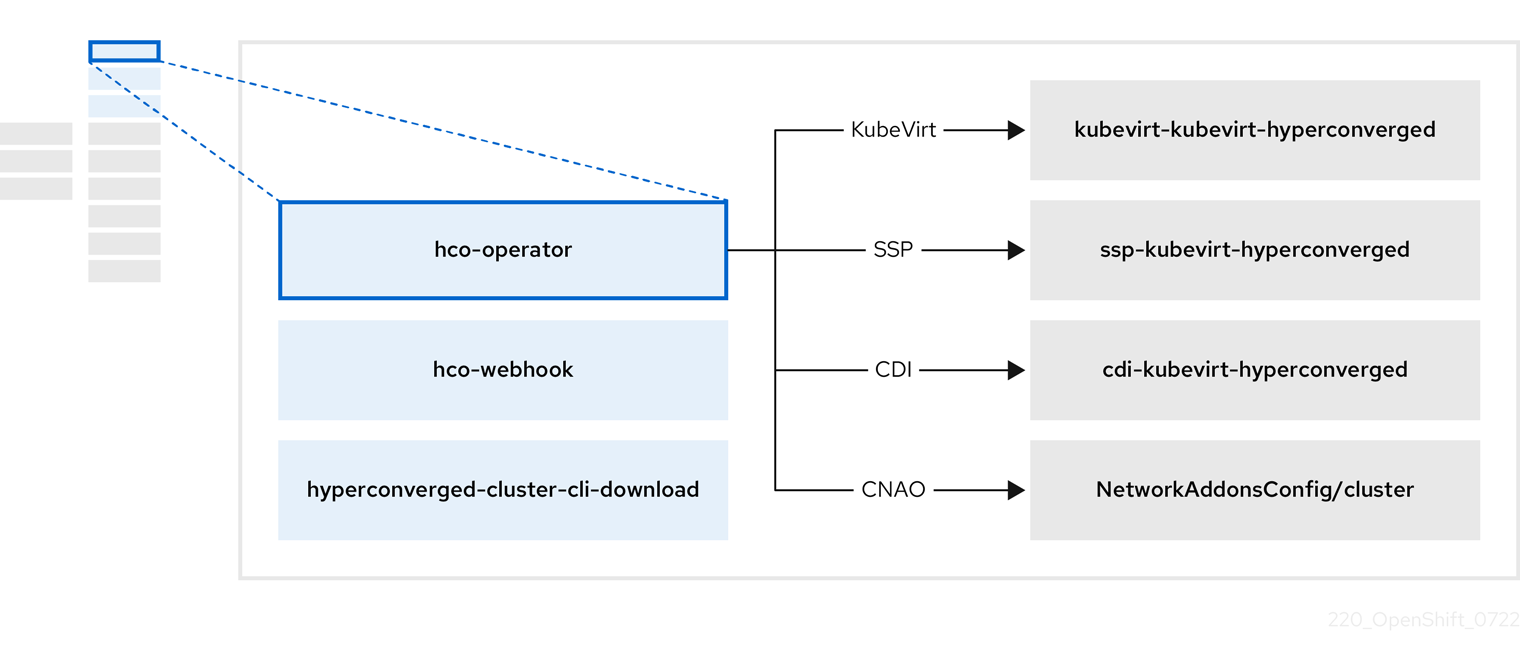
The HyperConverged CR creates corresponding CRs for the operators of all other components within its reconciliation loop. Each operator then creates resources such as daemon sets, config maps, and additional components for the OpenShift Virtualization control plane. For example, when the HyperConverged Operator (HCO) creates the KubeVirt CR, the OpenShift Virtualization Operator reconciles it and creates additional resources such as virt-controller, virt-handler, and virt-api.
The OLM deploys the Hostpath Provisioner (HPP) Operator, but it is not functional until you create a hostpath-provisioner CR.
1.4.1. About the HyperConverged Operator (HCO)
The HCO, hco-operator, provides a single entry point for deploying and managing OpenShift Virtualization and several helper operators with opinionated defaults. It also creates custom resources (CRs) for those operators.
| Component | Description |
|---|---|
|
|
Validates the |
|
|
Provides the |
|
| Contains all operators, CRs, and objects needed by OpenShift Virtualization. |
|
| A Scheduling, Scale, and Performance (SSP) CR. This is automatically created by the HCO. |
|
| A Containerized Data Importer (CDI) CR. This is automatically created by the HCO. |
|
|
A CR that instructs and is managed by the |
1.4.2. About the Containerized Data Importer (CDI) Operator
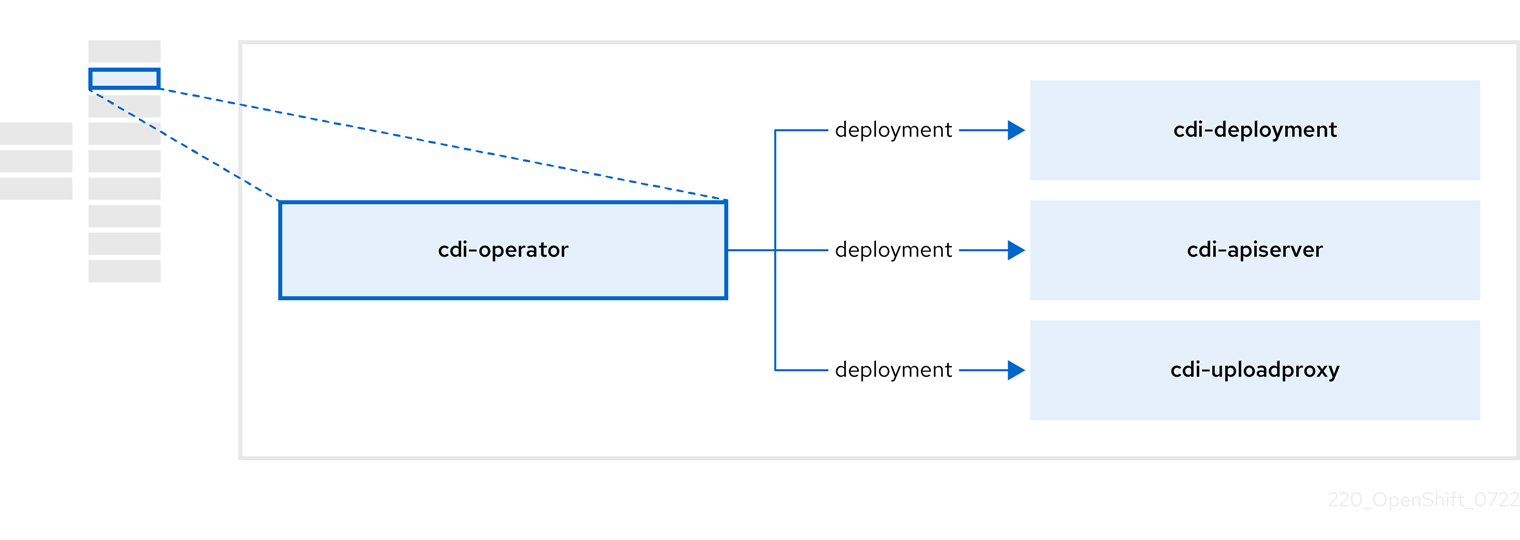
The CDI Operator, cdi-operator, manages CDI and its related resources, which imports a virtual machine (VM) image into a persistent volume claim (PVC) by using a data volume.
| Component | Description |
|---|---|
|
| Manages the authorization to upload VM disks into PVCs by issuing secure upload tokens. |
|
| Directs external disk upload traffic to the appropriate upload server pod so that it can be written to the correct PVC. Requires a valid upload token. |
|
| Helper pod that imports a virtual machine image into a PVC when creating a data volume. |
1.4.3. About the Cluster Network Addons Operator
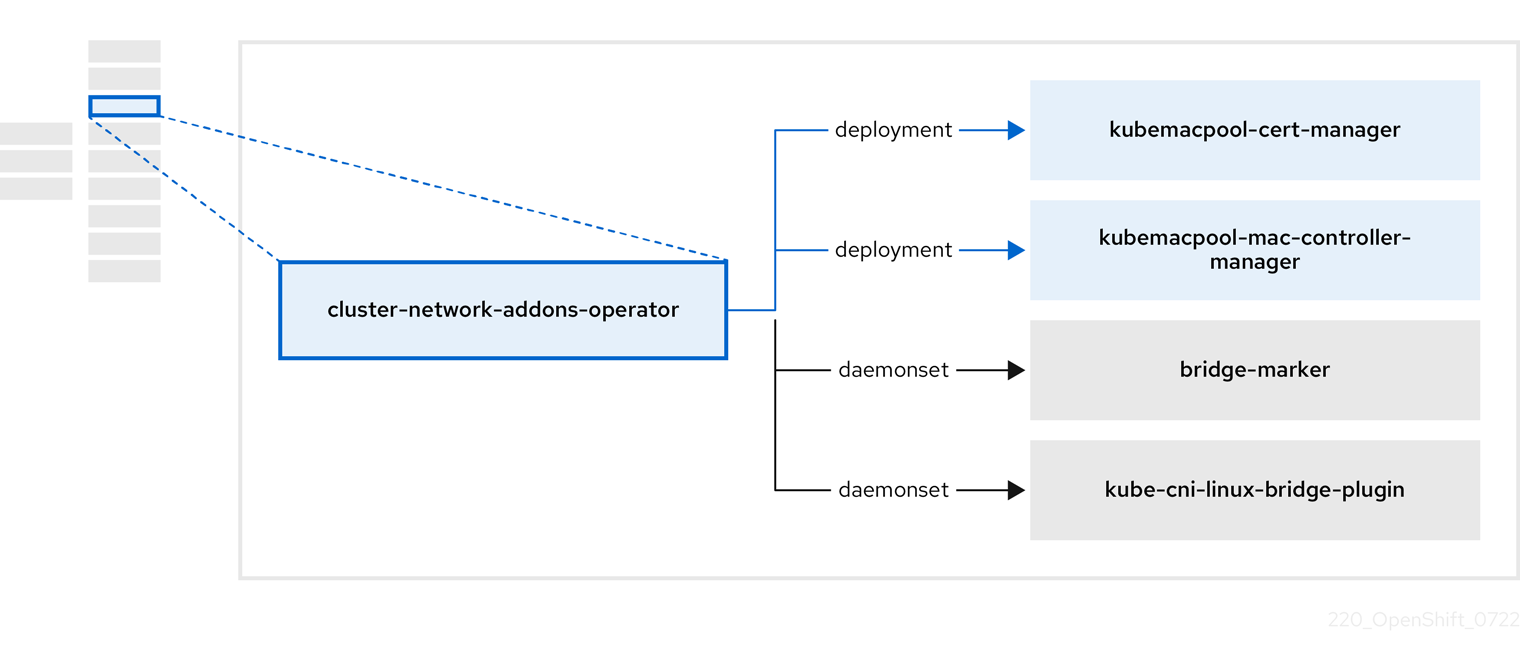
The Cluster Network Addons Operator, cluster-network-addons-operator, deploys networking components on a cluster and manages the related resources for extended network functionality.
| Component | Description |
|---|---|
|
| Manages TLS certificates of Kubemacpool’s webhooks. |
|
| Provides a MAC address pooling service for virtual machine (VM) network interface cards (NICs). |
|
| Marks network bridges available on nodes as node resources. |
|
| Installs Container Network Interface (CNI) plugins on cluster nodes, enabling the attachment of VMs to Linux bridges through network attachment definitions. |
1.4.4. About the Hostpath Provisioner (HPP) Operator
The HPP Operator, hostpath-provisioner-operator, deploys and manages the multi-node HPP and related resources.
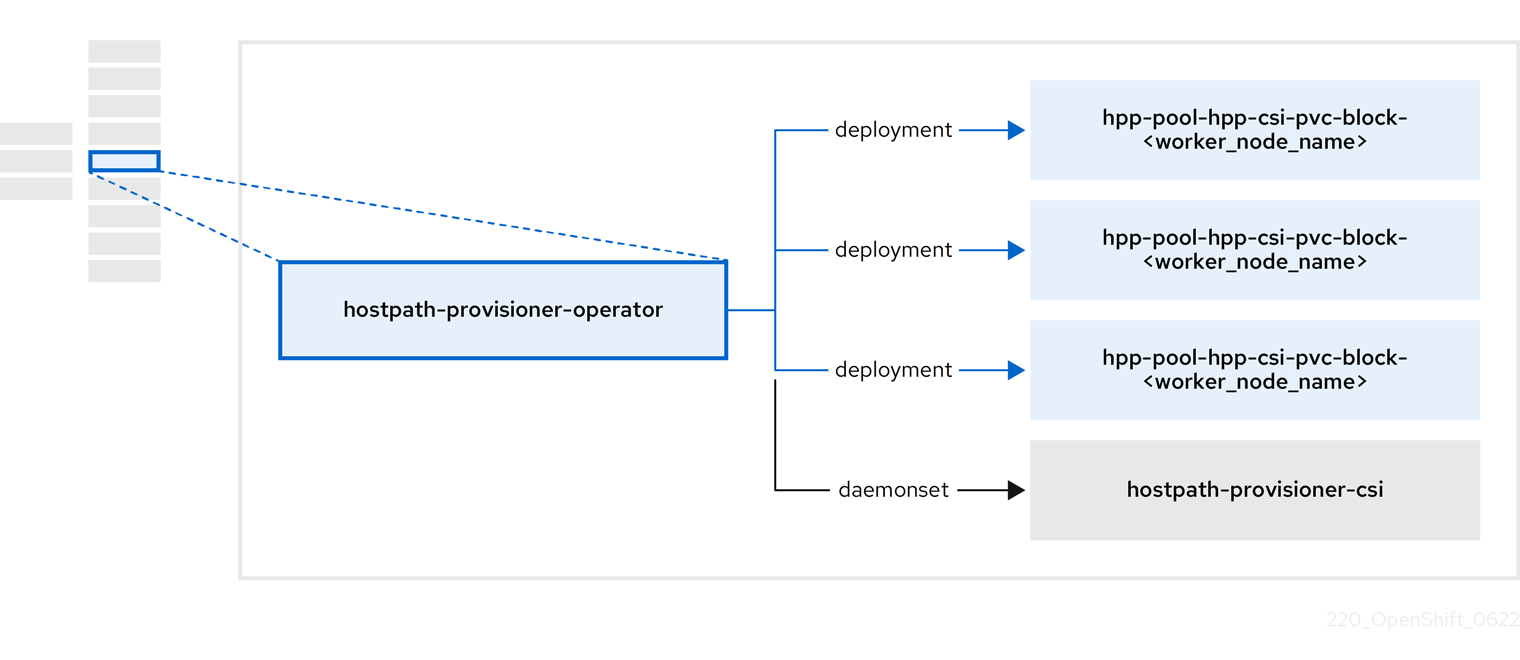
| Component | Description |
|---|---|
|
| Provides a worker for each node where the HPP is designated to run. The pods mount the specified backing storage on the node. |
|
| Implements the Container Storage Interface (CSI) driver interface of the HPP. |
|
| Implements the legacy driver interface of the HPP. |
1.4.5. About the Scheduling, Scale, and Performance (SSP) Operator
The SSP Operator, ssp-operator, deploys the common templates, the related default boot sources, the pipeline tasks, and the template validator.
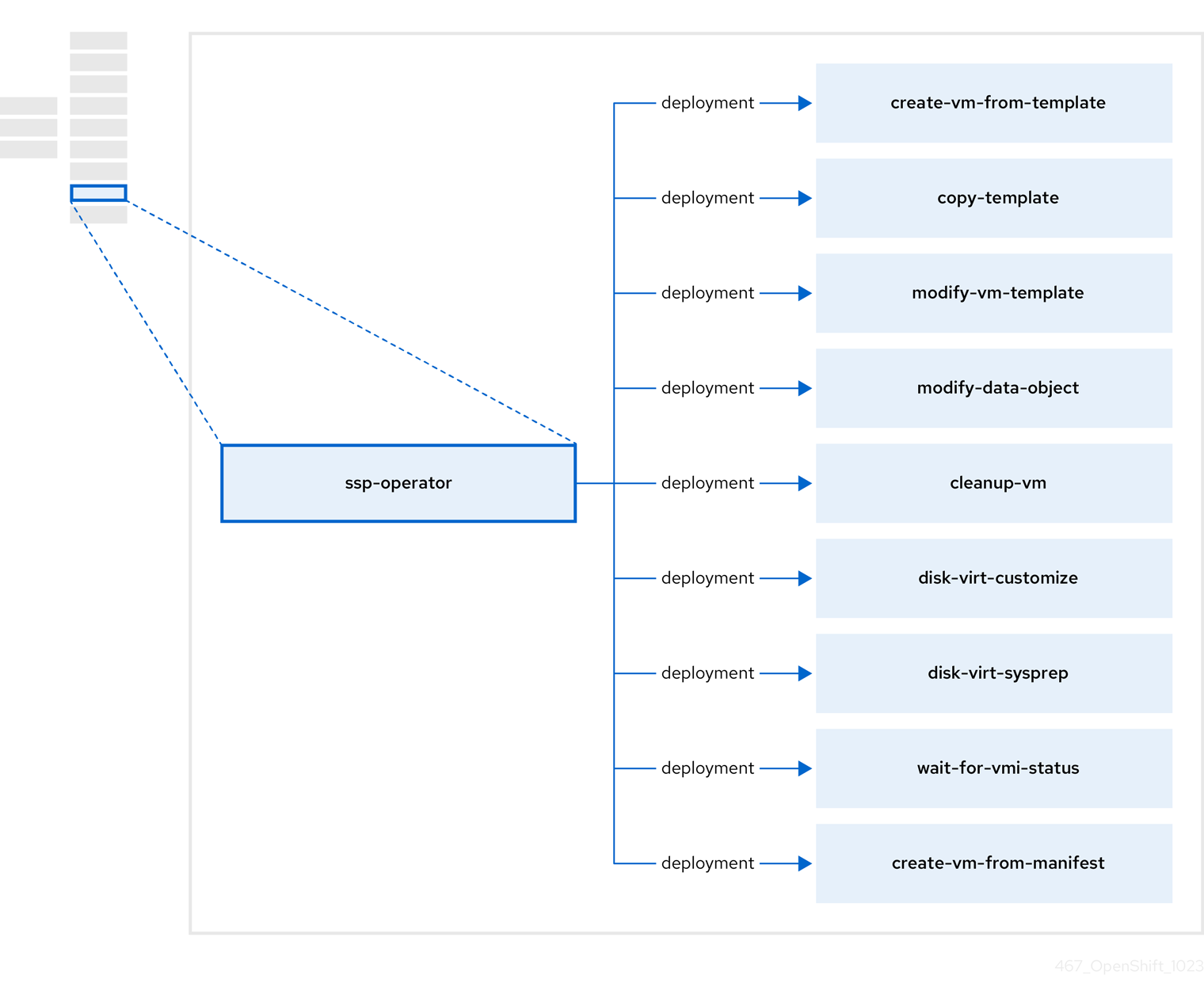
| Component | Description |
|---|---|
|
| Creates a VM from a template. |
|
| Copies a VM template. |
|
| Creates or removes a VM template. |
|
| Creates or removes data volumes or data sources. |
|
| Runs a script or a command on a VM, then stops or deletes the VM afterward. |
|
|
Runs a |
|
|
Runs a |
|
| Waits for a specific virtual machine instance (VMI) status, then fails or succeeds according to that status. |
|
| Creates a VM from a manifest. |
1.4.6. About the OpenShift Virtualization Operator
The OpenShift Virtualization Operator, virt-operator deploys, upgrades, and manages OpenShift Virtualization without disrupting current virtual machine (VM) workloads.
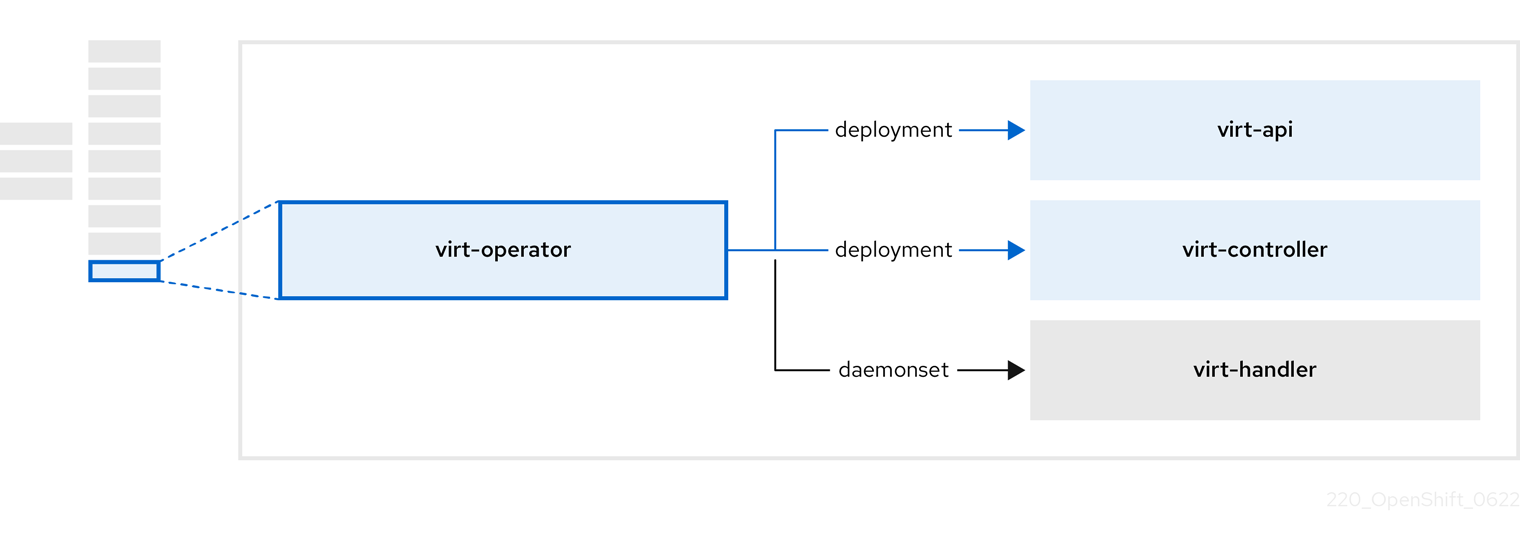
| Component | Description |
|---|---|
|
| HTTP API server that serves as the entry point for all virtualization-related flows. |
|
|
Observes the creation of a new VM instance object and creates a corresponding pod. When the pod is scheduled on a node, |
|
|
Monitors any changes to a VM and instructs |
|
|
Contains the VM that was created by the user as implemented by |

'%20d='M201.5%20305.5c-13.8%200-24.9-11.1-24.9-24.6%200-13.8%2011.1-24.9%2024.9-24.9%2013.6%200%2024.6%2011.1%2024.6%2024.9%200%2013.6-11.1%2024.6-24.6%2024.6zM504%20256c0%20137-111%20248-248%20248S8%20393%208%20256%20119%208%20256%208s248%20111%20248%20248zm-132.3-41.2c-9.4%200-17.7%203.9-23.8%2010-22.4-15.5-52.6-25.5-86.1-26.6l17.4-78.3%2055.4%2012.5c0%2013.6%2011.1%2024.6%2024.6%2024.6%2013.8%200%2024.9-11.3%2024.9-24.9s-11.1-24.9-24.9-24.9c-9.7%200-18%205.8-22.1%2013.8l-61.2-13.6c-3-.8-6.1%201.4-6.9%204.4l-19.1%2086.4c-33.2%201.4-63.1%2011.3-85.5%2026.8-6.1-6.4-14.7-10.2-24.1-10.2-34.9%200-46.3%2046.9-14.4%2062.8-1.1%205-1.7%2010.2-1.7%2015.5%200%2052.6%2059.2%2095.2%20132%2095.2%2073.1%200%20132.3-42.6%20132.3-95.2%200-5.3-.6-10.8-1.9-15.8%2031.3-16%2019.8-62.5-14.9-62.5zM302.8%20331c-18.2%2018.2-76.1%2017.9-93.6%200-2.2-2.2-6.1-2.2-8.3%200-2.5%202.5-2.5%206.4%200%208.6%2022.8%2022.8%2087.3%2022.8%20110.2%200%202.5-2.2%202.5-6.1%200-8.6-2.2-2.2-6.1-2.2-8.3%200zm7.7-75c-13.6%200-24.6%2011.1-24.6%2024.9%200%2013.6%2011.1%2024.6%2024.6%2024.6%2013.8%200%2024.9-11.1%2024.9-24.6%200-13.8-11-24.9-24.9-24.9z'/%3e%3c/svg%3e)