 Red Hat Summit
Dieser Inhalt ist in der von Ihnen ausgewählten Sprache nicht verfügbar.
Chapter 11. Preparing for users
After installing OpenShift Container Platform, you can further expand and customize your cluster to your requirements, including taking steps to prepare for users.
11.1. Understanding identity provider configuration
The OpenShift Container Platform control plane includes a built-in OAuth server. Developers and administrators obtain OAuth access tokens to authenticate themselves to the API.
As an administrator, you can configure OAuth to specify an identity provider after you install your cluster.
11.1.1. About identity providers in OpenShift Container Platform
By default, only a kubeadmin user exists on your cluster. To specify an identity provider, you must create a custom resource (CR) that describes that identity provider and add it to the cluster.
OpenShift Container Platform user names containing /, :, and % are not supported.
11.1.2. Supported identity providers
You can configure the following types of identity providers:
| Identity provider | Description |
|---|---|
|
Configure the | |
|
Configure the | |
|
Configure the | |
|
Configure a | |
|
Configure a | |
|
Configure a | |
|
Configure a | |
|
Configure a | |
|
Configure an |
After you define an identity provider, you can use RBAC to define and apply permissions.
11.1.3. Identity provider parameters
The following parameters are common to all identity providers:
| Parameter | Description |
|---|---|
|
| The provider name is prefixed to provider user names to form an identity name. |
|
| Defines how new identities are mapped to users when they log in. Enter one of the following values:
|
When adding or changing identity providers, you can map identities from the new provider to existing users by setting the mappingMethod parameter to add.
11.1.4. Sample identity provider CR
The following custom resource (CR) shows the parameters and default values that you use to configure an identity provider. This example uses the htpasswd identity provider.
Sample identity provider CR
apiVersion: config.openshift.io/v1
kind: OAuth
metadata:
  name: cluster
spec:
  identityProviders:
  - name: my_identity_provider
mappingMethod: claim
    type: HTPasswd
    htpasswd:
      fileData:
name: htpass-secret 11.2. Using RBAC to define and apply permissions
Understand and apply role-based access control.
11.2.1. RBAC overview
Role-based access control (RBAC) objects determine whether a user is allowed to perform a given action within a project.
Cluster administrators can use the cluster roles and bindings to control who has various access levels to the OpenShift Container Platform platform itself and all projects.
Developers can use local roles and bindings to control who has access to their projects. Note that authorization is a separate step from authentication, which is more about determining the identity of who is taking the action.
Authorization is managed using:
| Authorization object | Description |
|---|---|
| Rules |
Sets of permitted verbs on a set of objects. For example, whether a user or service account can |
| Roles | Collections of rules. You can associate, or bind, users and groups to multiple roles. |
| Bindings | Associations between users and/or groups with a role. |
There are two levels of RBAC roles and bindings that control authorization:
| RBAC level | Description |
|---|---|
| Cluster RBAC | Roles and bindings that are applicable across all projects. Cluster roles exist cluster-wide, and cluster role bindings can reference only cluster roles. |
| Local RBAC | Roles and bindings that are scoped to a given project. While local roles exist only in a single project, local role bindings can reference both cluster and local roles. |
A cluster role binding is a binding that exists at the cluster level. A role binding exists at the project level. The cluster role view must be bound to a user using a local role binding for that user to view the project. Create local roles only if a cluster role does not provide the set of permissions needed for a particular situation.
This two-level hierarchy allows reuse across multiple projects through the cluster roles while allowing customization inside of individual projects through local roles.
During evaluation, both the cluster role bindings and the local role bindings are used. For example:
- Cluster-wide "allow" rules are checked.
- Locally-bound "allow" rules are checked.
- Deny by default.
11.2.1.1. Default cluster roles
OpenShift Container Platform includes a set of default cluster roles that you can bind to users and groups cluster-wide or locally.
It is not recommended to manually modify the default cluster roles. Modifications to these system roles can prevent a cluster from functioning properly.
| Default cluster role | Description |
|---|---|
|
|
A project manager. If used in a local binding, an |
|
| A user that can get basic information about projects and users. |
|
| A super-user that can perform any action in any project. When bound to a user with a local binding, they have full control over quota and every action on every resource in the project. |
|
| A user that can get basic cluster status information. |
|
| A user that can get or view most of the objects but cannot modify them. |
|
| A user that can modify most objects in a project but does not have the power to view or modify roles or bindings. |
|
| A user that can create their own projects. |
|
| A user who cannot make any modifications, but can see most objects in a project. They cannot view or modify roles or bindings. |
Be mindful of the difference between local and cluster bindings. For example, if you bind the cluster-admin role to a user by using a local role binding, it might appear that this user has the privileges of a cluster administrator. This is not the case. Binding the cluster-admin to a user in a project grants super administrator privileges for only that project to the user. That user has the permissions of the cluster role admin, plus a few additional permissions like the ability to edit rate limits, for that project. This binding can be confusing via the web console UI, which does not list cluster role bindings that are bound to true cluster administrators. However, it does list local role bindings that you can use to locally bind cluster-admin.
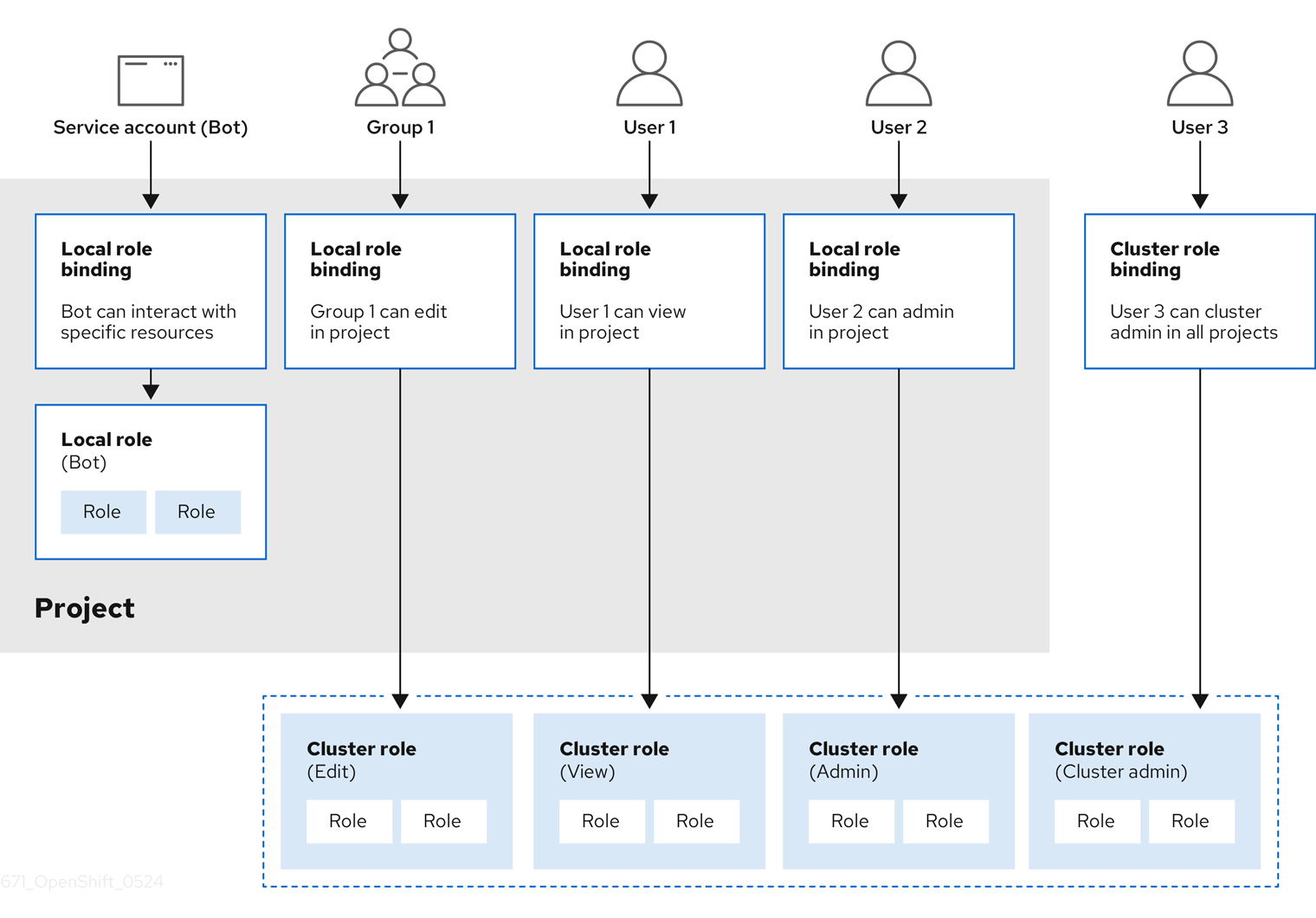
The relationships between cluster roles, local roles, cluster role bindings, local role bindings, users, groups and service accounts are illustrated below.
The get pods/exec, get pods/*, and get * rules grant execution privileges when they are applied to a role. Apply the principle of least privilege and assign only the minimal RBAC rights required for users and agents. For more information, see RBAC rules allow execution privileges.
11.2.1.2. Evaluating authorization
OpenShift Container Platform evaluates authorization by using:
- Identity
- The user name and list of groups that the user belongs to.
- Action
The action you perform. In most cases, this consists of:
- Project: The project you access. A project is a Kubernetes namespace with additional annotations that allows a community of users to organize and manage their content in isolation from other communities.
-
Verb : The action itself:
get,list,create,update,delete,deletecollection, orwatch. - Resource name: The API endpoint that you access.
- Bindings
- The full list of bindings, the associations between users or groups with a role.
OpenShift Container Platform evaluates authorization by using the following steps:
- The identity and the project-scoped action is used to find all bindings that apply to the user or their groups.
- Bindings are used to locate all the roles that apply.
- Roles are used to find all the rules that apply.
- The action is checked against each rule to find a match.
- If no matching rule is found, the action is then denied by default.
Remember that users and groups can be associated with, or bound to, multiple roles at the same time.
Project administrators can use the CLI to view local roles and bindings, including a matrix of the verbs and resources each are associated with.
The cluster role bound to the project administrator is limited in a project through a local binding. It is not bound cluster-wide like the cluster roles granted to the cluster-admin or system:admin.
Cluster roles are roles defined at the cluster level but can be bound either at the cluster level or at the project level.
11.2.1.2.1. Cluster role aggregation
The default admin, edit, view, and cluster-reader cluster roles support cluster role aggregation, where the cluster rules for each role are dynamically updated as new rules are created. This feature is relevant only if you extend the Kubernetes API by creating custom resources.
11.2.2. Projects and namespaces
A Kubernetes namespace provides a mechanism to scope resources in a cluster. The Kubernetes documentation has more information on namespaces.
Namespaces provide a unique scope for:
- Named resources to avoid basic naming collisions.
- Delegated management authority to trusted users.
- The ability to limit community resource consumption.
Most objects in the system are scoped by namespace, but some are excepted and have no namespace, including nodes and users.
A project is a Kubernetes namespace with additional annotations and is the central vehicle by which access to resources for regular users is managed. A project allows a community of users to organize and manage their content in isolation from other communities. Users must be given access to projects by administrators, or if allowed to create projects, automatically have access to their own projects.
Projects can have a separate name, displayName, and description.
-
The mandatory
nameis a unique identifier for the project and is most visible when using the CLI tools or API. The maximum name length is 63 characters. -
The optional
displayNameis how the project is displayed in the web console (defaults toname). -
The optional
descriptioncan be a more detailed description of the project and is also visible in the web console.
Each project scopes its own set of:
| Object | Description |
|---|---|
|
| Pods, services, replication controllers, etc. |
|
| Rules for which users can or cannot perform actions on objects. |
|
| Quotas for each kind of object that can be limited. |
|
| Service accounts act automatically with designated access to objects in the project. |
Cluster administrators can create projects and delegate administrative rights for the project to any member of the user community. Cluster administrators can also allow developers to create their own projects.
Developers and administrators can interact with projects by using the CLI or the web console.
11.2.3. Default projects
OpenShift Container Platform comes with a number of default projects, and projects starting with openshift- are the most essential to users. These projects host master components that run as pods and other infrastructure components. The pods created in these namespaces that have a critical pod annotation are considered critical, and the have guaranteed admission by kubelet. Pods created for master components in these namespaces are already marked as critical.
Do not run workloads in or share access to default projects. Default projects are reserved for running core cluster components.
The following default projects are considered highly privileged: default, kube-public, kube-system, openshift, openshift-infra, openshift-node, and other system-created projects that have the openshift.io/run-level label set to 0 or 1. Functionality that relies on admission plugins, such as pod security admission, security context constraints, cluster resource quotas, and image reference resolution, does not work in highly privileged projects.
11.2.4. Viewing cluster roles and bindings
You can use the oc CLI to view cluster roles and bindings by using the oc describe command.
Prerequisites
-
Install the
ocCLI. - Obtain permission to view the cluster roles and bindings.
Users with the cluster-admin default cluster role bound cluster-wide can perform any action on any resource, including viewing cluster roles and bindings.
Procedure
To view the cluster roles and their associated rule sets:
$ oc describe clusterrole.rbacExample output
Name: admin Labels: kubernetes.io/bootstrapping=rbac-defaults Annotations: rbac.authorization.kubernetes.io/autoupdate: true PolicyRule: Resources Non-Resource URLs Resource Names Verbs --------- ----------------- -------------- ----- .packages.apps.redhat.com [] [] [* create update patch delete get list watch] imagestreams [] [] [create delete deletecollection get list patch update watch create get list watch] imagestreams.image.openshift.io [] [] [create delete deletecollection get list patch update watch create get list watch] secrets [] [] [create delete deletecollection get list patch update watch get list watch create delete deletecollection patch update] buildconfigs/webhooks [] [] [create delete deletecollection get list patch update watch get list watch] buildconfigs [] [] [create delete deletecollection get list patch update watch get list watch] buildlogs [] [] [create delete deletecollection get list patch update watch get list watch] deploymentconfigs/scale [] [] [create delete deletecollection get list patch update watch get list watch] deploymentconfigs [] [] [create delete deletecollection get list patch update watch get list watch] imagestreamimages [] [] [create delete deletecollection get list patch update watch get list watch] imagestreammappings [] [] [create delete deletecollection get list patch update watch get list watch] imagestreamtags [] [] [create delete deletecollection get list patch update watch get list watch] processedtemplates [] [] [create delete deletecollection get list patch update watch get list watch] routes [] [] [create delete deletecollection get list patch update watch get list watch] templateconfigs [] [] [create delete deletecollection get list patch update watch get list watch] templateinstances [] [] [create delete deletecollection get list patch update watch get list watch] templates [] [] [create delete deletecollection get list patch update watch get list watch] deploymentconfigs.apps.openshift.io/scale [] [] [create delete deletecollection get list patch update watch get list watch] deploymentconfigs.apps.openshift.io [] [] [create delete deletecollection get list patch update watch get list watch] buildconfigs.build.openshift.io/webhooks [] [] [create delete deletecollection get list patch update watch get list watch] buildconfigs.build.openshift.io [] [] [create delete deletecollection get list patch update watch get list watch] buildlogs.build.openshift.io [] [] [create delete deletecollection get list patch update watch get list watch] imagestreamimages.image.openshift.io [] [] [create delete deletecollection get list patch update watch get list watch] imagestreammappings.image.openshift.io [] [] [create delete deletecollection get list patch update watch get list watch] imagestreamtags.image.openshift.io [] [] [create delete deletecollection get list patch update watch get list watch] routes.route.openshift.io [] [] [create delete deletecollection get list patch update watch get list watch] processedtemplates.template.openshift.io [] [] [create delete deletecollection get list patch update watch get list watch] templateconfigs.template.openshift.io [] [] [create delete deletecollection get list patch update watch get list watch] templateinstances.template.openshift.io [] [] [create delete deletecollection get list patch update watch get list watch] templates.template.openshift.io [] [] [create delete deletecollection get list patch update watch get list watch] serviceaccounts [] [] [create delete deletecollection get list patch update watch impersonate create delete deletecollection patch update get list watch] imagestreams/secrets [] [] [create delete deletecollection get list patch update watch] rolebindings [] [] [create delete deletecollection get list patch update watch] roles [] [] [create delete deletecollection get list patch update watch] rolebindings.authorization.openshift.io [] [] [create delete deletecollection get list patch update watch] roles.authorization.openshift.io [] [] [create delete deletecollection get list patch update watch] imagestreams.image.openshift.io/secrets [] [] [create delete deletecollection get list patch update watch] rolebindings.rbac.authorization.k8s.io [] [] [create delete deletecollection get list patch update watch] roles.rbac.authorization.k8s.io [] [] [create delete deletecollection get list patch update watch] networkpolicies.extensions [] [] [create delete deletecollection patch update create delete deletecollection get list patch update watch get list watch] networkpolicies.networking.k8s.io [] [] [create delete deletecollection patch update create delete deletecollection get list patch update watch get list watch] configmaps [] [] [create delete deletecollection patch update get list watch] endpoints [] [] [create delete deletecollection patch update get list watch] persistentvolumeclaims [] [] [create delete deletecollection patch update get list watch] pods [] [] [create delete deletecollection patch update get list watch] replicationcontrollers/scale [] [] [create delete deletecollection patch update get list watch] replicationcontrollers [] [] [create delete deletecollection patch update get list watch] services [] [] [create delete deletecollection patch update get list watch] daemonsets.apps [] [] [create delete deletecollection patch update get list watch] deployments.apps/scale [] [] [create delete deletecollection patch update get list watch] deployments.apps [] [] [create delete deletecollection patch update get list watch] replicasets.apps/scale [] [] [create delete deletecollection patch update get list watch] replicasets.apps [] [] [create delete deletecollection patch update get list watch] statefulsets.apps/scale [] [] [create delete deletecollection patch update get list watch] statefulsets.apps [] [] [create delete deletecollection patch update get list watch] horizontalpodautoscalers.autoscaling [] [] [create delete deletecollection patch update get list watch] cronjobs.batch [] [] [create delete deletecollection patch update get list watch] jobs.batch [] [] [create delete deletecollection patch update get list watch] daemonsets.extensions [] [] [create delete deletecollection patch update get list watch] deployments.extensions/scale [] [] [create delete deletecollection patch update get list watch] deployments.extensions [] [] [create delete deletecollection patch update get list watch] ingresses.extensions [] [] [create delete deletecollection patch update get list watch] replicasets.extensions/scale [] [] [create delete deletecollection patch update get list watch] replicasets.extensions [] [] [create delete deletecollection patch update get list watch] replicationcontrollers.extensions/scale [] [] [create delete deletecollection patch update get list watch] poddisruptionbudgets.policy [] [] [create delete deletecollection patch update get list watch] deployments.apps/rollback [] [] [create delete deletecollection patch update] deployments.extensions/rollback [] [] [create delete deletecollection patch update] catalogsources.operators.coreos.com [] [] [create update patch delete get list watch] clusterserviceversions.operators.coreos.com [] [] [create update patch delete get list watch] installplans.operators.coreos.com [] [] [create update patch delete get list watch] packagemanifests.operators.coreos.com [] [] [create update patch delete get list watch] subscriptions.operators.coreos.com [] [] [create update patch delete get list watch] buildconfigs/instantiate [] [] [create] buildconfigs/instantiatebinary [] [] [create] builds/clone [] [] [create] deploymentconfigrollbacks [] [] [create] deploymentconfigs/instantiate [] [] [create] deploymentconfigs/rollback [] [] [create] imagestreamimports [] [] [create] localresourceaccessreviews [] [] [create] localsubjectaccessreviews [] [] [create] podsecuritypolicyreviews [] [] [create] podsecuritypolicyselfsubjectreviews [] [] [create] podsecuritypolicysubjectreviews [] [] [create] resourceaccessreviews [] [] [create] routes/custom-host [] [] [create] subjectaccessreviews [] [] [create] subjectrulesreviews [] [] [create] deploymentconfigrollbacks.apps.openshift.io [] [] [create] deploymentconfigs.apps.openshift.io/instantiate [] [] [create] deploymentconfigs.apps.openshift.io/rollback [] [] [create] localsubjectaccessreviews.authorization.k8s.io [] [] [create] localresourceaccessreviews.authorization.openshift.io [] [] [create] localsubjectaccessreviews.authorization.openshift.io [] [] [create] resourceaccessreviews.authorization.openshift.io [] [] [create] subjectaccessreviews.authorization.openshift.io [] [] [create] subjectrulesreviews.authorization.openshift.io [] [] [create] buildconfigs.build.openshift.io/instantiate [] [] [create] buildconfigs.build.openshift.io/instantiatebinary [] [] [create] builds.build.openshift.io/clone [] [] [create] imagestreamimports.image.openshift.io [] [] [create] routes.route.openshift.io/custom-host [] [] [create] podsecuritypolicyreviews.security.openshift.io [] [] [create] podsecuritypolicyselfsubjectreviews.security.openshift.io [] [] [create] podsecuritypolicysubjectreviews.security.openshift.io [] [] [create] jenkins.build.openshift.io [] [] [edit view view admin edit view] builds [] [] [get create delete deletecollection get list patch update watch get list watch] builds.build.openshift.io [] [] [get create delete deletecollection get list patch update watch get list watch] projects [] [] [get delete get delete get patch update] projects.project.openshift.io [] [] [get delete get delete get patch update] namespaces [] [] [get get list watch] pods/attach [] [] [get list watch create delete deletecollection patch update] pods/exec [] [] [get list watch create delete deletecollection patch update] pods/portforward [] [] [get list watch create delete deletecollection patch update] pods/proxy [] [] [get list watch create delete deletecollection patch update] services/proxy [] [] [get list watch create delete deletecollection patch update] routes/status [] [] [get list watch update] routes.route.openshift.io/status [] [] [get list watch update] appliedclusterresourcequotas [] [] [get list watch] bindings [] [] [get list watch] builds/log [] [] [get list watch] deploymentconfigs/log [] [] [get list watch] deploymentconfigs/status [] [] [get list watch] events [] [] [get list watch] imagestreams/status [] [] [get list watch] limitranges [] [] [get list watch] namespaces/status [] [] [get list watch] pods/log [] [] [get list watch] pods/status [] [] [get list watch] replicationcontrollers/status [] [] [get list watch] resourcequotas/status [] [] [get list watch] resourcequotas [] [] [get list watch] resourcequotausages [] [] [get list watch] rolebindingrestrictions [] [] [get list watch] deploymentconfigs.apps.openshift.io/log [] [] [get list watch] deploymentconfigs.apps.openshift.io/status [] [] [get list watch] controllerrevisions.apps [] [] [get list watch] rolebindingrestrictions.authorization.openshift.io [] [] [get list watch] builds.build.openshift.io/log [] [] [get list watch] imagestreams.image.openshift.io/status [] [] [get list watch] appliedclusterresourcequotas.quota.openshift.io [] [] [get list watch] imagestreams/layers [] [] [get update get] imagestreams.image.openshift.io/layers [] [] [get update get] builds/details [] [] [update] builds.build.openshift.io/details [] [] [update] Name: basic-user Labels: <none> Annotations: openshift.io/description: A user that can get basic information about projects. rbac.authorization.kubernetes.io/autoupdate: true PolicyRule: Resources Non-Resource URLs Resource Names Verbs --------- ----------------- -------------- ----- selfsubjectrulesreviews [] [] [create] selfsubjectaccessreviews.authorization.k8s.io [] [] [create] selfsubjectrulesreviews.authorization.openshift.io [] [] [create] clusterroles.rbac.authorization.k8s.io [] [] [get list watch] clusterroles [] [] [get list] clusterroles.authorization.openshift.io [] [] [get list] storageclasses.storage.k8s.io [] [] [get list] users [] [~] [get] users.user.openshift.io [] [~] [get] projects [] [] [list watch] projects.project.openshift.io [] [] [list watch] projectrequests [] [] [list] projectrequests.project.openshift.io [] [] [list] Name: cluster-admin Labels: kubernetes.io/bootstrapping=rbac-defaults Annotations: rbac.authorization.kubernetes.io/autoupdate: true PolicyRule: Resources Non-Resource URLs Resource Names Verbs --------- ----------------- -------------- ----- *.* [] [] [*] [*] [] [*] ...To view the current set of cluster role bindings, which shows the users and groups that are bound to various roles:
$ oc describe clusterrolebinding.rbacExample output
Name:         alertmanager-main
Labels:       <none>
Annotations:  <none>
Role:
  Kind:  ClusterRole
  Name:  alertmanager-main
Subjects:
  Kind            Name               Namespace
  ----            ----               ---------
  ServiceAccount  alertmanager-main  openshift-monitoring


Name:         basic-users
Labels:       <none>
Annotations:  rbac.authorization.kubernetes.io/autoupdate: true
Role:
  Kind:  ClusterRole
  Name:  basic-user
Subjects:
  Kind   Name                  Namespace
  ----   ----                  ---------
  Group  system:authenticated


Name:         cloud-credential-operator-rolebinding
Labels:       <none>
Annotations:  <none>
Role:
  Kind:  ClusterRole
  Name:  cloud-credential-operator-role
Subjects:
  Kind            Name     Namespace
  ----            ----     ---------
  ServiceAccount  default  openshift-cloud-credential-operator


Name:         cluster-admin
Labels:       kubernetes.io/bootstrapping=rbac-defaults
Annotations:  rbac.authorization.kubernetes.io/autoupdate: true
Role:
  Kind:  ClusterRole
  Name:  cluster-admin
Subjects:
  Kind   Name            Namespace
  ----   ----            ---------
  Group  system:masters


Name:         cluster-admins
Labels:       <none>
Annotations:  rbac.authorization.kubernetes.io/autoupdate: true
Role:
  Kind:  ClusterRole
  Name:  cluster-admin
Subjects:
  Kind   Name                   Namespace
  ----   ----                   ---------
  Group  system:cluster-admins
  User   system:admin


Name:         cluster-api-manager-rolebinding
Labels:       <none>
Annotations:  <none>
Role:
  Kind:  ClusterRole
  Name:  cluster-api-manager-role
Subjects:
  Kind            Name     Namespace
  ----            ----     ---------
  ServiceAccount  default  openshift-machine-api

...
11.2.5. Viewing local roles and bindings
You can use the oc CLI to view local roles and bindings by using the oc describe command.
Prerequisites
-
Install the
ocCLI. Obtain permission to view the local roles and bindings:
-
Users with the
cluster-admindefault cluster role bound cluster-wide can perform any action on any resource, including viewing local roles and bindings. -
Users with the
admindefault cluster role bound locally can view and manage roles and bindings in that project.
-
Users with the
Procedure
To view the current set of local role bindings, which show the users and groups that are bound to various roles for the current project:
$ oc describe rolebinding.rbacTo view the local role bindings for a different project, add the
-nflag to the command:$ oc describe rolebinding.rbac -n joe-projectExample output
Name:         admin
Labels:       <none>
Annotations:  <none>
Role:
  Kind:  ClusterRole
  Name:  admin
Subjects:
  Kind  Name        Namespace
  ----  ----        ---------
  User  kube:admin


Name:         system:deployers
Labels:       <none>
Annotations:  openshift.io/description:
                Allows deploymentconfigs in this namespace to rollout pods in
                this namespace.  It is auto-managed by a controller; remove
                subjects to disa...
Role:
  Kind:  ClusterRole
  Name:  system:deployer
Subjects:
  Kind            Name      Namespace
  ----            ----      ---------
  ServiceAccount  deployer  joe-project


Name:         system:image-builders
Labels:       <none>
Annotations:  openshift.io/description:
                Allows builds in this namespace to push images to this
                namespace.  It is auto-managed by a controller; remove subjects
                to disable.
Role:
  Kind:  ClusterRole
  Name:  system:image-builder
Subjects:
  Kind            Name     Namespace
  ----            ----     ---------
  ServiceAccount  builder  joe-project


Name:         system:image-pullers
Labels:       <none>
Annotations:  openshift.io/description:
                Allows all pods in this namespace to pull images from this
                namespace.  It is auto-managed by a controller; remove subjects
                to disable.
Role:
  Kind:  ClusterRole
  Name:  system:image-puller
Subjects:
  Kind   Name                                Namespace
  ----   ----                                ---------
  Group  system:serviceaccounts:joe-project
11.2.6. Adding roles to users
You can use the oc adm administrator CLI to manage the roles and bindings.
Binding, or adding, a role to users or groups gives the user or group the access that is granted by the role. You can add and remove roles to and from users and groups using oc adm policy commands.
You can bind any of the default cluster roles to local users or groups in your project.
Procedure
Add a role to a user in a specific project:
$ oc adm policy add-role-to-user <role> <user> -n <project>For example, you can add the
adminrole to thealiceuser injoeproject by running:$ oc adm policy add-role-to-user admin alice -n joeTipYou can alternatively apply the following YAML to add the role to the user:
apiVersion: rbac.authorization.k8s.io/v1
kind: RoleBinding
metadata:
  name: admin-0
  namespace: joe
roleRef:
  apiGroup: rbac.authorization.k8s.io
  kind: ClusterRole
  name: admin
subjects:
- apiGroup: rbac.authorization.k8s.io
  kind: User
  name: alice
View the local role bindings and verify the addition in the output:
$ oc describe rolebinding.rbac -n <project>For example, to view the local role bindings for the
joeproject:$ oc describe rolebinding.rbac -n joeExample output
Name:         admin
Labels:       <none>
Annotations:  <none>
Role:
  Kind:  ClusterRole
  Name:  admin
Subjects:
  Kind  Name        Namespace
  ----  ----        ---------
  User  kube:admin


Name:         admin-0
Labels:       <none>
Annotations:  <none>
Role:
  Kind:  ClusterRole
  Name:  admin
Subjects:
  Kind  Name   Namespace
  ----  ----   ---------
  User  alice
1 Name: system:deployers Labels: <none> Annotations: openshift.io/description: Allows deploymentconfigs in this namespace to rollout pods in this namespace. It is auto-managed by a controller; remove subjects to disa... Role: Kind: ClusterRole Name: system:deployer Subjects: Kind Name Namespace ---- ---- --------- ServiceAccount deployer joe Name: system:image-builders Labels: <none> Annotations: openshift.io/description: Allows builds in this namespace to push images to this namespace. It is auto-managed by a controller; remove subjects to disable. Role: Kind: ClusterRole Name: system:image-builder Subjects: Kind Name Namespace ---- ---- --------- ServiceAccount builder joe Name: system:image-pullers Labels: <none> Annotations: openshift.io/description: Allows all pods in this namespace to pull images from this namespace. It is auto-managed by a controller; remove subjects to disable. Role: Kind: ClusterRole Name: system:image-puller Subjects: Kind Name Namespace ---- ---- --------- Group system:serviceaccounts:joe- 1
- The
aliceuser has been added to theadminsRoleBinding.
11.2.7. Creating a local role
You can create a local role for a project and then bind it to a user.
Procedure
To create a local role for a project, run the following command:
$ oc create role <name> --verb=<verb> --resource=<resource> -n <project>In this command, specify:
-
<name>, the local role’s name -
<verb>, a comma-separated list of the verbs to apply to the role -
<resource>, the resources that the role applies to -
<project>, the project name
For example, to create a local role that allows a user to view pods in the
blueproject, run the following command:$ oc create role podview --verb=get --resource=pod -n blue-
To bind the new role to a user, run the following command:
$ oc adm policy add-role-to-user podview user2 --role-namespace=blue -n blue
11.2.8. Creating a cluster role
You can create a cluster role.
Procedure
To create a cluster role, run the following command:
$ oc create clusterrole <name> --verb=<verb> --resource=<resource>In this command, specify:
-
<name>, the local role’s name -
<verb>, a comma-separated list of the verbs to apply to the role -
<resource>, the resources that the role applies to
For example, to create a cluster role that allows a user to view pods, run the following command:
$ oc create clusterrole podviewonly --verb=get --resource=pod-
11.2.9. Local role binding commands
When you manage a user or group’s associated roles for local role bindings using the following operations, a project may be specified with the -n flag. If it is not specified, then the current project is used.
You can use the following commands for local RBAC management.
| Command | Description |
|---|---|
|
| Indicates which users can perform an action on a resource. |
|
| Binds a specified role to specified users in the current project. |
|
| Removes a given role from specified users in the current project. |
|
| Removes specified users and all of their roles in the current project. |
|
| Binds a given role to specified groups in the current project. |
|
| Removes a given role from specified groups in the current project. |
|
| Removes specified groups and all of their roles in the current project. |
11.2.10. Cluster role binding commands
You can also manage cluster role bindings using the following operations. The -n flag is not used for these operations because cluster role bindings use non-namespaced resources.
| Command | Description |
|---|---|
|
| Binds a given role to specified users for all projects in the cluster. |
|
| Removes a given role from specified users for all projects in the cluster. |
|
| Binds a given role to specified groups for all projects in the cluster. |
|
| Removes a given role from specified groups for all projects in the cluster. |
11.2.11. Creating a cluster admin
The cluster-admin role is required to perform administrator level tasks on the OpenShift Container Platform cluster, such as modifying cluster resources.
Prerequisites
- You must have created a user to define as the cluster admin.
Procedure
Define the user as a cluster admin:
$ oc adm policy add-cluster-role-to-user cluster-admin <user>
11.3. The kubeadmin user
OpenShift Container Platform creates a cluster administrator, kubeadmin, after the installation process completes.
This user has the cluster-admin role automatically applied and is treated as the root user for the cluster. The password is dynamically generated and unique to your OpenShift Container Platform environment. After installation completes the password is provided in the installation program’s output. For example:
INFO Install complete!
INFO Run 'export KUBECONFIG=<your working directory>/auth/kubeconfig' to manage the cluster with 'oc', the OpenShift CLI.
INFO The cluster is ready when 'oc login -u kubeadmin -p <provided>' succeeds (wait a few minutes).
INFO Access the OpenShift web-console here: https://console-openshift-console.apps.demo1.openshift4-beta-abcorp.com
INFO Login to the console with user: kubeadmin, password: <provided>
11.3.1. Removing the kubeadmin user
After you define an identity provider and create a new cluster-admin user, you can remove the kubeadmin to improve cluster security.
If you follow this procedure before another user is a cluster-admin, then OpenShift Container Platform must be reinstalled. It is not possible to undo this command.
Prerequisites
- You must have configured at least one identity provider.
-
You must have added the
cluster-adminrole to a user. - You must be logged in as an administrator.
Procedure
Remove the
kubeadminsecrets:$ oc delete secrets kubeadmin -n kube-system
11.4. Populating OperatorHub from mirrored Operator catalogs
If you mirrored Operator catalogs for use with disconnected clusters, you can populate OperatorHub with the Operators from your mirrored catalogs. You can use the generated manifests from the mirroring process to create the required ImageContentSourcePolicy and CatalogSource objects.
11.4.1. Prerequisites
11.4.1.1. Creating the ImageContentSourcePolicy object
After mirroring Operator catalog content to your mirror registry, create the required ImageContentSourcePolicy (ICSP) object. The ICSP object configures nodes to translate between the image references stored in Operator manifests and the mirrored registry.
Procedure
On a host with access to the disconnected cluster, create the ICSP by running the following command to specify the
imageContentSourcePolicy.yamlfile in your manifests directory:$ oc create -f <path/to/manifests/dir>/imageContentSourcePolicy.yamlwhere
<path/to/manifests/dir>is the path to the manifests directory for your mirrored content.You can now create a
CatalogSourceobject to reference your mirrored index image and Operator content.
11.4.1.2. Adding a catalog source to a cluster
Adding a catalog source to an OpenShift Container Platform cluster enables the discovery and installation of Operators for users. Cluster administrators can create a CatalogSource object that references an index image. OperatorHub uses catalog sources to populate the user interface.
Alternatively, you can use the web console to manage catalog sources. From the Administration
Prerequisites
- You built and pushed an index image to a registry.
-
You have access to the cluster as a user with the
cluster-adminrole.
Procedure
Create a
CatalogSourceobject that references your index image. If you used theoc adm catalog mirrorcommand to mirror your catalog to a target registry, you can use the generatedcatalogSource.yamlfile in your manifests directory as a starting point.Modify the following to your specifications and save it as a
catalogSource.yamlfile:apiVersion: operators.coreos.com/v1alpha1 kind: CatalogSource metadata: name: my-operator-catalog1 namespace: openshift-marketplace2 spec: sourceType: grpc grpcPodConfig: securityContextConfig: <security_mode>3 image: <registry>/<namespace>/redhat-operator-index:v4.144 displayName: My Operator Catalog publisher: <publisher_name>5 updateStrategy: registryPoll:6 interval: 30m- 1
- If you mirrored content to local files before uploading to a registry, remove any backslash (
/) characters from themetadata.namefield to avoid an "invalid resource name" error when you create the object. - 2
- If you want the catalog source to be available globally to users in all namespaces, specify the
openshift-marketplacenamespace. Otherwise, you can specify a different namespace for the catalog to be scoped and available only for that namespace. - 3
- Specify the value of
legacyorrestricted. If the field is not set, the default value islegacy. In a future OpenShift Container Platform release, it is planned that the default value will berestricted.NoteIf your catalog cannot run with
restrictedpermissions, it is recommended that you manually set this field tolegacy. - 4
- Specify your index image. If you specify a tag after the image name, for example
:v4.14, the catalog source pod uses an image pull policy ofAlways, meaning the pod always pulls the image prior to starting the container. If you specify a digest, for example@sha256:<id>, the image pull policy isIfNotPresent, meaning the pod pulls the image only if it does not already exist on the node. - 5
- Specify your name or an organization name publishing the catalog.
- 6
- Catalog sources can automatically check for new versions to keep up to date.
Use the file to create the
CatalogSourceobject:$ oc apply -f catalogSource.yaml
Verify the following resources are created successfully.
Check the pods:
$ oc get pods -n openshift-marketplaceExample output
NAME                                    READY   STATUS    RESTARTS  AGE
my-operator-catalog-6njx6               1/1     Running   0         28s
marketplace-operator-d9f549946-96sgr    1/1     Running   0         26h
Check the catalog source:
$ oc get catalogsource -n openshift-marketplaceExample output
NAME                  DISPLAY               TYPE PUBLISHER  AGE
my-operator-catalog   My Operator Catalog   grpc            5s
Check the package manifest:
$ oc get packagemanifest -n openshift-marketplaceExample output
NAME                          CATALOG               AGE
jaeger-product                My Operator Catalog   93s
You can now install the Operators from the OperatorHub page on your OpenShift Container Platform web console.
11.5. About Operator installation with OperatorHub
OperatorHub is a user interface for discovering Operators; it works in conjunction with Operator Lifecycle Manager (OLM), which installs and manages Operators on a cluster.
As a cluster administrator, you can install an Operator from OperatorHub by using the OpenShift Container Platform web console or CLI. Subscribing an Operator to one or more namespaces makes the Operator available to developers on your cluster.
During installation, you must determine the following initial settings for the Operator:
- Installation Mode
- Choose All namespaces on the cluster (default) to have the Operator installed on all namespaces or choose individual namespaces, if available, to only install the Operator on selected namespaces. This example chooses All namespaces… to make the Operator available to all users and projects.
- Update Channel
- If an Operator is available through multiple channels, you can choose which channel you want to subscribe to. For example, to deploy from the stable channel, if available, select it from the list.
- Approval Strategy
You can choose automatic or manual updates.
If you choose automatic updates for an installed Operator, when a new version of that Operator is available in the selected channel, Operator Lifecycle Manager (OLM) automatically upgrades the running instance of your Operator without human intervention.
If you select manual updates, when a newer version of an Operator is available, OLM creates an update request. As a cluster administrator, you must then manually approve that update request to have the Operator updated to the new version.
11.5.1. Installing from OperatorHub using the web console
You can install and subscribe to an Operator from OperatorHub by using the OpenShift Container Platform web console.
Prerequisites
-
Access to an OpenShift Container Platform cluster using an account with
cluster-adminpermissions.
Procedure
-
Navigate in the web console to the Operators
OperatorHub page. Scroll or type a keyword into the Filter by keyword box to find the Operator you want. For example, type
jaegerto find the Jaeger Operator.You can also filter options by Infrastructure Features. For example, select Disconnected if you want to see Operators that work in disconnected environments, also known as restricted network environments.
Select the Operator to display additional information.
NoteChoosing a Community Operator warns that Red Hat does not certify Community Operators; you must acknowledge the warning before continuing.
- Read the information about the Operator and click Install.
On the Install Operator page:
Select one of the following:
-
All namespaces on the cluster (default) installs the Operator in the default
openshift-operatorsnamespace to watch and be made available to all namespaces in the cluster. This option is not always available. - A specific namespace on the cluster allows you to choose a specific, single namespace in which to install the Operator. The Operator will only watch and be made available for use in this single namespace.
-
All namespaces on the cluster (default) installs the Operator in the default
If the cluster is in AWS STS mode, enter the Amazon Resource Name (ARN) of the AWS IAM role of your service account in the role ARN field.
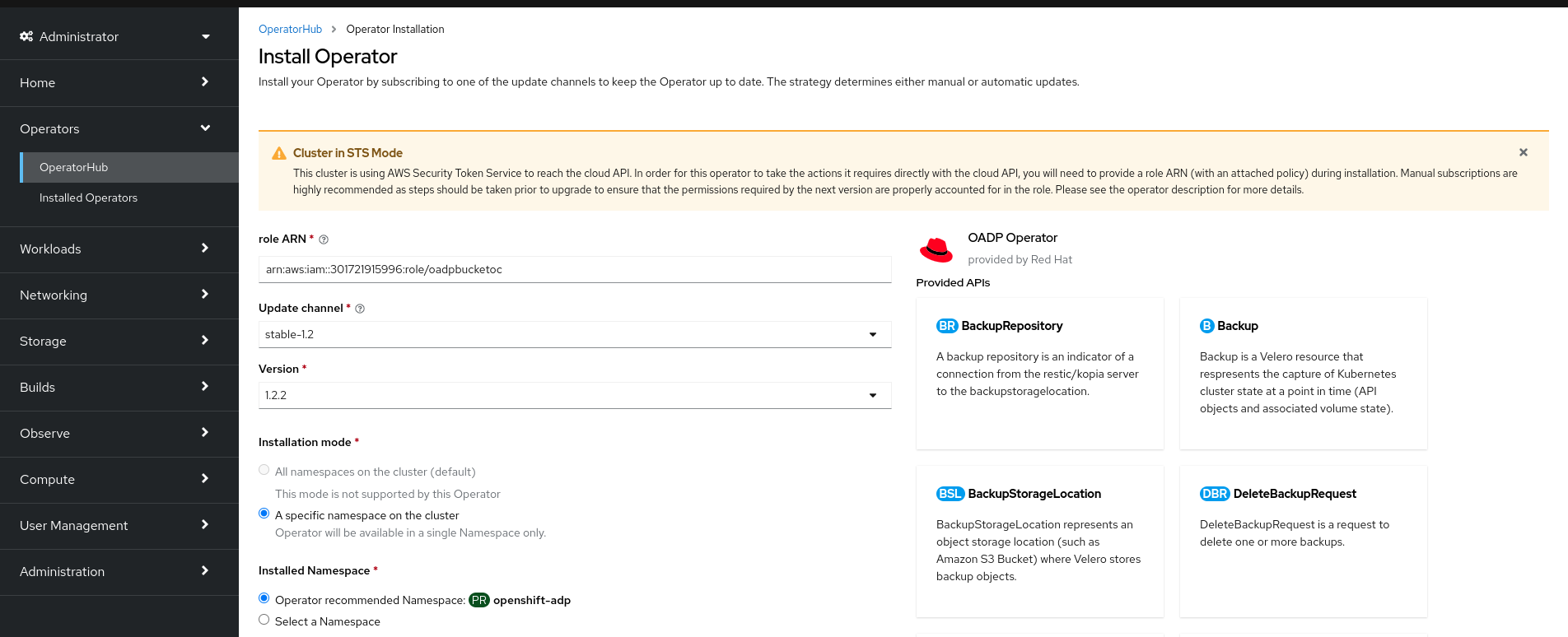
To create the role’s ARN, follow the procedure described in Preparing AWS account.
- If more than one update channel is available, select an Update channel.
Select Automatic or Manual approval strategy, as described earlier.
ImportantIf the web console shows that the cluster is in "STS mode", you must set Update approval to Manual.
Subscriptions with automatic update approvals are not recommended because there might be permission changes to make prior to updating. Subscriptions with manual update approvals ensure that administrators have the opportunity to verify the permissions of the later version and take any necessary steps prior to update.
Click Install to make the Operator available to the selected namespaces on this OpenShift Container Platform cluster.
If you selected a Manual approval strategy, the upgrade status of the subscription remains Upgrading until you review and approve the install plan.
After approving on the Install Plan page, the subscription upgrade status moves to Up to date.
- If you selected an Automatic approval strategy, the upgrade status should resolve to Up to date without intervention.
After the upgrade status of the subscription is Up to date, select Operators
Installed Operators to verify that the cluster service version (CSV) of the installed Operator eventually shows up. The Status should ultimately resolve to InstallSucceeded in the relevant namespace. NoteFor the All namespaces… installation mode, the status resolves to InstallSucceeded in the
openshift-operatorsnamespace, but the status is Copied if you check in other namespaces.If it does not:
-
Check the logs in any pods in the
openshift-operatorsproject (or other relevant namespace if A specific namespace… installation mode was selected) on the WorkloadsPods page that are reporting issues to troubleshoot further.
-
Check the logs in any pods in the
11.5.2. Installing from OperatorHub by using the CLI
Instead of using the OpenShift Container Platform web console, you can install an Operator from OperatorHub by using the CLI. Use the oc command to create or update a Subscription object.
Prerequisites
-
Access to an OpenShift Container Platform cluster using an account with
cluster-adminpermissions. -
You have installed the OpenShift CLI (
oc).
Procedure
View the list of Operators available to the cluster from OperatorHub:
$ oc get packagemanifests -n openshift-marketplaceExample output
NAME                               CATALOG               AGE
3scale-operator                    Red Hat Operators     91m
advanced-cluster-management        Red Hat Operators     91m
amq7-cert-manager                  Red Hat Operators     91m
...
couchbase-enterprise-certified     Certified Operators   91m
crunchy-postgres-operator          Certified Operators   91m
mongodb-enterprise                 Certified Operators   91m
...
etcd                               Community Operators   91m
jaeger                             Community Operators   91m
kubefed                            Community Operators   91m
...
Note the catalog for your desired Operator.
Inspect your desired Operator to verify its supported install modes and available channels:
$ oc describe packagemanifests <operator_name> -n openshift-marketplaceAn Operator group, defined by an
OperatorGroupobject, selects target namespaces in which to generate required RBAC access for all Operators in the same namespace as the Operator group.The namespace to which you subscribe the Operator must have an Operator group that matches the install mode of the Operator, either the
AllNamespacesorSingleNamespacemode. If the Operator you intend to install uses theAllNamespacesmode, theopenshift-operatorsnamespace already has the appropriateglobal-operatorsOperator group in place.However, if the Operator uses the
SingleNamespacemode and you do not already have an appropriate Operator group in place, you must create one.Note-
The web console version of this procedure handles the creation of the
OperatorGroupandSubscriptionobjects automatically behind the scenes for you when choosingSingleNamespacemode. - You can only have one Operator group per namespace. For more information, see "Operator groups".
Create an
OperatorGroupobject YAML file, for exampleoperatorgroup.yaml:Example
OperatorGroupobjectapiVersion: operators.coreos.com/v1 kind: OperatorGroup metadata: name: <operatorgroup_name> namespace: <namespace> spec: targetNamespaces: - <namespace>WarningOperator Lifecycle Manager (OLM) creates the following cluster roles for each Operator group:
-
<operatorgroup_name>-admin -
<operatorgroup_name>-edit -
<operatorgroup_name>-view
When you manually create an Operator group, you must specify a unique name that does not conflict with the existing cluster roles or other Operator groups on the cluster.
-
Create the
OperatorGroupobject:$ oc apply -f operatorgroup.yaml
-
The web console version of this procedure handles the creation of the
Create a
Subscriptionobject YAML file to subscribe a namespace to an Operator, for examplesub.yaml:Example
SubscriptionobjectapiVersion: operators.coreos.com/v1alpha1 kind: Subscription metadata: name: <subscription_name> namespace: openshift-operators1 spec: channel: <channel_name>2 name: <operator_name>3 source: redhat-operators4 sourceNamespace: openshift-marketplace5 config: env:6 - name: ARGS value: "-v=10" envFrom:7 - secretRef: name: license-secret volumes:8 - name: <volume_name> configMap: name: <configmap_name> volumeMounts:9 - mountPath: <directory_name> name: <volume_name> tolerations:10 - operator: "Exists" resources:11 requests: memory: "64Mi" cpu: "250m" limits: memory: "128Mi" cpu: "500m" nodeSelector:12 foo: bar- 1
- For default
AllNamespacesinstall mode usage, specify theopenshift-operatorsnamespace. Alternatively, you can specify a custom global namespace, if you have created one. Otherwise, specify the relevant single namespace forSingleNamespaceinstall mode usage. - 2
- Name of the channel to subscribe to.
- 3
- Name of the Operator to subscribe to.
- 4
- Name of the catalog source that provides the Operator.
- 5
- Namespace of the catalog source. Use
openshift-marketplacefor the default OperatorHub catalog sources. - 6
- The
envparameter defines a list of Environment Variables that must exist in all containers in the pod created by OLM. - 7
- The
envFromparameter defines a list of sources to populate Environment Variables in the container. - 8
- The
volumesparameter defines a list of Volumes that must exist on the pod created by OLM. - 9
- The
volumeMountsparameter defines a list of volume mounts that must exist in all containers in the pod created by OLM. If avolumeMountreferences avolumethat does not exist, OLM fails to deploy the Operator. - 10
- The
tolerationsparameter defines a list of Tolerations for the pod created by OLM. - 11
- The
resourcesparameter defines resource constraints for all the containers in the pod created by OLM. - 12
- The
nodeSelectorparameter defines aNodeSelectorfor the pod created by OLM.
If the cluster is in STS mode, include the following fields in the
Subscriptionobject:kind: Subscription # ... spec: installPlanApproval: Manual1 config: env: - name: ROLEARN value: "<role_arn>"2 - 1
- Subscriptions with automatic update approvals are not recommended because there might be permission changes to make prior to updating. Subscriptions with manual update approvals ensure that administrators have the opportunity to verify the permissions of the later version and take any necessary steps prior to update.
- 2
- Include the role ARN details.
Create the
Subscriptionobject:$ oc apply -f sub.yamlAt this point, OLM is now aware of the selected Operator. A cluster service version (CSV) for the Operator should appear in the target namespace, and APIs provided by the Operator should be available for creation.

'%20d='M201.5%20305.5c-13.8%200-24.9-11.1-24.9-24.6%200-13.8%2011.1-24.9%2024.9-24.9%2013.6%200%2024.6%2011.1%2024.6%2024.9%200%2013.6-11.1%2024.6-24.6%2024.6zM504%20256c0%20137-111%20248-248%20248S8%20393%208%20256%20119%208%20256%208s248%20111%20248%20248zm-132.3-41.2c-9.4%200-17.7%203.9-23.8%2010-22.4-15.5-52.6-25.5-86.1-26.6l17.4-78.3%2055.4%2012.5c0%2013.6%2011.1%2024.6%2024.6%2024.6%2013.8%200%2024.9-11.3%2024.9-24.9s-11.1-24.9-24.9-24.9c-9.7%200-18%205.8-22.1%2013.8l-61.2-13.6c-3-.8-6.1%201.4-6.9%204.4l-19.1%2086.4c-33.2%201.4-63.1%2011.3-85.5%2026.8-6.1-6.4-14.7-10.2-24.1-10.2-34.9%200-46.3%2046.9-14.4%2062.8-1.1%205-1.7%2010.2-1.7%2015.5%200%2052.6%2059.2%2095.2%20132%2095.2%2073.1%200%20132.3-42.6%20132.3-95.2%200-5.3-.6-10.8-1.9-15.8%2031.3-16%2019.8-62.5-14.9-62.5zM302.8%20331c-18.2%2018.2-76.1%2017.9-93.6%200-2.2-2.2-6.1-2.2-8.3%200-2.5%202.5-2.5%206.4%200%208.6%2022.8%2022.8%2087.3%2022.8%20110.2%200%202.5-2.2%202.5-6.1%200-8.6-2.2-2.2-6.1-2.2-8.3%200zm7.7-75c-13.6%200-24.6%2011.1-24.6%2024.9%200%2013.6%2011.1%2024.6%2024.6%2024.6%2013.8%200%2024.9-11.1%2024.9-24.6%200-13.8-11-24.9-24.9-24.9z'/%3e%3c/svg%3e)