 Red Hat Summit
Dieser Inhalt ist in der von Ihnen ausgewählten Sprache nicht verfügbar.
Chapter 6. Control plane architecture
The control plane, which is composed of control plane machines, manages the OpenShift Container Platform cluster. The control plane machines manage workloads on the compute machines, which are also known as worker machines. The cluster itself manages all upgrades to the machines by the actions of the Cluster Version Operator (CVO), the Machine Config Operator, and a set of individual Operators.
6.1. Node configuration management with machine config pools
Machines that run control plane components or user workloads are divided into groups based on the types of resources they handle. These groups of machines are called machine config pools (MCP). Each MCP manages a set of nodes and its corresponding machine configs. The role of the node determines which MCP it belongs to; the MCP governs nodes based on its assigned node role label. Nodes in an MCP have the same configuration; this means nodes can be scaled up and torn down in response to increased or decreased workloads.
By default, there are two MCPs created by the cluster when it is installed: master and worker. Each default MCP has a defined configuration applied by the Machine Config Operator (MCO), which is responsible for managing MCPs and facilitating MCP updates.
For worker nodes, you can create additional MCPs, or custom pools, to manage nodes with custom use cases that extend outside of the default node types. Custom MCPs for the control plane nodes are not supported.
Custom pools are pools that inherit their configurations from the worker pool. They use any machine config targeted for the worker pool, but add the ability to deploy changes only targeted at the custom pool. Since a custom pool inherits its configuration from the worker pool, any change to the worker pool is applied to the custom pool as well. Custom pools that do not inherit their configurations from the worker pool are not supported by the MCO.
A node can only be included in one MCP. If a node has multiple labels that correspond to several MCPs, like worker,infra, it is managed by the infra custom pool, not the worker pool. Custom pools take priority on selecting nodes to manage based on node labels; nodes that do not belong to a custom pool are managed by the worker pool.
It is recommended to have a custom pool for every node role you want to manage in your cluster. For example, if you create infra nodes to handle infra workloads, it is recommended to create a custom infra MCP to group those nodes together. If you apply an infra role label to a worker node so it has the worker,infra dual label, but do not have a custom infra MCP, the MCO considers it a worker node. If you remove the worker label from a node and apply the infra label without grouping it in a custom pool, the node is not recognized by the MCO and is unmanaged by the cluster.
Any node labeled with the infra role that is only running infra workloads is not counted toward the total number of subscriptions. The MCP managing an infra node is mutually exclusive from how the cluster determines subscription charges; tagging a node with the appropriate infra role and using taints to prevent user workloads from being scheduled on that node are the only requirements for avoiding subscription charges for infra workloads.
The MCO applies updates for pools independently; for example, if there is an update that affects all pools, nodes from each pool update in parallel with each other. If you add a custom pool, nodes from that pool also attempt to update concurrently with the master and worker nodes.
There might be situations where the configuration on a node does not fully match what the currently-applied machine config specifies. This state is called configuration drift. The Machine Config Daemon (MCD) regularly checks the nodes for configuration drift. If the MCD detects configuration drift, the MCO marks the node degraded until an administrator corrects the node configuration. A degraded node is online and operational, but, it cannot be updated.
6.2. Machine roles in OpenShift Container Platform
OpenShift Container Platform assigns hosts different roles. These roles define the function of the machine within the cluster. The cluster contains definitions for the standard master and worker role types.
The cluster also contains the definition for the bootstrap role. Because the bootstrap machine is used only during cluster installation, its function is explained in the cluster installation documentation.
6.2.1. Control plane and node host compatibility
The OpenShift Container Platform version must match between control plane host and node host. For example, in a 4.12 cluster, all control plane hosts must be 4.12 and all nodes must be 4.12.
Temporary mismatches during cluster upgrades are acceptable. For example, when upgrading from OpenShift Container Platform 4.11 to 4.12, some nodes will upgrade to 4.12 before others. Prolonged skewing of control plane hosts and node hosts might expose older compute machines to bugs and missing features. Users should resolve skewed control plane hosts and node hosts as soon as possible.
The kubelet service must not be newer than kube-apiserver, and can be up to two minor versions older depending on whether your OpenShift Container Platform version is odd or even. The table below shows the appropriate version compatibility:
| OpenShift Container Platform version | Supported kubelet skew |
|---|---|
| Odd OpenShift Container Platform minor versions [1] | Up to one version older |
| Even OpenShift Container Platform minor versions [2] | Up to two versions older |
- For example, OpenShift Container Platform 4.9, 4.11.
- For example, OpenShift Container Platform 4.8, 4.10, 4.12.
6.2.2. Cluster workers
In a Kubernetes cluster, the worker nodes are where the actual workloads requested by Kubernetes users run and are managed. The worker nodes advertise their capacity and the scheduler, which a control plane service, determines on which nodes to start pods and containers. Important services run on each worker node, including CRI-O, which is the container engine; Kubelet, which is the service that accepts and fulfills requests for running and stopping container workloads; a service proxy, which manages communication for pods across workers; and the runC or crun (Technology Preview) low-level container runtime, which creates and runs containers.
For information about how to enable crun instead of the default runC, see the documentation for creating a ContainerRuntimeConfig CR.
In OpenShift Container Platform, compute machine sets control the compute machines, which are assigned the worker machine role. Machines with the worker role drive compute workloads that are governed by a specific machine pool that autoscales them. Because OpenShift Container Platform has the capacity to support multiple machine types, the machines with the worker role are classed as compute machines. In this release, the terms worker machine and compute machine are used interchangeably because the only default type of compute machine is the worker machine. In future versions of OpenShift Container Platform, different types of compute machines, such as infrastructure machines, might be used by default.
Compute machine sets are groupings of compute machine resources under the machine-api namespace. Compute machine sets are configurations that are designed to start new compute machines on a specific cloud provider. Conversely, machine config pools (MCPs) are part of the Machine Config Operator (MCO) namespace. An MCP is used to group machines together so the MCO can manage their configurations and facilitate their upgrades.
6.2.3. Cluster control planes
In a Kubernetes cluster, the master nodes run services that are required to control the Kubernetes cluster. In OpenShift Container Platform, the control plane is comprised of control plane machines that have a master machine role. They contain more than just the Kubernetes services for managing the OpenShift Container Platform cluster.
For most OpenShift Container Platform clusters, control plane machines are defined by a series of standalone machine API resources. For supported cloud provider and OpenShift Container Platform version combinations, control planes can be managed with control plane machine sets. Extra controls apply to control plane machines to prevent you from deleting all control plane machines and breaking your cluster.
Exactly three control plane nodes must be used for all production deployments.
Services that fall under the Kubernetes category on the control plane include the Kubernetes API server, etcd, the Kubernetes controller manager, and the Kubernetes scheduler.
| Component | Description |
|---|---|
| Kubernetes API server | The Kubernetes API server validates and configures the data for pods, services, and replication controllers. It also provides a focal point for the shared state of the cluster. |
| etcd | etcd stores the persistent control plane state while other components watch etcd for changes to bring themselves into the specified state. |
| Kubernetes controller manager | The Kubernetes controller manager watches etcd for changes to objects such as replication, namespace, and service account controller objects, and then uses the API to enforce the specified state. Several such processes create a cluster with one active leader at a time. |
| Kubernetes scheduler | The Kubernetes scheduler watches for newly created pods without an assigned node and selects the best node to host the pod. |
There are also OpenShift services that run on the control plane, which include the OpenShift API server, OpenShift controller manager, OpenShift OAuth API server, and OpenShift OAuth server.
| Component | Description |
|---|---|
| OpenShift API server | The OpenShift API server validates and configures the data for OpenShift resources, such as projects, routes, and templates. The OpenShift API server is managed by the OpenShift API Server Operator. |
| OpenShift controller manager | The OpenShift controller manager watches etcd for changes to OpenShift objects, such as project, route, and template controller objects, and then uses the API to enforce the specified state. The OpenShift controller manager is managed by the OpenShift Controller Manager Operator. |
| OpenShift OAuth API server | The OpenShift OAuth API server validates and configures the data to authenticate to OpenShift Container Platform, such as users, groups, and OAuth tokens. The OpenShift OAuth API server is managed by the Cluster Authentication Operator. |
| OpenShift OAuth server | Users request tokens from the OpenShift OAuth server to authenticate themselves to the API. The OpenShift OAuth server is managed by the Cluster Authentication Operator. |
Some of these services on the control plane machines run as systemd services, while others run as static pods.
Systemd services are appropriate for services that you need to always come up on that particular system shortly after it starts. For control plane machines, those include sshd, which allows remote login. It also includes services such as:
- The CRI-O container engine (crio), which runs and manages the containers. OpenShift Container Platform 4.12 uses CRI-O instead of the Docker Container Engine.
- Kubelet (kubelet), which accepts requests for managing containers on the machine from control plane services.
CRI-O and Kubelet must run directly on the host as systemd services because they need to be running before you can run other containers.
The installer-* and revision-pruner-* control plane pods must run with root permissions because they write to the /etc/kubernetes directory, which is owned by the root user. These pods are in the following namespaces:
-
openshift-etcd -
openshift-kube-apiserver -
openshift-kube-controller-manager -
openshift-kube-scheduler
6.3. Operators in OpenShift Container Platform
Operators are among the most important components of OpenShift Container Platform. Operators are the preferred method of packaging, deploying, and managing services on the control plane. They can also provide advantages to applications that users run.
Operators integrate with Kubernetes APIs and CLI tools such as kubectl and oc commands. They provide the means of monitoring applications, performing health checks, managing over-the-air (OTA) updates, and ensuring that applications remain in your specified state.
Operators also offer a more granular configuration experience. You configure each component by modifying the API that the Operator exposes instead of modifying a global configuration file.
Because CRI-O and the Kubelet run on every node, almost every other cluster function can be managed on the control plane by using Operators. Components that are added to the control plane by using Operators include critical networking and credential services.
While both follow similar Operator concepts and goals, Operators in OpenShift Container Platform are managed by two different systems, depending on their purpose:
- Cluster Operators, which are managed by the Cluster Version Operator (CVO), are installed by default to perform cluster functions.
- Optional add-on Operators, which are managed by Operator Lifecycle Manager (OLM), can be made accessible for users to run in their applications.
6.3.1. Cluster Operators
In OpenShift Container Platform, all cluster functions are divided into a series of default cluster Operators. Cluster Operators manage a particular area of cluster functionality, such as cluster-wide application logging, management of the Kubernetes control plane, or the machine provisioning system.
Cluster Operators are represented by a ClusterOperator object, which cluster administrators can view in the OpenShift Container Platform web console from the Administration
6.3.2. Add-on Operators
Operator Lifecycle Manager (OLM) and OperatorHub are default components in OpenShift Container Platform that help manage Kubernetes-native applications as Operators. Together they provide the system for discovering, installing, and managing the optional add-on Operators available on the cluster.
Using OperatorHub in the OpenShift Container Platform web console, cluster administrators and authorized users can select Operators to install from catalogs of Operators. After installing an Operator from OperatorHub, it can be made available globally or in specific namespaces to run in user applications.
Default catalog sources are available that include Red Hat Operators, certified Operators, and community Operators. Cluster administrators can also add their own custom catalog sources, which can contain a custom set of Operators.
Developers can use the Operator SDK to help author custom Operators that take advantage of OLM features, as well. Their Operator can then be bundled and added to a custom catalog source, which can be added to a cluster and made available to users.
OLM does not manage the cluster Operators that comprise the OpenShift Container Platform architecture.
6.3.3. Platform Operators (Technology Preview)
The platform Operator type is a Technology Preview feature only. Technology Preview features are not supported with Red Hat production service level agreements (SLAs) and might not be functionally complete. Red Hat does not recommend using them in production. These features provide early access to upcoming product features, enabling customers to test functionality and provide feedback during the development process.
For more information about the support scope of Red Hat Technology Preview features, see Technology Preview Features Support Scope.
Operator Lifecycle Manager (OLM) introduces a new type of Operator called platform Operators. A platform Operator is an OLM-based Operator that can be installed during or after an OpenShift Container Platform cluster’s Day 0 operations and participates in the cluster’s lifecycle. As a cluster administrator, you can use platform Operators to further customize your OpenShift Container Platform installation to meet your requirements and use cases.
Using the existing cluster capabilities feature in OpenShift Container Platform, cluster administrators can already disable a subset of Cluster Version Operator-based (CVO) components considered non-essential to the initial payload prior to cluster installation. Platform Operators iterate on this model by providing additional customization options. Through the platform Operator mechanism, which relies on resources from the RukPak component, OLM-based Operators can now be installed at cluster installation time and can block cluster rollout if the Operator fails to install successfully.
In OpenShift Container Platform 4.12, this Technology Preview release focuses on the basic platform Operator mechanism and builds a foundation for expanding the concept in upcoming releases. You can use the cluster-wide PlatformOperator API to configure Operators before or after cluster creation on clusters that have enabled the TechPreviewNoUpgrade feature set.
6.4. Overview of hosted control planes (Technology Preview)
You can use hosted control planes for Red Hat OpenShift Container Platform to reduce management costs, optimize cluster deployment time, and separate management and workload concerns so that you can focus on your applications.
You can enable hosted control planes as a Technology Preview feature by using the multicluster engine for Kubernetes operator version 2.0 or later on Amazon Web Services (AWS).
Hosted control planes is a Technology Preview feature only. Technology Preview features are not supported with Red Hat production service level agreements (SLAs) and might not be functionally complete. Red Hat does not recommend using them in production. These features provide early access to upcoming product features, enabling customers to test functionality and provide feedback during the development process.
For more information about the support scope of Red Hat Technology Preview features, see Technology Preview Features Support Scope.
6.4.1. Architecture of hosted control planes
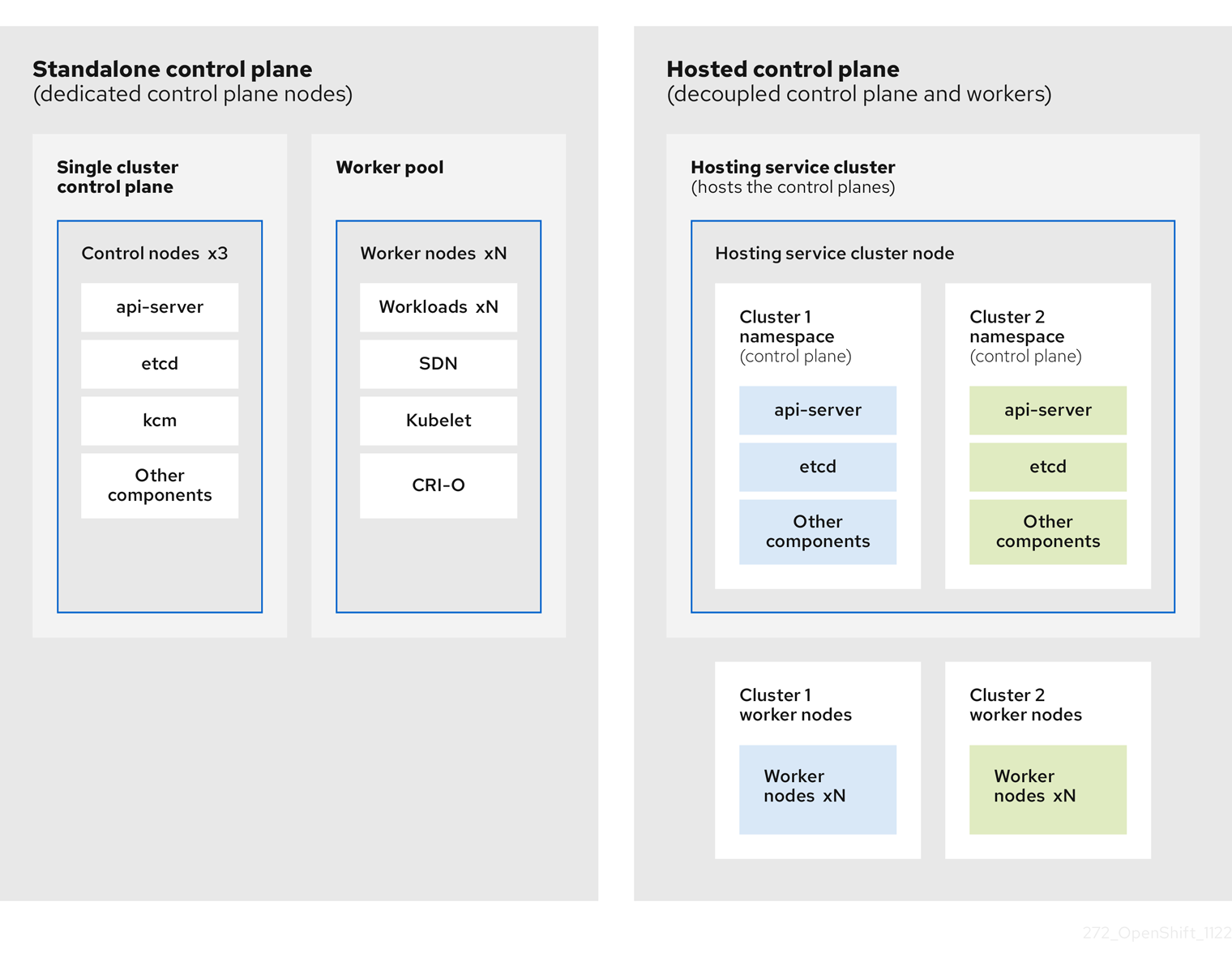
OpenShift Container Platform is often deployed in a coupled, or standalone, model, where a cluster consists of a control plane and a data plane. The control plane includes an API endpoint, a storage endpoint, a workload scheduler, and an actuator that ensures state. The data plane includes compute, storage, and networking where workloads and applications run.
The standalone control plane is hosted by a dedicated group of nodes, which can be physical or virtual, with a minimum number to ensure quorum. The network stack is shared. Administrator access to a cluster offers visibility into the cluster’s control plane, machine management APIs, and other components that contribute to the state of a cluster.
Although the standalone model works well, some situations require an architecture where the control plane and data plane are decoupled. In those cases, the data plane is on a separate network domain with a dedicated physical hosting environment. The control plane is hosted by using high-level primitives such as deployments and stateful sets that are native to Kubernetes. The control plane is treated as any other workload.
6.4.2. Benefits of hosted control planes
With hosted control planes for OpenShift Container Platform, you can pave the way for a true hybrid-cloud approach and enjoy several other benefits.
- The security boundaries between management and workloads are stronger because the control plane is decoupled and hosted on a dedicated hosting service cluster. As a result, you are less likely to leak credentials for clusters to other users. Because infrastructure secret account management is also decoupled, cluster infrastructure administrators cannot accidentally delete control plane infrastructure.
- With hosted control planes, you can run many control planes on fewer nodes. As a result, clusters are more affordable.
- Because the control planes consist of pods that are launched on OpenShift Container Platform, control planes start quickly. The same principles apply to control planes and workloads, such as monitoring, logging, and auto-scaling.
- From an infrastructure perspective, you can push registries, HAProxy, cluster monitoring, storage nodes, and other infrastructure components to the tenant’s cloud provider account, isolating usage to the tenant.
- From an operational perspective, multicluster management is more centralized, which results in fewer external factors that affect the cluster status and consistency. Site reliability engineers have a central place to debug issues and navigate to the cluster data plane, which can lead to shorter Time to Resolution (TTR) and greater productivity.
6.4.3. Versioning for hosted control planes
With each major, minor, or patch version release of OpenShift Container Platform, two components of hosted control planes are released:
- HyperShift Operator
- Command-line interface (CLI)
The HyperShift Operator manages the lifecycle of hosted clusters that are represented by HostedCluster API resources. The HyperShift Operator is released with each OpenShift Container Platform release.
The CLI is a helper utility for development purposes. The CLI is released as part of any HyperShift Operator release. No compatibility policies are guaranteed.
The API, hypershift.openshift.io, provides a way to create and manage lightweight, flexible, heterogeneous OpenShift Container Platform clusters at scale. The API exposes two user-facing resources: HostedCluster and NodePool. A HostedCluster resource encapsulates the control plane and common data plane configuration. When you create a HostedCluster resource, you have a fully functional control plane with no attached nodes. A NodePool resource is a scalable set of worker nodes that is attached to a HostedCluster resource.
The API version policy generally aligns with the policy for Kubernetes API versioning.

'%20d='M201.5%20305.5c-13.8%200-24.9-11.1-24.9-24.6%200-13.8%2011.1-24.9%2024.9-24.9%2013.6%200%2024.6%2011.1%2024.6%2024.9%200%2013.6-11.1%2024.6-24.6%2024.6zM504%20256c0%20137-111%20248-248%20248S8%20393%208%20256%20119%208%20256%208s248%20111%20248%20248zm-132.3-41.2c-9.4%200-17.7%203.9-23.8%2010-22.4-15.5-52.6-25.5-86.1-26.6l17.4-78.3%2055.4%2012.5c0%2013.6%2011.1%2024.6%2024.6%2024.6%2013.8%200%2024.9-11.3%2024.9-24.9s-11.1-24.9-24.9-24.9c-9.7%200-18%205.8-22.1%2013.8l-61.2-13.6c-3-.8-6.1%201.4-6.9%204.4l-19.1%2086.4c-33.2%201.4-63.1%2011.3-85.5%2026.8-6.1-6.4-14.7-10.2-24.1-10.2-34.9%200-46.3%2046.9-14.4%2062.8-1.1%205-1.7%2010.2-1.7%2015.5%200%2052.6%2059.2%2095.2%20132%2095.2%2073.1%200%20132.3-42.6%20132.3-95.2%200-5.3-.6-10.8-1.9-15.8%2031.3-16%2019.8-62.5-14.9-62.5zM302.8%20331c-18.2%2018.2-76.1%2017.9-93.6%200-2.2-2.2-6.1-2.2-8.3%200-2.5%202.5-2.5%206.4%200%208.6%2022.8%2022.8%2087.3%2022.8%20110.2%200%202.5-2.2%202.5-6.1%200-8.6-2.2-2.2-6.1-2.2-8.3%200zm7.7-75c-13.6%200-24.6%2011.1-24.6%2024.9%200%2013.6%2011.1%2024.6%2024.6%2024.6%2013.8%200%2024.9-11.1%2024.9-24.6%200-13.8-11-24.9-24.9-24.9z'/%3e%3c/svg%3e)