 Red Hat Summit
Dieser Inhalt ist in der von Ihnen ausgewählten Sprache nicht verfügbar.
Chapter 11. Monitoring bare-metal events with the Bare Metal Event Relay
Bare Metal Event Relay is a Technology Preview feature only. Technology Preview features are not supported with Red Hat production service level agreements (SLAs) and might not be functionally complete. Red Hat does not recommend using them in production. These features provide early access to upcoming product features, enabling customers to test functionality and provide feedback during the development process.
For more information about the support scope of Red Hat Technology Preview features, see Technology Preview Features Support Scope.
11.1. About bare-metal events
Use the Bare Metal Event Relay to subscribe applications that run in your OpenShift Container Platform cluster to events that are generated on the underlying bare-metal host. The Redfish service publishes events on a node and transmits them on an advanced message queue to subscribed applications.
Bare-metal events are based on the open Redfish standard that is developed under the guidance of the Distributed Management Task Force (DMTF). Redfish provides a secure industry-standard protocol with a REST API. The protocol is used for the management of distributed, converged or software-defined resources and infrastructure.
Hardware-related events published through Redfish includes:
- Breaches of temperature limits
- Server status
- Fan status
Begin using bare-metal events by deploying the Bare Metal Event Relay Operator and subscribing your application to the service. The Bare Metal Event Relay Operator installs and manages the lifecycle of the Redfish bare-metal event service.
The Bare Metal Event Relay works only with Redfish-capable devices on single-node clusters provisioned on bare-metal infrastructure.
11.2. How bare-metal events work
The Bare Metal Event Relay enables applications running on bare-metal clusters to respond quickly to Redfish hardware changes and failures such as breaches of temperature thresholds, fan failure, disk loss, power outages, and memory failure. These hardware events are delivered using an HTTP transport or AMQP mechanism. The latency of the messaging service is between 10 to 20 milliseconds.
The Bare Metal Event Relay provides a publish-subscribe service for the hardware events. Applications can use a REST API to subscribe to the events. The Bare Metal Event Relay supports hardware that complies with Redfish OpenAPI v1.8 or later.
11.2.1. Bare Metal Event Relay data flow
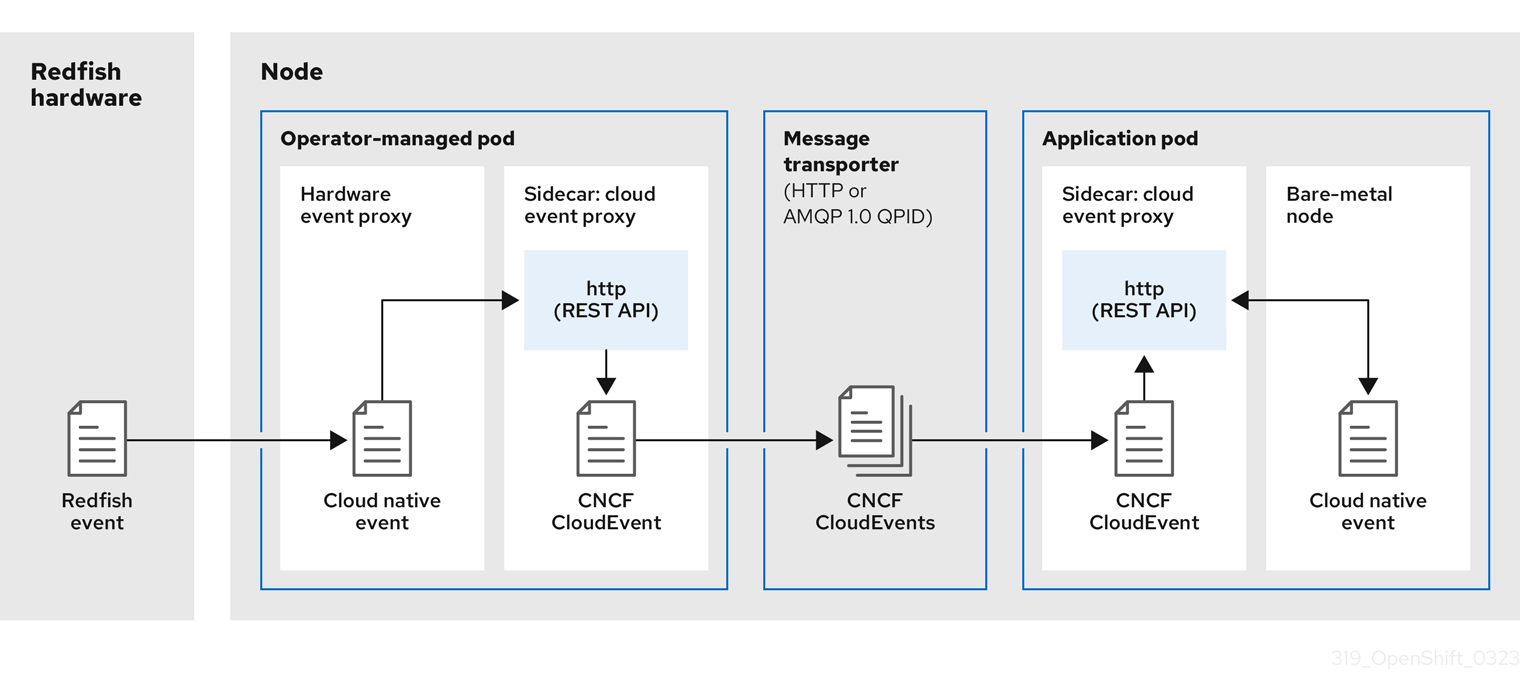
The following figure illustrates an example bare-metal events data flow:
Figure 11.1. Bare Metal Event Relay data flow
11.2.1.1. Operator-managed pod
The Operator uses custom resources to manage the pod containing the Bare Metal Event Relay and its components using the HardwareEvent CR.
11.2.1.2. Bare Metal Event Relay
At startup, the Bare Metal Event Relay queries the Redfish API and downloads all the message registries, including custom registries. The Bare Metal Event Relay then begins to receive subscribed events from the Redfish hardware.
The Bare Metal Event Relay enables applications running on bare-metal clusters to respond quickly to Redfish hardware changes and failures such as breaches of temperature thresholds, fan failure, disk loss, power outages, and memory failure. The events are reported using the HardwareEvent CR.
11.2.1.3. Cloud native event
Cloud native events (CNE) is a REST API specification for defining the format of event data.
11.2.1.4. CNCF CloudEvents
CloudEvents is a vendor-neutral specification developed by the Cloud Native Computing Foundation (CNCF) for defining the format of event data.
11.2.1.5. HTTP transport or AMQP dispatch router
The HTTP transport or AMQP dispatch router is responsible for the message delivery service between publisher and subscriber.
HTTP transport is the default transport for PTP and bare-metal events. Use HTTP transport instead of AMQP for PTP and bare-metal events where possible. AMQ Interconnect is EOL from 30 June 2024. Extended life cycle support (ELS) for AMQ Interconnect ends 29 November 2029. For more information see, Red Hat AMQ Interconnect support status.
11.2.1.6. Cloud event proxy sidecar
The cloud event proxy sidecar container image is based on the O-RAN API specification and provides a publish-subscribe event framework for hardware events.
11.2.2. Redfish message parsing service
In addition to handling Redfish events, the Bare Metal Event Relay provides message parsing for events without a Message property. The proxy downloads all the Redfish message registries including vendor specific registries from the hardware when it starts. If an event does not contain a Message property, the proxy uses the Redfish message registries to construct the Message and Resolution properties and add them to the event before passing the event to the cloud events framework. This service allows Redfish events to have smaller message size and lower transmission latency.
11.2.3. Installing the Bare Metal Event Relay using the CLI
As a cluster administrator, you can install the Bare Metal Event Relay Operator by using the CLI.
Prerequisites
- A cluster that is installed on bare-metal hardware with nodes that have a RedFish-enabled Baseboard Management Controller (BMC).
-
Install the OpenShift CLI (
oc). -
Log in as a user with
cluster-adminprivileges.
Procedure
Create a namespace for the Bare Metal Event Relay.
Save the following YAML in the
bare-metal-events-namespace.yamlfile:apiVersion: v1 kind: Namespace metadata: name: openshift-bare-metal-events labels: name: openshift-bare-metal-events openshift.io/cluster-monitoring: "true"Create the
NamespaceCR:$ oc create -f bare-metal-events-namespace.yaml
Create an Operator group for the Bare Metal Event Relay Operator.
Save the following YAML in the
bare-metal-events-operatorgroup.yamlfile:apiVersion: operators.coreos.com/v1 kind: OperatorGroup metadata: name: bare-metal-event-relay-group namespace: openshift-bare-metal-events spec: targetNamespaces: - openshift-bare-metal-eventsCreate the
OperatorGroupCR:$ oc create -f bare-metal-events-operatorgroup.yaml
Subscribe to the Bare Metal Event Relay.
Save the following YAML in the
bare-metal-events-sub.yamlfile:apiVersion: operators.coreos.com/v1alpha1 kind: Subscription metadata: name: bare-metal-event-relay-subscription namespace: openshift-bare-metal-events spec: channel: "stable" name: bare-metal-event-relay source: redhat-operators sourceNamespace: openshift-marketplaceCreate the
SubscriptionCR:$ oc create -f bare-metal-events-sub.yaml
Verification
To verify that the Bare Metal Event Relay Operator is installed, run the following command:
$ oc get csv -n openshift-bare-metal-events -o custom-columns=Name:.metadata.name,Phase:.status.phase11.2.4. Installing the Bare Metal Event Relay using the web console
As a cluster administrator, you can install the Bare Metal Event Relay Operator using the web console.
Prerequisites
- A cluster that is installed on bare-metal hardware with nodes that have a RedFish-enabled Baseboard Management Controller (BMC).
-
Log in as a user with
cluster-adminprivileges.
Procedure
Install the Bare Metal Event Relay using the OpenShift Container Platform web console:
-
In the OpenShift Container Platform web console, click Operators
OperatorHub. - Choose Bare Metal Event Relay from the list of available Operators, and then click Install.
- On the Install Operator page, select or create a Namespace, select openshift-bare-metal-events, and then click Install.
-
In the OpenShift Container Platform web console, click Operators
Verification
Optional: You can verify that the Operator installed successfully by performing the following check:
-
Switch to the Operators
Installed Operators page. Ensure that Bare Metal Event Relay is listed in the project with a Status of InstallSucceeded.
NoteDuring installation an Operator might display a Failed status. If the installation later succeeds with an InstallSucceeded message, you can ignore the Failed message.
If the Operator does not appear as installed, to troubleshoot further:
-
Go to the Operators
Installed Operators page and inspect the Operator Subscriptions and Install Plans tabs for any failure or errors under Status. -
Go to the Workloads
Pods page and check the logs for pods in the project namespace.
11.3. Installing the AMQ messaging bus
To pass Redfish bare-metal event notifications between publisher and subscriber on a node, you can install and configure an AMQ messaging bus to run locally on the node. You do this by installing the AMQ Interconnect Operator for use in the cluster.
HTTP transport is the default transport for PTP and bare-metal events. Use HTTP transport instead of AMQP for PTP and bare-metal events where possible. AMQ Interconnect is EOL from 30 June 2024. Extended life cycle support (ELS) for AMQ Interconnect ends 29 November 2029. For more information see, Red Hat AMQ Interconnect support status.
Prerequisites
-
Install the OpenShift Container Platform CLI (
oc). -
Log in as a user with
cluster-adminprivileges.
Procedure
-
Install the AMQ Interconnect Operator to its own
amq-interconnectnamespace. See Installing the AMQ Interconnect Operator.
Verification
Verify that the AMQ Interconnect Operator is available and the required pods are running:
$ oc get pods -n amq-interconnectExample output
NAME                                    READY   STATUS    RESTARTS   AGE
amq-interconnect-645db76c76-k8ghs       1/1     Running   0          23h
interconnect-operator-5cb5fc7cc-4v7qm   1/1     Running   0          23h
Verify that the required
bare-metal-event-relaybare-metal event producer pod is running in theopenshift-bare-metal-eventsnamespace:$ oc get pods -n openshift-bare-metal-eventsExample output
NAME                                                            READY   STATUS    RESTARTS   AGE
hw-event-proxy-operator-controller-manager-74d5649b7c-dzgtl     2/2     Running   0          25s
11.4. Subscribing to Redfish BMC bare-metal events for a cluster node
You can subscribe to Redfish BMC events generated on a node in your cluster by creating a BMCEventSubscription custom resource (CR) for the node, creating a HardwareEvent CR for the event, and creating a Secret CR for the BMC.
11.4.1. Subscribing to bare-metal events
You can configure the baseboard management controller (BMC) to send bare-metal events to subscribed applications running in an OpenShift Container Platform cluster. Example Redfish bare-metal events include an increase in device temperature, or removal of a device. You subscribe applications to bare-metal events using a REST API.
You can only create a BMCEventSubscription custom resource (CR) for physical hardware that supports Redfish and has a vendor interface set to redfish or idrac-redfish.
Use the BMCEventSubscription CR to subscribe to predefined Redfish events. The Redfish standard does not provide an option to create specific alerts and thresholds. For example, to receive an alert event when an enclosure’s temperature exceeds 40° Celsius, you must manually configure the event according to the vendor’s recommendations.
Perform the following procedure to subscribe to bare-metal events for the node using a BMCEventSubscription CR.
Prerequisites
-
Install the OpenShift CLI (
oc). -
Log in as a user with
cluster-adminprivileges. - Get the user name and password for the BMC.
Deploy a bare-metal node with a Redfish-enabled Baseboard Management Controller (BMC) in your cluster, and enable Redfish events on the BMC.
NoteEnabling Redfish events on specific hardware is outside the scope of this information. For more information about enabling Redfish events for your specific hardware, consult the BMC manufacturer documentation.
Procedure
Confirm that the node hardware has the Redfish
EventServiceenabled by running the followingcurlcommand:$ curl https://<bmc_ip_address>/redfish/v1/EventService --insecure -H 'Content-Type: application/json' -u "<bmc_username>:<password>"where:
- bmc_ip_address
- is the IP address of the BMC where the Redfish events are generated.
Example output
{
   "@odata.context": "/redfish/v1/$metadata#EventService.EventService",
   "@odata.id": "/redfish/v1/EventService",
   "@odata.type": "#EventService.v1_0_2.EventService",
   "Actions": {
      "#EventService.SubmitTestEvent": {
         "EventType@Redfish.AllowableValues": ["StatusChange", "ResourceUpdated", "ResourceAdded", "ResourceRemoved", "Alert"],
         "target": "/redfish/v1/EventService/Actions/EventService.SubmitTestEvent"
      }
   },
   "DeliveryRetryAttempts": 3,
   "DeliveryRetryIntervalSeconds": 30,
   "Description": "Event Service represents the properties for the service",
   "EventTypesForSubscription": ["StatusChange", "ResourceUpdated", "ResourceAdded", "ResourceRemoved", "Alert"],
   "EventTypesForSubscription@odata.count": 5,
   "Id": "EventService",
   "Name": "Event Service",
   "ServiceEnabled": true,
   "Status": {
      "Health": "OK",
      "HealthRollup": "OK",
      "State": "Enabled"
   },
   "Subscriptions": {
      "@odata.id": "/redfish/v1/EventService/Subscriptions"
   }
}
Get the Bare Metal Event Relay service route for the cluster by running the following command:
$ oc get route -n openshift-bare-metal-eventsExample output
NAME            HOST/PORT   PATH                                                                    SERVICES                 PORT   TERMINATION   WILDCARD
hw-event-proxy              hw-event-proxy-openshift-bare-metal-events.apps.compute-1.example.com   hw-event-proxy-service   9087   edge          None
Create a
BMCEventSubscriptionresource to subscribe to the Redfish events:Save the following YAML in the
bmc_sub.yamlfile:apiVersion: metal3.io/v1alpha1 kind: BMCEventSubscription metadata: name: sub-01 namespace: openshift-machine-api spec: hostName: <hostname>1 destination: <proxy_service_url>2 context: ''- 1
- Specifies the name or UUID of the worker node where the Redfish events are generated.
- 2
- Specifies the bare-metal event proxy service, for example,
https://hw-event-proxy-openshift-bare-metal-events.apps.compute-1.example.com/webhook.
Create the
BMCEventSubscriptionCR:$ oc create -f bmc_sub.yaml
Optional: To delete the BMC event subscription, run the following command:
$ oc delete -f bmc_sub.yamlOptional: To manually create a Redfish event subscription without creating a
BMCEventSubscriptionCR, run the followingcurlcommand, specifying the BMC username and password.$ curl -i -k -X POST -H "Content-Type: application/json" -d '{"Destination": "https://<proxy_service_url>", "Protocol" : "Redfish", "EventTypes": ["Alert"], "Context": "root"}' -u <bmc_username>:<password> 'https://<bmc_ip_address>/redfish/v1/EventService/Subscriptions' –vwhere:
- proxy_service_url
-
is the bare-metal event proxy service, for example,
https://hw-event-proxy-openshift-bare-metal-events.apps.compute-1.example.com/webhook.
- bmc_ip_address
- is the IP address of the BMC where the Redfish events are generated.
Example output
HTTP/1.1 201 Created
Server: AMI MegaRAC Redfish Service
Location: /redfish/v1/EventService/Subscriptions/1
Allow: GET, POST
Access-Control-Allow-Origin: *
Access-Control-Expose-Headers: X-Auth-Token
Access-Control-Allow-Headers: X-Auth-Token
Access-Control-Allow-Credentials: true
Cache-Control: no-cache, must-revalidate
Link: <http://redfish.dmtf.org/schemas/v1/EventDestination.v1_6_0.json>; rel=describedby
Link: <http://redfish.dmtf.org/schemas/v1/EventDestination.v1_6_0.json>
Link: </redfish/v1/EventService/Subscriptions>; path=
ETag: "1651135676"
Content-Type: application/json; charset=UTF-8
OData-Version: 4.0
Content-Length: 614
Date: Thu, 28 Apr 2022 08:47:57 GMT
11.4.2. Querying Redfish bare-metal event subscriptions with curl
Some hardware vendors limit the amount of Redfish hardware event subscriptions. You can query the number of Redfish event subscriptions by using curl.
Prerequisites
- Get the user name and password for the BMC.
- Deploy a bare-metal node with a Redfish-enabled Baseboard Management Controller (BMC) in your cluster, and enable Redfish hardware events on the BMC.
Procedure
Check the current subscriptions for the BMC by running the following
curlcommand:$ curl --globoff -H "Content-Type: application/json" -k -X GET --user <bmc_username>:<password> https://<bmc_ip_address>/redfish/v1/EventService/Subscriptionswhere:
- bmc_ip_address
- is the IP address of the BMC where the Redfish events are generated.
Example output
% Total % Received % Xferd Average Speed Time Time Time Current
Dload Upload Total Spent Left Speed
100 435 100 435 0 0 399 0 0:00:01 0:00:01 --:--:-- 399
{
  "@odata.context": "/redfish/v1/$metadata#EventDestinationCollection.EventDestinationCollection",
  "@odata.etag": ""
  1651137375 "",
  "@odata.id": "/redfish/v1/EventService/Subscriptions",
  "@odata.type": "#EventDestinationCollection.EventDestinationCollection",
  "Description": "Collection for Event Subscriptions",
  "Members": [
  {
    "@odata.id": "/redfish/v1/EventService/Subscriptions/1"
  }],
  "Members@odata.count": 1,
  "Name": "Event Subscriptions Collection"
}
In this example, a single subscription is configured:
/redfish/v1/EventService/Subscriptions/1.Optional: To remove the
/redfish/v1/EventService/Subscriptions/1subscription withcurl, run the following command, specifying the BMC username and password:$ curl --globoff -L -w "%{http_code} %{url_effective}\n" -k -u <bmc_username>:<password >-H "Content-Type: application/json" -d '{}' -X DELETE https://<bmc_ip_address>/redfish/v1/EventService/Subscriptions/1where:
- bmc_ip_address
- is the IP address of the BMC where the Redfish events are generated.
11.4.3. Creating the bare-metal event and Secret CRs
To start using bare-metal events, create the HardwareEvent custom resource (CR) for the host where the Redfish hardware is present. Hardware events and faults are reported in the hw-event-proxy logs.
Prerequisites
-
You have installed the OpenShift Container Platform CLI (
oc). -
You have logged in as a user with
cluster-adminprivileges. - You have installed the Bare Metal Event Relay.
-
You have created a
BMCEventSubscriptionCR for the BMC Redfish hardware.
Procedure
Create the
HardwareEventcustom resource (CR):NoteMultiple
HardwareEventresources are not permitted.Save the following YAML in the
hw-event.yamlfile:apiVersion: "event.redhat-cne.org/v1alpha1" kind: "HardwareEvent" metadata: name: "hardware-event" spec: nodeSelector: node-role.kubernetes.io/hw-event: ""1 logLevel: "debug"2 msgParserTimeout: "10"3 - 1
- Required. Use the
nodeSelectorfield to target nodes with the specified label, for example,node-role.kubernetes.io/hw-event: "".NoteIn OpenShift Container Platform 4.12 or later, you do not need to set the
spec.transportHostfield in theHardwareEventresource when you use HTTP transport for bare-metal events. SettransportHostonly when you use AMQP transport for bare-metal events. - 2
- Optional. The default value is
debug. Sets the log level inhw-event-proxylogs. The following log levels are available:fatal,error,warning,info,debug,trace. - 3
- Optional. Sets the timeout value in milliseconds for the Message Parser. If a message parsing request is not responded to within the timeout duration, the original hardware event message is passed to the cloud native event framework. The default value is 10.
Apply the
HardwareEventCR in the cluster:$ oc create -f hardware-event.yaml
Create a BMC username and password
SecretCR that enables the hardware events proxy to access the Redfish message registry for the bare-metal host.Save the following YAML in the
hw-event-bmc-secret.yamlfile:apiVersion: v1 kind: Secret metadata: name: redfish-basic-auth type: Opaque stringData:1 username: <bmc_username> password: <bmc_password> # BMC host DNS or IP address hostaddr: <bmc_host_ip_address>- 1
- Enter plain text values for the various items under
stringData.
Create the
SecretCR:$ oc create -f hw-event-bmc-secret.yaml
11.5. Subscribing applications to bare-metal events REST API reference
Use the bare-metal events REST API to subscribe an application to the bare-metal events that are generated on the parent node.
Subscribe applications to Redfish events by using the resource address /cluster/node/<node_name>/redfish/event, where <node_name> is the cluster node running the application.
Deploy your cloud-event-consumer application container and cloud-event-proxy sidecar container in a separate application pod. The cloud-event-consumer application subscribes to the cloud-event-proxy container in the application pod.
Use the following API endpoints to subscribe the cloud-event-consumer application to Redfish events posted by the cloud-event-proxy container at http://localhost:8089/api/ocloudNotifications/v1/ in the application pod:
/api/ocloudNotifications/v1/subscriptions-
POST: Creates a new subscription -
GET: Retrieves a list of subscriptions
-
/api/ocloudNotifications/v1/subscriptions/<subscription_id>-
PUT: Creates a new status ping request for the specified subscription ID
-
/api/ocloudNotifications/v1/health-
GET: Returns the health status ofocloudNotificationsAPI
-
9089 is the default port for the cloud-event-consumer container deployed in the application pod. You can configure a different port for your application as required.
api/ocloudNotifications/v1/subscriptions
HTTP method
GET api/ocloudNotifications/v1/subscriptions
Description
Returns a list of subscriptions. If subscriptions exist, a 200 OK status code is returned along with the list of subscriptions.
Example API response
[
 {
  "id": "ca11ab76-86f9-428c-8d3a-666c24e34d32",
  "endpointUri": "http://localhost:9089/api/ocloudNotifications/v1/dummy",
  "uriLocation": "http://localhost:8089/api/ocloudNotifications/v1/subscriptions/ca11ab76-86f9-428c-8d3a-666c24e34d32",
  "resource": "/cluster/node/openshift-worker-0.openshift.example.com/redfish/event"
 }
]
HTTP method
POST api/ocloudNotifications/v1/subscriptions
Description
Creates a new subscription. If a subscription is successfully created, or if it already exists, a 201 Created status code is returned.
| Parameter | Type |
|---|---|
| subscription | data |
Example payload
{
  "uriLocation": "http://localhost:8089/api/ocloudNotifications/v1/subscriptions",
  "resource": "/cluster/node/openshift-worker-0.openshift.example.com/redfish/event"
}
api/ocloudNotifications/v1/subscriptions/<subscription_id>
HTTP method
GET api/ocloudNotifications/v1/subscriptions/<subscription_id>
Description
Returns details for the subscription with ID <subscription_id>
| Parameter | Type |
|---|---|
|
| string |
Example API response
{
  "id":"ca11ab76-86f9-428c-8d3a-666c24e34d32",
  "endpointUri":"http://localhost:9089/api/ocloudNotifications/v1/dummy",
  "uriLocation":"http://localhost:8089/api/ocloudNotifications/v1/subscriptions/ca11ab76-86f9-428c-8d3a-666c24e34d32",
  "resource":"/cluster/node/openshift-worker-0.openshift.example.com/redfish/event"
}
api/ocloudNotifications/v1/health/
HTTP method
GET api/ocloudNotifications/v1/health/
Description
Returns the health status for the ocloudNotifications REST API.
Example API response
OK11.6. Migrating consumer applications to use HTTP transport for PTP or bare-metal events
If you have previously deployed PTP or bare-metal events consumer applications, you need to update the applications to use HTTP message transport.
Prerequisites
-
You have installed the OpenShift CLI (
oc). -
You have logged in as a user with
cluster-adminprivileges. - You have updated the PTP Operator or Bare Metal Event Relay to version 4.12 or later which uses HTTP transport by default.
Procedure
Update your events consumer application to use HTTP transport. Set the
http-event-publishersvariable for the cloud event sidecar deployment.For example, in a cluster with PTP events configured, the following YAML snippet illustrates a cloud event sidecar deployment:
containers:
  - name: cloud-event-sidecar
    image: cloud-event-sidecar
    args:
      - "--metrics-addr=127.0.0.1:9091"
      - "--store-path=/store"
      - "--transport-host=consumer-events-subscription-service.cloud-events.svc.cluster.local:9043"
      - "--http-event-publishers=ptp-event-publisher-service-NODE_NAME.openshift-ptp.svc.cluster.local:9043"
1 - "--api-port=8089"- 1
- The PTP Operator automatically resolves
NODE_NAMEto the host that is generating the PTP events. For example,compute-1.example.com.
In a cluster with bare-metal events configured, set the
http-event-publishersfield tohw-event-publisher-service.openshift-bare-metal-events.svc.cluster.local:9043in the cloud event sidecar deployment CR.Deploy the
consumer-events-subscription-serviceservice alongside the events consumer application. For example:apiVersion: v1 kind: Service metadata: annotations: prometheus.io/scrape: "true" service.alpha.openshift.io/serving-cert-secret-name: sidecar-consumer-secret name: consumer-events-subscription-service namespace: cloud-events labels: app: consumer-service spec: ports: - name: sub-port port: 9043 selector: app: consumer clusterIP: None sessionAffinity: None type: ClusterIP

'%20d='M201.5%20305.5c-13.8%200-24.9-11.1-24.9-24.6%200-13.8%2011.1-24.9%2024.9-24.9%2013.6%200%2024.6%2011.1%2024.6%2024.9%200%2013.6-11.1%2024.6-24.6%2024.6zM504%20256c0%20137-111%20248-248%20248S8%20393%208%20256%20119%208%20256%208s248%20111%20248%20248zm-132.3-41.2c-9.4%200-17.7%203.9-23.8%2010-22.4-15.5-52.6-25.5-86.1-26.6l17.4-78.3%2055.4%2012.5c0%2013.6%2011.1%2024.6%2024.6%2024.6%2013.8%200%2024.9-11.3%2024.9-24.9s-11.1-24.9-24.9-24.9c-9.7%200-18%205.8-22.1%2013.8l-61.2-13.6c-3-.8-6.1%201.4-6.9%204.4l-19.1%2086.4c-33.2%201.4-63.1%2011.3-85.5%2026.8-6.1-6.4-14.7-10.2-24.1-10.2-34.9%200-46.3%2046.9-14.4%2062.8-1.1%205-1.7%2010.2-1.7%2015.5%200%2052.6%2059.2%2095.2%20132%2095.2%2073.1%200%20132.3-42.6%20132.3-95.2%200-5.3-.6-10.8-1.9-15.8%2031.3-16%2019.8-62.5-14.9-62.5zM302.8%20331c-18.2%2018.2-76.1%2017.9-93.6%200-2.2-2.2-6.1-2.2-8.3%200-2.5%202.5-2.5%206.4%200%208.6%2022.8%2022.8%2087.3%2022.8%20110.2%200%202.5-2.2%202.5-6.1%200-8.6-2.2-2.2-6.1-2.2-8.3%200zm7.7-75c-13.6%200-24.6%2011.1-24.6%2024.9%200%2013.6%2011.1%2024.6%2024.6%2024.6%2013.8%200%2024.9-11.1%2024.9-24.6%200-13.8-11-24.9-24.9-24.9z'/%3e%3c/svg%3e)