 Red Hat Summit
Questo contenuto non è disponibile nella lingua selezionata.
Chapter 14. Deploying installer-provisioned clusters on bare metal
14.1. Overview
Installer-provisioned installation on bare metal nodes deploys and configures the infrastructure that an OpenShift Container Platform cluster runs on. This guide provides a methodology to achieving a successful installer-provisioned bare-metal installation. The following diagram illustrates the installation environment in phase 1 of deployment:
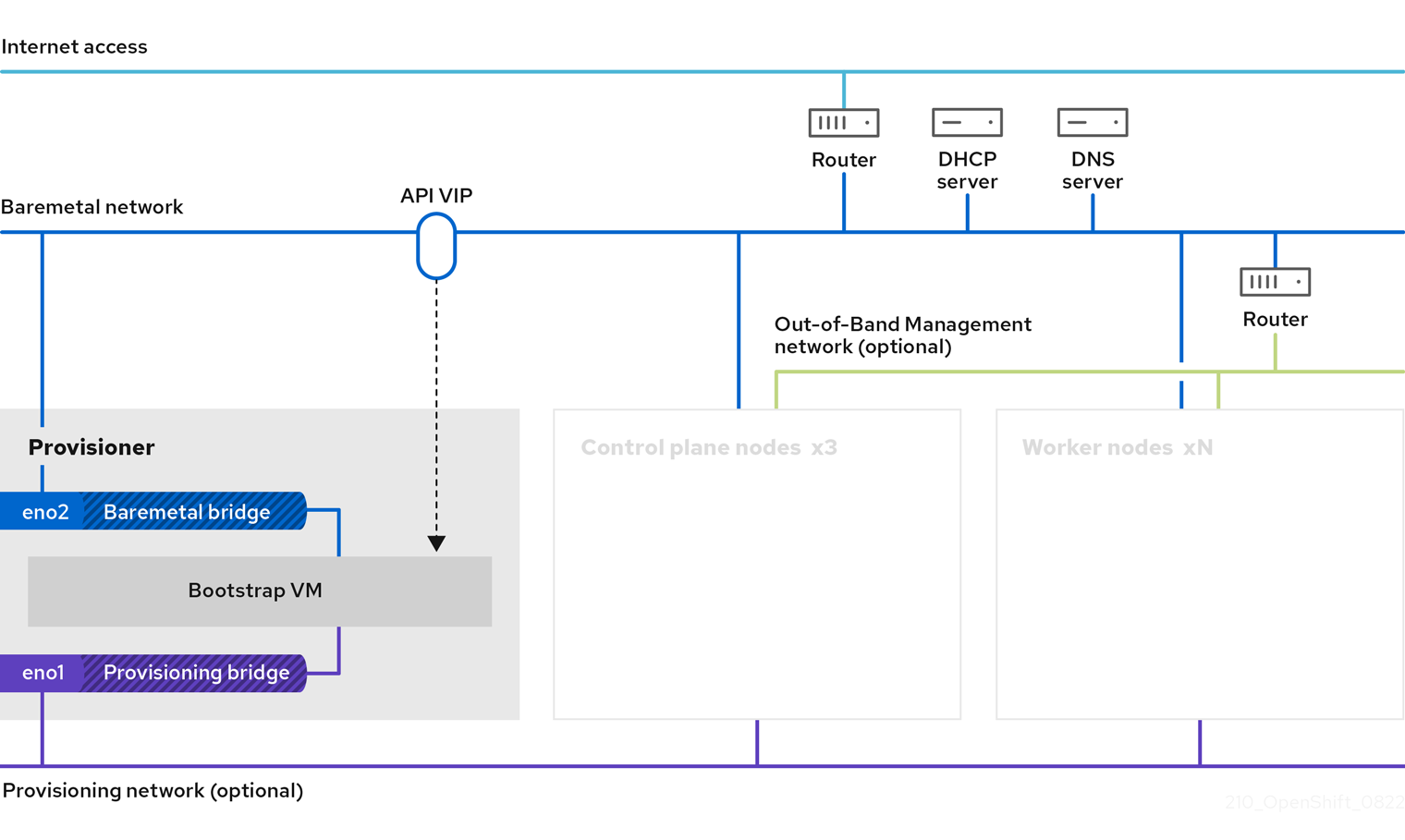
For the installation, the key elements in the previous diagram are:
- Provisioner: A physical machine that runs the installation program and hosts the bootstrap VM that deploys the control plane of a new OpenShift Container Platform cluster.
- Bootstrap VM: A virtual machine used in the process of deploying an OpenShift Container Platform cluster.
-
Network bridges: The bootstrap VM connects to the bare metal network and to the provisioning network, if present, via network bridges,
eno1andeno2. -
API VIP: An API virtual IP address (VIP) is used to provide failover of the API server across the control plane nodes. The API VIP first resides on the bootstrap VM. A script generates the
keepalived.confconfiguration file before launching the service. The VIP moves to one of the control plane nodes after the bootstrap process has completed and the bootstrap VM stops.
In phase 2 of the deployment, the provisioner destroys the bootstrap VM automatically and moves the virtual IP addresses (VIPs) to the appropriate nodes.
The keepalived.conf file sets the control plane machines with a lower Virtual Router Redundancy Protocol (VRRP) priority than the bootstrap VM, which ensures that the API on the control plane machines is fully functional before the API VIP moves from the bootstrap VM to the control plane. Once the API VIP moves to one of the control plane nodes, traffic sent from external clients to the API VIP routes to an haproxy load balancer running on that control plane node. This instance of haproxy load balances the API VIP traffic across the control plane nodes.
The Ingress VIP moves to the worker nodes. The keepalived instance also manages the Ingress VIP.
The following diagram illustrates phase 2 of deployment:
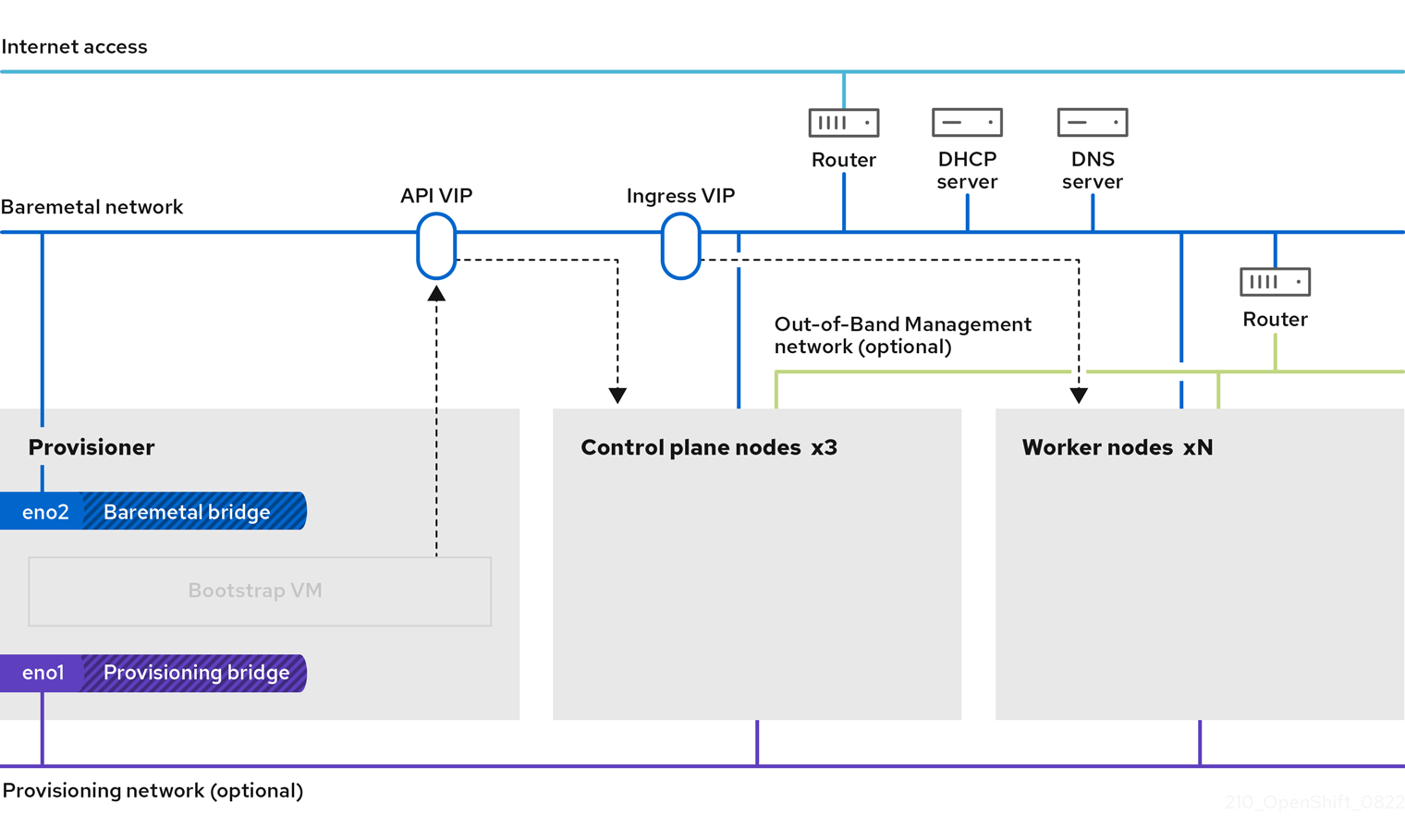
After this point, the node used by the provisioner can be removed or repurposed. From here, all additional provisioning tasks are carried out by the control plane.
The provisioning network is optional, but it is required for PXE booting. If you deploy without a provisioning network, you must use a virtual media baseboard management controller (BMC) addressing option such as redfish-virtualmedia or idrac-virtualmedia.
14.2. Prerequisites
Installer-provisioned installation of OpenShift Container Platform requires:
- One provisioner node with Red Hat Enterprise Linux (RHEL) 8.x installed. The provisioner can be removed after installation.
- Three control plane nodes
- Baseboard management controller (BMC) access to each node
At least one network:
- One required routable network
- One optional provisioning network
- One optional management network
Before starting an installer-provisioned installation of OpenShift Container Platform, ensure the hardware environment meets the following requirements.
14.2.1. Node requirements
Installer-provisioned installation involves a number of hardware node requirements:
- CPU architecture: All nodes must use x86_64 or AArch64 CPU architecture.
- Similar nodes: Red Hat recommends nodes have an identical configuration per role. That is, Red Hat recommends nodes be the same brand and model with the same CPU, memory, and storage configuration.
-
Baseboard Management Controller: The
provisionernode must be able to access the baseboard management controller (BMC) of each OpenShift Container Platform cluster node. You may use IPMI, Redfish, or a proprietary protocol. -
Latest generation: Nodes must be of the most recent generation. Installer-provisioned installation relies on BMC protocols, which must be compatible across nodes. Additionally, RHEL 8 ships with the most recent drivers for RAID controllers. Ensure that the nodes are recent enough to support RHEL 8 for the
provisionernode and RHCOS 8 for the control plane and worker nodes. - Registry node: (Optional) If setting up a disconnected mirrored registry, it is recommended the registry reside in its own node.
-
Provisioner node: Installer-provisioned installation requires one
provisionernode. - Control plane: Installer-provisioned installation requires three control plane nodes for high availability. You can deploy an OpenShift Container Platform cluster with only three control plane nodes, making the control plane nodes schedulable as worker nodes. Smaller clusters are more resource efficient for administrators and developers during development, production, and testing.
Worker nodes: While not required, a typical production cluster has two or more worker nodes.
ImportantDo not deploy a cluster with only one worker node, because the cluster will deploy with routers and ingress traffic in a degraded state.
-
Network interfaces: Each node must have at least one network interface for the routable
baremetalnetwork. Each node must have one network interface for aprovisioningnetwork when using theprovisioningnetwork for deployment. Using theprovisioningnetwork is the default configuration. Unified Extensible Firmware Interface (UEFI): Installer-provisioned installation requires UEFI boot on all OpenShift Container Platform nodes when using IPv6 addressing on the
provisioningnetwork. In addition, UEFI Device PXE Settings must be set to use the IPv6 protocol on theprovisioningnetwork NIC, but omitting theprovisioningnetwork removes this requirement.ImportantWhen starting the installation from virtual media such as an ISO image, delete all old UEFI boot table entries. If the boot table includes entries that are not generic entries provided by the firmware, the installation might fail.
Secure Boot: Many production scenarios require nodes with Secure Boot enabled to verify the node only boots with trusted software, such as UEFI firmware drivers, EFI applications, and the operating system. You may deploy with Secure Boot manually or managed.
- Manually: To deploy an OpenShift Container Platform cluster with Secure Boot manually, you must enable UEFI boot mode and Secure Boot on each control plane node and each worker node. Red Hat supports Secure Boot with manually enabled UEFI and Secure Boot only when installer-provisioned installations use Redfish virtual media. See "Configuring nodes for Secure Boot manually" in the "Configuring nodes" section for additional details.
Managed: To deploy an OpenShift Container Platform cluster with managed Secure Boot, you must set the
bootModevalue toUEFISecureBootin theinstall-config.yamlfile. Red Hat only supports installer-provisioned installation with managed Secure Boot on 10th generation HPE hardware and 13th generation Dell hardware running firmware version2.75.75.75or greater. Deploying with managed Secure Boot does not require Redfish virtual media. See "Configuring managed Secure Boot" in the "Setting up the environment for an OpenShift installation" section for details.NoteRed Hat does not support Secure Boot with self-generated keys.
14.2.2. Planning a bare metal cluster for OpenShift Virtualization
If you will use OpenShift Virtualization, it is important to be aware of several requirements before you install your bare metal cluster.
If you want to use live migration features, you must have multiple worker nodes at the time of cluster installation. This is because live migration requires the cluster-level high availability (HA) flag to be set to true. The HA flag is set when a cluster is installed and cannot be changed afterwards. If there are fewer than two worker nodes defined when you install your cluster, the HA flag is set to false for the life of the cluster.
NoteYou can install OpenShift Virtualization on a single-node cluster, but single-node OpenShift does not support high availability.
- Live migration requires shared storage. Storage for OpenShift Virtualization must support and use the ReadWriteMany (RWX) access mode.
- If you plan to use Single Root I/O Virtualization (SR-IOV), ensure that your network interface controllers (NICs) are supported by OpenShift Container Platform.
14.2.3. Firmware requirements for installing with virtual media
The installation program for installer-provisioned OpenShift Container Platform clusters validates the hardware and firmware compatibility with Redfish virtual media. The installation program does not begin installation on a node if the node firmware is not compatible. The following tables list the minimum firmware versions tested and verified to work for installer-provisioned OpenShift Container Platform clusters deployed by using Redfish virtual media.
Red Hat does not test every combination of firmware, hardware, or other third-party components. For further information about third-party support, see Red Hat third-party support policy. For information about updating the firmware, see the hardware documentation for the nodes or contact the hardware vendor.
| Model | Management | Firmware versions |
|---|---|---|
| 10th Generation | iLO5 | 2.63 or later |
| Model | Management | Firmware versions |
|---|---|---|
| 15th Generation | iDRAC 9 | v5.10.00.00 - v5.10.50.00 only |
| 14th Generation | iDRAC 9 | v5.10.00.00 - v5.10.50.00 only |
| 13th Generation | iDRAC 8 | v2.75.75.75 or later |
For Dell servers, ensure the OpenShift Container Platform cluster nodes have AutoAttach enabled through the iDRAC console. The menu path is Configuration 04.40.00.00 and all releases up to including the 5.xx series, the virtual console plugin defaults to eHTML5, an enhanced version of HTML5, which causes problems with the InsertVirtualMedia workflow. Set the plugin to use HTML5 to avoid this issue. The menu path is Configuration
14.2.4. Network requirements
Installer-provisioned installation of OpenShift Container Platform involves several network requirements. First, installer-provisioned installation involves an optional non-routable provisioning network for provisioning the operating system on each bare metal node. Second, installer-provisioned installation involves a routable baremetal network.
14.2.4.1. Increase the network MTU
Before deploying OpenShift Container Platform, increase the network maximum transmission unit (MTU) to 1500 or more. If the MTU is lower than 1500, the Ironic image that is used to boot the node might fail to communicate with the Ironic inspector pod, and inspection will fail. If this occurs, installation stops because the nodes are not available for installation.
14.2.4.2. Configuring NICs
OpenShift Container Platform deploys with two networks:
provisioning: Theprovisioningnetwork is an optional non-routable network used for provisioning the underlying operating system on each node that is a part of the OpenShift Container Platform cluster. The network interface for theprovisioningnetwork on each cluster node must have the BIOS or UEFI configured to PXE boot.The
provisioningNetworkInterfaceconfiguration setting specifies theprovisioningnetwork NIC name on the control plane nodes, which must be identical on the control plane nodes. ThebootMACAddressconfiguration setting provides a means to specify a particular NIC on each node for theprovisioningnetwork.The
provisioningnetwork is optional, but it is required for PXE booting. If you deploy without aprovisioningnetwork, you must use a virtual media BMC addressing option such asredfish-virtualmediaoridrac-virtualmedia.-
baremetal: Thebaremetalnetwork is a routable network. You can use any NIC to interface with thebaremetalnetwork provided the NIC is not configured to use theprovisioningnetwork.
When using a VLAN, each NIC must be on a separate VLAN corresponding to the appropriate network.
14.2.4.3. DNS requirements
Clients access the OpenShift Container Platform cluster nodes over the baremetal network. A network administrator must configure a subdomain or subzone where the canonical name extension is the cluster name.
<cluster_name>.<base_domain>For example:
test-cluster.example.comOpenShift Container Platform includes functionality that uses cluster membership information to generate A/AAAA records. This resolves the node names to their IP addresses. After the nodes are registered with the API, the cluster can disperse node information without using CoreDNS-mDNS. This eliminates the network traffic associated with multicast DNS.
In OpenShift Container Platform deployments, DNS name resolution is required for the following components:
- The Kubernetes API
- The OpenShift Container Platform application wildcard ingress API
A/AAAA records are used for name resolution and PTR records are used for reverse name resolution. Red Hat Enterprise Linux CoreOS (RHCOS) uses the reverse records or DHCP to set the hostnames for all the nodes.
Installer-provisioned installation includes functionality that uses cluster membership information to generate A/AAAA records. This resolves the node names to their IP addresses. In each record, <cluster_name> is the cluster name and <base_domain> is the base domain that you specify in the install-config.yaml file. A complete DNS record takes the form: <component>.<cluster_name>.<base_domain>..
| Component | Record | Description |
|---|---|---|
| Kubernetes API |
| An A/AAAA record and a PTR record identify the API load balancer. These records must be resolvable by both clients external to the cluster and from all the nodes within the cluster. |
| Routes |
| The wildcard A/AAAA record refers to the application ingress load balancer. The application ingress load balancer targets the nodes that run the Ingress Controller pods. The Ingress Controller pods run on the worker nodes by default. These records must be resolvable by both clients external to the cluster and from all the nodes within the cluster.
For example, |
You can use the dig command to verify DNS resolution.
14.2.4.4. Dynamic Host Configuration Protocol (DHCP) requirements
By default, installer-provisioned installation deploys ironic-dnsmasq with DHCP enabled for the provisioning network. No other DHCP servers should be running on the provisioning network when the provisioningNetwork configuration setting is set to managed, which is the default value. If you have a DHCP server running on the provisioning network, you must set the provisioningNetwork configuration setting to unmanaged in the install-config.yaml file.
Network administrators must reserve IP addresses for each node in the OpenShift Container Platform cluster for the baremetal network on an external DHCP server.
14.2.4.5. Reserving IP addresses for nodes with the DHCP server
For the baremetal network, a network administrator must reserve a number of IP addresses, including:
Two unique virtual IP addresses.
- One virtual IP address for the API endpoint.
- One virtual IP address for the wildcard ingress endpoint.
- One IP address for the provisioner node.
- One IP address for each control plane node.
- One IP address for each worker node, if applicable.
Some administrators prefer to use static IP addresses so that each node’s IP address remains constant in the absence of a DHCP server. To configure static IP addresses with NMState, see "(Optional) Configuring host network interfaces" in the "Setting up the environment for an OpenShift installation" section.
External load balancing services and the control plane nodes must run on the same L2 network, and on the same VLAN when using VLANs to route traffic between the load balancing services and the control plane nodes.
The storage interface requires a DHCP reservation or a static IP.
The following table provides an exemplary embodiment of fully qualified domain names. The API and Nameserver addresses begin with canonical name extensions. The hostnames of the control plane and worker nodes are exemplary, so you can use any host naming convention you prefer.
| Usage | Host Name | IP |
|---|---|---|
| API |
|
|
| Ingress LB (apps) |
|
|
| Provisioner node |
|
|
| Control-plane-0 |
|
|
| Control-plane-1 |
|
|
| Control-plane-2 |
|
|
| Worker-0 |
|
|
| Worker-1 |
|
|
| Worker-n |
|
|
If you do not create DHCP reservations, the installer requires reverse DNS resolution to set the hostnames for the Kubernetes API node, the provisioner node, the control plane nodes, and the worker nodes.
14.2.4.6. Provisioner node requirements
You must specify the MAC address for the provisioner node in your installation configuration. The bootMacAddress specification is typically associated with PXE network booting. However, the Ironic provisioning service also requires the bootMacAddress specification to identify nodes during the inspection of the cluster, or during node redeployment in the cluster.
The provisioner node requires layer 2 connectivity for network booting, DHCP and DNS resolution, and local network communication. The provisioner node requires layer 3 connectivity for virtual media booting.
14.2.4.7. Network Time Protocol (NTP)
Each OpenShift Container Platform node in the cluster must have access to an NTP server. OpenShift Container Platform nodes use NTP to synchronize their clocks. For example, cluster nodes use SSL certificates that require validation, which might fail if the date and time between the nodes are not in sync.
Define a consistent clock date and time format in each cluster node’s BIOS settings, or installation might fail.
You can reconfigure the control plane nodes to act as NTP servers on disconnected clusters, and reconfigure worker nodes to retrieve time from the control plane nodes.
14.2.4.8. Port access for the out-of-band management IP address
The out-of-band management IP address is on a separate network from the node. To ensure that the out-of-band management can communicate with the provisioner during installation, the out-of-band management IP address must be granted access to port 80 on the bootstrap host and port 6180 on the OpenShift Container Platform control plane hosts. TLS port 6183 is required for virtual media installation, for example, via Redfish.
14.2.5. Configuring nodes
Configuring nodes when using the provisioning network
Each node in the cluster requires the following configuration for proper installation.
A mismatch between nodes will cause an installation failure.
While the cluster nodes can contain more than two NICs, the installation process only focuses on the first two NICs. In the following table, NIC1 is a non-routable network (provisioning) that is only used for the installation of the OpenShift Container Platform cluster.
| NIC | Network | VLAN |
|---|---|---|
| NIC1 |
|
|
| NIC2 |
|
|
The Red Hat Enterprise Linux (RHEL) 8.x installation process on the provisioner node might vary. To install Red Hat Enterprise Linux (RHEL) 8.x using a local Satellite server or a PXE server, PXE-enable NIC2.
| PXE | Boot order |
|---|---|
|
NIC1 PXE-enabled | 1 |
|
NIC2 | 2 |
Ensure PXE is disabled on all other NICs.
Configure the control plane and worker nodes as follows:
| PXE | Boot order |
|---|---|
| NIC1 PXE-enabled (provisioning network) | 1 |
Configuring nodes without the provisioning network
The installation process requires one NIC:
| NIC | Network | VLAN |
|---|---|---|
| NICx |
|
|
NICx is a routable network (baremetal) that is used for the installation of the OpenShift Container Platform cluster, and routable to the internet.
The provisioning network is optional, but it is required for PXE booting. If you deploy without a provisioning network, you must use a virtual media BMC addressing option such as redfish-virtualmedia or idrac-virtualmedia.
Configuring nodes for Secure Boot manually
Secure Boot prevents a node from booting unless it verifies the node is using only trusted software, such as UEFI firmware drivers, EFI applications, and the operating system.
Red Hat only supports manually configured Secure Boot when deploying with Redfish virtual media.
To enable Secure Boot manually, refer to the hardware guide for the node and execute the following:
Procedure
- Boot the node and enter the BIOS menu.
-
Set the node’s boot mode to
UEFI Enabled. - Enable Secure Boot.
Red Hat does not support Secure Boot with self-generated keys.
Configuring the Compatibility Support Module for Fujitsu iRMC
The Compatibility Support Module (CSM) configuration provides support for legacy BIOS backward compatibility with UEFI systems. You must configure the CSM when you deploy a cluster with Fujitsu iRMC, otherwise the installation might fail.
For information about configuring the CSM for your specific node type, refer to the hardware guide for the node.
Prerequisites
-
Ensure that you have disabled Secure Boot Control. You can disable the feature under Security
Secure Boot Configuration Secure Boot Control.
Procedure
- Boot the node and select the BIOS menu.
- Under the Advanced tab, select CSM Configuration from the list.
Enable the Launch CSM option and set the following values:
Expand Item Value Boot option filter
UEFI and Legacy
Launch PXE OpROM Policy
UEFI only
Launch Storage OpROM policy
UEFI only
Other PCI device ROM priority
UEFI only
14.2.6. Out-of-band management
Nodes typically have an additional NIC used by the baseboard management controllers (BMCs). These BMCs must be accessible from the provisioner node.
Each node must be accessible via out-of-band management. When using an out-of-band management network, the provisioner node requires access to the out-of-band management network for a successful OpenShift Container Platform installation.
The out-of-band management setup is out of scope for this document. Using a separate management network for out-of-band management can enhance performance and improve security. However, using the provisioning network or the bare metal network are valid options.
The bootstrap VM features a maximum of two network interfaces. If you configure a separate management network for out-of-band management, and you are using a provisioning network, the bootstrap VM requires routing access to the management network through one of the network interfaces. In this scenario, the bootstrap VM can then access three networks:
- the bare metal network
- the provisioning network
- the management network routed through one of the network interfaces
14.2.7. Required data for installation
Prior to the installation of the OpenShift Container Platform cluster, gather the following information from all cluster nodes:
Out-of-band management IP
Examples
- Dell (iDRAC) IP
- HP (iLO) IP
- Fujitsu (iRMC) IP
When using the provisioning network
-
NIC (
provisioning) MAC address -
NIC (
baremetal) MAC address
When omitting the provisioning network
-
NIC (
baremetal) MAC address
14.2.8. Validation checklist for nodes
When using the provisioning network
-
❏ NIC1 VLAN is configured for the
provisioningnetwork. -
❏ NIC1 for the
provisioningnetwork is PXE-enabled on the provisioner, control plane, and worker nodes. -
❏ NIC2 VLAN is configured for the
baremetalnetwork. - ❏ PXE has been disabled on all other NICs.
- ❏ DNS is configured with API and Ingress endpoints.
- ❏ Control plane and worker nodes are configured.
- ❏ All nodes accessible via out-of-band management.
- ❏ (Optional) A separate management network has been created.
- ❏ Required data for installation.
When omitting the provisioning network
-
❏ NIC1 VLAN is configured for the
baremetalnetwork. - ❏ DNS is configured with API and Ingress endpoints.
- ❏ Control plane and worker nodes are configured.
- ❏ All nodes accessible via out-of-band management.
- ❏ (Optional) A separate management network has been created.
- ❏ Required data for installation.
14.3. Setting up the environment for an OpenShift installation
14.3.1. Installing RHEL on the provisioner node
With the configuration of the prerequisites complete, the next step is to install RHEL 8.x on the provisioner node. The installer uses the provisioner node as the orchestrator while installing the OpenShift Container Platform cluster. For the purposes of this document, installing RHEL on the provisioner node is out of scope. However, options include but are not limited to using a RHEL Satellite server, PXE, or installation media.
14.3.2. Preparing the provisioner node for OpenShift Container Platform installation
Perform the following steps to prepare the environment.
Procedure
-
Log in to the provisioner node via
ssh. Create a non-root user (
kni) and provide that user withsudoprivileges:# useradd kni# passwd kni# echo "kni ALL=(root) NOPASSWD:ALL" | tee -a /etc/sudoers.d/kni# chmod 0440 /etc/sudoers.d/kniCreate an
sshkey for the new user:# su - kni -c "ssh-keygen -t ed25519 -f /home/kni/.ssh/id_rsa -N ''"Log in as the new user on the provisioner node:
# su - kniUse Red Hat Subscription Manager to register the provisioner node:
$ sudo subscription-manager register --username=<user> --password=<pass> --auto-attach $ sudo subscription-manager repos --enable=rhel-8-for-<architecture>-appstream-rpms --enable=rhel-8-for-<architecture>-baseos-rpmsNoteFor more information about Red Hat Subscription Manager, see Using and Configuring Red Hat Subscription Manager.
Install the following packages:
$ sudo dnf install -y libvirt qemu-kvm mkisofs python3-devel jq ipmitoolModify the user to add the
libvirtgroup to the newly created user:$ sudo usermod --append --groups libvirt <user>Restart
firewalldand enable thehttpservice:$ sudo systemctl start firewalld$ sudo firewall-cmd --zone=public --add-service=http --permanent$ sudo firewall-cmd --reloadStart and enable the
libvirtdservice:$ sudo systemctl enable libvirtd --nowCreate the
defaultstorage pool and start it:$ sudo virsh pool-define-as --name default --type dir --target /var/lib/libvirt/images$ sudo virsh pool-start default$ sudo virsh pool-autostart defaultCreate a
pull-secret.txtfile:$ vim pull-secret.txtIn a web browser, navigate to Install OpenShift on Bare Metal with installer-provisioned infrastructure. Click Copy pull secret. Paste the contents into the
pull-secret.txtfile and save the contents in thekniuser’s home directory.
14.3.3. Checking NTP server synchronization
The OpenShift Container Platform installation program installs the chrony Network Time Protocol (NTP) service on the cluster nodes. To complete installation, each node must have access to an NTP time server. You can verify NTP server synchronization by using the chrony service.
For disconnected clusters, you must configure the NTP servers on the control plane nodes. For more information see the Additional resources section.
Prerequisites
-
You installed the
chronypackage on the target node.
Procedure
-
Log in to the node by using the
sshcommand. View the NTP servers available to the node by running the following command:
$ chronyc sourcesExample output
MS Name/IP address         Stratum Poll Reach LastRx Last sample
===============================================================================
^+ time.cloudflare.com           3  10   377   187   -209us[ -209us] +/-   32ms
^+ t1.time.ir2.yahoo.com         2  10   377   185  -4382us[-4382us] +/-   23ms
^+ time.cloudflare.com           3  10   377   198   -996us[-1220us] +/-   33ms
^* brenbox.westnet.ie            1  10   377   193  -9538us[-9761us] +/-   24ms
Use the
pingcommand to ensure that the node can access an NTP server, for example:$ ping time.cloudflare.comExample output
PING time.cloudflare.com (162.159.200.123) 56(84) bytes of data.
64 bytes from time.cloudflare.com (162.159.200.123): icmp_seq=1 ttl=54 time=32.3 ms
64 bytes from time.cloudflare.com (162.159.200.123): icmp_seq=2 ttl=54 time=30.9 ms
64 bytes from time.cloudflare.com (162.159.200.123): icmp_seq=3 ttl=54 time=36.7 ms
...
14.3.4. Configuring networking
Before installation, you must configure the networking on the provisioner node. Installer-provisioned clusters deploy with a bare-metal bridge and network, and an optional provisioning bridge and network.
You can also configure networking from the web console.
Procedure
Export the bare-metal network NIC name:
$ export PUB_CONN=<baremetal_nic_name>Configure the bare-metal network:
NoteThe SSH connection might disconnect after executing these steps.
$ sudo nohup bash -c "
    nmcli con down \"$PUB_CONN\"
    nmcli con delete \"$PUB_CONN\"
    # RHEL 8.1 appends the word \"System\" in front of the connection, delete in case it exists
    nmcli con down \"System $PUB_CONN\"
    nmcli con delete \"System $PUB_CONN\"
    nmcli connection add ifname baremetal type bridge con-name baremetal bridge.stp no
    nmcli con add type bridge-slave ifname \"$PUB_CONN\" master baremetal
    pkill dhclient;dhclient baremetal
"
Optional: If you are deploying with a provisioning network, export the provisioning network NIC name:
$ export PROV_CONN=<prov_nic_name>Optional: If you are deploying with a provisioning network, configure the provisioning network:
$ sudo nohup bash -c " nmcli con down \"$PROV_CONN\" nmcli con delete \"$PROV_CONN\" nmcli connection add ifname provisioning type bridge con-name provisioning nmcli con add type bridge-slave ifname \"$PROV_CONN\" master provisioning nmcli connection modify provisioning ipv6.addresses fd00:1101::1/64 ipv6.method manual nmcli con down provisioning nmcli con up provisioning "NoteThe ssh connection might disconnect after executing these steps.
The IPv6 address can be any address as long as it is not routable via the bare-metal network.
Ensure that UEFI is enabled and UEFI PXE settings are set to the IPv6 protocol when using IPv6 addressing.
Optional: If you are deploying with a provisioning network, configure the IPv4 address on the provisioning network connection:
$ nmcli connection modify provisioning ipv4.addresses 172.22.0.254/24 ipv4.method manualsshback into theprovisionernode (if required):# ssh kni@provisioner.<cluster-name>.<domain>Verify the connection bridges have been properly created:
$ sudo nmcli con showNAME UUID TYPE DEVICE baremetal 4d5133a5-8351-4bb9-bfd4-3af264801530 bridge baremetal provisioning 43942805-017f-4d7d-a2c2-7cb3324482ed bridge provisioning virbr0 d9bca40f-eee1-410b-8879-a2d4bb0465e7 bridge virbr0 bridge-slave-eno1 76a8ed50-c7e5-4999-b4f6-6d9014dd0812 ethernet eno1 bridge-slave-eno2 f31c3353-54b7-48de-893a-02d2b34c4736 ethernet eno2
14.3.5. Establishing communication between subnets
In a typical OpenShift Container Platform cluster setup, all nodes, including the control plane and worker nodes, reside in the same network. However, for edge computing scenarios, it can be beneficial to locate worker nodes closer to the edge. This often involves using different network segments or subnets for the remote worker nodes than the subnet used by the control plane and local worker nodes. Such a setup can reduce latency for the edge and allow for enhanced scalability. However, the network must be configured properly before installing OpenShift Container Platform to ensure that the edge subnets containing the remote worker nodes can reach the subnet containing the control plane nodes and receive traffic from the control plane too.
All control plane nodes must run in the same subnet. When using more than one subnet, you can also configure the Ingress VIP to run on the control plane nodes by using a manifest. See "Configuring network components to run on the control plane" for details.
Deploying a cluster with multiple subnets requires using virtual media.
This procedure details the network configuration required to allow the remote worker nodes in the second subnet to communicate effectively with the control plane nodes in the first subnet and to allow the control plane nodes in the first subnet to communicate effectively with the remote worker nodes in the second subnet.
In this procedure, the cluster spans two subnets:
-
The first subnet (
10.0.0.0) contains the control plane and local worker nodes. -
The second subnet (
192.168.0.0) contains the edge worker nodes.
Procedure
Configure the first subnet to communicate with the second subnet:
Log in as
rootto a control plane node by running the following command:$ sudo su -Get the name of the network interface:
# nmcli dev status-
Add a route to the second subnet (
192.168.0.0) via the gateway: s+
# nmcli connection modify <interface_name> +ipv4.routes "192.168.0.0/24 via <gateway>"
+ Replace <interface_name> with the interface name. Replace <gateway> with the IP address of the actual gateway.
+ .Example
+
# nmcli connection modify eth0 +ipv4.routes "192.168.0.0/24 via 192.168.0.1"Apply the changes:
# nmcli connection up <interface_name>Replace
<interface_name>with the interface name.Verify the routing table to ensure the route has been added successfully:
# ip routeRepeat the previous steps for each control plane node in the first subnet.
NoteAdjust the commands to match your actual interface names and gateway.
- Configure the second subnet to communicate with the first subnet:
Log in as
rootto a remote worker node:$ sudo su -Get the name of the network interface:
# nmcli dev statusAdd a route to the first subnet (
10.0.0.0) via the gateway:# nmcli connection modify <interface_name> +ipv4.routes "10.0.0.0/24 via <gateway>"Replace
<interface_name>with the interface name. Replace<gateway>with the IP address of the actual gateway.Example
# nmcli connection modify eth0 +ipv4.routes "10.0.0.0/24 via 10.0.0.1"Apply the changes:
# nmcli connection up <interface_name>Replace
<interface_name>with the interface name.Verify the routing table to ensure the route has been added successfully:
# ip routeRepeat the previous steps for each worker node in the second subnet.
NoteAdjust the commands to match your actual interface names and gateway.
- Once you have configured the networks, test the connectivity to ensure the remote worker nodes can reach the control plane nodes and the control plane nodes can reach the remote worker nodes.
From the control plane nodes in the first subnet, ping a remote worker node in the second subnet:
$ ping <remote_worker_node_ip_address>If the ping is successful, it means the control plane nodes in the first subnet can reach the remote worker nodes in the second subnet. If you don’t receive a response, review the network configurations and repeat the procedure for the node.
From the remote worker nodes in the second subnet, ping a control plane node in the first subnet:
$ ping <control_plane_node_ip_address>If the ping is successful, it means the remote worker nodes in the second subnet can reach the control plane in the first subnet. If you don’t receive a response, review the network configurations and repeat the procedure for the node.
14.3.6. Retrieving the OpenShift Container Platform installer
Use the stable-4.x version of the installation program and your selected architecture to deploy the generally available stable version of OpenShift Container Platform:
$ export VERSION=stable-4.11$ export RELEASE_ARCH=<architecture>$ export RELEASE_IMAGE=$(curl -s https://mirror.openshift.com/pub/openshift-v4/$RELEASE_ARCH/clients/ocp/$VERSION/release.txt | grep 'Pull From: quay.io' | awk -F ' ' '{print $3}')14.3.7. Extracting the OpenShift Container Platform installer
After retrieving the installer, the next step is to extract it.
Procedure
Set the environment variables:
$ export cmd=openshift-baremetal-install$ export pullsecret_file=~/pull-secret.txt$ export extract_dir=$(pwd)Get the
ocbinary:$ curl -s https://mirror.openshift.com/pub/openshift-v4/clients/ocp/$VERSION/openshift-client-linux.tar.gz | tar zxvf - ocExtract the installer:
$ sudo cp oc /usr/local/bin$ oc adm release extract --registry-config "${pullsecret_file}" --command=$cmd --to "${extract_dir}" ${RELEASE_IMAGE}$ sudo cp openshift-baremetal-install /usr/local/bin
14.3.8. Optional: Creating an RHCOS images cache
To employ image caching, you must download the Red Hat Enterprise Linux CoreOS (RHCOS) image used by the bootstrap VM to provision the cluster nodes. Image caching is optional, but it is especially useful when running the installation program on a network with limited bandwidth.
The installation program no longer needs the clusterOSImage RHCOS image because the correct image is in the release payload.
If you are running the installation program on a network with limited bandwidth and the RHCOS images download takes more than 15 to 20 minutes, the installation program will timeout. Caching images on a web server will help in such scenarios.
If you enable TLS for the HTTPD server, you must confirm the root certificate is signed by an authority trusted by the client and verify the trusted certificate chain between your OpenShift Container Platform hub and spoke clusters and the HTTPD server. Using a server configured with an untrusted certificate prevents the images from being downloaded to the image creation service. Using untrusted HTTPS servers is not supported.
Install a container that contains the images.
Procedure
Install
podman:$ sudo dnf install -y podmanOpen firewall port
8080to be used for RHCOS image caching:$ sudo firewall-cmd --add-port=8080/tcp --zone=public --permanent$ sudo firewall-cmd --reloadCreate a directory to store the
bootstraposimage:$ mkdir /home/kni/rhcos_image_cacheSet the appropriate SELinux context for the newly created directory:
$ sudo semanage fcontext -a -t httpd_sys_content_t "/home/kni/rhcos_image_cache(/.*)?"$ sudo restorecon -Rv /home/kni/rhcos_image_cache/Get the URI for the RHCOS image that the installation program will deploy on the bootstrap VM:
$ export RHCOS_QEMU_URI=$(/usr/local/bin/openshift-baremetal-install coreos print-stream-json | jq -r --arg ARCH "$(arch)" '.architectures[$ARCH].artifacts.qemu.formats["qcow2.gz"].disk.location')Get the name of the image that the installation program will deploy on the bootstrap VM:
$ export RHCOS_QEMU_NAME=${RHCOS_QEMU_URI##*/}Get the SHA hash for the RHCOS image that will be deployed on the bootstrap VM:
$ export RHCOS_QEMU_UNCOMPRESSED_SHA256=$(/usr/local/bin/openshift-baremetal-install coreos print-stream-json | jq -r --arg ARCH "$(arch)" '.architectures[$ARCH].artifacts.qemu.formats["qcow2.gz"].disk["uncompressed-sha256"]')Download the image and place it in the
/home/kni/rhcos_image_cachedirectory:$ curl -L ${RHCOS_QEMU_URI} -o /home/kni/rhcos_image_cache/${RHCOS_QEMU_NAME}Confirm SELinux type is of
httpd_sys_content_tfor the new file:$ ls -Z /home/kni/rhcos_image_cacheCreate the pod:
$ podman run -d --name rhcos_image_cache \1 -v /home/kni/rhcos_image_cache:/var/www/html \ -p 8080:8080/tcp \ quay.io/centos7/httpd-24-centos7:latest- 1
- Creates a caching webserver with the name
rhcos_image_cache. This pod serves thebootstrapOSImageimage in theinstall-config.yamlfile for deployment.
Generate the
bootstrapOSImageconfiguration:$ export BAREMETAL_IP=$(ip addr show dev baremetal | awk '/inet /{print $2}' | cut -d"/" -f1)$ export BOOTSTRAP_OS_IMAGE="http://${BAREMETAL_IP}:8080/${RHCOS_QEMU_NAME}?sha256=${RHCOS_QEMU_UNCOMPRESSED_SHA256}"$ echo " bootstrapOSImage=${BOOTSTRAP_OS_IMAGE}"Add the required configuration to the
install-config.yamlfile underplatform.baremetal:platform: baremetal: bootstrapOSImage: <bootstrap_os_image>1 - 1
- Replace
<bootstrap_os_image>with the value of$BOOTSTRAP_OS_IMAGE.
See the "Configuring the install-config.yaml file" section for additional details.
14.3.9. Configuring the install-config.yaml file
14.3.9.1. Configuring the install-config.yaml file
The install-config.yaml file requires some additional details. Most of the information teaches the installation program and the resulting cluster enough about the available hardware that it is able to fully manage it.
The installation program no longer needs the clusterOSImage RHCOS image because the correct image is in the release payload.
Configure
install-config.yaml. Change the appropriate variables to match the environment, includingpullSecretandsshKey:apiVersion: v1 baseDomain: <domain> metadata: name: <cluster_name> networking: machineNetwork: - cidr: <public_cidr> networkType: OVNKubernetes compute: - name: worker replicas: 21 controlPlane: name: master replicas: 3 platform: baremetal: {} platform: baremetal: apiVIP: <api_ip> ingressVIP: <wildcard_ip> provisioningNetworkCIDR: <CIDR> bootstrapExternalStaticIP: <bootstrap_static_ip_address>2 bootstrapExternalStaticGateway: <bootstrap_static_gateway>3 hosts: - name: openshift-master-0 role: master bmc: address: ipmi://<out_of_band_ip>4 username: <user> password: <password> bootMACAddress: <NIC1_mac_address> rootDeviceHints: deviceName: "<installation_disk_drive_path>"5 - name: <openshift_master_1> role: master bmc: address: ipmi://<out_of_band_ip> username: <user> password: <password> bootMACAddress: <NIC1_mac_address> rootDeviceHints: deviceName: "<installation_disk_drive_path>" - name: <openshift_master_2> role: master bmc: address: ipmi://<out_of_band_ip> username: <user> password: <password> bootMACAddress: <NIC1_mac_address> rootDeviceHints: deviceName: "<installation_disk_drive_path>" - name: <openshift_worker_0> role: worker bmc: address: ipmi://<out_of_band_ip> username: <user> password: <password> bootMACAddress: <NIC1_mac_address> - name: <openshift_worker_1> role: worker bmc: address: ipmi://<out_of_band_ip> username: <user> password: <password> bootMACAddress: <NIC1_mac_address> rootDeviceHints: deviceName: "<installation_disk_drive_path>" pullSecret: '<pull_secret>' sshKey: '<ssh_pub_key>'- 1
- Scale the worker machines based on the number of worker nodes that are part of the OpenShift Container Platform cluster. Valid options for the
replicasvalue are0and integers greater than or equal to2. Set the number of replicas to0to deploy a three-node cluster, which contains only three control plane machines. A three-node cluster is a smaller, more resource-efficient cluster that can be used for testing, development, and production. You cannot install the cluster with only one worker. - 2
- When deploying a cluster with static IP addresses, you must set the
bootstrapExternalStaticIPconfiguration setting to specify the static IP address of the bootstrap VM when there is no DHCP server on the bare-metal network. - 3
- When deploying a cluster with static IP addresses, you must set the
bootstrapExternalStaticGatewayconfiguration setting to specify the gateway IP address for the bootstrap VM when there is no DHCP server on the bare-metal network. - 4
- See the BMC addressing sections for more options.
- 5
- To set the path to the installation disk drive, enter the kernel name of the disk. For example,
/dev/sda.ImportantBecause the disk discovery order is not guaranteed, the kernel name of the disk can change across booting options for machines with multiple disks. For instance,
/dev/sdabecomes/dev/sdband vice versa. To avoid this issue, you must use persistent disk attributes, such as the disk World Wide Name (WWN). To use the disk WWN, replace thedeviceNameparameter with thewwnWithExtensionparameter. Depending on the parameter that you use, enter the disk name, for example,/dev/sdaor the disk WWN, for example,"0x64cd98f04fde100024684cf3034da5c2". Ensure that you enter the disk WWN value within quotes so that it is used as a string value and not a hexadecimal value.Failure to meet these requirements for the
rootDeviceHintsparameter might result in the following error:ironic-inspector inspection failed: No disks satisfied root device hints
Create a directory to store the cluster configuration:
$ mkdir ~/clusterconfigsCopy the
install-config.yamlfile to the new directory:$ cp install-config.yaml ~/clusterconfigsEnsure all bare metal nodes are powered off prior to installing the OpenShift Container Platform cluster:
$ ipmitool -I lanplus -U <user> -P <password> -H <management-server-ip> power offRemove old bootstrap resources if any are left over from a previous deployment attempt:
for i in $(sudo virsh list | tail -n +3 | grep bootstrap | awk {'print $2'});
do
  sudo virsh destroy $i;
  sudo virsh undefine $i;
  sudo virsh vol-delete $i --pool $i;
  sudo virsh vol-delete $i.ign --pool $i;
  sudo virsh pool-destroy $i;
  sudo virsh pool-undefine $i;
done
14.3.9.2. Additional install-config parameters
See the following tables for the required parameters, the hosts parameter, and the bmc parameter for the install-config.yaml file.
| Parameters | Default | Description |
|---|---|---|
|
|
The domain name for the cluster. For example, | |
|
|
|
The boot mode for a node. Options are |
|
| The static IP address for the bootstrap VM. You must set this value when deploying a cluster with static IP addresses when there is no DHCP server on the bare-metal network. | |
|
| The static IP address of the gateway for the bootstrap VM. You must set this value when deploying a cluster with static IP addresses when there is no DHCP server on the bare-metal network. | |
|
|
The | |
|
|
The | |
|
The name to be given to the OpenShift Container Platform cluster. For example, | |
|
The public CIDR (Classless Inter-Domain Routing) of the external network. For example, | |
| The OpenShift Container Platform cluster requires a name be provided for worker (or compute) nodes even if there are zero nodes. | |
| Replicas sets the number of worker (or compute) nodes in the OpenShift Container Platform cluster. | |
| The OpenShift Container Platform cluster requires a name for control plane (master) nodes. | |
| Replicas sets the number of control plane (master) nodes included as part of the OpenShift Container Platform cluster. | |
|
|
The name of the network interface on nodes connected to the provisioning network. For OpenShift Container Platform 4.9 and later releases, use the | |
|
| The default configuration used for machine pools without a platform configuration. | |
|
| (Optional) The virtual IP address for Kubernetes API communication.
This setting must either be provided in the | |
|
|
|
|
|
| (Optional) The virtual IP address for ingress traffic.
This setting must either be provided in the |
| Parameters | Default | Description |
|---|---|---|
|
|
| Defines the IP range for nodes on the provisioning network. |
|
|
| The CIDR for the network to use for provisioning. This option is required when not using the default address range on the provisioning network. |
|
|
The third IP address of the |
The IP address within the cluster where the provisioning services run. Defaults to the third IP address of the provisioning subnet. For example, |
|
|
The second IP address of the |
The IP address on the bootstrap VM where the provisioning services run while the installer is deploying the control plane (master) nodes. Defaults to the second IP address of the provisioning subnet. For example, |
|
|
| The name of the bare-metal bridge of the hypervisor attached to the bare-metal network. |
|
|
|
The name of the provisioning bridge on the |
|
|
Defines the host architecture for your cluster. Valid values are | |
|
| The default configuration used for machine pools without a platform configuration. | |
|
|
A URL to override the default operating system image for the bootstrap node. The URL must contain a SHA-256 hash of the image. For example: | |
|
|
The
| |
|
| Set this parameter to the appropriate HTTP proxy used within your environment. | |
|
| Set this parameter to the appropriate HTTPS proxy used within your environment. | |
|
| Set this parameter to the appropriate list of exclusions for proxy usage within your environment. |
Hosts
The hosts parameter is a list of separate bare metal assets used to build the cluster.
| Name | Default | Description |
|---|---|---|
|
|
The name of the | |
|
|
The role of the bare metal node. Either | |
|
| Connection details for the baseboard management controller. See the BMC addressing section for additional details. | |
|
|
The MAC address of the NIC that the host uses for the provisioning network. Ironic retrieves the IP address using the Note You must provide a valid MAC address from the host if you disabled the provisioning network. | |
|
| Set this optional parameter to configure the network interface of a host. See "(Optional) Configuring host network interfaces" for additional details. |
14.3.9.3. BMC addressing
Most vendors support Baseboard Management Controller (BMC) addressing with the Intelligent Platform Management Interface (IPMI). IPMI does not encrypt communications. It is suitable for use within a data center over a secured or dedicated management network. Check with your vendor to see if they support Redfish network boot. Redfish delivers simple and secure management for converged, hybrid IT and the Software Defined Data Center (SDDC). Redfish is human readable and machine capable, and leverages common internet and web services standards to expose information directly to the modern tool chain. If your hardware does not support Redfish network boot, use IPMI.
IPMI
Hosts using IPMI use the ipmi://<out-of-band-ip>:<port> address format, which defaults to port 623 if not specified. The following example demonstrates an IPMI configuration within the install-config.yaml file.
platform:
  baremetal:
    hosts:
      - name: openshift-master-0
        role: master
        bmc:
          address: ipmi://<out-of-band-ip>
          username: <user>
          password: <password>
The provisioning network is required when PXE booting using IPMI for BMC addressing. It is not possible to PXE boot hosts without a provisioning network. If you deploy without a provisioning network, you must use a virtual media BMC addressing option such as redfish-virtualmedia or idrac-virtualmedia. See "Redfish virtual media for HPE iLO" in the "BMC addressing for HPE iLO" section or "Redfish virtual media for Dell iDRAC" in the "BMC addressing for Dell iDRAC" section for additional details.
Redfish network boot
To enable Redfish, use redfish:// or redfish+http:// to disable TLS. The installer requires both the hostname or the IP address and the path to the system ID. The following example demonstrates a Redfish configuration within the install-config.yaml file.
platform:
  baremetal:
    hosts:
      - name: openshift-master-0
        role: master
        bmc:
          address: redfish://<out-of-band-ip>/redfish/v1/Systems/1
          username: <user>
          password: <password>
While it is recommended to have a certificate of authority for the out-of-band management addresses, you must include disableCertificateVerification: True in the bmc configuration if using self-signed certificates. The following example demonstrates a Redfish configuration using the disableCertificateVerification: True configuration parameter within the install-config.yaml file.
platform:
  baremetal:
    hosts:
      - name: openshift-master-0
        role: master
        bmc:
          address: redfish://<out-of-band-ip>/redfish/v1/Systems/1
          username: <user>
          password: <password>
          disableCertificateVerification: True
Redfish APIs
Several redfish API endpoints are called onto your BCM when using the bare-metal installer-provisioned infrastructure.
You need to ensure that your BMC supports all of the redfish APIs before installation.
- List of redfish APIs
Power on
curl -u $USER:$PASS -X POST -H'Content-Type: application/json' -H'Accept: application/json' -d '{"Action": "Reset", "ResetType": "On"}' https://$SERVER/redfish/v1/Systems/$SystemID/Actions/ComputerSystem.ResetPower off
curl -u $USER:$PASS -X POST -H'Content-Type: application/json' -H'Accept: application/json' -d '{"Action": "Reset", "ResetType": "ForceOff"}' https://$SERVER/redfish/v1/Systems/$SystemID/Actions/ComputerSystem.ResetTemporary boot using
pxecurl -u $USER:$PASS -X PATCH -H "Content-Type: application/json" https://$Server/redfish/v1/Systems/$SystemID/ -d '{"Boot": {"BootSourceOverrideTarget": "pxe", "BootSourceOverrideEnabled": "Once"}}Set BIOS boot mode using
LegacyorUEFIcurl -u $USER:$PASS -X PATCH -H "Content-Type: application/json" https://$Server/redfish/v1/Systems/$SystemID/ -d '{"Boot": {"BootSourceOverrideMode":"UEFI"}}
- List of redfish-virtualmedia APIs
Set temporary boot device using
cdordvdcurl -u $USER:$PASS -X PATCH -H "Content-Type: application/json" https://$Server/redfish/v1/Systems/$SystemID/ -d '{"Boot": {"BootSourceOverrideTarget": "cd", "BootSourceOverrideEnabled": "Once"}}'Mount virtual media
curl -u $USER:$PASS -X PATCH -H "Content-Type: application/json" -H "If-Match: *" https://$Server/redfish/v1/Managers/$ManagerID/VirtualMedia/$VmediaId -d '{"Image": "https://example.com/test.iso", "TransferProtocolType": "HTTPS", "UserName": "", "Password":""}'
The PowerOn and PowerOff commands for redfish APIs are the same for the redfish-virtualmedia APIs.
HTTPS and HTTP are the only supported parameter types for TransferProtocolTypes.
14.3.9.4. BMC addressing for Dell iDRAC
The address field for each bmc entry is a URL for connecting to the OpenShift Container Platform cluster nodes, including the type of controller in the URL scheme and its location on the network.
platform:
  baremetal:
    hosts:
      - name: <hostname>
        role: <master | worker>
        bmc:
          address: <address>
          username: <user>
password: <password>- 1
- The
addressconfiguration setting specifies the protocol.
For Dell hardware, Red Hat supports integrated Dell Remote Access Controller (iDRAC) virtual media, Redfish network boot, and IPMI.
BMC address formats for Dell iDRAC
| Protocol | Address Format |
|---|---|
| iDRAC virtual media |
|
| Redfish network boot |
|
| IPMI |
|
Use idrac-virtualmedia as the protocol for Redfish virtual media. redfish-virtualmedia will not work on Dell hardware. Dell’s idrac-virtualmedia uses the Redfish standard with Dell’s OEM extensions.
See the following sections for additional details.
Redfish virtual media for Dell iDRAC
For Redfish virtual media on Dell servers, use idrac-virtualmedia:// in the address setting. Using redfish-virtualmedia:// will not work.
The following example demonstrates using iDRAC virtual media within the install-config.yaml file.
platform:
  baremetal:
    hosts:
      - name: openshift-master-0
        role: master
        bmc:
          address: idrac-virtualmedia://<out-of-band-ip>/redfish/v1/Systems/System.Embedded.1
          username: <user>
          password: <password>
While it is recommended to have a certificate of authority for the out-of-band management addresses, you must include disableCertificateVerification: True in the bmc configuration if using self-signed certificates. The following example demonstrates a Redfish configuration using the disableCertificateVerification: True configuration parameter within the install-config.yaml file.
platform:
  baremetal:
    hosts:
      - name: openshift-master-0
        role: master
        bmc:
          address: idrac-virtualmedia://<out-of-band-ip>/redfish/v1/Systems/System.Embedded.1
          username: <user>
          password: <password>
          disableCertificateVerification: True
There is a known issue on Dell iDRAC 9 with firmware version 04.40.00.00 or later for installer-provisioned installations on bare metal deployments. The Virtual Console plugin defaults to eHTML5, an enhanced version of HTML5, which causes problems with the InsertVirtualMedia workflow. Set the plugin to use HTML5 to avoid this issue. The menu path is Configuration
Ensure the OpenShift Container Platform cluster nodes have AutoAttach enabled through the iDRAC console. The menu path is: Configuration
Use idrac-virtualmedia:// as the protocol for Redfish virtual media. Using redfish-virtualmedia:// will not work on Dell hardware, because the idrac-virtualmedia:// protocol corresponds to the idrac hardware type and the Redfish protocol in Ironic. Dell’s idrac-virtualmedia:// protocol uses the Redfish standard with Dell’s OEM extensions. Ironic also supports the idrac type with the WSMAN protocol. Therefore, you must specify idrac-virtualmedia:// to avoid unexpected behavior when electing to use Redfish with virtual media on Dell hardware.
Redfish network boot for iDRAC
To enable Redfish, use redfish:// or redfish+http:// to disable transport layer security (TLS). The installer requires both the hostname or the IP address and the path to the system ID. The following example demonstrates a Redfish configuration within the install-config.yaml file.
platform:
  baremetal:
    hosts:
      - name: openshift-master-0
        role: master
        bmc:
          address: redfish://<out-of-band-ip>/redfish/v1/Systems/System.Embedded.1
          username: <user>
          password: <password>
While it is recommended to have a certificate of authority for the out-of-band management addresses, you must include disableCertificateVerification: True in the bmc configuration if using self-signed certificates. The following example demonstrates a Redfish configuration using the disableCertificateVerification: True configuration parameter within the install-config.yaml file.
platform:
  baremetal:
    hosts:
      - name: openshift-master-0
        role: master
        bmc:
          address: redfish://<out-of-band-ip>/redfish/v1/Systems/System.Embedded.1
          username: <user>
          password: <password>
          disableCertificateVerification: True
There is a known issue on Dell iDRAC 9 with firmware version 04.40.00.00 and all releases up to including the 5.xx series for installer-provisioned installations on bare metal deployments. The virtual console plugin defaults to eHTML5, an enhanced version of HTML5, which causes problems with the InsertVirtualMedia workflow. Set the plugin to use HTML5 to avoid this issue. The menu path is Configuration
Ensure the OpenShift Container Platform cluster nodes have AutoAttach enabled through the iDRAC console. The menu path is: Configuration
14.3.9.5. BMC addressing for HPE iLO
The address field for each bmc entry is a URL for connecting to the OpenShift Container Platform cluster nodes, including the type of controller in the URL scheme and its location on the network.
platform:
  baremetal:
    hosts:
      - name: <hostname>
        role: <master | worker>
        bmc:
          address: <address>
          username: <user>
password: <password>- 1
- The
addressconfiguration setting specifies the protocol.
For HPE integrated Lights Out (iLO), Red Hat supports Redfish virtual media, Redfish network boot, and IPMI.
| Protocol | Address Format |
|---|---|
| Redfish virtual media |
|
| Redfish network boot |
|
| IPMI |
|
See the following sections for additional details.
Redfish virtual media for HPE iLO
To enable Redfish virtual media for HPE servers, use redfish-virtualmedia:// in the address setting. The following example demonstrates using Redfish virtual media within the install-config.yaml file.
platform:
  baremetal:
    hosts:
      - name: openshift-master-0
        role: master
        bmc:
          address: redfish-virtualmedia://<out-of-band-ip>/redfish/v1/Systems/1
          username: <user>
          password: <password>
While it is recommended to have a certificate of authority for the out-of-band management addresses, you must include disableCertificateVerification: True in the bmc configuration if using self-signed certificates. The following example demonstrates a Redfish configuration using the disableCertificateVerification: True configuration parameter within the install-config.yaml file.
platform:
  baremetal:
    hosts:
      - name: openshift-master-0
        role: master
        bmc:
          address: redfish-virtualmedia://<out-of-band-ip>/redfish/v1/Systems/1
          username: <user>
          password: <password>
disableCertificateVerification: TrueRedfish virtual media is not supported on 9th generation systems running iLO4, because Ironic does not support iLO4 with virtual media.
Redfish network boot for HPE iLO
To enable Redfish, use redfish:// or redfish+http:// to disable TLS. The installer requires both the hostname or the IP address and the path to the system ID. The following example demonstrates a Redfish configuration within the install-config.yaml file.
platform:
  baremetal:
    hosts:
      - name: openshift-master-0
        role: master
        bmc:
          address: redfish://<out-of-band-ip>/redfish/v1/Systems/1
          username: <user>
          password: <password>
While it is recommended to have a certificate of authority for the out-of-band management addresses, you must include disableCertificateVerification: True in the bmc configuration if using self-signed certificates. The following example demonstrates a Redfish configuration using the disableCertificateVerification: True configuration parameter within the install-config.yaml file.
platform:
  baremetal:
    hosts:
      - name: openshift-master-0
        role: master
        bmc:
          address: redfish://<out-of-band-ip>/redfish/v1/Systems/1
          username: <user>
          password: <password>
          disableCertificateVerification: True
14.3.9.6. BMC addressing for Fujitsu iRMC
The address field for each bmc entry is a URL for connecting to the OpenShift Container Platform cluster nodes, including the type of controller in the URL scheme and its location on the network.
platform:
  baremetal:
    hosts:
      - name: <hostname>
        role: <master | worker>
        bmc:
          address: <address>
          username: <user>
password: <password>- 1
- The
addressconfiguration setting specifies the protocol.
For Fujitsu hardware, Red Hat supports integrated Remote Management Controller (iRMC) and IPMI.
| Protocol | Address Format |
|---|---|
| iRMC |
|
| IPMI |
|
iRMC
Fujitsu nodes can use irmc://<out-of-band-ip> and defaults to port 443. The following example demonstrates an iRMC configuration within the install-config.yaml file.
platform:
  baremetal:
    hosts:
      - name: openshift-master-0
        role: master
        bmc:
          address: irmc://<out-of-band-ip>
          username: <user>
password: <password>Currently Fujitsu supports iRMC S5 firmware version 3.05P and above for installer-provisioned installation on bare metal.
14.3.9.7. Root device hints
The rootDeviceHints parameter enables the installer to provision the Red Hat Enterprise Linux CoreOS (RHCOS) image to a particular device. The installer examines the devices in the order it discovers them, and compares the discovered values with the hint values. The installer uses the first discovered device that matches the hint value. The configuration can combine multiple hints, but a device must match all hints for the installer to select it.
| Subfield | Description |
|---|---|
|
|
A string containing a Linux device name like |
|
|
A string containing a SCSI bus address like |
|
| A string containing a vendor-specific device identifier. The hint can be a substring of the actual value. |
|
| A string containing the name of the vendor or manufacturer of the device. The hint can be a sub-string of the actual value. |
|
| A string containing the device serial number. The hint must match the actual value exactly. |
|
| An integer representing the minimum size of the device in gigabytes. |
|
| A string containing the unique storage identifier. The hint must match the actual value exactly. |
|
| A string containing the unique storage identifier with the vendor extension appended. The hint must match the actual value exactly. |
|
| A string containing the unique vendor storage identifier. The hint must match the actual value exactly. |
|
| A boolean indicating whether the device should be a rotating disk (true) or not (false). |
Example usage
     - name: master-0
       role: master
       bmc:
         address: ipmi://10.10.0.3:6203
         username: admin
         password: redhat
       bootMACAddress: de:ad:be:ef:00:40
       rootDeviceHints:
         deviceName: "/dev/sda"
14.3.9.8. Optional: Setting proxy settings
To deploy an OpenShift Container Platform cluster using a proxy, make the following changes to the install-config.yaml file.
apiVersion: v1
baseDomain: <domain>
proxy:
  httpProxy: http://USERNAME:PASSWORD@proxy.example.com:PORT
  httpsProxy: https://USERNAME:PASSWORD@proxy.example.com:PORT
  noProxy: <WILDCARD_OF_DOMAIN>,<PROVISIONING_NETWORK/CIDR>,<BMC_ADDRESS_RANGE/CIDR>
The following is an example of noProxy with values.
noProxy: .example.com,172.22.0.0/24,10.10.0.0/24With a proxy enabled, set the appropriate values of the proxy in the corresponding key/value pair.
Key considerations:
-
If the proxy does not have an HTTPS proxy, change the value of
httpsProxyfromhttps://tohttp://. -
If using a provisioning network, include it in the
noProxysetting, otherwise the installer will fail. -
Set all of the proxy settings as environment variables within the provisioner node. For example,
HTTP_PROXY,HTTPS_PROXY, andNO_PROXY.
When provisioning with IPv6, you cannot define a CIDR address block in the noProxy settings. You must define each address separately.
14.3.9.9. Optional: Deploying with no provisioning network
To deploy an OpenShift Container Platform cluster without a provisioning network, make the following changes to the install-config.yaml file.
platform:
  baremetal:
    apiVIP: <api_VIP>
    ingressVIP: <ingress_VIP>
provisioningNetwork: "Disabled" - 1
- Add the
provisioningNetworkconfiguration setting, if needed, and set it toDisabled.
The provisioning network is required for PXE booting. If you deploy without a provisioning network, you must use a virtual media BMC addressing option such as redfish-virtualmedia or idrac-virtualmedia. See "Redfish virtual media for HPE iLO" in the "BMC addressing for HPE iLO" section or "Redfish virtual media for Dell iDRAC" in the "BMC addressing for Dell iDRAC" section for additional details.
14.3.9.10. Optional: Deploying with dual-stack networking
To deploy an OpenShift Container Platform cluster with dual-stack networking, edit the machineNetwork, clusterNetwork, and serviceNetwork configuration settings in the install-config.yaml file. Each setting must have two CIDR entries each. Ensure the first CIDR entry is the IPv4 setting and the second CIDR entry is the IPv6 setting.
machineNetwork:
- cidr: {{ extcidrnet }}
- cidr: {{ extcidrnet6 }}
clusterNetwork:
- cidr: 10.128.0.0/14
  hostPrefix: 23
- cidr: fd02::/48
  hostPrefix: 64
serviceNetwork:
- 172.30.0.0/16
- fd03::/112The API VIP IP address and the Ingress VIP address must be of the primary IP address family when using dual-stack networking. Currently, Red Hat does not support dual-stack VIPs or dual-stack networking with IPv6 as the primary IP address family. However, Red Hat does support dual-stack networking with IPv4 as the primary IP address family. Therefore, the IPv4 entries must go before the IPv6 entries.
14.3.9.11. Optional: Configuring host network interfaces
Before installation, you can set the networkConfig configuration setting in the install-config.yaml file to configure host network interfaces using NMState.
The most common use case for this functionality is to specify a static IP address on the bare-metal network, but you can also configure other networks such as a storage network. This functionality supports other NMState features such as VLAN, VXLAN, bridges, bonds, routes, MTU, and DNS resolver settings.
Prerequisites
-
Configure a
PTRDNS record with a valid hostname for each node with a static IP address. -
Install the NMState CLI (
nmstate).
Procedure
Optional: Consider testing the NMState syntax with
nmstatectl gcbefore including it in theinstall-config.yamlfile, because the installer will not check the NMState YAML syntax.NoteErrors in the YAML syntax might result in a failure to apply the network configuration. Additionally, maintaining the validated YAML syntax is useful when applying changes using Kubernetes NMState after deployment or when expanding the cluster.
Create an NMState YAML file:
interfaces:
- name: <nic1_name>
1 type: ethernet state: up ipv4: address: - ip: <ip_address>2 prefix-length: 24 enabled: true dns-resolver: config: server: - <dns_ip_address>3 routes: config: - destination: 0.0.0.0/0 next-hop-address: <next_hop_ip_address>4 next-hop-interface: <next_hop_nic1_name>5 Test the configuration file by running the following command:
$ nmstatectl gc <nmstate_yaml_file>Replace
<nmstate_yaml_file>with the configuration file name.
Use the
networkConfigconfiguration setting by adding the NMState configuration to hosts within theinstall-config.yamlfile:hosts: - name: openshift-master-0 role: master bmc: address: redfish+http://<out_of_band_ip>/redfish/v1/Systems/ username: <user> password: <password> disableCertificateVerification: null bootMACAddress: <NIC1_mac_address> bootMode: UEFI rootDeviceHints: deviceName: "/dev/sda" networkConfig:1 interfaces: - name: <nic1_name>2 type: ethernet state: up ipv4: address: - ip: <ip_address>3 prefix-length: 24 enabled: true dns-resolver: config: server: - <dns_ip_address>4 routes: config: - destination: 0.0.0.0/0 next-hop-address: <next_hop_ip_address>5 next-hop-interface: <next_hop_nic1_name>6 ImportantAfter deploying the cluster, you cannot modify the
networkConfigconfiguration setting ofinstall-config.yamlfile to make changes to the host network interface. Use the Kubernetes NMState Operator to make changes to the host network interface after deployment.
14.3.9.12. Configuring host network interfaces for subnets
For edge computing scenarios, it can be beneficial to locate worker nodes closer to the edge. To locate remote worker nodes in subnets, you might use different network segments or subnets for the remote worker nodes than you used for the control plane subnet and local worker nodes. You can reduce latency for the edge and allow for enhanced scalability by setting up subnets for edge computing scenarios.
If you have established different network segments or subnets for remote worker nodes as described in the section on "Establishing communication between subnets", you must specify the subnets in the machineNetwork configuration setting if the workers are using static IP addresses, bonds or other advanced networking. When setting the node IP address in the networkConfig parameter for each remote worker node, you must also specify the gateway and the DNS server for the subnet containing the control plane nodes when using static IP addresses. This ensures the remote worker nodes can reach the subnet containing the control plane nodes and that they can receive network traffic from the control plane.
All control plane nodes must run in the same subnet. When using more than one subnet, you can also configure the Ingress VIP to run on the control plane nodes by using a manifest. See "Configuring network components to run on the control plane" for details.
Deploying a cluster with multiple subnets requires using virtual media, such as redfish-virtualmedia and idrac-virtualmedia.
Procedure
Add the subnets to the
machineNetworkin theinstall-config.yamlfile when using static IP addresses:networking: machineNetwork: - cidr: 10.0.0.0/24 - cidr: 192.168.0.0/24 networkType: OVNKubernetesAdd the gateway and DNS configuration to the
networkConfigparameter of each edge worker node using NMState syntax when using a static IP address or advanced networking such as bonds:networkConfig: nmstate: interfaces: - name: <interface_name>1 type: ethernet state: up ipv4: enabled: true dhcp: false address: - ip: <node_ip>2 prefix-length: 24 gateway: <gateway_ip>3 dns-resolver: config: server: - <dns_ip>4
14.3.9.13. Optional: Configuring address generation modes for SLAAC in dual-stack networks
For dual-stack clusters that use Stateless Address AutoConfiguration (SLAAC), you must specify a global value for the ipv6.addr-gen-mode network setting. You can set this value using NMState to configure the ramdisk and the cluster configuration files. If you don’t configure a consistent ipv6.addr-gen-mode in these locations, IPv6 address mismatches can occur between CSR resources and BareMetalHost resources in the cluster.
Prerequisites
-
Install the NMState CLI (
nmstate).
Procedure
Optional: Consider testing the NMState YAML syntax with the
nmstatectl gccommand before including it in theinstall-config.yamlfile because the installation program will not check the NMState YAML syntax.Create an NMState YAML file:
interfaces:
- name: eth0
  ipv6:
    addr-gen-mode: <address_mode>
1 - 1
- Replace
<address_mode>with the type of address generation mode required for IPv6 addresses in the cluster. Valid values areeui64,stable-privacy, orrandom.
Test the configuration file by running the following command:
$ nmstatectl gc <nmstate_yaml_file>1 - 1
- Replace
<nmstate_yaml_file>with the name of the test configuration file.
Add the NMState configuration to the
hosts.networkConfigsection within the install-config.yaml file:hosts: - name: openshift-master-0 role: master bmc: address: redfish+http://<out_of_band_ip>/redfish/v1/Systems/ username: <user> password: <password> disableCertificateVerification: null bootMACAddress: <NIC1_mac_address> bootMode: UEFI rootDeviceHints: deviceName: "/dev/sda" networkConfig: interfaces: - name: eth0 ipv6: addr-gen-mode: <address_mode>1 ...- 1
- Replace
<address_mode>with the type of address generation mode required for IPv6 addresses in the cluster. Valid values areeui64,stable-privacy, orrandom.
14.3.9.14. Configuring multiple cluster nodes
You can simultaneously configure OpenShift Container Platform cluster nodes with identical settings. Configuring multiple cluster nodes avoids adding redundant information for each node to the install-config.yaml file. This file contains specific parameters to apply an identical configuration to multiple nodes in the cluster.
Compute nodes are configured separately from the controller node. However, configurations for both node types use the highlighted parameters in the install-config.yaml file to enable multi-node configuration. Set the networkConfig parameters to BOND, as shown in the following example:
hosts:
- name: ostest-master-0
 [...]
 networkConfig: &BOND
   interfaces:
   - name: bond0
     type: bond
     state: up
     ipv4:
       dhcp: true
       enabled: true
     link-aggregation:
       mode: active-backup
       port:
       - enp2s0
       - enp3s0
- name: ostest-master-1
 [...]
 networkConfig: *BOND
- name: ostest-master-2
 [...]
networkConfig: *BONDConfiguration of multiple cluster nodes is only available for initial deployments on installer-provisioned infrastructure.
14.3.9.15. Optional: Configuring managed Secure Boot
You can enable managed Secure Boot when deploying an installer-provisioned cluster using Redfish BMC addressing, such as redfish, redfish-virtualmedia, or idrac-virtualmedia. To enable managed Secure Boot, add the bootMode configuration setting to each node:
Example
hosts:
  - name: openshift-master-0
    role: master
    bmc:
      address: redfish://<out_of_band_ip>
      username: <username>
      password: <password>
    bootMACAddress: <NIC1_mac_address>
    rootDeviceHints:
     deviceName: "/dev/sda"
bootMode: UEFISecureBoot - 1
- Ensure the
bmc.addresssetting usesredfish,redfish-virtualmedia, oridrac-virtualmediaas the protocol. See "BMC addressing for HPE iLO" or "BMC addressing for Dell iDRAC" for additional details. - 2
- The
bootModesetting isUEFIby default. Change it toUEFISecureBootto enable managed Secure Boot.
See "Configuring nodes" in the "Prerequisites" to ensure the nodes can support managed Secure Boot. If the nodes do not support managed Secure Boot, see "Configuring nodes for Secure Boot manually" in the "Configuring nodes" section. Configuring Secure Boot manually requires Redfish virtual media.
Red Hat does not support Secure Boot with IPMI, because IPMI does not provide Secure Boot management facilities.
14.3.10. Manifest configuration files
14.3.10.1. Creating the OpenShift Container Platform manifests
Create the OpenShift Container Platform manifests.
$ ./openshift-baremetal-install --dir ~/clusterconfigs create manifestsINFO Consuming Install Config from target directory WARNING Making control-plane schedulable by setting MastersSchedulable to true for Scheduler cluster settings WARNING Discarding the OpenShift Manifest that was provided in the target directory because its dependencies are dirty and it needs to be regenerated
14.3.10.2. Optional: Configuring NTP for disconnected clusters
OpenShift Container Platform installs the chrony Network Time Protocol (NTP) service on the cluster nodes.
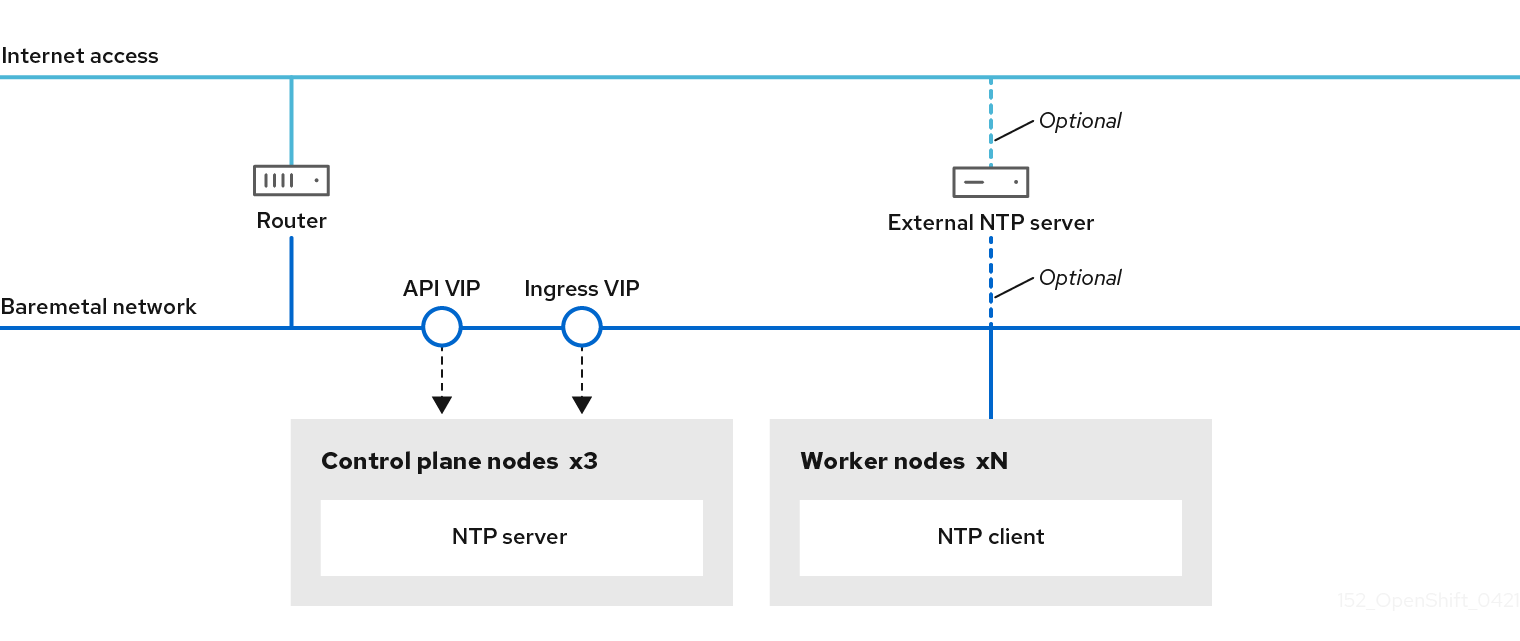
OpenShift Container Platform nodes must agree on a date and time to run properly. When worker nodes retrieve the date and time from the NTP servers on the control plane nodes, it enables the installation and operation of clusters that are not connected to a routable network and thereby do not have access to a higher stratum NTP server.
Procedure
Create a Butane config,
99-master-chrony-conf-override.bu, including the contents of thechrony.conffile for the control plane nodes.NoteSee "Creating machine configs with Butane" for information about Butane.
Butane config example
variant: openshift
version: 4.11.0
metadata:
  name: 99-master-chrony-conf-override
  labels:
    machineconfiguration.openshift.io/role: master
storage:
  files:
    - path: /etc/chrony.conf
      mode: 0644
      overwrite: true
      contents:
        inline: |
          # Use public servers from the pool.ntp.org project.
          # Please consider joining the pool (https://www.pool.ntp.org/join.html).

          # The Machine Config Operator manages this file
          server openshift-master-0.<cluster-name>.<domain> iburst
1 server openshift-master-1.<cluster-name>.<domain> iburst server openshift-master-2.<cluster-name>.<domain> iburst stratumweight 0 driftfile /var/lib/chrony/drift rtcsync makestep 10 3 bindcmdaddress 127.0.0.1 bindcmdaddress ::1 keyfile /etc/chrony.keys commandkey 1 generatecommandkey noclientlog logchange 0.5 logdir /var/log/chrony # Configure the control plane nodes to serve as local NTP servers # for all worker nodes, even if they are not in sync with an # upstream NTP server. # Allow NTP client access from the local network. allow all # Serve time even if not synchronized to a time source. local stratum 3 orphan- 1
- You must replace
<cluster-name>with the name of the cluster and replace<domain>with the fully qualified domain name.
Use Butane to generate a
MachineConfigobject file,99-master-chrony-conf-override.yaml, containing the configuration to be delivered to the control plane nodes:$ butane 99-master-chrony-conf-override.bu -o 99-master-chrony-conf-override.yamlCreate a Butane config,
99-worker-chrony-conf-override.bu, including the contents of thechrony.conffile for the worker nodes that references the NTP servers on the control plane nodes.Butane config example
variant: openshift
version: 4.11.0
metadata:
  name: 99-worker-chrony-conf-override
  labels:
    machineconfiguration.openshift.io/role: worker
storage:
  files:
    - path: /etc/chrony.conf
      mode: 0644
      overwrite: true
      contents:
        inline: |
          # The Machine Config Operator manages this file.
          server openshift-master-0.<cluster-name>.<domain> iburst
1 server openshift-master-1.<cluster-name>.<domain> iburst server openshift-master-2.<cluster-name>.<domain> iburst stratumweight 0 driftfile /var/lib/chrony/drift rtcsync makestep 10 3 bindcmdaddress 127.0.0.1 bindcmdaddress ::1 keyfile /etc/chrony.keys commandkey 1 generatecommandkey noclientlog logchange 0.5 logdir /var/log/chrony- 1
- You must replace
<cluster-name>with the name of the cluster and replace<domain>with the fully qualified domain name.
Use Butane to generate a
MachineConfigobject file,99-worker-chrony-conf-override.yaml, containing the configuration to be delivered to the worker nodes:$ butane 99-worker-chrony-conf-override.bu -o 99-worker-chrony-conf-override.yaml
14.3.10.3. Configuring network components to run on the control plane
You can configure networking components to run exclusively on the control plane nodes. By default, OpenShift Container Platform allows any node in the machine config pool to host the ingressVIP virtual IP address. However, some environments deploy worker nodes in separate subnets from the control plane nodes, which requires configuring the ingressVIP virtual IP address to run on the control plane nodes.
When deploying remote workers in separate subnets, you must place the ingressVIP virtual IP address exclusively with the control plane nodes.
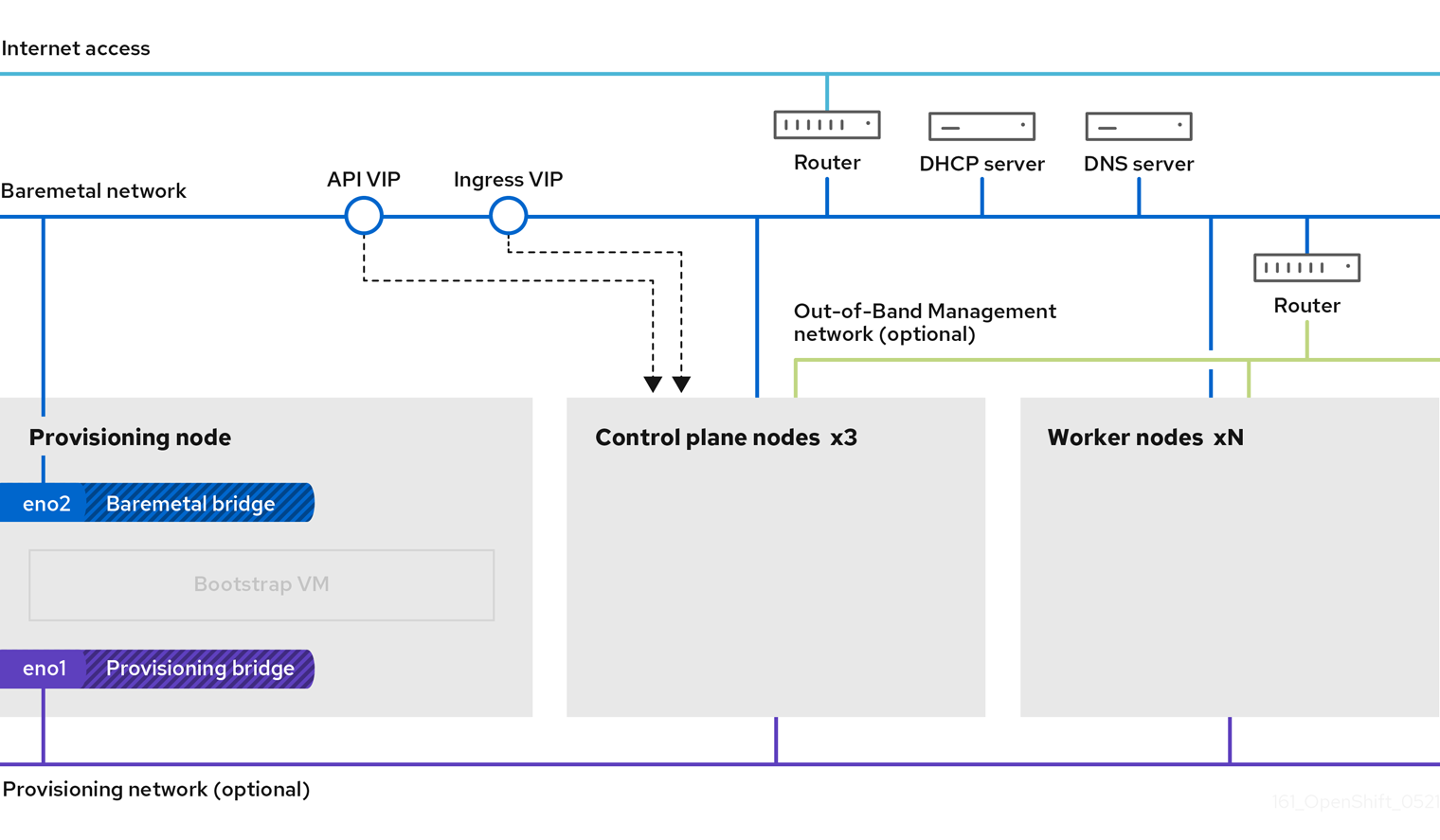
Procedure
Change to the directory storing the
install-config.yamlfile:$ cd ~/clusterconfigsSwitch to the
manifestssubdirectory:$ cd manifestsCreate a file named
cluster-network-avoid-workers-99-config.yaml:$ touch cluster-network-avoid-workers-99-config.yamlOpen the
cluster-network-avoid-workers-99-config.yamlfile in an editor and enter a custom resource (CR) that describes the Operator configuration:apiVersion: machineconfiguration.openshift.io/v1 kind: MachineConfig metadata: name: 50-worker-fix-ipi-rwn labels: machineconfiguration.openshift.io/role: worker spec: config: ignition: version: 3.2.0 storage: files: - path: /etc/kubernetes/manifests/keepalived.yaml mode: 0644 contents: source: data:,This manifest places the
ingressVIPvirtual IP address on the control plane nodes. Additionally, this manifest deploys the following processes on the control plane nodes only:-
openshift-ingress-operator -
keepalived
-
-
Save the
cluster-network-avoid-workers-99-config.yamlfile. Create a
manifests/cluster-ingress-default-ingresscontroller.yamlfile:apiVersion: operator.openshift.io/v1 kind: IngressController metadata: name: default namespace: openshift-ingress-operator spec: nodePlacement: nodeSelector: matchLabels: node-role.kubernetes.io/master: ""-
Consider backing up the
manifestsdirectory. The installer deletes themanifests/directory when creating the cluster. Modify the
cluster-scheduler-02-config.ymlmanifest to make the control plane nodes schedulable by setting themastersSchedulablefield totrue. Control plane nodes are not schedulable by default. For example:$ sed -i "s;mastersSchedulable: false;mastersSchedulable: true;g" clusterconfigs/manifests/cluster-scheduler-02-config.ymlNoteIf control plane nodes are not schedulable after completing this procedure, deploying the cluster will fail.
14.3.10.4. Optional: Deploying routers on worker nodes
During installation, the installer deploys router pods on worker nodes. By default, the installer installs two router pods. If a deployed cluster requires additional routers to handle external traffic loads destined for services within the OpenShift Container Platform cluster, you can create a yaml file to set an appropriate number of router replicas.
Deploying a cluster with only one worker node is not supported. While modifying the router replicas will address issues with the degraded state when deploying with one worker, the cluster loses high availability for the ingress API, which is not suitable for production environments.
By default, the installer deploys two routers. If the cluster has no worker nodes, the installer deploys the two routers on the control plane nodes by default.
Procedure
Create a
router-replicas.yamlfile:apiVersion: operator.openshift.io/v1 kind: IngressController metadata: name: default namespace: openshift-ingress-operator spec: replicas: <num-of-router-pods> endpointPublishingStrategy: type: HostNetwork nodePlacement: nodeSelector: matchLabels: node-role.kubernetes.io/worker: ""NoteReplace
<num-of-router-pods>with an appropriate value. If working with just one worker node, setreplicas:to1. If working with more than 3 worker nodes, you can increasereplicas:from the default value2as appropriate.Save and copy the
router-replicas.yamlfile to theclusterconfigs/openshiftdirectory:$ cp ~/router-replicas.yaml clusterconfigs/openshift/99_router-replicas.yaml
14.3.10.5. Optional: Configuring the BIOS
The following procedure configures the BIOS during the installation process.
Procedure
- Create the manifests.
Modify the
BareMetalHostresource file corresponding to the node:$ vim clusterconfigs/openshift/99_openshift-cluster-api_hosts-*.yamlAdd the BIOS configuration to the
specsection of theBareMetalHostresource:spec: firmware: simultaneousMultithreadingEnabled: true sriovEnabled: true virtualizationEnabled: trueNoteRed Hat supports three BIOS configurations. Only servers with BMC type
irmcare supported. Other types of servers are currently not supported.- Create the cluster.
14.3.10.6. Optional: Configuring the RAID
The following procedure configures a redundant array of independent disks (RAID) during the installation process.
- OpenShift Container Platform supports hardware RAID for baseboard management controllers (BMCs) using the iRMC protocol only. OpenShift Container Platform 4.11 does not support software RAID.
- If you want to configure a hardware RAID for the node, verify that the node has a RAID controller.
Procedure
- Create the manifests.
Modify the
BareMetalHostresource corresponding to the node:$ vim clusterconfigs/openshift/99_openshift-cluster-api_hosts-*.yamlNoteThe following example uses a hardware RAID configuration because OpenShift Container Platform 4.11 does not support software RAID.
If you added a specific RAID configuration to the
specsection, this causes the node to delete the original RAID configuration in thepreparingphase and perform a specified configuration on the RAID. For example:spec: raid: hardwareRAIDVolumes: - level: "0"1 name: "sda" numberOfPhysicalDisks: 1 rotational: true sizeGibibytes: 0- 1
levelis a required field, and the others are optional fields.
If you added an empty RAID configuration to the
specsection, the empty configuration causes the node to delete the original RAID configuration during thepreparingphase, but does not perform a new configuration. For example:spec: raid: hardwareRAIDVolumes: []-
If you do not add a
raidfield in thespecsection, the original RAID configuration is not deleted, and no new configuration will be performed.
- Create the cluster.
14.3.11. Creating a disconnected registry
In some cases, you might want to install an OpenShift Container Platform cluster using a local copy of the installation registry. This could be for enhancing network efficiency because the cluster nodes are on a network that does not have access to the internet.
A local, or mirrored, copy of the registry requires the following:
- A certificate for the registry node. This can be a self-signed certificate.
- A web server that a container on a system will serve.
- An updated pull secret that contains the certificate and local repository information.
Creating a disconnected registry on a registry node is optional. If you need to create a disconnected registry on a registry node, you must complete all of the following sub-sections.
Prerequisites
- If you have already prepared a mirror registry for Mirroring images for a disconnected installation, you can skip directly to Modify the install-config.yaml file to use the disconnected registry.
14.3.11.1. Preparing the registry node to host the mirrored registry
The following steps must be completed prior to hosting a mirrored registry on bare metal.
Procedure
Open the firewall port on the registry node:
$ sudo firewall-cmd --add-port=5000/tcp --zone=libvirt --permanent$ sudo firewall-cmd --add-port=5000/tcp --zone=public --permanent$ sudo firewall-cmd --reloadInstall the required packages for the registry node:
$ sudo yum -y install python3 podman httpd httpd-tools jqCreate the directory structure where the repository information will be held:
$ sudo mkdir -p /opt/registry/{auth,certs,data}
14.3.11.2. Mirroring the OpenShift Container Platform image repository for a disconnected registry
Complete the following steps to mirror the OpenShift Container Platform image repository for a disconnected registry.
Prerequisites
- Your mirror host has access to the internet.
- You configured a mirror registry to use in your restricted network and can access the certificate and credentials that you configured.
- You downloaded the pull secret from the Red Hat OpenShift Cluster Manager and modified it to include authentication to your mirror repository.
Procedure
- Review the OpenShift Container Platform downloads page to determine the version of OpenShift Container Platform that you want to install and determine the corresponding tag on the Repository Tags page.
Set the required environment variables:
Export the release version:
$ OCP_RELEASE=<release_version>For
<release_version>, specify the tag that corresponds to the version of OpenShift Container Platform to install, such as4.5.4.Export the local registry name and host port:
$ LOCAL_REGISTRY='<local_registry_host_name>:<local_registry_host_port>'For
<local_registry_host_name>, specify the registry domain name for your mirror repository, and for<local_registry_host_port>, specify the port that it serves content on.Export the local repository name:
$ LOCAL_REPOSITORY='<local_repository_name>'For
<local_repository_name>, specify the name of the repository to create in your registry, such asocp4/openshift4.Export the name of the repository to mirror:
$ PRODUCT_REPO='openshift-release-dev'For a production release, you must specify
openshift-release-dev.Export the path to your registry pull secret:
$ LOCAL_SECRET_JSON='<path_to_pull_secret>'For
<path_to_pull_secret>, specify the absolute path to and file name of the pull secret for your mirror registry that you created.Export the release mirror:
$ RELEASE_NAME="ocp-release"For a production release, you must specify
ocp-release.Export the type of architecture for your server, such as
x86_64:$ ARCHITECTURE=<server_architecture>Export the path to the directory to host the mirrored images:
$ REMOVABLE_MEDIA_PATH=<path>1 - 1
- Specify the full path, including the initial forward slash (/) character.
Mirror the version images to the mirror registry:
If your mirror host does not have internet access, take the following actions:
- Connect the removable media to a system that is connected to the internet.
Review the images and configuration manifests to mirror:
$ oc adm release mirror -a ${LOCAL_SECRET_JSON} \ --from=quay.io/${PRODUCT_REPO}/${RELEASE_NAME}:${OCP_RELEASE}-${ARCHITECTURE} \ --to=${LOCAL_REGISTRY}/${LOCAL_REPOSITORY} \ --to-release-image=${LOCAL_REGISTRY}/${LOCAL_REPOSITORY}:${OCP_RELEASE}-${ARCHITECTURE} --dry-run-
Record the entire
imageContentSourcessection from the output of the previous command. The information about your mirrors is unique to your mirrored repository, and you must add theimageContentSourcessection to theinstall-config.yamlfile during installation. Mirror the images to a directory on the removable media:
$ oc adm release mirror -a ${LOCAL_SECRET_JSON} --to-dir=${REMOVABLE_MEDIA_PATH}/mirror quay.io/${PRODUCT_REPO}/${RELEASE_NAME}:${OCP_RELEASE}-${ARCHITECTURE}Take the media to the restricted network environment and upload the images to the local container registry.
$ oc image mirror -a ${LOCAL_SECRET_JSON} --from-dir=${REMOVABLE_MEDIA_PATH}/mirror "file://openshift/release:${OCP_RELEASE}*" ${LOCAL_REGISTRY}/${LOCAL_REPOSITORY}1 - 1
- For
REMOVABLE_MEDIA_PATH, you must use the same path that you specified when you mirrored the images.
If the local container registry is connected to the mirror host, take the following actions:
Directly push the release images to the local registry by using following command:
$ oc adm release mirror -a ${LOCAL_SECRET_JSON}  \
     --from=quay.io/${PRODUCT_REPO}/${RELEASE_NAME}:${OCP_RELEASE}-${ARCHITECTURE} \
     --to=${LOCAL_REGISTRY}/${LOCAL_REPOSITORY} \
     --to-release-image=${LOCAL_REGISTRY}/${LOCAL_REPOSITORY}:${OCP_RELEASE}-${ARCHITECTURE}
This command pulls the release information as a digest, and its output includes the
imageContentSourcesdata that you require when you install your cluster.Record the entire
imageContentSourcessection from the output of the previous command. The information about your mirrors is unique to your mirrored repository, and you must add theimageContentSourcessection to theinstall-config.yamlfile during installation.NoteThe image name gets patched to Quay.io during the mirroring process, and the podman images will show Quay.io in the registry on the bootstrap virtual machine.
To create the installation program that is based on the content that you mirrored, extract it and pin it to the release:
If your mirror host does not have internet access, run the following command:
$ oc adm release extract -a ${LOCAL_SECRET_JSON} --command=openshift-baremetal-install "${LOCAL_REGISTRY}/${LOCAL_REPOSITORY}:${OCP_RELEASE}"If the local container registry is connected to the mirror host, run the following command:
$ oc adm release extract -a ${LOCAL_SECRET_JSON} --command=openshift-baremetal-install "${LOCAL_REGISTRY}/${LOCAL_REPOSITORY}:${OCP_RELEASE}-${ARCHITECTURE}"ImportantTo ensure that you use the correct images for the version of OpenShift Container Platform that you selected, you must extract the installation program from the mirrored content.
You must perform this step on a machine with an active internet connection.
If you are in a disconnected environment, use the
--imageflag as part of must-gather and point to the payload image.
For clusters using installer-provisioned infrastructure, run the following command:
$ openshift-baremetal-install
14.3.11.3. Modify the install-config.yaml file to use the disconnected registry
On the provisioner node, the install-config.yaml file should use the newly created pull-secret from the pull-secret-update.txt file. The install-config.yaml file must also contain the disconnected registry node’s certificate and registry information.
Procedure
Add the disconnected registry node’s certificate to the
install-config.yamlfile:$ echo "additionalTrustBundle: |" >> install-config.yamlThe certificate should follow the
"additionalTrustBundle: |"line and be properly indented, usually by two spaces.$ sed -e 's/^/ /' /opt/registry/certs/domain.crt >> install-config.yamlAdd the mirror information for the registry to the
install-config.yamlfile:$ echo "imageContentSources:" >> install-config.yaml$ echo "- mirrors:" >> install-config.yaml$ echo " - registry.example.com:5000/ocp4/openshift4" >> install-config.yamlReplace
registry.example.comwith the registry’s fully qualified domain name.$ echo " source: quay.io/openshift-release-dev/ocp-release" >> install-config.yaml$ echo "- mirrors:" >> install-config.yaml$ echo " - registry.example.com:5000/ocp4/openshift4" >> install-config.yamlReplace
registry.example.comwith the registry’s fully qualified domain name.$ echo " source: quay.io/openshift-release-dev/ocp-v4.0-art-dev" >> install-config.yaml
14.3.12. Validation checklist for installation
- ❏ OpenShift Container Platform installer has been retrieved.
- ❏ OpenShift Container Platform installer has been extracted.
-
❏ Required parameters for the
install-config.yamlhave been configured. -
❏ The
hostsparameter for theinstall-config.yamlhas been configured. -
❏ The
bmcparameter for theinstall-config.yamlhas been configured. -
❏ Conventions for the values configured in the
bmcaddressfield have been applied. - ❏ Created the OpenShift Container Platform manifests.
- ❏ (Optional) Deployed routers on worker nodes.
- ❏ (Optional) Created a disconnected registry.
- ❏ (Optional) Validate disconnected registry settings if in use.
14.3.13. Deploying the cluster via the OpenShift Container Platform installer
Run the OpenShift Container Platform installer:
$ ./openshift-baremetal-install --dir ~/clusterconfigs --log-level debug create cluster14.3.14. Following the installation
During the deployment process, you can check the installation’s overall status by issuing the tail command to the .openshift_install.log log file in the install directory folder:
$ tail -f /path/to/install-dir/.openshift_install.log14.3.15. Verifying static IP address configuration
If the DHCP reservation for a cluster node specifies an infinite lease, after the installer successfully provisions the node, the dispatcher script checks the node’s network configuration. If the script determines that the network configuration contains an infinite DHCP lease, it creates a new connection using the IP address of the DHCP lease as a static IP address.
The dispatcher script might run on successfully provisioned nodes while the provisioning of other nodes in the cluster is ongoing.
Verify the network configuration is working properly.
Procedure
- Check the network interface configuration on the node.
- Turn off the DHCP server and reboot the OpenShift Container Platform node and ensure that the network configuration works properly.
14.3.16. Preparing to reinstall a cluster on bare metal
Before you reinstall a cluster on bare metal, you must perform cleanup operations.
Procedure
- Remove or reformat the disks for the bootstrap, control plane node, and worker nodes. If you are working in a hypervisor environment, you must add any disks you removed.
Delete the artifacts that the previous installation generated:
$ cd ; /bin/rm -rf auth/ bootstrap.ign master.ign worker.ign metadata.json \ .openshift_install.log .openshift_install_state.json- Generate new manifests and Ignition config files. See “Creating the Kubernetes manifest and Ignition config files" for more information.
- Upload the new bootstrap, control plane, and compute node Ignition config files that the installation program created to your HTTP server. This will overwrite the previous Ignition files.
14.4. Installer-provisioned postinstallation configuration
After successfully deploying an installer-provisioned cluster, consider the following postinstallation procedures.
14.4.1. Optional: Configuring NTP for disconnected clusters
OpenShift Container Platform installs the chrony Network Time Protocol (NTP) service on the cluster nodes. Use the following procedure to configure NTP servers on the control plane nodes and configure worker nodes as NTP clients of the control plane nodes after a successful deployment.
OpenShift Container Platform nodes must agree on a date and time to run properly. When worker nodes retrieve the date and time from the NTP servers on the control plane nodes, it enables the installation and operation of clusters that are not connected to a routable network and thereby do not have access to a higher stratum NTP server.
Procedure
Create a Butane config,
99-master-chrony-conf-override.bu, including the contents of thechrony.conffile for the control plane nodes.NoteSee "Creating machine configs with Butane" for information about Butane.
Butane config example
variant: openshift
version: 4.11.0
metadata:
  name: 99-master-chrony-conf-override
  labels:
    machineconfiguration.openshift.io/role: master
storage:
  files:
    - path: /etc/chrony.conf
      mode: 0644
      overwrite: true
      contents:
        inline: |
          # Use public servers from the pool.ntp.org project.
          # Please consider joining the pool (https://www.pool.ntp.org/join.html).

          # The Machine Config Operator manages this file
          server openshift-master-0.<cluster-name>.<domain> iburst
1 server openshift-master-1.<cluster-name>.<domain> iburst server openshift-master-2.<cluster-name>.<domain> iburst stratumweight 0 driftfile /var/lib/chrony/drift rtcsync makestep 10 3 bindcmdaddress 127.0.0.1 bindcmdaddress ::1 keyfile /etc/chrony.keys commandkey 1 generatecommandkey noclientlog logchange 0.5 logdir /var/log/chrony # Configure the control plane nodes to serve as local NTP servers # for all worker nodes, even if they are not in sync with an # upstream NTP server. # Allow NTP client access from the local network. allow all # Serve time even if not synchronized to a time source. local stratum 3 orphan- 1
- You must replace
<cluster-name>with the name of the cluster and replace<domain>with the fully qualified domain name.
Use Butane to generate a
MachineConfigobject file,99-master-chrony-conf-override.yaml, containing the configuration to be delivered to the control plane nodes:$ butane 99-master-chrony-conf-override.bu -o 99-master-chrony-conf-override.yamlCreate a Butane config,
99-worker-chrony-conf-override.bu, including the contents of thechrony.conffile for the worker nodes that references the NTP servers on the control plane nodes.Butane config example
variant: openshift
version: 4.11.0
metadata:
  name: 99-worker-chrony-conf-override
  labels:
    machineconfiguration.openshift.io/role: worker
storage:
  files:
    - path: /etc/chrony.conf
      mode: 0644
      overwrite: true
      contents:
        inline: |
          # The Machine Config Operator manages this file.
          server openshift-master-0.<cluster-name>.<domain> iburst
1 server openshift-master-1.<cluster-name>.<domain> iburst server openshift-master-2.<cluster-name>.<domain> iburst stratumweight 0 driftfile /var/lib/chrony/drift rtcsync makestep 10 3 bindcmdaddress 127.0.0.1 bindcmdaddress ::1 keyfile /etc/chrony.keys commandkey 1 generatecommandkey noclientlog logchange 0.5 logdir /var/log/chrony- 1
- You must replace
<cluster-name>with the name of the cluster and replace<domain>with the fully qualified domain name.
Use Butane to generate a
MachineConfigobject file,99-worker-chrony-conf-override.yaml, containing the configuration to be delivered to the worker nodes:$ butane 99-worker-chrony-conf-override.bu -o 99-worker-chrony-conf-override.yamlApply the
99-master-chrony-conf-override.yamlpolicy to the control plane nodes.$ oc apply -f 99-master-chrony-conf-override.yamlExample output
machineconfig.machineconfiguration.openshift.io/99-master-chrony-conf-override createdApply the
99-worker-chrony-conf-override.yamlpolicy to the worker nodes.$ oc apply -f 99-worker-chrony-conf-override.yamlExample output
machineconfig.machineconfiguration.openshift.io/99-worker-chrony-conf-override createdCheck the status of the applied NTP settings.
$ oc describe machineconfigpool
14.4.2. Enabling a provisioning network after installation
The assisted installer and installer-provisioned installation for bare metal clusters provide the ability to deploy a cluster without a provisioning network. This capability is for scenarios such as proof-of-concept clusters or deploying exclusively with Redfish virtual media when each node’s baseboard management controller is routable via the baremetal network.
You can enable a provisioning network after installation using the Cluster Baremetal Operator (CBO).
Prerequisites
- A dedicated physical network must exist, connected to all worker and control plane nodes.
- You must isolate the native, untagged physical network.
-
The network cannot have a DHCP server when the
provisioningNetworkconfiguration setting is set toManaged. -
You can omit the
provisioningInterfacesetting in OpenShift Container Platform 4.10 to use thebootMACAddressconfiguration setting.
Procedure
-
When setting the
provisioningInterfacesetting, first identify the provisioning interface name for the cluster nodes. For example,eth0oreno1. -
Enable the Preboot eXecution Environment (PXE) on the
provisioningnetwork interface of the cluster nodes. Retrieve the current state of the
provisioningnetwork and save it to a provisioning custom resource (CR) file:$ oc get provisioning -o yaml > enable-provisioning-nw.yamlModify the provisioning CR file:
$ vim ~/enable-provisioning-nw.yamlScroll down to the
provisioningNetworkconfiguration setting and change it fromDisabledtoManaged. Then, add theprovisioningIP,provisioningNetworkCIDR,provisioningDHCPRange,provisioningInterface, andwatchAllNameSpacesconfiguration settings after theprovisioningNetworksetting. Provide appropriate values for each setting.apiVersion: v1 items: - apiVersion: metal3.io/v1alpha1 kind: Provisioning metadata: name: provisioning-configuration spec: provisioningNetwork:1 provisioningIP:2 provisioningNetworkCIDR:3 provisioningDHCPRange:4 provisioningInterface:5 watchAllNameSpaces:6 - 1
- The
provisioningNetworkis one ofManaged,Unmanaged, orDisabled. When set toManaged, Metal3 manages the provisioning network and the CBO deploys the Metal3 pod with a configured DHCP server. When set toUnmanaged, the system administrator configures the DHCP server manually. - 2
- The
provisioningIPis the static IP address that the DHCP server and ironic use to provision the network. This static IP address must be within theprovisioningsubnet, and outside of the DHCP range. If you configure this setting, it must have a valid IP address even if theprovisioningnetwork isDisabled. The static IP address is bound to the metal3 pod. If the metal3 pod fails and moves to another server, the static IP address also moves to the new server. - 3
- The Classless Inter-Domain Routing (CIDR) address. If you configure this setting, it must have a valid CIDR address even if the
provisioningnetwork isDisabled. For example:192.168.0.1/24. - 4
- The DHCP range. This setting is only applicable to a
Managedprovisioning network. Omit this configuration setting if theprovisioningnetwork isDisabled. For example:192.168.0.64, 192.168.0.253. - 5
- The NIC name for the
provisioninginterface on cluster nodes. TheprovisioningInterfacesetting is only applicable toManagedandUnmanagedprovisioning networks. Omit theprovisioningInterfaceconfiguration setting if theprovisioningnetwork isDisabled. Omit theprovisioningInterfaceconfiguration setting to use thebootMACAddressconfiguration setting instead. - 6
- Set this setting to
trueif you want metal3 to watch namespaces other than the defaultopenshift-machine-apinamespace. The default value isfalse.
- Save the changes to the provisioning CR file.
Apply the provisioning CR file to the cluster:
$ oc apply -f enable-provisioning-nw.yaml
14.4.3. Configuring an external load balancer
You can configure an OpenShift Container Platform cluster to use an external load balancer in place of the default load balancer.
Configuring an external load balancer depends on your vendor’s load balancer.
The information and examples in this section are for guideline purposes only. Consult the vendor documentation for more specific information about the vendor’s load balancer.
Red Hat supports the following services for an external load balancer:
- Ingress Controller
- OpenShift API
- OpenShift MachineConfig API
You can choose whether you want to configure one or all of these services for an external load balancer. Configuring only the Ingress Controller service is a common configuration option. To better understand each service, view the following diagrams:
Figure 14.1. Example network workflow that shows an Ingress Controller operating in an OpenShift Container Platform environment
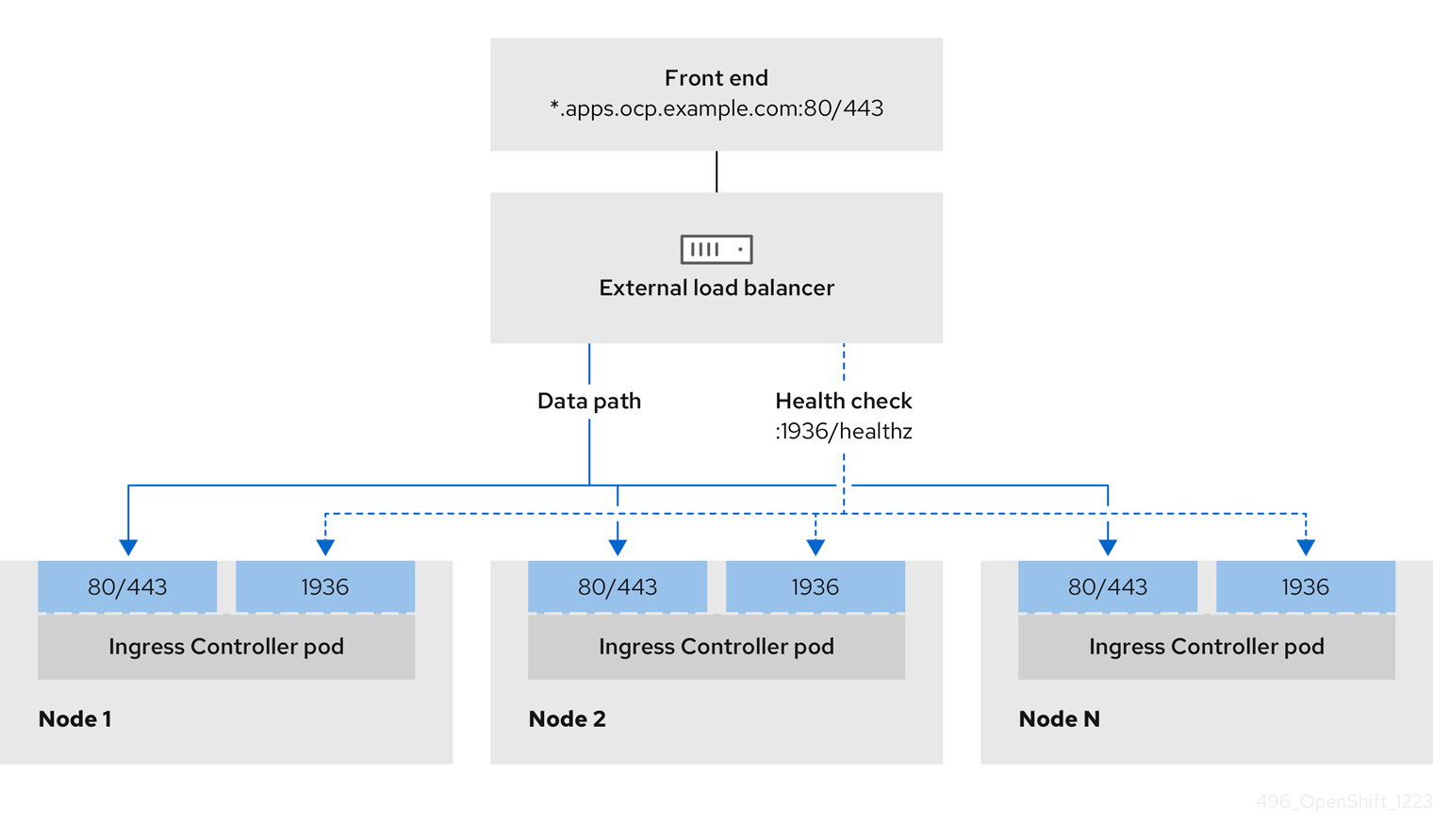
Figure 14.2. Example network workflow that shows an OpenShift API operating in an OpenShift Container Platform environment
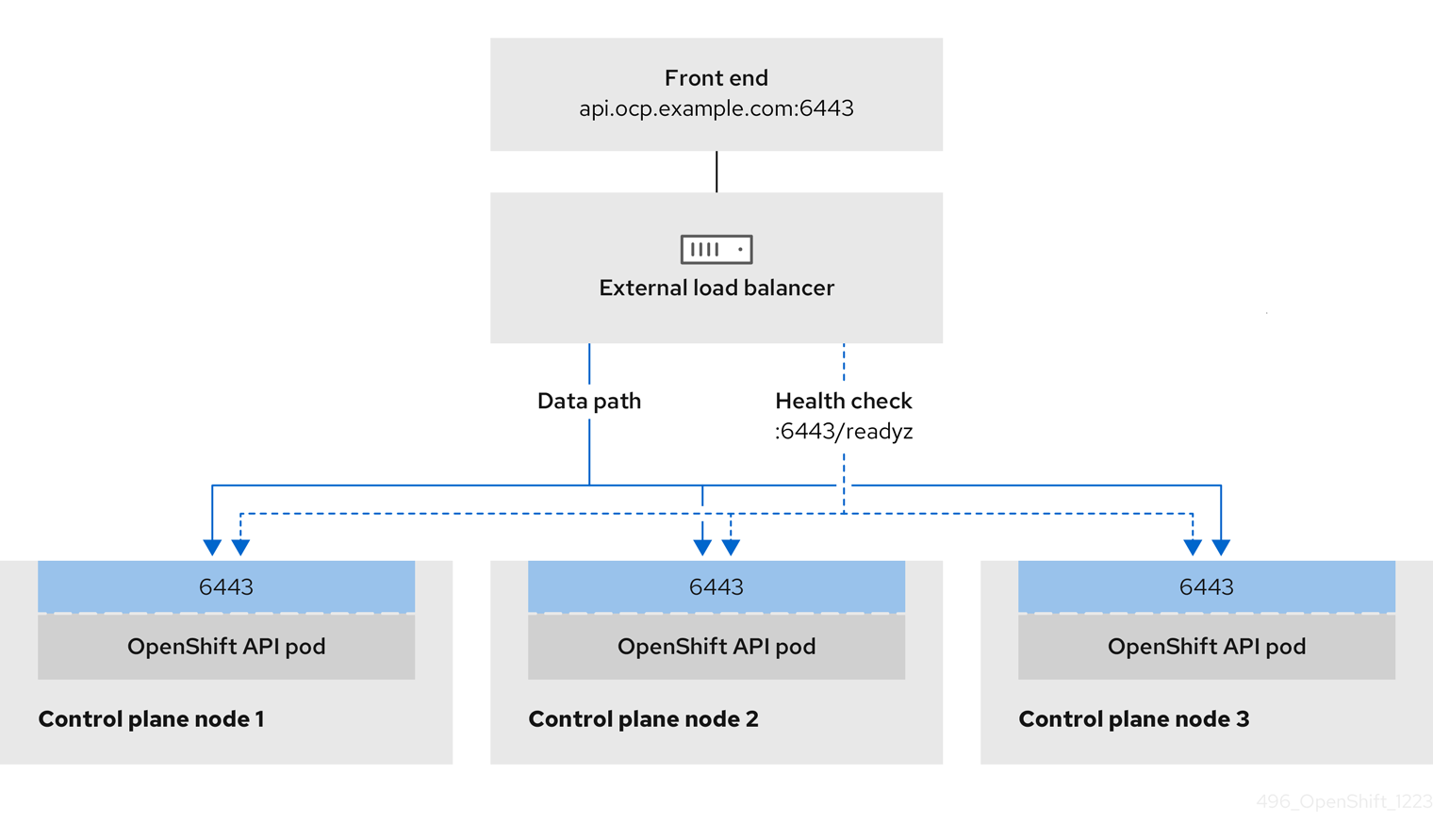
Figure 14.3. Example network workflow that shows an OpenShift MachineConfig API operating in an OpenShift Container Platform environment
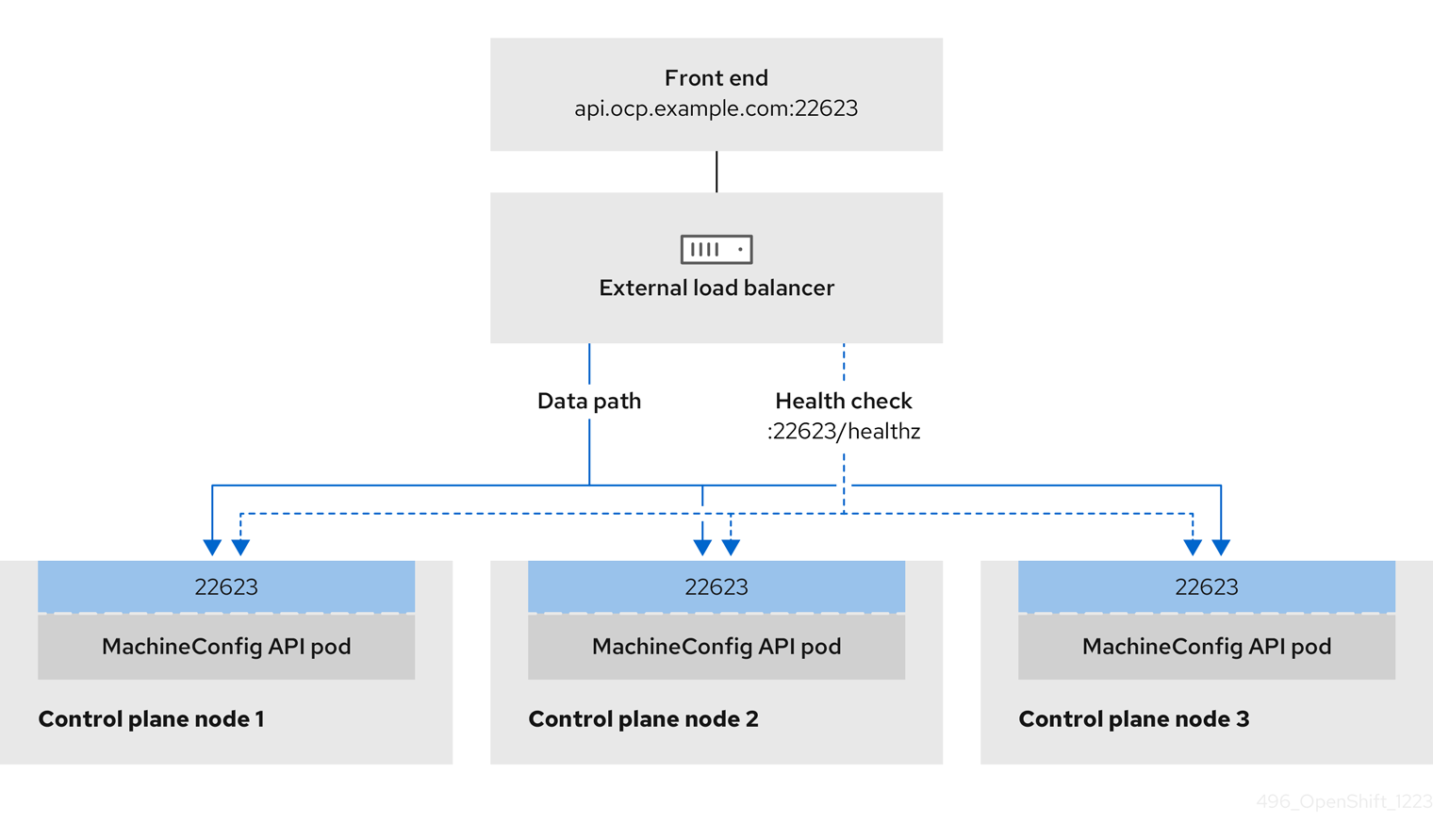
Considerations
- For a front-end IP address, you can use the same IP address for the front-end IP address, the Ingress Controller’s load balancer, and API load balancer. Check the vendor’s documentation for this capability.
For a back-end IP address, ensure that an IP address for an OpenShift Container Platform control plane node does not change during the lifetime of the external load balancer. You can achieve this by completing one of the following actions:
- Assign a static IP address to each control plane node.
- Configure each node to receive the same IP address from the DHCP every time the node requests a DHCP lease. Depending on the vendor, the DHCP lease might be in the form of an IP reservation or a static DHCP assignment.
- Manually define each node that runs the Ingress Controller in the external load balancer for the Ingress Controller back-end service. For example, if the Ingress Controller moves to an undefined node, a connection outage can occur.
OpenShift API prerequisites
- You defined a front-end IP address.
TCP ports 6443 and 22623 are exposed on the front-end IP address of your load balancer. Check the following items:
- Port 6443 provides access to the OpenShift API service.
- Port 22623 can provide ignition startup configurations to nodes.
- The front-end IP address and port 6443 are reachable by all users of your system with a location external to your OpenShift Container Platform cluster.
- The front-end IP address and port 22623 are reachable only by OpenShift Container Platform nodes.
- The load balancer backend can communicate with OpenShift Container Platform control plane nodes on port 6443 and 22623.
Ingress Controller prerequisites
- You defined a front-end IP address.
- TCP ports 443 and 80 are exposed on the front-end IP address of your load balancer.
- The front-end IP address, port 80 and port 443 are be reachable by all users of your system with a location external to your OpenShift Container Platform cluster.
- The front-end IP address, port 80 and port 443 are reachable to all nodes that operate in your OpenShift Container Platform cluster.
- The load balancer backend can communicate with OpenShift Container Platform nodes that run the Ingress Controller on ports 80, 443, and 1936.
Prerequisite for health check URL specifications
You can configure most load balancers by setting health check URLs that determine if a service is available or unavailable. OpenShift Container Platform provides these health checks for the OpenShift API, Machine Configuration API, and Ingress Controller backend services.
The following examples demonstrate health check specifications for the previously listed backend services:
Example of a Kubernetes API health check specification
Path: HTTPS:6443/readyz
Healthy threshold: 2
Unhealthy threshold: 2
Timeout: 10
Interval: 10
Example of a Machine Config API health check specification
Path: HTTPS:22623/healthz
Healthy threshold: 2
Unhealthy threshold: 2
Timeout: 10
Interval: 10
Example of an Ingress Controller health check specification
Path: HTTP:1936/healthz/ready
Healthy threshold: 2
Unhealthy threshold: 2
Timeout: 5
Interval: 10
Procedure
Configure the HAProxy Ingress Controller, so that you can enable access to the cluster from your load balancer on ports 6443, 443, and 80:
Example HAProxy configuration
#...
listen my-cluster-api-6443
    bind 192.168.1.100:6443
    mode tcp
    balance roundrobin
  option httpchk
  http-check connect
  http-check send meth GET uri /readyz
  http-check expect status 200
    server my-cluster-master-2 192.168.1.101:6443 check inter 10s rise 2 fall 2
    server my-cluster-master-0 192.168.1.102:6443 check inter 10s rise 2 fall 2
    server my-cluster-master-1 192.168.1.103:6443 check inter 10s rise 2 fall 2

listen my-cluster-machine-config-api-22623
    bind 192.168.1.1000.0.0.0:22623
    mode tcp
    balance roundrobin
  option httpchk
  http-check connect
  http-check send meth GET uri /healthz
  http-check expect status 200
    server my-cluster-master-2 192.0168.21.2101:22623 check inter 10s rise 2 fall 2
    server my-cluster-master-0 192.168.1.1020.2.3:22623 check inter 10s rise 2 fall 2
    server my-cluster-master-1 192.168.1.1030.2.1:22623 check inter 10s rise 2 fall 2

listen my-cluster-apps-443
        bind 192.168.1.100:443
        mode tcp
        balance roundrobin
    option httpchk
    http-check connect
    http-check send meth GET uri /healthz/ready
    http-check expect status 200
        server my-cluster-worker-0 192.168.1.111:443 check port 1936 inter 10s rise 2 fall 2
        server my-cluster-worker-1 192.168.1.112:443 check port 1936 inter 10s rise 2 fall 2
        server my-cluster-worker-2 192.168.1.113:443 check port 1936 inter 10s rise 2 fall 2

listen my-cluster-apps-80
        bind 192.168.1.100:80
        mode tcp
        balance roundrobin
    option httpchk
    http-check connect
    http-check send meth GET uri /healthz/ready
    http-check expect status 200
        server my-cluster-worker-0 192.168.1.111:80 check port 1936 inter 10s rise 2 fall 2
        server my-cluster-worker-1 192.168.1.112:80 check port 1936 inter 10s rise 2 fall 2
        server my-cluster-worker-2 192.168.1.113:80 check port 1936 inter 10s rise 2 fall 2
# ...
Use the
curlCLI command to verify that the external load balancer and its resources are operational:Verify that the cluster machine configuration API is accessible to the Kubernetes API server resource, by running the following command and observing the response:
$ curl https://<loadbalancer_ip_address>:6443/version --insecureIf the configuration is correct, you receive a JSON object in response:
{
  "major": "1",
  "minor": "11+",
  "gitVersion": "v1.11.0+ad103ed",
  "gitCommit": "ad103ed",
  "gitTreeState": "clean",
  "buildDate": "2019-01-09T06:44:10Z",
  "goVersion": "go1.10.3",
  "compiler": "gc",
  "platform": "linux/amd64"
}
Verify that the cluster machine configuration API is accessible to the Machine config server resource, by running the following command and observing the output:
$ curl -v https://<loadbalancer_ip_address>:22623/healthz --insecureIf the configuration is correct, the output from the command shows the following response:
HTTP/1.1 200 OK
Content-Length: 0
Verify that the controller is accessible to the Ingress Controller resource on port 80, by running the following command and observing the output:
$ curl -I -L -H "Host: console-openshift-console.apps.<cluster_name>.<base_domain>" http://<load_balancer_front_end_IP_address>If the configuration is correct, the output from the command shows the following response:
HTTP/1.1 302 Found
content-length: 0
location: https://console-openshift-console.apps.ocp4.private.opequon.net/
cache-control: no-cache
Verify that the controller is accessible to the Ingress Controller resource on port 443, by running the following command and observing the output:
$ curl -I -L --insecure --resolve console-openshift-console.apps.<cluster_name>.<base_domain>:443:<Load Balancer Front End IP Address> https://console-openshift-console.apps.<cluster_name>.<base_domain>If the configuration is correct, the output from the command shows the following response:
HTTP/1.1 200 OK
referrer-policy: strict-origin-when-cross-origin
set-cookie: csrf-token=UlYWOyQ62LWjw2h003xtYSKlh1a0Py2hhctw0WmV2YEdhJjFyQwWcGBsja261dGLgaYO0nxzVErhiXt6QepA7g==; Path=/; Secure; SameSite=Lax
x-content-type-options: nosniff
x-dns-prefetch-control: off
x-frame-options: DENY
x-xss-protection: 1; mode=block
date: Wed, 04 Oct 2023 16:29:38 GMT
content-type: text/html; charset=utf-8
set-cookie: 1e2670d92730b515ce3a1bb65da45062=1bf5e9573c9a2760c964ed1659cc1673; path=/; HttpOnly; Secure; SameSite=None
cache-control: private
Configure the DNS records for your cluster to target the front-end IP addresses of the external load balancer. You must update records to your DNS server for the cluster API and applications over the load balancer.
Examples of modified DNS records
<load_balancer_ip_address>  A  api.<cluster_name>.<base_domain>
A record pointing to Load Balancer Front End
<load_balancer_ip_address> A apps.<cluster_name>.<base_domain> A record pointing to Load Balancer Front EndImportantDNS propagation might take some time for each DNS record to become available. Ensure that each DNS record propagates before validating each record.
Use the
curlCLI command to verify that the external load balancer and DNS record configuration are operational:Verify that you can access the cluster API, by running the following command and observing the output:
$ curl https://api.<cluster_name>.<base_domain>:6443/version --insecureIf the configuration is correct, you receive a JSON object in response:
{
  "major": "1",
  "minor": "11+",
  "gitVersion": "v1.11.0+ad103ed",
  "gitCommit": "ad103ed",
  "gitTreeState": "clean",
  "buildDate": "2019-01-09T06:44:10Z",
  "goVersion": "go1.10.3",
  "compiler": "gc",
  "platform": "linux/amd64"
  }
Verify that you can access the cluster machine configuration, by running the following command and observing the output:
$ curl -v https://api.<cluster_name>.<base_domain>:22623/healthz --insecureIf the configuration is correct, the output from the command shows the following response:
HTTP/1.1 200 OK
Content-Length: 0
Verify that you can access each cluster application on port, by running the following command and observing the output:
$ curl http://console-openshift-console.apps.<cluster_name>.<base_domain> -I -L --insecureIf the configuration is correct, the output from the command shows the following response:
HTTP/1.1 302 Found
content-length: 0
location: https://console-openshift-console.apps.<cluster-name>.<base domain>/
cache-control: no-cacheHTTP/1.1 200 OK
referrer-policy: strict-origin-when-cross-origin
set-cookie: csrf-token=39HoZgztDnzjJkq/JuLJMeoKNXlfiVv2YgZc09c3TBOBU4NI6kDXaJH1LdicNhN1UsQWzon4Dor9GWGfopaTEQ==; Path=/; Secure
x-content-type-options: nosniff
x-dns-prefetch-control: off
x-frame-options: DENY
x-xss-protection: 1; mode=block
date: Tue, 17 Nov 2020 08:42:10 GMT
content-type: text/html; charset=utf-8
set-cookie: 1e2670d92730b515ce3a1bb65da45062=9b714eb87e93cf34853e87a92d6894be; path=/; HttpOnly; Secure; SameSite=None
cache-control: private
Verify that you can access each cluster application on port 443, by running the following command and observing the output:
$ curl https://console-openshift-console.apps.<cluster_name>.<base_domain> -I -L --insecureIf the configuration is correct, the output from the command shows the following response:
HTTP/1.1 200 OK
referrer-policy: strict-origin-when-cross-origin
set-cookie: csrf-token=UlYWOyQ62LWjw2h003xtYSKlh1a0Py2hhctw0WmV2YEdhJjFyQwWcGBsja261dGLgaYO0nxzVErhiXt6QepA7g==; Path=/; Secure; SameSite=Lax
x-content-type-options: nosniff
x-dns-prefetch-control: off
x-frame-options: DENY
x-xss-protection: 1; mode=block
date: Wed, 04 Oct 2023 16:29:38 GMT
content-type: text/html; charset=utf-8
set-cookie: 1e2670d92730b515ce3a1bb65da45062=1bf5e9573c9a2760c964ed1659cc1673; path=/; HttpOnly; Secure; SameSite=None
cache-control: private
14.5. Expanding the cluster
After deploying an installer-provisioned OpenShift Container Platform cluster, you can use the following procedures to expand the number of worker nodes. Ensure that each prospective worker node meets the prerequisites.
Expanding the cluster using RedFish Virtual Media involves meeting minimum firmware requirements. See Firmware requirements for installing with virtual media in the Prerequisites section for additional details when expanding the cluster using RedFish Virtual Media.
14.5.1. Preparing the bare metal node
To expand your cluster, you must provide the node with the relevant IP address. This can be done with a static configuration, or with a DHCP (Dynamic Host Configuration protocol) server. When expanding the cluster using a DHCP server, each node must have a DHCP reservation.
Some administrators prefer to use static IP addresses so that each node’s IP address remains constant in the absence of a DHCP server. To configure static IP addresses with NMState, see "Optional: Configuring host network interfaces in the install-config.yaml file" in the "Setting up the environment for an OpenShift installation" section for additional details.
Preparing the bare metal node requires executing the following procedure from the provisioner node.
Procedure
Get the
ocbinary:$ curl -s https://mirror.openshift.com/pub/openshift-v4/clients/ocp/$VERSION/openshift-client-linux-$VERSION.tar.gz | tar zxvf - oc$ sudo cp oc /usr/local/bin- Power off the bare metal node by using the baseboard management controller (BMC), and ensure it is off.
Retrieve the user name and password of the bare metal node’s baseboard management controller. Then, create
base64strings from the user name and password:$ echo -ne "root" | base64$ echo -ne "password" | base64Create a configuration file for the bare metal node. Depending on whether you are using a static configuration or a DHCP server, use one of the following example
bmh.yamlfiles, replacing values in the YAML to match your environment:$ vim bmh.yamlStatic configuration
bmh.yaml:--- apiVersion: v11 kind: Secret metadata: name: openshift-worker-<num>-network-config-secret2 namespace: openshift-machine-api type: Opaque stringData: nmstate: |3 interfaces:4 - name: <nic1_name>5 type: ethernet state: up ipv4: address: - ip: <ip_address>6 prefix-length: 24 enabled: true dns-resolver: config: server: - <dns_ip_address>7 routes: config: - destination: 0.0.0.0/0 next-hop-address: <next_hop_ip_address>8 next-hop-interface: <next_hop_nic1_name>9 --- apiVersion: v1 kind: Secret metadata: name: openshift-worker-<num>-bmc-secret10 namespace: openshift-machine-api type: Opaque data: username: <base64_of_uid>11 password: <base64_of_pwd>12 --- apiVersion: metal3.io/v1alpha1 kind: BareMetalHost metadata: name: openshift-worker-<num>13 namespace: openshift-machine-api spec: online: True bootMACAddress: <nic1_mac_address>14 bmc: address: <protocol>://<bmc_url>15 credentialsName: openshift-worker-<num>-bmc-secret16 disableCertificateVerification: True17 username: <bmc_username>18 password: <bmc_password>19 rootDeviceHints: deviceName: <root_device_hint>20 preprovisioningNetworkDataName: openshift-worker-<num>-network-config-secret21 - 1
- To configure the network interface for a newly created node, specify the name of the secret that contains the network configuration. Follow the
nmstatesyntax to define the network configuration for your node. See "Optional: Configuring host network interfaces in the install-config.yaml file" for details on configuring NMState syntax. - 2 10 13 16
- Replace
<num>for the worker number of the bare metal node in thenamefields, thecredentialsNamefield, and thepreprovisioningNetworkDataNamefield. - 3
- Add the NMState YAML syntax to configure the host interfaces.
- 4
- Optional: If you have configured the network interface with
nmstate, and you want to disable an interface, setstate: upwith the IP addresses set toenabled: falseas shown:--- interfaces: - name: <nic_name> type: ethernet state: up ipv4: enabled: false ipv6: enabled: false - 5 6 7 8 9
- Replace
<nic1_name>,<ip_address>,<dns_ip_address>,<next_hop_ip_address>and<next_hop_nic1_name>with appropriate values. - 11 12
- Replace
<base64_of_uid>and<base64_of_pwd>with the base64 string of the user name and password. - 14
- Replace
<nic1_mac_address>with the MAC address of the bare metal node’s first NIC. See the "BMC addressing" section for additional BMC configuration options. - 15
- Replace
<protocol>with the BMC protocol, such as IPMI, RedFish, or others. Replace<bmc_url>with the URL of the bare metal node’s baseboard management controller. - 17
- To skip certificate validation, set
disableCertificateVerificationto true. - 18 19
- Replace
<bmc_username>and<bmc_password>with the string of the BMC user name and password. - 20
- Optional: Replace
<root_device_hint>with a device path if you specify a root device hint. - 21
- Optional: If you have configured the network interface for the newly created node, provide the network configuration secret name in the
preprovisioningNetworkDataNameof the BareMetalHost CR.
DHCP configuration
bmh.yaml:--- apiVersion: v1 kind: Secret metadata: name: openshift-worker-<num>-bmc-secret1 namespace: openshift-machine-api type: Opaque data: username: <base64_of_uid>2 password: <base64_of_pwd>3 --- apiVersion: metal3.io/v1alpha1 kind: BareMetalHost metadata: name: openshift-worker-<num>4 namespace: openshift-machine-api spec: online: True bootMACAddress: <nic1_mac_address>5 bmc: address: <protocol>://<bmc_url>6 credentialsName: openshift-worker-<num>-bmc-secret7 disableCertificateVerification: True8 username: <bmc_username>9 password: <bmc_password>10 rootDeviceHints: deviceName: <root_device_hint>11 preprovisioningNetworkDataName: openshift-worker-<num>-network-config-secret12 - 1 4 7
- Replace
<num>for the worker number of the bare metal node in thenamefields, thecredentialsNamefield, and thepreprovisioningNetworkDataNamefield. - 2 3
- Replace
<base64_of_uid>and<base64_of_pwd>with the base64 string of the user name and password. - 5
- Replace
<nic1_mac_address>with the MAC address of the bare metal node’s first NIC. See the "BMC addressing" section for additional BMC configuration options. - 6
- Replace
<protocol>with the BMC protocol, such as IPMI, RedFish, or others. Replace<bmc_url>with the URL of the bare metal node’s baseboard management controller. - 8
- To skip certificate validation, set
disableCertificateVerificationto true. - 9 10
- Replace
<bmc_username>and<bmc_password>with the string of the BMC user name and password. - 11
- Optional: Replace
<root_device_hint>with a device path if you specify a root device hint. - 12
- Optional: If you have configured the network interface for the newly created node, provide the network configuration secret name in the
preprovisioningNetworkDataNameof the BareMetalHost CR.
NoteIf the MAC address of an existing bare metal node matches the MAC address of a bare metal host that you are attempting to provision, then the Ironic installation will fail. If the host enrollment, inspection, cleaning, or other Ironic steps fail, the Bare Metal Operator retries the installation continuously. See "Diagnosing a host duplicate MAC address" for more information.
Create the bare metal node:
$ oc -n openshift-machine-api create -f bmh.yamlExample output
secret/openshift-worker-<num>-network-config-secret created
secret/openshift-worker-<num>-bmc-secret created
baremetalhost.metal3.io/openshift-worker-<num> created
Where
<num>will be the worker number.Power up and inspect the bare metal node:
$ oc -n openshift-machine-api get bmh openshift-worker-<num>Where
<num>is the worker node number.Example output
NAME STATE CONSUMER ONLINE ERROR openshift-worker-<num> available trueNoteTo allow the worker node to join the cluster, scale the
machinesetobject to the number of theBareMetalHostobjects. You can scale nodes either manually or automatically. To scale nodes automatically, use themetal3.io/autoscale-to-hostsannotation formachineset.
14.5.2. Replacing a bare-metal control plane node
Use the following procedure to replace an installer-provisioned OpenShift Container Platform control plane node.
If you reuse the BareMetalHost object definition from an existing control plane host, do not leave the externallyProvisioned field set to true.
Existing control plane BareMetalHost objects may have the externallyProvisioned flag set to true if they were provisioned by the OpenShift Container Platform installation program.
Prerequisites
-
You have access to the cluster as a user with the
cluster-adminrole. You have taken an etcd backup.
ImportantTake an etcd backup before performing this procedure so that you can restore your cluster if you encounter any issues. For more information about taking an etcd backup, see the Additional resources section.
Procedure
Ensure that the Bare Metal Operator is available:
$ oc get clusteroperator baremetalExample output
NAME        VERSION   AVAILABLE   PROGRESSING   DEGRADED   SINCE   MESSAGE
baremetal   4.10.12   True        False         False      3d15h
Remove the old
BareMetalHostandMachineobjects:$ oc delete bmh -n openshift-machine-api <host_name> $ oc delete machine -n openshift-machine-api <machine_name>Replace
<host_name>with the name of the host and<machine_name>with the name of the machine. The machine name appears under theCONSUMERfield.After you remove the
BareMetalHostandMachineobjects, then the machine controller automatically deletes theNodeobject.Create the new
BareMetalHostobject and the secret to store the BMC credentials:$ cat <<EOF | oc apply -f - apiVersion: v1 kind: Secret metadata: name: control-plane-<num>-bmc-secret1 namespace: openshift-machine-api data: username: <base64_of_uid>2 password: <base64_of_pwd>3 type: Opaque --- apiVersion: metal3.io/v1alpha1 kind: BareMetalHost metadata: name: control-plane-<num>4 namespace: openshift-machine-api spec: automatedCleaningMode: disabled bmc: address: <protocol>://<bmc_ip>5 credentialsName: control-plane-<num>-bmc-secret6 bootMACAddress: <NIC1_mac_address>7 bootMode: UEFI externallyProvisioned: false hardwareProfile: unknown online: true EOF- 1 4 6
- Replace
<num>for the control plane number of the bare metal node in thenamefields and thecredentialsNamefield. - 2
- Replace
<base64_of_uid>with thebase64string of the user name. - 3
- Replace
<base64_of_pwd>with thebase64string of the password. - 5
- Replace
<protocol>with the BMC protocol, such asredfish,redfish-virtualmedia,idrac-virtualmedia, or others. Replace<bmc_ip>with the IP address of the bare metal node’s baseboard management controller. For additional BMC configuration options, see "BMC addressing" in the Additional resources section. - 7
- Replace
<NIC1_mac_address>with the MAC address of the bare metal node’s first NIC.
After the inspection is complete, the
BareMetalHostobject is created and available to be provisioned.View available
BareMetalHostobjects:$ oc get bmh -n openshift-machine-apiExample output
NAME                          STATE                    CONSUMER                   ONLINE   ERROR   AGE
control-plane-1.example.com   available                control-plane-1            true             1h10m
control-plane-2.example.com   externally provisioned   control-plane-2            true             4h53m
control-plane-3.example.com   externally provisioned   control-plane-3            true             4h53m
compute-1.example.com         provisioned              compute-1-ktmmx            true             4h53m
compute-1.example.com         provisioned              compute-2-l2zmb            true             4h53m
There are no
MachineSetobjects for control plane nodes, so you must create aMachineobject instead. You can copy theproviderSpecfrom another control planeMachineobject.Create a
Machineobject:$ cat <<EOF | oc apply -f - apiVersion: machine.openshift.io/v1beta1 kind: Machine metadata: annotations: metal3.io/BareMetalHost: openshift-machine-api/control-plane-<num>1 labels: machine.openshift.io/cluster-api-cluster: control-plane-<num>2 machine.openshift.io/cluster-api-machine-role: master machine.openshift.io/cluster-api-machine-type: master name: control-plane-<num>3 namespace: openshift-machine-api spec: metadata: {} providerSpec: value: apiVersion: baremetal.cluster.k8s.io/v1alpha1 customDeploy: method: install_coreos hostSelector: {} image: checksum: "" url: "" kind: BareMetalMachineProviderSpec metadata: creationTimestamp: null userData: name: master-user-data-managed EOFTo view the
BareMetalHostobjects, run the following command:$ oc get bmh -AExample output
NAME                          STATE                    CONSUMER                   ONLINE   ERROR   AGE
control-plane-1.example.com   provisioned              control-plane-1            true             2h53m
control-plane-2.example.com   externally provisioned   control-plane-2            true             5h53m
control-plane-3.example.com   externally provisioned   control-plane-3            true             5h53m
compute-1.example.com         provisioned              compute-1-ktmmx            true             5h53m
compute-2.example.com         provisioned              compute-2-l2zmb            true             5h53m
After the RHCOS installation, verify that the
BareMetalHostis added to the cluster:$ oc get nodesExample output
NAME STATUS ROLES AGE VERSION control-plane-1.example.com available master 4m2s v1.18.2 control-plane-2.example.com available master 141m v1.18.2 control-plane-3.example.com available master 141m v1.18.2 compute-1.example.com available worker 87m v1.18.2 compute-2.example.com available worker 87m v1.18.2NoteAfter replacement of the new control plane node, the etcd pod running in the new node is in
crashloopbackstatus. See "Replacing an unhealthy etcd member" in the Additional resources section for more information.
14.5.3. Preparing to deploy with Virtual Media on the baremetal network
If the provisioning network is enabled and you want to expand the cluster using Virtual Media on the baremetal network, use the following procedure.
Prerequisites
-
There is an existing cluster with a
baremetalnetwork and aprovisioningnetwork.
Procedure
Edit the
provisioningcustom resource (CR) to enable deploying with Virtual Media on thebaremetalnetwork:oc edit provisioningapiVersion: metal3.io/v1alpha1 kind: Provisioning metadata: creationTimestamp: "2021-08-05T18:51:50Z" finalizers: - provisioning.metal3.io generation: 8 name: provisioning-configuration resourceVersion: "551591" uid: f76e956f-24c6-4361-aa5b-feaf72c5b526 spec: provisioningDHCPRange: 172.22.0.10,172.22.0.254 provisioningIP: 172.22.0.3 provisioningInterface: enp1s0 provisioningNetwork: Managed provisioningNetworkCIDR: 172.22.0.0/24 virtualMediaViaExternalNetwork: true1 status: generations: - group: apps hash: "" lastGeneration: 7 name: metal3 namespace: openshift-machine-api resource: deployments - group: apps hash: "" lastGeneration: 1 name: metal3-image-cache namespace: openshift-machine-api resource: daemonsets observedGeneration: 8 readyReplicas: 0- 1
- Add
virtualMediaViaExternalNetwork: trueto theprovisioningCR.
If the image URL exists, edit the
machinesetto use the API VIP address. This step only applies to clusters installed in versions 4.9 or earlier.oc edit machinesetapiVersion: machine.openshift.io/v1beta1 kind: MachineSet metadata: creationTimestamp: "2021-08-05T18:51:52Z" generation: 11 labels: machine.openshift.io/cluster-api-cluster: ostest-hwmdt machine.openshift.io/cluster-api-machine-role: worker machine.openshift.io/cluster-api-machine-type: worker name: ostest-hwmdt-worker-0 namespace: openshift-machine-api resourceVersion: "551513" uid: fad1c6e0-b9da-4d4a-8d73-286f78788931 spec: replicas: 2 selector: matchLabels: machine.openshift.io/cluster-api-cluster: ostest-hwmdt machine.openshift.io/cluster-api-machineset: ostest-hwmdt-worker-0 template: metadata: labels: machine.openshift.io/cluster-api-cluster: ostest-hwmdt machine.openshift.io/cluster-api-machine-role: worker machine.openshift.io/cluster-api-machine-type: worker machine.openshift.io/cluster-api-machineset: ostest-hwmdt-worker-0 spec: metadata: {} providerSpec: value: apiVersion: baremetal.cluster.k8s.io/v1alpha1 hostSelector: {} image: checksum: http:/172.22.0.3:6181/images/rhcos-<version>.<architecture>.qcow2.<md5sum>1 url: http://172.22.0.3:6181/images/rhcos-<version>.<architecture>.qcow22 kind: BareMetalMachineProviderSpec metadata: creationTimestamp: null userData: name: worker-user-data status: availableReplicas: 2 fullyLabeledReplicas: 2 observedGeneration: 11 readyReplicas: 2 replicas: 2
14.5.4. Diagnosing a duplicate MAC address when provisioning a new host in the cluster
If the MAC address of an existing bare-metal node in the cluster matches the MAC address of a bare-metal host you are attempting to add to the cluster, the Bare Metal Operator associates the host with the existing node. If the host enrollment, inspection, cleaning, or other Ironic steps fail, the Bare Metal Operator retries the installation continuously. A registration error is displayed for the failed bare-metal host.
You can diagnose a duplicate MAC address by examining the bare-metal hosts that are running in the openshift-machine-api namespace.
Prerequisites
- Install an OpenShift Container Platform cluster on bare metal.
-
Install the OpenShift Container Platform CLI
oc. -
Log in as a user with
cluster-adminprivileges.
Procedure
To determine whether a bare-metal host that fails provisioning has the same MAC address as an existing node, do the following:
Get the bare-metal hosts running in the
openshift-machine-apinamespace:$ oc get bmh -n openshift-machine-apiExample output
NAME                 STATUS   PROVISIONING STATUS      CONSUMER
openshift-master-0   OK       externally provisioned   openshift-zpwpq-master-0
openshift-master-1   OK       externally provisioned   openshift-zpwpq-master-1
openshift-master-2   OK       externally provisioned   openshift-zpwpq-master-2
openshift-worker-0   OK       provisioned              openshift-zpwpq-worker-0-lv84n
openshift-worker-1   OK       provisioned              openshift-zpwpq-worker-0-zd8lm
openshift-worker-2   error    registering
To see more detailed information about the status of the failing host, run the following command replacing
<bare_metal_host_name>with the name of the host:$ oc get -n openshift-machine-api bmh <bare_metal_host_name> -o yamlExample output
...
status:
  errorCount: 12
  errorMessage: MAC address b4:96:91:1d:7c:20 conflicts with existing node openshift-worker-1
  errorType: registration error
...
14.5.5. Provisioning the bare metal node
Provisioning the bare metal node requires executing the following procedure from the provisioner node.
Procedure
Ensure the
STATEisavailablebefore provisioning the bare metal node.$ oc -n openshift-machine-api get bmh openshift-worker-<num>Where
<num>is the worker node number.NAME STATE ONLINE ERROR AGE openshift-worker available true 34hGet a count of the number of worker nodes.
$ oc get nodesNAME STATUS ROLES AGE VERSION openshift-master-1.openshift.example.com Ready master 30h v1.24.0 openshift-master-2.openshift.example.com Ready master 30h v1.24.0 openshift-master-3.openshift.example.com Ready master 30h v1.24.0 openshift-worker-0.openshift.example.com Ready worker 30h v1.24.0 openshift-worker-1.openshift.example.com Ready worker 30h v1.24.0Get the machine set.
$ oc get machinesets -n openshift-machine-apiNAME DESIRED CURRENT READY AVAILABLE AGE ... openshift-worker-0.example.com 1 1 1 1 55m openshift-worker-1.example.com 1 1 1 1 55mIncrease the number of worker nodes by one.
$ oc scale --replicas=<num> machineset <machineset> -n openshift-machine-apiReplace
<num>with the new number of worker nodes. Replace<machineset>with the name of the machine set from the previous step.Check the status of the bare metal node.
$ oc -n openshift-machine-api get bmh openshift-worker-<num>Where
<num>is the worker node number. The STATE changes fromreadytoprovisioning.NAME STATE CONSUMER ONLINE ERROR openshift-worker-<num> provisioning openshift-worker-<num>-65tjz trueThe
provisioningstatus remains until the OpenShift Container Platform cluster provisions the node. This can take 30 minutes or more. After the node is provisioned, the state will change toprovisioned.NAME STATE CONSUMER ONLINE ERROR openshift-worker-<num> provisioned openshift-worker-<num>-65tjz trueAfter provisioning completes, ensure the bare metal node is ready.
$ oc get nodesNAME STATUS ROLES AGE VERSION openshift-master-1.openshift.example.com Ready master 30h v1.24.0 openshift-master-2.openshift.example.com Ready master 30h v1.24.0 openshift-master-3.openshift.example.com Ready master 30h v1.24.0 openshift-worker-0.openshift.example.com Ready worker 30h v1.24.0 openshift-worker-1.openshift.example.com Ready worker 30h v1.24.0 openshift-worker-<num>.openshift.example.com Ready worker 3m27s v1.24.0You can also check the kubelet.
$ ssh openshift-worker-<num>[kni@openshift-worker-<num>]$ journalctl -fu kubelet
14.6. Troubleshooting
14.6.1. Troubleshooting the installer workflow
Prior to troubleshooting the installation environment, it is critical to understand the overall flow of the installer-provisioned installation on bare metal. The diagrams below provide a troubleshooting flow with a step-by-step breakdown for the environment.
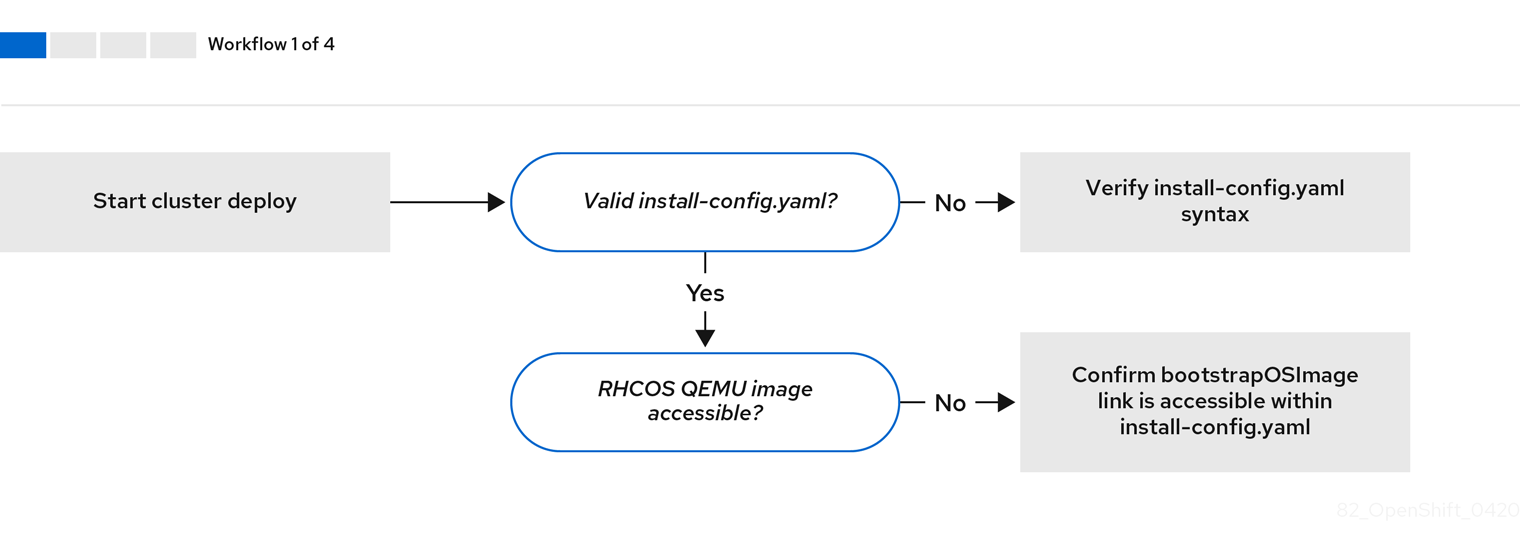
Workflow 1 of 4 illustrates a troubleshooting workflow when the install-config.yaml file has errors or the Red Hat Enterprise Linux CoreOS (RHCOS) images are inaccessible. Troubleshooting suggestions can be found at Troubleshooting install-config.yaml.
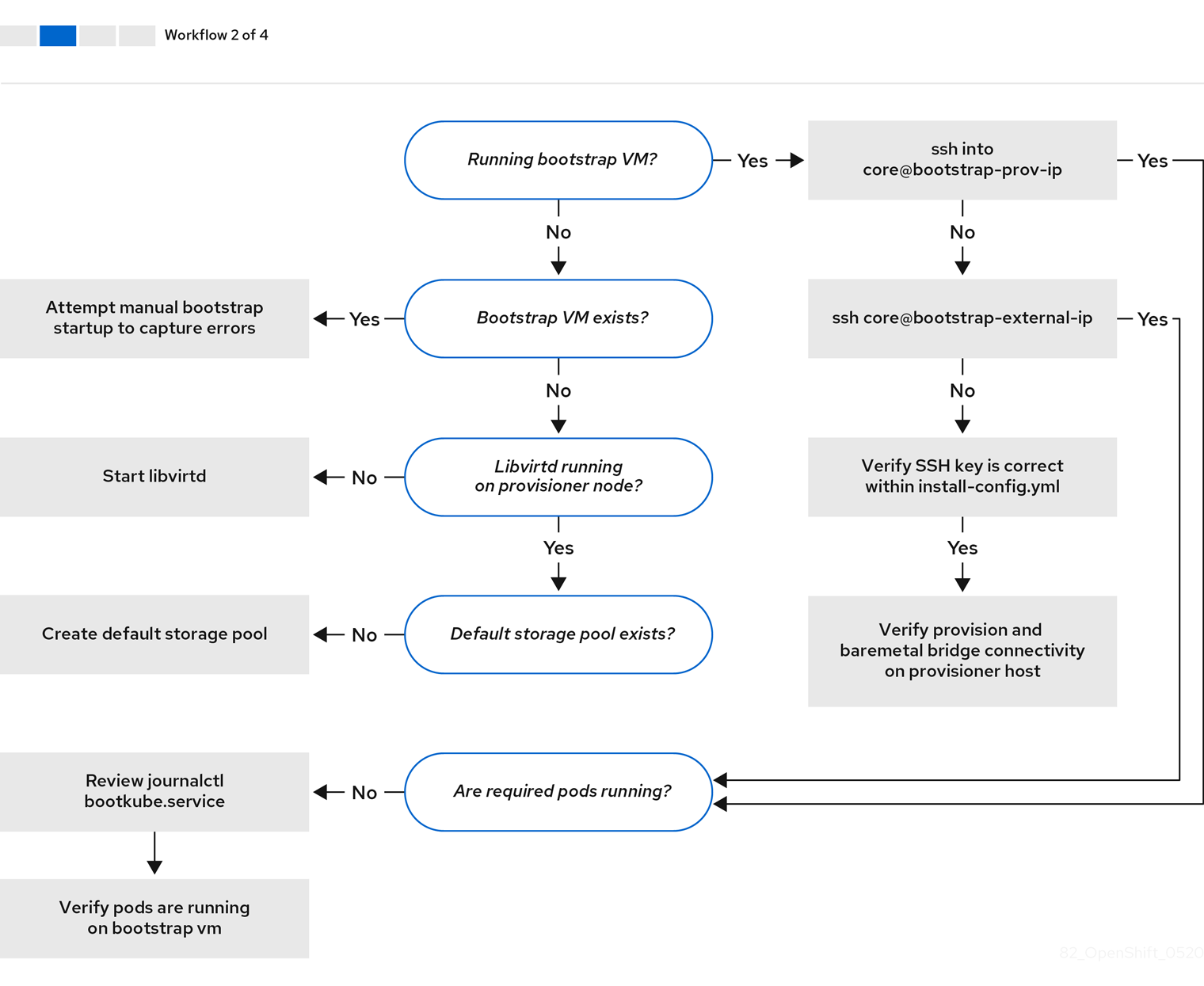
Workflow 2 of 4 illustrates a troubleshooting workflow for bootstrap VM issues, bootstrap VMs that cannot boot up the cluster nodes, and inspecting logs. When installing an OpenShift Container Platform cluster without the provisioning network, this workflow does not apply.
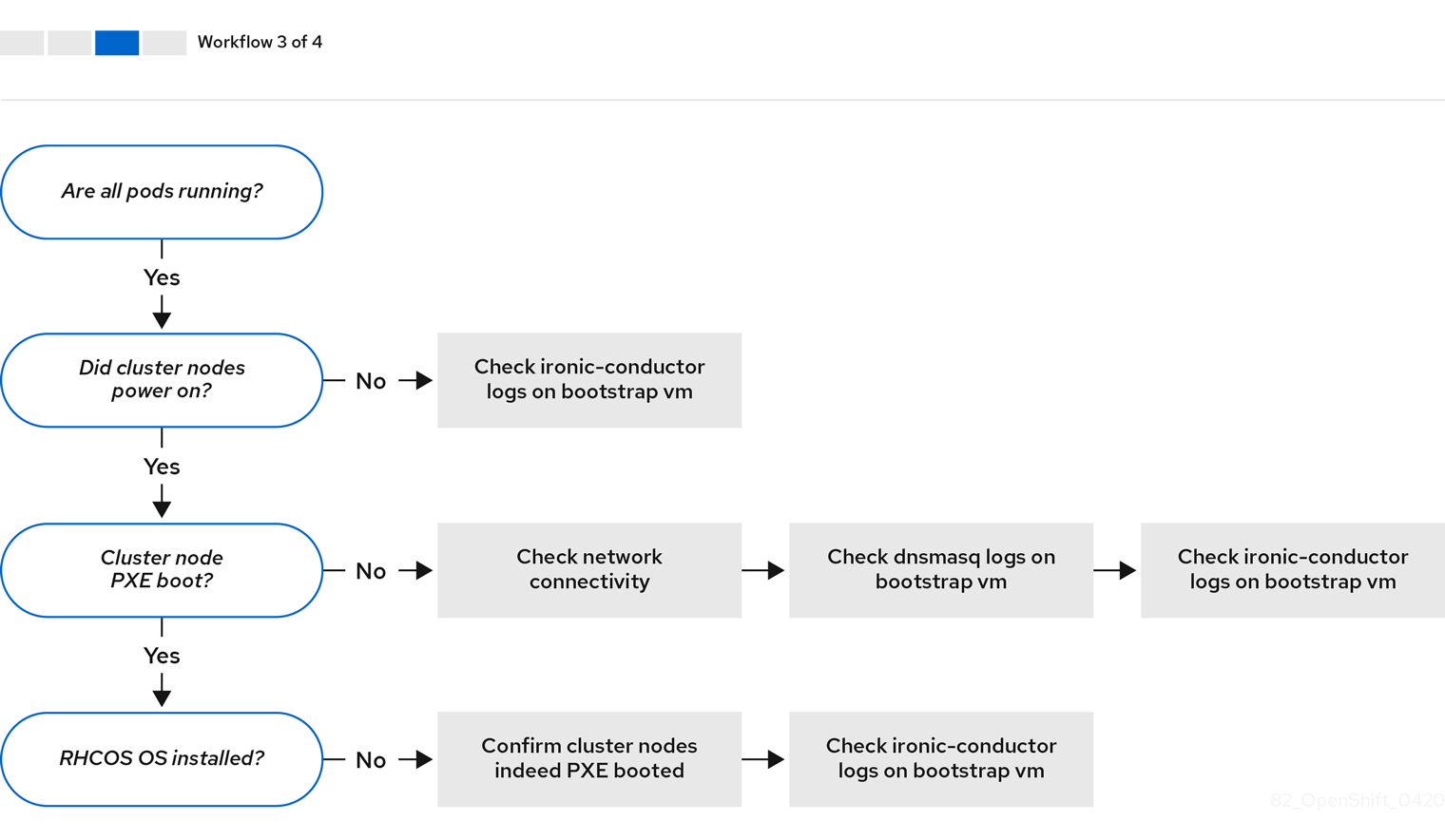
Workflow 3 of 4 illustrates a troubleshooting workflow for cluster nodes that will not PXE boot. If installing using RedFish Virtual Media, each node must meet minimum firmware requirements for the installer to deploy the node. See Firmware requirements for installing with virtual media in the Prerequisites section for additional details.
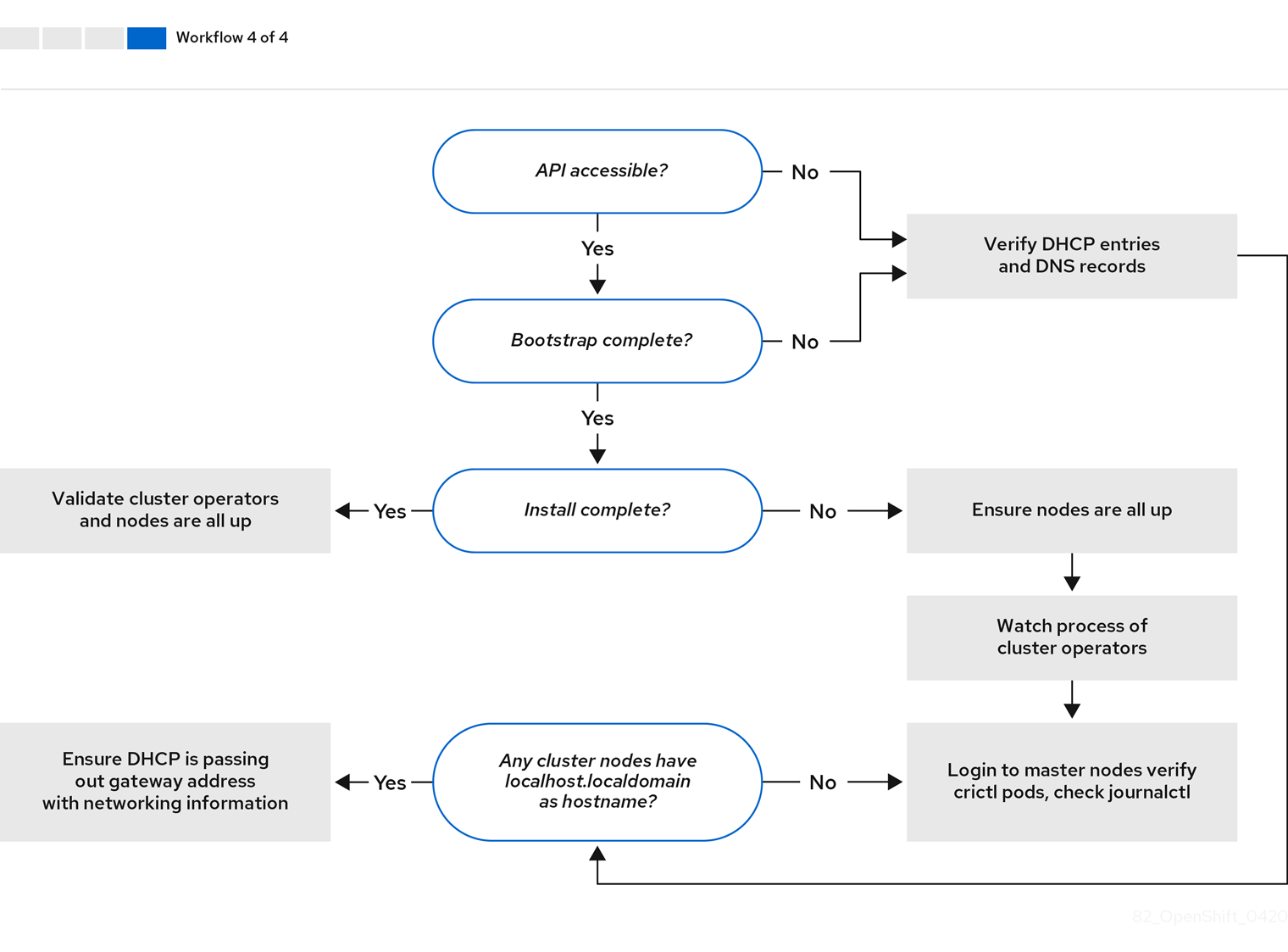
Workflow 4 of 4 illustrates a troubleshooting workflow from a non-accessible API to a validated installation.
14.6.2. Troubleshooting install-config.yaml
The install-config.yaml configuration file represents all of the nodes that are part of the OpenShift Container Platform cluster. The file contains the necessary options consisting of but not limited to apiVersion, baseDomain, imageContentSources and virtual IP addresses. If errors occur early in the deployment of the OpenShift Container Platform cluster, the errors are likely in the install-config.yaml configuration file.
Procedure
- Use the guidelines in YAML-tips.
- Verify the YAML syntax is correct using syntax-check.
Verify the Red Hat Enterprise Linux CoreOS (RHCOS) QEMU images are properly defined and accessible via the URL provided in the
install-config.yaml. For example:$ curl -s -o /dev/null -I -w "%{http_code}\n" http://webserver.example.com:8080/rhcos-44.81.202004250133-0-qemu.<architecture>.qcow2.gz?sha256=7d884b46ee54fe87bbc3893bf2aa99af3b2d31f2e19ab5529c60636fbd0f1ce7If the output is
200, there is a valid response from the webserver storing the bootstrap VM image.
14.6.3. Bootstrap VM issues
The OpenShift Container Platform installation program spawns a bootstrap node virtual machine, which handles provisioning the OpenShift Container Platform cluster nodes.
Procedure
About 10 to 15 minutes after triggering the installation program, check to ensure the bootstrap VM is operational using the
virshcommand:$ sudo virsh listId Name State -------------------------------------------- 12 openshift-xf6fq-bootstrap runningNoteThe name of the bootstrap VM is always the cluster name followed by a random set of characters and ending in the word "bootstrap."
If the bootstrap VM is not running after 10-15 minutes, troubleshoot why it is not running. Possible issues include:
Verify
libvirtdis running on the system:$ systemctl status libvirtd● libvirtd.service - Virtualization daemon Loaded: loaded (/usr/lib/systemd/system/libvirtd.service; enabled; vendor preset: enabled) Active: active (running) since Tue 2020-03-03 21:21:07 UTC; 3 weeks 5 days ago Docs: man:libvirtd(8) https://libvirt.org Main PID: 9850 (libvirtd) Tasks: 20 (limit: 32768) Memory: 74.8M CGroup: /system.slice/libvirtd.service ├─ 9850 /usr/sbin/libvirtdIf the bootstrap VM is operational, log in to it.
Use the
virsh consolecommand to find the IP address of the bootstrap VM:$ sudo virsh console example.comConnected to domain example.com Escape character is ^] Red Hat Enterprise Linux CoreOS 43.81.202001142154.0 (Ootpa) 4.3 SSH host key: SHA256:BRWJktXZgQQRY5zjuAV0IKZ4WM7i4TiUyMVanqu9Pqg (ED25519) SSH host key: SHA256:7+iKGA7VtG5szmk2jB5gl/5EZ+SNcJ3a2g23o0lnIio (ECDSA) SSH host key: SHA256:DH5VWhvhvagOTaLsYiVNse9ca+ZSW/30OOMed8rIGOc (RSA) ens3: fd35:919d:4042:2:c7ed:9a9f:a9ec:7 ens4: 172.22.0.2 fe80::1d05:e52e:be5d:263f localhost login:ImportantWhen deploying an OpenShift Container Platform cluster without the
provisioningnetwork, you must use a public IP address and not a private IP address like172.22.0.2.After you obtain the IP address, log in to the bootstrap VM using the
sshcommand:NoteIn the console output of the previous step, you can use the IPv6 IP address provided by
ens3or the IPv4 IP provided byens4.$ ssh core@172.22.0.2
If you are not successful logging in to the bootstrap VM, you have likely encountered one of the following scenarios:
-
You cannot reach the
172.22.0.0/24network. Verify the network connectivity between the provisioner and theprovisioningnetwork bridge. This issue might occur if you are using aprovisioningnetwork. ` -
You cannot reach the bootstrap VM through the public network. When attempting to SSH via
baremetalnetwork, verify connectivity on theprovisionerhost specifically around thebaremetalnetwork bridge. -
You encountered
Permission denied (publickey,password,keyboard-interactive). When attempting to access the bootstrap VM, aPermission deniederror might occur. Verify that the SSH key for the user attempting to log in to the VM is set within theinstall-config.yamlfile.
14.6.3.1. Bootstrap VM cannot boot up the cluster nodes
During the deployment, it is possible for the bootstrap VM to fail to boot the cluster nodes, which prevents the VM from provisioning the nodes with the RHCOS image. This scenario can arise due to:
-
A problem with the
install-config.yamlfile. - Issues with out-of-band network access when using the baremetal network.
To verify the issue, there are three containers related to ironic:
-
ironic -
ironic-inspector
Procedure
Log in to the bootstrap VM:
$ ssh core@172.22.0.2To check the container logs, execute the following:
[core@localhost ~]$ sudo podman logs -f <container_name>Replace
<container_name>with one ofironicorironic-inspector. If you encounter an issue where the control plane nodes are not booting up from PXE, check theironicpod. Theironicpod contains information about the attempt to boot the cluster nodes, because it attempts to log in to the node over IPMI.
Potential reason
The cluster nodes might be in the ON state when deployment started.
Solution
Power off the OpenShift Container Platform cluster nodes before you begin the installation over IPMI:
$ ipmitool -I lanplus -U root -P <password> -H <out_of_band_ip> power off14.6.3.2. Inspecting logs
When experiencing issues downloading or accessing the RHCOS images, first verify that the URL is correct in the install-config.yaml configuration file.
Example of internal webserver hosting RHCOS images
bootstrapOSImage: http://<ip:port>/rhcos-43.81.202001142154.0-qemu.<architecture>.qcow2.gz?sha256=9d999f55ff1d44f7ed7c106508e5deecd04dc3c06095d34d36bf1cd127837e0c
clusterOSImage: http://<ip:port>/rhcos-43.81.202001142154.0-openstack.<architecture>.qcow2.gz?sha256=a1bda656fa0892f7b936fdc6b6a6086bddaed5dafacedcd7a1e811abb78fe3b0
The coreos-downloader container downloads resources from a webserver or from the external quay.io registry, whichever the install-config.yaml configuration file specifies. Verify that the coreos-downloader container is up and running and inspect its logs as needed.
Procedure
Log in to the bootstrap VM:
$ ssh core@172.22.0.2Check the status of the
coreos-downloadercontainer within the bootstrap VM by running the following command:[core@localhost ~]$ sudo podman logs -f coreos-downloaderIf the bootstrap VM cannot access the URL to the images, use the
curlcommand to verify that the VM can access the images.To inspect the
bootkubelogs that indicate if all the containers launched during the deployment phase, execute the following:[core@localhost ~]$ journalctl -xe[core@localhost ~]$ journalctl -b -f -u bootkube.serviceVerify all the pods, including
dnsmasq,mariadb,httpd, andironic, are running:[core@localhost ~]$ sudo podman psIf there are issues with the pods, check the logs of the containers with issues. To check the logs of the
ironicservice, run the following command:[core@localhost ~]$ sudo podman logs ironic
14.6.4. Cluster nodes will not PXE boot
When OpenShift Container Platform cluster nodes will not PXE boot, execute the following checks on the cluster nodes that will not PXE boot. This procedure does not apply when installing an OpenShift Container Platform cluster without the provisioning network.
Procedure
-
Check the network connectivity to the
provisioningnetwork. -
Ensure PXE is enabled on the NIC for the
provisioningnetwork and PXE is disabled for all other NICs. Verify that the
install-config.yamlconfiguration file has the proper hardware profile and boot MAC address for the NIC connected to theprovisioningnetwork. For example:control plane node settings
bootMACAddress: 24:6E:96:1B:96:90 # MAC of bootable provisioning NIC
hardwareProfile: default          #control plane node settings
Worker node settings
bootMACAddress: 24:6E:96:1B:96:90 # MAC of bootable provisioning NIC
hardwareProfile: unknown          #worker node settings
14.6.5. Unable to discover new bare metal hosts using the BMC
In some cases, the installation program will not be able to discover the new bare metal hosts and issue an error, because it cannot mount the remote virtual media share.
For example:
ProvisioningError 51s metal3-baremetal-controller Image provisioning failed: Deploy step deploy.deploy failed with BadRequestError: HTTP POST
https://<bmc_address>/redfish/v1/Managers/iDRAC.Embedded.1/VirtualMedia/CD/Actions/VirtualMedia.InsertMedia
returned code 400.
Base.1.8.GeneralError: A general error has occurred. See ExtendedInfo for more information
Extended information: [
  {
    "Message": "Unable to mount remote share https://<ironic_address>/redfish/boot-<uuid>.iso.",
    "MessageArgs": [
      "https://<ironic_address>/redfish/boot-<uuid>.iso"
    ],
    "MessageArgs@odata.count": 1,
    "MessageId": "IDRAC.2.5.RAC0720",
    "RelatedProperties": [
      "#/Image"
    ],
    "RelatedProperties@odata.count": 1,
    "Resolution": "Retry the operation.",
    "Severity": "Informational"
  }
].
In this situation, if you are using virtual media with an unknown certificate authority, you can configure your baseboard management controller (BMC) remote file share settings to trust an unknown certificate authority to avoid this error.
This resolution was tested on OpenShift Container Platform 4.11 with Dell iDRAC 9 and firmware version 5.10.50.
14.6.6. The API is not accessible
When the cluster is running and clients cannot access the API, domain name resolution issues might impede access to the API.
Procedure
Hostname Resolution: Check the cluster nodes to ensure they have a fully qualified domain name, and not just
localhost.localdomain. For example:$ hostnameIf a hostname is not set, set the correct hostname. For example:
$ hostnamectl set-hostname <hostname>Incorrect Name Resolution: Ensure that each node has the correct name resolution in the DNS server using
digandnslookup. For example:$ dig api.<cluster_name>.example.com; <<>> DiG 9.11.4-P2-RedHat-9.11.4-26.P2.el8 <<>> api.<cluster_name>.example.com ;; global options: +cmd ;; Got answer: ;; ->>HEADER<<- opcode: QUERY, status: NOERROR, id: 37551 ;; flags: qr aa rd ra; QUERY: 1, ANSWER: 1, AUTHORITY: 1, ADDITIONAL: 2 ;; OPT PSEUDOSECTION: ; EDNS: version: 0, flags:; udp: 4096 ; COOKIE: 866929d2f8e8563582af23f05ec44203d313e50948d43f60 (good) ;; QUESTION SECTION: ;api.<cluster_name>.example.com. IN A ;; ANSWER SECTION: api.<cluster_name>.example.com. 10800 IN A 10.19.13.86 ;; AUTHORITY SECTION: <cluster_name>.example.com. 10800 IN NS <cluster_name>.example.com. ;; ADDITIONAL SECTION: <cluster_name>.example.com. 10800 IN A 10.19.14.247 ;; Query time: 0 msec ;; SERVER: 10.19.14.247#53(10.19.14.247) ;; WHEN: Tue May 19 20:30:59 UTC 2020 ;; MSG SIZE rcvd: 140The output in the foregoing example indicates that the appropriate IP address for the
api.<cluster_name>.example.comVIP is10.19.13.86. This IP address should reside on thebaremetalnetwork.
14.6.7. Troubleshooting worker nodes that cannot join the cluster
Installer-provisioned clusters deploy with a DNS server that includes a DNS entry for the api-int.<cluster_name>.<base_domain> URL. If the nodes within the cluster use an external or upstream DNS server to resolve the api-int.<cluster_name>.<base_domain> URL and there is no such entry, worker nodes might fail to join the cluster. Ensure that all nodes in the cluster can resolve the domain name.
Procedure
Add a DNS A/AAAA or CNAME record to internally identify the API load balancer. For example, when using dnsmasq, modify the
dnsmasq.confconfiguration file:$ sudo nano /etc/dnsmasq.confaddress=/api-int.<cluster_name>.<base_domain>/<IP_address> address=/api-int.mycluster.example.com/192.168.1.10 address=/api-int.mycluster.example.com/2001:0db8:85a3:0000:0000:8a2e:0370:7334Add a DNS PTR record to internally identify the API load balancer. For example, when using dnsmasq, modify the
dnsmasq.confconfiguration file:$ sudo nano /etc/dnsmasq.confptr-record=<IP_address>.in-addr.arpa,api-int.<cluster_name>.<base_domain> ptr-record=10.1.168.192.in-addr.arpa,api-int.mycluster.example.comRestart the DNS server. For example, when using dnsmasq, execute the following command:
$ sudo systemctl restart dnsmasq
These records must be resolvable from all the nodes within the cluster.
14.6.8. Cleaning up previous installations
In the event of a previous failed deployment, remove the artifacts from the failed attempt before attempting to deploy OpenShift Container Platform again.
Procedure
Power off all bare metal nodes prior to installing the OpenShift Container Platform cluster:
$ ipmitool -I lanplus -U <user> -P <password> -H <management_server_ip> power offRemove all old bootstrap resources if any are left over from a previous deployment attempt:
for i in $(sudo virsh list | tail -n +3 | grep bootstrap | awk {'print $2'});
do
  sudo virsh destroy $i;
  sudo virsh undefine $i;
  sudo virsh vol-delete $i --pool $i;
  sudo virsh vol-delete $i.ign --pool $i;
  sudo virsh pool-destroy $i;
  sudo virsh pool-undefine $i;
done
Remove the following from the
clusterconfigsdirectory to prevent Terraform from failing:$ rm -rf ~/clusterconfigs/auth ~/clusterconfigs/terraform* ~/clusterconfigs/tls ~/clusterconfigs/metadata.json
14.6.9. Issues with creating the registry
When creating a disconnected registry, you might encounter a "User Not Authorized" error when attempting to mirror the registry. This error might occur if you fail to append the new authentication to the existing pull-secret.txt file.
Procedure
Check to ensure authentication is successful:
$ /usr/local/bin/oc adm release mirror \ -a pull-secret-update.json --from=$UPSTREAM_REPO \ --to-release-image=$LOCAL_REG/$LOCAL_REPO:${VERSION} \ --to=$LOCAL_REG/$LOCAL_REPONoteExample output of the variables used to mirror the install images:
UPSTREAM_REPO=${RELEASE_IMAGE}
LOCAL_REG=<registry_FQDN>:<registry_port>
LOCAL_REPO='ocp4/openshift4'
The values of
RELEASE_IMAGEandVERSIONwere set during the Retrieving OpenShift Installer step of the Setting up the environment for an OpenShift installation section.After mirroring the registry, confirm that you can access it in your disconnected environment:
$ curl -k -u <user>:<password> https://registry.example.com:<registry_port>/v2/_catalog
{"repositories":["<Repo_Name>"]}
14.6.10. Miscellaneous issues
14.6.10.1. Addressing the runtime network not ready error
After the deployment of a cluster you might receive the following error:
`runtime network not ready: NetworkReady=false reason:NetworkPluginNotReady message:Network plugin returns error: Missing CNI default network`
The Cluster Network Operator is responsible for deploying the networking components in response to a special object created by the installer. It runs very early in the installation process, after the control plane (master) nodes have come up, but before the bootstrap control plane has been torn down. It can be indicative of more subtle installer issues, such as long delays in bringing up control plane (master) nodes or issues with apiserver communication.
Procedure
Inspect the pods in the
openshift-network-operatornamespace:$ oc get all -n openshift-network-operatorNAME READY STATUS RESTARTS AGE pod/network-operator-69dfd7b577-bg89v 0/1 ContainerCreating 0 149mOn the
provisionernode, determine that the network configuration exists:$ kubectl get network.config.openshift.io cluster -oyamlapiVersion: config.openshift.io/v1 kind: Network metadata: name: cluster spec: serviceNetwork: - 172.30.0.0/16 clusterNetwork: - cidr: 10.128.0.0/14 hostPrefix: 23 networkType: OpenShiftSDNIf it does not exist, the installer did not create it. To determine why the installer did not create it, execute the following:
$ openshift-install create manifestsCheck that the
network-operatoris running:$ kubectl -n openshift-network-operator get podsRetrieve the logs:
$ kubectl -n openshift-network-operator logs -l "name=network-operator"On high availability clusters with three or more control plane (master) nodes, the Operator will perform leader election and all other Operators will sleep. For additional details, see Troubleshooting.
14.6.10.2. Cluster nodes not getting the correct IPv6 address over DHCP
If the cluster nodes are not getting the correct IPv6 address over DHCP, check the following:
- Ensure the reserved IPv6 addresses reside outside the DHCP range.
In the IP address reservation on the DHCP server, ensure the reservation specifies the correct DHCP Unique Identifier (DUID). For example:
# This is a dnsmasq dhcp reservation, 'id:00:03:00:01' is the client id and '18:db:f2:8c:d5:9f' is the MAC Address for the NIC id:00:03:00:01:18:db:f2:8c:d5:9f,openshift-master-1,[2620:52:0:1302::6]- Ensure that route announcements are working.
- Ensure that the DHCP server is listening on the required interfaces serving the IP address ranges.
14.6.10.3. Cluster nodes not getting the correct hostname over DHCP
During IPv6 deployment, cluster nodes must get their hostname over DHCP. Sometimes the NetworkManager does not assign the hostname immediately. A control plane (master) node might report an error such as:
Failed Units: 2
  NetworkManager-wait-online.service
  nodeip-configuration.service
This error indicates that the cluster node likely booted without first receiving a hostname from the DHCP server, which causes kubelet to boot with a localhost.localdomain hostname. To address the error, force the node to renew the hostname.
Procedure
Retrieve the
hostname:[core@master-X ~]$ hostnameIf the hostname is
localhost, proceed with the following steps.NoteWhere
Xis the control plane node number.Force the cluster node to renew the DHCP lease:
[core@master-X ~]$ sudo nmcli con up "<bare_metal_nic>"Replace
<bare_metal_nic>with the wired connection corresponding to thebaremetalnetwork.Check
hostnameagain:[core@master-X ~]$ hostnameIf the hostname is still
localhost.localdomain, restartNetworkManager:[core@master-X ~]$ sudo systemctl restart NetworkManager-
If the hostname is still
localhost.localdomain, wait a few minutes and check again. If the hostname remainslocalhost.localdomain, repeat the previous steps. Restart the
nodeip-configurationservice:[core@master-X ~]$ sudo systemctl restart nodeip-configuration.serviceThis service will reconfigure the
kubeletservice with the correct hostname references.Reload the unit files definition since the kubelet changed in the previous step:
[core@master-X ~]$ sudo systemctl daemon-reloadRestart the
kubeletservice:[core@master-X ~]$ sudo systemctl restart kubelet.serviceEnsure
kubeletbooted with the correct hostname:[core@master-X ~]$ sudo journalctl -fu kubelet.service
If the cluster node is not getting the correct hostname over DHCP after the cluster is up and running, such as during a reboot, the cluster will have a pending csr. Do not approve a csr, or other issues might arise.
Addressing a csr
Get CSRs on the cluster:
$ oc get csrVerify if a pending
csrcontainsSubject Name: localhost.localdomain:$ oc get csr <pending_csr> -o jsonpath='{.spec.request}' | base64 --decode | openssl req -noout -textRemove any
csrthat containsSubject Name: localhost.localdomain:$ oc delete csr <wrong_csr>
14.6.10.4. Routes do not reach endpoints
During the installation process, it is possible to encounter a Virtual Router Redundancy Protocol (VRRP) conflict. This conflict might occur if a previously used OpenShift Container Platform node that was once part of a cluster deployment using a specific cluster name is still running but not part of the current OpenShift Container Platform cluster deployment using that same cluster name. For example, a cluster was deployed using the cluster name openshift, deploying three control plane (master) nodes and three worker nodes. Later, a separate install uses the same cluster name openshift, but this redeployment only installed three control plane (master) nodes, leaving the three worker nodes from a previous deployment in an ON state. This might cause a Virtual Router Identifier (VRID) conflict and a VRRP conflict.
Get the route:
$ oc get route oauth-openshiftCheck the service endpoint:
$ oc get svc oauth-openshiftNAME TYPE CLUSTER-IP EXTERNAL-IP PORT(S) AGE oauth-openshift ClusterIP 172.30.19.162 <none> 443/TCP 59mAttempt to reach the service from a control plane (master) node:
[core@master0 ~]$ curl -k https://172.30.19.162{ "kind": "Status", "apiVersion": "v1", "metadata": { }, "status": "Failure", "message": "forbidden: User \"system:anonymous\" cannot get path \"/\"", "reason": "Forbidden", "details": { }, "code": 403Identify the
authentication-operatorerrors from theprovisionernode:$ oc logs deployment/authentication-operator -n openshift-authentication-operatorEvent(v1.ObjectReference{Kind:"Deployment", Namespace:"openshift-authentication-operator", Name:"authentication-operator", UID:"225c5bd5-b368-439b-9155-5fd3c0459d98", APIVersion:"apps/v1", ResourceVersion:"", FieldPath:""}): type: 'Normal' reason: 'OperatorStatusChanged' Status for clusteroperator/authentication changed: Degraded message changed from "IngressStateEndpointsDegraded: All 2 endpoints for oauth-server are reporting"
Solution
- Ensure that the cluster name for every deployment is unique, ensuring no conflict.
- Turn off all the rogue nodes which are not part of the cluster deployment that are using the same cluster name. Otherwise, the authentication pod of the OpenShift Container Platform cluster might never start successfully.
14.6.10.5. Failed Ignition during Firstboot
During the Firstboot, the Ignition configuration may fail.
Procedure
Connect to the node where the Ignition configuration failed:
Failed Units: 1
  machine-config-daemon-firstboot.service
Restart the
machine-config-daemon-firstbootservice:[core@worker-X ~]$ sudo systemctl restart machine-config-daemon-firstboot.service
14.6.10.6. NTP out of sync
The deployment of OpenShift Container Platform clusters depends on NTP synchronized clocks among the cluster nodes. Without synchronized clocks, the deployment may fail due to clock drift if the time difference is greater than two seconds.
Procedure
Check for differences in the
AGEof the cluster nodes. For example:$ oc get nodesNAME STATUS ROLES AGE VERSION master-0.cloud.example.com Ready master 145m v1.24.0 master-1.cloud.example.com Ready master 135m v1.24.0 master-2.cloud.example.com Ready master 145m v1.24.0 worker-2.cloud.example.com Ready worker 100m v1.24.0Check for inconsistent timing delays due to clock drift. For example:
$ oc get bmh -n openshift-machine-apimaster-1 error registering master-1 ipmi://<out_of_band_ip>$ sudo timedatectlLocal time: Tue 2020-03-10 18:20:02 UTC Universal time: Tue 2020-03-10 18:20:02 UTC RTC time: Tue 2020-03-10 18:36:53 Time zone: UTC (UTC, +0000) System clock synchronized: no NTP service: active RTC in local TZ: no
Addressing clock drift in existing clusters
Create a Butane config file including the contents of the
chrony.conffile to be delivered to the nodes. In the following example, create99-master-chrony.buto add the file to the control plane nodes. You can modify the file for worker nodes or repeat this procedure for the worker role.NoteSee "Creating machine configs with Butane" for information about Butane.
variant: openshift
version: 4.11.0
metadata:
  name: 99-master-chrony
  labels:
    machineconfiguration.openshift.io/role: master
storage:
  files:
  - path: /etc/chrony.conf
    mode: 0644
    overwrite: true
    contents:
      inline: |
        server <NTP_server> iburst
1 stratumweight 0 driftfile /var/lib/chrony/drift rtcsync makestep 10 3 bindcmdaddress 127.0.0.1 bindcmdaddress ::1 keyfile /etc/chrony.keys commandkey 1 generatecommandkey noclientlog logchange 0.5 logdir /var/log/chrony- 1
- Replace
<NTP_server>with the IP address of the NTP server.
Use Butane to generate a
MachineConfigobject file,99-master-chrony.yaml, containing the configuration to be delivered to the nodes:$ butane 99-master-chrony.bu -o 99-master-chrony.yamlApply the
MachineConfigobject file:$ oc apply -f 99-master-chrony.yamlEnsure the
System clock synchronizedvalue is yes:$ sudo timedatectlLocal time: Tue 2020-03-10 19:10:02 UTC Universal time: Tue 2020-03-10 19:10:02 UTC RTC time: Tue 2020-03-10 19:36:53 Time zone: UTC (UTC, +0000) System clock synchronized: yes NTP service: active RTC in local TZ: noTo setup clock synchronization prior to deployment, generate the manifest files and add this file to the
openshiftdirectory. For example:$ cp chrony-masters.yaml ~/clusterconfigs/openshift/99_masters-chrony-configuration.yamlThen, continue to create the cluster.
14.6.11. Reviewing the installation
After installation, ensure the installer deployed the nodes and pods successfully.
Procedure
When the OpenShift Container Platform cluster nodes are installed appropriately, the following
Readystate is seen within theSTATUScolumn:$ oc get nodesNAME STATUS ROLES AGE VERSION master-0.example.com Ready master,worker 4h v1.24.0 master-1.example.com Ready master,worker 4h v1.24.0 master-2.example.com Ready master,worker 4h v1.24.0Confirm the installer deployed all pods successfully. The following command removes any pods that are still running or have completed as part of the output.
$ oc get pods --all-namespaces | grep -iv running | grep -iv complete

'%20d='M201.5%20305.5c-13.8%200-24.9-11.1-24.9-24.6%200-13.8%2011.1-24.9%2024.9-24.9%2013.6%200%2024.6%2011.1%2024.6%2024.9%200%2013.6-11.1%2024.6-24.6%2024.6zM504%20256c0%20137-111%20248-248%20248S8%20393%208%20256%20119%208%20256%208s248%20111%20248%20248zm-132.3-41.2c-9.4%200-17.7%203.9-23.8%2010-22.4-15.5-52.6-25.5-86.1-26.6l17.4-78.3%2055.4%2012.5c0%2013.6%2011.1%2024.6%2024.6%2024.6%2013.8%200%2024.9-11.3%2024.9-24.9s-11.1-24.9-24.9-24.9c-9.7%200-18%205.8-22.1%2013.8l-61.2-13.6c-3-.8-6.1%201.4-6.9%204.4l-19.1%2086.4c-33.2%201.4-63.1%2011.3-85.5%2026.8-6.1-6.4-14.7-10.2-24.1-10.2-34.9%200-46.3%2046.9-14.4%2062.8-1.1%205-1.7%2010.2-1.7%2015.5%200%2052.6%2059.2%2095.2%20132%2095.2%2073.1%200%20132.3-42.6%20132.3-95.2%200-5.3-.6-10.8-1.9-15.8%2031.3-16%2019.8-62.5-14.9-62.5zM302.8%20331c-18.2%2018.2-76.1%2017.9-93.6%200-2.2-2.2-6.1-2.2-8.3%200-2.5%202.5-2.5%206.4%200%208.6%2022.8%2022.8%2087.3%2022.8%20110.2%200%202.5-2.2%202.5-6.1%200-8.6-2.2-2.2-6.1-2.2-8.3%200zm7.7-75c-13.6%200-24.6%2011.1-24.6%2024.9%200%2013.6%2011.1%2024.6%2024.6%2024.6%2013.8%200%2024.9-11.1%2024.9-24.6%200-13.8-11-24.9-24.9-24.9z'/%3e%3c/svg%3e)