 Red Hat Summit
Questo contenuto non è disponibile nella lingua selezionata.
Chapter 25. Configuring ingress cluster traffic
25.1. Configuring ingress cluster traffic overview
OpenShift Container Platform provides the following methods for communicating from outside the cluster with services running in the cluster.
The methods are recommended, in order or preference:
- If you have HTTP/HTTPS, use an Ingress Controller.
- If you have a TLS-encrypted protocol other than HTTPS. For example, for TLS with the SNI header, use an Ingress Controller.
-
Otherwise, use a Load Balancer, an External IP, or a
NodePort.
| Method | Purpose |
|---|---|
| Allows access to HTTP/HTTPS traffic and TLS-encrypted protocols other than HTTPS (for example, TLS with the SNI header). | |
| Automatically assign an external IP using a load balancer service | Allows traffic to non-standard ports through an IP address assigned from a pool. Most cloud platforms offer a method to start a service with a load-balancer IP address. |
| Allows traffic to a specific IP address or address from a pool on the machine network. For bare-metal installations or platforms that are like bare metal, MetalLB provides a way to start a service with a load-balancer IP address. | |
| Allows traffic to non-standard ports through a specific IP address. | |
| Expose a service on all nodes in the cluster. |
25.1.1. Comparision: Fault tolerant access to external IP addresses
For the communication methods that provide access to an external IP address, fault tolerant access to the IP address is another consideration. The following features provide fault tolerant access to an external IP address.
- IP failover
- IP failover manages a pool of virtual IP address for a set of nodes. It is implemented with Keepalived and Virtual Router Redundancy Protocol (VRRP). IP failover is a layer 2 mechanism only and relies on multicast. Multicast can have disadvantages for some networks.
- MetalLB
- MetalLB has a layer 2 mode, but it does not use multicast. Layer 2 mode has a disadvantage that it transfers all traffic for an external IP address through one node.
- Manually assigning external IP addresses
- You can configure your cluster with an IP address block that is used to assign external IP addresses to services. By default, this feature is disabled. This feature is flexible, but places the largest burden on the cluster or network administrator. The cluster is prepared to receive traffic that is destined for the external IP, but each customer has to decide how they want to route traffic to nodes.
25.2. Configuring ExternalIPs for services
As a cluster administrator, you can designate an IP address block that is external to the cluster that can send traffic to services in the cluster.
This functionality is generally most useful for clusters installed on bare-metal hardware.
25.2.1. Prerequisites
- Your network infrastructure must route traffic for the external IP addresses to your cluster.
25.2.2. About ExternalIP
For non-cloud environments, OpenShift Container Platform supports the assignment of external IP addresses to a Service object spec.externalIPs[] field through the ExternalIP facility. By setting this field, OpenShift Container Platform assigns an additional virtual IP address to the service. The IP address can be outside the service network defined for the cluster. A service configured with an ExternalIP functions similarly to a service with type=NodePort, allowing you to direct traffic to a local node for load balancing.
You must configure your networking infrastructure to ensure that the external IP address blocks that you define are routed to the cluster.
OpenShift Container Platform extends the ExternalIP functionality in Kubernetes by adding the following capabilities:
- Restrictions on the use of external IP addresses by users through a configurable policy
- Allocation of an external IP address automatically to a service upon request
Disabled by default, use of ExternalIP functionality can be a security risk, because in-cluster traffic to an external IP address is directed to that service. This could allow cluster users to intercept sensitive traffic destined for external resources.
This feature is supported only in non-cloud deployments. For cloud deployments, use the load balancer services for automatic deployment of a cloud load balancer to target the endpoints of a service.
You can assign an external IP address in the following ways:
- Automatic assignment of an external IP
-
OpenShift Container Platform automatically assigns an IP address from the
autoAssignCIDRsCIDR block to thespec.externalIPs[]array when you create aServiceobject withspec.type=LoadBalancerset. In this case, OpenShift Container Platform implements a non-cloud version of the load balancer service type and assigns IP addresses to the services. Automatic assignment is disabled by default and must be configured by a cluster administrator as described in the following section. - Manual assignment of an external IP
-
OpenShift Container Platform uses the IP addresses assigned to the
spec.externalIPs[]array when you create aServiceobject. You cannot specify an IP address that is already in use by another service.
25.2.2.1. Configuration for ExternalIP
Use of an external IP address in OpenShift Container Platform is governed by the following fields in the Network.config.openshift.io CR named cluster:
-
spec.externalIP.autoAssignCIDRsdefines an IP address block used by the load balancer when choosing an external IP address for the service. OpenShift Container Platform supports only a single IP address block for automatic assignment. This can be simpler than having to manage the port space of a limited number of shared IP addresses when manually assigning ExternalIPs to services. If automatic assignment is enabled, aServiceobject withspec.type=LoadBalanceris allocated an external IP address. -
spec.externalIP.policydefines the permissible IP address blocks when manually specifying an IP address. OpenShift Container Platform does not apply policy rules to IP address blocks defined byspec.externalIP.autoAssignCIDRs.
If routed correctly, external traffic from the configured external IP address block can reach service endpoints through any TCP or UDP port that the service exposes.
As a cluster administrator, you must configure routing to externalIPs on both OpenShiftSDN and OVN-Kubernetes network types. You must also ensure that the IP address block you assign terminates at one or more nodes in your cluster. For more information, see Kubernetes External IPs.
OpenShift Container Platform supports both the automatic and manual assignment of IP addresses, and each address is guaranteed to be assigned to a maximum of one service. This ensures that each service can expose its chosen ports regardless of the ports exposed by other services.
To use IP address blocks defined by autoAssignCIDRs in OpenShift Container Platform, you must configure the necessary IP address assignment and routing for your host network.
The following YAML describes a service with an external IP address configured:
Example Service object with spec.externalIPs[] set
apiVersion: v1
kind: Service
metadata:
  name: http-service
spec:
  clusterIP: 172.30.163.110
  externalIPs:
  - 192.168.132.253
  externalTrafficPolicy: Cluster
  ports:
  - name: highport
    nodePort: 31903
    port: 30102
    protocol: TCP
    targetPort: 30102
  selector:
    app: web
  sessionAffinity: None
  type: LoadBalancer
status:
  loadBalancer:
    ingress:
    - ip: 192.168.132.253
25.2.2.2. Restrictions on the assignment of an external IP address
As a cluster administrator, you can specify IP address blocks to allow and to reject.
Restrictions apply only to users without cluster-admin privileges. A cluster administrator can always set the service spec.externalIPs[] field to any IP address.
You configure IP address policy with a policy object defined by specifying the spec.ExternalIP.policy field. The policy object has the following shape:
{
  "policy": {
    "allowedCIDRs": [],
    "rejectedCIDRs": []
  }
}
When configuring policy restrictions, the following rules apply:
-
If
policy={}is set, then creating aServiceobject withspec.ExternalIPs[]set will fail. This is the default for OpenShift Container Platform. The behavior whenpolicy=nullis set is identical. If
policyis set and eitherpolicy.allowedCIDRs[]orpolicy.rejectedCIDRs[]is set, the following rules apply:-
If
allowedCIDRs[]andrejectedCIDRs[]are both set, thenrejectedCIDRs[]has precedence overallowedCIDRs[]. -
If
allowedCIDRs[]is set, creating aServiceobject withspec.ExternalIPs[]will succeed only if the specified IP addresses are allowed. -
If
rejectedCIDRs[]is set, creating aServiceobject withspec.ExternalIPs[]will succeed only if the specified IP addresses are not rejected.
-
If
25.2.2.3. Example policy objects
The examples that follow demonstrate several different policy configurations.
In the following example, the policy prevents OpenShift Container Platform from creating any service with an external IP address specified:
Example policy to reject any value specified for
Serviceobjectspec.externalIPs[]apiVersion: config.openshift.io/v1 kind: Network metadata: name: cluster spec: externalIP: policy: {} ...In the following example, both the
allowedCIDRsandrejectedCIDRsfields are set.Example policy that includes both allowed and rejected CIDR blocks
apiVersion: config.openshift.io/v1
kind: Network
metadata:
  name: cluster
spec:
  externalIP:
    policy:
      allowedCIDRs:
      - 172.16.66.10/23
      rejectedCIDRs:
      - 172.16.66.10/24
  ...
In the following example,
policyis set tonull. If set tonull, when inspecting the configuration object by enteringoc get networks.config.openshift.io -o yaml, thepolicyfield will not appear in the output.Example policy to allow any value specified for
Serviceobjectspec.externalIPs[]apiVersion: config.openshift.io/v1 kind: Network metadata: name: cluster spec: externalIP: policy: null ...
25.2.3. ExternalIP address block configuration
The configuration for ExternalIP address blocks is defined by a Network custom resource (CR) named cluster. The Network CR is part of the config.openshift.io API group.
During cluster installation, the Cluster Version Operator (CVO) automatically creates a Network CR named cluster. Creating any other CR objects of this type is not supported.
The following YAML describes the ExternalIP configuration:
Network.config.openshift.io CR named cluster
apiVersion: config.openshift.io/v1
kind: Network
metadata:
  name: cluster
spec:
  externalIP:
    autoAssignCIDRs: []
policy:
...- 1
- Defines the IP address block in CIDR format that is available for automatic assignment of external IP addresses to a service. Only a single IP address range is allowed.
- 2
- Defines restrictions on manual assignment of an IP address to a service. If no restrictions are defined, specifying the
spec.externalIPfield in aServiceobject is not allowed. By default, no restrictions are defined.
The following YAML describes the fields for the policy stanza:
Network.config.openshift.io policy stanza
policy:
  allowedCIDRs: []
rejectedCIDRs: [] Example external IP configurations
Several possible configurations for external IP address pools are displayed in the following examples:
The following YAML describes a configuration that enables automatically assigned external IP addresses:
Example configuration with
spec.externalIP.autoAssignCIDRssetapiVersion: config.openshift.io/v1 kind: Network metadata: name: cluster spec: ... externalIP: autoAssignCIDRs: - 192.168.132.254/29The following YAML configures policy rules for the allowed and rejected CIDR ranges:
Example configuration with
spec.externalIP.policysetapiVersion: config.openshift.io/v1 kind: Network metadata: name: cluster spec: ... externalIP: policy: allowedCIDRs: - 192.168.132.0/29 - 192.168.132.8/29 rejectedCIDRs: - 192.168.132.7/32
25.2.4. Configure external IP address blocks for your cluster
As a cluster administrator, you can configure the following ExternalIP settings:
-
An ExternalIP address block used by OpenShift Container Platform to automatically populate the
spec.clusterIPfield for aServiceobject. -
A policy object to restrict what IP addresses may be manually assigned to the
spec.clusterIParray of aServiceobject.
Prerequisites
-
Install the OpenShift CLI (
oc). -
Access to the cluster as a user with the
cluster-adminrole.
Procedure
Optional: To display the current external IP configuration, enter the following command:
$ oc describe networks.config clusterTo edit the configuration, enter the following command:
$ oc edit networks.config clusterModify the ExternalIP configuration, as in the following example:
apiVersion: config.openshift.io/v1
kind: Network
metadata:
  name: cluster
spec:
  ...
  externalIP:
1 ...- 1
- Specify the configuration for the
externalIPstanza.
To confirm the updated ExternalIP configuration, enter the following command:
$ oc get networks.config cluster -o go-template='{{.spec.externalIP}}{{"\n"}}'
25.2.5. Next steps
25.3. Configuring ingress cluster traffic using an Ingress Controller
OpenShift Container Platform provides methods for communicating from outside the cluster with services running in the cluster. This method uses an Ingress Controller.
25.3.1. Using Ingress Controllers and routes
The Ingress Operator manages Ingress Controllers and wildcard DNS.
Using an Ingress Controller is the most common way to allow external access to an OpenShift Container Platform cluster.
An Ingress Controller is configured to accept external requests and proxy them based on the configured routes. This is limited to HTTP, HTTPS using SNI, and TLS using SNI, which is sufficient for web applications and services that work over TLS with SNI.
Work with your administrator to configure an Ingress Controller to accept external requests and proxy them based on the configured routes.
The administrator can create a wildcard DNS entry and then set up an Ingress Controller. Then, you can work with the edge Ingress Controller without having to contact the administrators.
By default, every Ingress Controller in the cluster can admit any route created in any project in the cluster.
The Ingress Controller:
- Has two replicas by default, which means it should be running on two worker nodes.
- Can be scaled up to have more replicas on more nodes.
The procedures in this section require prerequisites performed by the cluster administrator.
25.3.2. Prerequisites
Before starting the following procedures, the administrator must:
- Set up the external port to the cluster networking environment so that requests can reach the cluster.
Make sure there is at least one user with cluster admin role. To add this role to a user, run the following command:
$ oc adm policy add-cluster-role-to-user cluster-admin username- Have an OpenShift Container Platform cluster with at least one master and at least one node and a system outside the cluster that has network access to the cluster. This procedure assumes that the external system is on the same subnet as the cluster. The additional networking required for external systems on a different subnet is out-of-scope for this topic.
25.3.3. Creating a project and service
If the project and service that you want to expose do not exist, first create the project, then the service.
If the project and service already exist, skip to the procedure on exposing the service to create a route.
Prerequisites
-
Install the
ocCLI and log in as a cluster administrator.
Procedure
Create a new project for your service by running the
oc new-projectcommand:$ oc new-project myprojectUse the
oc new-appcommand to create your service:$ oc new-app nodejs:12~https://github.com/sclorg/nodejs-ex.gitTo verify that the service was created, run the following command:
$ oc get svc -n myprojectExample output
NAME        TYPE        CLUSTER-IP       EXTERNAL-IP   PORT(S)    AGE
nodejs-ex   ClusterIP   172.30.197.157   <none>        8080/TCP   70s
By default, the new service does not have an external IP address.
25.3.4. Exposing the service by creating a route
You can expose the service as a route by using the oc expose command.
Procedure
To expose the service:
- Log in to OpenShift Container Platform.
Log in to the project where the service you want to expose is located:
$ oc project myprojectRun the
oc expose servicecommand to expose the route:$ oc expose service nodejs-exExample output
route.route.openshift.io/nodejs-ex exposedTo verify that the service is exposed, you can use a tool, such as cURL, to make sure the service is accessible from outside the cluster.
Use the
oc get routecommand to find the route’s host name:$ oc get routeExample output
NAME        HOST/PORT                        PATH   SERVICES    PORT       TERMINATION   WILDCARD
nodejs-ex   nodejs-ex-myproject.example.com         nodejs-ex   8080-tcp                 None
Use cURL to check that the host responds to a GET request:
$ curl --head nodejs-ex-myproject.example.comExample output
HTTP/1.1 200 OK
...
25.3.5. Configuring Ingress Controller sharding by using route labels
Ingress Controller sharding by using route labels means that the Ingress Controller serves any route in any namespace that is selected by the route selector.
Figure 25.1. Ingress sharding using route labels
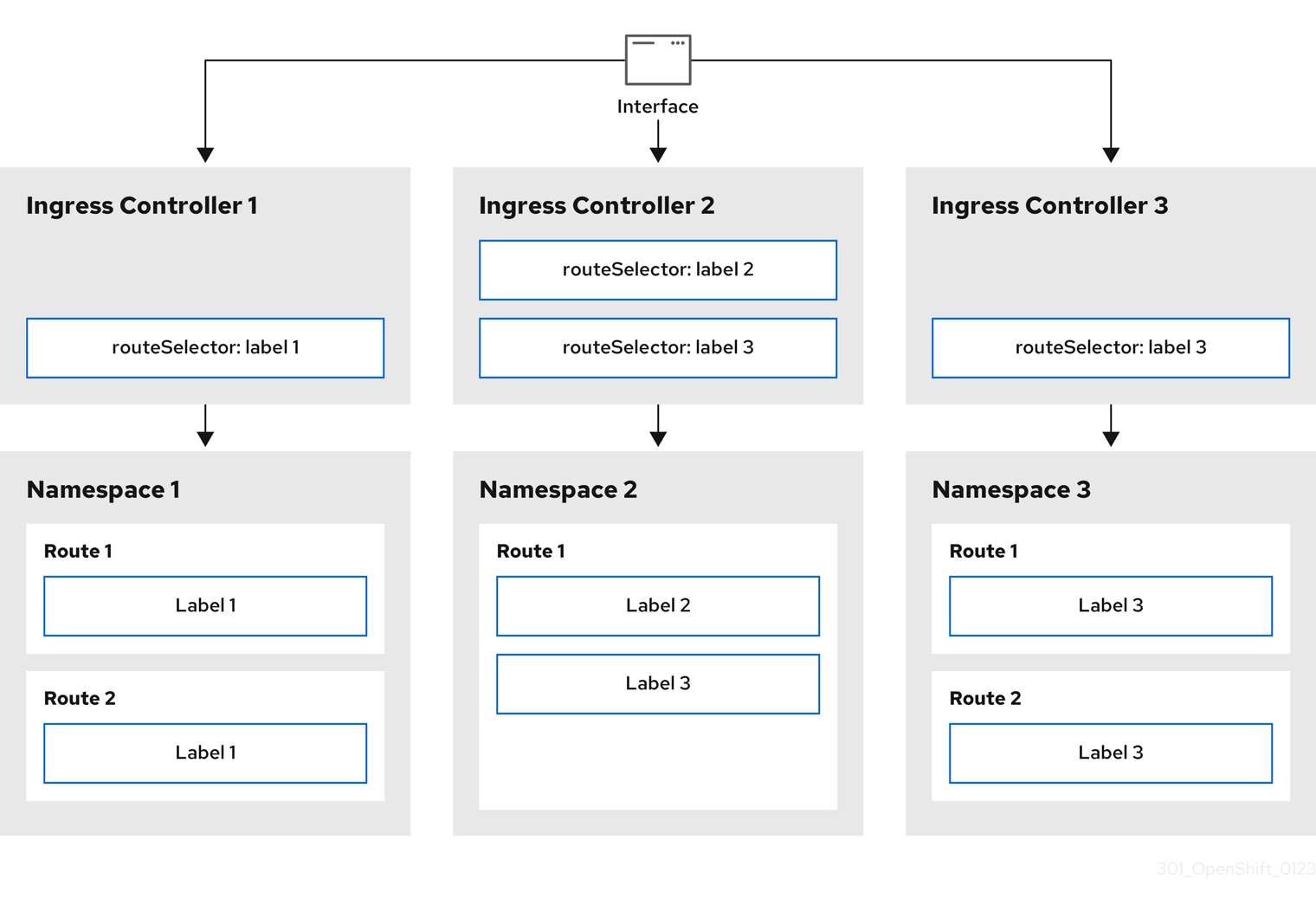
Ingress Controller sharding is useful when balancing incoming traffic load among a set of Ingress Controllers and when isolating traffic to a specific Ingress Controller. For example, company A goes to one Ingress Controller and company B to another.
Procedure
Edit the
router-internal.yamlfile:# cat router-internal.yaml apiVersion: operator.openshift.io/v1 kind: IngressController metadata: name: sharded namespace: openshift-ingress-operator spec: domain: <apps-sharded.basedomain.example.net>1 nodePlacement: nodeSelector: matchLabels: node-role.kubernetes.io/worker: "" routeSelector: matchLabels: type: sharded- 1
- Specify a domain to be used by the Ingress Controller. This domain must be different from the default Ingress Controller domain.
Apply the Ingress Controller
router-internal.yamlfile:# oc apply -f router-internal.yamlThe Ingress Controller selects routes in any namespace that have the label
type: sharded.Create a new route using the domain configured in the
router-internal.yaml:$ oc expose svc <service-name> --hostname <route-name>.apps-sharded.basedomain.example.net
25.3.6. Configuring Ingress Controller sharding by using namespace labels
Ingress Controller sharding by using namespace labels means that the Ingress Controller serves any route in any namespace that is selected by the namespace selector.
Figure 25.2. Ingress sharding using namespace labels
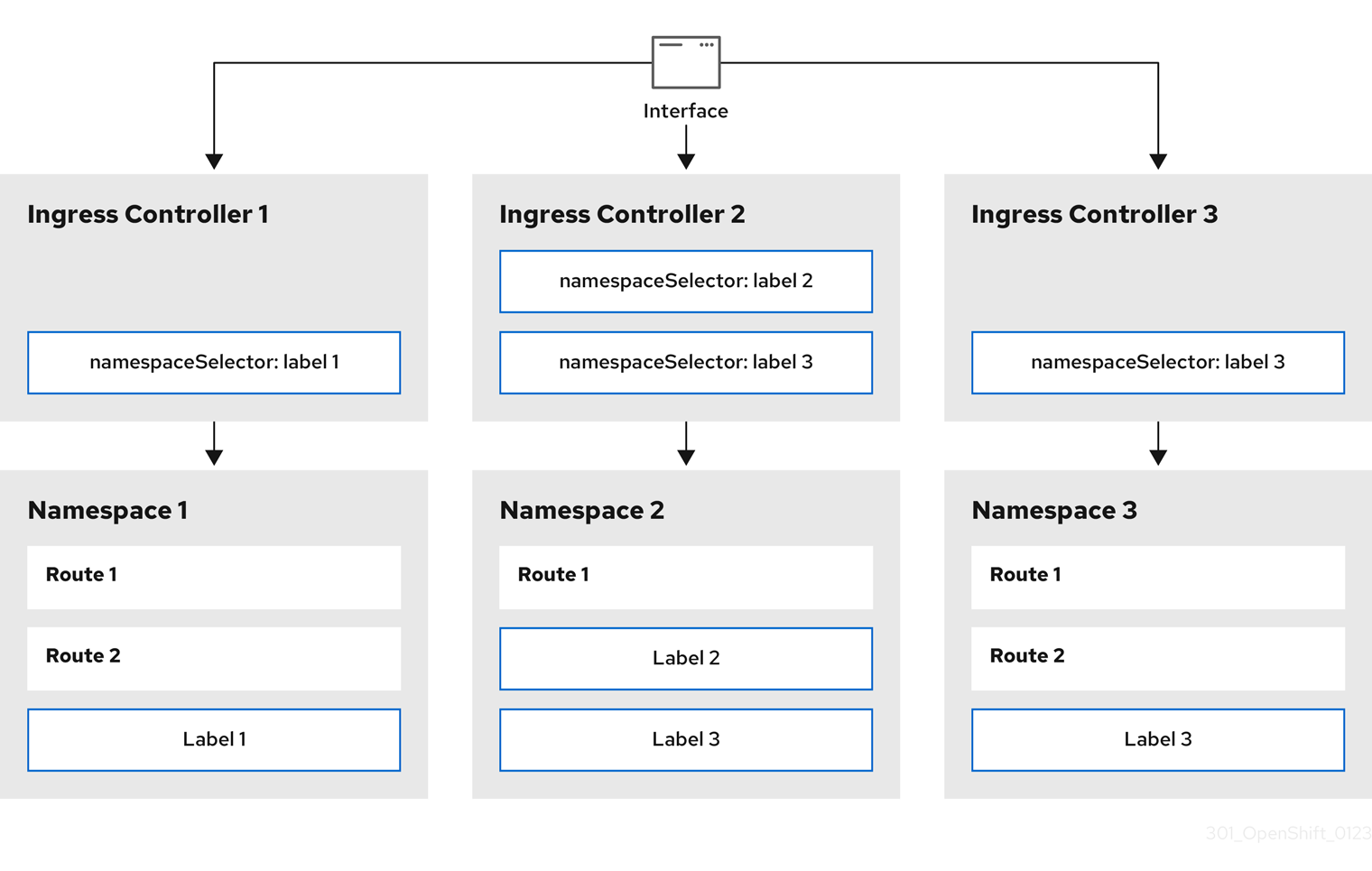
Ingress Controller sharding is useful when balancing incoming traffic load among a set of Ingress Controllers and when isolating traffic to a specific Ingress Controller. For example, company A goes to one Ingress Controller and company B to another.
Procedure
Edit the
router-internal.yamlfile:# cat router-internal.yamlExample output
apiVersion: operator.openshift.io/v1
kind: IngressController
metadata:
  name: sharded
  namespace: openshift-ingress-operator
spec:
  domain: <apps-sharded.basedomain.example.net>
1 nodePlacement: nodeSelector: matchLabels: node-role.kubernetes.io/worker: "" namespaceSelector: matchLabels: type: sharded- 1
- Specify a domain to be used by the Ingress Controller. This domain must be different from the default Ingress Controller domain.
Apply the Ingress Controller
router-internal.yamlfile:# oc apply -f router-internal.yamlThe Ingress Controller selects routes in any namespace that is selected by the namespace selector that have the label
type: sharded.Create a new route using the domain configured in the
router-internal.yaml:$ oc expose svc <service-name> --hostname <route-name>.apps-sharded.basedomain.example.net
25.3.7. Creating a route for Ingress Controller sharding
A route allows you to host your application at a URL. In this case, the hostname is not set and the route uses a subdomain instead. When you specify a subdomain, you automatically use the domain of the Ingress Controller that exposes the route. For situations where a route is exposed by multiple Ingress Controllers, the route is hosted at multiple URLs.
The following procedure describes how to create a route for Ingress Controller sharding, using the hello-openshift application as an example.
Ingress Controller sharding is useful when balancing incoming traffic load among a set of Ingress Controllers and when isolating traffic to a specific Ingress Controller. For example, company A goes to one Ingress Controller and company B to another.
Prerequisites
-
You installed the OpenShift CLI (
oc). - You are logged in as a project administrator.
- You have a web application that exposes a port and an HTTP or TLS endpoint listening for traffic on the port.
- You have configured the Ingress Controller for sharding.
Procedure
Create a project called
hello-openshiftby running the following command:$ oc new-project hello-openshiftCreate a pod in the project by running the following command:
$ oc create -f https://raw.githubusercontent.com/openshift/origin/master/examples/hello-openshift/hello-pod.jsonCreate a service called
hello-openshiftby running the following command:$ oc expose pod/hello-openshiftCreate a route definition called
hello-openshift-route.yaml:YAML definition of the created route for sharding:
apiVersion: route.openshift.io/v1
kind: Route
metadata:
  labels:
    type: sharded
1 name: hello-openshift-edge namespace: hello-openshift spec: subdomain: hello-openshift2 tls: termination: edge to: kind: Service name: hello-openshift- 1
- Both the label key and its corresponding label value must match the ones specified in the Ingress Controller. In this example, the Ingress Controller has the label key and value
type: sharded. - 2
- The route will be exposed using the value of the
subdomainfield. When you specify thesubdomainfield, you must leave the hostname unset. If you specify both thehostandsubdomainfields, then the route will use the value of thehostfield, and ignore thesubdomainfield.
Use
hello-openshift-route.yamlto create a route to thehello-openshiftapplication by running the following command:$ oc -n hello-openshift create -f hello-openshift-route.yaml
Verification
Get the status of the route with the following command:
$ oc -n hello-openshift get routes/hello-openshift-edge -o yamlThe resulting
Routeresource should look similar to the following:Example output
apiVersion: route.openshift.io/v1
kind: Route
metadata:
  labels:
    type: sharded
  name: hello-openshift-edge
  namespace: hello-openshift
spec:
  subdomain: hello-openshift
  tls:
    termination: edge
  to:
    kind: Service
    name: hello-openshift
status:
  ingress:
  - host: hello-openshift.<apps-sharded.basedomain.example.net>
1 routerCanonicalHostname: router-sharded.<apps-sharded.basedomain.example.net>2 routerName: sharded3 - 1
- The hostname the Ingress Controller, or router, uses to expose the route. The value of the
hostfield is automatically determined by the Ingress Controller, and uses its domain. In this example, the domain of the Ingress Controller is<apps-sharded.basedomain.example.net>. - 2
- The hostname of the Ingress Controller.
- 3
- The name of the Ingress Controller. In this example, the Ingress Controller has the name
sharded.
25.4. Configuring ingress cluster traffic using a load balancer
OpenShift Container Platform provides methods for communicating from outside the cluster with services running in the cluster. This method uses a load balancer.
25.4.1. Using a load balancer to get traffic into the cluster
If you do not need a specific external IP address, you can configure a load balancer service to allow external access to an OpenShift Container Platform cluster.
A load balancer service allocates a unique IP. The load balancer has a single edge router IP, which can be a virtual IP (VIP), but is still a single machine for initial load balancing.
If a pool is configured, it is done at the infrastructure level, not by a cluster administrator.
The procedures in this section require prerequisites performed by the cluster administrator.
25.4.2. Prerequisites
Before starting the following procedures, the administrator must:
- Set up the external port to the cluster networking environment so that requests can reach the cluster.
Make sure there is at least one user with cluster admin role. To add this role to a user, run the following command:
$ oc adm policy add-cluster-role-to-user cluster-admin username- Have an OpenShift Container Platform cluster with at least one master and at least one node and a system outside the cluster that has network access to the cluster. This procedure assumes that the external system is on the same subnet as the cluster. The additional networking required for external systems on a different subnet is out-of-scope for this topic.
25.4.3. Creating a project and service
If the project and service that you want to expose do not exist, first create the project, then the service.
If the project and service already exist, skip to the procedure on exposing the service to create a route.
Prerequisites
-
Install the
ocCLI and log in as a cluster administrator.
Procedure
Create a new project for your service by running the
oc new-projectcommand:$ oc new-project myprojectUse the
oc new-appcommand to create your service:$ oc new-app nodejs:12~https://github.com/sclorg/nodejs-ex.gitTo verify that the service was created, run the following command:
$ oc get svc -n myprojectExample output
NAME        TYPE        CLUSTER-IP       EXTERNAL-IP   PORT(S)    AGE
nodejs-ex   ClusterIP   172.30.197.157   <none>        8080/TCP   70s
By default, the new service does not have an external IP address.
25.4.4. Exposing the service by creating a route
You can expose the service as a route by using the oc expose command.
Procedure
To expose the service:
- Log in to OpenShift Container Platform.
Log in to the project where the service you want to expose is located:
$ oc project myprojectRun the
oc expose servicecommand to expose the route:$ oc expose service nodejs-exExample output
route.route.openshift.io/nodejs-ex exposedTo verify that the service is exposed, you can use a tool, such as cURL, to make sure the service is accessible from outside the cluster.
Use the
oc get routecommand to find the route’s host name:$ oc get routeExample output
NAME        HOST/PORT                        PATH   SERVICES    PORT       TERMINATION   WILDCARD
nodejs-ex   nodejs-ex-myproject.example.com         nodejs-ex   8080-tcp                 None
Use cURL to check that the host responds to a GET request:
$ curl --head nodejs-ex-myproject.example.comExample output
HTTP/1.1 200 OK
...
25.4.5. Creating a load balancer service
Use the following procedure to create a load balancer service.
Prerequisites
- Make sure that the project and service you want to expose exist.
- Your cloud provider supports load balancers.
Procedure
To create a load balancer service:
- Log in to OpenShift Container Platform.
Load the project where the service you want to expose is located.
$ oc project project1Open a text file on the control plane node and paste the following text, editing the file as needed:
Sample load balancer configuration file
apiVersion: v1
kind: Service
metadata:
  name: egress-2
1 spec: ports: - name: db port: 33062 loadBalancerIP: loadBalancerSourceRanges:3 - 10.0.0.0/8 - 192.168.0.0/16 type: LoadBalancer4 selector: name: mysql5 - 1
- Enter a descriptive name for the load balancer service.
- 2
- Enter the same port that the service you want to expose is listening on.
- 3
- Enter a list of specific IP addresses to restrict traffic through the load balancer. This field is ignored if the cloud-provider does not support the feature.
- 4
- Enter
Loadbalanceras the type. - 5
- Enter the name of the service.
NoteTo restrict traffic through the load balancer to specific IP addresses, it is recommended to use the
service.beta.kubernetes.io/load-balancer-source-rangesannotation rather than setting theloadBalancerSourceRangesfield. With the annotation, you can more easily migrate to the OpenShift API, which will be implemented in a future release.- Save and exit the file.
Run the following command to create the service:
$ oc create -f <file-name>For example:
$ oc create -f mysql-lb.yamlExecute the following command to view the new service:
$ oc get svcExample output
NAME       TYPE           CLUSTER-IP      EXTERNAL-IP                             PORT(S)          AGE
egress-2   LoadBalancer   172.30.22.226   ad42f5d8b303045-487804948.example.com   3306:30357/TCP   15m
The service has an external IP address automatically assigned if there is a cloud provider enabled.
On the master, use a tool, such as cURL, to make sure you can reach the service using the public IP address:
$ curl <public-ip>:<port>For example:
$ curl 172.29.121.74:3306The examples in this section use a MySQL service, which requires a client application. If you get a string of characters with the
Got packets out of ordermessage, you are connecting with the service:If you have a MySQL client, log in with the standard CLI command:
$ mysql -h 172.30.131.89 -u admin -pExample output
Enter password:
Welcome to the MariaDB monitor.  Commands end with ; or \g.

MySQL [(none)]>
25.5. Configuring ingress cluster traffic on AWS
OpenShift Container Platform provides methods for communicating from outside the cluster with services running in the cluster. This method uses load balancers on AWS, specifically a Network Load Balancer (NLB) or a Classic Load Balancer (CLB). Both types of load balancers can forward the client’s IP address to the node, but a CLB requires proxy protocol support, which OpenShift Container Platform automatically enables.
You can configure these load balancers on a new or existing AWS cluster.
25.5.1. Configuring Classic Load Balancer timeouts on AWS
OpenShift Container Platform provides a method for setting a custom timeout period for a specific route or Ingress Controller. Additionally, an AWS Classic Load Balancer (CLB) has its own timeout period with a default time of 60 seconds.
If the timeout period of the CLB is shorter than the route timeout or Ingress Controller timeout, the load balancer can prematurely terminate the connection. You can prevent this problem by increasing both the timeout period of the route and CLB.
25.5.1.1. Configuring route timeouts
You can configure the default timeouts for an existing route when you have services in need of a low timeout, which is required for Service Level Availability (SLA) purposes, or a high timeout, for cases with a slow back end.
Prerequisites
- You need a deployed Ingress Controller on a running cluster.
Procedure
Using the
oc annotatecommand, add the timeout to the route:$ oc annotate route <route_name> \ --overwrite haproxy.router.openshift.io/timeout=<timeout><time_unit>1 - 1
- Supported time units are microseconds (us), milliseconds (ms), seconds (s), minutes (m), hours (h), or days (d).
The following example sets a timeout of two seconds on a route named
myroute:$ oc annotate route myroute --overwrite haproxy.router.openshift.io/timeout=2s
25.5.1.2. Configuring Classic Load Balancer timeouts
You can configure the default timeouts for a Classic Load Balancer (CLB) to extend idle connections.
Prerequisites
- You must have a deployed Ingress Controller on a running cluster.
Procedure
Set an AWS connection idle timeout of five minutes for the default
ingresscontrollerby running the following command:$ oc -n openshift-ingress-operator patch ingresscontroller/default \ --type=merge --patch='{"spec":{"endpointPublishingStrategy": \ {"type":"LoadBalancerService", "loadBalancer": \ {"scope":"External", "providerParameters":{"type":"AWS", "aws": \ {"type":"Classic", "classicLoadBalancer": \ {"connectionIdleTimeout":"5m"}}}}}}}'Optional: Restore the default value of the timeout by running the following command:
$ oc -n openshift-ingress-operator patch ingresscontroller/default \
    --type=merge --patch='{"spec":{"endpointPublishingStrategy": \
    {"loadBalancer":{"providerParameters":{"aws":{"classicLoadBalancer": \
    {"connectionIdleTimeout":null}}}}}}}'
You must specify the scope field when you change the connection timeout value unless the current scope is already set. When you set the scope field, you do not need to do so again if you restore the default timeout value.
25.5.2. Configuring ingress cluster traffic on AWS using a Network Load Balancer
OpenShift Container Platform provides methods for communicating from outside the cluster with services that run in the cluster. One such method uses a Network Load Balancer (NLB). You can configure an NLB on a new or existing AWS cluster.
25.5.2.1. Replacing Ingress Controller Classic Load Balancer with Network Load Balancer
You can replace an Ingress Controller that is using a Classic Load Balancer (CLB) with one that uses a Network Load Balancer (NLB) on AWS.
This procedure causes an expected outage that can last several minutes due to new DNS records propagation, new load balancers provisioning, and other factors. IP addresses and canonical names of the Ingress Controller load balancer might change after applying this procedure.
Procedure
Create a file with a new default Ingress Controller. The following example assumes that your default Ingress Controller has an
Externalscope and no other customizations:Example
ingresscontroller.ymlfileapiVersion: operator.openshift.io/v1 kind: IngressController metadata: creationTimestamp: null name: default namespace: openshift-ingress-operator spec: endpointPublishingStrategy: loadBalancer: scope: External providerParameters: type: AWS aws: type: NLB type: LoadBalancerServiceIf your default Ingress Controller has other customizations, ensure that you modify the file accordingly.
Force replace the Ingress Controller YAML file:
$ oc replace --force --wait -f ingresscontroller.ymlWait until the Ingress Controller is replaced. Expect serveral of minutes of outages.
25.5.2.2. Configuring an Ingress Controller Network Load Balancer on an existing AWS cluster
You can create an Ingress Controller backed by an AWS Network Load Balancer (NLB) on an existing cluster.
Prerequisites
- You must have an installed AWS cluster.
PlatformStatusof the infrastructure resource must be AWS.To verify that the
PlatformStatusis AWS, run:$ oc get infrastructure/cluster -o jsonpath='{.status.platformStatus.type}' AWS
Procedure
Create an Ingress Controller backed by an AWS NLB on an existing cluster.
Create the Ingress Controller manifest:
$ cat ingresscontroller-aws-nlb.yamlExample output
apiVersion: operator.openshift.io/v1
kind: IngressController
metadata:
  name: $my_ingress_controller
1 namespace: openshift-ingress-operator spec: domain: $my_unique_ingress_domain2 endpointPublishingStrategy: type: LoadBalancerService loadBalancer: scope: External3 providerParameters: type: AWS aws: type: NLB- 1
- Replace
$my_ingress_controllerwith a unique name for the Ingress Controller. - 2
- Replace
$my_unique_ingress_domainwith a domain name that is unique among all Ingress Controllers in the cluster. This variable must be a subdomain of the DNS name<clustername>.<domain>. - 3
- You can replace
ExternalwithInternalto use an internal NLB.
Create the resource in the cluster:
$ oc create -f ingresscontroller-aws-nlb.yaml
Before you can configure an Ingress Controller NLB on a new AWS cluster, you must complete the Creating the installation configuration file procedure.
25.5.2.3. Configuring an Ingress Controller Network Load Balancer on a new AWS cluster
You can create an Ingress Controller backed by an AWS Network Load Balancer (NLB) on a new cluster.
Prerequisites
-
Create the
install-config.yamlfile and complete any modifications to it.
Procedure
Create an Ingress Controller backed by an AWS NLB on a new cluster.
Change to the directory that contains the installation program and create the manifests:
$ ./openshift-install create manifests --dir <installation_directory>1 - 1
- For
<installation_directory>, specify the name of the directory that contains theinstall-config.yamlfile for your cluster.
Create a file that is named
cluster-ingress-default-ingresscontroller.yamlin the<installation_directory>/manifests/directory:$ touch <installation_directory>/manifests/cluster-ingress-default-ingresscontroller.yaml1 - 1
- For
<installation_directory>, specify the directory name that contains themanifests/directory for your cluster.
After creating the file, several network configuration files are in the
manifests/directory, as shown:$ ls <installation_directory>/manifests/cluster-ingress-default-ingresscontroller.yamlExample output
cluster-ingress-default-ingresscontroller.yamlOpen the
cluster-ingress-default-ingresscontroller.yamlfile in an editor and enter a custom resource (CR) that describes the Operator configuration you want:apiVersion: operator.openshift.io/v1 kind: IngressController metadata: creationTimestamp: null name: default namespace: openshift-ingress-operator spec: endpointPublishingStrategy: loadBalancer: scope: External providerParameters: type: AWS aws: type: NLB type: LoadBalancerService-
Save the
cluster-ingress-default-ingresscontroller.yamlfile and quit the text editor. -
Optional: Back up the
manifests/cluster-ingress-default-ingresscontroller.yamlfile. The installation program deletes themanifests/directory when creating the cluster.
25.6. Configuring ingress cluster traffic for a service external IP
You can attach an external IP address to a service so that it is available to traffic outside the cluster. This is generally useful only for a cluster installed on bare metal hardware. The external network infrastructure must be configured correctly to route traffic to the service.
25.6.1. Prerequisites
Your cluster is configured with ExternalIPs enabled. For more information, read Configuring ExternalIPs for services.
NoteDo not use the same ExternalIP for the egress IP.
25.6.2. Attaching an ExternalIP to a service
You can attach an ExternalIP to a service. If your cluster is configured to allocate an ExternalIP automatically, you might not need to manually attach an ExternalIP to the service.
Procedure
Optional: To confirm what IP address ranges are configured for use with ExternalIP, enter the following command:
$ oc get networks.config cluster -o jsonpath='{.spec.externalIP}{"\n"}'If
autoAssignCIDRsis set, OpenShift Container Platform automatically assigns an ExternalIP to a newServiceobject if thespec.externalIPsfield is not specified.Attach an ExternalIP to the service.
If you are creating a new service, specify the
spec.externalIPsfield and provide an array of one or more valid IP addresses. For example:apiVersion: v1 kind: Service metadata: name: svc-with-externalip spec: ... externalIPs: - 192.174.120.10If you are attaching an ExternalIP to an existing service, enter the following command. Replace
<name>with the service name. Replace<ip_address>with a valid ExternalIP address. You can provide multiple IP addresses separated by commas.$ oc patch svc <name> -p \ '{ "spec": { "externalIPs": [ "<ip_address>" ] } }'For example:
$ oc patch svc mysql-55-rhel7 -p '{"spec":{"externalIPs":["192.174.120.10"]}}'Example output
"mysql-55-rhel7" patched
To confirm that an ExternalIP address is attached to the service, enter the following command. If you specified an ExternalIP for a new service, you must create the service first.
$ oc get svcExample output
NAME               CLUSTER-IP      EXTERNAL-IP     PORT(S)    AGE
mysql-55-rhel7     172.30.131.89   192.174.120.10  3306/TCP   13m
25.7. Configuring ingress cluster traffic using a NodePort
OpenShift Container Platform provides methods for communicating from outside the cluster with services running in the cluster. This method uses a NodePort.
25.7.1. Using a NodePort to get traffic into the cluster
Use a NodePort-type Service resource to expose a service on a specific port on all nodes in the cluster. The port is specified in the Service resource’s .spec.ports[*].nodePort field.
Using a node port requires additional port resources.
A NodePort exposes the service on a static port on the node’s IP address. NodePorts are in the 30000 to 32767 range by default, which means a NodePort is unlikely to match a service’s intended port. For example, port 8080 may be exposed as port 31020 on the node.
The administrator must ensure the external IP addresses are routed to the nodes.
NodePorts and external IPs are independent and both can be used concurrently.
The procedures in this section require prerequisites performed by the cluster administrator.
25.7.2. Prerequisites
Before starting the following procedures, the administrator must:
- Set up the external port to the cluster networking environment so that requests can reach the cluster.
Make sure there is at least one user with cluster admin role. To add this role to a user, run the following command:
$ oc adm policy add-cluster-role-to-user cluster-admin <user_name>- Have an OpenShift Container Platform cluster with at least one master and at least one node and a system outside the cluster that has network access to the cluster. This procedure assumes that the external system is on the same subnet as the cluster. The additional networking required for external systems on a different subnet is out-of-scope for this topic.
25.7.3. Creating a project and service
If the project and service that you want to expose do not exist, first create the project, then the service.
If the project and service already exist, skip to the procedure on exposing the service to create a route.
Prerequisites
-
Install the
ocCLI and log in as a cluster administrator.
Procedure
Create a new project for your service by running the
oc new-projectcommand:$ oc new-project myprojectUse the
oc new-appcommand to create your service:$ oc new-app nodejs:12~https://github.com/sclorg/nodejs-ex.gitTo verify that the service was created, run the following command:
$ oc get svc -n myprojectExample output
NAME        TYPE        CLUSTER-IP       EXTERNAL-IP   PORT(S)    AGE
nodejs-ex   ClusterIP   172.30.197.157   <none>        8080/TCP   70s
By default, the new service does not have an external IP address.
25.7.4. Exposing the service by creating a route
You can expose the service as a route by using the oc expose command.
Procedure
To expose the service:
- Log in to OpenShift Container Platform.
Log in to the project where the service you want to expose is located:
$ oc project myprojectTo expose a node port for the application, modify the custom resource definition (CRD) of a service by entering the following command:
$ oc edit svc <service_name>Example output
spec:
  ports:
  - name: 8443-tcp
    nodePort: 30327
1 port: 8443 protocol: TCP targetPort: 8443 sessionAffinity: None type: NodePort2 Optional: To confirm the service is available with a node port exposed, enter the following command:
$ oc get svc -n myprojectExample output
NAME                TYPE        CLUSTER-IP       EXTERNAL-IP   PORT(S)          AGE
nodejs-ex           ClusterIP   172.30.217.127   <none>        3306/TCP         9m44s
nodejs-ex-ingress   NodePort    172.30.107.72    <none>        3306:31345/TCP   39s
Optional: To remove the service created automatically by the
oc new-appcommand, enter the following command:$ oc delete svc nodejs-ex
Verification
To check that the service node port is updated with a port in the
30000-32767range, enter the following command:$ oc get svcIn the following example output, the updated port is
30327:Example output
NAME    TYPE       CLUSTER-IP      EXTERNAL-IP   PORT(S)          AGE
httpd   NodePort   172.xx.xx.xx    <none>        8443:30327/TCP   109s

'%20d='M201.5%20305.5c-13.8%200-24.9-11.1-24.9-24.6%200-13.8%2011.1-24.9%2024.9-24.9%2013.6%200%2024.6%2011.1%2024.6%2024.9%200%2013.6-11.1%2024.6-24.6%2024.6zM504%20256c0%20137-111%20248-248%20248S8%20393%208%20256%20119%208%20256%208s248%20111%20248%20248zm-132.3-41.2c-9.4%200-17.7%203.9-23.8%2010-22.4-15.5-52.6-25.5-86.1-26.6l17.4-78.3%2055.4%2012.5c0%2013.6%2011.1%2024.6%2024.6%2024.6%2013.8%200%2024.9-11.3%2024.9-24.9s-11.1-24.9-24.9-24.9c-9.7%200-18%205.8-22.1%2013.8l-61.2-13.6c-3-.8-6.1%201.4-6.9%204.4l-19.1%2086.4c-33.2%201.4-63.1%2011.3-85.5%2026.8-6.1-6.4-14.7-10.2-24.1-10.2-34.9%200-46.3%2046.9-14.4%2062.8-1.1%205-1.7%2010.2-1.7%2015.5%200%2052.6%2059.2%2095.2%20132%2095.2%2073.1%200%20132.3-42.6%20132.3-95.2%200-5.3-.6-10.8-1.9-15.8%2031.3-16%2019.8-62.5-14.9-62.5zM302.8%20331c-18.2%2018.2-76.1%2017.9-93.6%200-2.2-2.2-6.1-2.2-8.3%200-2.5%202.5-2.5%206.4%200%208.6%2022.8%2022.8%2087.3%2022.8%20110.2%200%202.5-2.2%202.5-6.1%200-8.6-2.2-2.2-6.1-2.2-8.3%200zm7.7-75c-13.6%200-24.6%2011.1-24.6%2024.9%200%2013.6%2011.1%2024.6%2024.6%2024.6%2013.8%200%2024.9-11.1%2024.9-24.6%200-13.8-11-24.9-24.9-24.9z'/%3e%3c/svg%3e)