 Red Hat Summit
Questo contenuto non è disponibile nella lingua selezionata.
Chapter 7. Ingress sharding in OpenShift Container Platform
In OpenShift Container Platform, an Ingress Controller can serve all routes, or it can serve a subset of routes. By default, the Ingress Controller serves any route created in any namespace in the cluster. You can add additional Ingress Controllers to your cluster to optimize routing by creating shards, which are subsets of routes based on selected characteristics. To mark a route as a member of a shard, use labels in the route or namespace metadata field. The Ingress Controller uses selectors, also known as a selection expression, to select a subset of routes from the entire pool of routes to serve.
Ingress sharding is useful in cases where you want to load balance incoming traffic across multiple Ingress Controllers, when you want to isolate traffic to be routed to a specific Ingress Controller, or for a variety of other reasons described in the next section.
By default, each route uses the default domain of the cluster. However, routes can be configured to use the domain of the router instead. For more information, see Creating a route for Ingress Controller Sharding.
7.1. Ingress Controller sharding
You can use Ingress sharding, also known as router sharding, to distribute a set of routes across multiple routers by adding labels to routes, namespaces, or both. The Ingress Controller uses a corresponding set of selectors to admit only the routes that have a specified label. Each Ingress shard comprises the routes that are filtered using a given selection expression.
As the primary mechanism for traffic to enter the cluster, the demands on the Ingress Controller can be significant. As a cluster administrator, you can shard the routes to:
- Balance Ingress Controllers, or routers, with several routes to speed up responses to changes.
- Allocate certain routes to have different reliability guarantees than other routes.
- Allow certain Ingress Controllers to have different policies defined.
- Allow only specific routes to use additional features.
- Expose different routes on different addresses so that internal and external users can see different routes, for example.
- Transfer traffic from one version of an application to another during a blue green deployment.
When Ingress Controllers are sharded, a given route is admitted to zero or more Ingress Controllers in the group. A route’s status describes whether an Ingress Controller has admitted it or not. An Ingress Controller will only admit a route if it is unique to its shard.
An Ingress Controller can use three sharding methods:
- Adding only a namespace selector to the Ingress Controller, so that all routes in a namespace with labels that match the namespace selector are in the Ingress shard.
- Adding only a route selector to the Ingress Controller, so that all routes with labels that match the route selector are in the Ingress shard.
- Adding both a namespace selector and route selector to the Ingress Controller, so that routes with labels that match the route selector in a namespace with labels that match the namespace selector are in the Ingress shard.
With sharding, you can distribute subsets of routes over multiple Ingress Controllers. These subsets can be non-overlapping, also called traditional sharding, or overlapping, otherwise known as overlapped sharding.
7.1.1. Traditional sharding example
An Ingress Controller finops-router is configured with the label selector spec.namespaceSelector.matchLabels.name set to finance and ops:
Example YAML definition for finops-router
apiVersion: operator.openshift.io/v1
kind: IngressController
metadata:
  name: finops-router
  namespace: openshift-ingress-operator
spec:
  namespaceSelector:
    matchLabels:
      name:
        - finance
        - ops
A second Ingress Controller dev-router is configured with the label selector spec.namespaceSelector.matchLabels.name set to dev:
Example YAML definition for dev-router
apiVersion: operator.openshift.io/v1
kind: IngressController
metadata:
  name: dev-router
  namespace: openshift-ingress-operator
spec:
  namespaceSelector:
    matchLabels:
      name: dev
If all application routes are in separate namespaces, each labeled with name:finance, name:ops, and name:dev respectively, this configuration effectively distributes your routes between the two Ingress Controllers. OpenShift Container Platform routes for console, authentication, and other purposes should not be handled.
In the above scenario, sharding becomes a special case of partitioning, with no overlapping subsets. Routes are divided between router shards.
The default Ingress Controller continues to serve all routes unless the namespaceSelector or routeSelector fields contain routes that are meant for exclusion. See this Red Hat Knowledgebase solution and the section "Sharding the default Ingress Controller" for more information on how to exclude routes from the default Ingress Controller.
7.1.2. Overlapped sharding example
In addition to finops-router and dev-router in the example above, you also have devops-router, which is configured with the label selector spec.namespaceSelector.matchLabels.name set to dev and ops:
Example YAML definition for devops-router
apiVersion: operator.openshift.io/v1
kind: IngressController
metadata:
  name: devops-router
  namespace: openshift-ingress-operator
spec:
  namespaceSelector:
    matchLabels:
      name:
        - dev
        - ops
The routes in the namespaces labeled name:dev and name:ops are now serviced by two different Ingress Controllers. With this configuration, you have overlapping subsets of routes.
With overlapping subsets of routes you can create more complex routing rules. For example, you can divert higher priority traffic to the dedicated finops-router while sending lower priority traffic to devops-router.
7.1.3. Sharding the default Ingress Controller
After creating a new Ingress shard, there might be routes that are admitted to your new Ingress shard that are also admitted by the default Ingress Controller. This is because the default Ingress Controller has no selectors and admits all routes by default.
You can restrict an Ingress Controller from servicing routes with specific labels using either namespace selectors or route selectors. The following procedure restricts the default Ingress Controller from servicing your newly sharded finance, ops, and dev, routes using a namespace selector. This adds further isolation to Ingress shards.
You must keep all of OpenShift Container Platform’s administration routes on the same Ingress Controller. Therefore, avoid adding additional selectors to the default Ingress Controller that exclude these essential routes.
Prerequisites
-
You installed the OpenShift CLI (
oc). - You are logged in as a project administrator.
Procedure
Modify the default Ingress Controller by running the following command:
$ oc edit ingresscontroller -n openshift-ingress-operator defaultEdit the Ingress Controller to contain a
namespaceSelectorthat excludes the routes with any of thefinance,ops, anddevlabels:apiVersion: operator.openshift.io/v1 kind: IngressController metadata: name: default namespace: openshift-ingress-operator spec: namespaceSelector: matchExpressions: - key: type operator: NotIn values: - finance - ops - dev
The default Ingress Controller will no longer serve the namespaces labeled name:finance, name:ops, and name:dev.
7.1.4. Ingress sharding and DNS
The cluster administrator is responsible for making a separate DNS entry for each router in a project. A router will not forward unknown routes to another router.
Consider the following example:
-
Router A lives on host 192.168.0.5 and has routes with
*.foo.com. -
Router B lives on host 192.168.1.9 and has routes with
*.example.com.
Separate DNS entries must resolve *.foo.com to the node hosting Router A and *.example.com to the node hosting Router B:
-
*.foo.com A IN 192.168.0.5 -
*.example.com A IN 192.168.1.9
7.1.5. Configuring Ingress Controller sharding by using route labels
Ingress Controller sharding by using route labels means that the Ingress Controller serves any route in any namespace that is selected by the route selector.
Figure 7.1. Ingress sharding using route labels
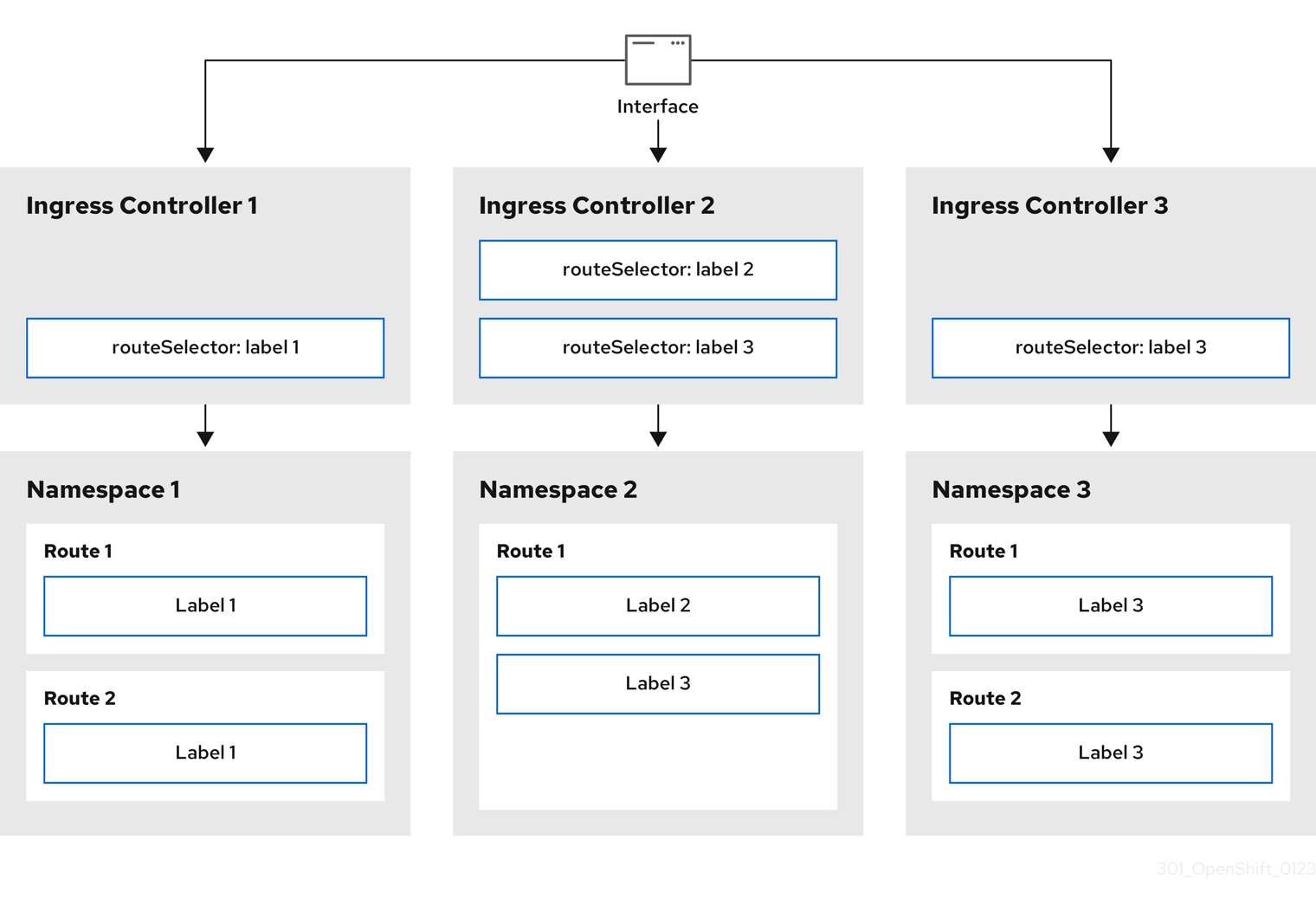
Ingress Controller sharding is useful when balancing incoming traffic load among a set of Ingress Controllers and when isolating traffic to a specific Ingress Controller. For example, company A goes to one Ingress Controller and company B to another.
Procedure
Edit the
router-internal.yamlfile:# cat router-internal.yaml apiVersion: operator.openshift.io/v1 kind: IngressController metadata: name: sharded namespace: openshift-ingress-operator spec: domain: <apps-sharded.basedomain.example.net>1 nodePlacement: nodeSelector: matchLabels: node-role.kubernetes.io/worker: "" routeSelector: matchLabels: type: sharded- 1
- Specify a domain to be used by the Ingress Controller. This domain must be different from the default Ingress Controller domain.
Apply the Ingress Controller
router-internal.yamlfile:# oc apply -f router-internal.yamlThe Ingress Controller selects routes in any namespace that have the label
type: sharded.Create a new route using the domain configured in the
router-internal.yaml:$ oc expose svc <service-name> --hostname <route-name>.apps-sharded.basedomain.example.net
7.1.6. Configuring Ingress Controller sharding by using namespace labels
Ingress Controller sharding by using namespace labels means that the Ingress Controller serves any route in any namespace that is selected by the namespace selector.
Figure 7.2. Ingress sharding using namespace labels
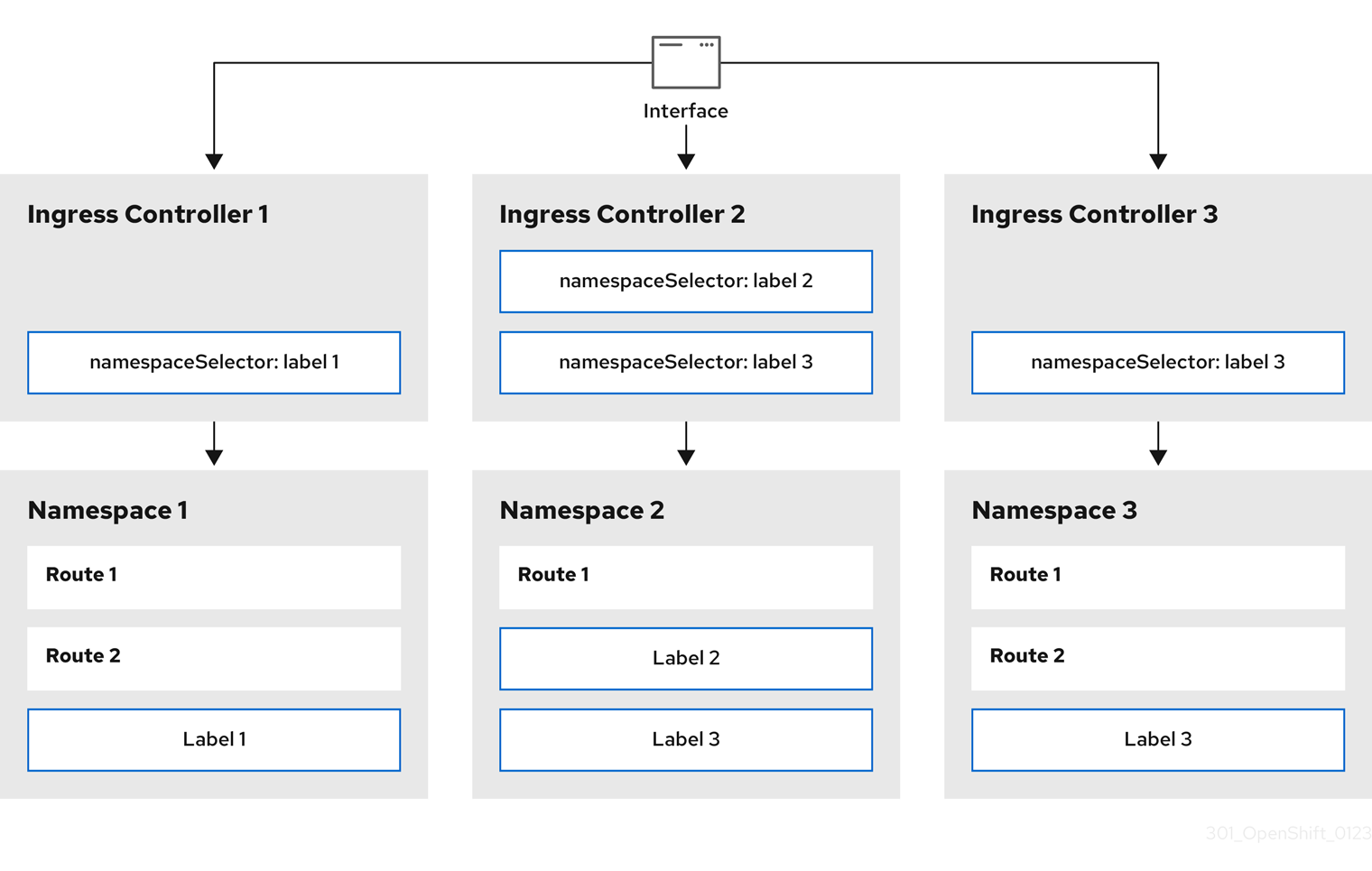
Ingress Controller sharding is useful when balancing incoming traffic load among a set of Ingress Controllers and when isolating traffic to a specific Ingress Controller. For example, company A goes to one Ingress Controller and company B to another.
Procedure
Edit the
router-internal.yamlfile:# cat router-internal.yamlExample output
apiVersion: operator.openshift.io/v1
kind: IngressController
metadata:
  name: sharded
  namespace: openshift-ingress-operator
spec:
  domain: <apps-sharded.basedomain.example.net>
1 nodePlacement: nodeSelector: matchLabels: node-role.kubernetes.io/worker: "" namespaceSelector: matchLabels: type: sharded- 1
- Specify a domain to be used by the Ingress Controller. This domain must be different from the default Ingress Controller domain.
Apply the Ingress Controller
router-internal.yamlfile:# oc apply -f router-internal.yamlThe Ingress Controller selects routes in any namespace that is selected by the namespace selector that have the label
type: sharded.Create a new route using the domain configured in the
router-internal.yaml:$ oc expose svc <service-name> --hostname <route-name>.apps-sharded.basedomain.example.net
7.2. Creating a route for Ingress Controller sharding
A route allows you to host your application at a URL. In this case, the hostname is not set and the route uses a subdomain instead. When you specify a subdomain, you automatically use the domain of the Ingress Controller that exposes the route. For situations where a route is exposed by multiple Ingress Controllers, the route is hosted at multiple URLs.
The following procedure describes how to create a route for Ingress Controller sharding, using the hello-openshift application as an example.
Ingress Controller sharding is useful when balancing incoming traffic load among a set of Ingress Controllers and when isolating traffic to a specific Ingress Controller. For example, company A goes to one Ingress Controller and company B to another.
Prerequisites
-
You installed the OpenShift CLI (
oc). - You are logged in as a project administrator.
- You have a web application that exposes a port and an HTTP or TLS endpoint listening for traffic on the port.
- You have configured the Ingress Controller for sharding.
Procedure
Create a project called
hello-openshiftby running the following command:$ oc new-project hello-openshiftCreate a pod in the project by running the following command:
$ oc create -f https://raw.githubusercontent.com/openshift/origin/master/examples/hello-openshift/hello-pod.jsonCreate a service called
hello-openshiftby running the following command:$ oc expose pod/hello-openshiftCreate a route definition called
hello-openshift-route.yaml:YAML definition of the created route for sharding:
apiVersion: route.openshift.io/v1
kind: Route
metadata:
  labels:
    type: sharded
1 name: hello-openshift-edge namespace: hello-openshift spec: subdomain: hello-openshift2 tls: termination: edge to: kind: Service name: hello-openshift- 1
- Both the label key and its corresponding label value must match the ones specified in the Ingress Controller. In this example, the Ingress Controller has the label key and value
type: sharded. - 2
- The route will be exposed using the value of the
subdomainfield. When you specify thesubdomainfield, you must leave the hostname unset. If you specify both thehostandsubdomainfields, then the route will use the value of thehostfield, and ignore thesubdomainfield.
Use
hello-openshift-route.yamlto create a route to thehello-openshiftapplication by running the following command:$ oc -n hello-openshift create -f hello-openshift-route.yaml
Verification
Get the status of the route with the following command:
$ oc -n hello-openshift get routes/hello-openshift-edge -o yamlThe resulting
Routeresource should look similar to the following:Example output
apiVersion: route.openshift.io/v1
kind: Route
metadata:
  labels:
    type: sharded
  name: hello-openshift-edge
  namespace: hello-openshift
spec:
  subdomain: hello-openshift
  tls:
    termination: edge
  to:
    kind: Service
    name: hello-openshift
status:
  ingress:
  - host: hello-openshift.<apps-sharded.basedomain.example.net>
1 routerCanonicalHostname: router-sharded.<apps-sharded.basedomain.example.net>2 routerName: sharded3 - 1
- The hostname the Ingress Controller, or router, uses to expose the route. The value of the
hostfield is automatically determined by the Ingress Controller, and uses its domain. In this example, the domain of the Ingress Controller is<apps-sharded.basedomain.example.net>. - 2
- The hostname of the Ingress Controller.
- 3
- The name of the Ingress Controller. In this example, the Ingress Controller has the name
sharded.

'%20d='M201.5%20305.5c-13.8%200-24.9-11.1-24.9-24.6%200-13.8%2011.1-24.9%2024.9-24.9%2013.6%200%2024.6%2011.1%2024.6%2024.9%200%2013.6-11.1%2024.6-24.6%2024.6zM504%20256c0%20137-111%20248-248%20248S8%20393%208%20256%20119%208%20256%208s248%20111%20248%20248zm-132.3-41.2c-9.4%200-17.7%203.9-23.8%2010-22.4-15.5-52.6-25.5-86.1-26.6l17.4-78.3%2055.4%2012.5c0%2013.6%2011.1%2024.6%2024.6%2024.6%2013.8%200%2024.9-11.3%2024.9-24.9s-11.1-24.9-24.9-24.9c-9.7%200-18%205.8-22.1%2013.8l-61.2-13.6c-3-.8-6.1%201.4-6.9%204.4l-19.1%2086.4c-33.2%201.4-63.1%2011.3-85.5%2026.8-6.1-6.4-14.7-10.2-24.1-10.2-34.9%200-46.3%2046.9-14.4%2062.8-1.1%205-1.7%2010.2-1.7%2015.5%200%2052.6%2059.2%2095.2%20132%2095.2%2073.1%200%20132.3-42.6%20132.3-95.2%200-5.3-.6-10.8-1.9-15.8%2031.3-16%2019.8-62.5-14.9-62.5zM302.8%20331c-18.2%2018.2-76.1%2017.9-93.6%200-2.2-2.2-6.1-2.2-8.3%200-2.5%202.5-2.5%206.4%200%208.6%2022.8%2022.8%2087.3%2022.8%20110.2%200%202.5-2.2%202.5-6.1%200-8.6-2.2-2.2-6.1-2.2-8.3%200zm7.7-75c-13.6%200-24.6%2011.1-24.6%2024.9%200%2013.6%2011.1%2024.6%2024.6%2024.6%2013.8%200%2024.9-11.1%2024.9-24.6%200-13.8-11-24.9-24.9-24.9z'/%3e%3c/svg%3e)