 Red Hat Summit
Questo contenuto non è disponibile nella lingua selezionata.
Chapter 6. Scheduling NUMA-aware workloads
Learn about NUMA-aware scheduling and how you can use it to deploy high performance workloads in an OpenShift Container Platform cluster.
NUMA-aware scheduling is a Technology Preview feature only. Technology Preview features are not supported with Red Hat production service level agreements (SLAs) and might not be functionally complete. Red Hat does not recommend using them in production. These features provide early access to upcoming product features, enabling customers to test functionality and provide feedback during the development process.
For more information about the support scope of Red Hat Technology Preview features, see Technology Preview Features Support Scope.
The NUMA Resources Operator allows you to schedule high-performance workloads in the same NUMA zone. It deploys a node resources exporting agent that reports on available cluster node NUMA resources, and a secondary scheduler that manages the workloads.
6.1. About NUMA-aware scheduling
Non-Uniform Memory Access (NUMA) is a compute platform architecture that allows different CPUs to access different regions of memory at different speeds. NUMA resource topology refers to the locations of CPUs, memory, and PCI devices relative to each other in the compute node. Co-located resources are said to be in the same NUMA zone. For high-performance applications, the cluster needs to process pod workloads in a single NUMA zone.
NUMA architecture allows a CPU with multiple memory controllers to use any available memory across CPU complexes, regardless of where the memory is located. This allows for increased flexibility at the expense of performance. A CPU processing a workload using memory that is outside its NUMA zone is slower than a workload processed in a single NUMA zone. Also, for I/O-constrained workloads, the network interface on a distant NUMA zone slows down how quickly information can reach the application. High-performance workloads, such as telecommunications workloads, cannot operate to specification under these conditions. NUMA-aware scheduling aligns the requested cluster compute resources (CPUs, memory, devices) in the same NUMA zone to process latency-sensitive or high-performance workloads efficiently. NUMA-aware scheduling also improves pod density per compute node for greater resource efficiency.
The default OpenShift Container Platform pod scheduler scheduling logic considers the available resources of the entire compute node, not individual NUMA zones. If the most restrictive resource alignment is requested in the kubelet topology manager, error conditions can occur when admitting the pod to a node. Conversely, if the most restrictive resource alignment is not requested, the pod can be admitted to the node without proper resource alignment, leading to worse or unpredictable performance. For example, runaway pod creation with Topology Affinity Error statuses can occur when the pod scheduler makes suboptimal scheduling decisions for guaranteed pod workloads by not knowing if the pod’s requested resources are available. Scheduling mismatch decisions can cause indefinite pod startup delays. Also, depending on the cluster state and resource allocation, poor pod scheduling decisions can cause extra load on the cluster because of failed startup attempts.
The NUMA Resources Operator deploys a custom NUMA resources secondary scheduler and other resources to mitigate against the shortcomings of the default OpenShift Container Platform pod scheduler. The following diagram provides a high-level overview of NUMA-aware pod scheduling.
Figure 6.1. NUMA-aware scheduling overview
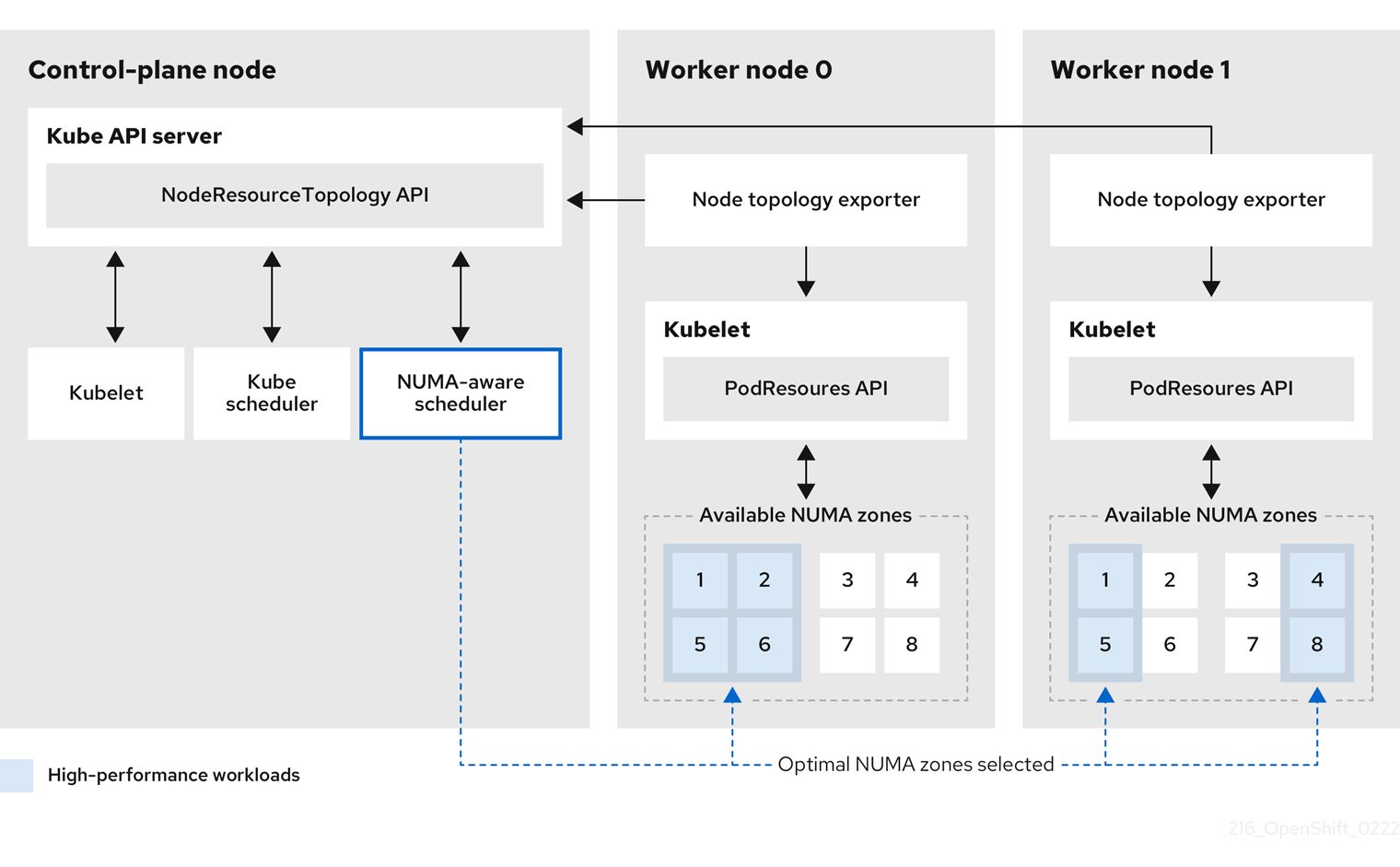
- NodeResourceTopology API
-
The
NodeResourceTopologyAPI describes the available NUMA zone resources in each compute node. - NUMA-aware scheduler
-
The NUMA-aware secondary scheduler receives information about the available NUMA zones from the
NodeResourceTopologyAPI and schedules high-performance workloads on a node where it can be optimally processed. - Node topology exporter
-
The node topology exporter exposes the available NUMA zone resources for each compute node to the
NodeResourceTopologyAPI. The node topology exporter daemon tracks the resource allocation from the kubelet by using thePodResourcesAPI. - PodResources API
-
The
PodResourcesAPI is local to each node and exposes the resource topology and available resources to the kubelet.
Additional resources
- For more information about running secondary pod schedulers in your cluster and how to deploy pods with a secondary pod scheduler, see Scheduling pods using a secondary scheduler.
6.2. Installing the NUMA Resources Operator
NUMA Resources Operator deploys resources that allow you to schedule NUMA-aware workloads and deployments. You can install the NUMA Resources Operator using the OpenShift Container Platform CLI or the web console.
6.2.1. Installing the NUMA Resources Operator using the CLI
As a cluster administrator, you can install the Operator using the CLI.
Prerequisites
-
Install the OpenShift CLI (
oc). -
Log in as a user with
cluster-adminprivileges.
Procedure
Create a namespace for the NUMA Resources Operator:
Save the following YAML in the
nro-namespace.yamlfile:apiVersion: v1 kind: Namespace metadata: name: openshift-numaresourcesCreate the
NamespaceCR by running the following command:$ oc create -f nro-namespace.yaml
Create the Operator group for the NUMA Resources Operator:
Save the following YAML in the
nro-operatorgroup.yamlfile:apiVersion: operators.coreos.com/v1 kind: OperatorGroup metadata: name: numaresources-operator namespace: openshift-numaresources spec: targetNamespaces: - openshift-numaresourcesCreate the
OperatorGroupCR by running the following command:$ oc create -f nro-operatorgroup.yaml
Create the subscription for the NUMA Resources Operator:
Save the following YAML in the
nro-sub.yamlfile:apiVersion: operators.coreos.com/v1alpha1 kind: Subscription metadata: name: numaresources-operator namespace: openshift-numaresources spec: channel: "4.11" name: numaresources-operator source: redhat-operators sourceNamespace: openshift-marketplaceCreate the
SubscriptionCR by running the following command:$ oc create -f nro-sub.yaml
Verification
Verify that the installation succeeded by inspecting the CSV resource in the
openshift-numaresourcesnamespace. Run the following command:$ oc get csv -n openshift-numaresourcesExample output
NAME                             DISPLAY                  VERSION   REPLACES   PHASE
numaresources-operator.v4.11.2   numaresources-operator   4.11.2               Succeeded
6.2.2. Installing the NUMA Resources Operator using the web console
As a cluster administrator, you can install the NUMA Resources Operator using the web console.
Procedure
Create a namespace for the NUMA Resources Operator:
-
In the OpenShift Container Platform web console, click Administration
Namespaces. -
Click Create Namespace, enter
openshift-numaresourcesin the Name field, and then click Create.
-
In the OpenShift Container Platform web console, click Administration
Install the NUMA Resources Operator:
-
In the OpenShift Container Platform web console, click Operators
OperatorHub. - Choose NUMA Resources Operator from the list of available Operators, and then click Install.
-
In the Installed Namespaces field, select the
openshift-numaresourcesnamespace, and then click Install.
-
In the OpenShift Container Platform web console, click Operators
Optional: Verify that the NUMA Resources Operator installed successfully:
-
Switch to the Operators
Installed Operators page. Ensure that NUMA Resources Operator is listed in the
openshift-numaresourcesnamespace with a Status of InstallSucceeded.NoteDuring installation an Operator might display a Failed status. If the installation later succeeds with an InstallSucceeded message, you can ignore the Failed message.
If the Operator does not appear as installed, to troubleshoot further:
-
Go to the Operators
Installed Operators page and inspect the Operator Subscriptions and Install Plans tabs for any failure or errors under Status. -
Go to the Workloads
Pods page and check the logs for pods in the defaultproject.
-
Go to the Operators
-
Switch to the Operators
6.3. Creating the NUMAResourcesOperator custom resource
When you have installed the NUMA Resources Operator, then create the NUMAResourcesOperator custom resource (CR) that instructs the NUMA Resources Operator to install all the cluster infrastructure needed to support the NUMA-aware scheduler, including daemon sets and APIs.
Prerequisites
-
Install the OpenShift CLI (
oc). -
Log in as a user with
cluster-adminprivileges. - Install the NUMA Resources Operator.
Procedure
Create the
MachineConfigPoolcustom resource that enables custom kubelet configurations for worker nodes:Save the following YAML in the
nro-machineconfig.yamlfile:apiVersion: machineconfiguration.openshift.io/v1 kind: MachineConfigPool metadata: labels: cnf-worker-tuning: enabled machineconfiguration.openshift.io/mco-built-in: "" pools.operator.machineconfiguration.openshift.io/worker: "" name: worker spec: machineConfigSelector: matchLabels: machineconfiguration.openshift.io/role: worker nodeSelector: matchLabels: node-role.kubernetes.io/worker: ""Create the
MachineConfigPoolCR by running the following command:$ oc create -f nro-machineconfig.yaml
Create the
NUMAResourcesOperatorcustom resource:Save the following YAML in the
nrop.yamlfile:apiVersion: nodetopology.openshift.io/v1alpha1 kind: NUMAResourcesOperator metadata: name: numaresourcesoperator spec: nodeGroups: - machineConfigPoolSelector: matchLabels: pools.operator.machineconfiguration.openshift.io/worker: ""1 - 1
- Should match the label applied to worker nodes in the related
MachineConfigPoolCR.
Create the
NUMAResourcesOperatorCR by running the following command:$ oc create -f nrop.yaml
Verification
Verify that the NUMA Resources Operator deployed successfully by running the following command:
$ oc get numaresourcesoperators.nodetopology.openshift.ioExample output
NAME                    AGE
numaresourcesoperator   10m
6.4. Deploying the NUMA-aware secondary pod scheduler
After you install the NUMA Resources Operator, do the following to deploy the NUMA-aware secondary pod scheduler:
- Configure the pod admittance policy for the required machine profile
- Create the required machine config pool
- Deploy the NUMA-aware secondary scheduler
Prerequisites
-
Install the OpenShift CLI (
oc). -
Log in as a user with
cluster-adminprivileges. - Install the NUMA Resources Operator.
Procedure
Create the
KubeletConfigcustom resource that configures the pod admittance policy for the machine profile:Save the following YAML in the
nro-kubeletconfig.yamlfile:apiVersion: machineconfiguration.openshift.io/v1 kind: KubeletConfig metadata: name: cnf-worker-tuning spec: machineConfigPoolSelector: matchLabels: cnf-worker-tuning: enabled kubeletConfig: cpuManagerPolicy: "static"1 cpuManagerReconcilePeriod: "5s" reservedSystemCPUs: "0,1" memoryManagerPolicy: "Static"2 evictionHard: memory.available: "100Mi" kubeReserved: memory: "512Mi" reservedMemory: - numaNode: 0 limits: memory: "1124Mi" systemReserved: memory: "512Mi" topologyManagerPolicy: "single-numa-node"3 topologyManagerScope: "pod"Create the
KubeletConfigcustom resource (CR) by running the following command:$ oc create -f nro-kubeletconfig.yaml
Create the
NUMAResourcesSchedulercustom resource that deploys the NUMA-aware custom pod scheduler:Save the following YAML in the
nro-scheduler.yamlfile:apiVersion: nodetopology.openshift.io/v1alpha1 kind: NUMAResourcesScheduler metadata: name: numaresourcesscheduler spec: imageSpec: "registry.redhat.io/openshift4/noderesourcetopology-scheduler-container-rhel8:v4.11"Create the
NUMAResourcesSchedulerCR by running the following command:$ oc create -f nro-scheduler.yaml
Verification
Verify that the required resources deployed successfully by running the following command:
$ oc get all -n openshift-numaresourcesExample output
NAME                                                    READY   STATUS    RESTARTS   AGE
pod/numaresources-controller-manager-7575848485-bns4s   1/1     Running   0          13m
pod/numaresourcesoperator-worker-dvj4n                  2/2     Running   0          16m
pod/numaresourcesoperator-worker-lcg4t                  2/2     Running   0          16m
pod/secondary-scheduler-56994cf6cf-7qf4q                1/1     Running   0          16m
NAME                                          DESIRED   CURRENT   READY   UP-TO-DATE   AVAILABLE   NODE SELECTOR                     AGE
daemonset.apps/numaresourcesoperator-worker   2         2         2       2            2           node-role.kubernetes.io/worker=   16m
NAME                                               READY   UP-TO-DATE   AVAILABLE   AGE
deployment.apps/numaresources-controller-manager   1/1     1            1           13m
deployment.apps/secondary-scheduler                1/1     1            1           16m
NAME                                                          DESIRED   CURRENT   READY   AGE
replicaset.apps/numaresources-controller-manager-7575848485   1         1         1       13m
replicaset.apps/secondary-scheduler-56994cf6cf                1         1         1       16m
6.5. Scheduling workloads with the NUMA-aware scheduler
You can schedule workloads with the NUMA-aware scheduler using Deployment CRs that specify the minimum required resources to process the workload.
The following example deployment uses NUMA-aware scheduling for a sample workload.
Prerequisites
-
Install the OpenShift CLI (
oc). -
Log in as a user with
cluster-adminprivileges. - Install the NUMA Resources Operator and deploy the NUMA-aware secondary scheduler.
Procedure
Get the name of the NUMA-aware scheduler that is deployed in the cluster by running the following command:
$ oc get numaresourcesschedulers.nodetopology.openshift.io numaresourcesscheduler -o json | jq '.status.schedulerName'Example output
topo-aware-schedulerCreate a
DeploymentCR that uses scheduler namedtopo-aware-scheduler, for example:Save the following YAML in the
nro-deployment.yamlfile:apiVersion: apps/v1 kind: Deployment metadata: name: numa-deployment-1 namespace: openshift-numaresources spec: replicas: 1 selector: matchLabels: app: test template: metadata: labels: app: test spec: schedulerName: topo-aware-scheduler1 containers: - name: ctnr image: quay.io/openshifttest/hello-openshift:openshift imagePullPolicy: IfNotPresent resources: limits: memory: "100Mi" cpu: "10" requests: memory: "100Mi" cpu: "10" - name: ctnr2 image: registry.access.redhat.com/rhel:latest imagePullPolicy: IfNotPresent command: ["/bin/sh", "-c"] args: [ "while true; do sleep 1h; done;" ] resources: limits: memory: "100Mi" cpu: "8" requests: memory: "100Mi" cpu: "8"- 1
schedulerNamemust match the name of the NUMA-aware scheduler that is deployed in your cluster, for exampletopo-aware-scheduler.
Create the
DeploymentCR by running the following command:$ oc create -f nro-deployment.yaml
Verification
Verify that the deployment was successful:
$ oc get pods -n openshift-numaresourcesExample output
NAME                                                READY   STATUS    RESTARTS   AGE
numa-deployment-1-56954b7b46-pfgw8                  2/2     Running   0          129m
numaresources-controller-manager-7575848485-bns4s   1/1     Running   0          15h
numaresourcesoperator-worker-dvj4n                  2/2     Running   0          18h
numaresourcesoperator-worker-lcg4t                  2/2     Running   0          16h
secondary-scheduler-56994cf6cf-7qf4q                1/1     Running   0          18h
Verify that the
topo-aware-scheduleris scheduling the deployed pod by running the following command:$ oc describe pod numa-deployment-1-56954b7b46-pfgw8 -n openshift-numaresourcesExample output
Events: Type Reason Age From Message ---- ------ ---- ---- ------- Normal Scheduled 130m topo-aware-scheduler Successfully assigned openshift-numaresources/numa-deployment-1-56954b7b46-pfgw8 to compute-0.example.comNoteDeployments that request more resources than is available for scheduling will fail with a
MinimumReplicasUnavailableerror. The deployment succeeds when the required resources become available. Pods remain in thePendingstate until the required resources are available.Verify that the expected allocated resources are listed for the node. Run the following command:
$ oc describe noderesourcetopologies.topology.node.k8s.ioExample output
...

Zones:
  Costs:
    Name:   node-0
    Value:  10
    Name:   node-1
    Value:  21
  Name:     node-0
  Resources:
    Allocatable:  39
    Available:    21
1 Capacity: 40 Name: cpu Allocatable: 6442450944 Available: 6442450944 Capacity: 6442450944 Name: hugepages-1Gi Allocatable: 134217728 Available: 134217728 Capacity: 134217728 Name: hugepages-2Mi Allocatable: 262415904768 Available: 262206189568 Capacity: 270146007040 Name: memory Type: Node- 1
- The
Availablecapacity is reduced because of the resources that have been allocated to the guaranteed pod.
Resources consumed by guaranteed pods are subtracted from the available node resources listed under
noderesourcetopologies.topology.node.k8s.io.Resource allocations for pods with a
Best-effortorBurstablequality of service (qosClass) are not reflected in the NUMA node resources undernoderesourcetopologies.topology.node.k8s.io. If a pod’s consumed resources are not reflected in the node resource calculation, verify that the pod hasqosClassofGuaranteedby running the following command:$ oc get pod <pod_name> -n <pod_namespace> -o jsonpath="{ .status.qosClass }"Example output
Guaranteed
6.6. Troubleshooting NUMA-aware scheduling
To troubleshoot common problems with NUMA-aware pod scheduling, perform the following steps.
Prerequisites
-
Install the OpenShift Container Platform CLI (
oc). - Log in as a user with cluster-admin privileges.
- Install the NUMA Resources Operator and deploy the NUMA-aware secondary scheduler.
Procedure
Verify that the
noderesourcetopologiesCRD is deployed in the cluster by running the following command:$ oc get crd | grep noderesourcetopologiesExample output
NAME                                                              CREATED AT
noderesourcetopologies.topology.node.k8s.io                       2022-01-18T08:28:06Z
Check that the NUMA-aware scheduler name matches the name specified in your NUMA-aware workloads by running the following command:
$ oc get numaresourcesschedulers.nodetopology.openshift.io numaresourcesscheduler -o json | jq '.status.schedulerName'Example output
topo-aware-schedulerVerify that NUMA-aware scheduable nodes have the
noderesourcetopologiesCR applied to them. Run the following command:$ oc get noderesourcetopologies.topology.node.k8s.ioExample output
NAME AGE compute-0.example.com 17h compute-1.example.com 17hNoteThe number of nodes should equal the number of worker nodes that are configured by the machine config pool (
mcp) worker definition.Verify the NUMA zone granularity for all scheduable nodes by running the following command:
$ oc get noderesourcetopologies.topology.node.k8s.io -o yamlExample output
apiVersion: v1
items:
- apiVersion: topology.node.k8s.io/v1alpha1
  kind: NodeResourceTopology
  metadata:
    annotations:
      k8stopoawareschedwg/rte-update: periodic
    creationTimestamp: "2022-06-16T08:55:38Z"
    generation: 63760
    name: worker-0
    resourceVersion: "8450223"
    uid: 8b77be46-08c0-4074-927b-d49361471590
  topologyPolicies:
  - SingleNUMANodeContainerLevel
  zones:
  - costs:
    - name: node-0
      value: 10
    - name: node-1
      value: 21
    name: node-0
    resources:
    - allocatable: "38"
      available: "38"
      capacity: "40"
      name: cpu
    - allocatable: "134217728"
      available: "134217728"
      capacity: "134217728"
      name: hugepages-2Mi
    - allocatable: "262352048128"
      available: "262352048128"
      capacity: "270107316224"
      name: memory
    - allocatable: "6442450944"
      available: "6442450944"
      capacity: "6442450944"
      name: hugepages-1Gi
    type: Node
  - costs:
    - name: node-0
      value: 21
    - name: node-1
      value: 10
    name: node-1
    resources:
    - allocatable: "268435456"
      available: "268435456"
      capacity: "268435456"
      name: hugepages-2Mi
    - allocatable: "269231067136"
      available: "269231067136"
      capacity: "270573244416"
      name: memory
    - allocatable: "40"
      available: "40"
      capacity: "40"
      name: cpu
    - allocatable: "1073741824"
      available: "1073741824"
      capacity: "1073741824"
      name: hugepages-1Gi
    type: Node
- apiVersion: topology.node.k8s.io/v1alpha1
  kind: NodeResourceTopology
  metadata:
    annotations:
      k8stopoawareschedwg/rte-update: periodic
    creationTimestamp: "2022-06-16T08:55:37Z"
    generation: 62061
    name: worker-1
    resourceVersion: "8450129"
    uid: e8659390-6f8d-4e67-9a51-1ea34bba1cc3
  topologyPolicies:
  - SingleNUMANodeContainerLevel
  zones:
1 - costs: - name: node-0 value: 10 - name: node-1 value: 21 name: node-0 resources:2 - allocatable: "38" available: "38" capacity: "40" name: cpu - allocatable: "6442450944" available: "6442450944" capacity: "6442450944" name: hugepages-1Gi - allocatable: "134217728" available: "134217728" capacity: "134217728" name: hugepages-2Mi - allocatable: "262391033856" available: "262391033856" capacity: "270146301952" name: memory type: Node - costs: - name: node-0 value: 21 - name: node-1 value: 10 name: node-1 resources: - allocatable: "40" available: "40" capacity: "40" name: cpu - allocatable: "1073741824" available: "1073741824" capacity: "1073741824" name: hugepages-1Gi - allocatable: "268435456" available: "268435456" capacity: "268435456" name: hugepages-2Mi - allocatable: "269192085504" available: "269192085504" capacity: "270534262784" name: memory type: Node kind: List metadata: resourceVersion: "" selfLink: ""
6.6.1. Checking the NUMA-aware scheduler logs
Troubleshoot problems with the NUMA-aware scheduler by reviewing the logs. If required, you can increase the scheduler log level by modifying the spec.logLevel field of the NUMAResourcesScheduler resource. Acceptable values are Normal, Debug, and Trace, with Trace being the most verbose option.
To change the log level of the secondary scheduler, delete the running scheduler resource and re-deploy it with the changed log level. The scheduler is unavailable for scheduling new workloads during this downtime.
Prerequisites
-
Install the OpenShift CLI (
oc). -
Log in as a user with
cluster-adminprivileges.
Procedure
Delete the currently running
NUMAResourcesSchedulerresource:Get the active
NUMAResourcesSchedulerby running the following command:$ oc get NUMAResourcesSchedulerExample output
NAME                     AGE
numaresourcesscheduler   90m
Delete the secondary scheduler resource by running the following command:
$ oc delete NUMAResourcesScheduler numaresourcesschedulerExample output
numaresourcesscheduler.nodetopology.openshift.io "numaresourcesscheduler" deleted
Save the following YAML in the file
nro-scheduler-debug.yaml. This example changes the log level toDebug:apiVersion: nodetopology.openshift.io/v1alpha1 kind: NUMAResourcesScheduler metadata: name: numaresourcesscheduler spec: imageSpec: "registry.redhat.io/openshift4/noderesourcetopology-scheduler-container-rhel8:v4.11" logLevel: DebugCreate the updated
DebugloggingNUMAResourcesSchedulerresource by running the following command:$ oc create -f nro-scheduler-debug.yamlExample output
numaresourcesscheduler.nodetopology.openshift.io/numaresourcesscheduler created
Verification steps
Check that the NUMA-aware scheduler was successfully deployed:
Run the following command to check that the CRD is created succesfully:
$ oc get crd | grep numaresourcesschedulersExample output
NAME                                                              CREATED AT
numaresourcesschedulers.nodetopology.openshift.io                 2022-02-25T11:57:03Z
Check that the new custom scheduler is available by running the following command:
$ oc get numaresourcesschedulers.nodetopology.openshift.ioExample output
NAME                     AGE
numaresourcesscheduler   3h26m
Check that the logs for the scheduler shows the increased log level:
Get the list of pods running in the
openshift-numaresourcesnamespace by running the following command:$ oc get pods -n openshift-numaresourcesExample output
NAME                                               READY   STATUS    RESTARTS   AGE
numaresources-controller-manager-d87d79587-76mrm   1/1     Running   0          46h
numaresourcesoperator-worker-5wm2k                 2/2     Running   0          45h
numaresourcesoperator-worker-pb75c                 2/2     Running   0          45h
secondary-scheduler-7976c4d466-qm4sc               1/1     Running   0          21m
Get the logs for the secondary scheduler pod by running the following command:
$ oc logs secondary-scheduler-7976c4d466-qm4sc -n openshift-numaresourcesExample output
...
I0223 11:04:55.614788       1 reflector.go:535] k8s.io/client-go/informers/factory.go:134: Watch close - *v1.Namespace total 11 items received
I0223 11:04:56.609114       1 reflector.go:535] k8s.io/client-go/informers/factory.go:134: Watch close - *v1.ReplicationController total 10 items received
I0223 11:05:22.626818       1 reflector.go:535] k8s.io/client-go/informers/factory.go:134: Watch close - *v1.StorageClass total 7 items received
I0223 11:05:31.610356       1 reflector.go:535] k8s.io/client-go/informers/factory.go:134: Watch close - *v1.PodDisruptionBudget total 7 items received
I0223 11:05:31.713032       1 eventhandlers.go:186] "Add event for scheduled pod" pod="openshift-marketplace/certified-operators-thtvq"
I0223 11:05:53.461016       1 eventhandlers.go:244] "Delete event for scheduled pod" pod="openshift-marketplace/certified-operators-thtvq"
6.6.2. Troubleshooting the resource topology exporter
Troubleshoot noderesourcetopologies objects where unexpected results are occurring by inspecting the corresponding resource-topology-exporter logs.
It is recommended that NUMA resource topology exporter instances in the cluster are named for nodes they refer to. For example, a worker node with the name worker should have a corresponding noderesourcetopologies object called worker.
Prerequisites
-
Install the OpenShift CLI (
oc). -
Log in as a user with
cluster-adminprivileges.
Procedure
Get the daemonsets managed by the NUMA Resources Operator. Each daemonset has a corresponding
nodeGroupin theNUMAResourcesOperatorCR. Run the following command:$ oc get numaresourcesoperators.nodetopology.openshift.io numaresourcesoperator -o jsonpath="{.status.daemonsets[0]}"Example output
{"name":"numaresourcesoperator-worker","namespace":"openshift-numaresources"}Get the label for the daemonset of interest using the value for
namefrom the previous step:$ oc get ds -n openshift-numaresources numaresourcesoperator-worker -o jsonpath="{.spec.selector.matchLabels}"Example output
{"name":"resource-topology"}Get the pods using the
resource-topologylabel by running the following command:$ oc get pods -n openshift-numaresources -l name=resource-topology -o wideExample output
NAME                                 READY   STATUS    RESTARTS   AGE    IP            NODE
numaresourcesoperator-worker-5wm2k   2/2     Running   0          2d1h   10.135.0.64   compute-0.example.com
numaresourcesoperator-worker-pb75c   2/2     Running   0          2d1h   10.132.2.33   compute-1.example.com
Examine the logs of the
resource-topology-exportercontainer running on the worker pod that corresponds to the node you are troubleshooting. Run the following command:$ oc logs -n openshift-numaresources -c resource-topology-exporter numaresourcesoperator-worker-pb75cExample output
I0221 13:38:18.334140       1 main.go:206] using sysinfo:
reservedCpus: 0,1
reservedMemory:
  "0": 1178599424
I0221 13:38:18.334370       1 main.go:67] === System information ===
I0221 13:38:18.334381       1 sysinfo.go:231] cpus: reserved "0-1"
I0221 13:38:18.334493       1 sysinfo.go:237] cpus: online "0-103"
I0221 13:38:18.546750       1 main.go:72]
cpus: allocatable "2-103"
hugepages-1Gi:
  numa cell 0 -> 6
  numa cell 1 -> 1
hugepages-2Mi:
  numa cell 0 -> 64
  numa cell 1 -> 128
memory:
  numa cell 0 -> 45758Mi
  numa cell 1 -> 48372Mi
6.6.3. Correcting a missing resource topology exporter config map
If you install the NUMA Resources Operator in a cluster with misconfigured cluster settings, in some circumstances, the Operator is shown as active but the logs of the resource topology exporter (RTE) daemon set pods show that the configuration for the RTE is missing, for example:
Info: couldn't find configuration in "/etc/resource-topology-exporter/config.yaml"
This log message indicates that the kubeletconfig with the required configuration was not properly applied in the cluster, resulting in a missing RTE configmap. For example, the following cluster is missing a numaresourcesoperator-worker configmap custom resource (CR):
$ oc get configmapExample output
NAME                           DATA   AGE
0e2a6bd3.openshift-kni.io      0      6d21h
kube-root-ca.crt               1      6d21h
openshift-service-ca.crt       1      6d21h
topo-aware-scheduler-config    1      6d18h
In a correctly configured cluster, oc get configmap also returns a numaresourcesoperator-worker configmap CR.
Prerequisites
-
Install the OpenShift Container Platform CLI (
oc). - Log in as a user with cluster-admin privileges.
- Install the NUMA Resources Operator and deploy the NUMA-aware secondary scheduler.
Procedure
Compare the values for
spec.machineConfigPoolSelector.matchLabelsinkubeletconfigandmetadata.labelsin theMachineConfigPool(mcp) worker CR using the following commands:Check the
kubeletconfiglabels by running the following command:$ oc get kubeletconfig -o yamlExample output
machineConfigPoolSelector:
  matchLabels:
    cnf-worker-tuning: enabled
Check the
mcplabels by running the following command:$ oc get mcp worker -o yamlExample output
labels:
  machineconfiguration.openshift.io/mco-built-in: ""
  pools.operator.machineconfiguration.openshift.io/worker: ""
The
cnf-worker-tuning: enabledlabel is not present in theMachineConfigPoolobject.
Edit the
MachineConfigPoolCR to include the missing label, for example:$ oc edit mcp worker -o yamlExample output
labels: machineconfiguration.openshift.io/mco-built-in: "" pools.operator.machineconfiguration.openshift.io/worker: "" cnf-worker-tuning: enabled- Apply the label changes and wait for the cluster to apply the updated configuration. Run the following command:
Verification
Check that the missing
numaresourcesoperator-workerconfigmapCR is applied:$ oc get configmapExample output
NAME                           DATA   AGE
0e2a6bd3.openshift-kni.io      0      6d21h
kube-root-ca.crt               1      6d21h
numaresourcesoperator-worker   1      5m
openshift-service-ca.crt       1      6d21h
topo-aware-scheduler-config    1      6d18h

'%20d='M201.5%20305.5c-13.8%200-24.9-11.1-24.9-24.6%200-13.8%2011.1-24.9%2024.9-24.9%2013.6%200%2024.6%2011.1%2024.6%2024.9%200%2013.6-11.1%2024.6-24.6%2024.6zM504%20256c0%20137-111%20248-248%20248S8%20393%208%20256%20119%208%20256%208s248%20111%20248%20248zm-132.3-41.2c-9.4%200-17.7%203.9-23.8%2010-22.4-15.5-52.6-25.5-86.1-26.6l17.4-78.3%2055.4%2012.5c0%2013.6%2011.1%2024.6%2024.6%2024.6%2013.8%200%2024.9-11.3%2024.9-24.9s-11.1-24.9-24.9-24.9c-9.7%200-18%205.8-22.1%2013.8l-61.2-13.6c-3-.8-6.1%201.4-6.9%204.4l-19.1%2086.4c-33.2%201.4-63.1%2011.3-85.5%2026.8-6.1-6.4-14.7-10.2-24.1-10.2-34.9%200-46.3%2046.9-14.4%2062.8-1.1%205-1.7%2010.2-1.7%2015.5%200%2052.6%2059.2%2095.2%20132%2095.2%2073.1%200%20132.3-42.6%20132.3-95.2%200-5.3-.6-10.8-1.9-15.8%2031.3-16%2019.8-62.5-14.9-62.5zM302.8%20331c-18.2%2018.2-76.1%2017.9-93.6%200-2.2-2.2-6.1-2.2-8.3%200-2.5%202.5-2.5%206.4%200%208.6%2022.8%2022.8%2087.3%2022.8%20110.2%200%202.5-2.2%202.5-6.1%200-8.6-2.2-2.2-6.1-2.2-8.3%200zm7.7-75c-13.6%200-24.6%2011.1-24.6%2024.9%200%2013.6%2011.1%2024.6%2024.6%2024.6%2013.8%200%2024.9-11.1%2024.9-24.6%200-13.8-11-24.9-24.9-24.9z'/%3e%3c/svg%3e)