 Red Hat Summit
Questo contenuto non è disponibile nella lingua selezionata.
Chapter 15. Using PTP hardware
You can configure linuxptp services and use PTP-capable hardware in OpenShift Container Platform cluster nodes.
15.1. About PTP hardware
You can use the OpenShift Container Platform console or OpenShift CLI (oc) to install PTP by deploying the PTP Operator. The PTP Operator creates and manages the linuxptp services and provides the following features:
- Discovery of the PTP-capable devices in the cluster.
-
Management of the configuration of
linuxptpservices. -
Notification of PTP clock events that negatively affect the performance and reliability of your application with the PTP Operator
cloud-event-proxysidecar.
The PTP Operator works with PTP-capable devices on clusters provisioned only on bare-metal infrastructure.
15.2. About PTP
Precision Time Protocol (PTP) is used to synchronize clocks in a network. When used in conjunction with hardware support, PTP is capable of sub-microsecond accuracy, and is more accurate than Network Time Protocol (NTP).
The linuxptp package includes the ptp4l and phc2sys programs for clock synchronization. ptp4l implements the PTP boundary clock and ordinary clock. ptp4l synchronizes the PTP hardware clock to the source clock with hardware time stamping and synchronizes the system clock to the source clock with software time stamping. phc2sys is used for hardware time stamping to synchronize the system clock to the PTP hardware clock on the network interface controller (NIC).
15.2.1. Elements of a PTP domain
PTP is used to synchronize multiple nodes connected in a network, with clocks for each node. The clocks synchronized by PTP are organized in a source-destination hierarchy. The hierarchy is created and updated automatically by the best master clock (BMC) algorithm, which runs on every clock. Destination clocks are synchronized to source clocks, and destination clocks can themselves be the source for other downstream clocks. The following types of clocks can be included in configurations:
- Grandmaster clock
- The grandmaster clock provides standard time information to other clocks across the network and ensures accurate and stable synchronisation. It writes time stamps and responds to time requests from other clocks. Grandmaster clocks can be synchronized to a Global Positioning System (GPS) time source.
- Ordinary clock
- The ordinary clock has a single port connection that can play the role of source or destination clock, depending on its position in the network. The ordinary clock can read and write time stamps.
- Boundary clock
- The boundary clock has ports in two or more communication paths and can be a source and a destination to other destination clocks at the same time. The boundary clock works as a destination clock upstream. The destination clock receives the timing message, adjusts for delay, and then creates a new source time signal to pass down the network. The boundary clock produces a new timing packet that is still correctly synced with the source clock and can reduce the number of connected devices reporting directly to the source clock.
15.2.2. Advantages of PTP over NTP
One of the main advantages that PTP has over NTP is the hardware support present in various network interface controllers (NIC) and network switches. The specialized hardware allows PTP to account for delays in message transfer and improves the accuracy of time synchronization. To achieve the best possible accuracy, it is recommended that all networking components between PTP clocks are PTP hardware enabled.
Hardware-based PTP provides optimal accuracy, since the NIC can time stamp the PTP packets at the exact moment they are sent and received. Compare this to software-based PTP, which requires additional processing of the PTP packets by the operating system.
Before enabling PTP, ensure that NTP is disabled for the required nodes. You can disable the chrony time service (chronyd) using a MachineConfig custom resource. For more information, see Disabling chrony time service.
15.2.3. Using PTP with dual NIC hardware
OpenShift Container Platform supports single and dual NIC hardware for precision PTP timing in the cluster.
For 5G telco networks that deliver mid-band spectrum coverage, each virtual distributed unit (vDU) requires connections to 6 radio units (RUs). To make these connections, each vDU host requires 2 NICs configured as boundary clocks.
Dual NIC hardware allows you to connect each NIC to the same upstream leader clock with separate ptp4l instances for each NIC feeding the downstream clocks.
15.3. Installing the PTP Operator using the CLI
As a cluster administrator, you can install the Operator by using the CLI.
Prerequisites
- A cluster installed on bare-metal hardware with nodes that have hardware that supports PTP.
-
Install the OpenShift CLI (
oc). -
Log in as a user with
cluster-adminprivileges.
Procedure
Create a namespace for the PTP Operator.
Save the following YAML in the
ptp-namespace.yamlfile:apiVersion: v1 kind: Namespace metadata: name: openshift-ptp annotations: workload.openshift.io/allowed: management labels: name: openshift-ptp openshift.io/cluster-monitoring: "true"Create the
NamespaceCR:$ oc create -f ptp-namespace.yaml
Create an Operator group for the PTP Operator.
Save the following YAML in the
ptp-operatorgroup.yamlfile:apiVersion: operators.coreos.com/v1 kind: OperatorGroup metadata: name: ptp-operators namespace: openshift-ptp spec: targetNamespaces: - openshift-ptpCreate the
OperatorGroupCR:$ oc create -f ptp-operatorgroup.yaml
Subscribe to the PTP Operator.
Save the following YAML in the
ptp-sub.yamlfile:apiVersion: operators.coreos.com/v1alpha1 kind: Subscription metadata: name: ptp-operator-subscription namespace: openshift-ptp spec: channel: "stable" name: ptp-operator source: redhat-operators sourceNamespace: openshift-marketplaceCreate the
SubscriptionCR:$ oc create -f ptp-sub.yaml
To verify that the Operator is installed, enter the following command:
$ oc get csv -n openshift-ptp -o custom-columns=Name:.metadata.name,Phase:.status.phaseExample output
Name                         Phase
4.12.0-202301261535          Succeeded
15.4. Installing the PTP Operator using the web console
As a cluster administrator, you can install the PTP Operator using the web console.
You have to create the namespace and Operator group as mentioned in the previous section.
Procedure
Install the PTP Operator using the OpenShift Container Platform web console:
-
In the OpenShift Container Platform web console, click Operators
OperatorHub. - Choose PTP Operator from the list of available Operators, and then click Install.
- On the Install Operator page, under A specific namespace on the cluster select openshift-ptp. Then, click Install.
-
In the OpenShift Container Platform web console, click Operators
Optional: Verify that the PTP Operator installed successfully:
-
Switch to the Operators
Installed Operators page. Ensure that PTP Operator is listed in the openshift-ptp project with a Status of InstallSucceeded.
NoteDuring installation an Operator might display a Failed status. If the installation later succeeds with an InstallSucceeded message, you can ignore the Failed message.
If the Operator does not appear as installed, to troubleshoot further:
-
Go to the Operators
Installed Operators page and inspect the Operator Subscriptions and Install Plans tabs for any failure or errors under Status. -
Go to the Workloads
Pods page and check the logs for pods in the openshift-ptpproject.
-
Go to the Operators
-
Switch to the Operators
15.5. Configuring PTP devices
The PTP Operator adds the NodePtpDevice.ptp.openshift.io custom resource definition (CRD) to OpenShift Container Platform.
When installed, the PTP Operator searches your cluster for PTP-capable network devices on each node. It creates and updates a NodePtpDevice custom resource (CR) object for each node that provides a compatible PTP-capable network device.
15.5.1. Discovering PTP capable network devices in your cluster
To return a complete list of PTP capable network devices in your cluster, run the following command:
$ oc get NodePtpDevice -n openshift-ptp -o yamlExample output
apiVersion: v1
items:
- apiVersion: ptp.openshift.io/v1
  kind: NodePtpDevice
  metadata:
    creationTimestamp: "2022-01-27T15:16:28Z"
    generation: 1
    name: dev-worker-0
1 namespace: openshift-ptp resourceVersion: "6538103" uid: d42fc9ad-bcbf-4590-b6d8-b676c642781a spec: {} status: devices:2 - name: eno1 - name: eno2 - name: eno3 - name: eno4 - name: enp5s0f0 - name: enp5s0f1 ...
15.5.2. Configuring linuxptp services as a grandmaster clock
You can configure the linuxptp services (ptp4l, phc2sys, ts2phc) as grandmaster clock by creating a PtpConfig custom resource (CR) that configures the host NIC.
The ts2phc utility allows you to synchronize the system clock with the PTP grandmaster clock so that the node can stream precision clock signal to downstream PTP ordinary clocks and boundary clocks.
Use the following example PtpConfig CR as the basis to configure linuxptp services as the grandmaster clock for your particular hardware and environment. This example CR does not configure PTP fast events. To configure PTP fast events, set appropriate values for ptp4lOpts, ptp4lConf, and ptpClockThreshold. ptpClockThreshold is used only when events are enabled. See "Configuring the PTP fast event notifications publisher" for more information.
Prerequisites
- Install an Intel Westport Channel network interface in the bare-metal cluster host.
-
Install the OpenShift CLI (
oc). -
Log in as a user with
cluster-adminprivileges. - Install the PTP Operator.
Procedure
Create the
PtpConfigresource. For example:Save the following YAML in the
grandmaster-clock-ptp-config.yamlfile:Example PTP grandmaster clock configuration
apiVersion: ptp.openshift.io/v1
kind: PtpConfig
metadata:
  name: grandmaster-clock
  namespace: openshift-ptp
  annotations: {}
spec:
  profile:
    - name: grandmaster-clock
      # The interface name is hardware-specific
      interface: $interface
      ptp4lOpts: "-2"
      phc2sysOpts: "-a -r -r -n 24"
      ptpSchedulingPolicy: SCHED_FIFO
      ptpSchedulingPriority: 10
      ptpSettings:
        logReduce: "true"
      ptp4lConf: |
        [global]
        #
        # Default Data Set
        #
        twoStepFlag 1
        slaveOnly 0
        priority1 128
        priority2 128
        domainNumber 24
        #utc_offset 37
        clockClass 255
        clockAccuracy 0xFE
        offsetScaledLogVariance 0xFFFF
        free_running 0
        freq_est_interval 1
        dscp_event 0
        dscp_general 0
        dataset_comparison G.8275.x
        G.8275.defaultDS.localPriority 128
        #
        # Port Data Set
        #
        logAnnounceInterval -3
        logSyncInterval -4
        logMinDelayReqInterval -4
        logMinPdelayReqInterval -4
        announceReceiptTimeout 3
        syncReceiptTimeout 0
        delayAsymmetry 0
        fault_reset_interval -4
        neighborPropDelayThresh 20000000
        masterOnly 0
        G.8275.portDS.localPriority 128
        #
        # Run time options
        #
        assume_two_step 0
        logging_level 6
        path_trace_enabled 0
        follow_up_info 0
        hybrid_e2e 0
        inhibit_multicast_service 0
        net_sync_monitor 0
        tc_spanning_tree 0
        tx_timestamp_timeout 50
        unicast_listen 0
        unicast_master_table 0
        unicast_req_duration 3600
        use_syslog 1
        verbose 0
        summary_interval 0
        kernel_leap 1
        check_fup_sync 0
        clock_class_threshold 7
        #
        # Servo Options
        #
        pi_proportional_const 0.0
        pi_integral_const 0.0
        pi_proportional_scale 0.0
        pi_proportional_exponent -0.3
        pi_proportional_norm_max 0.7
        pi_integral_scale 0.0
        pi_integral_exponent 0.4
        pi_integral_norm_max 0.3
        step_threshold 2.0
        first_step_threshold 0.00002
        max_frequency 900000000
        clock_servo pi
        sanity_freq_limit 200000000
        ntpshm_segment 0
        #
        # Transport options
        #
        transportSpecific 0x0
        ptp_dst_mac 01:1B:19:00:00:00
        p2p_dst_mac 01:80:C2:00:00:0E
        udp_ttl 1
        udp6_scope 0x0E
        uds_address /var/run/ptp4l
        #
        # Default interface options
        #
        clock_type OC
        network_transport L2
        delay_mechanism E2E
        time_stamping hardware
        tsproc_mode filter
        delay_filter moving_median
        delay_filter_length 10
        egressLatency 0
        ingressLatency 0
        boundary_clock_jbod 0
        #
        # Clock description
        #
        productDescription ;;
        revisionData ;;
        manufacturerIdentity 00:00:00
        userDescription ;
        timeSource 0xA0
  recommend:
    - profile: grandmaster-clock
      priority: 4
      match:
        - nodeLabel: "node-role.kubernetes.io/$mcp"
Create the CR by running the following command:
$ oc create -f grandmaster-clock-ptp-config.yaml
Verification
Check that the
PtpConfigprofile is applied to the node.Get the list of pods in the
openshift-ptpnamespace by running the following command:$ oc get pods -n openshift-ptp -o wideExample output
NAME                          READY   STATUS    RESTARTS   AGE     IP             NODE
linuxptp-daemon-74m2g         3/3     Running   3          4d15h   10.16.230.7    compute-1.example.com
ptp-operator-5f4f48d7c-x7zkf  1/1     Running   1          4d15h   10.128.1.145   compute-1.example.com
Check that the profile is correct. Examine the logs of the
linuxptpdaemon that corresponds to the node you specified in thePtpConfigprofile. Run the following command:$ oc logs linuxptp-daemon-74m2g -n openshift-ptp -c linuxptp-daemon-containerExample output
ts2phc[94980.334]: [ts2phc.0.config] nmea delay: 98690975 ns
ts2phc[94980.334]: [ts2phc.0.config] ens3f0 extts index 0 at 1676577329.999999999 corr 0 src 1676577330.901342528 diff -1
ts2phc[94980.334]: [ts2phc.0.config] ens3f0 master offset         -1 s2 freq      -1
ts2phc[94980.441]: [ts2phc.0.config] nmea sentence: GNRMC,195453.00,A,4233.24427,N,07126.64420,W,0.008,,160223,,,A,V
phc2sys[94980.450]: [ptp4l.0.config] CLOCK_REALTIME phc offset       943 s2 freq  -89604 delay    504
phc2sys[94980.512]: [ptp4l.0.config] CLOCK_REALTIME phc offset      1000 s2 freq  -89264 delay    474
15.5.3. Configuring linuxptp services as an ordinary clock
You can configure linuxptp services (ptp4l, phc2sys) as ordinary clock by creating a PtpConfig custom resource (CR) object.
Use the following example PtpConfig CR as the basis to configure linuxptp services as an ordinary clock for your particular hardware and environment. This example CR does not configure PTP fast events. To configure PTP fast events, set appropriate values for ptp4lOpts, ptp4lConf, and ptpClockThreshold. ptpClockThreshold is required only when events are enabled. See "Configuring the PTP fast event notifications publisher" for more information.
Prerequisites
-
Install the OpenShift CLI (
oc). -
Log in as a user with
cluster-adminprivileges. - Install the PTP Operator.
Procedure
Create the following
PtpConfigCR, and then save the YAML in theordinary-clock-ptp-config.yamlfile.Example PTP ordinary clock configuration
apiVersion: ptp.openshift.io/v1
kind: PtpConfig
metadata:
  name: ordinary-clock
  namespace: openshift-ptp
  annotations: {}
spec:
  profile:
    - name: ordinary-clock
      # The interface name is hardware-specific
      interface: $interface
      ptp4lOpts: "-2 -s"
      phc2sysOpts: "-a -r -n 24"
      ptpSchedulingPolicy: SCHED_FIFO
      ptpSchedulingPriority: 10
      ptpSettings:
        logReduce: "true"
      ptp4lConf: |
        [global]
        #
        # Default Data Set
        #
        twoStepFlag 1
        slaveOnly 1
        priority1 128
        priority2 128
        domainNumber 24
        #utc_offset 37
        clockClass 255
        clockAccuracy 0xFE
        offsetScaledLogVariance 0xFFFF
        free_running 0
        freq_est_interval 1
        dscp_event 0
        dscp_general 0
        dataset_comparison G.8275.x
        G.8275.defaultDS.localPriority 128
        #
        # Port Data Set
        #
        logAnnounceInterval -3
        logSyncInterval -4
        logMinDelayReqInterval -4
        logMinPdelayReqInterval -4
        announceReceiptTimeout 3
        syncReceiptTimeout 0
        delayAsymmetry 0
        fault_reset_interval -4
        neighborPropDelayThresh 20000000
        masterOnly 0
        G.8275.portDS.localPriority 128
        #
        # Run time options
        #
        assume_two_step 0
        logging_level 6
        path_trace_enabled 0
        follow_up_info 0
        hybrid_e2e 0
        inhibit_multicast_service 0
        net_sync_monitor 0
        tc_spanning_tree 0
        tx_timestamp_timeout 50
        unicast_listen 0
        unicast_master_table 0
        unicast_req_duration 3600
        use_syslog 1
        verbose 0
        summary_interval 0
        kernel_leap 1
        check_fup_sync 0
        clock_class_threshold 7
        #
        # Servo Options
        #
        pi_proportional_const 0.0
        pi_integral_const 0.0
        pi_proportional_scale 0.0
        pi_proportional_exponent -0.3
        pi_proportional_norm_max 0.7
        pi_integral_scale 0.0
        pi_integral_exponent 0.4
        pi_integral_norm_max 0.3
        step_threshold 2.0
        first_step_threshold 0.00002
        max_frequency 900000000
        clock_servo pi
        sanity_freq_limit 200000000
        ntpshm_segment 0
        #
        # Transport options
        #
        transportSpecific 0x0
        ptp_dst_mac 01:1B:19:00:00:00
        p2p_dst_mac 01:80:C2:00:00:0E
        udp_ttl 1
        udp6_scope 0x0E
        uds_address /var/run/ptp4l
        #
        # Default interface options
        #
        clock_type OC
        network_transport L2
        delay_mechanism E2E
        time_stamping hardware
        tsproc_mode filter
        delay_filter moving_median
        delay_filter_length 10
        egressLatency 0
        ingressLatency 0
        boundary_clock_jbod 0
        #
        # Clock description
        #
        productDescription ;;
        revisionData ;;
        manufacturerIdentity 00:00:00
        userDescription ;
        timeSource 0xA0
  recommend:
    - profile: ordinary-clock
      priority: 4
      match:
        - nodeLabel: "node-role.kubernetes.io/$mcp"
Expand Table 15.1. PTP ordinary clock CR configuration options Custom resource field Description nameThe name of the
PtpConfigCR.profileSpecify an array of one or more
profileobjects. Each profile must be uniquely named.interfaceSpecify the network interface to be used by the
ptp4lservice, for exampleens787f1.ptp4lOptsSpecify system config options for the
ptp4lservice, for example-2to select the IEEE 802.3 network transport. The options should not include the network interface name-i <interface>and service config file-f /etc/ptp4l.confbecause the network interface name and the service config file are automatically appended. Append--summary_interval -4to use PTP fast events with this interface.phc2sysOptsSpecify system config options for the
phc2sysservice. If this field is empty, the PTP Operator does not start thephc2sysservice. For Intel Columbiaville 800 Series NICs, setphc2sysOptsoptions to-a -r -m -n 24 -N 8 -R 16.-mprints messages tostdout. Thelinuxptp-daemonDaemonSetparses the logs and generates Prometheus metrics.ptp4lConfSpecify a string that contains the configuration to replace the default
/etc/ptp4l.conffile. To use the default configuration, leave the field empty.tx_timestamp_timeoutFor Intel Columbiaville 800 Series NICs, set
tx_timestamp_timeoutto50.boundary_clock_jbodFor Intel Columbiaville 800 Series NICs, set
boundary_clock_jbodto0.ptpSchedulingPolicyScheduling policy for
ptp4landphc2sysprocesses. Default value isSCHED_OTHER. UseSCHED_FIFOon systems that support FIFO scheduling.ptpSchedulingPriorityInteger value from 1-65 used to set FIFO priority for
ptp4landphc2sysprocesses whenptpSchedulingPolicyis set toSCHED_FIFO. TheptpSchedulingPriorityfield is not used whenptpSchedulingPolicyis set toSCHED_OTHER.ptpClockThresholdOptional. If
ptpClockThresholdis not present, default values are used for theptpClockThresholdfields.ptpClockThresholdconfigures how long after the PTP master clock is disconnected before PTP events are triggered.holdOverTimeoutis the time value in seconds before the PTP clock event state changes toFREERUNwhen the PTP master clock is disconnected. ThemaxOffsetThresholdandminOffsetThresholdsettings configure offset values in nanoseconds that compare against the values forCLOCK_REALTIME(phc2sys) or master offset (ptp4l). When theptp4lorphc2sysoffset value is outside this range, the PTP clock state is set toFREERUN. When the offset value is within this range, the PTP clock state is set toLOCKED.recommendSpecify an array of one or more
recommendobjects that define rules on how theprofileshould be applied to nodes..recommend.profileSpecify the
.recommend.profileobject name defined in theprofilesection..recommend.prioritySet
.recommend.priorityto0for ordinary clock..recommend.matchSpecify
.recommend.matchrules withnodeLabelornodeNamevalues..recommend.match.nodeLabelSet
nodeLabelwith thekeyof thenode.Labelsfield from the node object by using theoc get nodes --show-labelscommand. For example,node-role.kubernetes.io/worker..recommend.match.nodeNameSet
nodeNamewith the value of thenode.Namefield from the node object by using theoc get nodescommand. For example,compute-1.example.com.Create the
PtpConfigCR by running the following command:$ oc create -f ordinary-clock-ptp-config.yaml
Verification
Check that the
PtpConfigprofile is applied to the node.Get the list of pods in the
openshift-ptpnamespace by running the following command:$ oc get pods -n openshift-ptp -o wideExample output
NAME                            READY   STATUS    RESTARTS   AGE   IP               NODE
linuxptp-daemon-4xkbb           1/1     Running   0          43m   10.1.196.24      compute-0.example.com
linuxptp-daemon-tdspf           1/1     Running   0          43m   10.1.196.25      compute-1.example.com
ptp-operator-657bbb64c8-2f8sj   1/1     Running   0          43m   10.129.0.61      control-plane-1.example.com
Check that the profile is correct. Examine the logs of the
linuxptpdaemon that corresponds to the node you specified in thePtpConfigprofile. Run the following command:$ oc logs linuxptp-daemon-4xkbb -n openshift-ptp -c linuxptp-daemon-containerExample output
I1115 09:41:17.117596 4143292 daemon.go:107] in applyNodePTPProfile
I1115 09:41:17.117604 4143292 daemon.go:109] updating NodePTPProfile to:
I1115 09:41:17.117607 4143292 daemon.go:110] ------------------------------------
I1115 09:41:17.117612 4143292 daemon.go:102] Profile Name: profile1
I1115 09:41:17.117616 4143292 daemon.go:102] Interface: ens787f1
I1115 09:41:17.117620 4143292 daemon.go:102] Ptp4lOpts: -2 -s
I1115 09:41:17.117623 4143292 daemon.go:102] Phc2sysOpts: -a -r -n 24
I1115 09:41:17.117626 4143292 daemon.go:116] ------------------------------------
15.5.4. Configuring linuxptp services as a boundary clock
You can configure the linuxptp services (ptp4l, phc2sys) as boundary clock by creating a PtpConfig custom resource (CR) object.
Use the following example PtpConfig CR as the basis to configure linuxptp services as the boundary clock for your particular hardware and environment. This example CR does not configure PTP fast events. To configure PTP fast events, set appropriate values for ptp4lOpts, ptp4lConf, and ptpClockThreshold. ptpClockThreshold is used only when events are enabled. See "Configuring the PTP fast event notifications publisher" for more information.
Prerequisites
-
Install the OpenShift CLI (
oc). -
Log in as a user with
cluster-adminprivileges. - Install the PTP Operator.
Procedure
Create the following
PtpConfigCR, and then save the YAML in theboundary-clock-ptp-config.yamlfile.Example PTP boundary clock configuration
apiVersion: ptp.openshift.io/v1
kind: PtpConfig
metadata:
  name: boundary-clock
  namespace: openshift-ptp
  annotations: {}
spec:
  profile:
    - name: boundary-clock
      ptp4lOpts: "-2"
      phc2sysOpts: "-a -r -n 24"
      ptpSchedulingPolicy: SCHED_FIFO
      ptpSchedulingPriority: 10
      ptpSettings:
        logReduce: "true"
      ptp4lConf: |
        # The interface name is hardware-specific
        [$iface_slave]
        masterOnly 0
        [$iface_master_1]
        masterOnly 1
        [$iface_master_2]
        masterOnly 1
        [$iface_master_3]
        masterOnly 1
        [global]
        #
        # Default Data Set
        #
        twoStepFlag 1
        slaveOnly 0
        priority1 128
        priority2 128
        domainNumber 24
        #utc_offset 37
        clockClass 248
        clockAccuracy 0xFE
        offsetScaledLogVariance 0xFFFF
        free_running 0
        freq_est_interval 1
        dscp_event 0
        dscp_general 0
        dataset_comparison G.8275.x
        G.8275.defaultDS.localPriority 128
        #
        # Port Data Set
        #
        logAnnounceInterval -3
        logSyncInterval -4
        logMinDelayReqInterval -4
        logMinPdelayReqInterval -4
        announceReceiptTimeout 3
        syncReceiptTimeout 0
        delayAsymmetry 0
        fault_reset_interval -4
        neighborPropDelayThresh 20000000
        masterOnly 0
        G.8275.portDS.localPriority 128
        #
        # Run time options
        #
        assume_two_step 0
        logging_level 6
        path_trace_enabled 0
        follow_up_info 0
        hybrid_e2e 0
        inhibit_multicast_service 0
        net_sync_monitor 0
        tc_spanning_tree 0
        tx_timestamp_timeout 50
        unicast_listen 0
        unicast_master_table 0
        unicast_req_duration 3600
        use_syslog 1
        verbose 0
        summary_interval 0
        kernel_leap 1
        check_fup_sync 0
        clock_class_threshold 135
        #
        # Servo Options
        #
        pi_proportional_const 0.0
        pi_integral_const 0.0
        pi_proportional_scale 0.0
        pi_proportional_exponent -0.3
        pi_proportional_norm_max 0.7
        pi_integral_scale 0.0
        pi_integral_exponent 0.4
        pi_integral_norm_max 0.3
        step_threshold 2.0
        first_step_threshold 0.00002
        max_frequency 900000000
        clock_servo pi
        sanity_freq_limit 200000000
        ntpshm_segment 0
        #
        # Transport options
        #
        transportSpecific 0x0
        ptp_dst_mac 01:1B:19:00:00:00
        p2p_dst_mac 01:80:C2:00:00:0E
        udp_ttl 1
        udp6_scope 0x0E
        uds_address /var/run/ptp4l
        #
        # Default interface options
        #
        clock_type BC
        network_transport L2
        delay_mechanism E2E
        time_stamping hardware
        tsproc_mode filter
        delay_filter moving_median
        delay_filter_length 10
        egressLatency 0
        ingressLatency 0
        boundary_clock_jbod 0
        #
        # Clock description
        #
        productDescription ;;
        revisionData ;;
        manufacturerIdentity 00:00:00
        userDescription ;
        timeSource 0xA0
  recommend:
    - profile: boundary-clock
      priority: 4
      match:
        - nodeLabel: "node-role.kubernetes.io/$mcp"
Expand Table 15.2. PTP boundary clock CR configuration options Custom resource field Description nameThe name of the
PtpConfigCR.profileSpecify an array of one or more
profileobjects.nameSpecify the name of a profile object which uniquely identifies a profile object.
ptp4lOptsSpecify system config options for the
ptp4lservice. The options should not include the network interface name-i <interface>and service config file-f /etc/ptp4l.confbecause the network interface name and the service config file are automatically appended.ptp4lConfSpecify the required configuration to start
ptp4las boundary clock. For example,ens1f0synchronizes from a grandmaster clock andens1f3synchronizes connected devices.<interface_1>The interface that receives the synchronization clock.
<interface_2>The interface that sends the synchronization clock.
tx_timestamp_timeoutFor Intel Columbiaville 800 Series NICs, set
tx_timestamp_timeoutto50.boundary_clock_jbodFor Intel Columbiaville 800 Series NICs, ensure
boundary_clock_jbodis set to0. For Intel Fortville X710 Series NICs, ensureboundary_clock_jbodis set to1.phc2sysOptsSpecify system config options for the
phc2sysservice. If this field is empty, the PTP Operator does not start thephc2sysservice.ptpSchedulingPolicyScheduling policy for ptp4l and phc2sys processes. Default value is
SCHED_OTHER. UseSCHED_FIFOon systems that support FIFO scheduling.ptpSchedulingPriorityInteger value from 1-65 used to set FIFO priority for
ptp4landphc2sysprocesses whenptpSchedulingPolicyis set toSCHED_FIFO. TheptpSchedulingPriorityfield is not used whenptpSchedulingPolicyis set toSCHED_OTHER.ptpClockThresholdOptional. If
ptpClockThresholdis not present, default values are used for theptpClockThresholdfields.ptpClockThresholdconfigures how long after the PTP master clock is disconnected before PTP events are triggered.holdOverTimeoutis the time value in seconds before the PTP clock event state changes toFREERUNwhen the PTP master clock is disconnected. ThemaxOffsetThresholdandminOffsetThresholdsettings configure offset values in nanoseconds that compare against the values forCLOCK_REALTIME(phc2sys) or master offset (ptp4l). When theptp4lorphc2sysoffset value is outside this range, the PTP clock state is set toFREERUN. When the offset value is within this range, the PTP clock state is set toLOCKED.recommendSpecify an array of one or more
recommendobjects that define rules on how theprofileshould be applied to nodes..recommend.profileSpecify the
.recommend.profileobject name defined in theprofilesection..recommend.prioritySpecify the
prioritywith an integer value between0and99. A larger number gets lower priority, so a priority of99is lower than a priority of10. If a node can be matched with multiple profiles according to rules defined in thematchfield, the profile with the higher priority is applied to that node..recommend.matchSpecify
.recommend.matchrules withnodeLabelornodeNamevalues..recommend.match.nodeLabelSet
nodeLabelwith thekeyof thenode.Labelsfield from the node object by using theoc get nodes --show-labelscommand. For example,node-role.kubernetes.io/worker..recommend.match.nodeNameSet
nodeNamewith the value of thenode.Namefield from the node object by using theoc get nodescommand. For example,compute-1.example.com.Create the CR by running the following command:
$ oc create -f boundary-clock-ptp-config.yaml
Verification
Check that the
PtpConfigprofile is applied to the node.Get the list of pods in the
openshift-ptpnamespace by running the following command:$ oc get pods -n openshift-ptp -o wideExample output
NAME                            READY   STATUS    RESTARTS   AGE   IP               NODE
linuxptp-daemon-4xkbb           1/1     Running   0          43m   10.1.196.24      compute-0.example.com
linuxptp-daemon-tdspf           1/1     Running   0          43m   10.1.196.25      compute-1.example.com
ptp-operator-657bbb64c8-2f8sj   1/1     Running   0          43m   10.129.0.61      control-plane-1.example.com
Check that the profile is correct. Examine the logs of the
linuxptpdaemon that corresponds to the node you specified in thePtpConfigprofile. Run the following command:$ oc logs linuxptp-daemon-4xkbb -n openshift-ptp -c linuxptp-daemon-containerExample output
I1115 09:41:17.117596 4143292 daemon.go:107] in applyNodePTPProfile
I1115 09:41:17.117604 4143292 daemon.go:109] updating NodePTPProfile to:
I1115 09:41:17.117607 4143292 daemon.go:110] ------------------------------------
I1115 09:41:17.117612 4143292 daemon.go:102] Profile Name: profile1
I1115 09:41:17.117616 4143292 daemon.go:102] Interface:
I1115 09:41:17.117620 4143292 daemon.go:102] Ptp4lOpts: -2
I1115 09:41:17.117623 4143292 daemon.go:102] Phc2sysOpts: -a -r -n 24
I1115 09:41:17.117626 4143292 daemon.go:116] ------------------------------------
15.5.5. Configuring linuxptp services as boundary clocks for dual NIC hardware
Precision Time Protocol (PTP) hardware with dual NIC configured as boundary clocks is a Technology Preview feature only. Technology Preview features are not supported with Red Hat production service level agreements (SLAs) and might not be functionally complete. Red Hat does not recommend using them in production. These features provide early access to upcoming product features, enabling customers to test functionality and provide feedback during the development process.
For more information about the support scope of Red Hat Technology Preview features, see Technology Preview Features Support Scope.
You can configure the linuxptp services (ptp4l, phc2sys) as boundary clocks for dual NIC hardware by creating a PtpConfig custom resource (CR) object for each NIC.
Dual NIC hardware allows you to connect each NIC to the same upstream leader clock with separate ptp4l instances for each NIC feeding the downstream clocks.
Prerequisites
-
Install the OpenShift CLI (
oc). -
Log in as a user with
cluster-adminprivileges. - Install the PTP Operator.
Procedure
Create two separate
PtpConfigCRs, one for each NIC, using the reference CR in "Configuring linuxptp services as a boundary clock" as the basis for each CR. For example:Create
boundary-clock-ptp-config-nic1.yaml, specifying values forphc2sysOpts:apiVersion: ptp.openshift.io/v1 kind: PtpConfig metadata: name: boundary-clock-ptp-config-nic1 namespace: openshift-ptp spec: profile: - name: "profile1" ptp4lOpts: "-2 --summary_interval -4" ptp4lConf: |1 [ens5f1] masterOnly 1 [ens5f0] masterOnly 0 ... phc2sysOpts: "-a -r -m -n 24 -N 8 -R 16"2 - 1
- Specify the required interfaces to start
ptp4las a boundary clock. For example,ens5f0synchronizes from a grandmaster clock andens5f1synchronizes connected devices. - 2
- Required
phc2sysOptsvalues.-mprints messages tostdout. Thelinuxptp-daemonDaemonSetparses the logs and generates Prometheus metrics.
Create
boundary-clock-ptp-config-nic2.yaml, removing thephc2sysOptsfield altogether to disable thephc2sysservice for the second NIC:apiVersion: ptp.openshift.io/v1 kind: PtpConfig metadata: name: boundary-clock-ptp-config-nic2 namespace: openshift-ptp spec: profile: - name: "profile2" ptp4lOpts: "-2 --summary_interval -4" ptp4lConf: |1 [ens7f1] masterOnly 1 [ens7f0] masterOnly 0 ...- 1
- Specify the required interfaces to start
ptp4las a boundary clock on the second NIC.
NoteYou must completely remove the
phc2sysOptsfield from the secondPtpConfigCR to disable thephc2sysservice on the second NIC.
Create the dual NIC
PtpConfigCRs by running the following commands:Create the CR that configures PTP for the first NIC:
$ oc create -f boundary-clock-ptp-config-nic1.yamlCreate the CR that configures PTP for the second NIC:
$ oc create -f boundary-clock-ptp-config-nic2.yaml
Verification
Check that the PTP Operator has applied the
PtpConfigCRs for both NICs. Examine the logs for thelinuxptpdaemon corresponding to the node that has the dual NIC hardware installed. For example, run the following command:$ oc logs linuxptp-daemon-cvgr6 -n openshift-ptp -c linuxptp-daemon-containerExample output
ptp4l[80828.335]: [ptp4l.1.config] master offset          5 s2 freq   -5727 path delay       519
ptp4l[80828.343]: [ptp4l.0.config] master offset         -5 s2 freq  -10607 path delay       533
phc2sys[80828.390]: [ptp4l.0.config] CLOCK_REALTIME phc offset         1 s2 freq  -87239 delay    539
15.5.6. Intel Columbiaville E800 series NIC as PTP ordinary clock reference
The following table describes the changes that you must make to the reference PTP configuration in order to use Intel Columbiaville E800 series NICs as ordinary clocks. Make the changes in a PtpConfig custom resource (CR) that you apply to the cluster.
| PTP configuration | Recommended setting |
|---|---|
|
|
|
|
|
|
|
|
|
For phc2sysOpts, -m prints messages to stdout. The linuxptp-daemon DaemonSet parses the logs and generates Prometheus metrics.
15.5.7. Configuring FIFO priority scheduling for PTP hardware
In telco or other deployment configurations that require low latency performance, PTP daemon threads run in a constrained CPU footprint alongside the rest of the infrastructure components. By default, PTP threads run with the SCHED_OTHER policy. Under high load, these threads might not get the scheduling latency they require for error-free operation.
To mitigate against potential scheduling latency errors, you can configure the PTP Operator linuxptp services to allow threads to run with a SCHED_FIFO policy. If SCHED_FIFO is set for a PtpConfig CR, then ptp4l and phc2sys will run in the parent container under chrt with a priority set by the ptpSchedulingPriority field of the PtpConfig CR.
Setting ptpSchedulingPolicy is optional, and is only required if you are experiencing latency errors.
Procedure
Edit the
PtpConfigCR profile:$ oc edit PtpConfig -n openshift-ptpChange the
ptpSchedulingPolicyandptpSchedulingPriorityfields:apiVersion: ptp.openshift.io/v1 kind: PtpConfig metadata: name: <ptp_config_name> namespace: openshift-ptp ... spec: profile: - name: "profile1" ... ptpSchedulingPolicy: SCHED_FIFO1 ptpSchedulingPriority: 102 -
Save and exit to apply the changes to the
PtpConfigCR.
Verification
Get the name of the
linuxptp-daemonpod and corresponding node where thePtpConfigCR has been applied:$ oc get pods -n openshift-ptp -o wideExample output
NAME                            READY   STATUS    RESTARTS   AGE     IP            NODE
linuxptp-daemon-gmv2n           3/3     Running   0          1d17h   10.1.196.24   compute-0.example.com
linuxptp-daemon-lgm55           3/3     Running   0          1d17h   10.1.196.25   compute-1.example.com
ptp-operator-3r4dcvf7f4-zndk7   1/1     Running   0          1d7h    10.129.0.61   control-plane-1.example.com
Check that the
ptp4lprocess is running with the updatedchrtFIFO priority:$ oc -n openshift-ptp logs linuxptp-daemon-lgm55 -c linuxptp-daemon-container|grep chrtExample output
I1216 19:24:57.091872 1600715 daemon.go:285] /bin/chrt -f 65 /usr/sbin/ptp4l -f /var/run/ptp4l.0.config -2 --summary_interval -4 -m
15.6. Troubleshooting common PTP Operator issues
Troubleshoot common problems with the PTP Operator by performing the following steps.
Prerequisites
-
Install the OpenShift Container Platform CLI (
oc). -
Log in as a user with
cluster-adminprivileges. - Install the PTP Operator on a bare-metal cluster with hosts that support PTP.
Procedure
Check the Operator and operands are successfully deployed in the cluster for the configured nodes.
$ oc get pods -n openshift-ptp -o wideExample output
NAME READY STATUS RESTARTS AGE IP NODE linuxptp-daemon-lmvgn 3/3 Running 0 4d17h 10.1.196.24 compute-0.example.com linuxptp-daemon-qhfg7 3/3 Running 0 4d17h 10.1.196.25 compute-1.example.com ptp-operator-6b8dcbf7f4-zndk7 1/1 Running 0 5d7h 10.129.0.61 control-plane-1.example.comNoteWhen the PTP fast event bus is enabled, the number of ready
linuxptp-daemonpods is3/3. If the PTP fast event bus is not enabled,2/2is displayed.Check that supported hardware is found in the cluster.
$ oc -n openshift-ptp get nodeptpdevices.ptp.openshift.ioExample output
NAME                                  AGE
control-plane-0.example.com           10d
control-plane-1.example.com           10d
compute-0.example.com                 10d
compute-1.example.com                 10d
compute-2.example.com                 10d
Check the available PTP network interfaces for a node:
$ oc -n openshift-ptp get nodeptpdevices.ptp.openshift.io <node_name> -o yamlwhere:
- <node_name>
Specifies the node you want to query, for example,
compute-0.example.com.Example output
apiVersion: ptp.openshift.io/v1
kind: NodePtpDevice
metadata:
  creationTimestamp: "2021-09-14T16:52:33Z"
  generation: 1
  name: compute-0.example.com
  namespace: openshift-ptp
  resourceVersion: "177400"
  uid: 30413db0-4d8d-46da-9bef-737bacd548fd
spec: {}
status:
  devices:
  - name: eno1
  - name: eno2
  - name: eno3
  - name: eno4
  - name: enp5s0f0
  - name: enp5s0f1
Check that the PTP interface is successfully synchronized to the primary clock by accessing the
linuxptp-daemonpod for the corresponding node.Get the name of the
linuxptp-daemonpod and corresponding node you want to troubleshoot by running the following command:$ oc get pods -n openshift-ptp -o wideExample output
NAME                            READY   STATUS    RESTARTS   AGE     IP            NODE
linuxptp-daemon-lmvgn           3/3     Running   0          4d17h   10.1.196.24   compute-0.example.com
linuxptp-daemon-qhfg7           3/3     Running   0          4d17h   10.1.196.25   compute-1.example.com
ptp-operator-6b8dcbf7f4-zndk7   1/1     Running   0          5d7h    10.129.0.61   control-plane-1.example.com
Remote shell into the required
linuxptp-daemoncontainer:$ oc rsh -n openshift-ptp -c linuxptp-daemon-container <linux_daemon_container>where:
- <linux_daemon_container>
-
is the container you want to diagnose, for example
linuxptp-daemon-lmvgn.
In the remote shell connection to the
linuxptp-daemoncontainer, use the PTP Management Client (pmc) tool to diagnose the network interface. Run the followingpmccommand to check the sync status of the PTP device, for exampleptp4l.# pmc -u -f /var/run/ptp4l.0.config -b 0 'GET PORT_DATA_SET'Example output when the node is successfully synced to the primary clock
sending: GET PORT_DATA_SET
    40a6b7.fffe.166ef0-1 seq 0 RESPONSE MANAGEMENT PORT_DATA_SET
        portIdentity            40a6b7.fffe.166ef0-1
        portState               SLAVE
        logMinDelayReqInterval  -4
        peerMeanPathDelay       0
        logAnnounceInterval     -3
        announceReceiptTimeout  3
        logSyncInterval         -4
        delayMechanism          1
        logMinPdelayReqInterval -4
        versionNumber           2
15.6.1. Collecting Precision Time Protocol (PTP) Operator data
You can use the oc adm must-gather CLI command to collect information about your cluster, including features and objects associated with Precision Time Protocol (PTP) Operator.
Prerequisites
-
You have access to the cluster as a user with the
cluster-adminrole. -
You have installed the OpenShift CLI (
oc). - You have installed the PTP Operator.
Procedure
To collect PTP Operator data with
must-gather, you must specify the PTP Operatormust-gatherimage.$ oc adm must-gather --image=registry.redhat.io/openshift4/ptp-must-gather-rhel8:v4.11
15.7. PTP hardware fast event notifications framework
15.7.1. About PTP and clock synchronization error events
Cloud native applications such as virtual RAN require access to notifications about hardware timing events that are critical to the functioning of the overall network. Fast event notifications are early warning signals about impending and real-time Precision Time Protocol (PTP) clock synchronization events. PTP clock synchronization errors can negatively affect the performance and reliability of your low latency application, for example, a vRAN application running in a distributed unit (DU).
Loss of PTP synchronization is a critical error for a RAN network. If synchronization is lost on a node, the radio might be shut down and the network Over the Air (OTA) traffic might be shifted to another node in the wireless network. Fast event notifications mitigate against workload errors by allowing cluster nodes to communicate PTP clock sync status to the vRAN application running in the DU.
Event notifications are available to RAN applications running on the same DU node. A publish/subscribe REST API passes events notifications to the messaging bus. Publish/subscribe messaging, or pub/sub messaging, is an asynchronous service to service communication architecture where any message published to a topic is immediately received by all the subscribers to the topic.
Fast event notifications are generated by the PTP Operator in OpenShift Container Platform for every PTP-capable network interface. The events are made available using a cloud-event-proxy sidecar container over an Advanced Message Queuing Protocol (AMQP) message bus. The AMQP message bus is provided by the AMQ Interconnect Operator.
PTP fast event notifications are available for network interfaces configured to use PTP ordinary clocks or PTP boundary clocks.
15.7.2. About the PTP fast event notifications framework
You can subscribe distributed unit (DU) applications to Precision Time Protocol (PTP) fast events notifications that are generated by OpenShift Container Platform with the PTP Operator and cloud-event-proxy sidecar container. You enable the cloud-event-proxy sidecar container by setting the enableEventPublisher field to true in the ptpOperatorConfig custom resource (CR) and specifying an Advanced Message Queuing Protocol (AMQP) transportHost address. PTP fast events use an AMQP event notification bus provided by the AMQ Interconnect Operator. AMQ Interconnect is a component of Red Hat AMQ, a messaging router that provides flexible routing of messages between any AMQP-enabled endpoints. An overview of the PTP fast events framework is below:
Figure 15.1. Overview of PTP fast events
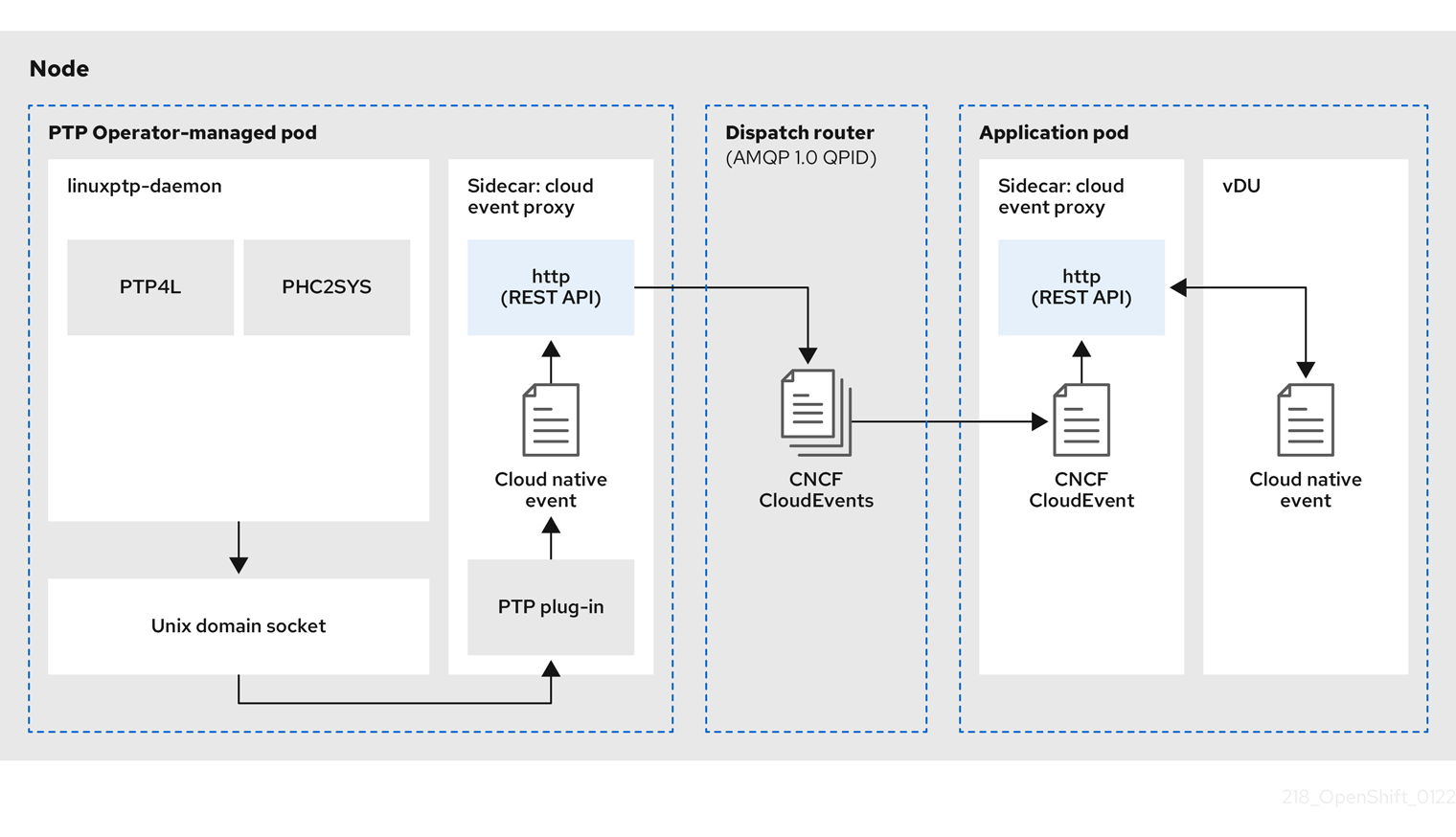
The cloud-event-proxy sidecar container can access the same resources as the primary vRAN application without using any of the resources of the primary application and with no significant latency.
The fast events notifications framework uses a REST API for communication and is based on the O-RAN REST API specification. The framework consists of a publisher, subscriber, and an AMQ messaging bus to handle communications between the publisher and subscriber applications. The cloud-event-proxy sidecar is a utility container that runs in a pod that is loosely coupled to the main DU application container on the DU node. It provides an event publishing framework that allows you to subscribe DU applications to published PTP events.
DU applications run the cloud-event-proxy container in a sidecar pattern to subscribe to PTP events. The following workflow describes how a DU application uses PTP fast events:
-
DU application requests a subscription: The DU sends an API request to the
cloud-event-proxysidecar to create a PTP events subscription. Thecloud-event-proxysidecar creates a subscription resource. -
cloud-event-proxy sidecar creates the subscription: The event resource is persisted by the
cloud-event-proxysidecar. Thecloud-event-proxysidecar container sends an acknowledgment with an ID and URL location to access the stored subscription resource. The sidecar creates an AMQ messaging listener protocol for the resource specified in the subscription. -
DU application receives the PTP event notification: The
cloud-event-proxysidecar container listens to the address specified in the resource qualifier. The DU events consumer processes the message and passes it to the return URL specified in the subscription. -
cloud-event-proxy sidecar validates the PTP event and posts it to the DU application: The
cloud-event-proxysidecar receives the event, unwraps the cloud events object to retrieve the data, and fetches the return URL to post the event back to the DU consumer application. - DU application uses the PTP event: The DU application events consumer receives and processes the PTP event.
15.7.3. Installing the AMQ messaging bus
To pass PTP fast event notifications between publisher and subscriber on a node, you must install and configure an AMQ messaging bus to run locally on the node. You do this by installing the AMQ Interconnect Operator for use in the cluster.
Prerequisites
-
Install the OpenShift Container Platform CLI (
oc). -
Log in as a user with
cluster-adminprivileges.
Procedure
-
Install the AMQ Interconnect Operator to its own
amq-interconnectnamespace. See Adding the Red Hat Integration - AMQ Interconnect Operator.
Verification
Check that the AMQ Interconnect Operator is available and the required pods are running:
$ oc get pods -n amq-interconnectExample output
NAME                                    READY   STATUS    RESTARTS   AGE
amq-interconnect-645db76c76-k8ghs       1/1     Running   0          23h
interconnect-operator-5cb5fc7cc-4v7qm   1/1     Running   0          23h
Check that the required
linuxptp-daemonPTP event producer pods are running in theopenshift-ptpnamespace.$ oc get pods -n openshift-ptpExample output
NAME                     READY   STATUS    RESTARTS       AGE
linuxptp-daemon-2t78p    3/3     Running   0              12h
linuxptp-daemon-k8n88    3/3     Running   0              12h
15.7.4. Configuring the PTP fast event notifications publisher
To start using PTP fast event notifications for a network interface in your cluster, you must enable the fast event publisher in the PTP Operator PtpOperatorConfig custom resource (CR) and configure ptpClockThreshold values in a PtpConfig CR that you create.
Prerequisites
-
Install the OpenShift Container Platform CLI (
oc). -
Log in as a user with
cluster-adminprivileges. - Install the PTP Operator and AMQ Interconnect Operator.
Procedure
Modify the default PTP Operator config to enable PTP fast events.
Save the following YAML in the
ptp-operatorconfig.yamlfile:apiVersion: ptp.openshift.io/v1 kind: PtpOperatorConfig metadata: name: default namespace: openshift-ptp spec: daemonNodeSelector: node-role.kubernetes.io/worker: "" ptpEventConfig: enableEventPublisher: true1 transportHost: amqp://<instance_name>.<namespace>.svc.cluster.local2 - 1
- Set
enableEventPublishertotrueto enable PTP fast event notifications. - 2
- Set
transportHostto the AMQ router that you configured where<instance_name>and<namespace>correspond to the AMQ Interconnect router instance name and namespace, for example,amqp://amq-interconnect.amq-interconnect.svc.cluster.local
Update the
PtpOperatorConfigCR:$ oc apply -f ptp-operatorconfig.yaml
Create a
PtpConfigcustom resource (CR) for the PTP enabled interface, and set the required values forptpClockThresholdandptp4lOpts. The following YAML illustrates the required values that you must set in thePtpConfigCR:spec: profile: - name: "profile1" interface: "enp5s0f0" ptp4lOpts: "-2 -s --summary_interval -4"1 phc2sysOpts: "-a -r -m -n 24 -N 8 -R 16"2 ptp4lConf: ""3 ptpClockThreshold:4 holdOverTimeout: 5 maxOffsetThreshold: 100 minOffsetThreshold: -100- 1
- Append
--summary_interval -4to use PTP fast events. - 2
- Required
phc2sysOptsvalues.-mprints messages tostdout. Thelinuxptp-daemonDaemonSetparses the logs and generates Prometheus metrics. - 3
- Specify a string that contains the configuration to replace the default /etc/ptp4l.conf file. To use the default configuration, leave the field empty.
- 4
- Optional. If the
ptpClockThresholdstanza is not present, default values are used for theptpClockThresholdfields. The stanza shows defaultptpClockThresholdvalues. TheptpClockThresholdvalues configure how long after the PTP master clock is disconnected before PTP events are triggered.holdOverTimeoutis the time value in seconds before the PTP clock event state changes toFREERUNwhen the PTP master clock is disconnected. ThemaxOffsetThresholdandminOffsetThresholdsettings configure offset values in nanoseconds that compare against the values forCLOCK_REALTIME(phc2sys) or master offset (ptp4l). When theptp4lorphc2sysoffset value is outside this range, the PTP clock state is set toFREERUN. When the offset value is within this range, the PTP clock state is set toLOCKED.
15.7.5. Subscribing DU applications to PTP events REST API reference
Use the PTP event notifications REST API to subscribe a distributed unit (DU) application to the PTP events that are generated on the parent node.
Subscribe applications to PTP events by using the resource address /cluster/node/<node_name>/ptp, where <node_name> is the cluster node running the DU application.
Deploy your cloud-event-consumer DU application container and cloud-event-proxy sidecar container in a separate DU application pod. The cloud-event-consumer DU application subscribes to the cloud-event-proxy container in the application pod.
Use the following API endpoints to subscribe the cloud-event-consumer DU application to PTP events posted by the cloud-event-proxy container at http://localhost:8089/api/ocloudNotifications/v1/ in the DU application pod:
/api/ocloudNotifications/v1/subscriptions-
POST: Creates a new subscription -
GET: Retrieves a list of subscriptions
-
/api/ocloudNotifications/v1/subscriptions/<subscription_id>-
GET: Returns details for the specified subscription ID
-
/api/ocloudNotifications/v1/health-
GET: Returns the health status ofocloudNotificationsAPI
-
api/ocloudNotifications/v1/publishers-
GET: Returns an array ofos-clock-sync-state,ptp-clock-class-change, andlock-statemessages for the cluster node
-
/api/ocloudnotifications/v1/<resource_address>/CurrentState-
GET: Returns the current state of one the following event types:os-clock-sync-state,ptp-clock-class-change, orlock-stateevents
-
9089 is the default port for the cloud-event-consumer container deployed in the application pod. You can configure a different port for your DU application as required.
15.7.5.1. api/ocloudNotifications/v1/subscriptions
HTTP method
GET api/ocloudNotifications/v1/subscriptions
Description
Returns a list of subscriptions. If subscriptions exist, a 200 OK status code is returned along with the list of subscriptions.
Example API response
[
 {
  "id": "75b1ad8f-c807-4c23-acf5-56f4b7ee3826",
  "endpointUri": "http://localhost:9089/event",
  "uriLocation": "http://localhost:8089/api/ocloudNotifications/v1/subscriptions/75b1ad8f-c807-4c23-acf5-56f4b7ee3826",
  "resource": "/cluster/node/compute-1.example.com/ptp"
 }
]
HTTP method
POST api/ocloudNotifications/v1/subscriptions
Description
Creates a new subscription. If a subscription is successfully created, or if it already exists, a 201 Created status code is returned.
| Parameter | Type |
|---|---|
| subscription | data |
Example payload
{
  "uriLocation": "http://localhost:8089/api/ocloudNotifications/v1/subscriptions",
  "resource": "/cluster/node/compute-1.example.com/ptp"
}
15.7.5.2. api/ocloudNotifications/v1/subscriptions/
HTTP method
GET api/ocloudNotifications/v1/subscriptions/<subscription_id>
Description
Returns details for the subscription with ID <subscription_id>
| Parameter | Type |
|---|---|
|
| string |
Example API response
{
  "id":"48210fb3-45be-4ce0-aa9b-41a0e58730ab",
  "endpointUri": "http://localhost:9089/event",
  "uriLocation":"http://localhost:8089/api/ocloudNotifications/v1/subscriptions/48210fb3-45be-4ce0-aa9b-41a0e58730ab",
  "resource":"/cluster/node/compute-1.example.com/ptp"
}
15.7.5.3. api/ocloudNotifications/v1/health/
HTTP method
GET api/ocloudNotifications/v1/health/
Description
Returns the health status for the ocloudNotifications REST API.
Example API response
OK15.7.5.4. api/ocloudNotifications/v1/publishers
HTTP method
GET api/ocloudNotifications/v1/publishers
Description
Returns an array of os-clock-sync-state, ptp-clock-class-change, and lock-state details for the cluster node. The system generates notifications when the relevant equipment state changes.
-
os-clock-sync-statenotifications describe the host operating system clock synchronization state. Can be inLOCKEDorFREERUNstate. -
ptp-clock-class-changenotifications describe the current state of the PTP clock class. -
lock-statenotifications describe the current status of the PTP equipment lock state. Can be inLOCKED,HOLDOVERorFREERUNstate.
Example API response
[
  {
    "id": "0fa415ae-a3cf-4299-876a-589438bacf75",
    "endpointUri": "http://localhost:9085/api/ocloudNotifications/v1/dummy",
    "uriLocation": "http://localhost:9085/api/ocloudNotifications/v1/publishers/0fa415ae-a3cf-4299-876a-589438bacf75",
    "resource": "/cluster/node/compute-1.example.com/sync/sync-status/os-clock-sync-state"
  },
  {
    "id": "28cd82df-8436-4f50-bbd9-7a9742828a71",
    "endpointUri": "http://localhost:9085/api/ocloudNotifications/v1/dummy",
    "uriLocation": "http://localhost:9085/api/ocloudNotifications/v1/publishers/28cd82df-8436-4f50-bbd9-7a9742828a71",
    "resource": "/cluster/node/compute-1.example.com/sync/ptp-status/ptp-clock-class-change"
  },
  {
    "id": "44aa480d-7347-48b0-a5b0-e0af01fa9677",
    "endpointUri": "http://localhost:9085/api/ocloudNotifications/v1/dummy",
    "uriLocation": "http://localhost:9085/api/ocloudNotifications/v1/publishers/44aa480d-7347-48b0-a5b0-e0af01fa9677",
    "resource": "/cluster/node/compute-1.example.com/sync/ptp-status/lock-state"
  }
]
You can find os-clock-sync-state, ptp-clock-class-change and lock-state events in the logs for the cloud-event-proxy container. For example:
$ oc logs -f linuxptp-daemon-cvgr6 -n openshift-ptp -c cloud-event-proxyExample os-clock-sync-state event
{
   "id":"c8a784d1-5f4a-4c16-9a81-a3b4313affe5",
   "type":"event.sync.sync-status.os-clock-sync-state-change",
   "source":"/cluster/compute-1.example.com/ptp/CLOCK_REALTIME",
   "dataContentType":"application/json",
   "time":"2022-05-06T15:31:23.906277159Z",
   "data":{
      "version":"v1",
      "values":[
         {
            "resource":"/sync/sync-status/os-clock-sync-state",
            "dataType":"notification",
            "valueType":"enumeration",
            "value":"LOCKED"
         },
         {
            "resource":"/sync/sync-status/os-clock-sync-state",
            "dataType":"metric",
            "valueType":"decimal64.3",
            "value":"-53"
         }
      ]
   }
}
Example ptp-clock-class-change event
{
   "id":"69eddb52-1650-4e56-b325-86d44688d02b",
   "type":"event.sync.ptp-status.ptp-clock-class-change",
   "source":"/cluster/compute-1.example.com/ptp/ens2fx/master",
   "dataContentType":"application/json",
   "time":"2022-05-06T15:31:23.147100033Z",
   "data":{
      "version":"v1",
      "values":[
         {
            "resource":"/sync/ptp-status/ptp-clock-class-change",
            "dataType":"metric",
            "valueType":"decimal64.3",
            "value":"135"
         }
      ]
   }
}
Example lock-state event
{
   "id":"305ec18b-1472-47b3-aadd-8f37933249a9",
   "type":"event.sync.ptp-status.ptp-state-change",
   "source":"/cluster/compute-1.example.com/ptp/ens2fx/master",
   "dataContentType":"application/json",
   "time":"2022-05-06T15:31:23.467684081Z",
   "data":{
      "version":"v1",
      "values":[
         {
            "resource":"/sync/ptp-status/lock-state",
            "dataType":"notification",
            "valueType":"enumeration",
            "value":"LOCKED"
         },
         {
            "resource":"/sync/ptp-status/lock-state",
            "dataType":"metric",
            "valueType":"decimal64.3",
            "value":"62"
         }
      ]
   }
}
15.7.5.5. /api/ocloudnotifications/v1//CurrentState
HTTP method
GET api/ocloudNotifications/v1/cluster/node/<node_name>/sync/ptp-status/lock-state/CurrentState
GET api/ocloudNotifications/v1/cluster/node/<node_name>/sync/sync-status/os-clock-sync-state/CurrentState
GET api/ocloudNotifications/v1/cluster/node/<node_name>/sync/ptp-status/ptp-clock-class-change/CurrentState
Description
Configure the CurrentState API endpoint to return the current state of the os-clock-sync-state, ptp-clock-class-change, or lock-state events for the cluster node.
-
os-clock-sync-statenotifications describe the host operating system clock synchronization state. Can be inLOCKEDorFREERUNstate. -
ptp-clock-class-changenotifications describe the current state of the PTP clock class. -
lock-statenotifications describe the current status of the PTP equipment lock state. Can be inLOCKED,HOLDOVERorFREERUNstate.
| Parameter | Type |
|---|---|
|
| string |
Example lock-state API response
{
  "id": "c1ac3aa5-1195-4786-84f8-da0ea4462921",
  "type": "event.sync.ptp-status.ptp-state-change",
  "source": "/cluster/node/compute-1.example.com/sync/ptp-status/lock-state",
  "dataContentType": "application/json",
  "time": "2023-01-10T02:41:57.094981478Z",
  "data": {
    "version": "v1",
    "values": [
      {
        "resource": "/cluster/node/compute-1.example.com/ens5fx/master",
        "dataType": "notification",
        "valueType": "enumeration",
        "value": "LOCKED"
      },
      {
        "resource": "/cluster/node/compute-1.example.com/ens5fx/master",
        "dataType": "metric",
        "valueType": "decimal64.3",
        "value": "29"
      }
    ]
  }
}
Example os-clock-sync-state API response
{
  "specversion": "0.3",
  "id": "4f51fe99-feaa-4e66-9112-66c5c9b9afcb",
  "source": "/cluster/node/compute-1.example.com/sync/sync-status/os-clock-sync-state",
  "type": "event.sync.sync-status.os-clock-sync-state-change",
  "subject": "/cluster/node/compute-1.example.com/sync/sync-status/os-clock-sync-state",
  "datacontenttype": "application/json",
  "time": "2022-11-29T17:44:22.202Z",
  "data": {
    "version": "v1",
    "values": [
      {
        "resource": "/cluster/node/compute-1.example.com/CLOCK_REALTIME",
        "dataType": "notification",
        "valueType": "enumeration",
        "value": "LOCKED"
      },
      {
        "resource": "/cluster/node/compute-1.example.com/CLOCK_REALTIME",
        "dataType": "metric",
        "valueType": "decimal64.3",
        "value": "27"
      }
    ]
  }
}
Example ptp-clock-class-change API response
{
  "id": "064c9e67-5ad4-4afb-98ff-189c6aa9c205",
  "type": "event.sync.ptp-status.ptp-clock-class-change",
  "source": "/cluster/node/compute-1.example.com/sync/ptp-status/ptp-clock-class-change",
  "dataContentType": "application/json",
  "time": "2023-01-10T02:41:56.785673989Z",
  "data": {
    "version": "v1",
    "values": [
      {
        "resource": "/cluster/node/compute-1.example.com/ens5fx/master",
        "dataType": "metric",
        "valueType": "decimal64.3",
        "value": "165"
      }
    ]
  }
}
15.7.6. Monitoring PTP fast event metrics using the CLI
You can monitor fast events bus metrics directly from cloud-event-proxy containers using the oc CLI.
PTP fast event notification metrics are also available in the OpenShift Container Platform web console.
Prerequisites
-
Install the OpenShift Container Platform CLI (
oc). -
Log in as a user with
cluster-adminprivileges. - Install and configure the PTP Operator.
Procedure
Get the list of active
linuxptp-daemonpods.$ oc get pods -n openshift-ptpExample output
NAME                    READY   STATUS    RESTARTS   AGE
linuxptp-daemon-2t78p   3/3     Running   0          8h
linuxptp-daemon-k8n88   3/3     Running   0          8h
Access the metrics for the required
cloud-event-proxycontainer by running the following command:$ oc exec -it <linuxptp-daemon> -n openshift-ptp -c cloud-event-proxy -- curl 127.0.0.1:9091/metricswhere:
- <linuxptp-daemon>
Specifies the pod you want to query, for example,
linuxptp-daemon-2t78p.Example output
# HELP cne_amqp_events_published Metric to get number of events published by the transport
# TYPE cne_amqp_events_published gauge
cne_amqp_events_published{address="/cluster/node/compute-1.example.com/ptp/status",status="success"} 1041
# HELP cne_amqp_events_received Metric to get number of events received  by the transport
# TYPE cne_amqp_events_received gauge
cne_amqp_events_received{address="/cluster/node/compute-1.example.com/ptp",status="success"} 1019
# HELP cne_amqp_receiver Metric to get number of receiver created
# TYPE cne_amqp_receiver gauge
cne_amqp_receiver{address="/cluster/node/mock",status="active"} 1
cne_amqp_receiver{address="/cluster/node/compute-1.example.com/ptp",status="active"} 1
cne_amqp_receiver{address="/cluster/node/compute-1.example.com/redfish/event",status="active"}
...
15.7.7. Monitoring PTP fast event metrics in the web console
You can monitor PTP fast event metrics in the OpenShift Container Platform web console by using the pre-configured and self-updating Prometheus monitoring stack.
Prerequisites
-
Install the OpenShift Container Platform CLI
oc. -
Log in as a user with
cluster-adminprivileges.
Procedure
Enter the following command to return the list of available PTP metrics from the
cloud-event-proxysidecar container:$ oc exec -it <linuxptp_daemon_pod> -n openshift-ptp -c cloud-event-proxy -- curl 127.0.0.1:9091/metricswhere:
- <linuxptp_daemon_pod>
-
Specifies the pod you want to query, for example,
linuxptp-daemon-2t78p.
-
Copy the name of the PTP metric you want to query from the list of returned metrics, for example,
cne_amqp_events_received. -
In the OpenShift Container Platform web console, click Observe
Metrics. - Paste the PTP metric into the Expression field, and click Run queries.

'%20d='M201.5%20305.5c-13.8%200-24.9-11.1-24.9-24.6%200-13.8%2011.1-24.9%2024.9-24.9%2013.6%200%2024.6%2011.1%2024.6%2024.9%200%2013.6-11.1%2024.6-24.6%2024.6zM504%20256c0%20137-111%20248-248%20248S8%20393%208%20256%20119%208%20256%208s248%20111%20248%20248zm-132.3-41.2c-9.4%200-17.7%203.9-23.8%2010-22.4-15.5-52.6-25.5-86.1-26.6l17.4-78.3%2055.4%2012.5c0%2013.6%2011.1%2024.6%2024.6%2024.6%2013.8%200%2024.9-11.3%2024.9-24.9s-11.1-24.9-24.9-24.9c-9.7%200-18%205.8-22.1%2013.8l-61.2-13.6c-3-.8-6.1%201.4-6.9%204.4l-19.1%2086.4c-33.2%201.4-63.1%2011.3-85.5%2026.8-6.1-6.4-14.7-10.2-24.1-10.2-34.9%200-46.3%2046.9-14.4%2062.8-1.1%205-1.7%2010.2-1.7%2015.5%200%2052.6%2059.2%2095.2%20132%2095.2%2073.1%200%20132.3-42.6%20132.3-95.2%200-5.3-.6-10.8-1.9-15.8%2031.3-16%2019.8-62.5-14.9-62.5zM302.8%20331c-18.2%2018.2-76.1%2017.9-93.6%200-2.2-2.2-6.1-2.2-8.3%200-2.5%202.5-2.5%206.4%200%208.6%2022.8%2022.8%2087.3%2022.8%20110.2%200%202.5-2.2%202.5-6.1%200-8.6-2.2-2.2-6.1-2.2-8.3%200zm7.7-75c-13.6%200-24.6%2011.1-24.6%2024.9%200%2013.6%2011.1%2024.6%2024.6%2024.6%2013.8%200%2024.9-11.1%2024.9-24.6%200-13.8-11-24.9-24.9-24.9z'/%3e%3c/svg%3e)