 Red Hat Summit
Questo contenuto non è disponibile nella lingua selezionata.
Chapter 2. Understanding Operators
2.1. What are Operators?
Conceptually, Operators take human operational knowledge and encode it into software that is more easily shared with consumers.
Operators are pieces of software that ease the operational complexity of running another piece of software. They act like an extension of the software vendor’s engineering team, monitoring a Kubernetes environment (such as OpenShift Container Platform) and using its current state to make decisions in real time. Advanced Operators are designed to handle upgrades seamlessly, react to failures automatically, and not take shortcuts, like skipping a software backup process to save time.
More technically, Operators are a method of packaging, deploying, and managing a Kubernetes application.
A Kubernetes application is an app that is both deployed on Kubernetes and managed using the Kubernetes APIs and kubectl or oc tooling. To be able to make the most of Kubernetes, you require a set of cohesive APIs to extend in order to service and manage your apps that run on Kubernetes. Think of Operators as the runtime that manages this type of app on Kubernetes.
2.1.1. Why use Operators?
Operators provide:
- Repeatability of installation and upgrade.
- Constant health checks of every system component.
- Over-the-air (OTA) updates for OpenShift components and ISV content.
- A place to encapsulate knowledge from field engineers and spread it to all users, not just one or two.
- Why deploy on Kubernetes?
- Kubernetes (and by extension, OpenShift Container Platform) contains all of the primitives needed to build complex distributed systems – secret handling, load balancing, service discovery, autoscaling – that work across on-premises and cloud providers.
- Why manage your app with Kubernetes APIs and
kubectltooling? -
These APIs are feature rich, have clients for all platforms and plug into the cluster’s access control/auditing. An Operator uses the Kubernetes extension mechanism, custom resource definitions (CRDs), so your custom object, for example
MongoDB, looks and acts just like the built-in, native Kubernetes objects. - How do Operators compare with service brokers?
- A service broker is a step towards programmatic discovery and deployment of an app. However, because it is not a long running process, it cannot execute Day 2 operations like upgrade, failover, or scaling. Customizations and parameterization of tunables are provided at install time, versus an Operator that is constantly watching the current state of your cluster. Off-cluster services are a good match for a service broker, although Operators exist for these as well.
2.1.2. Operator Framework
The Operator Framework is a family of tools and capabilities to deliver on the customer experience described above. It is not just about writing code; testing, delivering, and updating Operators is just as important. The Operator Framework components consist of open source tools to tackle these problems:
- Operator SDK
- The Operator SDK assists Operator authors in bootstrapping, building, testing, and packaging their own Operator based on their expertise without requiring knowledge of Kubernetes API complexities.
- Operator Lifecycle Manager
- Operator Lifecycle Manager (OLM) controls the installation, upgrade, and role-based access control (RBAC) of Operators in a cluster. Deployed by default in OpenShift Container Platform 4.11.
- Operator Registry
- The Operator Registry stores cluster service versions (CSVs) and custom resource definitions (CRDs) for creation in a cluster and stores Operator metadata about packages and channels. It runs in a Kubernetes or OpenShift cluster to provide this Operator catalog data to OLM.
- OperatorHub
- OperatorHub is a web console for cluster administrators to discover and select Operators to install on their cluster. It is deployed by default in OpenShift Container Platform.
These tools are designed to be composable, so you can use any that are useful to you.
2.1.3. Operator maturity model
The level of sophistication of the management logic encapsulated within an Operator can vary. This logic is also in general highly dependent on the type of the service represented by the Operator.
One can however generalize the scale of the maturity of the encapsulated operations of an Operator for certain set of capabilities that most Operators can include. To this end, the following Operator maturity model defines five phases of maturity for generic day two operations of an Operator:
Figure 2.1. Operator maturity model
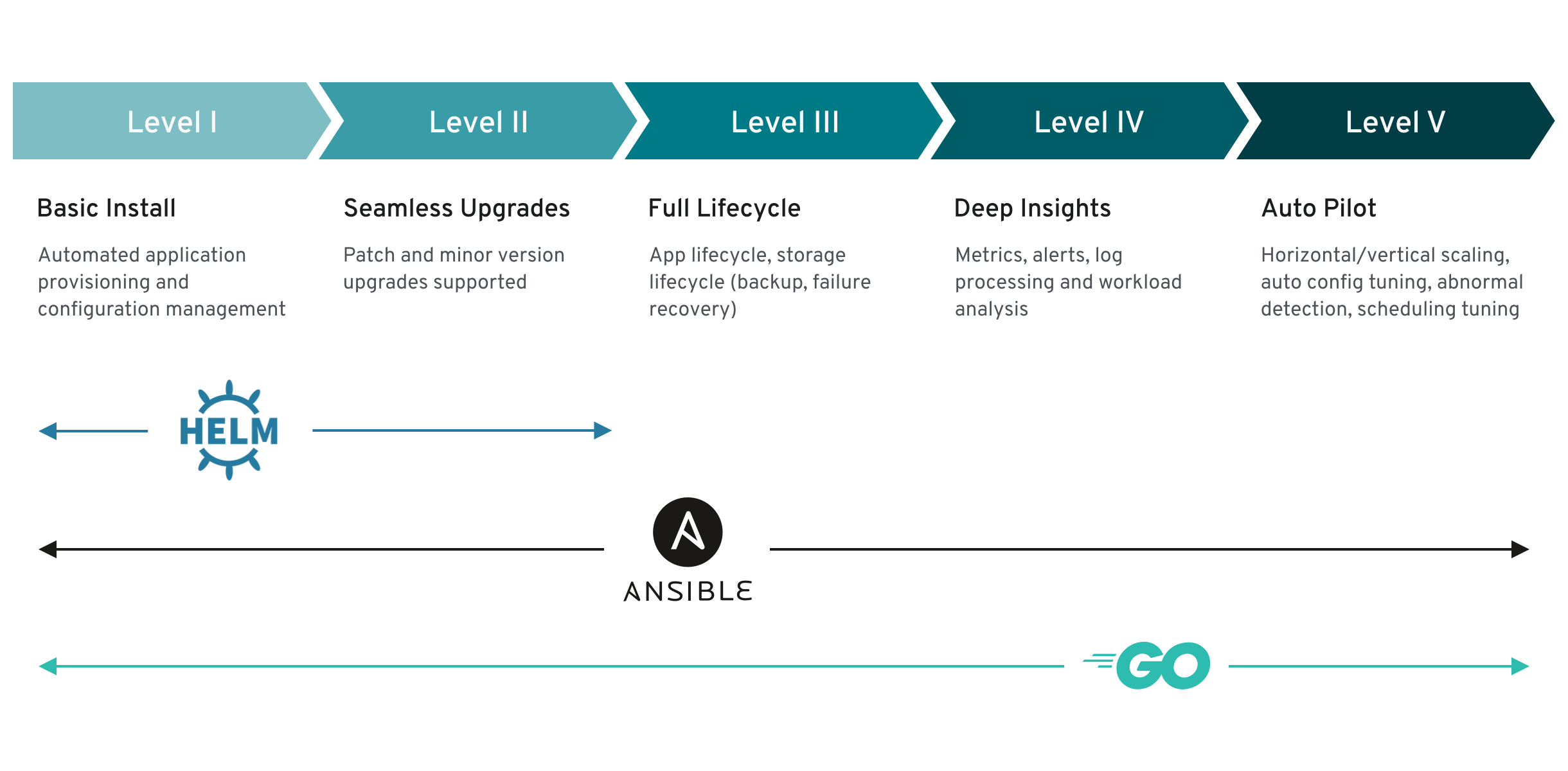
The above model also shows how these capabilities can best be developed through the Helm, Go, and Ansible capabilities of the Operator SDK.
2.2. Operator Framework packaging format
This guide outlines the packaging format for Operators supported by Operator Lifecycle Manager (OLM) in OpenShift Container Platform.
Support for the legacy package manifest format for Operators is removed in OpenShift Container Platform 4.8 and later. Existing Operator projects in the package manifest format can be migrated to the bundle format by using the Operator SDK pkgman-to-bundle command. See Migrating package manifest projects to bundle format for more details.
2.2.1. Bundle format
The bundle format for Operators is a packaging format introduced by the Operator Framework. To improve scalability and to better enable upstream users hosting their own catalogs, the bundle format specification simplifies the distribution of Operator metadata.
An Operator bundle represents a single version of an Operator. On-disk bundle manifests are containerized and shipped as a bundle image, which is a non-runnable container image that stores the Kubernetes manifests and Operator metadata. Storage and distribution of the bundle image is then managed using existing container tools like podman and docker and container registries such as Quay.
Operator metadata can include:
- Information that identifies the Operator, for example its name and version.
- Additional information that drives the UI, for example its icon and some example custom resources (CRs).
- Required and provided APIs.
- Related images.
When loading manifests into the Operator Registry database, the following requirements are validated:
- The bundle must have at least one channel defined in the annotations.
- Every bundle has exactly one cluster service version (CSV).
- If a CSV owns a custom resource definition (CRD), that CRD must exist in the bundle.
2.2.1.1. Manifests
Bundle manifests refer to a set of Kubernetes manifests that define the deployment and RBAC model of the Operator.
A bundle includes one CSV per directory and typically the CRDs that define the owned APIs of the CSV in its /manifests directory.
Example bundle format layout
etcd
├── manifests
│   ├── etcdcluster.crd.yaml
│   └── etcdoperator.clusterserviceversion.yaml
│   └── secret.yaml
│   └── configmap.yaml
└── metadata
    └── annotations.yaml
    └── dependencies.yaml
Additionally supported objects
The following object types can also be optionally included in the /manifests directory of a bundle:
Supported optional object types
-
ClusterRole -
ClusterRoleBinding -
ConfigMap -
ConsoleCLIDownload -
ConsoleLink -
ConsoleQuickStart -
ConsoleYamlSample -
PodDisruptionBudget -
PriorityClass -
PrometheusRule -
Role -
RoleBinding -
Secret -
Service -
ServiceAccount -
ServiceMonitor -
VerticalPodAutoscaler
When these optional objects are included in a bundle, Operator Lifecycle Manager (OLM) can create them from the bundle and manage their lifecycle along with the CSV:
Lifecycle for optional objects
- When the CSV is deleted, OLM deletes the optional object.
When the CSV is upgraded:
- If the name of the optional object is the same, OLM updates it in place.
- If the name of the optional object has changed between versions, OLM deletes and recreates it.
2.2.1.2. Annotations
A bundle also includes an annotations.yaml file in its /metadata directory. This file defines higher level aggregate data that helps describe the format and package information about how the bundle should be added into an index of bundles:
Example annotations.yaml
annotations:
  operators.operatorframework.io.bundle.mediatype.v1: "registry+v1"
operators.operatorframework.io.bundle.manifests.v1: "manifests/"
operators.operatorframework.io.bundle.metadata.v1: "metadata/"
operators.operatorframework.io.bundle.package.v1: "test-operator"
operators.operatorframework.io.bundle.channels.v1: "beta,stable"
operators.operatorframework.io.bundle.channel.default.v1: "stable" - 1
- The media type or format of the Operator bundle. The
registry+v1format means it contains a CSV and its associated Kubernetes objects. - 2
- The path in the image to the directory that contains the Operator manifests. This label is reserved for future use and currently defaults to
manifests/. The valuemanifests.v1implies that the bundle contains Operator manifests. - 3
- The path in the image to the directory that contains metadata files about the bundle. This label is reserved for future use and currently defaults to
metadata/. The valuemetadata.v1implies that this bundle has Operator metadata. - 4
- The package name of the bundle.
- 5
- The list of channels the bundle is subscribing to when added into an Operator Registry.
- 6
- The default channel an Operator should be subscribed to when installed from a registry.
In case of a mismatch, the annotations.yaml file is authoritative because the on-cluster Operator Registry that relies on these annotations only has access to this file.
2.2.1.3. Dependencies
The dependencies of an Operator are listed in a dependencies.yaml file in the metadata/ folder of a bundle. This file is optional and currently only used to specify explicit Operator-version dependencies.
The dependency list contains a type field for each item to specify what kind of dependency this is. The following types of Operator dependencies are supported:
olm.package-
This type indicates a dependency for a specific Operator version. The dependency information must include the package name and the version of the package in semver format. For example, you can specify an exact version such as
0.5.2or a range of versions such as>0.5.1. olm.gvk- With this type, the author can specify a dependency with group/version/kind (GVK) information, similar to existing CRD and API-based usage in a CSV. This is a path to enable Operator authors to consolidate all dependencies, API or explicit versions, to be in the same place.
olm.constraint- This type declares generic constraints on arbitrary Operator properties.
In the following example, dependencies are specified for a Prometheus Operator and etcd CRDs:
Example dependencies.yaml file
dependencies:
  - type: olm.package
    value:
      packageName: prometheus
      version: ">0.27.0"
  - type: olm.gvk
    value:
      group: etcd.database.coreos.com
      kind: EtcdCluster
version: v1beta22.2.1.4. About the opm CLI
The opm CLI tool is provided by the Operator Framework for use with the Operator bundle format. This tool allows you to create and maintain catalogs of Operators from a list of Operator bundles that are similar to software repositories. The result is a container image which can be stored in a container registry and then installed on a cluster.
A catalog contains a database of pointers to Operator manifest content that can be queried through an included API that is served when the container image is run. On OpenShift Container Platform, Operator Lifecycle Manager (OLM) can reference the image in a catalog source, defined by a CatalogSource object, which polls the image at regular intervals to enable frequent updates to installed Operators on the cluster.
-
See CLI tools for steps on installing the
opmCLI.
2.2.2. File-based catalogs
File-based catalogs are the latest iteration of the catalog format in Operator Lifecycle Manager (OLM). It is a plain text-based (JSON or YAML) and declarative config evolution of the earlier SQLite database format, and it is fully backwards compatible. The goal of this format is to enable Operator catalog editing, composability, and extensibility.
- Editing
With file-based catalogs, users interacting with the contents of a catalog are able to make direct changes to the format and verify that their changes are valid. Because this format is plain text JSON or YAML, catalog maintainers can easily manipulate catalog metadata by hand or with widely known and supported JSON or YAML tooling, such as the
jqCLI.This editability enables the following features and user-defined extensions:
- Promoting an existing bundle to a new channel
- Changing the default channel of a package
- Custom algorithms for adding, updating, and removing upgrade edges
- Composability
File-based catalogs are stored in an arbitrary directory hierarchy, which enables catalog composition. For example, consider two separate file-based catalog directories:
catalogAandcatalogB. A catalog maintainer can create a new combined catalog by making a new directorycatalogCand copyingcatalogAandcatalogBinto it.This composability enables decentralized catalogs. The format permits Operator authors to maintain Operator-specific catalogs, and it permits maintainers to trivially build a catalog composed of individual Operator catalogs. File-based catalogs can be composed by combining multiple other catalogs, by extracting subsets of one catalog, or a combination of both of these.
NoteDuplicate packages and duplicate bundles within a package are not permitted. The
opm validatecommand returns an error if any duplicates are found.Because Operator authors are most familiar with their Operator, its dependencies, and its upgrade compatibility, they are able to maintain their own Operator-specific catalog and have direct control over its contents. With file-based catalogs, Operator authors own the task of building and maintaining their packages in a catalog. Composite catalog maintainers, however, only own the task of curating the packages in their catalog and publishing the catalog to users.
- Extensibility
The file-based catalog specification is a low-level representation of a catalog. While it can be maintained directly in its low-level form, catalog maintainers can build interesting extensions on top that can be used by their own custom tooling to make any number of mutations.
For example, a tool could translate a high-level API, such as
(mode=semver), down to the low-level, file-based catalog format for upgrade edges. Or a catalog maintainer might need to customize all of the bundle metadata by adding a new property to bundles that meet a certain criteria.While this extensibility allows for additional official tooling to be developed on top of the low-level APIs for future OpenShift Container Platform releases, the major benefit is that catalog maintainers have this capability as well.
As of OpenShift Container Platform 4.11, the default Red Hat-provided Operator catalog releases in the file-based catalog format. The default Red Hat-provided Operator catalogs for OpenShift Container Platform 4.6 through 4.10 released in the deprecated SQLite database format.
The opm subcommands, flags, and functionality related to the SQLite database format are also deprecated and will be removed in a future release. The features are still supported and must be used for catalogs that use the deprecated SQLite database format.
Many of the opm subcommands and flags for working with the SQLite database format, such as opm index prune, do not work with the file-based catalog format. For more information about working with file-based catalogs, see Managing custom catalogs and Mirroring images for a disconnected installation using the oc-mirror plugin.
2.2.2.1. Directory structure
File-based catalogs can be stored and loaded from directory-based file systems. The opm CLI loads the catalog by walking the root directory and recursing into subdirectories. The CLI attempts to load every file it finds and fails if any errors occur.
Non-catalog files can be ignored using .indexignore files, which have the same rules for patterns and precedence as .gitignore files.
Example .indexignore file
# Ignore everything except non-object .json and .yaml files
**/*
!*.json
!*.yaml
**/objects/*.json
**/objects/*.yaml
Catalog maintainers have the flexibility to choose their desired layout, but it is recommended to store each package’s file-based catalog blobs in separate subdirectories. Each individual file can be either JSON or YAML; it is not necessary for every file in a catalog to use the same format.
Basic recommended structure
catalog
├── packageA
│   └── index.yaml
├── packageB
│   ├── .indexignore
│   ├── index.yaml
│   └── objects
│       └── packageB.v0.1.0.clusterserviceversion.yaml
└── packageC
    └── index.json
This recommended structure has the property that each subdirectory in the directory hierarchy is a self-contained catalog, which makes catalog composition, discovery, and navigation trivial file system operations. The catalog could also be included in a parent catalog by copying it into the parent catalog’s root directory.
2.2.2.2. Schemas
File-based catalogs use a format, based on the CUE language specification, that can be extended with arbitrary schemas. The following _Meta CUE schema defines the format that all file-based catalog blobs must adhere to:
_Meta schema
_Meta: {
  // schema is required and must be a non-empty string
  schema: string & !=""

  // package is optional, but if it's defined, it must be a non-empty string
  package?: string & !=""

  // properties is optional, but if it's defined, it must be a list of 0 or more properties
  properties?: [... #Property]
}

#Property: {
  // type is required
  type: string & !=""

  // value is required, and it must not be null
  value: !=null
}
No CUE schemas listed in this specification should be considered exhaustive. The opm validate command has additional validations that are difficult or impossible to express concisely in CUE.
An Operator Lifecycle Manager (OLM) catalog currently uses three schemas (olm.package, olm.channel, and olm.bundle), which correspond to OLM’s existing package and bundle concepts.
Each Operator package in a catalog requires exactly one olm.package blob, at least one olm.channel blob, and one or more olm.bundle blobs.
All olm.* schemas are reserved for OLM-defined schemas. Custom schemas must use a unique prefix, such as a domain that you own.
2.2.2.2.1. olm.package schema
The olm.package schema defines package-level metadata for an Operator. This includes its name, description, default channel, and icon.
Example 2.1. olm.package schema
#Package: {
  schema: "olm.package"

  // Package name
  name: string & !=""

  // A description of the package
  description?: string

  // The package's default channel
  defaultChannel: string & !=""

  // An optional icon
  icon?: {
    base64data: string
    mediatype:  string
  }
}
2.2.2.2.2. olm.channel schema
The olm.channel schema defines a channel within a package, the bundle entries that are members of the channel, and the upgrade edges for those bundles.
A bundle can included as an entry in multiple olm.channel blobs, but it can have only one entry per channel.
It is valid for an entry’s replaces value to reference another bundle name that cannot be found in this catalog or another catalog. However, all other channel invariants must hold true, such as a channel not having multiple heads.
Example 2.2. olm.channel schema
#Channel: {
  schema: "olm.channel"
  package: string & !=""
  name: string & !=""
  entries: [...#ChannelEntry]
}

#ChannelEntry: {
  // name is required. It is the name of an `olm.bundle` that
  // is present in the channel.
  name: string & !=""

  // replaces is optional. It is the name of bundle that is replaced
  // by this entry. It does not have to be present in the entry list.
  replaces?: string & !=""

  // skips is optional. It is a list of bundle names that are skipped by
  // this entry. The skipped bundles do not have to be present in the
  // entry list.
  skips?: [...string & !=""]

  // skipRange is optional. It is the semver range of bundle versions
  // that are skipped by this entry.
  skipRange?: string & !=""
}
2.2.2.2.3. olm.bundle schema
Example 2.3. olm.bundle schema
#Bundle: {
  schema: "olm.bundle"
  package: string & !=""
  name: string & !=""
  image: string & !=""
  properties: [...#Property]
  relatedImages?: [...#RelatedImage]
}

#Property: {
  // type is required
  type: string & !=""

  // value is required, and it must not be null
  value: !=null
}

#RelatedImage: {
  // image is the image reference
  image: string & !=""

  // name is an optional descriptive name for an image that
  // helps identify its purpose in the context of the bundle
  name?: string & !=""
}
2.2.2.3. Properties
Properties are arbitrary pieces of metadata that can be attached to file-based catalog schemas. The type field is a string that effectively specifies the semantic and syntactic meaning of the value field. The value can be any arbitrary JSON or YAML.
OLM defines a handful of property types, again using the reserved olm.* prefix.
2.2.2.3.1. olm.package property
The olm.package property defines the package name and version. This is a required property on bundles, and there must be exactly one of these properties. The packageName field must match the bundle’s first-class package field, and the version field must be a valid semantic version.
Example 2.4. olm.package property
#PropertyPackage: {
  type: "olm.package"
  value: {
    packageName: string & !=""
    version: string & !=""
  }
}
2.2.2.3.2. olm.gvk property
The olm.gvk property defines the group/version/kind (GVK) of a Kubernetes API that is provided by this bundle. This property is used by OLM to resolve a bundle with this property as a dependency for other bundles that list the same GVK as a required API. The GVK must adhere to Kubernetes GVK validations.
Example 2.5. olm.gvk property
#PropertyGVK: {
  type: "olm.gvk"
  value: {
    group: string & !=""
    version: string & !=""
    kind: string & !=""
  }
}
2.2.2.3.3. olm.package.required
The olm.package.required property defines the package name and version range of another package that this bundle requires. For every required package property a bundle lists, OLM ensures there is an Operator installed on the cluster for the listed package and in the required version range. The versionRange field must be a valid semantic version (semver) range.
Example 2.6. olm.package.required property
#PropertyPackageRequired: {
  type: "olm.package.required"
  value: {
    packageName: string & !=""
    versionRange: string & !=""
  }
}
2.2.2.3.4. olm.gvk.required
The olm.gvk.required property defines the group/version/kind (GVK) of a Kubernetes API that this bundle requires. For every required GVK property a bundle lists, OLM ensures there is an Operator installed on the cluster that provides it. The GVK must adhere to Kubernetes GVK validations.
Example 2.7. olm.gvk.required property
#PropertyGVKRequired: {
  type: "olm.gvk.required"
  value: {
    group: string & !=""
    version: string & !=""
    kind: string & !=""
  }
}
2.2.2.4. Example catalog
With file-based catalogs, catalog maintainers can focus on Operator curation and compatibility. Because Operator authors have already produced Operator-specific catalogs for their Operators, catalog maintainers can build their catalog by rendering each Operator catalog into a subdirectory of the catalog’s root directory.
There are many possible ways to build a file-based catalog; the following steps outline a simple approach:
Maintain a single configuration file for the catalog, containing image references for each Operator in the catalog:
Example catalog configuration file
name: community-operators
repo: quay.io/community-operators/catalog
tag: latest
references:
- name: etcd-operator
  image: quay.io/etcd-operator/index@sha256:5891b5b522d5df086d0ff0b110fbd9d21bb4fc7163af34d08286a2e846f6be03
- name: prometheus-operator
  image: quay.io/prometheus-operator/index@sha256:e258d248fda94c63753607f7c4494ee0fcbe92f1a76bfdac795c9d84101eb317
Run a script that parses the configuration file and creates a new catalog from its references:
Example script
name=$(yq eval '.name' catalog.yaml)
mkdir "$name"
yq eval '.name + "/" + .references[].name' catalog.yaml | xargs mkdir
for l in $(yq e '.name as $catalog | .references[] | .image + "|" + $catalog + "/" + .name + "/index.yaml"' catalog.yaml); do
  image=$(echo $l | cut -d'|' -f1)
  file=$(echo $l | cut -d'|' -f2)
  opm render "$image" > "$file"
done
opm alpha generate dockerfile "$name"
indexImage=$(yq eval '.repo + ":" + .tag' catalog.yaml)
docker build -t "$indexImage" -f "$name.Dockerfile" .
docker push "$indexImage"
2.2.2.5. Guidelines
Consider the following guidelines when maintaining file-based catalogs.
2.2.2.5.1. Immutable bundles
The general advice with Operator Lifecycle Manager (OLM) is that bundle images and their metadata should be treated as immutable.
If a broken bundle has been pushed to a catalog, you must assume that at least one of your users has upgraded to that bundle. Based on that assumption, you must release another bundle with an upgrade edge from the broken bundle to ensure users with the broken bundle installed receive an upgrade. OLM will not reinstall an installed bundle if the contents of that bundle are updated in the catalog.
However, there are some cases where a change in the catalog metadata is preferred:
-
Channel promotion: If you already released a bundle and later decide that you would like to add it to another channel, you can add an entry for your bundle in another
olm.channelblob. -
New upgrade edges: If you release a new
1.2.zbundle version, for example1.2.4, but1.3.0is already released, you can update the catalog metadata for1.3.0to skip1.2.4.
2.2.2.5.2. Source control
Catalog metadata should be stored in source control and treated as the source of truth. Updates to catalog images should include the following steps:
- Update the source-controlled catalog directory with a new commit.
-
Build and push the catalog image. Use a consistent tagging taxonomy, such as
:latestor:<target_cluster_version>, so that users can receive updates to a catalog as they become available.
2.2.2.6. CLI usage
For instructions about creating file-based catalogs by using the opm CLI, see Managing custom catalogs.
For reference documentation about the opm CLI commands related to managing file-based catalogs, see CLI tools.
2.2.2.7. Automation
Operator authors and catalog maintainers are encouraged to automate their catalog maintenance with CI/CD workflows. Catalog maintainers can further improve on this by building GitOps automation to accomplish the following tasks:
- Check that pull request (PR) authors are permitted to make the requested changes, for example by updating their package’s image reference.
-
Check that the catalog updates pass the
opm validatecommand. - Check that the updated bundle or catalog image references exist, the catalog images run successfully in a cluster, and Operators from that package can be successfully installed.
- Automatically merge PRs that pass the previous checks.
- Automatically rebuild and republish the catalog image.
2.3. Operator Framework glossary of common terms
This topic provides a glossary of common terms related to the Operator Framework, including Operator Lifecycle Manager (OLM) and the Operator SDK.
2.3.1. Common Operator Framework terms
2.3.1.1. Bundle
In the bundle format, a bundle is a collection of an Operator CSV, manifests, and metadata. Together, they form a unique version of an Operator that can be installed onto the cluster.
2.3.1.2. Bundle image
In the bundle format, a bundle image is a container image that is built from Operator manifests and that contains one bundle. Bundle images are stored and distributed by Open Container Initiative (OCI) spec container registries, such as Quay.io or DockerHub.
2.3.1.3. Catalog source
A catalog source represents a store of metadata that OLM can query to discover and install Operators and their dependencies.
2.3.1.4. Channel
A channel defines a stream of updates for an Operator and is used to roll out updates for subscribers. The head points to the latest version of that channel. For example, a stable channel would have all stable versions of an Operator arranged from the earliest to the latest.
An Operator can have several channels, and a subscription binding to a certain channel would only look for updates in that channel.
2.3.1.5. Channel head
A channel head refers to the latest known update in a particular channel.
2.3.1.6. Cluster service version
A cluster service version (CSV) is a YAML manifest created from Operator metadata that assists OLM in running the Operator in a cluster. It is the metadata that accompanies an Operator container image, used to populate user interfaces with information such as its logo, description, and version.
It is also a source of technical information that is required to run the Operator, like the RBAC rules it requires and which custom resources (CRs) it manages or depends on.
2.3.1.7. Dependency
An Operator may have a dependency on another Operator being present in the cluster. For example, the Vault Operator has a dependency on the etcd Operator for its data persistence layer.
OLM resolves dependencies by ensuring that all specified versions of Operators and CRDs are installed on the cluster during the installation phase. This dependency is resolved by finding and installing an Operator in a catalog that satisfies the required CRD API, and is not related to packages or bundles.
2.3.1.8. Index image
In the bundle format, an index image refers to an image of a database (a database snapshot) that contains information about Operator bundles including CSVs and CRDs of all versions. This index can host a history of Operators on a cluster and be maintained by adding or removing Operators using the opm CLI tool.
2.3.1.9. Install plan
An install plan is a calculated list of resources to be created to automatically install or upgrade a CSV.
2.3.1.10. Multitenancy
A tenant in OpenShift Container Platform is a user or group of users that share common access and privileges for a set of deployed workloads, typically represented by a namespace or project. You can use tenants to provide a level of isolation between different groups or teams.
When a cluster is shared by multiple users or groups, it is considered a multitenant cluster.
2.3.1.11. Operator group
An Operator group configures all Operators deployed in the same namespace as the OperatorGroup object to watch for their CR in a list of namespaces or cluster-wide.
2.3.1.12. Package
In the bundle format, a package is a directory that encloses all released history of an Operator with each version. A released version of an Operator is described in a CSV manifest alongside the CRDs.
2.3.1.13. Registry
A registry is a database that stores bundle images of Operators, each with all of its latest and historical versions in all channels.
2.3.1.14. Subscription
A subscription keeps CSVs up to date by tracking a channel in a package.
2.3.1.15. Update graph
An update graph links versions of CSVs together, similar to the update graph of any other packaged software. Operators can be installed sequentially, or certain versions can be skipped. The update graph is expected to grow only at the head with newer versions being added.
2.4. Operator Lifecycle Manager (OLM)
2.4.1. Operator Lifecycle Manager concepts and resources
This guide provides an overview of the concepts that drive Operator Lifecycle Manager (OLM) in OpenShift Container Platform.
2.4.1.1. What is Operator Lifecycle Manager?
Operator Lifecycle Manager (OLM) helps users install, update, and manage the lifecycle of Kubernetes native applications (Operators) and their associated services running across their OpenShift Container Platform clusters. It is part of the Operator Framework, an open source toolkit designed to manage Operators in an effective, automated, and scalable way.
Figure 2.2. Operator Lifecycle Manager workflow
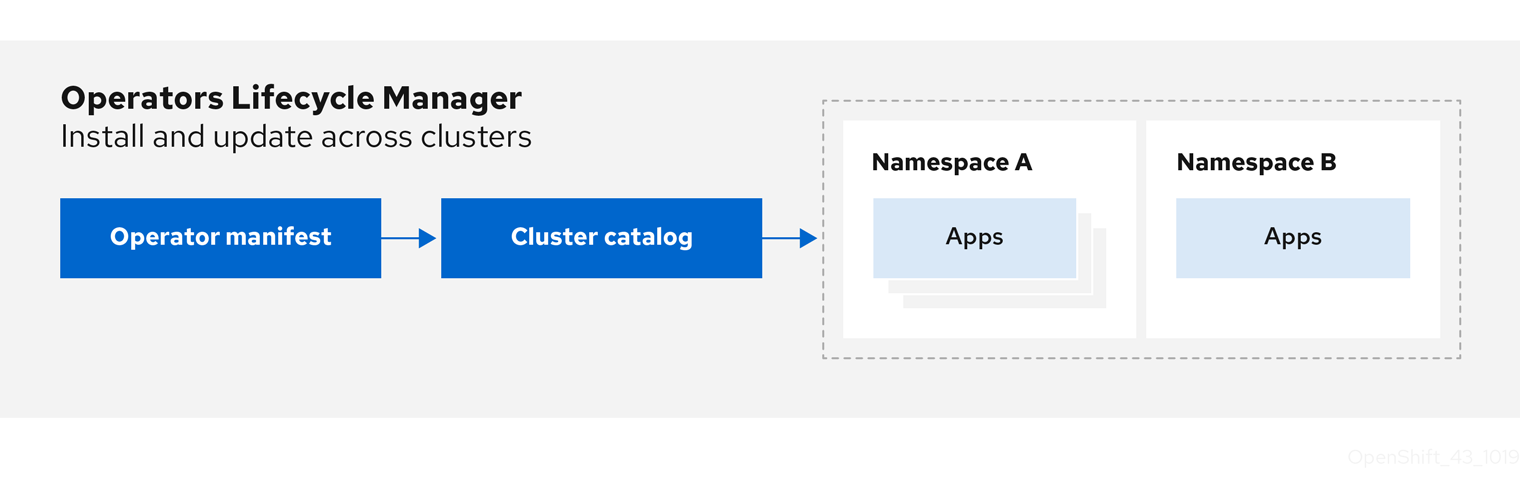
OLM runs by default in OpenShift Container Platform 4.11, which aids cluster administrators in installing, upgrading, and granting access to Operators running on their cluster. The OpenShift Container Platform web console provides management screens for cluster administrators to install Operators, as well as grant specific projects access to use the catalog of Operators available on the cluster.
For developers, a self-service experience allows provisioning and configuring instances of databases, monitoring, and big data services without having to be subject matter experts, because the Operator has that knowledge baked into it.
2.4.1.2. OLM resources
The following custom resource definitions (CRDs) are defined and managed by Operator Lifecycle Manager (OLM):
| Resource | Short name | Description |
|---|---|---|
|
|
| Application metadata. For example: name, version, icon, required resources. |
|
|
| A repository of CSVs, CRDs, and packages that define an application. |
|
|
| Keeps CSVs up to date by tracking a channel in a package. |
|
|
| Calculated list of resources to be created to automatically install or upgrade a CSV. |
|
|
|
Configures all Operators deployed in the same namespace as the |
|
| - |
Creates a communication channel between OLM and an Operator it manages. Operators can write to the |
2.4.1.2.1. Cluster service version
A cluster service version (CSV) represents a specific version of a running Operator on an OpenShift Container Platform cluster. It is a YAML manifest created from Operator metadata that assists Operator Lifecycle Manager (OLM) in running the Operator in the cluster.
OLM requires this metadata about an Operator to ensure that it can be kept running safely on a cluster, and to provide information about how updates should be applied as new versions of the Operator are published. This is similar to packaging software for a traditional operating system; think of the packaging step for OLM as the stage at which you make your rpm, deb, or apk bundle.
A CSV includes the metadata that accompanies an Operator container image, used to populate user interfaces with information such as its name, version, description, labels, repository link, and logo.
A CSV is also a source of technical information required to run the Operator, such as which custom resources (CRs) it manages or depends on, RBAC rules, cluster requirements, and install strategies. This information tells OLM how to create required resources and set up the Operator as a deployment.
2.4.1.2.2. Catalog source
A catalog source represents a store of metadata, typically by referencing an index image stored in a container registry. Operator Lifecycle Manager (OLM) queries catalog sources to discover and install Operators and their dependencies. OperatorHub in the OpenShift Container Platform web console also displays the Operators provided by catalog sources.
Cluster administrators can view the full list of Operators provided by an enabled catalog source on a cluster by using the Administration
The spec of a CatalogSource object indicates how to construct a pod or how to communicate with a service that serves the Operator Registry gRPC API.
Example 2.8. Example CatalogSource object
apiVersion: operators.coreos.com/v1alpha1
kind: CatalogSource
metadata:
  generation: 1
  name: example-catalog
namespace: openshift-marketplace
  annotations:
    olm.catalogImageTemplate:
      "quay.io/example-org/example-catalog:v{kube_major_version}.{kube_minor_version}.{kube_patch_version}"
spec:
  displayName: Example Catalog
image: quay.io/example-org/example-catalog:v1
priority: -400
  publisher: Example Org
  sourceType: grpc
  grpcPodConfig:
    nodeSelector:
      custom_label: <label>
    priorityClassName: system-cluster-critical
tolerations:
      - key: "key1"
        operator: "Equal"
        value: "value1"
        effect: "NoSchedule"
  updateStrategy:
    registryPoll:
      interval: 30m0s
status:
  connectionState:
    address: example-catalog.openshift-marketplace.svc:50051
    lastConnect: 2021-08-26T18:14:31Z
    lastObservedState: READY
latestImageRegistryPoll: 2021-08-26T18:46:25Z
registryService:
    createdAt: 2021-08-26T16:16:37Z
    port: 50051
    protocol: grpc
    serviceName: example-catalog
serviceNamespace: openshift-marketplace- 1
- Name for the
CatalogSourceobject. This value is also used as part of the name for the related pod that is created in the requested namespace. - 2
- Namespace to create the catalog in. To make the catalog available cluster-wide in all namespaces, set this value to
openshift-marketplace. The default Red Hat-provided catalog sources also use theopenshift-marketplacenamespace. Otherwise, set the value to a specific namespace to make the Operator only available in that namespace. - 3
- Optional: To avoid cluster upgrades potentially leaving Operator installations in an unsupported state or without a continued update path, you can enable automatically changing your Operator catalog’s index image version as part of cluster upgrades.
Set the
olm.catalogImageTemplateannotation to your index image name and use one or more of the Kubernetes cluster version variables as shown when constructing the template for the image tag. The annotation overwrites thespec.imagefield at run time. See the "Image template for custom catalog sources" section for more details. - 4
- Display name for the catalog in the web console and CLI.
- 5
- Index image for the catalog. Optionally, can be omitted when using the
olm.catalogImageTemplateannotation, which sets the pull spec at run time. - 6
- Weight for the catalog source. OLM uses the weight for prioritization during dependency resolution. A higher weight indicates the catalog is preferred over lower-weighted catalogs.
- 7
- Source types include the following:
-
grpcwith animagereference: OLM pulls the image and runs the pod, which is expected to serve a compliant API. -
grpcwith anaddressfield: OLM attempts to contact the gRPC API at the given address. This should not be used in most cases. -
configmap: OLM parses config map data and runs a pod that can serve the gRPC API over it.
-
- 8
- Optional: For
grpctype catalog sources, overrides the default node selector for the pod serving the content inspec.image, if defined. - 9
- Optional: For
grpctype catalog sources, overrides the default priority class name for the pod serving the content inspec.image, if defined. Kubernetes providessystem-cluster-criticalandsystem-node-criticalpriority classes by default. Setting the field to empty ("") assigns the pod the default priority. Other priority classes can be defined manually. - 10
- Optional: For
grpctype catalog sources, overrides the default tolerations for the pod serving the content inspec.image, if defined. - 11
- Automatically check for new versions at a given interval to stay up-to-date.
- 12
- Last observed state of the catalog connection. For example:
-
READY: A connection is successfully established. -
CONNECTING: A connection is attempting to establish. -
TRANSIENT_FAILURE: A temporary problem has occurred while attempting to establish a connection, such as a timeout. The state will eventually switch back toCONNECTINGand try again.
See States of Connectivity in the gRPC documentation for more details.
-
- 13
- Latest time the container registry storing the catalog image was polled to ensure the image is up-to-date.
- 14
- Status information for the catalog’s Operator Registry service.
Referencing the name of a CatalogSource object in a subscription instructs OLM where to search to find a requested Operator:
Example 2.9. Example Subscription object referencing a catalog source
apiVersion: operators.coreos.com/v1alpha1
kind: Subscription
metadata:
  name: example-operator
  namespace: example-namespace
spec:
  channel: stable
  name: example-operator
  source: example-catalog
sourceNamespace: openshift-marketplace2.4.1.2.2.1. Image template for custom catalog sources
Operator compatibility with the underlying cluster can be expressed by a catalog source in various ways. One way, which is used for the default Red Hat-provided catalog sources, is to identify image tags for index images that are specifically created for a particular platform release, for example OpenShift Container Platform 4.11.
During a cluster upgrade, the index image tag for the default Red Hat-provided catalog sources are updated automatically by the Cluster Version Operator (CVO) so that Operator Lifecycle Manager (OLM) pulls the updated version of the catalog. For example during an upgrade from OpenShift Container Platform 4.10 to 4.11, the spec.image field in the CatalogSource object for the redhat-operators catalog is updated from:
registry.redhat.io/redhat/redhat-operator-index:v4.10to:
registry.redhat.io/redhat/redhat-operator-index:v4.11However, the CVO does not automatically update image tags for custom catalogs. To ensure users are left with a compatible and supported Operator installation after a cluster upgrade, custom catalogs should also be kept updated to reference an updated index image.
Starting in OpenShift Container Platform 4.9, cluster administrators can add the olm.catalogImageTemplate annotation in the CatalogSource object for custom catalogs to an image reference that includes a template. The following Kubernetes version variables are supported for use in the template:
-
kube_major_version -
kube_minor_version -
kube_patch_version
You must specify the Kubernetes cluster version and not an OpenShift Container Platform cluster version, as the latter is not currently available for templating.
Provided that you have created and pushed an index image with a tag specifying the updated Kubernetes version, setting this annotation enables the index image versions in custom catalogs to be automatically changed after a cluster upgrade. The annotation value is used to set or update the image reference in the spec.image field of the CatalogSource object. This helps avoid cluster upgrades leaving Operator installations in unsupported states or without a continued update path.
You must ensure that the index image with the updated tag, in whichever registry it is stored in, is accessible by the cluster at the time of the cluster upgrade.
Example 2.10. Example catalog source with an image template
apiVersion: operators.coreos.com/v1alpha1
kind: CatalogSource
metadata:
  generation: 1
  name: example-catalog
  namespace: openshift-marketplace
  annotations:
    olm.catalogImageTemplate:
      "quay.io/example-org/example-catalog:v{kube_major_version}.{kube_minor_version}"
spec:
  displayName: Example Catalog
  image: quay.io/example-org/example-catalog:v1.24
  priority: -400
  publisher: Example Org
If the spec.image field and the olm.catalogImageTemplate annotation are both set, the spec.image field is overwritten by the resolved value from the annotation. If the annotation does not resolve to a usable pull spec, the catalog source falls back to the set spec.image value.
If the spec.image field is not set and the annotation does not resolve to a usable pull spec, OLM stops reconciliation of the catalog source and sets it into a human-readable error condition.
For an OpenShift Container Platform 4.11 cluster, which uses Kubernetes 1.24, the olm.catalogImageTemplate annotation in the preceding example resolves to the following image reference:
quay.io/example-org/example-catalog:v1.24
For future releases of OpenShift Container Platform, you can create updated index images for your custom catalogs that target the later Kubernetes version that is used by the later OpenShift Container Platform version. With the olm.catalogImageTemplate annotation set before the upgrade, upgrading the cluster to the later OpenShift Container Platform version would then automatically update the catalog’s index image as well.
2.4.1.2.2.2. Catalog health requirements
Operator catalogs on a cluster are interchangeable from the perspective of installation resolution; a Subscription object might reference a specific catalog, but dependencies are resolved using all catalogs on the cluster.
For example, if Catalog A is unhealthy, a subscription referencing Catalog A could resolve a dependency in Catalog B, which the cluster administrator might not have been expecting, because B normally had a lower catalog priority than A.
As a result, OLM requires that all catalogs with a given global namespace (for example, the default openshift-marketplace namespace or a custom global namespace) are healthy. When a catalog is unhealthy, all Operator installation or update operations within its shared global namespace will fail with a CatalogSourcesUnhealthy condition. If these operations were permitted in an unhealthy state, OLM might make resolution and installation decisions that were unexpected to the cluster administrator.
As a cluster administrator, if you observe an unhealthy catalog and want to consider the catalog as invalid and resume Operator installations, see the "Removing custom catalogs" or "Disabling the default OperatorHub catalog sources" sections for information about removing the unhealthy catalog.
2.4.1.2.3. Subscription
A subscription, defined by a Subscription object, represents an intention to install an Operator. It is the custom resource that relates an Operator to a catalog source.
Subscriptions describe which channel of an Operator package to subscribe to, and whether to perform updates automatically or manually. If set to automatic, the subscription ensures Operator Lifecycle Manager (OLM) manages and upgrades the Operator to ensure that the latest version is always running in the cluster.
Example Subscription object
apiVersion: operators.coreos.com/v1alpha1
kind: Subscription
metadata:
  name: example-operator
  namespace: example-namespace
spec:
  channel: stable
  name: example-operator
  source: example-catalog
  sourceNamespace: openshift-marketplace
This Subscription object defines the name and namespace of the Operator, as well as the catalog from which the Operator data can be found. The channel, such as alpha, beta, or stable, helps determine which Operator stream should be installed from the catalog source.
The names of channels in a subscription can differ between Operators, but the naming scheme should follow a common convention within a given Operator. For example, channel names might follow a minor release update stream for the application provided by the Operator (1.2, 1.3) or a release frequency (stable, fast).
In addition to being easily visible from the OpenShift Container Platform web console, it is possible to identify when there is a newer version of an Operator available by inspecting the status of the related subscription. The value associated with the currentCSV field is the newest version that is known to OLM, and installedCSV is the version that is installed on the cluster.
2.4.1.2.4. Install plan
An install plan, defined by an InstallPlan object, describes a set of resources that Operator Lifecycle Manager (OLM) creates to install or upgrade to a specific version of an Operator. The version is defined by a cluster service version (CSV).
To install an Operator, a cluster administrator, or a user who has been granted Operator installation permissions, must first create a Subscription object. A subscription represents the intent to subscribe to a stream of available versions of an Operator from a catalog source. The subscription then creates an InstallPlan object to facilitate the installation of the resources for the Operator.
The install plan must then be approved according to one of the following approval strategies:
-
If the subscription’s
spec.installPlanApprovalfield is set toAutomatic, the install plan is approved automatically. -
If the subscription’s
spec.installPlanApprovalfield is set toManual, the install plan must be manually approved by a cluster administrator or user with proper permissions.
After the install plan is approved, OLM creates the specified resources and installs the Operator in the namespace that is specified by the subscription.
Example 2.11. Example InstallPlan object
apiVersion: operators.coreos.com/v1alpha1
kind: InstallPlan
metadata:
  name: install-abcde
  namespace: operators
spec:
  approval: Automatic
  approved: true
  clusterServiceVersionNames:
    - my-operator.v1.0.1
  generation: 1
status:
  ...
  catalogSources: []
  conditions:
    - lastTransitionTime: '2021-01-01T20:17:27Z'
      lastUpdateTime: '2021-01-01T20:17:27Z'
      status: 'True'
      type: Installed
  phase: Complete
  plan:
    - resolving: my-operator.v1.0.1
      resource:
        group: operators.coreos.com
        kind: ClusterServiceVersion
        manifest: >-
        ...
        name: my-operator.v1.0.1
        sourceName: redhat-operators
        sourceNamespace: openshift-marketplace
        version: v1alpha1
      status: Created
    - resolving: my-operator.v1.0.1
      resource:
        group: apiextensions.k8s.io
        kind: CustomResourceDefinition
        manifest: >-
        ...
        name: webservers.web.servers.org
        sourceName: redhat-operators
        sourceNamespace: openshift-marketplace
        version: v1beta1
      status: Created
    - resolving: my-operator.v1.0.1
      resource:
        group: ''
        kind: ServiceAccount
        manifest: >-
        ...
        name: my-operator
        sourceName: redhat-operators
        sourceNamespace: openshift-marketplace
        version: v1
      status: Created
    - resolving: my-operator.v1.0.1
      resource:
        group: rbac.authorization.k8s.io
        kind: Role
        manifest: >-
        ...
        name: my-operator.v1.0.1-my-operator-6d7cbc6f57
        sourceName: redhat-operators
        sourceNamespace: openshift-marketplace
        version: v1
      status: Created
    - resolving: my-operator.v1.0.1
      resource:
        group: rbac.authorization.k8s.io
        kind: RoleBinding
        manifest: >-
        ...
        name: my-operator.v1.0.1-my-operator-6d7cbc6f57
        sourceName: redhat-operators
        sourceNamespace: openshift-marketplace
        version: v1
      status: Created
...2.4.1.2.5. Operator groups
An Operator group, defined by the OperatorGroup resource, provides multitenant configuration to OLM-installed Operators. An Operator group selects target namespaces in which to generate required RBAC access for its member Operators.
The set of target namespaces is provided by a comma-delimited string stored in the olm.targetNamespaces annotation of a cluster service version (CSV). This annotation is applied to the CSV instances of member Operators and is projected into their deployments.
Additional resources
2.4.1.2.6. Operator conditions
As part of its role in managing the lifecycle of an Operator, Operator Lifecycle Manager (OLM) infers the state of an Operator from the state of Kubernetes resources that define the Operator. While this approach provides some level of assurance that an Operator is in a given state, there are many instances where an Operator might need to communicate information to OLM that could not be inferred otherwise. This information can then be used by OLM to better manage the lifecycle of the Operator.
OLM provides a custom resource definition (CRD) called OperatorCondition that allows Operators to communicate conditions to OLM. There are a set of supported conditions that influence management of the Operator by OLM when present in the Spec.Conditions array of an OperatorCondition resource.
By default, the Spec.Conditions array is not present in an OperatorCondition object until it is either added by a user or as a result of custom Operator logic.
2.4.2. Operator Lifecycle Manager architecture
This guide outlines the component architecture of Operator Lifecycle Manager (OLM) in OpenShift Container Platform.
2.4.2.1. Component responsibilities
Operator Lifecycle Manager (OLM) is composed of two Operators: the OLM Operator and the Catalog Operator.
Each of these Operators is responsible for managing the custom resource definitions (CRDs) that are the basis for the OLM framework:
| Resource | Short name | Owner | Description |
|---|---|---|---|
|
|
| OLM | Application metadata: name, version, icon, required resources, installation, and so on. |
|
|
| Catalog | Calculated list of resources to be created to automatically install or upgrade a CSV. |
|
|
| Catalog | A repository of CSVs, CRDs, and packages that define an application. |
|
|
| Catalog | Used to keep CSVs up to date by tracking a channel in a package. |
|
|
| OLM |
Configures all Operators deployed in the same namespace as the |
Each of these Operators is also responsible for creating the following resources:
| Resource | Owner |
|---|---|
|
| OLM |
|
| |
|
| |
|
| |
|
| Catalog |
|
|
2.4.2.2. OLM Operator
The OLM Operator is responsible for deploying applications defined by CSV resources after the required resources specified in the CSV are present in the cluster.
The OLM Operator is not concerned with the creation of the required resources; you can choose to manually create these resources using the CLI or using the Catalog Operator. This separation of concern allows users incremental buy-in in terms of how much of the OLM framework they choose to leverage for their application.
The OLM Operator uses the following workflow:
- Watch for cluster service versions (CSVs) in a namespace and check that requirements are met.
If requirements are met, run the install strategy for the CSV.
NoteA CSV must be an active member of an Operator group for the install strategy to run.
2.4.2.3. Catalog Operator
The Catalog Operator is responsible for resolving and installing cluster service versions (CSVs) and the required resources they specify. It is also responsible for watching catalog sources for updates to packages in channels and upgrading them, automatically if desired, to the latest available versions.
To track a package in a channel, you can create a Subscription object configuring the desired package, channel, and the CatalogSource object you want to use for pulling updates. When updates are found, an appropriate InstallPlan object is written into the namespace on behalf of the user.
The Catalog Operator uses the following workflow:
- Connect to each catalog source in the cluster.
Watch for unresolved install plans created by a user, and if found:
- Find the CSV matching the name requested and add the CSV as a resolved resource.
- For each managed or required CRD, add the CRD as a resolved resource.
- For each required CRD, find the CSV that manages it.
- Watch for resolved install plans and create all of the discovered resources for it, if approved by a user or automatically.
- Watch for catalog sources and subscriptions and create install plans based on them.
2.4.2.4. Catalog Registry
The Catalog Registry stores CSVs and CRDs for creation in a cluster and stores metadata about packages and channels.
A package manifest is an entry in the Catalog Registry that associates a package identity with sets of CSVs. Within a package, channels point to a particular CSV. Because CSVs explicitly reference the CSV that they replace, a package manifest provides the Catalog Operator with all of the information that is required to update a CSV to the latest version in a channel, stepping through each intermediate version.
2.4.3. Operator Lifecycle Manager workflow
This guide outlines the workflow of Operator Lifecycle Manager (OLM) in OpenShift Container Platform.
2.4.3.1. Operator installation and upgrade workflow in OLM
In the Operator Lifecycle Manager (OLM) ecosystem, the following resources are used to resolve Operator installations and upgrades:
-
ClusterServiceVersion(CSV) -
CatalogSource -
Subscription
Operator metadata, defined in CSVs, can be stored in a collection called a catalog source. OLM uses catalog sources, which use the Operator Registry API, to query for available Operators as well as upgrades for installed Operators.
Figure 2.3. Catalog source overview
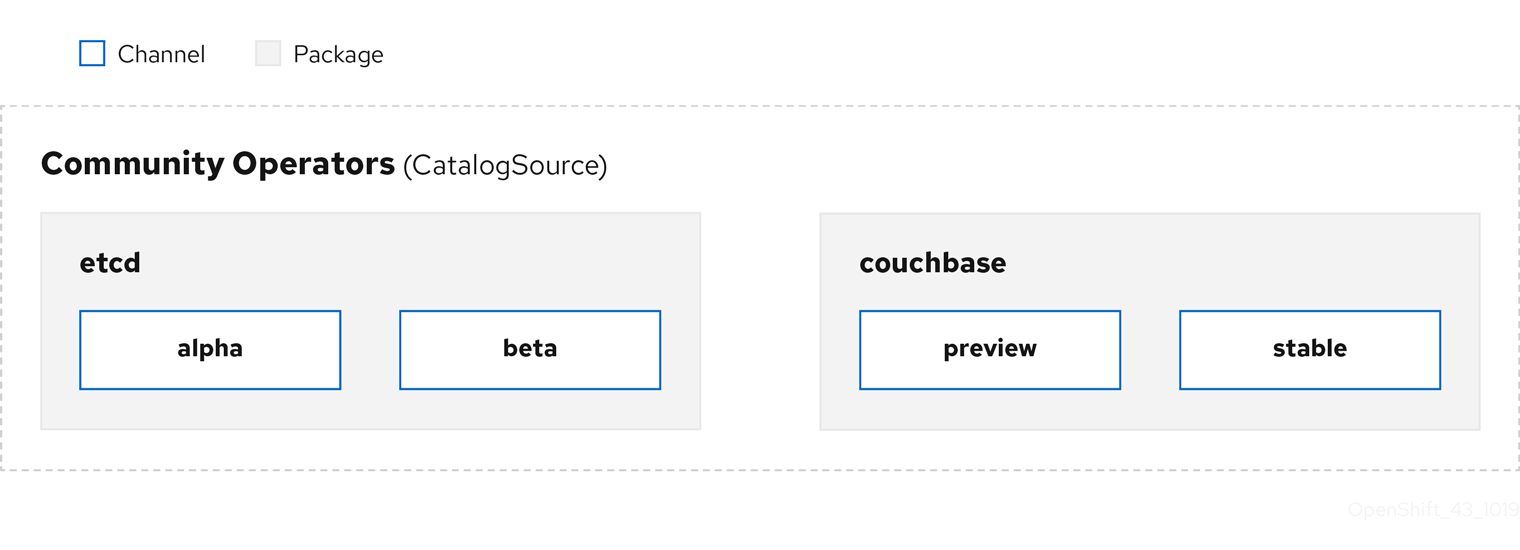
Within a catalog source, Operators are organized into packages and streams of updates called channels, which should be a familiar update pattern from OpenShift Container Platform or other software on a continuous release cycle like web browsers.
Figure 2.4. Packages and channels in a Catalog source
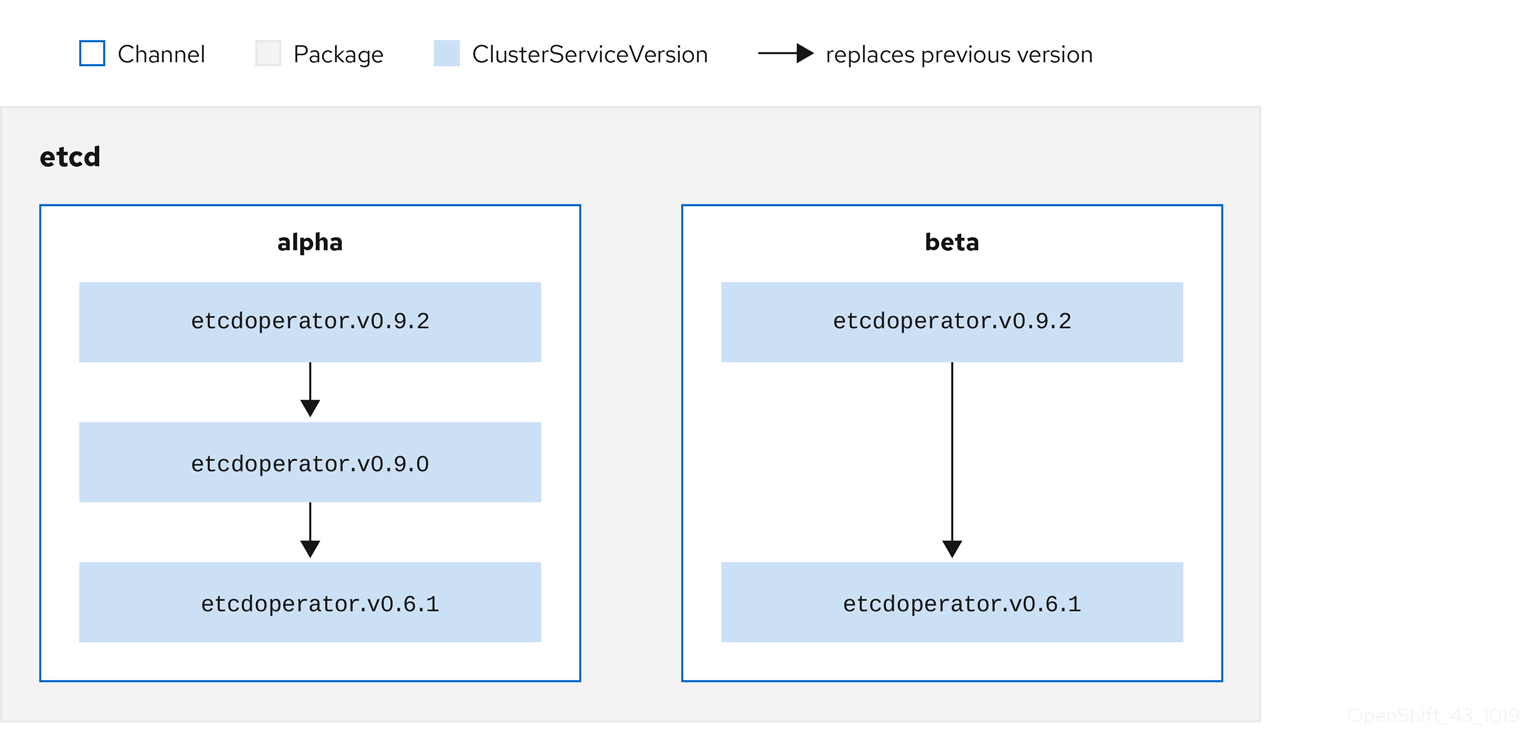
A user indicates a particular package and channel in a particular catalog source in a subscription, for example an etcd package and its alpha channel. If a subscription is made to a package that has not yet been installed in the namespace, the latest Operator for that package is installed.
OLM deliberately avoids version comparisons, so the "latest" or "newest" Operator available from a given catalog
Each CSV has a replaces parameter that indicates which Operator it replaces. This builds a graph of CSVs that can be queried by OLM, and updates can be shared between channels. Channels can be thought of as entry points into the graph of updates:
Figure 2.5. OLM graph of available channel updates
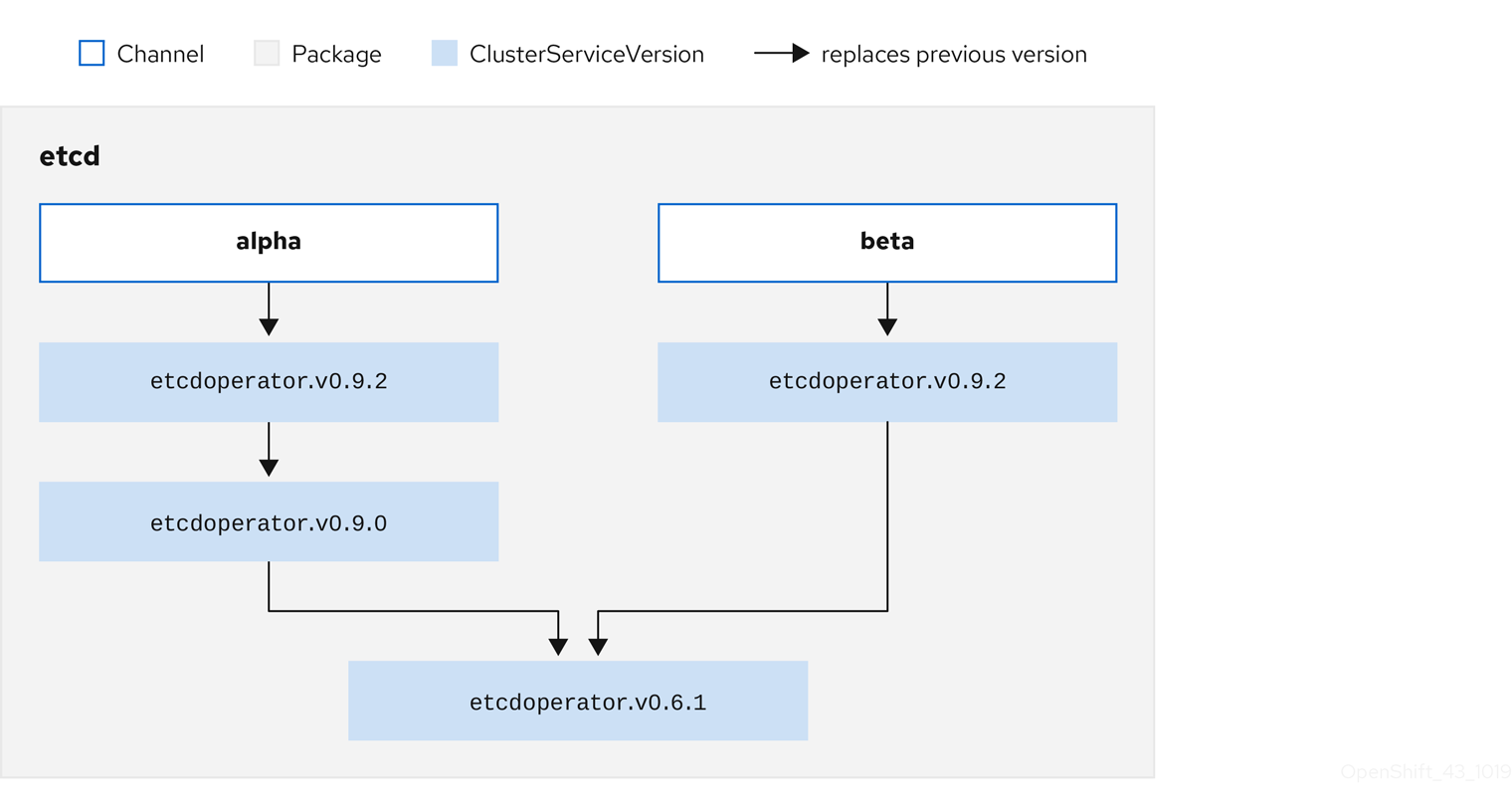
Example channels in a package
packageName: example
channels:
- name: alpha
  currentCSV: example.v0.1.2
- name: beta
  currentCSV: example.v0.1.3
defaultChannel: alpha
For OLM to successfully query for updates, given a catalog source, package, channel, and CSV, a catalog must be able to return, unambiguously and deterministically, a single CSV that replaces the input CSV.
2.4.3.1.1. Example upgrade path
For an example upgrade scenario, consider an installed Operator corresponding to CSV version 0.1.1. OLM queries the catalog source and detects an upgrade in the subscribed channel with new CSV version 0.1.3 that replaces an older but not-installed CSV version 0.1.2, which in turn replaces the older and installed CSV version 0.1.1.
OLM walks back from the channel head to previous versions via the replaces field specified in the CSVs to determine the upgrade path 0.1.3 0.1.2 0.1.1; the direction of the arrow indicates that the former replaces the latter. OLM upgrades the Operator one version at the time until it reaches the channel head.
For this given scenario, OLM installs Operator version 0.1.2 to replace the existing Operator version 0.1.1. Then, it installs Operator version 0.1.3 to replace the previously installed Operator version 0.1.2. At this point, the installed operator version 0.1.3 matches the channel head and the upgrade is completed.
2.4.3.1.2. Skipping upgrades
The basic path for upgrades in OLM is:
- A catalog source is updated with one or more updates to an Operator.
- OLM traverses every version of the Operator until reaching the latest version the catalog source contains.
However, sometimes this is not a safe operation to perform. There will be cases where a published version of an Operator should never be installed on a cluster if it has not already, for example because a version introduces a serious vulnerability.
In those cases, OLM must consider two cluster states and provide an update graph that supports both:
- The "bad" intermediate Operator has been seen by the cluster and installed.
- The "bad" intermediate Operator has not yet been installed onto the cluster.
By shipping a new catalog and adding a skipped release, OLM is ensured that it can always get a single unique update regardless of the cluster state and whether it has seen the bad update yet.
Example CSV with skipped release
apiVersion: operators.coreos.com/v1alpha1
kind: ClusterServiceVersion
metadata:
  name: etcdoperator.v0.9.2
  namespace: placeholder
  annotations:
spec:
    displayName: etcd
    description: Etcd Operator
    replaces: etcdoperator.v0.9.0
    skips:
    - etcdoperator.v0.9.1
Consider the following example of Old CatalogSource and New CatalogSource.
Figure 2.6. Skipping updates
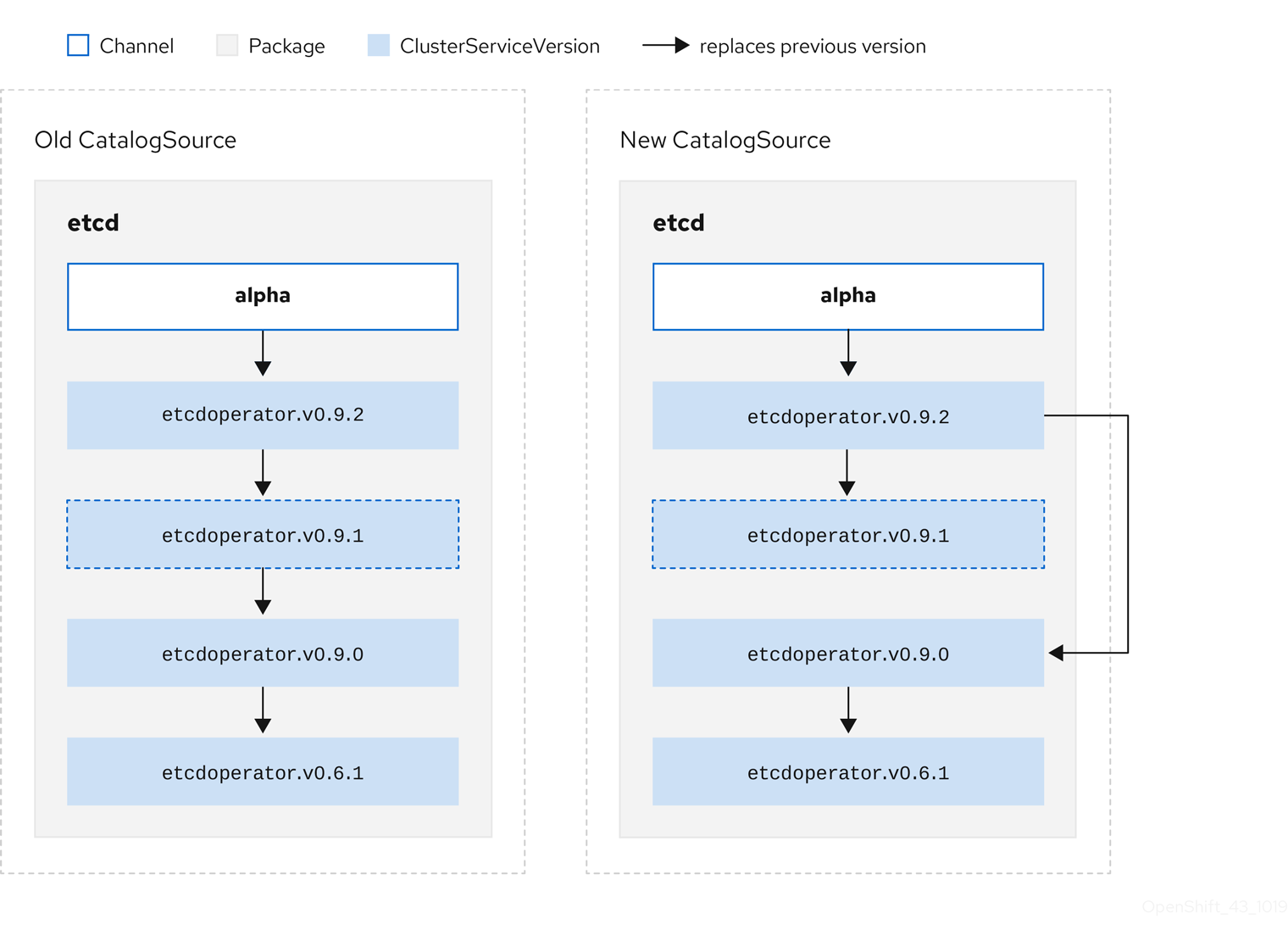
This graph maintains that:
- Any Operator found in Old CatalogSource has a single replacement in New CatalogSource.
- Any Operator found in New CatalogSource has a single replacement in New CatalogSource.
- If the bad update has not yet been installed, it will never be.
2.4.3.1.3. Replacing multiple Operators
Creating New CatalogSource as described requires publishing CSVs that replace one Operator, but can skip several. This can be accomplished using the skipRange annotation:
olm.skipRange: <semver_range>
where <semver_range> has the version range format supported by the semver library.
When searching catalogs for updates, if the head of a channel has a skipRange annotation and the currently installed Operator has a version field that falls in the range, OLM updates to the latest entry in the channel.
The order of precedence is:
-
Channel head in the source specified by
sourceNameon the subscription, if the other criteria for skipping are met. -
The next Operator that replaces the current one, in the source specified by
sourceName. - Channel head in another source that is visible to the subscription, if the other criteria for skipping are met.
- The next Operator that replaces the current one in any source visible to the subscription.
Example CSV with skipRange
apiVersion: operators.coreos.com/v1alpha1
kind: ClusterServiceVersion
metadata:
    name: elasticsearch-operator.v4.1.2
    namespace: <namespace>
    annotations:
        olm.skipRange: '>=4.1.0 <4.1.2'
2.4.3.1.4. Z-stream support
A z-stream, or patch release, must replace all previous z-stream releases for the same minor version. OLM does not consider major, minor, or patch versions, it just needs to build the correct graph in a catalog.
In other words, OLM must be able to take a graph as in Old CatalogSource and, similar to before, generate a graph as in New CatalogSource:
Figure 2.7. Replacing several Operators
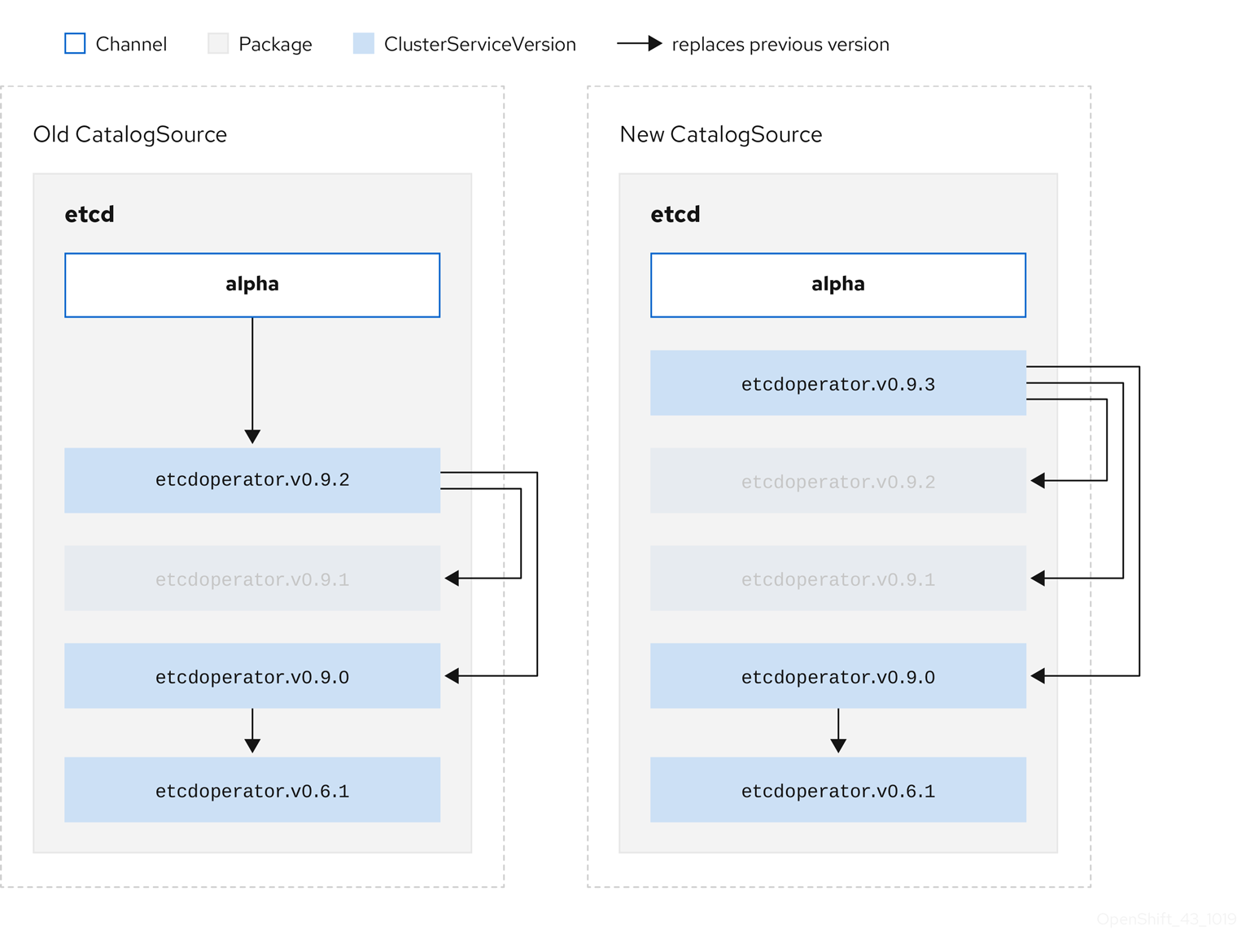
This graph maintains that:
- Any Operator found in Old CatalogSource has a single replacement in New CatalogSource.
- Any Operator found in New CatalogSource has a single replacement in New CatalogSource.
- Any z-stream release in Old CatalogSource will update to the latest z-stream release in New CatalogSource.
- Unavailable releases can be considered "virtual" graph nodes; their content does not need to exist, the registry just needs to respond as if the graph looks like this.
2.4.4. Operator Lifecycle Manager dependency resolution
This guide outlines dependency resolution and custom resource definition (CRD) upgrade lifecycles with Operator Lifecycle Manager (OLM) in OpenShift Container Platform.
2.4.4.1. About dependency resolution
Operator Lifecycle Manager (OLM) manages the dependency resolution and upgrade lifecycle of running Operators. In many ways, the problems OLM faces are similar to other system or language package managers, such as yum and rpm.
However, there is one constraint that similar systems do not generally have that OLM does: because Operators are always running, OLM attempts to ensure that you are never left with a set of Operators that do not work with each other.
As a result, OLM must never create the following scenarios:
- Install a set of Operators that require APIs that cannot be provided
- Update an Operator in a way that breaks another that depends upon it
This is made possible with two types of data:
| Properties | Typed metadata about the Operator that constitutes the public interface for it in the dependency resolver. Examples include the group/version/kind (GVK) of the APIs provided by the Operator and the semantic version (semver) of the Operator. |
| Constraints or dependencies | An Operator’s requirements that should be satisfied by other Operators that might or might not have already been installed on the target cluster. These act as queries or filters over all available Operators and constrain the selection during dependency resolution and installation. Examples include requiring a specific API to be available on the cluster or expecting a particular Operator with a particular version to be installed. |
OLM converts these properties and constraints into a system of Boolean formulas and passes them to a SAT solver, a program that establishes Boolean satisfiability, which does the work of determining what Operators should be installed.
2.4.4.2. Operator properties
All Operators in a catalog have the following properties:
olm.package- Includes the name of the package and the version of the Operator
olm.gvk- A single property for each provided API from the cluster service version (CSV)
Additional properties can also be directly declared by an Operator author by including a properties.yaml file in the metadata/ directory of the Operator bundle.
Example arbitrary property
properties:
- type: olm.kubeversion
  value:
    version: "1.16.0"
2.4.4.2.1. Arbitrary properties
Operator authors can declare arbitrary properties in a properties.yaml file in the metadata/ directory of the Operator bundle. These properties are translated into a map data structure that is used as an input to the Operator Lifecycle Manager (OLM) resolver at runtime.
These properties are opaque to the resolver as it does not understand the properties, but it can evaluate the generic constraints against those properties to determine if the constraints can be satisfied given the properties list.
Example arbitrary properties
properties:
  - property:
      type: color
      value: red
  - property:
      type: shape
      value: square
  - property:
      type: olm.gvk
      value:
        group: olm.coreos.io
        version: v1alpha1
        kind: myresource
This structure can be used to construct a Common Expression Language (CEL) expression for generic constraints.
Additional resources
2.4.4.3. Operator dependencies
The dependencies of an Operator are listed in a dependencies.yaml file in the metadata/ folder of a bundle. This file is optional and currently only used to specify explicit Operator-version dependencies.
The dependency list contains a type field for each item to specify what kind of dependency this is. The following types of Operator dependencies are supported:
olm.package-
This type indicates a dependency for a specific Operator version. The dependency information must include the package name and the version of the package in semver format. For example, you can specify an exact version such as
0.5.2or a range of versions such as>0.5.1. olm.gvk- With this type, the author can specify a dependency with group/version/kind (GVK) information, similar to existing CRD and API-based usage in a CSV. This is a path to enable Operator authors to consolidate all dependencies, API or explicit versions, to be in the same place.
olm.constraint- This type declares generic constraints on arbitrary Operator properties.
In the following example, dependencies are specified for a Prometheus Operator and etcd CRDs:
Example dependencies.yaml file
dependencies:
  - type: olm.package
    value:
      packageName: prometheus
      version: ">0.27.0"
  - type: olm.gvk
    value:
      group: etcd.database.coreos.com
      kind: EtcdCluster
      version: v1beta2
2.4.4.4. Generic constraints
An olm.constraint property declares a dependency constraint of a particular type, differentiating non-constraint and constraint properties. Its value field is an object containing a failureMessage field holding a string-representation of the constraint message. This message is surfaced as an informative comment to users if the constraint is not satisfiable at runtime.
The following keys denote the available constraint types:
gvk-
Type whose value and interpretation is identical to the
olm.gvktype package-
Type whose value and interpretation is identical to the
olm.packagetype cel- A Common Expression Language (CEL) expression evaluated at runtime by the Operator Lifecycle Manager (OLM) resolver over arbitrary bundle properties and cluster information
all,any,not-
Conjunction, disjunction, and negation constraints, respectively, containing one or more concrete constraints, such as
gvkor a nested compound constraint
2.4.4.4.1. Common Expression Language (CEL) constraints
The cel constraint type supports Common Expression Language (CEL) as the expression language. The cel struct has a rule field which contains the CEL expression string that is evaluated against Operator properties at runtime to determine if the Operator satisfies the constraint.
Example cel constraint
type: olm.constraint
value:
  failureMessage: 'require to have "certified"'
  cel:
    rule: 'properties.exists(p, p.type == "certified")'
The CEL syntax supports a wide range of logical operators, such as AND and OR. As a result, a single CEL expression can have multiple rules for multiple conditions that are linked together by these logical operators. These rules are evaluated against a dataset of multiple different properties from a bundle or any given source, and the output is solved into a single bundle or Operator that satisfies all of those rules within a single constraint.
Example cel constraint with multiple rules
type: olm.constraint
value:
  failureMessage: 'require to have "certified" and "stable" properties'
  cel:
    rule: 'properties.exists(p, p.type == "certified") && properties.exists(p, p.type == "stable")'
2.4.4.4.2. Compound constraints (all, any, not)
Compound constraint types are evaluated following their logical definitions.
The following is an example of a conjunctive constraint (all) of two packages and one GVK. That is, they must all be satisfied by installed bundles:
Example all constraint
schema: olm.bundle
name: red.v1.0.0
properties:
- type: olm.constraint
  value:
    failureMessage: All are required for Red because...
    all:
      constraints:
      - failureMessage: Package blue is needed for...
        package:
          name: blue
          versionRange: '>=1.0.0'
      - failureMessage: GVK Green/v1 is needed for...
        gvk:
          group: greens.example.com
          version: v1
          kind: Green
The following is an example of a disjunctive constraint (any) of three versions of the same GVK. That is, at least one must be satisfied by installed bundles:
Example any constraint
schema: olm.bundle
name: red.v1.0.0
properties:
- type: olm.constraint
  value:
    failureMessage: Any are required for Red because...
    any:
      constraints:
      - gvk:
          group: blues.example.com
          version: v1beta1
          kind: Blue
      - gvk:
          group: blues.example.com
          version: v1beta2
          kind: Blue
      - gvk:
          group: blues.example.com
          version: v1
          kind: Blue
The following is an example of a negation constraint (not) of one version of a GVK. That is, this GVK cannot be provided by any bundle in the result set:
Example not constraint
schema: olm.bundle
name: red.v1.0.0
properties:
- type: olm.constraint
  value:
  all:
    constraints:
    - failureMessage: Package blue is needed for...
      package:
        name: blue
        versionRange: '>=1.0.0'
    - failureMessage: Cannot be required for Red because...
      not:
        constraints:
        - gvk:
            group: greens.example.com
            version: v1alpha1
            kind: greens
The negation semantics might appear unclear in the not constraint context. To clarify, the negation is really instructing the resolver to remove any possible solution that includes a particular GVK, package at a version, or satisfies some child compound constraint from the result set.
As a corollary, the not compound constraint should only be used within all or any constraints, because negating without first selecting a possible set of dependencies does not make sense.
2.4.4.4.3. Nested compound constraints
A nested compound constraint, one that contains at least one child compound constraint along with zero or more simple constraints, is evaluated from the bottom up following the procedures for each previously described constraint type.
The following is an example of a disjunction of conjunctions, where one, the other, or both can satisfy the constraint:
Example nested compound constraint
schema: olm.bundle
name: red.v1.0.0
properties:
- type: olm.constraint
  value:
    failureMessage: Required for Red because...
    any:
      constraints:
      - all:
          constraints:
          - package:
              name: blue
              versionRange: '>=1.0.0'
          - gvk:
              group: blues.example.com
              version: v1
              kind: Blue
      - all:
          constraints:
          - package:
              name: blue
              versionRange: '<1.0.0'
          - gvk:
              group: blues.example.com
              version: v1beta1
              kind: Blue
The maximum raw size of an olm.constraint type is 64KB to limit resource exhaustion attacks.
2.4.4.5. Dependency preferences
There can be many options that equally satisfy a dependency of an Operator. The dependency resolver in Operator Lifecycle Manager (OLM) determines which option best fits the requirements of the requested Operator. As an Operator author or user, it can be important to understand how these choices are made so that dependency resolution is clear.
2.4.4.5.1. Catalog priority
On OpenShift Container Platform cluster, OLM reads catalog sources to know which Operators are available for installation.
Example CatalogSource object
apiVersion: "operators.coreos.com/v1alpha1"
kind: "CatalogSource"
metadata:
  name: "my-operators"
  namespace: "operators"
spec:
  sourceType: grpc
  image: example.com/my/operator-index:v1
  displayName: "My Operators"
  priority: 100
A CatalogSource object has a priority field, which is used by the resolver to know how to prefer options for a dependency.
There are two rules that govern catalog preference:
- Options in higher-priority catalogs are preferred to options in lower-priority catalogs.
- Options in the same catalog as the dependent are preferred to any other catalogs.
2.4.4.5.2. Channel ordering
An Operator package in a catalog is a collection of update channels that a user can subscribe to in an OpenShift Container Platform cluster. Channels can be used to provide a particular stream of updates for a minor release (1.2, 1.3) or a release frequency (stable, fast).
It is likely that a dependency might be satisfied by Operators in the same package, but different channels. For example, version 1.2 of an Operator might exist in both the stable and fast channels.
Each package has a default channel, which is always preferred to non-default channels. If no option in the default channel can satisfy a dependency, options are considered from the remaining channels in lexicographic order of the channel name.
2.4.4.5.3. Order within a channel
There are almost always multiple options to satisfy a dependency within a single channel. For example, Operators in one package and channel provide the same set of APIs.
When a user creates a subscription, they indicate which channel to receive updates from. This immediately reduces the search to just that one channel. But within the channel, it is likely that many Operators satisfy a dependency.
Within a channel, newer Operators that are higher up in the update graph are preferred. If the head of a channel satisfies a dependency, it will be tried first.
2.4.4.5.4. Other constraints
In addition to the constraints supplied by package dependencies, OLM includes additional constraints to represent the desired user state and enforce resolution invariants.
2.4.4.5.4.1. Subscription constraint
A subscription constraint filters the set of Operators that can satisfy a subscription. Subscriptions are user-supplied constraints for the dependency resolver. They declare the intent to either install a new Operator if it is not already on the cluster, or to keep an existing Operator updated.
2.4.4.5.4.2. Package constraint
Within a namespace, no two Operators may come from the same package.
2.4.4.6. CRD upgrades
OLM upgrades a custom resource definition (CRD) immediately if it is owned by a singular cluster service version (CSV). If a CRD is owned by multiple CSVs, then the CRD is upgraded when it has satisfied all of the following backward compatible conditions:
- All existing serving versions in the current CRD are present in the new CRD.
- All existing instances, or custom resources, that are associated with the serving versions of the CRD are valid when validated against the validation schema of the new CRD.
2.4.4.7. Dependency best practices
When specifying dependencies, there are best practices you should consider.
- Depend on APIs or a specific version range of Operators
-
Operators can add or remove APIs at any time; always specify an
olm.gvkdependency on any APIs your Operators requires. The exception to this is if you are specifyingolm.packageconstraints instead. - Set a minimum version
The Kubernetes documentation on API changes describes what changes are allowed for Kubernetes-style Operators. These versioning conventions allow an Operator to update an API without bumping the API version, as long as the API is backwards-compatible.
For Operator dependencies, this means that knowing the API version of a dependency might not be enough to ensure the dependent Operator works as intended.
For example:
-
TestOperator v1.0.0 provides v1alpha1 API version of the
MyObjectresource. -
TestOperator v1.0.1 adds a new field
spec.newfieldtoMyObject, but still at v1alpha1.
Your Operator might require the ability to write
spec.newfieldinto theMyObjectresource. Anolm.gvkconstraint alone is not enough for OLM to determine that you need TestOperator v1.0.1 and not TestOperator v1.0.0.Whenever possible, if a specific Operator that provides an API is known ahead of time, specify an additional
olm.packageconstraint to set a minimum.-
TestOperator v1.0.0 provides v1alpha1 API version of the
- Omit a maximum version or allow a very wide range
Because Operators provide cluster-scoped resources such as API services and CRDs, an Operator that specifies a small window for a dependency might unnecessarily constrain updates for other consumers of that dependency.
Whenever possible, do not set a maximum version. Alternatively, set a very wide semantic range to prevent conflicts with other Operators. For example,
>1.0.0 <2.0.0.Unlike with conventional package managers, Operator authors explicitly encode that updates are safe through channels in OLM. If an update is available for an existing subscription, it is assumed that the Operator author is indicating that it can update from the previous version. Setting a maximum version for a dependency overrides the update stream of the author by unnecessarily truncating it at a particular upper bound.
NoteCluster administrators cannot override dependencies set by an Operator author.
However, maximum versions can and should be set if there are known incompatibilities that must be avoided. Specific versions can be omitted with the version range syntax, for example
> 1.0.0 !1.2.1.
2.4.4.8. Dependency caveats
When specifying dependencies, there are caveats you should consider.
- No compound constraints (AND)
There is currently no method for specifying an AND relationship between constraints. In other words, there is no way to specify that one Operator depends on another Operator that both provides a given API and has version
>1.1.0.This means that when specifying a dependency such as:
dependencies:
- type: olm.package
  value:
    packageName: etcd
    version: ">3.1.0"
- type: olm.gvk
  value:
    group: etcd.database.coreos.com
    kind: EtcdCluster
    version: v1beta2
It would be possible for OLM to satisfy this with two Operators: one that provides EtcdCluster and one that has version
>3.1.0. Whether that happens, or whether an Operator is selected that satisfies both constraints, depends on the ordering that potential options are visited. Dependency preferences and ordering options are well-defined and can be reasoned about, but to exercise caution, Operators should stick to one mechanism or the other.- Cross-namespace compatibility
- OLM performs dependency resolution at the namespace scope. It is possible to get into an update deadlock if updating an Operator in one namespace would be an issue for an Operator in another namespace, and vice-versa.
2.4.4.9. Example dependency resolution scenarios
In the following examples, a provider is an Operator which "owns" a CRD or API service.
Example: Deprecating dependent APIs
A and B are APIs (CRDs):
- The provider of A depends on B.
- The provider of B has a subscription.
- The provider of B updates to provide C but deprecates B.
This results in:
- B no longer has a provider.
- A no longer works.
This is a case OLM prevents with its upgrade strategy.
Example: Version deadlock
A and B are APIs:
- The provider of A requires B.
- The provider of B requires A.
- The provider of A updates to (provide A2, require B2) and deprecate A.
- The provider of B updates to (provide B2, require A2) and deprecate B.
If OLM attempts to update A without simultaneously updating B, or vice-versa, it is unable to progress to new versions of the Operators, even though a new compatible set can be found.
This is another case OLM prevents with its upgrade strategy.
2.4.5. Operator groups
This guide outlines the use of Operator groups with Operator Lifecycle Manager (OLM) in OpenShift Container Platform.
2.4.5.1. About Operator groups
An Operator group, defined by the OperatorGroup resource, provides multitenant configuration to OLM-installed Operators. An Operator group selects target namespaces in which to generate required RBAC access for its member Operators.
The set of target namespaces is provided by a comma-delimited string stored in the olm.targetNamespaces annotation of a cluster service version (CSV). This annotation is applied to the CSV instances of member Operators and is projected into their deployments.
2.4.5.2. Operator group membership
An Operator is considered a member of an Operator group if the following conditions are true:
- The CSV of the Operator exists in the same namespace as the Operator group.
- The install modes in the CSV of the Operator support the set of namespaces targeted by the Operator group.
An install mode in a CSV consists of an InstallModeType field and a boolean Supported field. The spec of a CSV can contain a set of install modes of four distinct InstallModeTypes:
| InstallModeType | Description |
|---|---|
|
| The Operator can be a member of an Operator group that selects its own namespace. |
|
| The Operator can be a member of an Operator group that selects one namespace. |
|
| The Operator can be a member of an Operator group that selects more than one namespace. |
|
|
The Operator can be a member of an Operator group that selects all namespaces (target namespace set is the empty string |
If the spec of a CSV omits an entry of InstallModeType, then that type is considered unsupported unless support can be inferred by an existing entry that implicitly supports it.
2.4.5.3. Target namespace selection
You can explicitly name the target namespace for an Operator group using the spec.targetNamespaces parameter:
apiVersion: operators.coreos.com/v1
kind: OperatorGroup
metadata:
  name: my-group
  namespace: my-namespace
spec:
  targetNamespaces:
- my-namespaceOperator Lifecycle Manager (OLM) creates the following cluster roles for each Operator group:
-
<operatorgroup_name>-admin -
<operatorgroup_name>-edit -
<operatorgroup_name>-view
When you manually create an Operator group, you must specify a unique name that does not conflict with the existing cluster roles or other Operator groups on the cluster.
You can alternatively specify a namespace using a label selector with the spec.selector parameter:
apiVersion: operators.coreos.com/v1
kind: OperatorGroup
metadata:
  name: my-group
  namespace: my-namespace
spec:
  selector:
    cool.io/prod: "true"
Listing multiple namespaces via spec.targetNamespaces or use of a label selector via spec.selector is not recommended, as the support for more than one target namespace in an Operator group will likely be removed in a future release.
If both spec.targetNamespaces and spec.selector are defined, spec.selector is ignored. Alternatively, you can omit both spec.selector and spec.targetNamespaces to specify a global Operator group, which selects all namespaces:
apiVersion: operators.coreos.com/v1
kind: OperatorGroup
metadata:
  name: my-group
  namespace: my-namespace
The resolved set of selected namespaces is shown in the status.namespaces parameter of an Opeator group. The status.namespace of a global Operator group contains the empty string (""), which signals to a consuming Operator that it should watch all namespaces.
2.4.5.4. Operator group CSV annotations
Member CSVs of an Operator group have the following annotations:
| Annotation | Description |
|---|---|
|
| Contains the name of the Operator group. |
|
| Contains the namespace of the Operator group. |
|
| Contains a comma-delimited string that lists the target namespace selection of the Operator group. |
All annotations except olm.targetNamespaces are included with copied CSVs. Omitting the olm.targetNamespaces annotation on copied CSVs prevents the duplication of target namespaces between tenants.
2.4.5.5. Provided APIs annotation
A group/version/kind (GVK) is a unique identifier for a Kubernetes API. Information about what GVKs are provided by an Operator group are shown in an olm.providedAPIs annotation. The value of the annotation is a string consisting of <kind>.<version>.<group> delimited with commas. The GVKs of CRDs and API services provided by all active member CSVs of an Operator group are included.
Review the following example of an OperatorGroup object with a single active member CSV that provides the PackageManifest resource:
apiVersion: operators.coreos.com/v1
kind: OperatorGroup
metadata:
  annotations:
    olm.providedAPIs: PackageManifest.v1alpha1.packages.apps.redhat.com
  name: olm-operators
  namespace: local
  ...
spec:
  selector: {}
  serviceAccount:
    metadata:
      creationTimestamp: null
  targetNamespaces:
  - local
status:
  lastUpdated: 2019-02-19T16:18:28Z
  namespaces:
  - local
2.4.5.6. Role-based access control
When an Operator group is created, three cluster roles are generated. Each contains a single aggregation rule with a cluster role selector set to match a label, as shown below:
| Cluster role | Label to match |
|---|---|
|
|
|
|
|
|
|
|
|
Operator Lifecycle Manager (OLM) creates the following cluster roles for each Operator group:
-
<operatorgroup_name>-admin -
<operatorgroup_name>-edit -
<operatorgroup_name>-view
When you manually create an Operator group, you must specify a unique name that does not conflict with the existing cluster roles or other Operator groups on the cluster.
The following RBAC resources are generated when a CSV becomes an active member of an Operator group, as long as the CSV is watching all namespaces with the AllNamespaces install mode and is not in a failed state with reason InterOperatorGroupOwnerConflict:
- Cluster roles for each API resource from a CRD
- Cluster roles for each API resource from an API service
- Additional roles and role bindings
| Cluster role | Settings |
|---|---|
|
|
Verbs on
Aggregation labels:
|
|
|
Verbs on
Aggregation labels:
|
|
|
Verbs on
Aggregation labels:
|
|
|
Verbs on
Aggregation labels:
|
| Cluster role | Settings |
|---|---|
|
|
Verbs on
Aggregation labels:
|
|
|
Verbs on
Aggregation labels:
|
|
|
Verbs on
Aggregation labels:
|
Additional roles and role bindings
-
If the CSV defines exactly one target namespace that contains
*, then a cluster role and corresponding cluster role binding are generated for each permission defined in thepermissionsfield of the CSV. All resources generated are given theolm.owner: <csv_name>andolm.owner.namespace: <csv_namespace>labels. -
If the CSV does not define exactly one target namespace that contains
*, then all roles and role bindings in the Operator namespace with theolm.owner: <csv_name>andolm.owner.namespace: <csv_namespace>labels are copied into the target namespace.
2.4.5.7. Copied CSVs
OLM creates copies of all active member CSVs of an Operator group in each of the target namespaces of that Operator group. The purpose of a copied CSV is to tell users of a target namespace that a specific Operator is configured to watch resources created there.
Copied CSVs have a status reason Copied and are updated to match the status of their source CSV. The olm.targetNamespaces annotation is stripped from copied CSVs before they are created on the cluster. Omitting the target namespace selection avoids the duplication of target namespaces between tenants.
Copied CSVs are deleted when their source CSV no longer exists or the Operator group that their source CSV belongs to no longer targets the namespace of the copied CSV.
By default, the disableCopiedCSVs field is disabled. After enabling a disableCopiedCSVs field, the OLM deletes existing copied CSVs on a cluster. When a disableCopiedCSVs field is disabled, the OLM adds copied CSVs again.
Disable the
disableCopiedCSVsfield:$ cat << EOF | oc apply -f - apiVersion: operators.coreos.com/v1 kind: OLMConfig metadata: name: cluster spec: features: disableCopiedCSVs: false EOFEnable the
disableCopiedCSVsfield:$ cat << EOF | oc apply -f - apiVersion: operators.coreos.com/v1 kind: OLMConfig metadata: name: cluster spec: features: disableCopiedCSVs: true EOF
2.4.5.8. Static Operator groups
An Operator group is static if its spec.staticProvidedAPIs field is set to true. As a result, OLM does not modify the olm.providedAPIs annotation of an Operator group, which means that it can be set in advance. This is useful when a user wants to use an Operator group to prevent resource contention in a set of namespaces but does not have active member CSVs that provide the APIs for those resources.
Below is an example of an Operator group that protects Prometheus resources in all namespaces with the something.cool.io/cluster-monitoring: "true" annotation:
apiVersion: operators.coreos.com/v1
kind: OperatorGroup
metadata:
  name: cluster-monitoring
  namespace: cluster-monitoring
  annotations:
    olm.providedAPIs: Alertmanager.v1.monitoring.coreos.com,Prometheus.v1.monitoring.coreos.com,PrometheusRule.v1.monitoring.coreos.com,ServiceMonitor.v1.monitoring.coreos.com
spec:
  staticProvidedAPIs: true
  selector:
    matchLabels:
something.cool.io/cluster-monitoring: "true"Operator Lifecycle Manager (OLM) creates the following cluster roles for each Operator group:
-
<operatorgroup_name>-admin -
<operatorgroup_name>-edit -
<operatorgroup_name>-view
When you manually create an Operator group, you must specify a unique name that does not conflict with the existing cluster roles or other Operator groups on the cluster.
2.4.5.9. Operator group intersection
Two Operator groups are said to have intersecting provided APIs if the intersection of their target namespace sets is not an empty set and the intersection of their provided API sets, defined by olm.providedAPIs annotations, is not an empty set.
A potential issue is that Operator groups with intersecting provided APIs can compete for the same resources in the set of intersecting namespaces.
When checking intersection rules, an Operator group namespace is always included as part of its selected target namespaces.
Rules for intersection
Each time an active member CSV synchronizes, OLM queries the cluster for the set of intersecting provided APIs between the Operator group of the CSV and all others. OLM then checks if that set is an empty set:
If
trueand the CSV’s provided APIs are a subset of the Operator group’s:- Continue transitioning.
If
trueand the CSV’s provided APIs are not a subset of the Operator group’s:If the Operator group is static:
- Clean up any deployments that belong to the CSV.
-
Transition the CSV to a failed state with status reason
CannotModifyStaticOperatorGroupProvidedAPIs.
If the Operator group is not static:
-
Replace the Operator group’s
olm.providedAPIsannotation with the union of itself and the CSV’s provided APIs.
-
Replace the Operator group’s
If
falseand the CSV’s provided APIs are not a subset of the Operator group’s:- Clean up any deployments that belong to the CSV.
-
Transition the CSV to a failed state with status reason
InterOperatorGroupOwnerConflict.
If
falseand the CSV’s provided APIs are a subset of the Operator group’s:If the Operator group is static:
- Clean up any deployments that belong to the CSV.
-
Transition the CSV to a failed state with status reason
CannotModifyStaticOperatorGroupProvidedAPIs.
If the Operator group is not static:
-
Replace the Operator group’s
olm.providedAPIsannotation with the difference between itself and the CSV’s provided APIs.
-
Replace the Operator group’s
Failure states caused by Operator groups are non-terminal.
The following actions are performed each time an Operator group synchronizes:
- The set of provided APIs from active member CSVs is calculated from the cluster. Note that copied CSVs are ignored.
-
The cluster set is compared to
olm.providedAPIs, and ifolm.providedAPIscontains any extra APIs, then those APIs are pruned. - All CSVs that provide the same APIs across all namespaces are requeued. This notifies conflicting CSVs in intersecting groups that their conflict has possibly been resolved, either through resizing or through deletion of the conflicting CSV.
2.4.5.10. Limitations for multitenant Operator management
OpenShift Container Platform provides limited support for simultaneously installing different versions of an Operator on the same cluster. Operator Lifecycle Manager (OLM) installs Operators multiple times in different namespaces. One constraint of this is that the Operator’s API versions must be the same.
Operators are control plane extensions due to their usage of CustomResourceDefinition objects (CRDs), which are global resources in Kubernetes. Different major versions of an Operator often have incompatible CRDs. This makes them incompatible to install simultaneously in different namespaces on a cluster.
All tenants, or namespaces, share the same control plane of a cluster. Therefore, tenants in a multitenant cluster also share global CRDs, which limits the scenarios in which different instances of the same Operator can be used in parallel on the same cluster.
The supported scenarios include the following:
- Operators of different versions that ship the exact same CRD definition (in case of versioned CRDs, the exact same set of versions)
- Operators of different versions that do not ship a CRD, and instead have their CRD available in a separate bundle on the OperatorHub
All other scenarios are not supported, because the integrity of the cluster data cannot be guaranteed if there are multiple competing or overlapping CRDs from different Operator versions to be reconciled on the same cluster.
2.4.5.11. Troubleshooting Operator groups
Membership
An install plan’s namespace must contain only one Operator group. When attempting to generate a cluster service version (CSV) in a namespace, an install plan considers an Operator group invalid in the following scenarios:
- No Operator groups exist in the install plan’s namespace.
- Multiple Operator groups exist in the install plan’s namespace.
- An incorrect or non-existent service account name is specified in the Operator group.
If an install plan encounters an invalid Operator group, the CSV is not generated and the
InstallPlanresource continues to install with a relevant message. For example, the following message is provided if more than one Operator group exists in the same namespace:attenuated service account query failed - more than one operator group(s) are managing this namespace count=2where
count=specifies the number of Operator groups in the namespace.-
If the install modes of a CSV do not support the target namespace selection of the Operator group in its namespace, the CSV transitions to a failure state with the reason
UnsupportedOperatorGroup. CSVs in a failed state for this reason transition to pending after either the target namespace selection of the Operator group changes to a supported configuration, or the install modes of the CSV are modified to support the target namespace selection.
2.4.6. Multitenancy and Operator colocation
This guide outlines multitenancy and Operator colocation in Operator Lifecycle Manager (OLM).
2.4.6.1. Colocation of Operators in a namespace
Operator Lifecycle Manager (OLM) handles OLM-managed Operators that are installed in the same namespace, meaning their Subscription resources are colocated in the same namespace, as related Operators. Even if they are not actually related, OLM considers their states, such as their version and update policy, when any one of them is updated.
This default behavior manifests in two ways:
-
InstallPlanresources of pending updates includeClusterServiceVersion(CSV) resources of all other Operators that are in the same namespace. - All Operators in the same namespace share the same update policy. For example, if one Operator is set to manual updates, all other Operators' update policies are also set to manual.
These scenarios can lead to the following issues:
- It becomes hard to reason about install plans for Operator updates, because there are many more resources defined in them than just the updated Operator.
- It becomes impossible to have some Operators in a namespace update automatically while other are updated manually, which is a common desire for cluster administrators.
These issues usually surface because, when installing Operators with the OpenShift Container Platform web console, the default behavior installs Operators that support the All namespaces install mode into the default openshift-operators global namespace.
As a cluster administrator, you can bypass this default behavior manually by using the following workflow:
- Create a namespace for the installation of the Operator.
- Create a custom global Operator group, which is an Operator group that watches all namespaces. By associating this Operator group with the namespace you just created, it makes the installation namespace a global namespace, which makes Operators installed there available in all namespaces.
- Install the desired Operator in the installation namespace.
If the Operator has dependencies, the dependencies are automatically installed in the pre-created namespace. As a result, it is then valid for the dependency Operators to have the same update policy and shared install plans. For a detailed procedure, see "Installing global Operators in custom namespaces".
2.4.7. Operator conditions
This guide outlines how Operator Lifecycle Manager (OLM) uses Operator conditions.
2.4.7.1. About Operator conditions
As part of its role in managing the lifecycle of an Operator, Operator Lifecycle Manager (OLM) infers the state of an Operator from the state of Kubernetes resources that define the Operator. While this approach provides some level of assurance that an Operator is in a given state, there are many instances where an Operator might need to communicate information to OLM that could not be inferred otherwise. This information can then be used by OLM to better manage the lifecycle of the Operator.
OLM provides a custom resource definition (CRD) called OperatorCondition that allows Operators to communicate conditions to OLM. There are a set of supported conditions that influence management of the Operator by OLM when present in the Spec.Conditions array of an OperatorCondition resource.
By default, the Spec.Conditions array is not present in an OperatorCondition object until it is either added by a user or as a result of custom Operator logic.
2.4.7.2. Supported conditions
Operator Lifecycle Manager (OLM) supports the following Operator conditions.
2.4.7.2.1. Upgradeable condition
The Upgradeable Operator condition prevents an existing cluster service version (CSV) from being replaced by a newer version of the CSV. This condition is useful when:
- An Operator is about to start a critical process and should not be upgraded until the process is completed.
- An Operator is performing a migration of custom resources (CRs) that must be completed before the Operator is ready to be upgraded.
Setting the Upgradeable Operator condition to the False value does not avoid pod disruption. If you must ensure your pods are not disrupted, see "Using pod disruption budgets to specify the number of pods that must be up" and "Graceful termination" in the "Additional resources" section.
Example Upgradeable Operator condition
apiVersion: operators.coreos.com/v1
kind: OperatorCondition
metadata:
  name: my-operator
  namespace: operators
spec:
  conditions:
  - type: Upgradeable
status: "False"
    reason: "migration"
    message: "The Operator is performing a migration."
lastTransitionTime: "2020-08-24T23:15:55Z"2.4.8. Operator Lifecycle Manager metrics
2.4.8.1. Exposed metrics
Operator Lifecycle Manager (OLM) exposes certain OLM-specific resources for use by the Prometheus-based OpenShift Container Platform cluster monitoring stack.
| Name | Description |
|---|---|
|
| Number of catalog sources. |
|
|
State of a catalog source. The value |
|
|
When reconciling a cluster service version (CSV), present whenever a CSV version is in any state other than |
|
| Number of CSVs successfully registered. |
|
|
When reconciling a CSV, represents whether a CSV version is in a |
|
| Monotonic count of CSV upgrades. |
|
| Number of install plans. |
|
| Monotonic count of warnings generated by resources, such as deprecated resources, included in an install plan. |
|
| The duration of a dependency resolution attempt. |
|
| Number of subscriptions. |
|
|
Monotonic count of subscription syncs. Includes the |
2.4.9. Webhook management in Operator Lifecycle Manager
Webhooks allow Operator authors to intercept, modify, and accept or reject resources before they are saved to the object store and handled by the Operator controller. Operator Lifecycle Manager (OLM) can manage the lifecycle of these webhooks when they are shipped alongside your Operator.
See Defining cluster service versions (CSVs) for details on how an Operator developer can define webhooks for their Operator, as well as considerations when running on OLM.
2.5. Understanding OperatorHub
2.5.1. About OperatorHub
OperatorHub is the web console interface in OpenShift Container Platform that cluster administrators use to discover and install Operators. With one click, an Operator can be pulled from its off-cluster source, installed and subscribed on the cluster, and made ready for engineering teams to self-service manage the product across deployment environments using Operator Lifecycle Manager (OLM).
Cluster administrators can choose from catalogs grouped into the following categories:
| Category | Description |
|---|---|
| Red Hat Operators | Red Hat products packaged and shipped by Red Hat. Supported by Red Hat. |
| Certified Operators | Products from leading independent software vendors (ISVs). Red Hat partners with ISVs to package and ship. Supported by the ISV. |
| Red Hat Marketplace | Certified software that can be purchased from Red Hat Marketplace. |
| Community Operators | Optionally-visible software maintained by relevant representatives in the redhat-openshift-ecosystem/community-operators-prod/operators GitHub repository. No official support. |
| Custom Operators | Operators you add to the cluster yourself. If you have not added any custom Operators, the Custom category does not appear in the web console on your OperatorHub. |
Operators on OperatorHub are packaged to run on OLM. This includes a YAML file called a cluster service version (CSV) containing all of the CRDs, RBAC rules, deployments, and container images required to install and securely run the Operator. It also contains user-visible information like a description of its features and supported Kubernetes versions.
The Operator SDK can be used to assist developers packaging their Operators for use on OLM and OperatorHub. If you have a commercial application that you want to make accessible to your customers, get it included using the certification workflow provided on the Red Hat Partner Connect portal at connect.redhat.com.
2.5.2. OperatorHub architecture
The OperatorHub UI component is driven by the Marketplace Operator by default on OpenShift Container Platform in the openshift-marketplace namespace.
2.5.2.1. OperatorHub custom resource
The Marketplace Operator manages an OperatorHub custom resource (CR) named cluster that manages the default CatalogSource objects provided with OperatorHub. You can modify this resource to enable or disable the default catalogs, which is useful when configuring OpenShift Container Platform in restricted network environments.
Example OperatorHub custom resource
apiVersion: config.openshift.io/v1
kind: OperatorHub
metadata:
  name: cluster
spec:
  disableAllDefaultSources: true
sources: [
    {
      name: "community-operators",
      disabled: false
    }
]2.6. Red Hat-provided Operator catalogs
Red Hat provides several Operator catalogs that are included with OpenShift Container Platform by default.
As of OpenShift Container Platform 4.11, the default Red Hat-provided Operator catalog releases in the file-based catalog format. The default Red Hat-provided Operator catalogs for OpenShift Container Platform 4.6 through 4.10 released in the deprecated SQLite database format.
The opm subcommands, flags, and functionality related to the SQLite database format are also deprecated and will be removed in a future release. The features are still supported and must be used for catalogs that use the deprecated SQLite database format.
Many of the opm subcommands and flags for working with the SQLite database format, such as opm index prune, do not work with the file-based catalog format. For more information about working with file-based catalogs, see Managing custom catalogs, Operator Framework packaging format, and Mirroring images for a disconnected installation using the oc-mirror plugin.
2.6.1. About Operator catalogs
An Operator catalog is a repository of metadata that Operator Lifecycle Manager (OLM) can query to discover and install Operators and their dependencies on a cluster. OLM always installs Operators from the latest version of a catalog.
An index image, based on the Operator bundle format, is a containerized snapshot of a catalog. It is an immutable artifact that contains the database of pointers to a set of Operator manifest content. A catalog can reference an index image to source its content for OLM on the cluster.
As catalogs are updated, the latest versions of Operators change, and older versions may be removed or altered. In addition, when OLM runs on an OpenShift Container Platform cluster in a restricted network environment, it is unable to access the catalogs directly from the internet to pull the latest content.
As a cluster administrator, you can create your own custom index image, either based on a Red Hat-provided catalog or from scratch, which can be used to source the catalog content on the cluster. Creating and updating your own index image provides a method for customizing the set of Operators available on the cluster, while also avoiding the aforementioned restricted network environment issues.
Kubernetes periodically deprecates certain APIs that are removed in subsequent releases. As a result, Operators are unable to use removed APIs starting with the version of OpenShift Container Platform that uses the Kubernetes version that removed the API.
If your cluster is using custom catalogs, see Controlling Operator compatibility with OpenShift Container Platform versions for more details about how Operator authors can update their projects to help avoid workload issues and prevent incompatible upgrades.
Support for the legacy package manifest format for Operators, including custom catalogs that were using the legacy format, is removed in OpenShift Container Platform 4.8 and later.
When creating custom catalog images, previous versions of OpenShift Container Platform 4 required using the oc adm catalog build command, which was deprecated for several releases and is now removed. With the availability of Red Hat-provided index images starting in OpenShift Container Platform 4.6, catalog builders must use the opm index command to manage index images.
2.6.2. About Red Hat-provided Operator catalogs
The Red Hat-provided catalog sources are installed by default in the openshift-marketplace namespace, which makes the catalogs available cluster-wide in all namespaces.
The following Operator catalogs are distributed by Red Hat:
| Catalog | Index image | Description |
|---|---|---|
|
|
| Red Hat products packaged and shipped by Red Hat. Supported by Red Hat. |
|
|
| Products from leading independent software vendors (ISVs). Red Hat partners with ISVs to package and ship. Supported by the ISV. |
|
|
| Certified software that can be purchased from Red Hat Marketplace. |
|
|
| Software maintained by relevant representatives in the redhat-openshift-ecosystem/community-operators-prod/operators GitHub repository. No official support. |
During a cluster upgrade, the index image tag for the default Red Hat-provided catalog sources are updated automatically by the Cluster Version Operator (CVO) so that Operator Lifecycle Manager (OLM) pulls the updated version of the catalog. For example during an upgrade from OpenShift Container Platform 4.8 to 4.9, the spec.image field in the CatalogSource object for the redhat-operators catalog is updated from:
registry.redhat.io/redhat/redhat-operator-index:v4.8to:
registry.redhat.io/redhat/redhat-operator-index:v4.92.7. Operators in multitenant clusters
The default behavior for Operator Lifecycle Manager (OLM) aims to provide simplicity during Operator installation. However, this behavior can lack flexibility, especially in multitenant clusters. In order for multiple tenants on a OpenShift Container Platform cluster to use an Operator, the default behavior of OLM requires that administrators install the Operator in All namespaces mode, which can be considered to violate the principle of least privilege.
Consider the following scenarios to determine which Operator installation workflow works best for your environment and requirements.
2.7.1. Default Operator install modes and behavior
When installing Operators with the web console as an administrator, you typically have two choices for the install mode, depending on the Operator’s capabilities:
- Single namespace
- Installs the Operator in the chosen single namespace, and makes all permissions that the Operator requests available in that namespace.
- All namespaces
-
Installs the Operator in the default
openshift-operatorsnamespace to watch and be made available to all namespaces in the cluster. Makes all permissions that the Operator requests available in all namespaces. In some cases, an Operator author can define metadata to give the user a second option for that Operator’s suggested namespace.
This choice also means that users in the affected namespaces get access to the Operators APIs, which can leverage the custom resources (CRs) they own, depending on their role in the namespace:
-
The
namespace-adminandnamespace-editroles can read/write to the Operator APIs, meaning they can use them. -
The
namespace-viewrole can read CR objects of that Operator.
For Single namespace mode, because the Operator itself installs in the chosen namespace, its pod and service account are also located there. For All namespaces mode, the Operator’s privileges are all automatically elevated to cluster roles, meaning the Operator has those permissions in all namespaces.
2.7.2. Recommended solution for multitenant clusters
While a Multinamespace install mode does exist, it is supported by very few Operators. As a middle ground solution between the standard All namespaces and Single namespace install modes, you can install multiple instances of the same Operator, one for each tenant, by using the following workflow:
- Create a namespace for the tenant Operator that is separate from the tenant’s namespace.
- Create an Operator group for the tenant Operator scoped only to the tenant’s namespace.
- Install the Operator in the tenant Operator namespace.
As a result, the Operator resides in the tenant Operator namespace and watches the tenant namespace, but neither the Operator’s pod nor its service account are visible or usable by the tenant.
This solution provides better tenant separation, least privilege principle at the cost of resource usage, and additional orchestration to ensure the constraints are met. For a detailed procedure, see "Preparing for multiple instances of an Operator for multitenant clusters".
Limitations and considerations
This solution only works when the following constraints are met:
- All instances of the same Operator must be the same version.
- The Operator cannot have dependencies on other Operators.
- The Operator cannot ship a CRD conversion webhook.
You cannot use different versions of the same Operator on the same cluster. Eventually, the installation of another instance of the Operator would be blocked when it meets the following conditions:
- The instance is not the newest version of the Operator.
- The instance ships an older revision of the CRDs that lack information or versions that newer revisions have that are already in use on the cluster.
As an administrator, use caution when allowing non-cluster administrators to install Operators self-sufficiently, as explained in "Allowing non-cluster administrators to install Operators". These tenants should only have access to a curated catalog of Operators that are known to not have dependencies. These tenants must also be forced to use the same version line of an Operator, to ensure the CRDs do not change. This requires the use of namespace-scoped catalogs and likely disabling the global default catalogs.
2.7.3. Operator colocation and Operator groups
Operator Lifecycle Manager (OLM) handles OLM-managed Operators that are installed in the same namespace, meaning their Subscription resources are colocated in the same namespace, as related Operators. Even if they are not actually related, OLM considers their states, such as their version and update policy, when any one of them is updated.
For more information on Operator colocation and using Operator groups effectively, see Operator Lifecycle Manager (OLM)
2.8. CRDs
2.8.1. Extending the Kubernetes API with custom resource definitions
Operators use the Kubernetes extension mechanism, custom resource definitions (CRDs), so that custom objects managed by the Operator look and act just like the built-in, native Kubernetes objects. This guide describes how cluster administrators can extend their OpenShift Container Platform cluster by creating and managing CRDs.
2.8.1.1. Custom resource definitions
In the Kubernetes API, a resource is an endpoint that stores a collection of API objects of a certain kind. For example, the built-in Pods resource contains a collection of Pod objects.
A custom resource definition (CRD) object defines a new, unique object type, called a kind, in the cluster and lets the Kubernetes API server handle its entire lifecycle.
Custom resource (CR) objects are created from CRDs that have been added to the cluster by a cluster administrator, allowing all cluster users to add the new resource type into projects.
When a cluster administrator adds a new CRD to the cluster, the Kubernetes API server reacts by creating a new RESTful resource path that can be accessed by the entire cluster or a single project (namespace) and begins serving the specified CR.
Cluster administrators that want to grant access to the CRD to other users can use cluster role aggregation to grant access to users with the admin, edit, or view default cluster roles. Cluster role aggregation allows the insertion of custom policy rules into these cluster roles. This behavior integrates the new resource into the RBAC policy of the cluster as if it was a built-in resource.
Operators in particular make use of CRDs by packaging them with any required RBAC policy and other software-specific logic. Cluster administrators can also add CRDs manually to the cluster outside of the lifecycle of an Operator, making them available to all users.
While only cluster administrators can create CRDs, developers can create the CR from an existing CRD if they have read and write permission to it.
2.8.1.2. Creating a custom resource definition
To create custom resource (CR) objects, cluster administrators must first create a custom resource definition (CRD).
Prerequisites
-
Access to an OpenShift Container Platform cluster with
cluster-adminuser privileges.
Procedure
To create a CRD:
Create a YAML file that contains the following field types:
Example YAML file for a CRD
apiVersion: apiextensions.k8s.io/v11 kind: CustomResourceDefinition metadata: name: crontabs.stable.example.com2 spec: group: stable.example.com3 versions: name: v14 scope: Namespaced5 names: plural: crontabs6 singular: crontab7 kind: CronTab8 shortNames: - ct9 - 1
- Use the
apiextensions.k8s.io/v1API. - 2
- Specify a name for the definition. This must be in the
<plural-name>.<group>format using the values from thegroupandpluralfields. - 3
- Specify a group name for the API. An API group is a collection of objects that are logically related. For example, all batch objects like
JoborScheduledJobcould be in the batch API group (such asbatch.api.example.com). A good practice is to use a fully-qualified-domain name (FQDN) of your organization. - 4
- Specify a version name to be used in the URL. Each API group can exist in multiple versions, for example
v1alpha,v1beta,v1. - 5
- Specify whether the custom objects are available to a project (
Namespaced) or all projects in the cluster (Cluster). - 6
- Specify the plural name to use in the URL. The
pluralfield is the same as a resource in an API URL. - 7
- Specify a singular name to use as an alias on the CLI and for display.
- 8
- Specify the kind of objects that can be created. The type can be in CamelCase.
- 9
- Specify a shorter string to match your resource on the CLI.
NoteBy default, a CRD is cluster-scoped and available to all projects.
Create the CRD object:
$ oc create -f <file_name>.yamlA new RESTful API endpoint is created at:
/apis/<spec:group>/<spec:version>/<scope>/*/<names-plural>/...For example, using the example file, the following endpoint is created:
/apis/stable.example.com/v1/namespaces/*/crontabs/...You can now use this endpoint URL to create and manage CRs. The object kind is based on the
spec.kindfield of the CRD object you created.
2.8.1.3. Creating cluster roles for custom resource definitions
Cluster administrators can grant permissions to existing cluster-scoped custom resource definitions (CRDs). If you use the admin, edit, and view default cluster roles, you can take advantage of cluster role aggregation for their rules.
You must explicitly assign permissions to each of these roles. The roles with more permissions do not inherit rules from roles with fewer permissions. If you assign a rule to a role, you must also assign that verb to roles that have more permissions. For example, if you grant the get crontabs permission to the view role, you must also grant it to the edit and admin roles. The admin or edit role is usually assigned to the user that created a project through the project template.
Prerequisites
- Create a CRD.
Procedure
Create a cluster role definition file for the CRD. The cluster role definition is a YAML file that contains the rules that apply to each cluster role. An OpenShift Container Platform controller adds the rules that you specify to the default cluster roles.
Example YAML file for a cluster role definition
kind: ClusterRole
apiVersion: rbac.authorization.k8s.io/v1
1 metadata: name: aggregate-cron-tabs-admin-edit2 labels: rbac.authorization.k8s.io/aggregate-to-admin: "true"3 rbac.authorization.k8s.io/aggregate-to-edit: "true"4 rules: - apiGroups: ["stable.example.com"]5 resources: ["crontabs"]6 verbs: ["get", "list", "watch", "create", "update", "patch", "delete", "deletecollection"]7 --- kind: ClusterRole apiVersion: rbac.authorization.k8s.io/v1 metadata: name: aggregate-cron-tabs-view8 labels: # Add these permissions to the "view" default role. rbac.authorization.k8s.io/aggregate-to-view: "true"9 rbac.authorization.k8s.io/aggregate-to-cluster-reader: "true"10 rules: - apiGroups: ["stable.example.com"]11 resources: ["crontabs"]12 verbs: ["get", "list", "watch"]13 - 1
- Use the
rbac.authorization.k8s.io/v1API. - 2 8
- Specify a name for the definition.
- 3
- Specify this label to grant permissions to the admin default role.
- 4
- Specify this label to grant permissions to the edit default role.
- 5 11
- Specify the group name of the CRD.
- 6 12
- Specify the plural name of the CRD that these rules apply to.
- 7 13
- Specify the verbs that represent the permissions that are granted to the role. For example, apply read and write permissions to the
adminandeditroles and only read permission to theviewrole. - 9
- Specify this label to grant permissions to the
viewdefault role. - 10
- Specify this label to grant permissions to the
cluster-readerdefault role.
Create the cluster role:
$ oc create -f <file_name>.yaml
2.8.1.4. Creating custom resources from a file
After a custom resource definitions (CRD) has been added to the cluster, custom resources (CRs) can be created with the CLI from a file using the CR specification.
Prerequisites
- CRD added to the cluster by a cluster administrator.
Procedure
Create a YAML file for the CR. In the following example definition, the
cronSpecandimagecustom fields are set in a CR ofKind: CronTab. TheKindcomes from thespec.kindfield of the CRD object:Example YAML file for a CR
apiVersion: "stable.example.com/v1"1 kind: CronTab2 metadata: name: my-new-cron-object3 finalizers:4 - finalizer.stable.example.com spec:5 cronSpec: "* * * * /5" image: my-awesome-cron-image- 1
- Specify the group name and API version (name/version) from the CRD.
- 2
- Specify the type in the CRD.
- 3
- Specify a name for the object.
- 4
- Specify the finalizers for the object, if any. Finalizers allow controllers to implement conditions that must be completed before the object can be deleted.
- 5
- Specify conditions specific to the type of object.
After you create the file, create the object:
$ oc create -f <file_name>.yaml
2.8.1.5. Inspecting custom resources
You can inspect custom resource (CR) objects that exist in your cluster using the CLI.
Prerequisites
- A CR object exists in a namespace to which you have access.
Procedure
To get information on a specific kind of a CR, run:
$ oc get <kind>For example:
$ oc get crontabExample output
NAME                 KIND
my-new-cron-object   CronTab.v1.stable.example.com
Resource names are not case-sensitive, and you can use either the singular or plural forms defined in the CRD, as well as any short name. For example:
$ oc get crontabs$ oc get crontab$ oc get ctYou can also view the raw YAML data for a CR:
$ oc get <kind> -o yamlFor example:
$ oc get ct -o yamlExample output
apiVersion: v1
items:
- apiVersion: stable.example.com/v1
  kind: CronTab
  metadata:
    clusterName: ""
    creationTimestamp: 2017-05-31T12:56:35Z
    deletionGracePeriodSeconds: null
    deletionTimestamp: null
    name: my-new-cron-object
    namespace: default
    resourceVersion: "285"
    selfLink: /apis/stable.example.com/v1/namespaces/default/crontabs/my-new-cron-object
    uid: 9423255b-4600-11e7-af6a-28d2447dc82b
  spec:
    cronSpec: '* * * * /5'
1 image: my-awesome-cron-image2
2.8.2. Managing resources from custom resource definitions
This guide describes how developers can manage custom resources (CRs) that come from custom resource definitions (CRDs).
2.8.2.1. Custom resource definitions
In the Kubernetes API, a resource is an endpoint that stores a collection of API objects of a certain kind. For example, the built-in Pods resource contains a collection of Pod objects.
A custom resource definition (CRD) object defines a new, unique object type, called a kind, in the cluster and lets the Kubernetes API server handle its entire lifecycle.
Custom resource (CR) objects are created from CRDs that have been added to the cluster by a cluster administrator, allowing all cluster users to add the new resource type into projects.
Operators in particular make use of CRDs by packaging them with any required RBAC policy and other software-specific logic. Cluster administrators can also add CRDs manually to the cluster outside of the lifecycle of an Operator, making them available to all users.
While only cluster administrators can create CRDs, developers can create the CR from an existing CRD if they have read and write permission to it.
2.8.2.2. Creating custom resources from a file
After a custom resource definitions (CRD) has been added to the cluster, custom resources (CRs) can be created with the CLI from a file using the CR specification.
Prerequisites
- CRD added to the cluster by a cluster administrator.
Procedure
Create a YAML file for the CR. In the following example definition, the
cronSpecandimagecustom fields are set in a CR ofKind: CronTab. TheKindcomes from thespec.kindfield of the CRD object:Example YAML file for a CR
apiVersion: "stable.example.com/v1"1 kind: CronTab2 metadata: name: my-new-cron-object3 finalizers:4 - finalizer.stable.example.com spec:5 cronSpec: "* * * * /5" image: my-awesome-cron-image- 1
- Specify the group name and API version (name/version) from the CRD.
- 2
- Specify the type in the CRD.
- 3
- Specify a name for the object.
- 4
- Specify the finalizers for the object, if any. Finalizers allow controllers to implement conditions that must be completed before the object can be deleted.
- 5
- Specify conditions specific to the type of object.
After you create the file, create the object:
$ oc create -f <file_name>.yaml
2.8.2.3. Inspecting custom resources
You can inspect custom resource (CR) objects that exist in your cluster using the CLI.
Prerequisites
- A CR object exists in a namespace to which you have access.
Procedure
To get information on a specific kind of a CR, run:
$ oc get <kind>For example:
$ oc get crontabExample output
NAME                 KIND
my-new-cron-object   CronTab.v1.stable.example.com
Resource names are not case-sensitive, and you can use either the singular or plural forms defined in the CRD, as well as any short name. For example:
$ oc get crontabs$ oc get crontab$ oc get ctYou can also view the raw YAML data for a CR:
$ oc get <kind> -o yamlFor example:
$ oc get ct -o yamlExample output
apiVersion: v1
items:
- apiVersion: stable.example.com/v1
  kind: CronTab
  metadata:
    clusterName: ""
    creationTimestamp: 2017-05-31T12:56:35Z
    deletionGracePeriodSeconds: null
    deletionTimestamp: null
    name: my-new-cron-object
    namespace: default
    resourceVersion: "285"
    selfLink: /apis/stable.example.com/v1/namespaces/default/crontabs/my-new-cron-object
    uid: 9423255b-4600-11e7-af6a-28d2447dc82b
  spec:
    cronSpec: '* * * * /5'
1 image: my-awesome-cron-image2

'%20d='M201.5%20305.5c-13.8%200-24.9-11.1-24.9-24.6%200-13.8%2011.1-24.9%2024.9-24.9%2013.6%200%2024.6%2011.1%2024.6%2024.9%200%2013.6-11.1%2024.6-24.6%2024.6zM504%20256c0%20137-111%20248-248%20248S8%20393%208%20256%20119%208%20256%208s248%20111%20248%20248zm-132.3-41.2c-9.4%200-17.7%203.9-23.8%2010-22.4-15.5-52.6-25.5-86.1-26.6l17.4-78.3%2055.4%2012.5c0%2013.6%2011.1%2024.6%2024.6%2024.6%2013.8%200%2024.9-11.3%2024.9-24.9s-11.1-24.9-24.9-24.9c-9.7%200-18%205.8-22.1%2013.8l-61.2-13.6c-3-.8-6.1%201.4-6.9%204.4l-19.1%2086.4c-33.2%201.4-63.1%2011.3-85.5%2026.8-6.1-6.4-14.7-10.2-24.1-10.2-34.9%200-46.3%2046.9-14.4%2062.8-1.1%205-1.7%2010.2-1.7%2015.5%200%2052.6%2059.2%2095.2%20132%2095.2%2073.1%200%20132.3-42.6%20132.3-95.2%200-5.3-.6-10.8-1.9-15.8%2031.3-16%2019.8-62.5-14.9-62.5zM302.8%20331c-18.2%2018.2-76.1%2017.9-93.6%200-2.2-2.2-6.1-2.2-8.3%200-2.5%202.5-2.5%206.4%200%208.6%2022.8%2022.8%2087.3%2022.8%20110.2%200%202.5-2.2%202.5-6.1%200-8.6-2.2-2.2-6.1-2.2-8.3%200zm7.7-75c-13.6%200-24.6%2011.1-24.6%2024.9%200%2013.6%2011.1%2024.6%2024.6%2024.6%2013.8%200%2024.9-11.1%2024.9-24.6%200-13.8-11-24.9-24.9-24.9z'/%3e%3c/svg%3e)