 Red Hat Summit
Questo contenuto non è disponibile nella lingua selezionata.
Chapter 6. Working with nodes
6.1. Viewing and listing the nodes in your OpenShift Container Platform cluster
You can list all the nodes in your cluster to obtain information such as status, age, memory usage, and details about the nodes.
When you perform node management operations, the CLI interacts with node objects that are representations of actual node hosts. The master uses the information from node objects to validate nodes with health checks.
6.1.1. About listing all the nodes in a cluster
You can get detailed information on the nodes in the cluster.
The following command lists all nodes:
$ oc get nodesThe following example is a cluster with healthy nodes:
$ oc get nodesExample output
NAME                   STATUS    ROLES     AGE       VERSION
master.example.com     Ready     master    7h        v1.24.0
node1.example.com      Ready     worker    7h        v1.24.0
node2.example.com      Ready     worker    7h        v1.24.0
The following example is a cluster with one unhealthy node:
$ oc get nodesExample output
NAME                   STATUS                      ROLES     AGE       VERSION
master.example.com     Ready                       master    7h        v1.24.0
node1.example.com      NotReady,SchedulingDisabled worker    7h        v1.24.0
node2.example.com      Ready                       worker    7h        v1.24.0
The conditions that trigger a
NotReadystatus are shown later in this section.The
-o wideoption provides additional information on nodes.$ oc get nodes -o wideExample output
NAME                STATUS   ROLES    AGE    VERSION   INTERNAL-IP    EXTERNAL-IP   OS-IMAGE                                                       KERNEL-VERSION                 CONTAINER-RUNTIME
master.example.com  Ready    master   171m   v1.24.0   10.0.129.108   <none>        Red Hat Enterprise Linux CoreOS 48.83.202103210901-0 (Ootpa)   4.18.0-240.15.1.el8_3.x86_64   cri-o://1.24.0-30.rhaos4.10.gitf2f339d.el8-dev
node1.example.com   Ready    worker   72m    v1.24.0   10.0.129.222   <none>        Red Hat Enterprise Linux CoreOS 48.83.202103210901-0 (Ootpa)   4.18.0-240.15.1.el8_3.x86_64   cri-o://1.24.0-30.rhaos4.10.gitf2f339d.el8-dev
node2.example.com   Ready    worker   164m   v1.24.0   10.0.142.150   <none>        Red Hat Enterprise Linux CoreOS 48.83.202103210901-0 (Ootpa)   4.18.0-240.15.1.el8_3.x86_64   cri-o://1.24.0-30.rhaos4.10.gitf2f339d.el8-dev
The following command lists information about a single node:
$ oc get node <node>For example:
$ oc get node node1.example.comExample output
NAME                   STATUS    ROLES     AGE       VERSION
node1.example.com      Ready     worker    7h        v1.24.0
The following command provides more detailed information about a specific node, including the reason for the current condition:
$ oc describe node <node>For example:
$ oc describe node node1.example.comExample output
Name: node1.example.com1 Roles: worker2 Labels: beta.kubernetes.io/arch=amd643 beta.kubernetes.io/instance-type=m4.large beta.kubernetes.io/os=linux failure-domain.beta.kubernetes.io/region=us-east-2 failure-domain.beta.kubernetes.io/zone=us-east-2a kubernetes.io/hostname=ip-10-0-140-16 node-role.kubernetes.io/worker= Annotations: cluster.k8s.io/machine: openshift-machine-api/ahardin-worker-us-east-2a-q5dzc4 machineconfiguration.openshift.io/currentConfig: worker-309c228e8b3a92e2235edd544c62fea8 machineconfiguration.openshift.io/desiredConfig: worker-309c228e8b3a92e2235edd544c62fea8 machineconfiguration.openshift.io/state: Done volumes.kubernetes.io/controller-managed-attach-detach: true CreationTimestamp: Wed, 13 Feb 2019 11:05:57 -0500 Taints: <none>5 Unschedulable: false Conditions:6 Type Status LastHeartbeatTime LastTransitionTime Reason Message ---- ------ ----------------- ------------------ ------ ------- OutOfDisk False Wed, 13 Feb 2019 15:09:42 -0500 Wed, 13 Feb 2019 11:05:57 -0500 KubeletHasSufficientDisk kubelet has sufficient disk space available MemoryPressure False Wed, 13 Feb 2019 15:09:42 -0500 Wed, 13 Feb 2019 11:05:57 -0500 KubeletHasSufficientMemory kubelet has sufficient memory available DiskPressure False Wed, 13 Feb 2019 15:09:42 -0500 Wed, 13 Feb 2019 11:05:57 -0500 KubeletHasNoDiskPressure kubelet has no disk pressure PIDPressure False Wed, 13 Feb 2019 15:09:42 -0500 Wed, 13 Feb 2019 11:05:57 -0500 KubeletHasSufficientPID kubelet has sufficient PID available Ready True Wed, 13 Feb 2019 15:09:42 -0500 Wed, 13 Feb 2019 11:07:09 -0500 KubeletReady kubelet is posting ready status Addresses:7 InternalIP: 10.0.140.16 InternalDNS: ip-10-0-140-16.us-east-2.compute.internal Hostname: ip-10-0-140-16.us-east-2.compute.internal Capacity:8 attachable-volumes-aws-ebs: 39 cpu: 2 hugepages-1Gi: 0 hugepages-2Mi: 0 memory: 8172516Ki pods: 250 Allocatable: attachable-volumes-aws-ebs: 39 cpu: 1500m hugepages-1Gi: 0 hugepages-2Mi: 0 memory: 7558116Ki pods: 250 System Info:9 Machine ID: 63787c9534c24fde9a0cde35c13f1f66 System UUID: EC22BF97-A006-4A58-6AF8-0A38DEEA122A Boot ID: f24ad37d-2594-46b4-8830-7f7555918325 Kernel Version: 3.10.0-957.5.1.el7.x86_64 OS Image: Red Hat Enterprise Linux CoreOS 410.8.20190520.0 (Ootpa) Operating System: linux Architecture: amd64 Container Runtime Version: cri-o://1.24.0-0.6.dev.rhaos4.3.git9ad059b.el8-rc2 Kubelet Version: v1.24.0 Kube-Proxy Version: v1.24.0 PodCIDR: 10.128.4.0/24 ProviderID: aws:///us-east-2a/i-04e87b31dc6b3e171 Non-terminated Pods: (12 in total)10 Namespace Name CPU Requests CPU Limits Memory Requests Memory Limits --------- ---- ------------ ---------- --------------- ------------- openshift-cluster-node-tuning-operator tuned-hdl5q 0 (0%) 0 (0%) 0 (0%) 0 (0%) openshift-dns dns-default-l69zr 0 (0%) 0 (0%) 0 (0%) 0 (0%) openshift-image-registry node-ca-9hmcg 0 (0%) 0 (0%) 0 (0%) 0 (0%) openshift-ingress router-default-76455c45c-c5ptv 0 (0%) 0 (0%) 0 (0%) 0 (0%) openshift-machine-config-operator machine-config-daemon-cvqw9 20m (1%) 0 (0%) 50Mi (0%) 0 (0%) openshift-marketplace community-operators-f67fh 0 (0%) 0 (0%) 0 (0%) 0 (0%) openshift-monitoring alertmanager-main-0 50m (3%) 50m (3%) 210Mi (2%) 10Mi (0%) openshift-monitoring node-exporter-l7q8d 10m (0%) 20m (1%) 20Mi (0%) 40Mi (0%) openshift-monitoring prometheus-adapter-75d769c874-hvb85 0 (0%) 0 (0%) 0 (0%) 0 (0%) openshift-multus multus-kw8w5 0 (0%) 0 (0%) 0 (0%) 0 (0%) openshift-sdn ovs-t4dsn 100m (6%) 0 (0%) 300Mi (4%) 0 (0%) openshift-sdn sdn-g79hg 100m (6%) 0 (0%) 200Mi (2%) 0 (0%) Allocated resources: (Total limits may be over 100 percent, i.e., overcommitted.) Resource Requests Limits -------- -------- ------ cpu 380m (25%) 270m (18%) memory 880Mi (11%) 250Mi (3%) attachable-volumes-aws-ebs 0 0 Events:11 Type Reason Age From Message ---- ------ ---- ---- ------- Normal NodeHasSufficientPID 6d (x5 over 6d) kubelet, m01.example.com Node m01.example.com status is now: NodeHasSufficientPID Normal NodeAllocatableEnforced 6d kubelet, m01.example.com Updated Node Allocatable limit across pods Normal NodeHasSufficientMemory 6d (x6 over 6d) kubelet, m01.example.com Node m01.example.com status is now: NodeHasSufficientMemory Normal NodeHasNoDiskPressure 6d (x6 over 6d) kubelet, m01.example.com Node m01.example.com status is now: NodeHasNoDiskPressure Normal NodeHasSufficientDisk 6d (x6 over 6d) kubelet, m01.example.com Node m01.example.com status is now: NodeHasSufficientDisk Normal NodeHasSufficientPID 6d kubelet, m01.example.com Node m01.example.com status is now: NodeHasSufficientPID Normal Starting 6d kubelet, m01.example.com Starting kubelet. #...- 1
- The name of the node.
- 2
- The role of the node, either
masterorworker. - 3
- The labels applied to the node.
- 4
- The annotations applied to the node.
- 5
- The taints applied to the node.
- 6
- The node conditions and status. The
conditionsstanza lists theReady,PIDPressure,PIDPressure,MemoryPressure,DiskPressureandOutOfDiskstatus. These condition are described later in this section. - 7
- The IP address and hostname of the node.
- 8
- The pod resources and allocatable resources.
- 9
- Information about the node host.
- 10
- The pods on the node.
- 11
- The events reported by the node.
Among the information shown for nodes, the following node conditions appear in the output of the commands shown in this section:
| Condition | Description |
|---|---|
|
|
If |
|
|
If |
|
|
If |
|
|
If |
|
|
If |
|
|
If |
|
|
If |
|
| Pods cannot be scheduled for placement on the node. |
6.1.2. Listing pods on a node in your cluster
You can list all the pods on a specific node.
Procedure
To list all or selected pods on one or more nodes:
$ oc describe node <node1> <node2>For example:
$ oc describe node ip-10-0-128-218.ec2.internalTo list all or selected pods on selected nodes:
$ oc describe --selector=<node_selector>$ oc describe node --selector=kubernetes.io/osOr:
$ oc describe -l=<pod_selector>$ oc describe node -l node-role.kubernetes.io/workerTo list all pods on a specific node, including terminated pods:
$ oc get pod --all-namespaces --field-selector=spec.nodeName=<nodename>
6.1.3. Viewing memory and CPU usage statistics on your nodes
You can display usage statistics about nodes, which provide the runtime environments for containers. These usage statistics include CPU, memory, and storage consumption.
Prerequisites
-
You must have
cluster-readerpermission to view the usage statistics. - Metrics must be installed to view the usage statistics.
Procedure
To view the usage statistics:
$ oc adm top nodesExample output
NAME                                   CPU(cores)   CPU%      MEMORY(bytes)   MEMORY%
ip-10-0-12-143.ec2.compute.internal    1503m        100%      4533Mi          61%
ip-10-0-132-16.ec2.compute.internal    76m          5%        1391Mi          18%
ip-10-0-140-137.ec2.compute.internal   398m         26%       2473Mi          33%
ip-10-0-142-44.ec2.compute.internal    656m         43%       6119Mi          82%
ip-10-0-146-165.ec2.compute.internal   188m         12%       3367Mi          45%
ip-10-0-19-62.ec2.compute.internal     896m         59%       5754Mi          77%
ip-10-0-44-193.ec2.compute.internal    632m         42%       5349Mi          72%
To view the usage statistics for nodes with labels:
$ oc adm top node --selector=''You must choose the selector (label query) to filter on. Supports
=,==, and!=.
6.2. Working with nodes
As an administrator, you can perform a number of tasks to make your clusters more efficient.
6.2.1. Understanding how to evacuate pods on nodes
Evacuating pods allows you to migrate all or selected pods from a given node or nodes.
You can only evacuate pods backed by a replication controller. The replication controller creates new pods on other nodes and removes the existing pods from the specified node(s).
Bare pods, meaning those not backed by a replication controller, are unaffected by default. You can evacuate a subset of pods by specifying a pod-selector. Pod selectors are based on labels, so all the pods with the specified label will be evacuated.
Procedure
Mark the nodes unschedulable before performing the pod evacuation.
Mark the node as unschedulable:
$ oc adm cordon <node1>Example output
node/<node1> cordonedCheck that the node status is
Ready,SchedulingDisabled:$ oc get node <node1>Example output
NAME        STATUS                     ROLES     AGE       VERSION
<node1>     Ready,SchedulingDisabled   worker    1d        v1.24.0
Evacuate the pods using one of the following methods:
Evacuate all or selected pods on one or more nodes:
$ oc adm drain <node1> <node2> [--pod-selector=<pod_selector>]Force the deletion of bare pods using the
--forceoption. When set totrue, deletion continues even if there are pods not managed by a replication controller, replica set, job, daemon set, or stateful set:$ oc adm drain <node1> <node2> --force=trueSet a period of time in seconds for each pod to terminate gracefully, use
--grace-period. If negative, the default value specified in the pod will be used:$ oc adm drain <node1> <node2> --grace-period=-1Ignore pods managed by daemon sets using the
--ignore-daemonsetsflag set totrue:$ oc adm drain <node1> <node2> --ignore-daemonsets=trueSet the length of time to wait before giving up using the
--timeoutflag. A value of0sets an infinite length of time:$ oc adm drain <node1> <node2> --timeout=5sDelete pods even if there are pods using
emptyDirvolumes by setting the--delete-emptydir-dataflag totrue. Local data is deleted when the node is drained:$ oc adm drain <node1> <node2> --delete-emptydir-data=trueList objects that will be migrated without actually performing the evacuation, using the
--dry-runoption set totrue:$ oc adm drain <node1> <node2> --dry-run=trueInstead of specifying specific node names (for example,
<node1> <node2>), you can use the--selector=<node_selector>option to evacuate pods on selected nodes.
Mark the node as schedulable when done.
$ oc adm uncordon <node1>
6.2.2. Understanding how to update labels on nodes
You can update any label on a node.
Node labels are not persisted after a node is deleted even if the node is backed up by a Machine.
Any change to a MachineSet object is not applied to existing machines owned by the machine set. For example, labels edited or added to an existing MachineSet object are not propagated to existing machines and nodes associated with the machine set.
The following command adds or updates labels on a node:
$ oc label node <node> <key_1>=<value_1> ... <key_n>=<value_n>For example:
$ oc label nodes webconsole-7f7f6 unhealthy=trueTipYou can alternatively apply the following YAML to apply the label:
kind: Node
apiVersion: v1
metadata:
  name: webconsole-7f7f6
  labels:
    unhealthy: 'true'
#...
The following command updates all pods in the namespace:
$ oc label pods --all <key_1>=<value_1>For example:
$ oc label pods --all status=unhealthy
6.2.3. Understanding how to mark nodes as unschedulable or schedulable
By default, healthy nodes with a Ready status are marked as schedulable, which means that you can place new pods on the node. Manually marking a node as unschedulable blocks any new pods from being scheduled on the node. Existing pods on the node are not affected.
The following command marks a node or nodes as unschedulable:
Example output
$ oc adm cordon <node>For example:
$ oc adm cordon node1.example.comExample output
node/node1.example.com cordoned

NAME                 LABELS                                        STATUS
node1.example.com    kubernetes.io/hostname=node1.example.com      Ready,SchedulingDisabled
The following command marks a currently unschedulable node or nodes as schedulable:
$ oc adm uncordon <node1>Alternatively, instead of specifying specific node names (for example,
<node>), you can use the--selector=<node_selector>option to mark selected nodes as schedulable or unschedulable.
6.2.4. Deleting nodes
6.2.4.1. Deleting nodes from a cluster
When you delete a node using the CLI, the node object is deleted in Kubernetes, but the pods that exist on the node are not deleted. Any bare pods not backed by a replication controller become inaccessible to OpenShift Container Platform. Pods backed by replication controllers are rescheduled to other available nodes. You must delete local manifest pods.
Procedure
To delete a node from the OpenShift Container Platform cluster, edit the appropriate MachineSet object:
If you are running cluster on bare metal, you cannot delete a node by editing MachineSet objects. Machine sets are only available when a cluster is integrated with a cloud provider. Instead you must unschedule and drain the node before manually deleting it.
View the machine sets that are in the cluster:
$ oc get machinesets -n openshift-machine-apiThe machine sets are listed in the form of <clusterid>-worker-<aws-region-az>.
Scale the machine set:
$ oc scale --replicas=2 machineset <machineset> -n openshift-machine-apiOr:
$ oc edit machineset <machineset> -n openshift-machine-apiTipYou can alternatively apply the following YAML to scale the machine set:
apiVersion: machine.openshift.io/v1beta1
kind: MachineSet
metadata:
  name: <machineset>
  namespace: openshift-machine-api
spec:
  replicas: 2
#...
6.2.4.2. Deleting nodes from a bare metal cluster
When you delete a node using the CLI, the node object is deleted in Kubernetes, but the pods that exist on the node are not deleted. Any bare pods not backed by a replication controller become inaccessible to OpenShift Container Platform. Pods backed by replication controllers are rescheduled to other available nodes. You must delete local manifest pods.
Procedure
Delete a node from an OpenShift Container Platform cluster running on bare metal by completing the following steps:
Mark the node as unschedulable:
$ oc adm cordon <node_name>Drain all pods on the node:
$ oc adm drain <node_name> --force=trueThis step might fail if the node is offline or unresponsive. Even if the node does not respond, it might still be running a workload that writes to shared storage. To avoid data corruption, power down the physical hardware before you proceed.
Delete the node from the cluster:
$ oc delete node <node_name>Although the node object is now deleted from the cluster, it can still rejoin the cluster after reboot or if the kubelet service is restarted. To permanently delete the node and all its data, you must decommission the node.
- If you powered down the physical hardware, turn it back on so that the node can rejoin the cluster.
6.3. Managing nodes
OpenShift Container Platform uses a KubeletConfig custom resource (CR) to manage the configuration of nodes. By creating an instance of a KubeletConfig object, a managed machine config is created to override setting on the node.
Logging in to remote machines for the purpose of changing their configuration is not supported.
6.3.1. Modifying nodes
To make configuration changes to a cluster, or machine pool, you must create a custom resource definition (CRD), or kubeletConfig object. OpenShift Container Platform uses the Machine Config Controller to watch for changes introduced through the CRD to apply the changes to the cluster.
Because the fields in a kubeletConfig object are passed directly to the kubelet from upstream Kubernetes, the validation of those fields is handled directly by the kubelet itself. Please refer to the relevant Kubernetes documentation for the valid values for these fields. Invalid values in the kubeletConfig object can render cluster nodes unusable.
Procedure
Obtain the label associated with the static CRD, Machine Config Pool, for the type of node you want to configure. Perform one of the following steps:
Check current labels of the desired machine config pool.
For example:
$ oc get machineconfigpool --show-labelsExample output
NAME      CONFIG                                             UPDATED   UPDATING   DEGRADED   LABELS
master    rendered-master-e05b81f5ca4db1d249a1bf32f9ec24fd   True      False      False      operator.machineconfiguration.openshift.io/required-for-upgrade=
worker    rendered-worker-f50e78e1bc06d8e82327763145bfcf62   True      False      False
Add a custom label to the desired machine config pool.
For example:
$ oc label machineconfigpool worker custom-kubelet=enabled
Create a
kubeletconfigcustom resource (CR) for your configuration change.For example:
Sample configuration for a custom-config CR
apiVersion: machineconfiguration.openshift.io/v1
kind: KubeletConfig
metadata:
  name: custom-config
1 spec: machineConfigPoolSelector: matchLabels: custom-kubelet: enabled2 kubeletConfig:3 podsPerCore: 10 maxPods: 250 systemReserved: cpu: 2000m memory: 1Gi #...Create the CR object.
$ oc create -f <file-name>For example:
$ oc create -f master-kube-config.yaml
Most Kubelet Configuration options can be set by the user. The following options are not allowed to be overwritten:
- CgroupDriver
- ClusterDNS
- ClusterDomain
- StaticPodPath
If a single node contains more than 50 images, pod scheduling might be imbalanced across nodes. This is because the list of images on a node is shortened to 50 by default. You can disable the image limit by editing the KubeletConfig object and setting the value of nodeStatusMaxImages to -1.
6.3.2. Configuring control plane nodes as schedulable
You can configure control plane nodes to be schedulable, meaning that new pods are allowed for placement on the master nodes. By default, control plane nodes are not schedulable.
You can set the masters to be schedulable, but must retain the worker nodes.
You can deploy OpenShift Container Platform with no worker nodes on a bare metal cluster. In this case, the control plane nodes are marked schedulable by default.
You can allow or disallow control plane nodes to be schedulable by configuring the mastersSchedulable field.
When you configure control plane nodes from the default unschedulable to schedulable, additional subscriptions are required. This is because control plane nodes then become worker nodes.
Procedure
Edit the
schedulers.config.openshift.ioresource.$ oc edit schedulers.config.openshift.io clusterConfigure the
mastersSchedulablefield.apiVersion: config.openshift.io/v1 kind: Scheduler metadata: creationTimestamp: "2019-09-10T03:04:05Z" generation: 1 name: cluster resourceVersion: "433" selfLink: /apis/config.openshift.io/v1/schedulers/cluster uid: a636d30a-d377-11e9-88d4-0a60097bee62 spec: mastersSchedulable: false1 status: {} #...- 1
- Set to
trueto allow control plane nodes to be schedulable, orfalseto disallow control plane nodes to be schedulable.
- Save the file to apply the changes.
6.3.3. Setting SELinux booleans
OpenShift Container Platform allows you to enable and disable an SELinux boolean on a Red Hat Enterprise Linux CoreOS (RHCOS) node. The following procedure explains how to modify SELinux booleans on nodes using the Machine Config Operator (MCO). This procedure uses container_manage_cgroup as the example boolean. You can modify this value to whichever boolean you need.
Prerequisites
- You have installed the OpenShift CLI (oc).
Procedure
Create a new YAML file with a
MachineConfigobject, displayed in the following example:apiVersion: machineconfiguration.openshift.io/v1 kind: MachineConfig metadata: labels: machineconfiguration.openshift.io/role: worker name: 99-worker-setsebool spec: config: ignition: version: 3.2.0 systemd: units: - contents: | [Unit] Description=Set SELinux booleans Before=kubelet.service [Service] Type=oneshot ExecStart=/sbin/setsebool container_manage_cgroup=on RemainAfterExit=true [Install] WantedBy=multi-user.target graphical.target enabled: true name: setsebool.service #...Create the new
MachineConfigobject by running the following command:$ oc create -f 99-worker-setsebool.yaml
Applying any changes to the MachineConfig object causes all affected nodes to gracefully reboot after the change is applied.
6.3.4. Adding kernel arguments to nodes
In some special cases, you might want to add kernel arguments to a set of nodes in your cluster. This should only be done with caution and clear understanding of the implications of the arguments you set.
Improper use of kernel arguments can result in your systems becoming unbootable.
Examples of kernel arguments you could set include:
-
nosmt: Disables symmetric multithreading (SMT) in the kernel. Multithreading allows multiple logical threads for each CPU. You could consider
nosmtin multi-tenant environments to reduce risks from potential cross-thread attacks. By disabling SMT, you essentially choose security over performance. systemd.unified_cgroup_hierarchy: Enables Linux control group version 2 (cgroup v2). cgroup v2 is the next version of the kernel control group and offers multiple improvements.
ImportantThe OpenShift Container Platform cgroups version 2 feature is in Developer Preview and is not supported by Red Hat at this time.
enforcing=0: Configures Security Enhanced Linux (SELinux) to run in permissive mode. In permissive mode, the system acts as if SELinux is enforcing the loaded security policy, including labeling objects and emitting access denial entries in the logs, but it does not actually deny any operations. While not supported for production systems, permissive mode can be helpful for debugging.
WarningDisabling SELinux on RHCOS in production is not supported. Once SELinux has been disabled on a node, it must be re-provisioned before re-inclusion in a production cluster.
See Kernel.org kernel parameters for a list and descriptions of kernel arguments.
In the following procedure, you create a MachineConfig object that identifies:
- A set of machines to which you want to add the kernel argument. In this case, machines with a worker role.
- Kernel arguments that are appended to the end of the existing kernel arguments.
- A label that indicates where in the list of machine configs the change is applied.
Prerequisites
- Have administrative privilege to a working OpenShift Container Platform cluster.
Procedure
List existing
MachineConfigobjects for your OpenShift Container Platform cluster to determine how to label your machine config:$ oc get MachineConfigExample output
NAME                                               GENERATEDBYCONTROLLER                      IGNITIONVERSION   AGE
00-master                                          52dd3ba6a9a527fc3ab42afac8d12b693534c8c9   3.2.0             33m
00-worker                                          52dd3ba6a9a527fc3ab42afac8d12b693534c8c9   3.2.0             33m
01-master-container-runtime                        52dd3ba6a9a527fc3ab42afac8d12b693534c8c9   3.2.0             33m
01-master-kubelet                                  52dd3ba6a9a527fc3ab42afac8d12b693534c8c9   3.2.0             33m
01-worker-container-runtime                        52dd3ba6a9a527fc3ab42afac8d12b693534c8c9   3.2.0             33m
01-worker-kubelet                                  52dd3ba6a9a527fc3ab42afac8d12b693534c8c9   3.2.0             33m
99-master-generated-registries                     52dd3ba6a9a527fc3ab42afac8d12b693534c8c9   3.2.0             33m
99-master-ssh                                                                                 3.2.0             40m
99-worker-generated-registries                     52dd3ba6a9a527fc3ab42afac8d12b693534c8c9   3.2.0             33m
99-worker-ssh                                                                                 3.2.0             40m
rendered-master-23e785de7587df95a4b517e0647e5ab7   52dd3ba6a9a527fc3ab42afac8d12b693534c8c9   3.2.0             33m
rendered-worker-5d596d9293ca3ea80c896a1191735bb1   52dd3ba6a9a527fc3ab42afac8d12b693534c8c9   3.2.0             33m
Create a
MachineConfigobject file that identifies the kernel argument (for example,05-worker-kernelarg-selinuxpermissive.yaml)apiVersion: machineconfiguration.openshift.io/v1 kind: MachineConfig metadata: labels: machineconfiguration.openshift.io/role: worker1 name: 05-worker-kernelarg-selinuxpermissive2 spec: kernelArguments: - enforcing=03 Create the new machine config:
$ oc create -f 05-worker-kernelarg-selinuxpermissive.yamlCheck the machine configs to see that the new one was added:
$ oc get MachineConfigExample output
NAME                                               GENERATEDBYCONTROLLER                      IGNITIONVERSION   AGE
00-master                                          52dd3ba6a9a527fc3ab42afac8d12b693534c8c9   3.2.0             33m
00-worker                                          52dd3ba6a9a527fc3ab42afac8d12b693534c8c9   3.2.0             33m
01-master-container-runtime                        52dd3ba6a9a527fc3ab42afac8d12b693534c8c9   3.2.0             33m
01-master-kubelet                                  52dd3ba6a9a527fc3ab42afac8d12b693534c8c9   3.2.0             33m
01-worker-container-runtime                        52dd3ba6a9a527fc3ab42afac8d12b693534c8c9   3.2.0             33m
01-worker-kubelet                                  52dd3ba6a9a527fc3ab42afac8d12b693534c8c9   3.2.0             33m
05-worker-kernelarg-selinuxpermissive                                                         3.2.0             105s
99-master-generated-registries                     52dd3ba6a9a527fc3ab42afac8d12b693534c8c9   3.2.0             33m
99-master-ssh                                                                                 3.2.0             40m
99-worker-generated-registries                     52dd3ba6a9a527fc3ab42afac8d12b693534c8c9   3.2.0             33m
99-worker-ssh                                                                                 3.2.0             40m
rendered-master-23e785de7587df95a4b517e0647e5ab7   52dd3ba6a9a527fc3ab42afac8d12b693534c8c9   3.2.0             33m
rendered-worker-5d596d9293ca3ea80c896a1191735bb1   52dd3ba6a9a527fc3ab42afac8d12b693534c8c9   3.2.0             33m
Check the nodes:
$ oc get nodesExample output
NAME                           STATUS                     ROLES    AGE   VERSION
ip-10-0-136-161.ec2.internal   Ready                      worker   28m   v1.24.0
ip-10-0-136-243.ec2.internal   Ready                      master   34m   v1.24.0
ip-10-0-141-105.ec2.internal   Ready,SchedulingDisabled   worker   28m   v1.24.0
ip-10-0-142-249.ec2.internal   Ready                      master   34m   v1.24.0
ip-10-0-153-11.ec2.internal    Ready                      worker   28m   v1.24.0
ip-10-0-153-150.ec2.internal   Ready                      master   34m   v1.24.0
You can see that scheduling on each worker node is disabled as the change is being applied.
Check that the kernel argument worked by going to one of the worker nodes and listing the kernel command line arguments (in
/proc/cmdlineon the host):$ oc debug node/ip-10-0-141-105.ec2.internalExample output
Starting pod/ip-10-0-141-105ec2internal-debug ...
To use host binaries, run `chroot /host`

sh-4.2# cat /host/proc/cmdline
BOOT_IMAGE=/ostree/rhcos-... console=tty0 console=ttyS0,115200n8
rootflags=defaults,prjquota rw root=UUID=fd0... ostree=/ostree/boot.0/rhcos/16...
coreos.oem.id=qemu coreos.oem.id=ec2 ignition.platform.id=ec2 enforcing=0

sh-4.2# exit
You should see the
enforcing=0argument added to the other kernel arguments.
6.3.5. Enabling swap memory use on nodes
Enabling swap memory use on nodes is a Technology Preview feature only. Technology Preview features are not supported with Red Hat production service level agreements (SLAs) and might not be functionally complete. Red Hat does not recommend using them in production. These features provide early access to upcoming product features, enabling customers to test functionality and provide feedback during the development process.
For more information about the support scope of Red Hat Technology Preview features, see Technology Preview Features Support Scope.
You can enable swap memory use for OpenShift Container Platform workloads on a per-node basis.
Enabling swap memory can negatively impact workload performance and out-of-resource handling. Do not enable swap memory on control plane nodes.
To enable swap memory, create a kubeletconfig custom resource (CR) to set the swapbehavior parameter. You can set limited or unlimited swap memory:
Limited: Use the
LimitedSwapvalue to limit how much swap memory workloads can use. Any workloads on the node that are not managed by OpenShift Container Platform can still use swap memory. TheLimitedSwapbehavior depends on whether the node is running with Linux control groups version 1 (cgroups v1) or version 2 (cgroups v2):- cgroups v1: OpenShift Container Platform workloads can use any combination of memory and swap, up to the pod’s memory limit, if set.
- cgroups v2: OpenShift Container Platform workloads cannot use swap memory.
-
Unlimited: Use the
UnlimitedSwapvalue to allow workloads to use as much swap memory as they request, up to the system limit.
Because the kubelet will not start in the presence of swap memory without this configuration, you must enable swap memory in OpenShift Container Platform before enabling swap memory on the nodes. If there is no swap memory present on a node, enabling swap memory in OpenShift Container Platform has no effect.
Prerequisites
- You have a running OpenShift Container Platform cluster that uses version 4.10 or later.
- You are logged in to the cluster as a user with administrative privileges.
You have enabled the
TechPreviewNoUpgradefeature set on the cluster (see NodesWorking with clusters Enabling features using feature gates). NoteEnabling the
TechPreviewNoUpgradefeature set cannot be undone and prevents minor version updates. These feature sets are not recommended on production clusters.-
If cgroups v2 is enabled on a node, you must enable swap accounting on the node, by setting the
swapaccount=1kernel argument.
Procedure
Apply a custom label to the machine config pool where you want to allow swap memory.
$ oc label machineconfigpool worker kubelet-swap=enabledCreate a custom resource (CR) to enable and configure swap settings.
apiVersion: machineconfiguration.openshift.io/v1
kind: KubeletConfig
metadata:
  name: swap-config
spec:
  machineConfigPoolSelector:
    matchLabels:
      kubelet-swap: enabled
  kubeletConfig:
    failSwapOn: false
1 memorySwap: swapBehavior: LimitedSwap2 #...- Enable swap memory on the machines.
6.3.6. Migrating control plane nodes from one RHOSP host to another
You can run a script that moves a control plane node from one Red Hat OpenStack Platform (RHOSP) node to another.
Prerequisites
-
The environment variable
OS_CLOUDrefers to acloudsentry that has administrative credentials in aclouds.yamlfile. -
The environment variable
KUBECONFIGrefers to a configuration that contains administrative OpenShift Container Platform credentials.
Procedure
- From a command line, run the following script:
#!/usr/bin/env bash

set -Eeuo pipefail

if [ $# -lt 1 ]; then
	echo "Usage: '$0 node_name'"
	exit 64
fi

# Check for admin OpenStack credentials
openstack server list --all-projects >/dev/null || { >&2 echo "The script needs OpenStack admin credentials. Exiting"; exit 77; }

# Check for admin OpenShift credentials
oc adm top node >/dev/null || { >&2 echo "The script needs OpenShift admin credentials. Exiting"; exit 77; }

set -x

declare -r node_name="$1"
declare server_id
server_id="$(openstack server list --all-projects -f value -c ID -c Name | grep "$node_name" | cut -d' ' -f1)"
readonly server_id

# Drain the node
oc adm cordon "$node_name"
oc adm drain "$node_name" --delete-emptydir-data --ignore-daemonsets --force

# Power off the server
oc debug "node/${node_name}" -- chroot /host shutdown -h 1

# Verify the server is shut off
until openstack server show "$server_id" -f value -c status | grep -q 'SHUTOFF'; do sleep 5; done

# Migrate the node
openstack server migrate --wait "$server_id"

# Resize the VM
openstack server resize confirm "$server_id"

# Wait for the resize confirm to finish
until openstack server show "$server_id" -f value -c status | grep -q 'SHUTOFF'; do sleep 5; done

# Restart the VM
openstack server start "$server_id"

# Wait for the node to show up as Ready:
until oc get node "$node_name" | grep -q "^${node_name}[[:space:]]\+Ready"; do sleep 5; done

# Uncordon the node
oc adm uncordon "$node_name"

# Wait for cluster operators to stabilize
until oc get co -o go-template='statuses: {{ range .items }}{{ range .status.conditions }}{{ if eq .type "Degraded" }}{{ if ne .status "False" }}DEGRADED{{ end }}{{ else if eq .type "Progressing"}}{{ if ne .status "False" }}PROGRESSING{{ end }}{{ else if eq .type "Available"}}{{ if ne .status "True" }}NOTAVAILABLE{{ end }}{{ end }}{{ end }}{{ end }}' | grep -qv '\(DEGRADED\|PROGRESSING\|NOTAVAILABLE\)'; do sleep 5; done
If the script completes, the control plane machine is migrated to a new RHOSP node.
6.4. Managing the maximum number of pods per node
In OpenShift Container Platform, you can configure the number of pods that can run on a node based on the number of processor cores on the node, a hard limit or both. If you use both options, the lower of the two limits the number of pods on a node.
Exceeding these values can result in:
- Increased CPU utilization by OpenShift Container Platform.
- Slow pod scheduling.
- Potential out-of-memory scenarios, depending on the amount of memory in the node.
- Exhausting the IP address pool.
- Resource overcommitting, leading to poor user application performance.
A pod that is holding a single container actually uses two containers. The second container sets up networking prior to the actual container starting. As a result, a node running 10 pods actually has 20 containers running.
The podsPerCore parameter limits the number of pods the node can run based on the number of processor cores on the node. For example, if podsPerCore is set to 10 on a node with 4 processor cores, the maximum number of pods allowed on the node is 40.
The maxPods parameter limits the number of pods the node can run to a fixed value, regardless of the properties of the node.
6.4.1. Configuring the maximum number of pods per node
Two parameters control the maximum number of pods that can be scheduled to a node: podsPerCore and maxPods. If you use both options, the lower of the two limits the number of pods on a node.
For example, if podsPerCore is set to 10 on a node with 4 processor cores, the maximum number of pods allowed on the node will be 40.
Prerequisites
Obtain the label associated with the static
MachineConfigPoolCRD for the type of node you want to configure by entering the following command:$ oc edit machineconfigpool <name>For example:
$ oc edit machineconfigpool workerExample output
apiVersion: machineconfiguration.openshift.io/v1
kind: MachineConfigPool
metadata:
  creationTimestamp: "2022-11-16T15:34:25Z"
  generation: 4
  labels:
    pools.operator.machineconfiguration.openshift.io/worker: ""
1 name: worker #...- 1
- The label appears under Labels.
TipIf the label is not present, add a key/value pair such as:
$ oc label machineconfigpool worker custom-kubelet=small-pods
Procedure
Create a custom resource (CR) for your configuration change.
Sample configuration for a
max-podsCRapiVersion: machineconfiguration.openshift.io/v1 kind: KubeletConfig metadata: name: set-max-pods1 spec: machineConfigPoolSelector: matchLabels: pools.operator.machineconfiguration.openshift.io/worker: ""2 kubeletConfig: podsPerCore: 103 maxPods: 2504 #...NoteSetting
podsPerCoreto0disables this limit.In the above example, the default value for
podsPerCoreis10and the default value formaxPodsis250. This means that unless the node has 25 cores or more, by default,podsPerCorewill be the limiting factor.Run the following command to create the CR:
$ oc create -f <file_name>.yaml
Verification
List the
MachineConfigPoolCRDs to see if the change is applied. TheUPDATINGcolumn reportsTrueif the change is picked up by the Machine Config Controller:$ oc get machineconfigpoolsExample output
NAME     CONFIG                        UPDATED   UPDATING   DEGRADED
master   master-9cc2c72f205e103bb534   False     False      False
worker   worker-8cecd1236b33ee3f8a5e   False     True       False
Once the change is complete, the
UPDATEDcolumn reportsTrue.$ oc get machineconfigpoolsExample output
NAME     CONFIG                        UPDATED   UPDATING   DEGRADED
master   master-9cc2c72f205e103bb534   False     True       False
worker   worker-8cecd1236b33ee3f8a5e   True      False      False
6.5. Using the Node Tuning Operator
Learn about the Node Tuning Operator and how you can use it to manage node-level tuning by orchestrating the tuned daemon.
The Node Tuning Operator helps you manage node-level tuning by orchestrating the TuneD daemon and achieves low latency performance by using the Performance Profile controller. The majority of high-performance applications require some level of kernel tuning. The Node Tuning Operator provides a unified management interface to users of node-level sysctls and more flexibility to add custom tuning specified by user needs.
The Operator manages the containerized TuneD daemon for OpenShift Container Platform as a Kubernetes daemon set. It ensures the custom tuning specification is passed to all containerized TuneD daemons running in the cluster in the format that the daemons understand. The daemons run on all nodes in the cluster, one per node.
Node-level settings applied by the containerized TuneD daemon are rolled back on an event that triggers a profile change or when the containerized TuneD daemon is terminated gracefully by receiving and handling a termination signal.
The Node Tuning Operator uses the Performance Profile controller to implement automatic tuning to achieve low latency performance for OpenShift Container Platform applications. The cluster administrator configures a performance profile to define node-level settings such as the following:
- Updating the kernel to kernel-rt.
- Choosing CPUs for housekeeping.
- Choosing CPUs for running workloads.
The Node Tuning Operator is part of a standard OpenShift Container Platform installation in version 4.1 and later.
In earlier versions of OpenShift Container Platform, the Performance Addon Operator was used to implement automatic tuning to achieve low latency performance for OpenShift applications. In OpenShift Container Platform 4.11 and later, this functionality is part of the Node Tuning Operator.
6.5.1. Accessing an example Node Tuning Operator specification
Use this process to access an example Node Tuning Operator specification.
Procedure
Run the following command to access an example Node Tuning Operator specification:
oc get tuned.tuned.openshift.io/default -o yaml -n openshift-cluster-node-tuning-operator
The default CR is meant for delivering standard node-level tuning for the OpenShift Container Platform platform and it can only be modified to set the Operator Management state. Any other custom changes to the default CR will be overwritten by the Operator. For custom tuning, create your own Tuned CRs. Newly created CRs will be combined with the default CR and custom tuning applied to OpenShift Container Platform nodes based on node or pod labels and profile priorities.
While in certain situations the support for pod labels can be a convenient way of automatically delivering required tuning, this practice is discouraged and strongly advised against, especially in large-scale clusters. The default Tuned CR ships without pod label matching. If a custom profile is created with pod label matching, then the functionality will be enabled at that time. The pod label functionality will be deprecated in future versions of the Node Tuning Operator.
6.5.2. Custom tuning specification
The custom resource (CR) for the Operator has two major sections. The first section, profile:, is a list of TuneD profiles and their names. The second, recommend:, defines the profile selection logic.
Multiple custom tuning specifications can co-exist as multiple CRs in the Operator’s namespace. The existence of new CRs or the deletion of old CRs is detected by the Operator. All existing custom tuning specifications are merged and appropriate objects for the containerized TuneD daemons are updated.
Management state
The Operator Management state is set by adjusting the default Tuned CR. By default, the Operator is in the Managed state and the spec.managementState field is not present in the default Tuned CR. Valid values for the Operator Management state are as follows:
- Managed: the Operator will update its operands as configuration resources are updated
- Unmanaged: the Operator will ignore changes to the configuration resources
- Removed: the Operator will remove its operands and resources the Operator provisioned
Profile data
The profile: section lists TuneD profiles and their names.
profile:
- name: tuned_profile_1
  data: |
    # TuneD profile specification
    [main]
    summary=Description of tuned_profile_1 profile

    [sysctl]
    net.ipv4.ip_forward=1
    # ... other sysctl's or other TuneD daemon plugins supported by the containerized TuneD

# ...

- name: tuned_profile_n
  data: |
    # TuneD profile specification
    [main]
    summary=Description of tuned_profile_n profile

    # tuned_profile_n profile settings
Recommended profiles
The profile: selection logic is defined by the recommend: section of the CR. The recommend: section is a list of items to recommend the profiles based on a selection criteria.
recommend:
<recommend-item-1>
# ...
<recommend-item-n>
The individual items of the list:
- machineConfigLabels:
<mcLabels>
match:
<match>
priority: <priority>
profile: <tuned_profile_name>
operand:
debug: <bool>
    tunedConfig:
reapply_sysctl: <bool> - 1
- Optional.
- 2
- A dictionary of key/value
MachineConfiglabels. The keys must be unique. - 3
- If omitted, profile match is assumed unless a profile with a higher priority matches first or
machineConfigLabelsis set. - 4
- An optional list.
- 5
- Profile ordering priority. Lower numbers mean higher priority (
0is the highest priority). - 6
- A TuneD profile to apply on a match. For example
tuned_profile_1. - 7
- Optional operand configuration.
- 8
- Turn debugging on or off for the TuneD daemon. Options are
truefor on orfalsefor off. The default isfalse. - 9
- Turn
reapply_sysctlfunctionality on or off for the TuneD daemon. Options aretruefor on andfalsefor off.
<match> is an optional list recursively defined as follows:
- label: <label_name>
value: <label_value>
type: <label_type>
<match>
If <match> is not omitted, all nested <match> sections must also evaluate to true. Otherwise, false is assumed and the profile with the respective <match> section will not be applied or recommended. Therefore, the nesting (child <match> sections) works as logical AND operator. Conversely, if any item of the <match> list matches, the entire <match> list evaluates to true. Therefore, the list acts as logical OR operator.
If machineConfigLabels is defined, machine config pool based matching is turned on for the given recommend: list item. <mcLabels> specifies the labels for a machine config. The machine config is created automatically to apply host settings, such as kernel boot parameters, for the profile <tuned_profile_name>. This involves finding all machine config pools with machine config selector matching <mcLabels> and setting the profile <tuned_profile_name> on all nodes that are assigned the found machine config pools. To target nodes that have both master and worker roles, you must use the master role.
The list items match and machineConfigLabels are connected by the logical OR operator. The match item is evaluated first in a short-circuit manner. Therefore, if it evaluates to true, the machineConfigLabels item is not considered.
When using machine config pool based matching, it is advised to group nodes with the same hardware configuration into the same machine config pool. Not following this practice might result in TuneD operands calculating conflicting kernel parameters for two or more nodes sharing the same machine config pool.
Example: node or pod label based matching
- match:
  - label: tuned.openshift.io/elasticsearch
    match:
    - label: node-role.kubernetes.io/master
    - label: node-role.kubernetes.io/infra
    type: pod
  priority: 10
  profile: openshift-control-plane-es
- match:
  - label: node-role.kubernetes.io/master
  - label: node-role.kubernetes.io/infra
  priority: 20
  profile: openshift-control-plane
- priority: 30
  profile: openshift-node
The CR above is translated for the containerized TuneD daemon into its recommend.conf file based on the profile priorities. The profile with the highest priority (10) is openshift-control-plane-es and, therefore, it is considered first. The containerized TuneD daemon running on a given node looks to see if there is a pod running on the same node with the tuned.openshift.io/elasticsearch label set. If not, the entire <match> section evaluates as false. If there is such a pod with the label, in order for the <match> section to evaluate to true, the node label also needs to be node-role.kubernetes.io/master or node-role.kubernetes.io/infra.
If the labels for the profile with priority 10 matched, openshift-control-plane-es profile is applied and no other profile is considered. If the node/pod label combination did not match, the second highest priority profile (openshift-control-plane) is considered. This profile is applied if the containerized TuneD pod runs on a node with labels node-role.kubernetes.io/master or node-role.kubernetes.io/infra.
Finally, the profile openshift-node has the lowest priority of 30. It lacks the <match> section and, therefore, will always match. It acts as a profile catch-all to set openshift-node profile, if no other profile with higher priority matches on a given node.
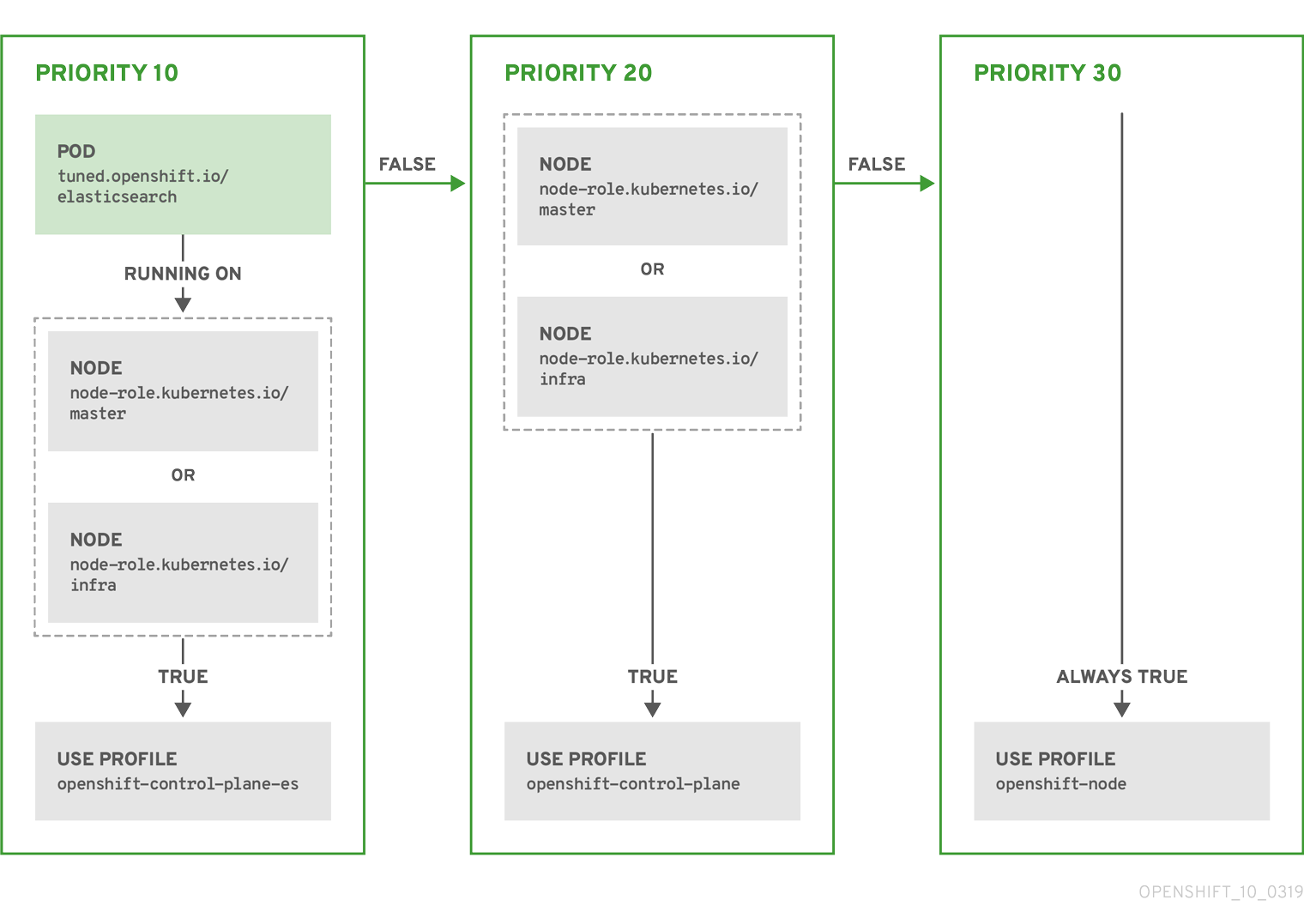
Example: machine config pool based matching
apiVersion: tuned.openshift.io/v1
kind: Tuned
metadata:
  name: openshift-node-custom
  namespace: openshift-cluster-node-tuning-operator
spec:
  profile:
  - data: |
      [main]
      summary=Custom OpenShift node profile with an additional kernel parameter
      include=openshift-node
      [bootloader]
      cmdline_openshift_node_custom=+skew_tick=1
    name: openshift-node-custom

  recommend:
  - machineConfigLabels:
      machineconfiguration.openshift.io/role: "worker-custom"
    priority: 20
    profile: openshift-node-custom
To minimize node reboots, label the target nodes with a label the machine config pool’s node selector will match, then create the Tuned CR above and finally create the custom machine config pool itself.
Cloud provider-specific TuneD profiles
With this functionality, all Cloud provider-specific nodes can conveniently be assigned a TuneD profile specifically tailored to a given Cloud provider on a OpenShift Container Platform cluster. This can be accomplished without adding additional node labels or grouping nodes into machine config pools.
This functionality takes advantage of spec.providerID node object values in the form of <cloud-provider>://<cloud-provider-specific-id> and writes the file /var/lib/tuned/provider with the value <cloud-provider> in NTO operand containers. The content of this file is then used by TuneD to load provider-<cloud-provider> profile if such profile exists.
The openshift profile that both openshift-control-plane and openshift-node profiles inherit settings from is now updated to use this functionality through the use of conditional profile loading. Neither NTO nor TuneD currently ship any Cloud provider-specific profiles. However, it is possible to create a custom profile provider-<cloud-provider> that will be applied to all Cloud provider-specific cluster nodes.
Example GCE Cloud provider profile
apiVersion: tuned.openshift.io/v1
kind: Tuned
metadata:
  name: provider-gce
  namespace: openshift-cluster-node-tuning-operator
spec:
  profile:
  - data: |
      [main]
      summary=GCE Cloud provider-specific profile
      # Your tuning for GCE Cloud provider goes here.
    name: provider-gce
Due to profile inheritance, any setting specified in the provider-<cloud-provider> profile will be overwritten by the openshift profile and its child profiles.
6.5.3. Default profiles set on a cluster
The following are the default profiles set on a cluster.
apiVersion: tuned.openshift.io/v1
kind: Tuned
metadata:
  name: default
  namespace: openshift-cluster-node-tuning-operator
spec:
  profile:
  - data: |
      [main]
      summary=Optimize systems running OpenShift (provider specific parent profile)
      include=-provider-${f:exec:cat:/var/lib/tuned/provider},openshift
    name: openshift
  recommend:
  - profile: openshift-control-plane
    priority: 30
    match:
    - label: node-role.kubernetes.io/master
    - label: node-role.kubernetes.io/infra
  - profile: openshift-node
    priority: 40
Starting with OpenShift Container Platform 4.9, all OpenShift TuneD profiles are shipped with the TuneD package. You can use the oc exec command to view the contents of these profiles:
$ oc exec $tuned_pod -n openshift-cluster-node-tuning-operator -- find /usr/lib/tuned/openshift{,-control-plane,-node} -name tuned.conf -exec grep -H ^ {} \;6.5.4. Supported TuneD daemon plugins
Excluding the [main] section, the following TuneD plugins are supported when using custom profiles defined in the profile: section of the Tuned CR:
- audio
- cpu
- disk
- eeepc_she
- modules
- mounts
- net
- scheduler
- scsi_host
- selinux
- sysctl
- sysfs
- usb
- video
- vm
- bootloader
There is some dynamic tuning functionality provided by some of these plugins that is not supported. The following TuneD plugins are currently not supported:
- script
- systemd
The TuneD bootloader plugin only supports Red Hat Enterprise Linux CoreOS (RHCOS) worker nodes.
Additional resources
6.6. Remediating nodes with the Self Node Remediation Operator
You can use the Self Node Remediation Operator to automatically reboot unhealthy nodes. This remediation strategy minimizes downtime for stateful applications and ReadWriteOnce (RWO) volumes, and restores compute capacity if transient failures occur.
6.6.1. About the Self Node Remediation Operator
The Self Node Remediation Operator runs on the cluster nodes and reboots nodes that are identified as unhealthy. The Operator uses the MachineHealthCheck or NodeHealthCheck controller to detect the health of a node in the cluster. When a node is identified as unhealthy, the MachineHealthCheck or the NodeHealthCheck resource creates the SelfNodeRemediation custom resource (CR), which triggers the Self Node Remediation Operator.
The SelfNodeRemediation CR resembles the following YAML file:
apiVersion: self-node-remediation.medik8s.io/v1alpha1
kind: SelfNodeRemediation
metadata:
  name: selfnoderemediation-sample
  namespace: openshift-operators
spec:
status:
lastError: <last_error_message> - 1
- Displays the last error that occurred during remediation. When remediation succeeds or if no errors occur, the field is left empty.
The Self Node Remediation Operator minimizes downtime for stateful applications and restores compute capacity if transient failures occur. You can use this Operator regardless of the management interface, such as IPMI or an API to provision a node, and regardless of the cluster installation type, such as installer-provisioned infrastructure or user-provisioned infrastructure.
6.6.1.1. Understanding the Self Node Remediation Operator configuration
The Self Node Remediation Operator creates the SelfNodeRemediationConfig CR with the name self-node-remediation-config. The CR is created in the namespace of the Self Node Remediation Operator.
A change in the SelfNodeRemediationConfig CR re-creates the Self Node Remediation daemon set.
The SelfNodeRemediationConfig CR resembles the following YAML file:
apiVersion: self-node-remediation.medik8s.io/v1alpha1
kind: SelfNodeRemediationConfig
metadata:
  name: self-node-remediation-config
  namespace: openshift-operators
spec:
  safeTimeToAssumeNodeRebootedSeconds: 180
watchdogFilePath: /dev/watchdog
isSoftwareRebootEnabled: true
apiServerTimeout: 15s
apiCheckInterval: 5s
maxApiErrorThreshold: 3
peerApiServerTimeout: 5s
peerDialTimeout: 5s
peerRequestTimeout: 5s
peerUpdateInterval: 15m - 1
- Specify the timeout duration for the surviving peer, after which the Operator can assume that an unhealthy node has been rebooted. The Operator automatically calculates the lower limit for this value. However, if different nodes have different watchdog timeouts, you must change this value to a higher value.
- 2
- Specify the file path of the watchdog device in the nodes. If you enter an incorrect path to the watchdog device, the Self Node Remediation Operator automatically detects the softdog device path.
If a watchdog device is unavailable, the
SelfNodeRemediationConfigCR uses a software reboot. - 3
- Specify if you want to enable software reboot of the unhealthy nodes. By default, the value of
isSoftwareRebootEnabledis set totrue. To disable the software reboot, set the parameter value tofalse. - 4
- Specify the timeout duration to check connectivity with each API server. When this duration elapses, the Operator starts remediation. The timeout duration must be more than or equal to 10 milliseconds.
- 5
- Specify the frequency to check connectivity with each API server. The timeout duration must be more than or equal to 1 second.
- 6
- Specify a threshold value. After reaching this threshold, the node starts contacting its peers. The threshold value must be more than or equal to 1 second.
- 7
- Specify the duration of the timeout for the peer to connect the API server. The timeout duration must be more than or equal to 10 milliseconds.
- 8
- Specify the duration of the timeout for establishing connection with the peer. The timeout duration must be more than or equal to 10 milliseconds.
- 9
- Specify the duration of the timeout to get a response from the peer. The timeout duration must be more than or equal to 10 milliseconds.
- 10
- Specify the frequency to update peer information, such as IP address. The timeout duration must be more than or equal to 10 seconds.
You can edit the self-node-remediation-config CR that is created by the Self Node Remediation Operator. However, when you try to create a new CR for the Self Node Remediation Operator, the following message is displayed in the logs:
controllers.SelfNodeRemediationConfig
ignoring selfnoderemediationconfig CRs that are not named 'self-node-remediation-config'
or not in the namespace of the operator:
'openshift-operators' {"selfnoderemediationconfig":
"openshift-operators/selfnoderemediationconfig-copy"}
6.6.1.2. Understanding the Self Node Remediation Template configuration
The Self Node Remediation Operator also creates the SelfNodeRemediationTemplate Custom Resource Definition (CRD). This CRD defines the remediation strategy for the nodes. The following remediation strategies are available:
ResourceDeletion-
This remediation strategy removes the pods and associated volume attachments on the node rather than the node object. This strategy helps to recover workloads faster.
ResourceDeletionis the default remediation strategy. NodeDeletion- This remediation strategy removes the node object.
The Self Node Remediation Operator creates the following SelfNodeRemediationTemplate CRs for each strategy:
-
self-node-remediation-resource-deletion-template, which theResourceDeletionremediation strategy uses -
self-node-remediation-node-deletion-template, which theNodeDeletionremediation strategy uses
The SelfNodeRemediationTemplate CR resembles the following YAML file:
apiVersion: self-node-remediation.medik8s.io/v1alpha1
kind: SelfNodeRemediationTemplate
metadata:
  creationTimestamp: "2022-03-02T08:02:40Z"
  name: self-node-remediation-<remediation_object>-deletion-template
  namespace: openshift-operators
spec:
  template:
    spec:
remediationStrategy: <remediation_strategy> - 1
- Specifies the type of remediation template based on the remediation strategy. Replace
<remediation_object>with eitherresourceornode, for example,self-node-remediation-resource-deletion-template. - 2
- Specifies the remediation strategy. The remediation strategy can either be
ResourceDeletionorNodeDeletion.
6.6.1.3. About watchdog devices
Watchdog devices can be any of the following:
- Independently powered hardware devices
- Hardware devices that share power with the hosts they control
-
Virtual devices implemented in software, or
softdog
Hardware watchdog and softdog devices have electronic or software timers, respectively. These watchdog devices are used to ensure that the machine enters a safe state when an error condition is detected. The cluster is required to repeatedly reset the watchdog timer to prove that it is in a healthy state. This timer might elapse due to fault conditions, such as deadlocks, CPU starvation, and loss of network or disk access. If the timer expires, the watchdog device assumes that a fault has occurred and the device triggers a forced reset of the node.
Hardware watchdog devices are more reliable than softdog devices.
6.6.1.3.1. Understanding Self Node Remediation Operator behavior with watchdog devices
The Self Node Remediation Operator determines the remediation strategy based on the watchdog devices that are present.
If a hardware watchdog device is configured and available, the Operator uses it for remediation. If a hardware watchdog device is not configured, the Operator enables and uses a softdog device for remediation.
If neither watchdog devices are supported, either by the system or by the configuration, the Operator remediates nodes by using software reboot.
Additional resources
6.6.2. Installing the Self Node Remediation Operator by using the web console
You can use the OpenShift Container Platform web console to install the Self Node Remediation Operator.
Prerequisites
-
Log in as a user with
cluster-adminprivileges.
Procedure
-
In the OpenShift Container Platform web console, navigate to Operators
OperatorHub. - Search for the Self Node Remediation Operator from the list of available Operators, and then click Install.
-
Keep the default selection of Installation mode and namespace to ensure that the Operator is installed to the
openshift-operatorsnamespace. - Click Install.
Verification
To confirm that the installation is successful:
-
Navigate to the Operators
Installed Operators page. -
Check that the Operator is installed in the
openshift-operatorsnamespace and its status isSucceeded.
If the Operator is not installed successfully:
-
Navigate to the Operators
Installed Operators page and inspect the Statuscolumn for any errors or failures. -
Navigate to the Workloads
Pods page and check the logs in any pods in the self-node-remediation-controller-managerproject that are reporting issues.
6.6.3. Installing the Self Node Remediation Operator by using the CLI
You can use the OpenShift CLI (oc) to install the Self Node Remediation Operator.
You can install the Self Node Remediation Operator in your own namespace or in the openshift-operators namespace.
To install the Operator in your own namespace, follow the steps in the procedure.
To install the Operator in the openshift-operators namespace, skip to step 3 of the procedure because the steps to create a new Namespace custom resource (CR) and an OperatorGroup CR are not required.
Prerequisites
-
Install the OpenShift CLI (
oc). -
Log in as a user with
cluster-adminprivileges.
Procedure
Create a
Namespacecustom resource (CR) for the Self Node Remediation Operator:Define the
NamespaceCR and save the YAML file, for example,self-node-remediation-namespace.yaml:apiVersion: v1 kind: Namespace metadata: name: self-node-remediationTo create the
NamespaceCR, run the following command:$ oc create -f self-node-remediation-namespace.yaml
Create an
OperatorGroupCR:Define the
OperatorGroupCR and save the YAML file, for example,self-node-remediation-operator-group.yaml:apiVersion: operators.coreos.com/v1 kind: OperatorGroup metadata: name: self-node-remediation-operator namespace: self-node-remediationTo create the
OperatorGroupCR, run the following command:$ oc create -f self-node-remediation-operator-group.yaml
Create a
SubscriptionCR:Define the
SubscriptionCR and save the YAML file, for example,self-node-remediation-subscription.yaml:apiVersion: operators.coreos.com/v1alpha1 kind: Subscription metadata: name: self-node-remediation-operator namespace: self-node-remediation1 spec: channel: stable installPlanApproval: Manual2 name: self-node-remediation-operator source: redhat-operators sourceNamespace: openshift-marketplace package: self-node-remediation- 1
- Specify the
Namespacewhere you want to install the Self Node Remediation Operator. To install the Self Node Remediation Operator in theopenshift-operatorsnamespace, specifyopenshift-operatorsin theSubscriptionCR. - 2
- Set the approval strategy to Manual in case your specified version is superseded by a later version in the catalog. This plan prevents an automatic upgrade to a later version and requires manual approval before the starting CSV can complete the installation.
To create the
SubscriptionCR, run the following command:$ oc create -f self-node-remediation-subscription.yaml
Verification
Verify that the installation succeeded by inspecting the CSV resource:
$ oc get csv -n self-node-remediationExample output
NAME                               DISPLAY                          VERSION   REPLACES   PHASE
self-node-remediation.v.0.4.0      Self Node Remediation Operator   v.0.4.0              Succeeded
Verify that the Self Node Remediation Operator is up and running:
$ oc get deploy -n self-node-remediationExample output
NAME                                        READY   UP-TO-DATE   AVAILABLE   AGE
self-node-remediation-controller-manager    1/1     1            1           28h
Verify that the Self Node Remediation Operator created the
SelfNodeRemediationConfigCR:$ oc get selfnoderemediationconfig -n self-node-remediationExample output
NAME                           AGE
self-node-remediation-config   28h
Verify that each self node remediation pod is scheduled and running on each worker node:
$ oc get daemonset -n self-node-remediationExample output
NAME DESIRED CURRENT READY UP-TO-DATE AVAILABLE NODE SELECTOR AGE self-node-remediation-ds 3 3 3 3 3 <none> 28hNoteThis command is unsupported for the control plane nodes.
6.6.4. Configuring machine health checks to use the Self Node Remediation Operator
Use the following procedure to configure the machine health checks to use the Self Node Remediation Operator as a remediation provider.
Prerequisites
-
Install the OpenShift CLI (
oc). -
Log in as a user with
cluster-adminprivileges.
Procedure
Create a
SelfNodeRemediationTemplateCR:Define the
SelfNodeRemediationTemplateCR:apiVersion: self-node-remediation.medik8s.io/v1alpha1 kind: SelfNodeRemediationTemplate metadata: namespace: openshift-machine-api name: selfnoderemediationtemplate-sample spec: template: spec: remediationStrategy: ResourceDeletion1 - 1
- Specifies the remediation strategy. The default strategy is
ResourceDeletion.
To create the
SelfNodeRemediationTemplateCR, run the following command:$ oc create -f <snr-name>.yaml
Create or update the
MachineHealthCheckCR to point to theSelfNodeRemediationTemplateCR:Define or update the
MachineHealthCheckCR:apiVersion: machine.openshift.io/v1beta1 kind: MachineHealthCheck metadata: name: machine-health-check namespace: openshift-machine-api spec: selector: matchLabels: machine.openshift.io/cluster-api-machine-role: "worker" machine.openshift.io/cluster-api-machine-type: "worker" unhealthyConditions: - type: "Ready" timeout: "300s" status: "False" - type: "Ready" timeout: "300s" status: "Unknown" maxUnhealthy: "40%" nodeStartupTimeout: "10m" remediationTemplate:1 kind: SelfNodeRemediationTemplate apiVersion: self-node-remediation.medik8s.io/v1alpha1 name: selfnoderemediationtemplate-sample- 1
- Specifies the details for the remediation template.
To create a
MachineHealthCheckCR, run the following command:$ oc create -f <file-name>.yamlTo update a
MachineHealthCheckCR, run the following command:$ oc apply -f <file-name>.yaml
6.6.5. Troubleshooting the Self Node Remediation Operator
6.6.5.1. General troubleshooting
- Issue
- You want to troubleshoot issues with the Self Node Remediation Operator.
- Resolution
- Check the Operator logs.
6.6.5.2. Checking the daemon set
- Issue
- The Self Node Remediation Operator is installed but the daemon set is not available.
- Resolution
- Check the Operator logs for errors or warnings.
6.6.5.3. Unsuccessful remediation
- Issue
- An unhealthy node was not remediated.
- Resolution
Verify that the
SelfNodeRemediationCR was created by running the following command:$ oc get snr -AIf the
MachineHealthCheckcontroller did not create theSelfNodeRemediationCR when the node turned unhealthy, check the logs of theMachineHealthCheckcontroller. Additionally, ensure that theMachineHealthCheckCR includes the required specification to use the remediation template.If the
SelfNodeRemediationCR was created, ensure that its name matches the unhealthy node or the machine object.
6.6.5.4. Daemon set and other Self Node Remediation Operator resources exist even after uninstalling the Operator
- Issue
- The Self Node Remediation Operator resources, such as the daemon set, configuration CR, and the remediation template CR, exist even after after uninstalling the Operator.
- Resolution
To remove the Self Node Remediation Operator resources, delete the resources by running the following commands for each resource type:
$ oc delete ds <self-node-remediation-ds> -n <namespace>$ oc delete snrc <self-node-remediation-config> -n <namespace>$ oc delete snrt <self-node-remediation-template> -n <namespace>
6.6.6. Gathering data about the Self Node Remediation Operator
To collect debugging information about the Self Node Remediation Operator, use the must-gather tool. For information about the must-gather image for the Self Node Remediation Operator, see Gathering data about specific features.
6.7. Deploying node health checks by using the Node Health Check Operator
Use the Node Health Check Operator to identify unhealthy nodes. The Operator uses the Self Node Remediation Operator to remediate the unhealthy nodes.
6.7.1. About the Node Health Check Operator
The Node Health Check Operator detects the health of the nodes in a cluster. The NodeHealthCheck controller creates the NodeHealthCheck custom resource (CR), which defines a set of criteria and thresholds to determine the health of a node.
The Node Health Check Operator also installs the Self Node Remediation Operator as a default remediation provider.
When the Node Health Check Operator detects an unhealthy node, it creates a remediation CR that triggers the remediation provider. For example, the controller creates the SelfNodeRemediation CR, which triggers the Self Node Remediation Operator to remediate the unhealthy node.
The NodeHealthCheck CR resembles the following YAML file:
apiVersion: remediation.medik8s.io/v1alpha1
kind: NodeHealthCheck
metadata:
  name: nodehealthcheck-sample
spec:
  minHealthy: 51%
pauseRequests:
    - <pause-test-cluster>
  remediationTemplate:
    apiVersion: self-node-remediation.medik8s.io/v1alpha1
    name: self-node-remediation-resource-deletion-template
    namespace: openshift-operators
    kind: SelfNodeRemediationTemplate
  selector:
    matchExpressions:
      - key: node-role.kubernetes.io/worker
        operator: Exists
  unhealthyConditions:
    - type: Ready
      status: "False"
      duration: 300s
    - type: Ready
      status: Unknown
duration: 300s - 1
- Specifies the amount of healthy nodes(in percentage or number) required for a remediation provider to concurrently remediate nodes in the targeted pool. If the number of healthy nodes equals to or exceeds the limit set by
minHealthy, remediation occurs. The default value is 51%. - 2
- Prevents any new remediation from starting, while allowing any ongoing remediations to persist. The default value is empty. However, you can enter an array of strings that identify the cause of pausing the remediation. For example,
pause-test-cluster.NoteDuring the upgrade process, nodes in the cluster might become temporarily unavailable and get identified as unhealthy. In the case of worker nodes, when the Operator detects that the cluster is upgrading, it stops remediating new unhealthy nodes to prevent such nodes from rebooting.
- 3
- Specifies a remediation template from the remediation provider. For example, from the Self Node Remediation Operator.
- 4
- Specifies a
selectorthat matches labels or expressions that you want to check. The default value is empty, which selects all nodes. - 5
- Specifies a list of the conditions that determine whether a node is considered unhealthy.
- 6 7
- Specifies the timeout duration for a node condition. If a condition is met for the duration of the timeout, the node will be remediated. Long timeouts can result in long periods of downtime for a workload on an unhealthy node.
6.7.1.1. Understanding the Node Health Check Operator workflow
When a node is identified as unhealthy, the Node Health Check Operator checks how many other nodes are unhealthy. If the number of healthy nodes exceeds the amount that is specified in the minHealthy field of the NodeHealthCheck CR, the controller creates a remediation CR from the details that are provided in the external remediation template by the remediation provider. After remediation, the kubelet updates the node’s health status.
When the node turns healthy, the controller deletes the external remediation template.
6.7.1.2. About how node health checks prevent conflicts with machine health checks
When both, node health checks and machine health checks are deployed, the node health check avoids conflict with the machine health check.
OpenShift Container Platform deploys machine-api-termination-handler as the default MachineHealthCheck resource.
The following list summarizes the system behavior when node health checks and machine health checks are deployed:
If only the default machine health check exists, the node health check continues to identify unhealthy nodes. However, the node health check ignores unhealthy nodes in a Terminating state. The default machine health check handles the unhealthy nodes with a Terminating state.
Example log message
INFO MHCChecker ignoring unhealthy Node, it is terminating and will be handled by MHC {"NodeName": "node-1.example.com"}If the default machine health check is modified (for example, the
unhealthyConditionsisReady), or if additional machine health checks are created, the node health check is disabled.Example log message
INFO controllers.NodeHealthCheck disabling NHC in order to avoid conflict with custom MHCs configured in the cluster {"NodeHealthCheck": "/nhc-worker-default"}When, again, only the default machine health check exists, the node health check is re-enabled.
Example log message
INFO controllers.NodeHealthCheck re-enabling NHC, no conflicting MHC configured in the cluster {"NodeHealthCheck": "/nhc-worker-default"}
6.7.2. Installing the Node Health Check Operator by using the web console
You can use the OpenShift Container Platform web console to install the Node Health Check Operator.
Prerequisites
-
Log in as a user with
cluster-adminprivileges.
Procedure
-
In the OpenShift Container Platform web console, navigate to Operators
OperatorHub. - Search for the Node Health Check Operator, then click Install.
-
Keep the default selection of Installation mode and namespace to ensure that the Operator will be installed to the
openshift-operatorsnamespace. - Click Install.
Verification
To confirm that the installation is successful:
-
Navigate to the Operators
Installed Operators page. -
Check that the Operator is installed in the
openshift-operatorsnamespace and that its status isSucceeded.
If the Operator is not installed successfully:
-
Navigate to the Operators
Installed Operators page and inspect the Statuscolumn for any errors or failures. -
Navigate to the Workloads
Pods page and check the logs in any pods in the openshift-operatorsproject that are reporting issues.
6.7.3. Installing the Node Health Check Operator by using the CLI
You can use the OpenShift CLI (oc) to install the Node Health Check Operator.
To install the Operator in your own namespace, follow the steps in the procedure.
To install the Operator in the openshift-operators namespace, skip to step 3 of the procedure because the steps to create a new Namespace custom resource (CR) and an OperatorGroup CR are not required.
Prerequisites
-
Install the OpenShift CLI (
oc). -
Log in as a user with
cluster-adminprivileges.
Procedure
Create a
Namespacecustom resource (CR) for the Node Health Check Operator:Define the
NamespaceCR and save the YAML file, for example,node-health-check-namespace.yaml:apiVersion: v1 kind: Namespace metadata: name: node-health-checkTo create the
NamespaceCR, run the following command:$ oc create -f node-health-check-namespace.yaml
Create an
OperatorGroupCR:Define the
OperatorGroupCR and save the YAML file, for example,node-health-check-operator-group.yaml:apiVersion: operators.coreos.com/v1 kind: OperatorGroup metadata: name: node-health-check-operator namespace: node-health-checkTo create the
OperatorGroupCR, run the following command:$ oc create -f node-health-check-operator-group.yaml
Create a
SubscriptionCR:Define the
SubscriptionCR and save the YAML file, for example,node-health-check-subscription.yaml:apiVersion: operators.coreos.com/v1alpha1 kind: Subscription metadata: name: node-health-check-operator namespace: node-health-check1 spec: channel: stable2 installPlanApproval: Manual3 name: node-healthcheck-operator source: redhat-operators sourceNamespace: openshift-marketplace package: node-healthcheck-operator- 1
- Specify the
Namespacewhere you want to install the Node Health Check Operator. To install the Node Health Check Operator in theopenshift-operatorsnamespace, specifyopenshift-operatorsin theSubscriptionCR. - 2
- Specify the channel name for your subscription. To upgrade to the latest version of the Node Health Check Operator, you must manually change the channel name for your subscription from
candidatetostable. - 3
- Set the approval strategy to Manual in case your specified version is superseded by a later version in the catalog. This plan prevents an automatic upgrade to a later version and requires manual approval before the starting CSV can complete the installation.
To create the
SubscriptionCR, run the following command:$ oc create -f node-health-check-subscription.yaml
Verification
Verify that the installation succeeded by inspecting the CSV resource:
$ oc get csv -n openshift-operatorsExample output
NAME                              DISPLAY                     VERSION  REPLACES PHASE
node-healthcheck-operator.v0.2.0. Node Health Check Operator  0.2.0             Succeeded
Verify that the Node Health Check Operator is up and running:
$ oc get deploy -n openshift-operatorsExample output
NAME                                           READY   UP-TO-DATE   AVAILABLE   AGE
node-health-check-operator-controller-manager  1/1     1            1           10d
6.7.4. Gathering data about the Node Health Check Operator
To collect debugging information about the Node Health Check Operator, use the must-gather tool. For information about the must-gather image for the Node Health Check Operator, see Gathering data about specific features.
6.7.5. Additional resources
- Changing the update channel for an Operator
- The Node Health Check Operator is supported in a restricted network environment. For more information, see Using Operator Lifecycle Manager on restricted networks.
6.8. Using the Node Maintenance Operator to place nodes in maintenance mode
You can use the Node Maintenance Operator to place nodes in maintenance mode by using the oc adm utility or NodeMaintenance custom resources (CRs).
6.8.1. About the Node Maintenance Operator
The Node Maintenance Operator watches for new or deleted NodeMaintenance CRs. When a new NodeMaintenance CR is detected, no new workloads are scheduled and the node is cordoned off from the rest of the cluster. All pods that can be evicted are evicted from the node. When a NodeMaintenance CR is deleted, the node that is referenced in the CR is made available for new workloads.
Using a NodeMaintenance CR for node maintenance tasks achieves the same results as the oc adm cordon and oc adm drain commands using standard OpenShift Container Platform CR processing.
6.8.2. Installing the Node Maintenance Operator
You can install the Node Maintenance Operator using the web console or the OpenShift CLI (oc).
If OpenShift Virtualization version 4.10 or less is installed in your cluster, it includes an outdated version of the Node Maintenance Operator version.
6.8.2.1. Installing the Node Maintenance Operator by using the web console
You can use the OpenShift Container Platform web console to install the Node Maintenance Operator.
Prerequisites
-
Log in as a user with
cluster-adminprivileges.
Procedure
-
In the OpenShift Container Platform web console, navigate to Operators
OperatorHub. - Search for the Node Maintenance Operator, then click Install.
-
Keep the default selection of Installation mode and namespace to ensure that the Operator will be installed to the
openshift-operatorsnamespace. - Click Install.
Verification
To confirm that the installation is successful:
-
Navigate to the Operators
Installed Operators page. -
Check that the Operator is installed in the
openshift-operatorsnamespace and that its status isSucceeded.
If the Operator is not installed successfully:
-
Navigate to the Operators
Installed Operators page and inspect the Statuscolumn for any errors or failures. -
Navigate to the Operators
Installed Operators Node Maintenance Operator Details page, and inspect the Conditionssection for errors before pod creation. -
Navigate to the Workloads
Pods page, search for the Node Maintenance Operatorpod in the installed namespace, and check the logs in theLogstab.
6.8.2.2. Installing the Node Maintenance Operator by using the CLI
You can use the OpenShift CLI (oc) to install the Node Maintenance Operator.
You can install the Node Maintenance Operator in your own namespace or in the openshift-operators namespace.
To install the Operator in your own namespace, follow the steps in the procedure.
To install the Operator in the openshift-operators namespace, skip to step 3 of the procedure because the steps to create a new Namespace custom resource (CR) and an OperatorGroup CR are not required.
Prerequisites
-
Install the OpenShift CLI (
oc). -
Log in as a user with
cluster-adminprivileges.
Procedure
Create a
NamespaceCR for the Node Maintenance Operator:Define the
NamespaceCR and save the YAML file, for example,node-maintenance-namespace.yaml:apiVersion: v1 kind: Namespace metadata: name: nmo-testTo create the
NamespaceCR, run the following command:$ oc create -f node-maintenance-namespace.yaml
Create an
OperatorGroupCR:Define the
OperatorGroupCR and save the YAML file, for example,node-maintenance-operator-group.yaml:apiVersion: operators.coreos.com/v1 kind: OperatorGroup metadata: name: node-maintenance-operator namespace: nmo-testTo create the
OperatorGroupCR, run the following command:$ oc create -f node-maintenance-operator-group.yaml
Create a
SubscriptionCR:Define the
SubscriptionCR and save the YAML file, for example,node-maintenance-subscription.yaml:apiVersion: operators.coreos.com/v1alpha1 kind: Subscription metadata: name: node-maintenance-operator namespace: nmo-test1 spec: channel: stable InstallPlaneApproval: Automatic name: node-maintenance-operator source: redhat-operators sourceNamespace: openshift-marketplace StartingCSV: node-maintenance-operator.v4.11.0- 1
- Specify the
Namespacewhere you want to install the Node Maintenance Operator.
ImportantTo install the Node Maintenance Operator in the
openshift-operatorsnamespace, specifyopenshift-operatorsin theSubscriptionCR.To create the
SubscriptionCR, run the following command:$ oc create -f node-maintenance-subscription.yaml
Verification
Verify that the installation succeeded by inspecting the CSV resource:
$ oc get csv -n openshift-operatorsExample output
NAME                               DISPLAY                     VERSION   REPLACES  PHASE
node-maintenance-operator.v4.11    Node Maintenance Operator   4.11                Succeeded
Verify that the Node Maintenance Operator is running:
$ oc get deploy -n openshift-operatorsExample output
NAME                                           READY   UP-TO-DATE   AVAILABLE   AGE
node-maintenance-operator-controller-manager   1/1     1            1           10d
The Node Maintenance Operator is supported in a restricted network environment. For more information, see Using Operator Lifecycle Manager on restricted networks.
6.8.3. Setting a node to maintenance mode
You can place a node into maintenance mode from the web console or from the CLI by using a NodeMaintenance CR.
6.8.3.1. Setting a node to maintenance mode by using the web console
To set a node to maintenance mode, you can create a NodeMaintenance custom resource (CR) by using the web console.
Prerequisites
-
Log in as a user with
cluster-adminprivileges. - Install the Node Maintenance Operator from the OperatorHub.
Procedure
-
From the Administrator perspective in the web console, navigate to Operators
Installed Operators. - Select the Node Maintenance Operator from the list of Operators.
- In the Node Maintenance tab, click Create NodeMaintenance.
-
In the Create NodeMaintenance page, select the Form view or the YAML view to configure the
NodeMaintenanceCR. -
To apply the
NodeMaintenanceCR that you have configured, click Create.
Verification
In the Node Maintenance tab, inspect the Status column and verify that its status is Succeeded.
6.8.3.2. Setting a node to maintenance mode by using the CLI
You can put a node into maintenance mode with a NodeMaintenance custom resource (CR). When you apply a NodeMaintenance CR, all allowed pods are evicted and the node is rendered unschedulable. Evicted pods are queued to be moved to another node in the cluster.
Prerequisites
-
Install the OpenShift Container Platform CLI
oc. -
Log in to the cluster as a user with
cluster-adminprivileges.
Procedure
Create the following
NodeMaintenanceCR, and save the file asnodemaintenance-cr.yaml:apiVersion: nodemaintenance.medik8s.io/v1beta1 kind: NodeMaintenance metadata: name: nodemaintenance-cr1 spec: nodeName: node-1.example.com2 reason: "NIC replacement"3 Apply the node maintenance CR by running the following command:
$ oc apply -f nodemaintenance-cr.yaml
Verification
Check the progress of the maintenance task by running the following command:
$ oc describe node <node-name>where
<node-name>is the name of your node; for example,node-1.example.comCheck the example output:
Events:
  Type     Reason                     Age                   From     Message
  ----     ------                     ----                  ----     -------
  Normal   NodeNotSchedulable         61m                   kubelet  Node node-1.example.com status is now: NodeNotSchedulable
6.8.3.3. Checking status of current NodeMaintenance CR tasks
You can check the status of current NodeMaintenance CR tasks.
Prerequisites
-
Install the OpenShift Container Platform CLI
oc. -
Log in as a user with
cluster-adminprivileges.
Procedure
Check the status of current node maintenance tasks, for example the
NodeMaintenanceCR ornmobject, by running the following command:$ oc get nm -o yamlExample output
apiVersion: v1
items:
- apiVersion: nodemaintenance.medik8s.io/v1beta1
  kind: NodeMaintenance
  metadata:
...
  spec:
    nodeName: node-1.example.com
    reason: Node maintenance
  status:
    drainProgress: 100
1 evictionPods: 32 lastError: "Last failure message"3 lastUpdate: "2022-06-23T11:43:18Z"4 phase: Succeeded totalpods: 55 ...
6.8.4. Resuming a node from maintenance mode
You can resume a node from maintenance mode from the web console or from the CLI by using a NodeMaintenance CR. Resuming a node brings it out of maintenance mode and makes it schedulable again.
6.8.4.1. Resuming a node from maintenance mode by using the web console
To resume a node from maintenance mode, you can delete a NodeMaintenance custom resource (CR) by using the web console.
Prerequisites
-
Log in as a user with
cluster-adminprivileges. - Install the Node Maintenance Operator from the OperatorHub.
Procedure
-
From the Administrator perspective in the web console, navigate to Operators
Installed Operators. - Select the Node Maintenance Operator from the list of Operators.
-
In the Node Maintenance tab, select the
NodeMaintenanceCR that you want to delete. -
Click the Options menu
 at the end of the node and select Delete NodeMaintenance.
Verification
-
In the OpenShift Container Platform console, click Compute
Nodes. -
Inspect the
Statuscolumn of the node for which you deleted theNodeMaintenanceCR and verify that its status isReady.
6.8.4.2. Resuming a node from maintenance mode by using the CLI
You can resume a node from maintenance mode that was initiated with a NodeMaintenance CR by deleting the NodeMaintenance CR.
Prerequisites
-
Install the OpenShift Container Platform CLI
oc. -
Log in to the cluster as a user with
cluster-adminprivileges.
Procedure
When your node maintenance task is complete, delete the active
NodeMaintenanceCR:$ oc delete -f nodemaintenance-cr.yamlExample output
nodemaintenance.nodemaintenance.medik8s.io "maintenance-example" deleted
Verification
Check the progress of the maintenance task by running the following command:
$ oc describe node <node-name>where
<node-name>is the name of your node; for example,node-1.example.comCheck the example output:
Events:
  Type     Reason                  Age                   From     Message
  ----     ------                  ----                  ----     -------
  Normal   NodeSchedulable         2m                    kubelet  Node node-1.example.com status is now: NodeSchedulable
6.8.5. Working with bare-metal nodes
For clusters with bare-metal nodes, you can place a node into maintenance mode, and resume a node from maintenance mode, by using the web console Actions control.
Clusters with bare-metal nodes can also place a node into maintenance mode, and resume a node from maintenance mode, by using the web console and CLI, as outlined. These methods, by using the web console Actions control, are applicable to bare-metal clusters only.
6.8.5.1. Maintaining bare-metal nodes
When you deploy OpenShift Container Platform on bare-metal infrastructure, you must take additional considerations into account compared to deploying on cloud infrastructure. Unlike in cloud environments, where the cluster nodes are considered ephemeral, reprovisioning a bare-metal node requires significantly more time and effort for maintenance tasks.
When a bare-metal node fails due to a kernel error or a NIC card hardware failure, workloads on the failed node need to be restarted on another node in the cluster while the problem node is repaired or replaced. Node maintenance mode allows cluster administrators to gracefully turn-off nodes, move workloads to other parts of the cluster, and ensure that workloads do not get interrupted. Detailed progress and node status details are provided during maintenance.
6.8.5.2. Setting a bare-metal node to maintenance mode
Set a bare-metal node to maintenance mode using the Options menu
found on each node in the Compute
Procedure
-
From the Administrator perspective of the web console, click Compute
Nodes. You can set the node to maintenance from this screen, which makes it easier to perform actions on multiple nodes, or from the Node Details screen, where you can view comprehensive details of the selected node:
-
Click the Options menu
at the end of the node and select Start Maintenance.
-
Click the node name to open the Node Details screen and click Actions
Start Maintenance.
-
Click the Options menu
- Click Start Maintenance in the confirmation window.
The node is no longer schedulable. If it had virtual machines with the LiveMigration eviction strategy, then it will live migrate them. All other pods and virtual machines on the node are deleted and recreated on another node.
Verification
-
Navigate to the Compute
Nodes page and verify that the corresponding node has a status of Under maintenance.
6.8.5.3. Resuming a bare-metal node from maintenance mode
Resume a bare-metal node from maintenance mode using the Options menu
found on each node in the Compute
Procedure
-
From the Administrator perspective of the web console, click Compute
Nodes. You can resume the node from this screen, which makes it easier to perform actions on multiple nodes, or from the Node Details screen, where you can view comprehensive details of the selected node:
-
Click the Options menu
at the end of the node and select Stop Maintenance.
-
Click the node name to open the Node Details screen and click Actions
Stop Maintenance.
-
Click the Options menu
- Click Stop Maintenance in the confirmation window.
The node becomes schedulable. If it had virtual machine instances that were running on the node prior to maintenance, then they will not automatically migrate back to this node.
Verification
-
Navigate to the Compute
Nodes page and verify that the corresponding node has a status of Ready.
6.8.6. Gathering data about the Node Maintenance Operator
To collect debugging information about the Node Maintenance Operator, use the must-gather tool. For information about the must-gather image for the Node Maintenance Operator, see Gathering data about specific features.
6.9. Understanding node rebooting
To reboot a node without causing an outage for applications running on the platform, it is important to first evacuate the pods. For pods that are made highly available by the routing tier, nothing else needs to be done. For other pods needing storage, typically databases, it is critical to ensure that they can remain in operation with one pod temporarily going offline. While implementing resiliency for stateful pods is different for each application, in all cases it is important to configure the scheduler to use node anti-affinity to ensure that the pods are properly spread across available nodes.
Another challenge is how to handle nodes that are running critical infrastructure such as the router or the registry. The same node evacuation process applies, though it is important to understand certain edge cases.
6.9.1. About rebooting nodes running critical infrastructure
When rebooting nodes that host critical OpenShift Container Platform infrastructure components, such as router pods, registry pods, and monitoring pods, ensure that there are at least three nodes available to run these components.
The following scenario demonstrates how service interruptions can occur with applications running on OpenShift Container Platform when only two nodes are available:
- Node A is marked unschedulable and all pods are evacuated.
- The registry pod running on that node is now redeployed on node B. Node B is now running both registry pods.
- Node B is now marked unschedulable and is evacuated.
- The service exposing the two pod endpoints on node B loses all endpoints, for a brief period of time, until they are redeployed to node A.
When using three nodes for infrastructure components, this process does not result in a service disruption. However, due to pod scheduling, the last node that is evacuated and brought back into rotation does not have a registry pod. One of the other nodes has two registry pods. To schedule the third registry pod on the last node, use pod anti-affinity to prevent the scheduler from locating two registry pods on the same node.
Additional information
- For more information on pod anti-affinity, see Placing pods relative to other pods using affinity and anti-affinity rules.
6.9.2. Rebooting a node using pod anti-affinity
Pod anti-affinity is slightly different than node anti-affinity. Node anti-affinity can be violated if there are no other suitable locations to deploy a pod. Pod anti-affinity can be set to either required or preferred.
With this in place, if only two infrastructure nodes are available and one is rebooted, the container image registry pod is prevented from running on the other node. oc get pods reports the pod as unready until a suitable node is available. Once a node is available and all pods are back in ready state, the next node can be restarted.
Procedure
To reboot a node using pod anti-affinity:
Edit the node specification to configure pod anti-affinity:
apiVersion: v1
kind: Pod
metadata:
  name: with-pod-antiaffinity
spec:
  affinity:
    podAntiAffinity:
1 preferredDuringSchedulingIgnoredDuringExecution:2 - weight: 1003 podAffinityTerm: labelSelector: matchExpressions: - key: registry4 operator: In5 values: - default topologyKey: kubernetes.io/hostname #...- 1
- Stanza to configure pod anti-affinity.
- 2
- Defines a preferred rule.
- 3
- Specifies a weight for a preferred rule. The node with the highest weight is preferred.
- 4
- Description of the pod label that determines when the anti-affinity rule applies. Specify a key and value for the label.
- 5
- The operator represents the relationship between the label on the existing pod and the set of values in the
matchExpressionparameters in the specification for the new pod. Can beIn,NotIn,Exists, orDoesNotExist.
This example assumes the container image registry pod has a label of
registry=default. Pod anti-affinity can use any Kubernetes match expression.-
Enable the
MatchInterPodAffinityscheduler predicate in the scheduling policy file. - Perform a graceful restart of the node.
6.9.3. Understanding how to reboot nodes running routers
In most cases, a pod running an OpenShift Container Platform router exposes a host port.
The PodFitsPorts scheduler predicate ensures that no router pods using the same port can run on the same node, and pod anti-affinity is achieved. If the routers are relying on IP failover for high availability, there is nothing else that is needed.
For router pods relying on an external service such as AWS Elastic Load Balancing for high availability, it is that service’s responsibility to react to router pod restarts.
In rare cases, a router pod may not have a host port configured. In those cases, it is important to follow the recommended restart process for infrastructure nodes.
6.9.4. Rebooting a node gracefully
Before rebooting a node, it is recommended to backup etcd data to avoid any data loss on the node.
For single-node OpenShift clusters that require users to perform the oc login command rather than having the certificates in kubeconfig file to manage the cluster, the oc adm commands might not be available after cordoning and draining the node. This is because the openshift-oauth-apiserver pod is not running due to the cordon. You can use SSH to access the nodes as indicated in the following procedure.
In a single-node OpenShift cluster, pods cannot be rescheduled when cordoning and draining. However, doing so gives the pods, especially your workload pods, time to properly stop and release associated resources.
Procedure
To perform a graceful restart of a node:
Mark the node as unschedulable:
$ oc adm cordon <node1>Drain the node to remove all the running pods:
$ oc adm drain <node1> --ignore-daemonsets --delete-emptydir-data --forceYou might receive errors that pods associated with custom pod disruption budgets (PDB) cannot be evicted.
Example error
error when evicting pods/"rails-postgresql-example-1-72v2w" -n "rails" (will retry after 5s): Cannot evict pod as it would violate the pod's disruption budget.In this case, run the drain command again, adding the
disable-evictionflag, which bypasses the PDB checks:$ oc adm drain <node1> --ignore-daemonsets --delete-emptydir-data --force --disable-evictionAccess the node in debug mode:
$ oc debug node/<node1>Change your root directory to
/host:$ chroot /hostRestart the node:
$ systemctl rebootIn a moment, the node enters the
NotReadystate.NoteWith some single-node OpenShift clusters, the
occommands might not be available after you cordon and drain the node because theopenshift-oauth-apiserverpod is not running. You can use SSH to connect to the node and perform the reboot.$ ssh core@<master-node>.<cluster_name>.<base_domain>$ sudo systemctl rebootAfter the reboot is complete, mark the node as schedulable by running the following command:
$ oc adm uncordon <node1>NoteWith some single-node OpenShift clusters, the
occommands might not be available after you cordon and drain the node because theopenshift-oauth-apiserverpod is not running. You can use SSH to connect to the node and uncordon it.$ ssh core@<target_node>$ sudo oc adm uncordon <node> --kubeconfig /etc/kubernetes/static-pod-resources/kube-apiserver-certs/secrets/node-kubeconfigs/localhost.kubeconfigVerify that the node is ready:
$ oc get node <node1>Example output
NAME    STATUS  ROLES    AGE     VERSION
<node1> Ready   worker   6d22h   v1.18.3+b0068a8
Additional information
For information on etcd data backup, see Backing up etcd data.
6.10. Freeing node resources using garbage collection
As an administrator, you can use OpenShift Container Platform to ensure that your nodes are running efficiently by freeing up resources through garbage collection.
The OpenShift Container Platform node performs two types of garbage collection:
- Container garbage collection: Removes terminated containers.
- Image garbage collection: Removes images not referenced by any running pods.
6.10.1. Understanding how terminated containers are removed through garbage collection
Container garbage collection removes terminated containers by using eviction thresholds.
When eviction thresholds are set for garbage collection, the node tries to keep any container for any pod accessible from the API. If the pod has been deleted, the containers will be as well. Containers are preserved as long the pod is not deleted and the eviction threshold is not reached. If the node is under disk pressure, it will remove containers and their logs will no longer be accessible using oc logs.
- eviction-soft - A soft eviction threshold pairs an eviction threshold with a required administrator-specified grace period.
- eviction-hard - A hard eviction threshold has no grace period, and if observed, OpenShift Container Platform takes immediate action.
The following table lists the eviction thresholds:
| Node condition | Eviction signal | Description |
|---|---|---|
| MemoryPressure |
| The available memory on the node. |
| DiskPressure |
|
The available disk space or inodes on the node root file system, |
For evictionHard you must specify all of these parameters. If you do not specify all parameters, only the specified parameters are applied and the garbage collection will not function properly.
If a node is oscillating above and below a soft eviction threshold, but not exceeding its associated grace period, the corresponding node would constantly oscillate between true and false. As a consequence, the scheduler could make poor scheduling decisions.
To protect against this oscillation, use the eviction-pressure-transition-period flag to control how long OpenShift Container Platform must wait before transitioning out of a pressure condition. OpenShift Container Platform will not set an eviction threshold as being met for the specified pressure condition for the period specified before toggling the condition back to false.
6.10.2. Understanding how images are removed through garbage collection
Image garbage collection removes images that are not referenced by any running pods.
OpenShift Container Platform determines which images to remove from a node based on the disk usage that is reported by cAdvisor.
The policy for image garbage collection is based on two conditions:
- The percent of disk usage (expressed as an integer) which triggers image garbage collection. The default is 85.
- The percent of disk usage (expressed as an integer) to which image garbage collection attempts to free. Default is 80.
For image garbage collection, you can modify any of the following variables using a custom resource.
| Setting | Description |
|---|---|
|
| The minimum age for an unused image before the image is removed by garbage collection. The default is 2m. |
|
| The percent of disk usage, expressed as an integer, which triggers image garbage collection. The default is 85. |
|
| The percent of disk usage, expressed as an integer, to which image garbage collection attempts to free. The default is 80. |
Two lists of images are retrieved in each garbage collector run:
- A list of images currently running in at least one pod.
- A list of images available on a host.
As new containers are run, new images appear. All images are marked with a time stamp. If the image is running (the first list above) or is newly detected (the second list above), it is marked with the current time. The remaining images are already marked from the previous spins. All images are then sorted by the time stamp.
Once the collection starts, the oldest images get deleted first until the stopping criterion is met.
6.10.3. Configuring garbage collection for containers and images
As an administrator, you can configure how OpenShift Container Platform performs garbage collection by creating a kubeletConfig object for each machine config pool.
OpenShift Container Platform supports only one kubeletConfig object for each machine config pool.
You can configure any combination of the following:
- Soft eviction for containers
- Hard eviction for containers
- Eviction for images
Container garbage collection removes terminated containers. Image garbage collection removes images that are not referenced by any running pods.
Prerequisites
Obtain the label associated with the static
MachineConfigPoolCRD for the type of node you want to configure by entering the following command:$ oc edit machineconfigpool <name>For example:
$ oc edit machineconfigpool workerExample output
apiVersion: machineconfiguration.openshift.io/v1
kind: MachineConfigPool
metadata:
  creationTimestamp: "2022-11-16T15:34:25Z"
  generation: 4
  labels:
    pools.operator.machineconfiguration.openshift.io/worker: ""
1 name: worker #...- 1
- The label appears under Labels.
TipIf the label is not present, add a key/value pair such as:
$ oc label machineconfigpool worker custom-kubelet=small-pods
Procedure
Create a custom resource (CR) for your configuration change.
ImportantIf there is one file system, or if
/var/lib/kubeletand/var/lib/containers/are in the same file system, the settings with the highest values trigger evictions, as those are met first. The file system triggers the eviction.Sample configuration for a container garbage collection CR:
apiVersion: machineconfiguration.openshift.io/v1
kind: KubeletConfig
metadata:
  name: worker-kubeconfig
1 spec: machineConfigPoolSelector: matchLabels: pools.operator.machineconfiguration.openshift.io/worker: ""2 kubeletConfig: evictionSoft:3 memory.available: "500Mi"4 nodefs.available: "10%" nodefs.inodesFree: "5%" imagefs.available: "15%" imagefs.inodesFree: "10%" evictionSoftGracePeriod:5 memory.available: "1m30s" nodefs.available: "1m30s" nodefs.inodesFree: "1m30s" imagefs.available: "1m30s" imagefs.inodesFree: "1m30s" evictionHard:6 memory.available: "200Mi" nodefs.available: "5%" nodefs.inodesFree: "4%" imagefs.available: "10%" imagefs.inodesFree: "5%" evictionPressureTransitionPeriod: 0s7 imageMinimumGCAge: 5m8 imageGCHighThresholdPercent: 809 imageGCLowThresholdPercent: 7510 #...- 1
- Name for the object.
- 2
- Specify the label from the machine config pool.
- 3
- For container garbage collection: Type of eviction:
evictionSoftorevictionHard. - 4
- For container garbage collection: Eviction thresholds based on a specific eviction trigger signal.
- 5
- For container garbage collection: Grace periods for the soft eviction. This parameter does not apply to
eviction-hard. - 6
- For container garbage collection: Eviction thresholds based on a specific eviction trigger signal. For
evictionHardyou must specify all of these parameters. If you do not specify all parameters, only the specified parameters are applied and the garbage collection will not function properly. - 7
- For container garbage collection: The duration to wait before transitioning out of an eviction pressure condition.
- 8
- For image garbage collection: The minimum age for an unused image before the image is removed by garbage collection.
- 9
- For image garbage collection: The percent of disk usage (expressed as an integer) that triggers image garbage collection.
- 10
- For image garbage collection: The percent of disk usage (expressed as an integer) that image garbage collection attempts to free.
Run the following command to create the CR:
$ oc create -f <file_name>.yamlFor example:
$ oc create -f gc-container.yamlExample output
kubeletconfig.machineconfiguration.openshift.io/gc-container created
Verification
Verify that garbage collection is active by entering the following command. The Machine Config Pool you specified in the custom resource appears with
UPDATINGas 'true` until the change is fully implemented:$ oc get machineconfigpoolExample output
NAME     CONFIG                                   UPDATED   UPDATING
master   rendered-master-546383f80705bd5aeaba93   True      False
worker   rendered-worker-b4c51bb33ccaae6fc4a6a5   False     True
6.11. Allocating resources for nodes in an OpenShift Container Platform cluster
To provide more reliable scheduling and minimize node resource overcommitment, reserve a portion of the CPU and memory resources for use by the underlying node components, such as kubelet and kube-proxy, and the remaining system components, such as sshd and NetworkManager. By specifying the resources to reserve, you provide the scheduler with more information about the remaining CPU and memory resources that a node has available for use by pods. You can allow OpenShift Container Platform to automatically determine the optimal system-reserved CPU and memory resources for your nodes or you can manually determine and set the best resources for your nodes.
To manually set resource values, you must use a kubelet config CR. You cannot use a machine config CR.
6.11.1. Understanding how to allocate resources for nodes
CPU and memory resources reserved for node components in OpenShift Container Platform are based on two node settings:
| Setting | Description |
|---|---|
|
|
This setting is not used with OpenShift Container Platform. Add the CPU and memory resources that you planned to reserve to the |
|
|
This setting identifies the resources to reserve for the node components and system components, such as CRI-O and Kubelet. The default settings depend on the OpenShift Container Platform and Machine Config Operator versions. Confirm the default |
If a flag is not set, the defaults are used. If none of the flags are set, the allocated resource is set to the node’s capacity as it was before the introduction of allocatable resources.
Any CPUs specifically reserved using the reservedSystemCPUs parameter are not available for allocation using kube-reserved or system-reserved.
6.11.1.1. How OpenShift Container Platform computes allocated resources
An allocated amount of a resource is computed based on the following formula:
[Allocatable] = [Node Capacity] - [system-reserved] - [Hard-Eviction-Thresholds]
The withholding of Hard-Eviction-Thresholds from Allocatable improves system reliability because the value for Allocatable is enforced for pods at the node level.
If Allocatable is negative, it is set to 0.
Each node reports the system resources that are used by the container runtime and kubelet. To simplify configuring the system-reserved parameter, view the resource use for the node by using the node summary API. The node summary is available at /api/v1/nodes/<node>/proxy/stats/summary.
6.11.1.2. How nodes enforce resource constraints
The node is able to limit the total amount of resources that pods can consume based on the configured allocatable value. This feature significantly improves the reliability of the node by preventing pods from using CPU and memory resources that are needed by system services such as the container runtime and node agent. To improve node reliability, administrators should reserve resources based on a target for resource use.
The node enforces resource constraints by using a new cgroup hierarchy that enforces quality of service. All pods are launched in a dedicated cgroup hierarchy that is separate from system daemons.
Administrators should treat system daemons similar to pods that have a guaranteed quality of service. System daemons can burst within their bounding control groups and this behavior must be managed as part of cluster deployments. Reserve CPU and memory resources for system daemons by specifying the amount of CPU and memory resources in system-reserved.
Enforcing system-reserved limits can prevent critical system services from receiving CPU and memory resources. As a result, a critical system service can be ended by the out-of-memory killer. The recommendation is to enforce system-reserved only if you have profiled the nodes exhaustively to determine precise estimates and you are confident that critical system services can recover if any process in that group is ended by the out-of-memory killer.
6.11.1.3. Understanding Eviction Thresholds
If a node is under memory pressure, it can impact the entire node and all pods running on the node. For example, a system daemon that uses more than its reserved amount of memory can trigger an out-of-memory event. To avoid or reduce the probability of system out-of-memory events, the node provides out-of-resource handling.
You can reserve some memory using the --eviction-hard flag. The node attempts to evict pods whenever memory availability on the node drops below the absolute value or percentage. If system daemons do not exist on a node, pods are limited to the memory capacity - eviction-hard. For this reason, resources set aside as a buffer for eviction before reaching out of memory conditions are not available for pods.
The following is an example to illustrate the impact of node allocatable for memory:
-
Node capacity is
32Gi -
--system-reserved is
3Gi -
--eviction-hard is set to
100Mi.
For this node, the effective node allocatable value is 28.9Gi. If the node and system components use all their reservation, the memory available for pods is 28.9Gi, and kubelet evicts pods when it exceeds this threshold.
If you enforce node allocatable, 28.9Gi, with top-level cgroups, then pods can never exceed 28.9Gi. Evictions are not performed unless system daemons consume more than 3.1Gi of memory.
If system daemons do not use up all their reservation, with the above example, pods would face memcg OOM kills from their bounding cgroup before node evictions kick in. To better enforce QoS under this situation, the node applies the hard eviction thresholds to the top-level cgroup for all pods to be Node Allocatable + Eviction Hard Thresholds.
If system daemons do not use up all their reservation, the node will evict pods whenever they consume more than 28.9Gi of memory. If eviction does not occur in time, a pod will be OOM killed if pods consume 29Gi of memory.
6.11.1.4. How the scheduler determines resource availability
The scheduler uses the value of node.Status.Allocatable instead of node.Status.Capacity to decide if a node will become a candidate for pod scheduling.
By default, the node will report its machine capacity as fully schedulable by the cluster.
6.11.2. Automatically allocating resources for nodes
OpenShift Container Platform can automatically determine the optimal system-reserved CPU and memory resources for nodes associated with a specific machine config pool and update the nodes with those values when the nodes start. By default, the system-reserved CPU is 500m and system-reserved memory is 1Gi.
To automatically determine and allocate the system-reserved resources on nodes, create a KubeletConfig custom resource (CR) to set the autoSizingReserved: true parameter. A script on each node calculates the optimal values for the respective reserved resources based on the installed CPU and memory capacity on each node. The script takes into account that increased capacity requires a corresponding increase in the reserved resources.
Automatically determining the optimal system-reserved settings ensures that your cluster is running efficiently and prevents node failure due to resource starvation of system components, such as CRI-O and kubelet, without your needing to manually calculate and update the values.
This feature is disabled by default.
Prerequisites
Obtain the label associated with the static
MachineConfigPoolobject for the type of node you want to configure by entering the following command:$ oc edit machineconfigpool <name>For example:
$ oc edit machineconfigpool workerExample output
apiVersion: machineconfiguration.openshift.io/v1
kind: MachineConfigPool
metadata:
  creationTimestamp: "2022-11-16T15:34:25Z"
  generation: 4
  labels:
    pools.operator.machineconfiguration.openshift.io/worker: ""
1 name: worker #...- 1
- The label appears under
Labels.
TipIf an appropriate label is not present, add a key/value pair such as:
$ oc label machineconfigpool worker custom-kubelet=small-pods
Procedure
Create a custom resource (CR) for your configuration change:
Sample configuration for a resource allocation CR
apiVersion: machineconfiguration.openshift.io/v1
kind: KubeletConfig
metadata:
  name: dynamic-node
1 spec: autoSizingReserved: true2 machineConfigPoolSelector: matchLabels: pools.operator.machineconfiguration.openshift.io/worker: ""3 #...- 1
- Assign a name to CR.
- 2
- Add the
autoSizingReservedparameter set totrueto allow OpenShift Container Platform to automatically determine and allocate thesystem-reservedresources on the nodes associated with the specified label. To disable automatic allocation on those nodes, set this parameter tofalse. - 3
- Specify the label from the machine config pool that you configured in the "Prerequisites" section. You can choose any desired labels for the machine config pool, such as
custom-kubelet: small-pods, or the default label,pools.operator.machineconfiguration.openshift.io/worker: "".
The previous example enables automatic resource allocation on all worker nodes. OpenShift Container Platform drains the nodes, applies the kubelet config, and restarts the nodes.
Create the CR by entering the following command:
$ oc create -f <file_name>.yaml
Verification
Log in to a node you configured by entering the following command:
$ oc debug node/<node_name>Set
/hostas the root directory within the debug shell:# chroot /hostView the
/etc/node-sizing.envfile:Example output
SYSTEM_RESERVED_MEMORY=3Gi SYSTEM_RESERVED_CPU=0.08The kubelet uses the
system-reservedvalues in the/etc/node-sizing.envfile. In the previous example, the worker nodes are allocated0.08CPU and 3 Gi of memory. It can take several minutes for the optimal values to appear.
6.11.3. Manually allocating resources for nodes
OpenShift Container Platform supports the CPU and memory resource types for allocation. The ephemeral-resource resource type is also supported. For the cpu type, you specify the resource quantity in units of cores, such as 200m, 0.5, or 1. For memory and ephemeral-storage, you specify the resource quantity in units of bytes, such as 200Ki, 50Mi, or 5Gi. By default, the system-reserved CPU is 500m and system-reserved memory is 1Gi.
As an administrator, you can set these values by using a kubelet config custom resource (CR) through a set of <resource_type>=<resource_quantity> pairs (e.g., cpu=200m,memory=512Mi).
You must use a kubelet config CR to manually set resource values. You cannot use a machine config CR.
For details on the recommended system-reserved values, refer to the recommended system-reserved values.
Prerequisites
Obtain the label associated with the static
MachineConfigPoolCRD for the type of node you want to configure by entering the following command:$ oc edit machineconfigpool <name>For example:
$ oc edit machineconfigpool workerExample output
apiVersion: machineconfiguration.openshift.io/v1 kind: MachineConfigPool metadata: creationTimestamp: "2022-11-16T15:34:25Z" generation: 4 labels: pools.operator.machineconfiguration.openshift.io/worker: ""1 name: worker #...- 1
- The label appears under Labels.
TipIf the label is not present, add a key/value pair such as:
$ oc label machineconfigpool worker custom-kubelet=small-pods
Procedure
Create a custom resource (CR) for your configuration change.
Sample configuration for a resource allocation CR
apiVersion: machineconfiguration.openshift.io/v1 kind: KubeletConfig metadata: name: set-allocatable1 spec: machineConfigPoolSelector: matchLabels: pools.operator.machineconfiguration.openshift.io/worker: ""2 kubeletConfig: systemReserved:3 cpu: 1000m memory: 1Gi #...Run the following command to create the CR:
$ oc create -f <file_name>.yaml
6.12. Allocating specific CPUs for nodes in a cluster
When using the static CPU Manager policy, you can reserve specific CPUs for use by specific nodes in your cluster. For example, on a system with 24 CPUs, you could reserve CPUs numbered 0 - 3 for the control plane allowing the compute nodes to use CPUs 4 - 23.
6.12.1. Reserving CPUs for nodes
To explicitly define a list of CPUs that are reserved for specific nodes, create a KubeletConfig custom resource (CR) to define the reservedSystemCPUs parameter. This list supersedes the CPUs that might be reserved using the systemReserved and kubeReserved parameters.
Procedure
Obtain the label associated with the machine config pool (MCP) for the type of node you want to configure:
$ oc describe machineconfigpool <name>For example:
$ oc describe machineconfigpool workerExample output
Name: worker Namespace: Labels: machineconfiguration.openshift.io/mco-built-in= pools.operator.machineconfiguration.openshift.io/worker=1 Annotations: <none> API Version: machineconfiguration.openshift.io/v1 Kind: MachineConfigPool #...- 1
- Get the MCP label.
Create a YAML file for the
KubeletConfigCR:apiVersion: machineconfiguration.openshift.io/v1 kind: KubeletConfig metadata: name: set-reserved-cpus1 spec: kubeletConfig: reservedSystemCPUs: "0,1,2,3"2 machineConfigPoolSelector: matchLabels: pools.operator.machineconfiguration.openshift.io/worker: ""3 #...Create the CR object:
$ oc create -f <file_name>.yaml
6.13. Enabling TLS security profiles for the kubelet
You can use a TLS (Transport Layer Security) security profile to define which TLS ciphers are required by the kubelet when it is acting as an HTTP server. The kubelet uses its HTTP/GRPC server to communicate with the Kubernetes API server, which sends commands to pods, gathers logs, and run exec commands on pods through the kubelet.
A TLS security profile defines the TLS ciphers that the Kubernetes API server must use when connecting with the kubelet to protect communication between the kubelet and the Kubernetes API server.
By default, when the kubelet acts as a client with the Kubernetes API server, it automatically negotiates the TLS parameters with the API server.
6.13.1. Understanding TLS security profiles
You can use a TLS (Transport Layer Security) security profile to define which TLS ciphers are required by various OpenShift Container Platform components. The OpenShift Container Platform TLS security profiles are based on Mozilla recommended configurations.
You can specify one of the following TLS security profiles for each component:
| Profile | Description |
|---|---|
|
| This profile is intended for use with legacy clients or libraries. The profile is based on the Old backward compatibility recommended configuration.
The Note For the Ingress Controller, the minimum TLS version is converted from 1.0 to 1.1. |
|
| This profile is the recommended configuration for the majority of clients. It is the default TLS security profile for the Ingress Controller, kubelet, and control plane. The profile is based on the Intermediate compatibility recommended configuration.
The |
|
| This profile is intended for use with modern clients that have no need for backwards compatibility. This profile is based on the Modern compatibility recommended configuration.
The |
|
| This profile allows you to define the TLS version and ciphers to use. Warning
Use caution when using a |
When using one of the predefined profile types, the effective profile configuration is subject to change between releases. For example, given a specification to use the Intermediate profile deployed on release X.Y.Z, an upgrade to release X.Y.Z+1 might cause a new profile configuration to be applied, resulting in a rollout.
6.13.2. Configuring the TLS security profile for the kubelet
To configure a TLS security profile for the kubelet when it is acting as an HTTP server, create a KubeletConfig custom resource (CR) to specify a predefined or custom TLS security profile for specific nodes. If a TLS security profile is not configured, the default TLS security profile is Intermediate.
Sample KubeletConfig CR that configures the Old TLS security profile on worker nodes
apiVersion: config.openshift.io/v1
kind: KubeletConfig
...
spec:
tlsSecurityProfile:
old: {}
type: Old
  machineConfigPoolSelector:
    matchLabels:
      pools.operator.machineconfiguration.openshift.io/worker: ""
#...
You can see the ciphers and the minimum TLS version of the configured TLS security profile in the kubelet.conf file on a configured node.
Prerequisites
-
You have access to the cluster as a user with the
cluster-adminrole.
Procedure
Create a
KubeletConfigCR to configure the TLS security profile:Sample
KubeletConfigCR for aCustomprofileapiVersion: machineconfiguration.openshift.io/v1 kind: KubeletConfig metadata: name: set-kubelet-tls-security-profile spec: tlsSecurityProfile: type: Custom1 custom:2 ciphers:3 - ECDHE-ECDSA-CHACHA20-POLY1305 - ECDHE-RSA-CHACHA20-POLY1305 - ECDHE-RSA-AES128-GCM-SHA256 - ECDHE-ECDSA-AES128-GCM-SHA256 minTLSVersion: VersionTLS11 machineConfigPoolSelector: matchLabels: pools.operator.machineconfiguration.openshift.io/worker: ""4 #...- 1
- Specify the TLS security profile type (
Old,Intermediate, orCustom). The default isIntermediate. - 2
- Specify the appropriate field for the selected type:
-
old: {} -
intermediate: {} -
custom:
-
- 3
- For the
customtype, specify a list of TLS ciphers and minimum accepted TLS version. - 4
- Optional: Specify the machine config pool label for the nodes you want to apply the TLS security profile.
Create the
KubeletConfigobject:$ oc create -f <filename>Depending on the number of worker nodes in the cluster, wait for the configured nodes to be rebooted one by one.
Verification
To verify that the profile is set, perform the following steps after the nodes are in the Ready state:
Start a debug session for a configured node:
$ oc debug node/<node_name>Set
/hostas the root directory within the debug shell:sh-4.4# chroot /hostView the
kubelet.conffile:sh-4.4# cat /etc/kubernetes/kubelet.confExample output
  "kind": "KubeletConfiguration",
  "apiVersion": "kubelet.config.k8s.io/v1beta1",
#...
  "tlsCipherSuites": [
    "TLS_ECDHE_ECDSA_WITH_AES_128_GCM_SHA256",
    "TLS_ECDHE_RSA_WITH_AES_128_GCM_SHA256",
    "TLS_ECDHE_ECDSA_WITH_AES_256_GCM_SHA384",
    "TLS_ECDHE_RSA_WITH_AES_256_GCM_SHA384",
    "TLS_ECDHE_ECDSA_WITH_CHACHA20_POLY1305_SHA256",
    "TLS_ECDHE_RSA_WITH_CHACHA20_POLY1305_SHA256"
  ],
  "tlsMinVersion": "VersionTLS12",
#...
6.14. Machine Config Daemon metrics
The Machine Config Daemon is a part of the Machine Config Operator. It runs on every node in the cluster. The Machine Config Daemon manages configuration changes and updates on each of the nodes.
6.14.1. Machine Config Daemon metrics
Beginning with OpenShift Container Platform 4.3, the Machine Config Daemon provides a set of metrics. These metrics can be accessed using the Prometheus Cluster Monitoring stack.
The following table describes this set of metrics.
Metrics marked with * in the *Name* and Description columns represent serious errors that might cause performance problems. Such problems might prevent updates and upgrades from proceeding.
While some entries contain commands for getting specific logs, the most comprehensive set of logs is available using the oc adm must-gather command.
| Name | Format | Description | Notes |
|---|---|---|---|
|
|
| Shows the OS that MCD is running on, such as RHCOS or RHEL. In case of RHCOS, the version is provided. | |
|
| Logs errors received during failed drain. * |
While drains might need multiple tries to succeed, terminal failed drains prevent updates from proceeding. The For further investigation, see the logs by running:
| |
|
|
| Logs errors encountered during pivot. * | Pivot errors might prevent OS upgrades from proceeding. For further investigation, run this command to access the node and see all its logs:
Alternatively, you can run this command to only see the logs from the
|
|
|
| State of Machine Config Daemon for the indicated node. Possible states are "Done", "Working", and "Degraded". In case of "Degraded", the reason is included. | For further investigation, see the logs by running:
|
|
| Logs kubelet health failures. * | This is expected to be empty, with failure count of 0. If failure count exceeds 2, the error indicating threshold is exceeded. This indicates a possible issue with the health of the kubelet. For further investigation, run this command to access the node and see all its logs:
| |
|
|
| Logs the failed reboots and the corresponding errors. * | This is expected to be empty, which indicates a successful reboot. For further investigation, see the logs by running:
|
|
|
| Logs success or failure of configuration updates and the corresponding errors. |
The expected value is For further investigation, see the logs by running:
|
6.15. Creating infrastructure nodes
You can use the advanced machine management and scaling capabilities only in clusters where the Machine API is operational. Clusters with user-provisioned infrastructure require additional validation and configuration to use the Machine API.
Clusters with the infrastructure platform type none cannot use the Machine API. This limitation applies even if the compute machines that are attached to the cluster are installed on a platform that supports the feature. This parameter cannot be changed after installation.
To view the platform type for your cluster, run the following command:
$ oc get infrastructure cluster -o jsonpath='{.status.platform}'You can use infrastructure machine sets to create machines that host only infrastructure components, such as the default router, the integrated container image registry, and the components for cluster metrics and monitoring. These infrastructure machines are not counted toward the total number of subscriptions that are required to run the environment.
In a production deployment, it is recommended that you deploy at least three machine sets to hold infrastructure components. Both OpenShift Logging and Red Hat OpenShift Service Mesh deploy Elasticsearch, which requires three instances to be installed on different nodes. Each of these nodes can be deployed to different availability zones for high availability. This configuration requires three different machine sets, one for each availability zone. In global Azure regions that do not have multiple availability zones, you can use availability sets to ensure high availability.
After adding the NoSchedule taint on the infrastructure node, existing DNS pods running on that node are marked as misscheduled. You must either delete or add toleration on misscheduled DNS pods.
6.15.1. OpenShift Container Platform infrastructure components
The following infrastructure workloads do not incur OpenShift Container Platform worker subscriptions:
- Kubernetes and OpenShift Container Platform control plane services that run on masters
- The default router
- The integrated container image registry
- The HAProxy-based Ingress Controller
- The cluster metrics collection, or monitoring service, including components for monitoring user-defined projects
- Cluster aggregated logging
- Service brokers
- Red Hat Quay
- Red Hat OpenShift Data Foundation
- Red Hat Advanced Cluster Manager
- Red Hat Advanced Cluster Security for Kubernetes
- Red Hat OpenShift GitOps
- Red Hat OpenShift Pipelines
Any node that runs any other container, pod, or component is a worker node that your subscription must cover.
For information about infrastructure nodes and which components can run on infrastructure nodes, see the "Red Hat OpenShift control plane and infrastructure nodes" section in the OpenShift sizing and subscription guide for enterprise Kubernetes document.
To create an infrastructure node, you can use a machine set, label the node, or use a machine config pool.
6.15.1.1. Creating an infrastructure node
See Creating infrastructure machine sets for installer-provisioned infrastructure environments or for any cluster where the control plane nodes are managed by the machine API.
Requirements of the cluster dictate that infrastructure, also called infra nodes, be provisioned. The installer only provides provisions for control plane and worker nodes. Worker nodes can be designated as infrastructure nodes or application, also called app, nodes through labeling.
Procedure
Add a label to the worker node that you want to act as application node:
$ oc label node <node-name> node-role.kubernetes.io/app=""Add a label to the worker nodes that you want to act as infrastructure nodes:
$ oc label node <node-name> node-role.kubernetes.io/infra=""Check to see if applicable nodes now have the
infrarole andapproles:$ oc get nodesCreate a default cluster-wide node selector. The default node selector is applied to pods created in all namespaces. This creates an intersection with any existing node selectors on a pod, which additionally constrains the pod’s selector.
ImportantIf the default node selector key conflicts with the key of a pod’s label, then the default node selector is not applied.
However, do not set a default node selector that might cause a pod to become unschedulable. For example, setting the default node selector to a specific node role, such as
node-role.kubernetes.io/infra="", when a pod’s label is set to a different node role, such asnode-role.kubernetes.io/master="", can cause the pod to become unschedulable. For this reason, use caution when setting the default node selector to specific node roles.You can alternatively use a project node selector to avoid cluster-wide node selector key conflicts.
Edit the
Schedulerobject:$ oc edit scheduler clusterAdd the
defaultNodeSelectorfield with the appropriate node selector:apiVersion: config.openshift.io/v1 kind: Scheduler metadata: name: cluster spec: defaultNodeSelector: topology.kubernetes.io/region=us-east-11 # ...- 1
- This example node selector deploys pods on nodes in the
us-east-1region by default.
- Save the file to apply the changes.
You can now move infrastructure resources to the newly labeled infra nodes.

'%20d='M201.5%20305.5c-13.8%200-24.9-11.1-24.9-24.6%200-13.8%2011.1-24.9%2024.9-24.9%2013.6%200%2024.6%2011.1%2024.6%2024.9%200%2013.6-11.1%2024.6-24.6%2024.6zM504%20256c0%20137-111%20248-248%20248S8%20393%208%20256%20119%208%20256%208s248%20111%20248%20248zm-132.3-41.2c-9.4%200-17.7%203.9-23.8%2010-22.4-15.5-52.6-25.5-86.1-26.6l17.4-78.3%2055.4%2012.5c0%2013.6%2011.1%2024.6%2024.6%2024.6%2013.8%200%2024.9-11.3%2024.9-24.9s-11.1-24.9-24.9-24.9c-9.7%200-18%205.8-22.1%2013.8l-61.2-13.6c-3-.8-6.1%201.4-6.9%204.4l-19.1%2086.4c-33.2%201.4-63.1%2011.3-85.5%2026.8-6.1-6.4-14.7-10.2-24.1-10.2-34.9%200-46.3%2046.9-14.4%2062.8-1.1%205-1.7%2010.2-1.7%2015.5%200%2052.6%2059.2%2095.2%20132%2095.2%2073.1%200%20132.3-42.6%20132.3-95.2%200-5.3-.6-10.8-1.9-15.8%2031.3-16%2019.8-62.5-14.9-62.5zM302.8%20331c-18.2%2018.2-76.1%2017.9-93.6%200-2.2-2.2-6.1-2.2-8.3%200-2.5%202.5-2.5%206.4%200%208.6%2022.8%2022.8%2087.3%2022.8%20110.2%200%202.5-2.2%202.5-6.1%200-8.6-2.2-2.2-6.1-2.2-8.3%200zm7.7-75c-13.6%200-24.6%2011.1-24.6%2024.9%200%2013.6%2011.1%2024.6%2024.6%2024.6%2013.8%200%2024.9-11.1%2024.9-24.6%200-13.8-11-24.9-24.9-24.9z'/%3e%3c/svg%3e)