Examine system boot performance

You can tune the systemd service by using the systemd-analyze command to shorten boot time and examine boot performance.

Procedure

  • List all enabled services to determine systemd to tune the boot time:
    $ systemctl list-unit-files --state=enabled
  • Analyze the information about the time that the last successful boot took:
    $ systemd-analyze
  • Analyze the unit initialization time of each systemd unit:
    $ systemd-analyze blame

    The output lists the units in descending order according to the time they took to initialize during the last successful boot.

  • Identify critical units that took the longest time to initialize at the last successful boot:
    $ systemd-analyze critical-chain

Results

  • The output with red color text indicates the units that can critically slow down the boot.
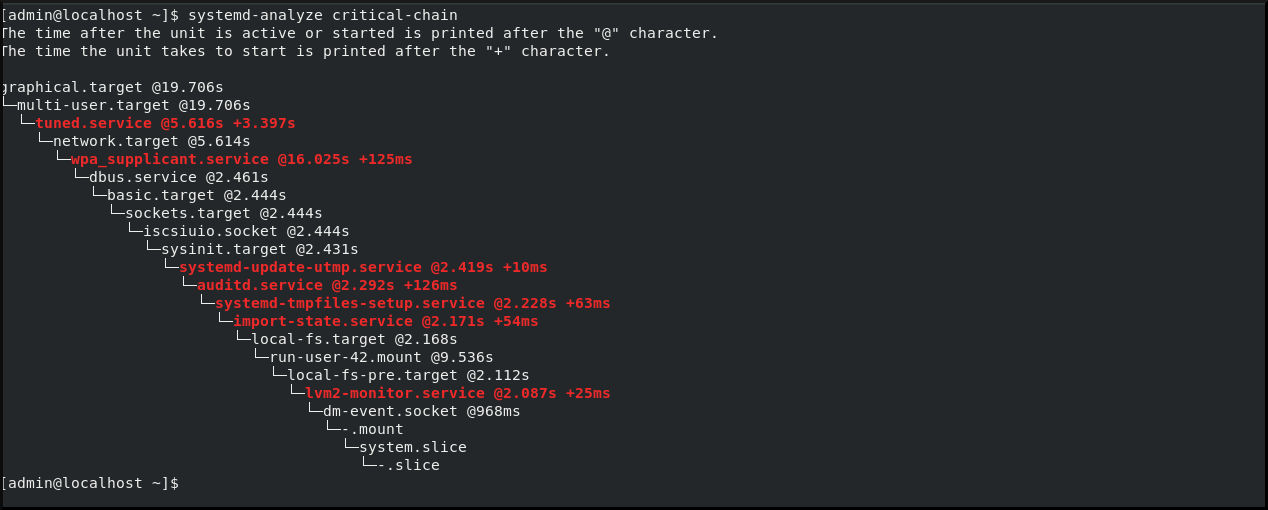
    Output of the systemd-analyze critical-chain command

    For details, see systemd(1), systemctl(1), and systemd-analyze (1) man pages on your system.