Configure IP tunnels
Similar to a VPN, an IP tunnel directly connects two networks over a third network, such as the internet. However, not all tunnel protocols support encryption.
The routers in both networks that establish the tunnel requires at least two interfaces:
- One interface that is connected to the local network
- One interface that is connected to the network through which the tunnel is established.
To establish the tunnel, you create a virtual interface on both routers with an IP address from the remote subnet.
NetworkManager supports the following IP tunnels:
- Generic Routing Encapsulation (GRE)
- Generic Routing Encapsulation over IPv6 (IP6GRE)
- Generic Routing Encapsulation Terminal Access Point (GRETAP)
- Generic Routing Encapsulation Terminal Access Point over IPv6 (IP6GRETAP)
- IPv4 over IPv4 (IPIP)
- IPv4 over IPv6 (IPIP6)
- IPv6 over IPv6 (IP6IP6)
- Simple Internet Transition (SIT)
Depending on the type, these tunnels act either on layer 2 or 3 of the Open Systems Interconnection (OSI) model.
Configure an IPIP tunnel to encapsulate IPv4 traffic in IPv4 packets
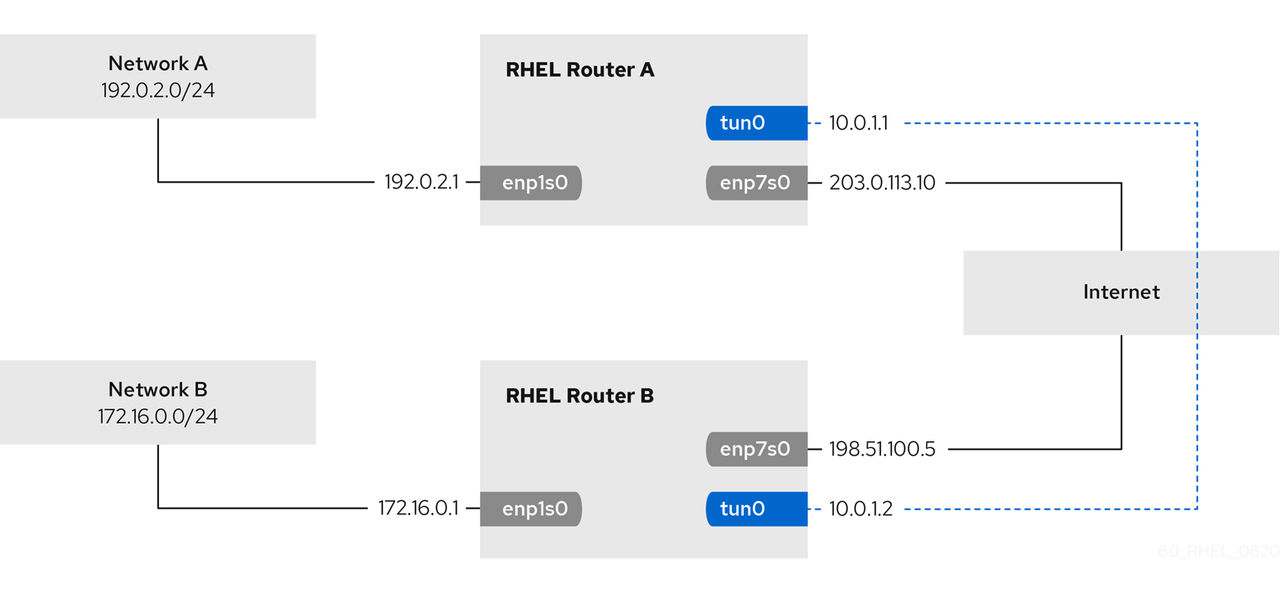
An IP over IP (IPIP) tunnel operates on OSI layer 3 and encapsulates IPv4 traffic in IPv4 packets.
Before you begin
- Each RHEL router has a network interface that is connected to its local subnet.
- Each RHEL router has a network interface that is connected to the internet.
- The traffic you want to send through the tunnel is IPv4 unicast.
About this task
Data sent through an IPIP tunnel is not encrypted. For security reasons, use the tunnel only for data that is already encrypted, for example, by other protocols, such as HTTPS.
Note that IPIP tunnels support only unicast packets. If you require an IPv4 tunnel that supports multicast, see Configuring a GRE tunnel using nmcli to encapsulate layer-3 traffic in IPv4 packets.
For example, you can create an IPIP tunnel between two RHEL routers to connect two internal subnets over the internet as shown in the following diagram:
Procedure
-
On the RHEL router in network A:
-
On the RHEL router in network B:
Results
- From each RHEL router, ping the IP address of the internal interface of the other router:
- On Router A, ping
172.16.0.1:# ping 172.16.0.1 - On Router B, ping
192.0.2.1:# ping 192.0.2.1
- On Router A, ping
Configure a GRE tunnel to encapsulate layer-3 traffic in IPv4 packets
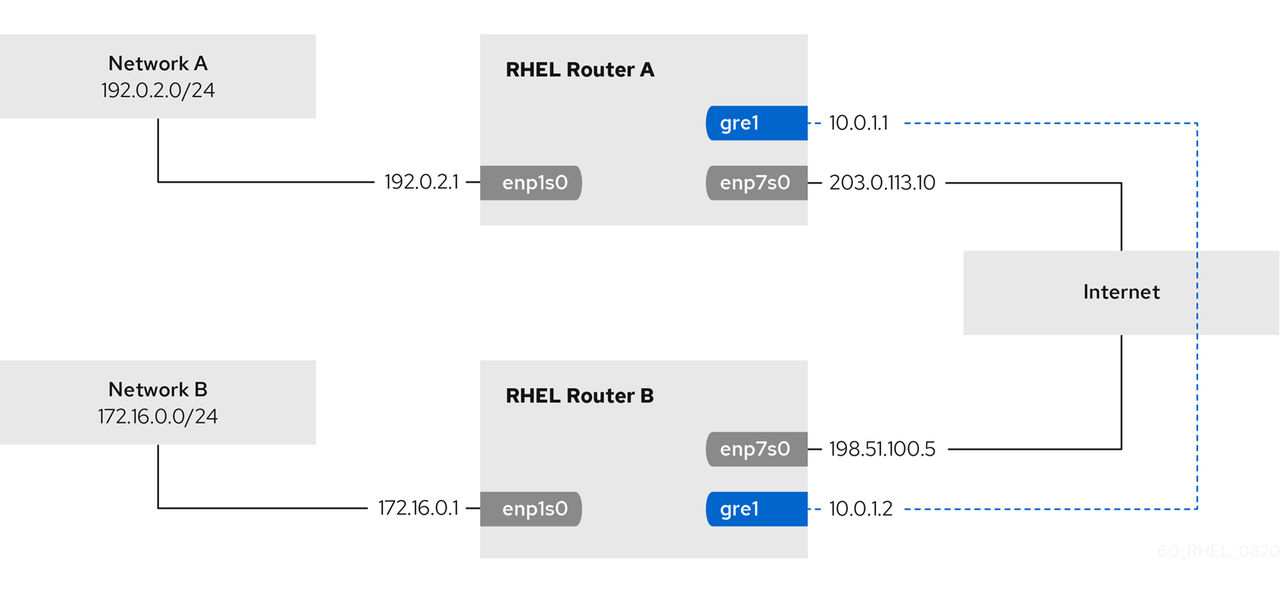
A Generic Routing Encapsulation (GRE) tunnel encapsulates layer-3 traffic in IPv4 packets. A GRE tunnel can encapsulate any layer 3 protocol with a valid Ethernet type.
Before you begin
- Each RHEL router has a network interface that is connected to its local subnet.
- Each RHEL router has a network interface that is connected to the internet.
About this task
Data sent through a GRE tunnel is not encrypted. For security reasons, use the tunnel only for data that is already encrypted, for example, by other protocols, such as HTTPS.
For example, you can create a GRE tunnel between two RHEL routers to connect two internal subnets over the internet as shown in the following diagram:
Procedure
-
On the RHEL router in network A:
-
On the RHEL router in network B:
Results
- From each RHEL router, ping the IP address of the internal interface of the other router:
- On Router A, ping
172.16.0.1:# ping 172.16.0.1 - On Router B, ping
192.0.2.1:# ping 192.0.2.1
- On Router A, ping
Configure a GRETAP tunnel to transfer Ethernet frames over IPv4
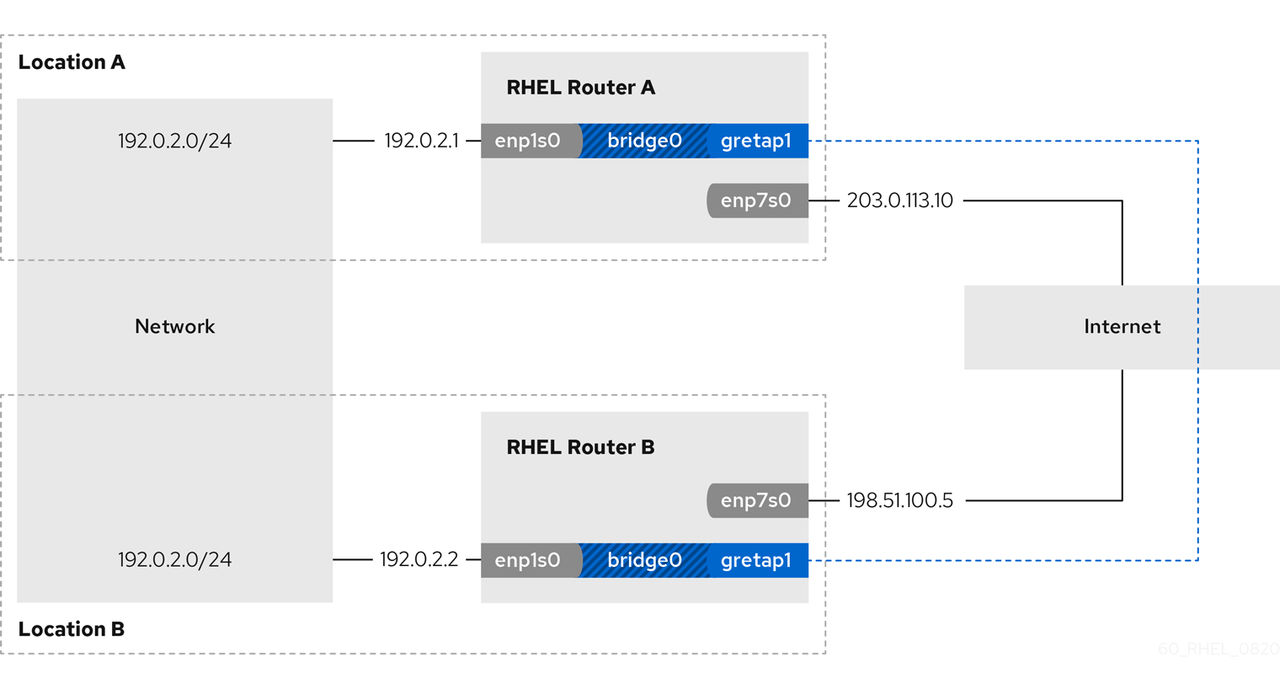
A Generic Routing Encapsulation Terminal Access Point (GRETAP) tunnel operates on OSI level 2 and encapsulates Ethernet traffic in IPv4 packets.
Before you begin
- Each RHEL router has a network interface that is connected to its local network, and the interface has no IP configuration assigned.
- Each RHEL router has a network interface that is connected to the internet.
About this task
Data sent through a GRETAP tunnel is not encrypted. For security reasons, establish the tunnel over a VPN or a different encrypted connection.
For example, you can create a GRETAP tunnel between two RHEL routers to connect two networks using a bridge as shown in the following diagram:
Procedure
-
On the RHEL router in network A:
-
On the RHEL router in network B:
Results
- On both routers, verify that the
enp1s0andgretap1connections are connected and that theCONNECTIONcolumn displays the connection name of the port:# nmcli devicenmcli device DEVICE TYPE STATE CONNECTION ... bridge0 bridge connected bridge0 enp1s0 ethernet connected bridge0-port1 gretap1 iptunnel connected bridge0-port2 - From each RHEL router, ping the IP address of the internal interface of the other router:
- On Router A, ping
192.0.2.2:# ping 192.0.2.2 - On Router B, ping
192.0.2.1:# ping 192.0.2.1
- On Router A, ping

