 Red Hat Summit
4.4. DMN decision logic in boxed expressions
Boxed expressions in DMN are tables that you use to define the underlying logic of decision nodes and business knowledge models in a decision requirements diagram (DRD). Some boxed expressions can contain other boxed expressions, but the top-level boxed expression corresponds to the decision logic of a single DRD artifact. While DRDs represent the flow of a DMN decision model, boxed expressions define the actual decision logic of individual nodes. DRDs and boxed expressions together form a complete and functional DMN decision model.
The following are the types of DMN boxed expressions:
- Decision tables
- Literal expressions
- Contexts
- Relations
- Functions
- Invocations
- Lists
Red Hat Decision Manager does not provide boxed list expressions in Business Central, but supports a FEEL list data type that you can use in boxed literal expressions. For more information about the list data type and other FEEL data types in Red Hat Decision Manager, see 「Data types in FEEL」.
All Friendly Enough Expression Language (FEEL) expressions that you use in your boxed expressions must conform to the FEEL syntax requirements in the OMG Decision Model and Notation specification.
4.4.1. DMN decision tables
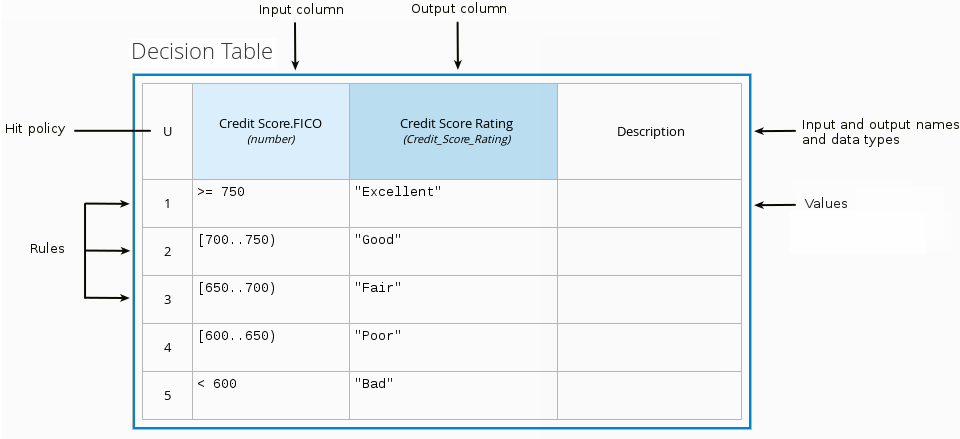
A decision table in DMN is a visual representation of one or more business rules in a tabular format. You use decision tables to define rules for a decision node that applies those rules at a given point in the decision model. Each rule consists of a single row in the table, and includes columns that define the conditions (input) and outcome (output) for that particular row. The definition of each row is precise enough to derive the outcome using the values of the conditions. Input and output values can be FEEL expressions or defined data type values.
For example, the following decision table determines credit score ratings based on a defined range of a loan applicant’s credit score:
図4.3 Decision table for credit score rating
The following decision table determines the next step in a lending strategy for applicants depending on applicant loan eligibility and the bureau call type:
図4.4 Decision table for lending strategy

The following decision table determines applicant qualification for a loan as the concluding decision node in a loan prequalification decision model:
図4.5 Decision table for loan prequalification

Decision tables are a popular way of modeling rules and decision logic, and are used in many methodologies (such as DMN) and implementation frameworks (such as Drools).
Red Hat Decision Manager supports both DMN decision tables and Drools-native decision tables, but they are different types of assets with different syntax requirements and are not interchangeable. For more information about Drools-native decision tables in Red Hat Decision Manager, see Designing a decision service using spreadsheet decision tables.
4.4.1.1. Hit policies in DMN decision tables
Hit policies determine how to reach an outcome when multiple rules in a decision table match the provided input values. For example, if one rule in a decision table applies a sales discount to military personnel and another rule applies a discount to students, then when a customer is both a student and in the military, the decision table hit policy must indicate whether to apply one discount or the other (Unique, First) or both discounts (Collect Sum). You specify the single character of the hit policy (U, F, C+) in the upper-left corner of the decision table.
The following decision table hit policies are supported in DMN:
- Unique (U): Permits only one rule to match. Any overlap raises an error.
- Any (A): Permits multiple rules to match, but they must all have the same output. If multiple matching rules do not have the same output, an error is raised.
- Priority (P): Permits multiple rules to match, with different outputs. The output that comes first in the output values list is selected.
- First (F): Uses the first match in rule order.
Collect (C+, C>, C<, C#): Aggregates output from multiple rules based on an aggregation function.
- Collect ( C ): Aggregates values in an arbitrary list.
- Collect Sum (C+): Outputs the sum of all collected values. Values must be numeric.
- Collect Min (C<): Outputs the minimum value among the matches. The resulting values must be comparable, such as numbers, dates, or text (lexicographic order).
- Collect Max (C>): Outputs the maximum value among the matches. The resulting values must be comparable, such as numbers, dates or text (lexicographic order).
- Collect Count (C#): Outputs the number of matching rules.

'%20d='M201.5%20305.5c-13.8%200-24.9-11.1-24.9-24.6%200-13.8%2011.1-24.9%2024.9-24.9%2013.6%200%2024.6%2011.1%2024.6%2024.9%200%2013.6-11.1%2024.6-24.6%2024.6zM504%20256c0%20137-111%20248-248%20248S8%20393%208%20256%20119%208%20256%208s248%20111%20248%20248zm-132.3-41.2c-9.4%200-17.7%203.9-23.8%2010-22.4-15.5-52.6-25.5-86.1-26.6l17.4-78.3%2055.4%2012.5c0%2013.6%2011.1%2024.6%2024.6%2024.6%2013.8%200%2024.9-11.3%2024.9-24.9s-11.1-24.9-24.9-24.9c-9.7%200-18%205.8-22.1%2013.8l-61.2-13.6c-3-.8-6.1%201.4-6.9%204.4l-19.1%2086.4c-33.2%201.4-63.1%2011.3-85.5%2026.8-6.1-6.4-14.7-10.2-24.1-10.2-34.9%200-46.3%2046.9-14.4%2062.8-1.1%205-1.7%2010.2-1.7%2015.5%200%2052.6%2059.2%2095.2%20132%2095.2%2073.1%200%20132.3-42.6%20132.3-95.2%200-5.3-.6-10.8-1.9-15.8%2031.3-16%2019.8-62.5-14.9-62.5zM302.8%20331c-18.2%2018.2-76.1%2017.9-93.6%200-2.2-2.2-6.1-2.2-8.3%200-2.5%202.5-2.5%206.4%200%208.6%2022.8%2022.8%2087.3%2022.8%20110.2%200%202.5-2.2%202.5-6.1%200-8.6-2.2-2.2-6.1-2.2-8.3%200zm7.7-75c-13.6%200-24.6%2011.1-24.6%2024.9%200%2013.6%2011.1%2024.6%2024.6%2024.6%2013.8%200%2024.9-11.1%2024.9-24.6%200-13.8-11-24.9-24.9-24.9z'/%3e%3c/svg%3e)