 Red Hat Summit
30.4. "Add an Action BRL fragment"
A Business Rule Language (BRL) fragment is a section of a rule created using the guided rules designer. The condition BRL fragment is the "WHEN" portion of the rule, and the action BRL fragment is the "THEN" portion of the rule. With this column option you can define an action BRL fragment to be used in the right ("THEN") side of a rule. Simpler column types can refer to Facts and Fact fields bound in the BRL fragment and vice-versa.
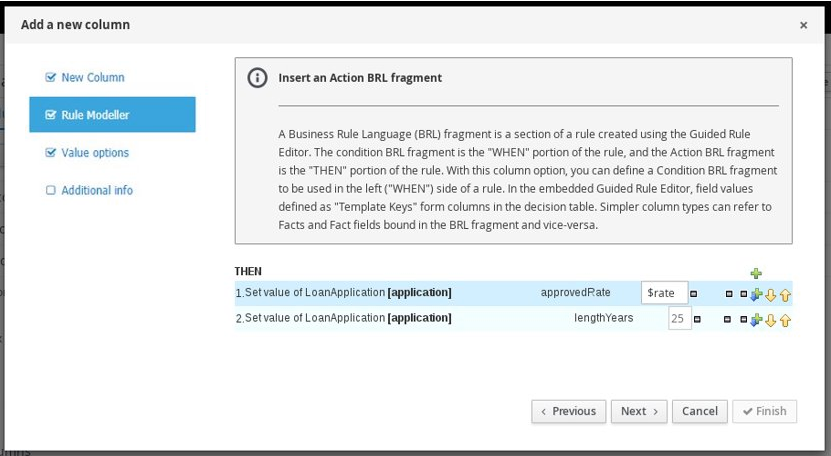
The following example is an action BRL fragment for a loan application:
図30.3 Add an action BRL fragment with the embedded guided rules designer
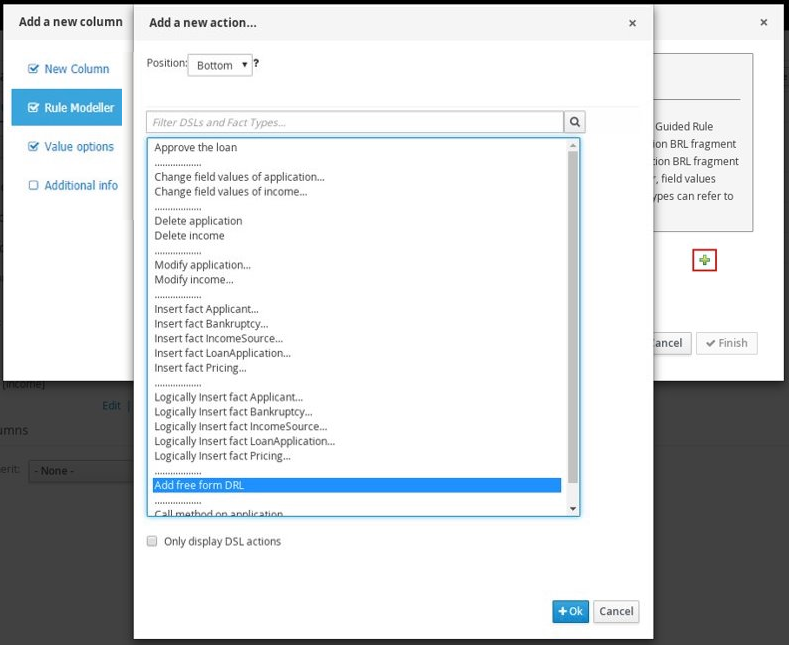
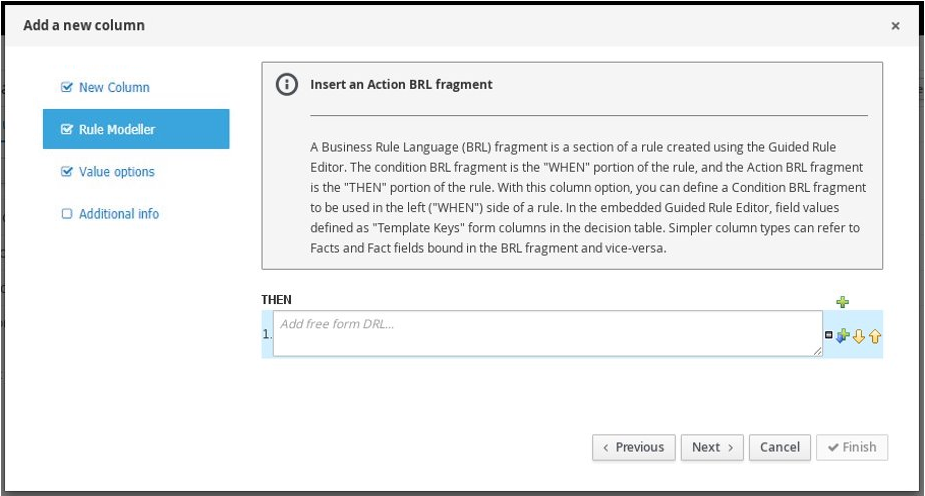
You can also select Add free form DRL from the list of action options to define the action BRL fragment without the embedded guided rules designer.
図30.4 Add an action BRL fragment with free form DRL
When you add a field for an action BRL fragment, one of the value options is Template key (as opposed to Literal or Formula). Template keys are placeholder variables that are interchanged with a specified value when the guided decision table is generated, and form separate columns in the table for each template key value specified. You can specify the default value of Template key in the Value options page. While Literal and Formula values are static in a decision table, Template key values can be modified as needed.
In the embedded guided rules designer, you can add a template key value to a field by selecting the Template key field option and entering the value in the editor in the format $key. For example, $age creates an $age column in the decision table.
In free form DRL, you can add a template key value to facts in the format @{key}. For example, Person( age > @{age} ) creates an $age column in the decision table.
The data type is String for new columns added using template keys.
Required column parameters
The following parameters are required in the Add a new column wizard to set up this column type:
- Rule Modeller: Define the action BRL fragment ("THEN" portion) for the rule.
- Header (description): Add header text for the column.
- Hide column: Select this to hide the column, or clear this to display the column.

'%20d='M201.5%20305.5c-13.8%200-24.9-11.1-24.9-24.6%200-13.8%2011.1-24.9%2024.9-24.9%2013.6%200%2024.6%2011.1%2024.6%2024.9%200%2013.6-11.1%2024.6-24.6%2024.6zM504%20256c0%20137-111%20248-248%20248S8%20393%208%20256%20119%208%20256%208s248%20111%20248%20248zm-132.3-41.2c-9.4%200-17.7%203.9-23.8%2010-22.4-15.5-52.6-25.5-86.1-26.6l17.4-78.3%2055.4%2012.5c0%2013.6%2011.1%2024.6%2024.6%2024.6%2013.8%200%2024.9-11.3%2024.9-24.9s-11.1-24.9-24.9-24.9c-9.7%200-18%205.8-22.1%2013.8l-61.2-13.6c-3-.8-6.1%201.4-6.9%204.4l-19.1%2086.4c-33.2%201.4-63.1%2011.3-85.5%2026.8-6.1-6.4-14.7-10.2-24.1-10.2-34.9%200-46.3%2046.9-14.4%2062.8-1.1%205-1.7%2010.2-1.7%2015.5%200%2052.6%2059.2%2095.2%20132%2095.2%2073.1%200%20132.3-42.6%20132.3-95.2%200-5.3-.6-10.8-1.9-15.8%2031.3-16%2019.8-62.5-14.9-62.5zM302.8%20331c-18.2%2018.2-76.1%2017.9-93.6%200-2.2-2.2-6.1-2.2-8.3%200-2.5%202.5-2.5%206.4%200%208.6%2022.8%2022.8%2087.3%2022.8%20110.2%200%202.5-2.2%202.5-6.1%200-8.6-2.2-2.2-6.1-2.2-8.3%200zm7.7-75c-13.6%200-24.6%2011.1-24.6%2024.9%200%2013.6%2011.1%2024.6%2024.6%2024.6%2013.8%200%2024.9-11.1%2024.9-24.6%200-13.8-11-24.9-24.9-24.9z'/%3e%3c/svg%3e)