 Red Hat Summit
6.3.2. Including PMML models within a DMN file in Business Central
In Business Central, you can include Predictive Model Markup Language (PMML) models from your project in a specified DMN file. When you include a PMML model within a DMN file, you can invoke that PMML model as a boxed function expression for a DMN decision node or business knowledge model node. If you update the source file for an included PMML model, you must remove and re-include the PMML model in the DMN file to apply the source changes.
You cannot include PMML models from other projects in Business Central.
Prerequisites
-
The PMML models are imported (as
.pmmlfiles) in the same project in Business Central as the DMN file in which you want to include the models.
Procedure
In your DMN project, add the following dependencies to the project
pom.xmlfile to enable PMML evaluation:<!-- Required for the PMML compiler --> <dependency> <groupId>org.drools</groupId> <artifactId>kie-pmml</artifactId> <version>${rhdm.version}</version> <scope>provided</scope> </dependency> <!-- Alternative dependencies for JPMML Evaluator, override `kie-pmml` dependency --> <dependency> <groupId>org.kie</groupId> <artifactId>kie-dmn-jpmml</artifactId> <version>${rhdm.version}</version> <scope>provided</scope> </dependency> <dependency> <groupId>org.jpmml</groupId> <artifactId>pmml-evaluator</artifactId> <version>1.5.1</version> <scope>provided</scope> </dependency> <dependency> <groupId>org.jpmml</groupId> <artifactId>pmml-evaluator-extension</artifactId> <version>1.5.1</version> <scope>provided</scope> </dependency>To access the project
pom.xmlfile in Business Central, you can select any existing asset in the project and then in the Project Explorer menu on the left side of the screen, click the Customize View gear icon and select Repository Viewpom.xml. If you want to use the full PMML specification implementation with the Java Evaluator API for PMML (JPMML), use the alternative set of JPMML dependencies in your DMN project. If the JPMML dependencies and the standard
kie-pmmldependency are both present, thekie-pmmldependency is disabled. For information about JPMML licensing terms, see Openscoring.io.重要The legacy
kie-pmmldependency is deprecated with Red Hat Decision Manager 7.10.0 and will be replaced bykie-pmml-trustydependency in a future Red Hat Decision Manager release.注記Instead of specifying a Red Hat Decision Manager
<version>for individual dependencies, consider adding the Red Hat Business Automation bill of materials (BOM) dependency to your projectpom.xmlfile. The Red Hat Business Automation BOM applies to both Red Hat Decision Manager and Red Hat Process Automation Manager. When you add the BOM files, the correct versions of transitive dependencies from the provided Maven repositories are included in the project.Example BOM dependency:
<dependency>
  <groupId>com.redhat.ba</groupId>
  <artifactId>ba-platform-bom</artifactId>
  <version>7.10.0.redhat-00004</version>
  <scope>import</scope>
  <type>pom</type>
</dependency>
For more information about the Red Hat Business Automation BOM, see What is the mapping between RHDM product and maven library version?.
If you added the JPMML dependencies in your DMN project to use the JPMML Evaluator, download the following JAR files and add them to the
~/kie-server.war/WEB-INF/liband~/business-central.war/WEB-INF/libdirectories in your Red Hat Decision Manager distribution:-
kie-dmn-jpmmlJAR file in the Red Hat Decision Manager 7.10.0 Maven Repository distribution (rhdm-7.10.0-maven-repository/maven-repository/org/kie/kie-dmn-jpmml/7.48.0.Final-redhat-00004/kie-dmn-jpmml-7.48.0.Final-redhat-00004.jar) from the Red Hat Customer Portal - JPMML Evaluator 1.5.1 JAR file from the online Maven repository
- JPMML Evaluator Extensions 1.5.1 JAR file from the online Maven repository
These artifacts are required to enable JPMML evaluation in KIE Server and Business Central.
重要Red Hat supports integration with the Java Evaluator API for PMML (JPMML) for PMML execution in Red Hat Decision Manager. However, Red Hat does not support the JPMML libraries directly. If you include JPMML libraries in your Red Hat Decision Manager distribution, see the Openscoring.io licensing terms for JPMML.
-
-
In Business Central, go to Menu
Design Projects, click the project name, and select the DMN file you want to modify. - In the DMN designer, click the Included Models tab.
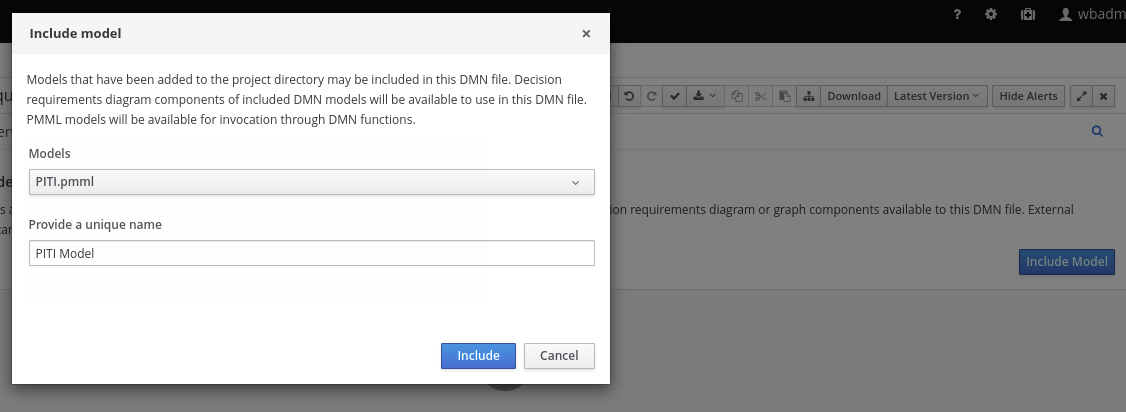
Click Include Model, select a PMML model from your project in the Models list, enter a unique name for the included model, and click Include:
図6.43 Including a PMML model
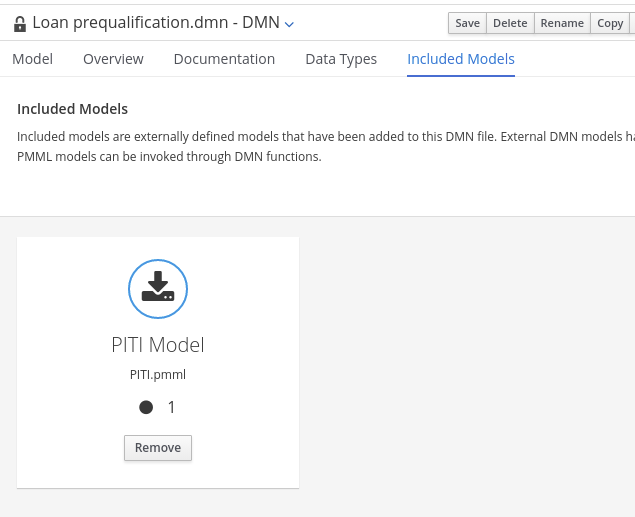
The PMML model is added to this DMN file:
図6.44 DMN file with included PMML model
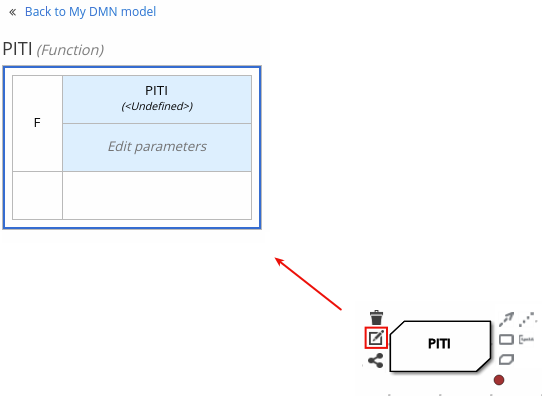
In the Model tab of the DMN designer, select or create the decision node or business knowledge model node in which you want to invoke the PMML model and click the Edit icon to open the DMN boxed expression designer:
図6.45 Opening a new decision node boxed expression

図6.46 Opening a new business knowledge model boxed expression
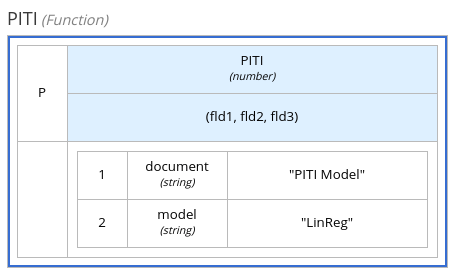
- Set the expression type to Function (default for business knowledge model nodes), click the top-left function cell, and select PMML.
In the document and model rows in the table, double-click the undefined cells to specify the included PMML document and the relevant PMML model within that document:
図6.47 Adding a PMML model in a DMN business knowledge model
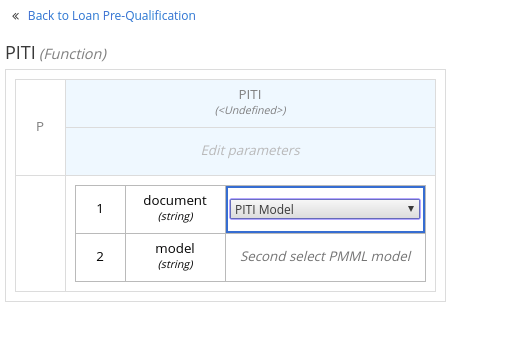
図6.48 Example PMML definition in a DMN business knowledge model
If you update the source file for an included PMML model, you must remove and re-include the PMML model in the DMN file to apply the source changes.
To edit the included model name or to remove the included model from the DMN file, use the Included Models tab in the DMN designer.

'%20d='M201.5%20305.5c-13.8%200-24.9-11.1-24.9-24.6%200-13.8%2011.1-24.9%2024.9-24.9%2013.6%200%2024.6%2011.1%2024.6%2024.9%200%2013.6-11.1%2024.6-24.6%2024.6zM504%20256c0%20137-111%20248-248%20248S8%20393%208%20256%20119%208%20256%208s248%20111%20248%20248zm-132.3-41.2c-9.4%200-17.7%203.9-23.8%2010-22.4-15.5-52.6-25.5-86.1-26.6l17.4-78.3%2055.4%2012.5c0%2013.6%2011.1%2024.6%2024.6%2024.6%2013.8%200%2024.9-11.3%2024.9-24.9s-11.1-24.9-24.9-24.9c-9.7%200-18%205.8-22.1%2013.8l-61.2-13.6c-3-.8-6.1%201.4-6.9%204.4l-19.1%2086.4c-33.2%201.4-63.1%2011.3-85.5%2026.8-6.1-6.4-14.7-10.2-24.1-10.2-34.9%200-46.3%2046.9-14.4%2062.8-1.1%205-1.7%2010.2-1.7%2015.5%200%2052.6%2059.2%2095.2%20132%2095.2%2073.1%200%20132.3-42.6%20132.3-95.2%200-5.3-.6-10.8-1.9-15.8%2031.3-16%2019.8-62.5-14.9-62.5zM302.8%20331c-18.2%2018.2-76.1%2017.9-93.6%200-2.2-2.2-6.1-2.2-8.3%200-2.5%202.5-2.5%206.4%200%208.6%2022.8%2022.8%2087.3%2022.8%20110.2%200%202.5-2.2%202.5-6.1%200-8.6-2.2-2.2-6.1-2.2-8.3%200zm7.7-75c-13.6%200-24.6%2011.1-24.6%2024.9%200%2013.6%2011.1%2024.6%2024.6%2024.6%2013.8%200%2024.9-11.1%2024.9-24.6%200-13.8-11-24.9-24.9-24.9z'/%3e%3c/svg%3e)