 红帽全球峰会
第 17 章 使用精确时间协议硬件
17.1. 关于 OpenShift 集群节点中的精确时间协议
精度时间协议(PTP)用于同步网络中的时钟。与硬件支持一起使用时,PTP 能够达到微秒级的准确性,比网络时间协议 (NTP) 更加准确。
如果您的带有 PTP 的 openshift-sdn 集群使用 User Datagram Protocol (UDP) 进行硬件时间戳,且迁移到 OVN-Kubernetes 插件,则硬件时间戳无法应用到主接口设备,如 Open vSwitch (OVS) 网桥。因此,UDP 版本 4 配置无法使用 br-ex 接口。
您可以配置 linuxptp 服务,并在 OpenShift Container Platform 集群节点中使用具有 PTP 功能的硬件。
通过部署 PTP Operator,使用 OpenShift Container Platform Web 控制台或 OpenShift CLI (oc)安装 PTP。PTP Operator 会创建和管理 linuxptp 服务,并提供以下功能:
- 在集群中发现具有 PTP 功能的设备。
-
管理
linuxptp服务的配置。 -
PTP 时钟事件通知会使用 PTP Operator
cloud-event-proxysidecar 会对应用程序的性能和可靠性造成负面影响。
PTP Operator 只适用于仅在裸机基础架构上置备的集群上具有 PTP 功能的设备。
17.1.1. PTP 域的元素
PTP 用于将网络中连接的多个节点与每个节点的时钟同步。PTP 同步时钟以领导层次结构进行组织。层次结构由最佳 master 时钟 (BMC) 算法自动创建和更新,该算法在每个时钟上运行。后续时钟与领导时钟同步,后续时钟本身可以是其他下游时钟的来源。
图 17.1. 网络中的 PTP 节点
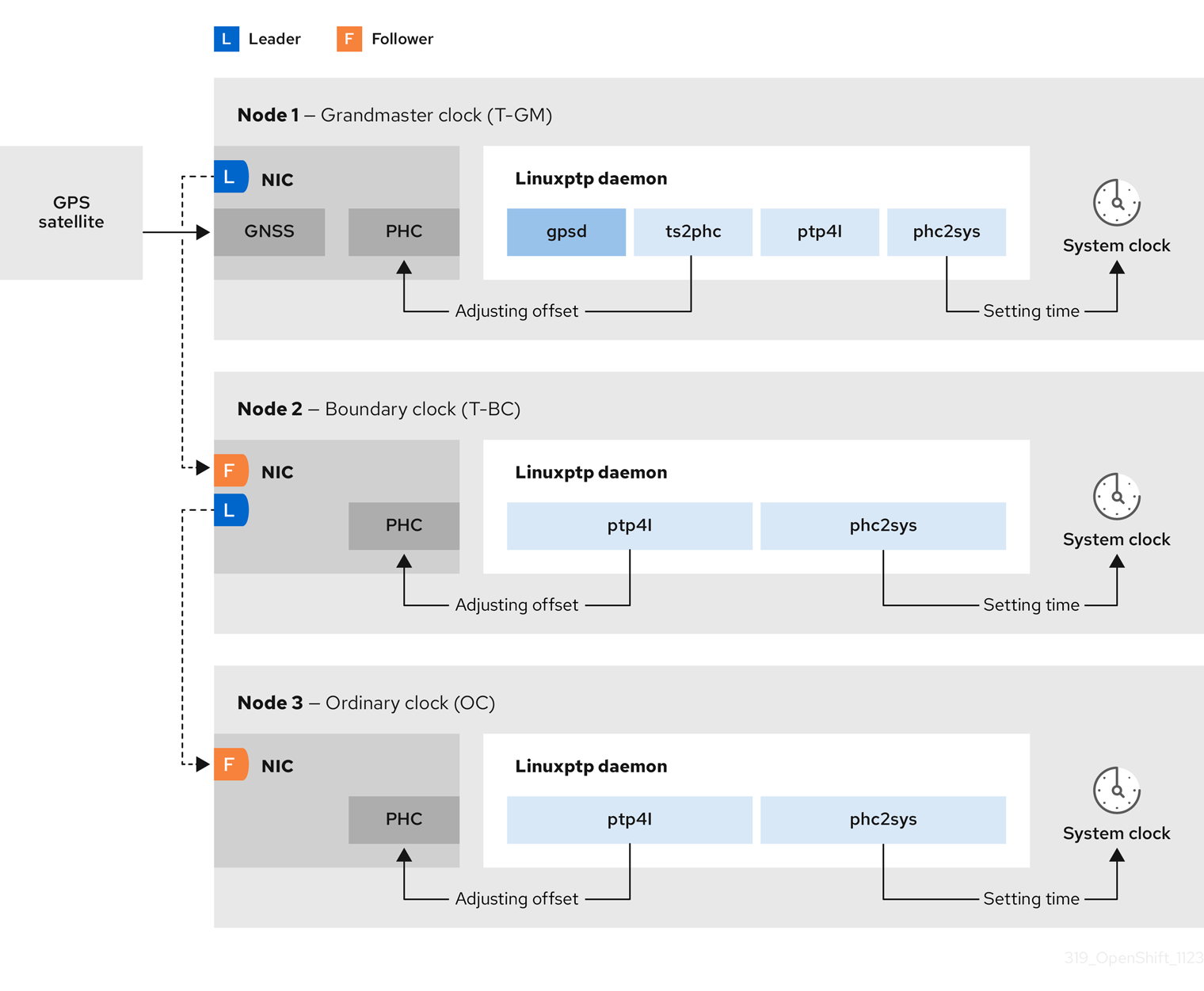
下面描述了三种 PTP 时钟类型。
- Grandmaster 时钟
- grandmaster 时钟向网络上的其他时钟提供标准时间信息并确保准确和稳定的同步。它写入时间戳并响应来自其他时钟的时间间隔。grandmaster 时钟与全局导航 Satellite 系统 (GNSS) 时间源同步。Grandmaster 时钟是网络中权威时间来源,负责为所有其他设备提供时间同步。
- Boundary 时钟
- Boundary(边界)时钟在两个或更多个通信路径中具有端口,并且可以是指向其他目标时钟的源和目标。边界时钟作为上游目标时钟工作。目标时钟接收计时消息,针对延迟进行调整,然后创建一个新的源时间信号来传递网络。边界时钟生成一个新的计时数据包,它仍然与源时钟正确同步,并可减少直接报告到源时钟的连接设备数量。
- Ordinary 时钟
- Ordinary(普通)时钟具有一个端口连接,可根据其在网络中的位置扮演源或目标时钟的角色。普通时钟可以读取和写入时间戳。
17.1.1.1. PTP 优于 NTP 的优点
PTP 与 NTP 相比有一个主要优势,即各种网络接口控制器 (NIC) 和网络交换机中存在的硬件支持。特殊硬件允许 PTP 考虑消息传输的延迟,并提高时间同步的准确性。为了获得最佳准确性,建议启用 PTP 时钟间的所有网络组件。
基于硬件的 PTP 提供最佳准确性,因为 NIC 可以在准确发送和接收时对 PTP 数据包进行时间戳。这与基于软件的 PTP 进行比较,这需要操作系统对 PTP 数据包进行额外的处理。
在启用 PTP 前,请确保为所需节点禁用 NTP。您可以使用 MachineConfig 自定义资源禁用 chrony 时间服务 (chronyd)。如需更多信息,请参阅禁用 chrony 时间服务。
17.1.2. 使用带有 PTP 的双 Intel E810 NIC 硬件
OpenShift Container Platform 支持单和双 NIC Intel E810 硬件,以便在 grandmaster 时钟(T-GM)和边界时钟(T-BC)中精度 PTP 时间。
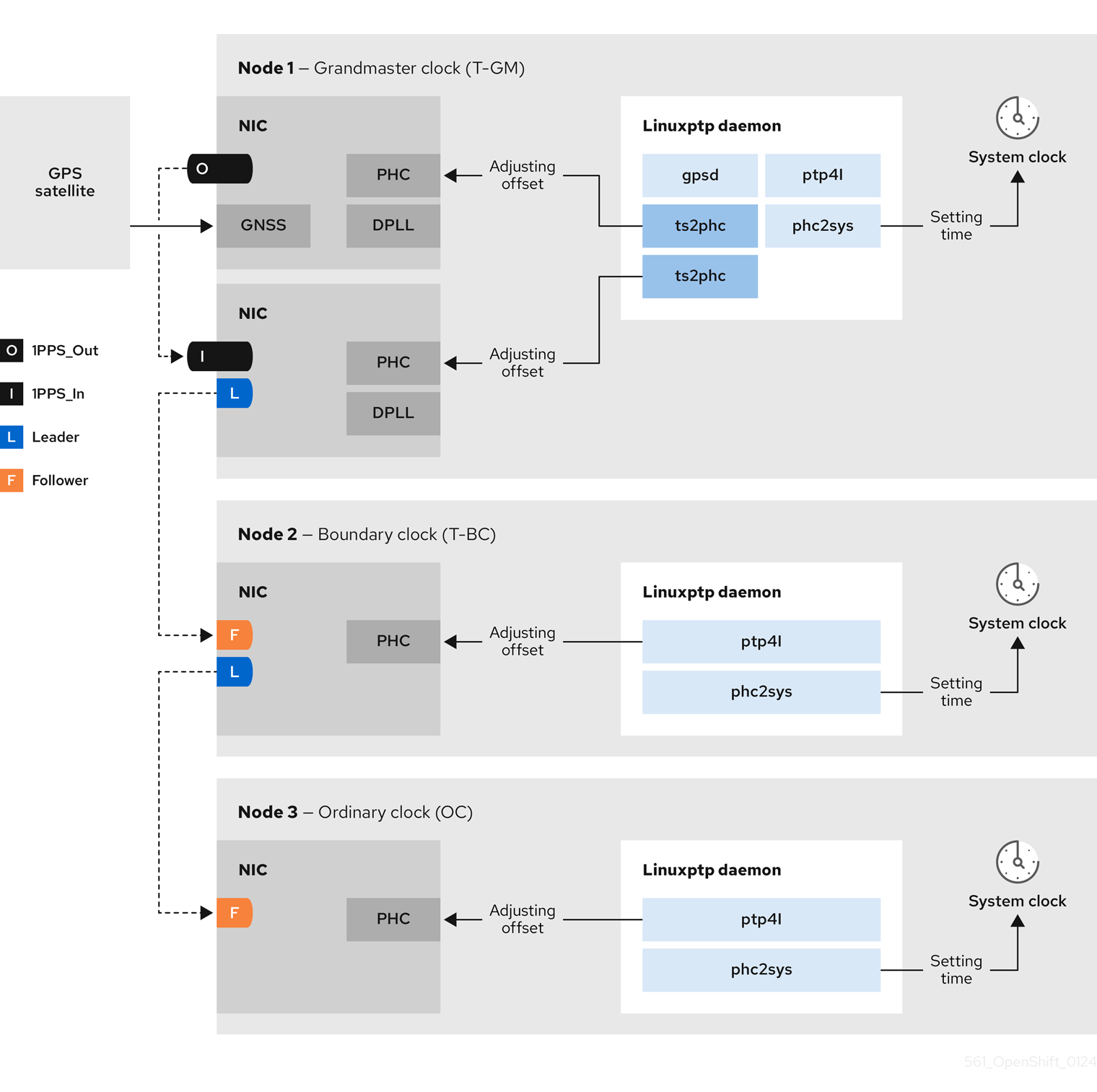
- 双 NIC grandmaster 时钟
您可以使用具有双 NIC 硬件作为 PTP grandmaster 时钟的集群主机。一个 NIC 从全局导航 Satellite 系统(GNSS)接收计时信息。第二个 NIC 在第一次使用 E810 NIC 上的 SMA1 Tx/Rx 连接接收时间信息。集群主机上的系统时钟从连接到 GNSS satellite 的 NIC 同步。
双 NIC grandmaster 时钟是分布式 RAN (D-RAN)配置的功能,其中远程 Radio 单元(RRU)和 Baseband 单元(BBU)位于相同的无线单元站点。d-RAN 在多个站点间分发无线功能,带有将它们链接到核心网络的连接。
图 17.2. 双 NIC grandmaster 时钟
 注意
注意在双 NIC T-GM 配置中,单个
ts2phc进程报告为系统中的两个ts2phc实例。- 双 NIC 边界时钟
对于提供中等范围的 5G 电信网络,每个虚拟分布式单元(vDU)需要连接到 6 个无线电单元(RU)。要使这些连接,每个 vDU 主机都需要 2 个 NIC 被配置为边界时钟。
双 NIC 硬件允许您将每个 NIC 连接到相同的上游领导时钟,并将每个 NIC 的
ptp4l实例连接给下游时钟。
OpenShift Container Platform 使用带有 linuxptp 和 gpsd 软件包的 PTP Operator 进行高精度网络同步。linuxptp 软件包为网络中的 PTP 时间提供工具和守护进程。带有 Global Navigation Satellite System (GNSS)功能 NIC 的集群主机使用 gpsd 来与 GNSS 时钟源进行接口。
linuxptp 软件包包括用于系统时钟同步的 ts2phc、pmc、ptp4l 和 phc2sys 程序。
- ts2phc
ts2phc将 PTP 设备中的 PTP 硬件时钟(PHC)与高度精确度同步。ts2phc用于 grandmaster 时钟配置。它收到精度计时信号,这是一个高度精确时钟源,如 Global Navigation Satellite System (GNSS)。GNSS 提供准确可靠的同步时间源,用于大型分布式网络。GNSS 时钟通常提供时间信息,其精度为几个纳秒。ts2phc系统守护进程通过读取 grandmaster 时钟中的时间信息,将时间信息从 grandmaster 时钟发送到网络中的其他 PTP 设备,并将其转换为 PHC 格式。PHC 时间供网络中的其他设备用来将其时钟与 grandmaster 时钟同步。- pmc
-
pmc根据 IEEE 标准 1588.1588 实现 PTP 管理客户端 (pmc)。pmc为ptp4l系统守护进程提供基本的管理访问权限。pmc从标准输入读取,并通过所选传输发送输出,打印它收到的任何回复。 - ptp4l
ptp4l实现 PTP 边界时钟和普通时钟,并作为系统守护进程运行。ptp4l执行以下操作:- 将 PHC 同步到源时钟与硬件时间戳
- 将系统时钟与源时钟与软件时间戳同步
- phc2sys
-
phc2sys将系统时钟与网络接口控制器 (NIC) 上的 PHC 同步。phc2sys系统守护进程持续监控 PHC 以获取计时信息。当检测到计时错误时,LareC 会更正系统时钟。
gpsd 软件包包括 ubxtool、gspipe、gpsd、GNSS 时钟与主机时钟同步的程序。
- ubxtool
-
ubxtoolCLI 可让您与 u-blox GPS 系统通信。ubxtoolCLI 使用 u-blox 二进制协议与 GPS 通信。 - gpspipe
-
gpspipe连接到gpsd输出并将其传送到stdout。 - gpsd
-
gpsd是一个服务守护进程,它监控一个或多个连接到主机的 GPS 或 AIS 接收器。
17.1.4. PTP grandmaster 时钟的 GNSS 时间概述
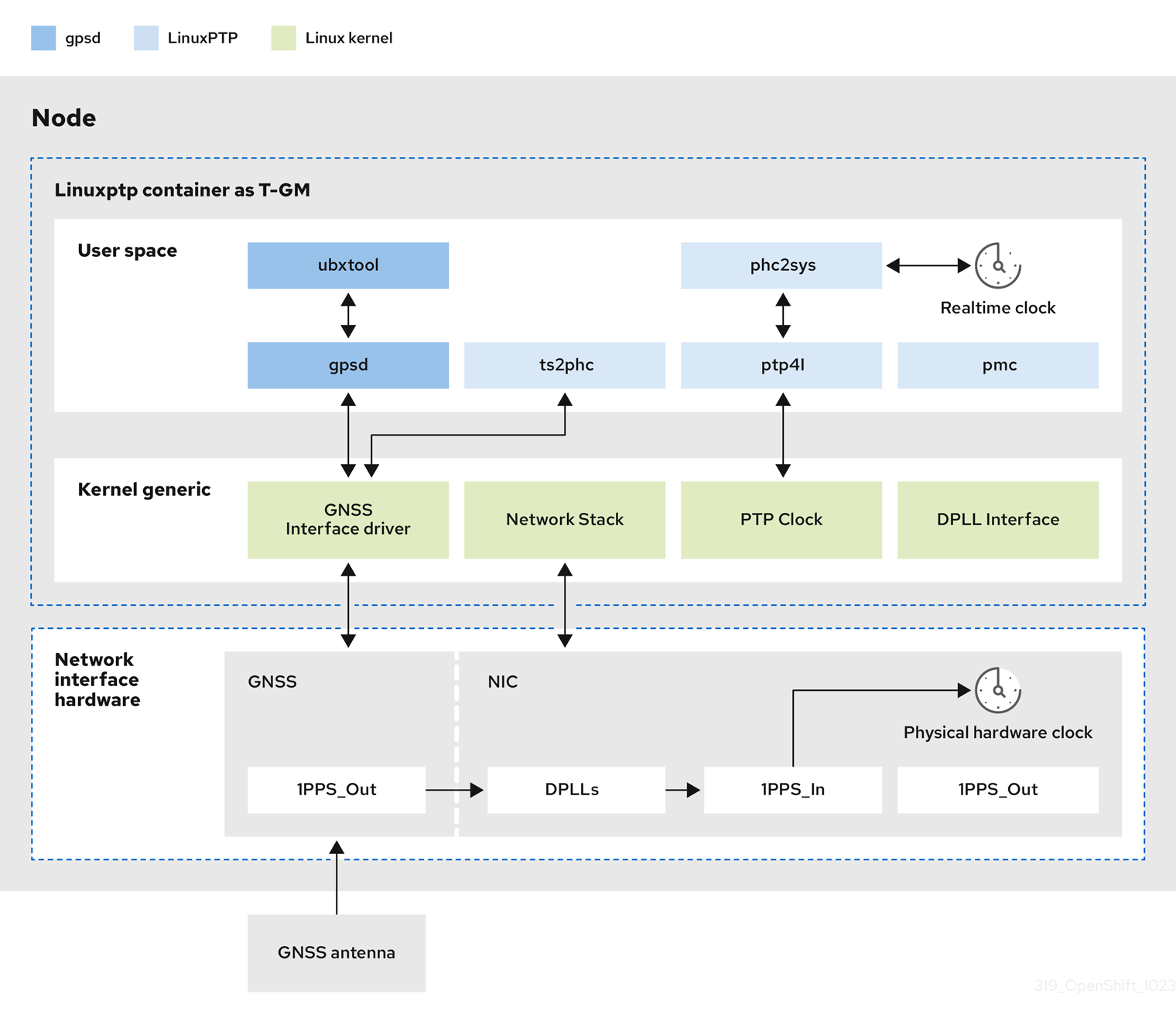
OpenShift Container Platform 支持从集群中的 Global Navigation Satellite 系统(GNSS)源和 grandmaster 时钟(T-GM)接收精度 PTP 时间。
OpenShift Container Platform 仅支持 Intel E810 Westport Channel NIC 的 GNSS 源中的 PTP 时间。
图 17.3. 使用 GNSS 和 T-GM 同步概述
- 全局导航 Satellite 系统(GNSS)
GNSS 是一个基于 satellite 的系统,用来为全球范围内接收器提供定位、导航和计时信息。在 PTP 中,GNSS 接收器通常用作高度准确且稳定的参考时钟源。这些接收器从多个 GNSS satellites 接收信号,允许它们计算精确的时间信息。从 GNSS 获取的时间信息被 PTP grandmaster 时钟参考。
通过将 GNSS 用作参考,PTP 网络中的 grandmaster 时钟可以为其他设备提供高度准确的时间戳,从而在整个网络中启用精确同步。
- Digital Phase-Locked Loop (DPLL)
- DPLL 在网络中的不同 PTP 节点之间提供时钟同步。DPLL 将本地系统时钟信号的阶段与传入同步信号的阶段进行比较,例如,来自 PTP grandmaster 时钟的 PTP 信息。DPLL 持续调整本地时钟频率和阶段,以最大程度降低本地时钟和参考时钟之间的阶段差异。
17.1.4.1. 在 GNSS-synced PTP grandmaster 时钟中处理 leap 秒事件
Leap second(闰秒)是一秒的调整,偶尔会被应用于 Coordinated Universal Time (UTC),使其与国际原子时间 (TAI) 同步。UTC 秒是无法预计的。在国际范围内认可的闰秒信息包括在 leap-seconds.list 中。此文件通过国际 Earth Rotation 和 Reference Systems Service (IERS)定期更新。一个未处理的闰秒对边缘 RAN 网络有严重影响。可能会导致边缘 RAN 应用程序立即断开语音调用和数据会话。

'%20d='M201.5%20305.5c-13.8%200-24.9-11.1-24.9-24.6%200-13.8%2011.1-24.9%2024.9-24.9%2013.6%200%2024.6%2011.1%2024.6%2024.9%200%2013.6-11.1%2024.6-24.6%2024.6zM504%20256c0%20137-111%20248-248%20248S8%20393%208%20256%20119%208%20256%208s248%20111%20248%20248zm-132.3-41.2c-9.4%200-17.7%203.9-23.8%2010-22.4-15.5-52.6-25.5-86.1-26.6l17.4-78.3%2055.4%2012.5c0%2013.6%2011.1%2024.6%2024.6%2024.6%2013.8%200%2024.9-11.3%2024.9-24.9s-11.1-24.9-24.9-24.9c-9.7%200-18%205.8-22.1%2013.8l-61.2-13.6c-3-.8-6.1%201.4-6.9%204.4l-19.1%2086.4c-33.2%201.4-63.1%2011.3-85.5%2026.8-6.1-6.4-14.7-10.2-24.1-10.2-34.9%200-46.3%2046.9-14.4%2062.8-1.1%205-1.7%2010.2-1.7%2015.5%200%2052.6%2059.2%2095.2%20132%2095.2%2073.1%200%20132.3-42.6%20132.3-95.2%200-5.3-.6-10.8-1.9-15.8%2031.3-16%2019.8-62.5-14.9-62.5zM302.8%20331c-18.2%2018.2-76.1%2017.9-93.6%200-2.2-2.2-6.1-2.2-8.3%200-2.5%202.5-2.5%206.4%200%208.6%2022.8%2022.8%2087.3%2022.8%20110.2%200%202.5-2.2%202.5-6.1%200-8.6-2.2-2.2-6.1-2.2-8.3%200zm7.7-75c-13.6%200-24.6%2011.1-24.6%2024.9%200%2013.6%2011.1%2024.6%2024.6%2024.6%2013.8%200%2024.9-11.1%2024.9-24.6%200-13.8-11-24.9-24.9-24.9z'/%3e%3c/svg%3e)