 Red Hat Summit
第10章 トラブルシューティング
このセクションでは、MTC (Migration Toolkit for Containers) のトラブルシューティングに使用するリソースについて説明します。
10.1. ログおよびデバッグツール
本セクションでは、トラブルシューティングに使用できるログおよびデバッグツールについて説明します。
10.1.1. 移行計画リソースの表示
移行計画リソースを表示して、実行中の移行を監視するか、MTC の Web コンソールおよびコマンドラインインターフェイス (CLI) を使用して失敗した移行のトラブルシューティングを行うことができます。
手順
- MTC Web コンソールで、Migration plans をクリックします。
移行計画の横にある Migrations 番号をクリックし、Migrations ページを表示します。
Migrations ページには、移行計画に関連する移行タイプ (Stage、Migrationまたは Rollback など) が表示されます。
- Type リンクをクリックして、Migration details ページを表示します。
Migration resources を展開して、移行リソースおよびそれらのステータスを表示します。
注記移行の失敗をトラブルシューティングするには、失敗した高レベルのリソースで開始し、リソースツリーでより低い位置にあるリソースまで堀り下げます。
リソースの横にある Options メニュー
 をクリックし、以下のオプションのいずれかを選択します。
copy
oc describeコマンド は、コマンドをクリップボードにコピーします。関連するクラスターにログインしてから、コマンドを実行します。
リソースの条件およびイベントは YAML 形式で表示されます。
Copy
oc logsコマンド は、コマンドをクリップボードにコピーします。関連するクラスターにログインしてから、コマンドを実行します。
リソースがログフィルターに対応していると、フィルターされたログが表示されます。
JSON ビューは、Web ブラウザーで JSON 形式でリソースデータを表示します。
データは
oc get <resource>コマンドの出力と同じです。
10.1.2. 移行計画ログの表示
移行計画の集計ログを表示できます。MTC の Web コンソールを使用して、コマンドをクリップボードにコピーしてから、コマンドラインインターフェイス (CLI) からコマンドを実行します。
このコマンドは、以下の Pod に関するフィルターされたログを表示します。
-
Migration Controller -
Velero -
Restic -
Rsync -
Stunnel -
Registry
手順
- MTC Web コンソールで、Migration plans をクリックします。
移行計画の横にある Migrations 番号をクリックし、Migrations ページを表示します。
Migrations ページには、移行計画に関連する移行タイプ (ウォーム移行の場合には Stage または Cutover など) が表示されます。
- View logs をクリックします。
-
コピーアイコンをクリックして、
oc logsコマンドをクリップボードにコピーします。 関連するクラスターにログインし、CLI でコマンドを実行します。
移行契約の集約ログが表示されます。
10.1.3. 移行ログリーダーの使用
移行ログリーダーを使用して、すべての移行ログの単一のフィルタービューを表示できます。
手順
mig-log-readerPod を取得します。$ oc -n openshift-migration get pods | grep log以下のコマンドを実行して、単一の移行ログを表示します。
$ oc -n openshift-migration logs -f <mig-log-reader-pod> -c color1 - 1
-c plainオプションは、色なしでログを表示します。
10.1.4. must-gather ツールの使用
must-gather ツールを使用して、MTC カスタムリソースのログ、メトリクス、および情報を収集できます。
must-gather データはすべてのカスタマーケースに割り当てられる必要があります。
1 時間または 24 時間のデータを収集し、Prometheus コンソールでデータを表示できます。
前提条件
-
cluster-adminロールを持つユーザーとして OpenShift Container Platform クラスターにログインする必要があります。 - OpenShift CLI がインストールされている必要があります。
手順
-
must-gatherデータを保存するディレクトリーに移動します。 oc adm must-gatherコマンドを実行します。過去 1 時間のデータを収集するには、以下を実行します。
$ oc adm must-gather --image=registry.redhat.io/rhmtc/openshift-migration-must-gather-rhel8:v1.4データは
/must-gather/must-gather.tar.gzとして保存されます。このファイルを Red Hat カスタマーポータル で作成したサポートケースにアップロードすることができます。過去 24 時間のデータを収集するには、以下を実行します。
$ oc adm must-gather --image= \ registry.redhat.io/rhmtc/openshift-migration-must-gather-rhel8: \ v1.4 -- /usr/bin/gather_metrics_dumpこの操作には長時間かかる場合があります。データは
/must-gather/metrics/prom_data.tar.gzとして保存されます。このファイルは Prometheus コンソールで表示できます。
Prometheus コンソールでデータを表示するには、以下を実行します。
ローカルの Prometheus インスタンスを作成します。
$ make prometheus-runこのコマンドでは、Prometheus URL が出力されます。
出力
Started Prometheus on http://localhost:9090- Web ブラウザーを起動して URL に移動し、Prometheus Web コンソールを使用してデータを表示します。
データを確認した後に、Prometheus インスタンスおよびデータを削除します。
$ make prometheus-cleanup
10.1.5. Velero CLI を使用したバックアップおよび復元 CR のデバッグ
Velero コマンドラインインターフェイス (CLI) を使用して Backup および Restore カスタムリソース (CR) と部分的な移行の失敗をデバッグできます。Velero CLI は velero Pod で実行されます。
10.1.5.1. Velero コマンド構文
Velero CLI コマンドは以下の構文を使用します。
$ oc exec $(oc get pods -n openshift-migration -o name | grep velero) -- ./velero <resource> <command> <resource_id>
$(oc get pods -n openshift-migration -o name | grep velero) に velero-<pod> -n openshift-migration を指定できます。
10.1.5.2. Help コマンド
Velero help コマンドは、すべての Velero CLI コマンドを一覧表示します。
$ oc exec $(oc get pods -n openshift-migration -o name | grep velero) -- ./velero --help10.1.5.3. describe コマンド
Velero describe コマンドは、Velero リソースに関連する警告およびエラーの要約を示します。
$ oc exec $(oc get pods -n openshift-migration -o name | grep velero) -- ./velero <resource> describe <resource_id>例
$ oc exec $(oc get pods -n openshift-migration -o name | grep velero) -- ./velero backup describe 0e44ae00-5dc3-11eb-9ca8-df7e5254778b-2d8ql10.1.5.4. logs コマンド
Velero logs コマンドは、Velero リソースに関連付けられたログを提供します。
velero <resource> logs <resource_id>例
$ oc exec $(oc get pods -n openshift-migration -o name | grep velero) -- ./velero restore logs ccc7c2d0-6017-11eb-afab-85d0007f5a19-x4lbf10.1.6. 部分的な移行の失敗のデバッグ
Velero CLI を使用して Restore カスタムリソース (CR) ログを確認し、部分的な移行の失敗についての警告メッセージをデバッグできます。
部分的な障害は、Velero で移行の失敗を生じさせない問題が発生する際に見られます。たとえば、カスタムリソース定義 (CRD) がない場合や、ソースクラスターおよびターゲットクラスターの CRD バージョン間で不一致がある場合、移行は完了しますが、CR はターゲットクラスターで作成されません。
Velero は問題を部分的な障害としてログに記録し、Backup CR の残りのオブジェクトを処理します。
手順
MigMigrationCR のステータスを確認します。$ oc get migmigration <migmigration> -o yaml出力例
status: conditions: - category: Warn durable: true lastTransitionTime: "2021-01-26T20:48:40Z" message: 'Final Restore openshift-migration/ccc7c2d0-6017-11eb-afab-85d0007f5a19-x4lbf: partially failed on destination cluster' status: "True" type: VeleroFinalRestorePartiallyFailed - category: Advisory durable: true lastTransitionTime: "2021-01-26T20:48:42Z" message: The migration has completed with warnings, please look at `Warn` conditions. reason: Completed status: "True" type: SucceededWithWarningsVelero
describeコマンドを使用してRestoreCR のステータスを確認します。$ oc exec $(oc get pods -n openshift-migration -o name | grep velero) -n openshift-migration -- ./velero restore describe <restore>出力例
Phase: PartiallyFailed (run 'velero restore logs ccc7c2d0-6017-11eb-afab-85d0007f5a19-x4lbf' for more information) Errors: Velero: <none> Cluster: <none> Namespaces: migration-example: error restoring example.com/migration-example/migration-example: the server could not find the requested resourceVelero
logsコマンドを使用してRestoreCR ログを確認します。$ oc exec $(oc get pods -n openshift-migration -o name | grep velero) -n openshift-migration -- ./velero restore logs <restore>出力例
time="2021-01-26T20:48:37Z" level=info msg="Attempting to restore migration-example: migration-example" logSource="pkg/restore/restore.go:1107" restore=openshift-migration/ccc7c2d0-6017-11eb-afab-85d0007f5a19-x4lbf time="2021-01-26T20:48:37Z" level=info msg="error restoring migration-example: the server could not find the requested resource" logSource="pkg/restore/restore.go:1170" restore=openshift-migration/ccc7c2d0-6017-11eb-afab-85d0007f5a19-x4lbfRestoreCR のログエラーメッセージのthe server could not find the requested resourceは、部分的に失敗した移行の原因を示します。
10.1.7. トラブルシューティング向けの MTC カスタムリソースの使用
以下の MTC (Migration Toolkit for Containers) カスタムリソース (CR) を確認し、失敗した移行のトラブルシューティングを行うことができます。
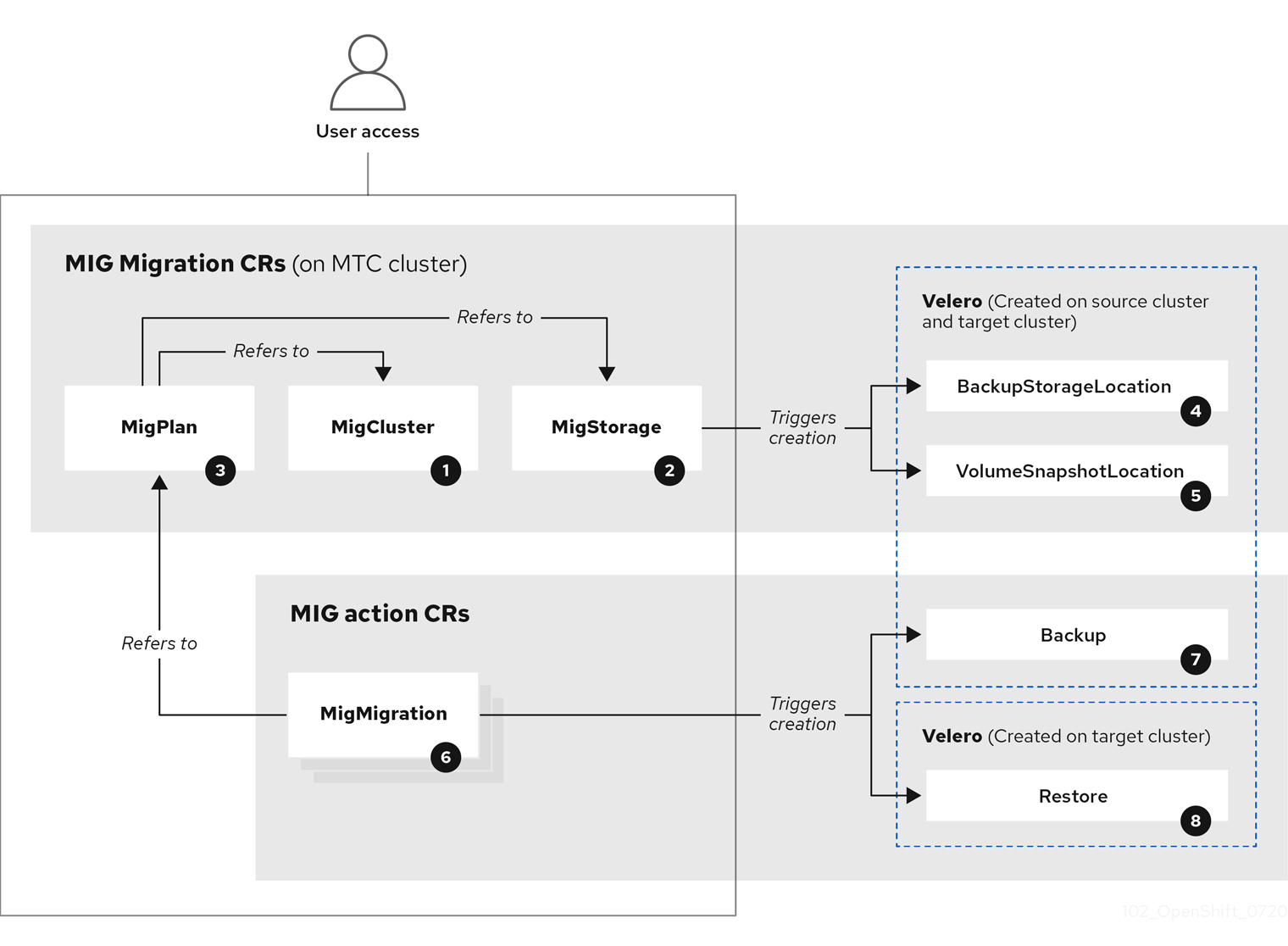
 MigCluster (設定、MTC クラスター): クラスター定義
 MigStorage (設定、MTC クラスター): ストレージ定義
 MigPlan (設定、MTC クラスター): 移行計画
MigPlan CR は、移行されるソースおよびターゲットクラスター、レプリケーションリポジトリー、および namespace を記述します。これは 0、1 または多数の MigMigration CR に関連付けられます。
MigPlan CR を削除すると、関連付けられた MigMigration CR が削除されます。
 BackupStorageLocation (設定、MTC クラスター):
 Velero バックアップオブジェクトの場所
 VolumeSnapshotLocation (設定、MTC クラスター):
 Velero ボリュームスナップショットの場所
 MigMigration (アクション、MTC クラスター): データのステージングまたは移行時に毎回作成される移行。各
 MigMigration CR は MigPlan CR に関連付けられます。
 Backup (アクション、ソースクラスター): 移行計画の実行時に、
MigMigration CR は各ソースクラスターに 2 つの Velero バックアップ CR を作成します。
- Kubernetes オブジェクトのバックアップ CR #1
- PV データのバックアップ CR #2
 Restore (アクション、ターゲットクラスター): 移行計画の実行時に、
MigMigration CR はターゲットクラスターに 2 つの Velero 復元 CR を作成します。
- PV データの復元 CR #1 (バックアップ CR #2 の使用)
- Kubernetes オブジェクトの復元 CR #2 (バックアップ CR #1 の使用)
手順
openshift-migrationnamespace のMigMigrationCR を一覧表示します。$ oc get migmigration -n openshift-migration出力例
NAME AGE 88435fe0-c9f8-11e9-85e6-5d593ce65e10 6m42sMigMigrationCR を検査します。$ oc describe migmigration 88435fe0-c9f8-11e9-85e6-5d593ce65e10 -n openshift-migration出力は以下の例のようになります。
MigMigration の出力例
name: 88435fe0-c9f8-11e9-85e6-5d593ce65e10
namespace: openshift-migration
labels: <none>
annotations: touch: 3b48b543-b53e-4e44-9d34-33563f0f8147
apiVersion: migration.openshift.io/v1alpha1
kind: MigMigration
metadata:
creationTimestamp: 2019-08-29T01:01:29Z
generation: 20
resourceVersion: 88179
selfLink: /apis/migration.openshift.io/v1alpha1/namespaces/openshift-migration/migmigrations/88435fe0-c9f8-11e9-85e6-5d593ce65e10
uid: 8886de4c-c9f8-11e9-95ad-0205fe66cbb6
spec:
migPlanRef:
name: socks-shop-mig-plan
namespace: openshift-migration
quiescePods: true
stage: false
status:
conditions:
category: Advisory
durable: True
lastTransitionTime: 2019-08-29T01:03:40Z
message: The migration has completed successfully.
reason: Completed
status: True
type: Succeeded
phase: Completed
startTimestamp: 2019-08-29T01:01:29Z
events: <none>PV データを記述する Velero バックアップ CR #2 の出力例
apiVersion: velero.io/v1
kind: Backup
metadata:
annotations:
openshift.io/migrate-copy-phase: final
openshift.io/migrate-quiesce-pods: "true"
openshift.io/migration-registry: 172.30.105.179:5000
openshift.io/migration-registry-dir: /socks-shop-mig-plan-registry-44dd3bd5-c9f8-11e9-95ad-0205fe66cbb6
creationTimestamp: "2019-08-29T01:03:15Z"
generateName: 88435fe0-c9f8-11e9-85e6-5d593ce65e10-
generation: 1
labels:
app.kubernetes.io/part-of: migration
migmigration: 8886de4c-c9f8-11e9-95ad-0205fe66cbb6
migration-stage-backup: 8886de4c-c9f8-11e9-95ad-0205fe66cbb6
velero.io/storage-location: myrepo-vpzq9
name: 88435fe0-c9f8-11e9-85e6-5d593ce65e10-59gb7
namespace: openshift-migration
resourceVersion: "87313"
selfLink: /apis/velero.io/v1/namespaces/openshift-migration/backups/88435fe0-c9f8-11e9-85e6-5d593ce65e10-59gb7
uid: c80dbbc0-c9f8-11e9-95ad-0205fe66cbb6
spec:
excludedNamespaces: []
excludedResources: []
hooks:
resources: []
includeClusterResources: null
includedNamespaces:
- sock-shop
includedResources:
- persistentvolumes
- persistentvolumeclaims
- namespaces
- imagestreams
- imagestreamtags
- secrets
- configmaps
- pods
labelSelector:
matchLabels:
migration-included-stage-backup: 8886de4c-c9f8-11e9-95ad-0205fe66cbb6
storageLocation: myrepo-vpzq9
ttl: 720h0m0s
volumeSnapshotLocations:
- myrepo-wv6fx
status:
completionTimestamp: "2019-08-29T01:02:36Z"
errors: 0
expiration: "2019-09-28T01:02:35Z"
phase: Completed
startTimestamp: "2019-08-29T01:02:35Z"
validationErrors: null
version: 1
volumeSnapshotsAttempted: 0
volumeSnapshotsCompleted: 0
warnings: 0Kubernetes リソースを記述する Velero CR #2 の出力例
apiVersion: velero.io/v1
kind: Restore
metadata:
annotations:
openshift.io/migrate-copy-phase: final
openshift.io/migrate-quiesce-pods: "true"
openshift.io/migration-registry: 172.30.90.187:5000
openshift.io/migration-registry-dir: /socks-shop-mig-plan-registry-36f54ca7-c925-11e9-825a-06fa9fb68c88
creationTimestamp: "2019-08-28T00:09:49Z"
generateName: e13a1b60-c927-11e9-9555-d129df7f3b96-
generation: 3
labels:
app.kubernetes.io/part-of: migration
migmigration: e18252c9-c927-11e9-825a-06fa9fb68c88
migration-final-restore: e18252c9-c927-11e9-825a-06fa9fb68c88
name: e13a1b60-c927-11e9-9555-d129df7f3b96-gb8nx
namespace: openshift-migration
resourceVersion: "82329"
selfLink: /apis/velero.io/v1/namespaces/openshift-migration/restores/e13a1b60-c927-11e9-9555-d129df7f3b96-gb8nx
uid: 26983ec0-c928-11e9-825a-06fa9fb68c88
spec:
backupName: e13a1b60-c927-11e9-9555-d129df7f3b96-sz24f
excludedNamespaces: null
excludedResources:
- nodes
- events
- events.events.k8s.io
- backups.velero.io
- restores.velero.io
- resticrepositories.velero.io
includedNamespaces: null
includedResources: null
namespaceMapping: null
restorePVs: true
status:
errors: 0
failureReason: ""
phase: Completed
validationErrors: null
warnings: 15
'%20d='M201.5%20305.5c-13.8%200-24.9-11.1-24.9-24.6%200-13.8%2011.1-24.9%2024.9-24.9%2013.6%200%2024.6%2011.1%2024.6%2024.9%200%2013.6-11.1%2024.6-24.6%2024.6zM504%20256c0%20137-111%20248-248%20248S8%20393%208%20256%20119%208%20256%208s248%20111%20248%20248zm-132.3-41.2c-9.4%200-17.7%203.9-23.8%2010-22.4-15.5-52.6-25.5-86.1-26.6l17.4-78.3%2055.4%2012.5c0%2013.6%2011.1%2024.6%2024.6%2024.6%2013.8%200%2024.9-11.3%2024.9-24.9s-11.1-24.9-24.9-24.9c-9.7%200-18%205.8-22.1%2013.8l-61.2-13.6c-3-.8-6.1%201.4-6.9%204.4l-19.1%2086.4c-33.2%201.4-63.1%2011.3-85.5%2026.8-6.1-6.4-14.7-10.2-24.1-10.2-34.9%200-46.3%2046.9-14.4%2062.8-1.1%205-1.7%2010.2-1.7%2015.5%200%2052.6%2059.2%2095.2%20132%2095.2%2073.1%200%20132.3-42.6%20132.3-95.2%200-5.3-.6-10.8-1.9-15.8%2031.3-16%2019.8-62.5-14.9-62.5zM302.8%20331c-18.2%2018.2-76.1%2017.9-93.6%200-2.2-2.2-6.1-2.2-8.3%200-2.5%202.5-2.5%206.4%200%208.6%2022.8%2022.8%2087.3%2022.8%20110.2%200%202.5-2.2%202.5-6.1%200-8.6-2.2-2.2-6.1-2.2-8.3%200zm7.7-75c-13.6%200-24.6%2011.1-24.6%2024.9%200%2013.6%2011.1%2024.6%2024.6%2024.6%2013.8%200%2024.9-11.1%2024.9-24.6%200-13.8-11-24.9-24.9-24.9z'/%3e%3c/svg%3e)